LimKokWing UniversitySecurity and Windows 7SanjayW – MVP (Security)Azra Rizal – MVP (Security)
TopicsWhy anyone should care about information security?Introduction & GoalsThe 10 security misconceptionsNew and emerging threatsProtecting privacy and information with Windows 7 and other Microsoft solutionsDemosCertifications – Your competitive advantage
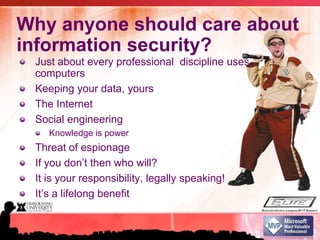
Why anyone should care about information security?Just about every professional  discipline uses computersKeeping your data, yoursThe InternetSocial engineeringKnowledge is powerThreat of espionage If you don’t then who will?It is your responsibility, legally speaking!It’s a lifelong benefit
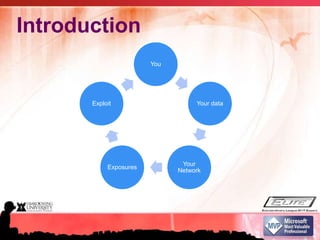
Introduction
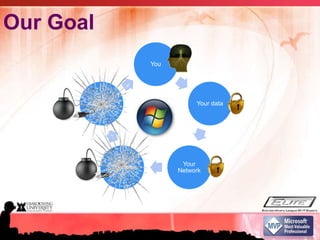
Our Goal
Top ten security mythsI’ve got antivirus, I’m good to goI have a strong password on my laptop, no one can access my dataI don’t use Windows,  I’m already secureNo one can see what I do in a public/private WiFi/networkThe campus IT guys got me covered
Top ten security myths –Cont’dI never visit “bad” internet sites, I will be safeI hide all my stuff in hidden folders and such, my data is safeI never add anyone Idon’t know on socialnetworking sites, blogs, etc..I install lots of security software, I think I am fineI store all my data externally and I carry that everywhere safely
Why Antivirus alone isn’t enough?Antivirus rely on patterns, i.e. it’s as good as the pattern you useWorms can potentially disarm protection and access to security websitesThus, most exploits become successful because of one primary thing:Lack of patching, both application and OS
P@sswords?What constitute a good password?Definitely not a passWORD, should a passPHRASE insteadFACT! - Longer passwords are better than short complex ones5 characters (all lowercase) takes about a minute to crack @ 500,000 passwords/sec10 characters (all lowercase) would take approximately 10 years @ 500,000 passwords/secOf course, don’t use known (dictionary) words la..
Security problems are everywhere, anywhere..Which is more secure? Unix/Linux or Windows? Or Mac?Security is as strong as it’s weakest linkSometimes (actually most of the time) it’s the human factorE.g. lack of patchingE.g. lack of security updates in applicationsE.g. use of weak passwords
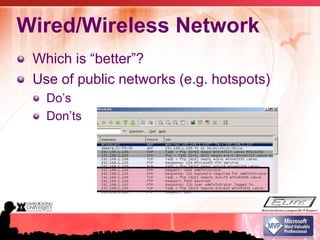
Wired/Wireless NetworkWhich is “better”?Use of public networks (e.g. hotspots)Do’s Don’ts
Organizational securityProtects a lot but not enoughThe perimeter should be your own machineMoving out of the orgUsing 3G modems, wireless peer, 3rd party connectivity
Threats come uninvited (too)Almost 50% of threats finds its own way to youThe rest are probably invited ones Plug an unpatched, unprotected computer out on an unprotected internet connectionTakes approximately 20 minutes to get it ridiculed with worms and viruses
Obscurity Security through obscurity is not securityIt’s merely hidingE.g. hiding a folder in your computerUsing “hide tools”Hiding is fine, just as long you know, it’s not securing
Online FriendsThe issue is not whether who you add or allow to see your private dataSocial networking,  blogs, picture sites etc..It’s human to trust friends, disallowing people you don’t knowThin line between friends and foes
Beefing up securityThe fact is, the more you have isn’t always the best when the sum of it mattersThat doesn’t also mean, the less is betterThe important thing to remember, the easier the betterThat you understand, you best useThat you don’t you may misuse
Mobile storageEasiest way to access your dataDoes not carry any security by defaultPassword protection on those drives can be easily defeated
New and emerging threatsSocial networkingMobile devicesWeb 2.0
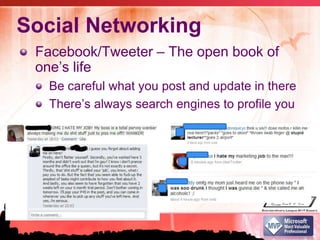
Social NetworkingFacebook/Tweeter – The open book of one’s lifeBe careful what you post and update in thereThere’s always search engines to profile you
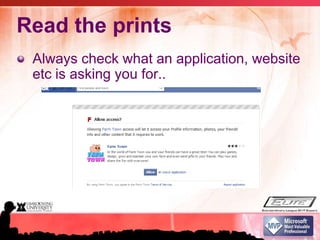
Read the printsAlways check what an application, website etc is asking you for..
Read the printsGoogle’s ad sensing technologyGoogle scans the text of Gmail messages in order to filter spam and detect viruses, just as all major webmail services do. Google also uses this scanning technology to deliver targeted text ads and other related information. This is completely automated and involves no humans.
Mobile devicesPDA/SmartphonesiPods etc…Any device that has data, and its mobile and it can connect to the internet
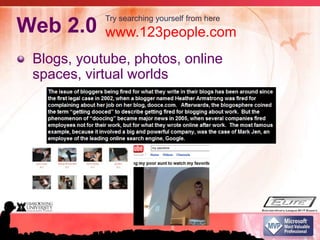
Web 2.0Blogs, youtube, photos, online spaces, virtual worldsTry searching yourself from herewww.123people.com
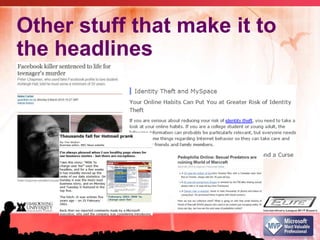
Other stuff that make it to the headlines
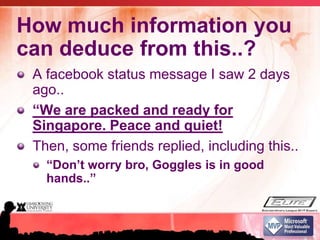
How much information you can deduce from this..?A facebook status message I saw 2 days ago..“We are packed and ready for Singapore. Peace and quiet!Then, some friends replied, including this..“Don’t worry bro, Goggles is in good hands..”
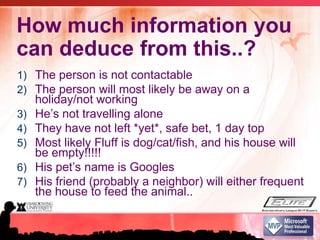
How much information you can deduce from this..?The person is not contactableThe person will most likely be away on a holiday/not workingHe’s not travelling aloneThey have not left *yet*, safe bet, 1 day topMost likely Fluff is dog/cat/fish, and his house will be empty!!!!! His pet’s name is GooglesHis friend (probably a neighbor) will either frequent the house to feed the animal..

Lkw Security Part 1_MVPs Azra & Sanjay

  • 1.
    LimKokWing UniversitySecurity andWindows 7SanjayW – MVP (Security)Azra Rizal – MVP (Security)
  • 2.
    TopicsWhy anyone shouldcare about information security?Introduction & GoalsThe 10 security misconceptionsNew and emerging threatsProtecting privacy and information with Windows 7 and other Microsoft solutionsDemosCertifications – Your competitive advantage
  • 3.
    Why anyone shouldcare about information security?Just about every professional discipline uses computersKeeping your data, yoursThe InternetSocial engineeringKnowledge is powerThreat of espionage If you don’t then who will?It is your responsibility, legally speaking!It’s a lifelong benefit
  • 4.
  • 5.
  • 6.
    Top ten securitymythsI’ve got antivirus, I’m good to goI have a strong password on my laptop, no one can access my dataI don’t use Windows, I’m already secureNo one can see what I do in a public/private WiFi/networkThe campus IT guys got me covered
  • 7.
    Top ten securitymyths –Cont’dI never visit “bad” internet sites, I will be safeI hide all my stuff in hidden folders and such, my data is safeI never add anyone Idon’t know on socialnetworking sites, blogs, etc..I install lots of security software, I think I am fineI store all my data externally and I carry that everywhere safely
  • 8.
    Why Antivirus aloneisn’t enough?Antivirus rely on patterns, i.e. it’s as good as the pattern you useWorms can potentially disarm protection and access to security websitesThus, most exploits become successful because of one primary thing:Lack of patching, both application and OS
  • 9.
    P@sswords?What constitute agood password?Definitely not a passWORD, should a passPHRASE insteadFACT! - Longer passwords are better than short complex ones5 characters (all lowercase) takes about a minute to crack @ 500,000 passwords/sec10 characters (all lowercase) would take approximately 10 years @ 500,000 passwords/secOf course, don’t use known (dictionary) words la..
  • 10.
    Security problems areeverywhere, anywhere..Which is more secure? Unix/Linux or Windows? Or Mac?Security is as strong as it’s weakest linkSometimes (actually most of the time) it’s the human factorE.g. lack of patchingE.g. lack of security updates in applicationsE.g. use of weak passwords
  • 11.
    Wired/Wireless NetworkWhich is“better”?Use of public networks (e.g. hotspots)Do’s Don’ts
  • 12.
    Organizational securityProtects alot but not enoughThe perimeter should be your own machineMoving out of the orgUsing 3G modems, wireless peer, 3rd party connectivity
  • 13.
    Threats come uninvited(too)Almost 50% of threats finds its own way to youThe rest are probably invited ones Plug an unpatched, unprotected computer out on an unprotected internet connectionTakes approximately 20 minutes to get it ridiculed with worms and viruses
  • 14.
    Obscurity Security throughobscurity is not securityIt’s merely hidingE.g. hiding a folder in your computerUsing “hide tools”Hiding is fine, just as long you know, it’s not securing
  • 15.
    Online FriendsThe issueis not whether who you add or allow to see your private dataSocial networking, blogs, picture sites etc..It’s human to trust friends, disallowing people you don’t knowThin line between friends and foes
  • 16.
    Beefing up securityThefact is, the more you have isn’t always the best when the sum of it mattersThat doesn’t also mean, the less is betterThe important thing to remember, the easier the betterThat you understand, you best useThat you don’t you may misuse
  • 17.
    Mobile storageEasiest wayto access your dataDoes not carry any security by defaultPassword protection on those drives can be easily defeated
  • 18.
    New and emergingthreatsSocial networkingMobile devicesWeb 2.0
  • 19.
    Social NetworkingFacebook/Tweeter –The open book of one’s lifeBe careful what you post and update in thereThere’s always search engines to profile you
  • 20.
    Read the printsAlwayscheck what an application, website etc is asking you for..
  • 21.
    Read the printsGoogle’sad sensing technologyGoogle scans the text of Gmail messages in order to filter spam and detect viruses, just as all major webmail services do. Google also uses this scanning technology to deliver targeted text ads and other related information. This is completely automated and involves no humans.
  • 22.
    Mobile devicesPDA/SmartphonesiPods etc…Anydevice that has data, and its mobile and it can connect to the internet
  • 23.
    Web 2.0Blogs, youtube,photos, online spaces, virtual worldsTry searching yourself from herewww.123people.com
  • 24.
    Other stuff thatmake it to the headlines
  • 25.
    How much informationyou can deduce from this..?A facebook status message I saw 2 days ago..“We are packed and ready for Singapore. Peace and quiet!Then, some friends replied, including this..“Don’t worry bro, Goggles is in good hands..”
  • 26.
    How much informationyou can deduce from this..?The person is not contactableThe person will most likely be away on a holiday/not workingHe’s not travelling aloneThey have not left *yet*, safe bet, 1 day topMost likely Fluff is dog/cat/fish, and his house will be empty!!!!! His pet’s name is GooglesHis friend (probably a neighbor) will either frequent the house to feed the animal..

Editor's Notes

  • #4 Its hard to find professional jobs that do not use themWhat you don’t share is probably private, lets keep it that wayTakes just about 20 minutes for a computer to get infected or compromised onlineSimple examples – Bank scenario …e.g. helpdesk asking for passwordPeople will do just about anything to pin you down, why make it easy for them?It’s knowledge that you can benefit from, just like driving a car, for a lifetime
  • #5 You ..begins with someoneYour data - When you start having data, over the internet, email, phones, PDA, laptops, thumbdrives, shared drives etcYour network – Both physically, metaphysical, virtual and human interactions transformed into digital dataExposures – Information gets leakedExploit – Malicious intent with your data and information
  • #6 Show you how Windows 7 helpsYou – empower you with knowledgeAzra will show you how you can secure your dataHelp you make intelligent decisions on what to share and what not to shareShrink unwanted exposure to virtually zeroDestroy possibilities of data exploits
  • #7 - Antivirus -
  • #9 Patterns - until you don’t have the newest pattern, you won’t know you are infected or vulnerable
  • #12 Wifi doAlways ask if that is the SSID (the broadcast) name actually belong to that providerRequest if you can use itWifi don’tIf it’s public, avoid private sites, banking sites if possibleWhen accessing anything that require passwords, make sure its HTTPS/FTP etc, otherwise, do it later
  • #19 - Information disclose
  • #23 Not much security emphasis is given on these devicesWhile “browsing in starbucks over a unauthenticated bluetooth connection”