Welcome to Windows 7Stephen L RoseWorldwide Community Manager – Windows Clientstros@microsoft.comhttp://microsoft.com/springboardBlog- http://windowsteamblog.comTwitter- @stephenlrose / @MSspringboard
AgendaWho Am I?Resources, Resources, ResourcesWindows 7 OverviewWindows 7 AnywhereSecurity and Control in Windows 7Windows 7 DeploymentWrap-up
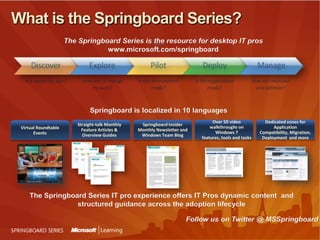
What is the Springboard Series?The Springboard Series is the resource for desktop IT pros www.microsoft.com/springboardSpringboard is localized in 10 languages Over 50 video walkthroughs on Windows 7 features, tools and tasksDedicated zones for Application Compatibility, Migration, Deployment  and moreStraight-talk Monthly Feature Articles & Overview GuidesSpringboard Insider Monthly Newsletter and Windows Team BlogVirtual Roundtable EventsThe Springboard Series IT pro experience offers IT Pros dynamic content  and structured guidance across the adoption lifecycleFollow us on Twitter @ MSSpringboard
www.TalkingAboutWindows.com  – The people , the backstories, and the events behind Windows 7.Join The Conversation!
Let’s Begin
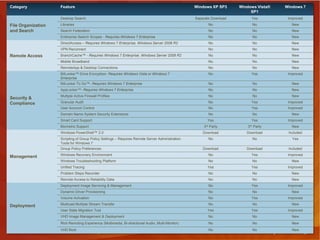
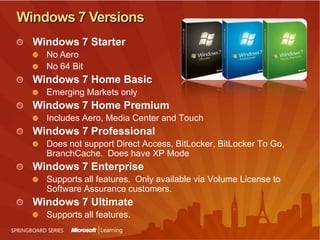
Windows 7 VersionsWindows 7 Starter NoAeroNo 64 BitWindows 7 Home BasicEmerging Markets onlyWindows 7 Home PremiumIncludes Aero, Media Center and TouchWindows 7 ProfessionalDoes not support Direct Access, BitLocker, BitLocker To Go, BranchCache.  Does have XP ModeWindows 7 EnterpriseSupports all features.  Only available via Volume License to Software Assurance customers.Windows 7 UltimateSupports all features.
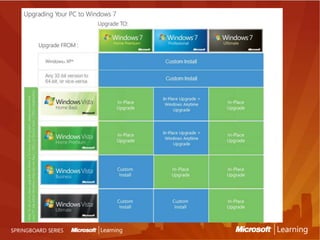
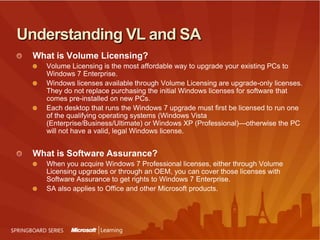
Understanding VL and SAWhat is Volume Licensing?Volume Licensing is the most affordable way to upgrade your existing PCs to Windows 7Enterprise.Windows licenses available through Volume Licensing are upgrade-only licenses. They do not replace purchasing the initial Windows licenses for software that comes pre-installed on new PCs. Each desktop that runs the Windows 7 upgrade must first be licensed to run one of the qualifying operating systems (Windows Vista (Enterprise/Business/Ultimate) or Windows XP (Professional)—otherwise the PC will not have a valid, legal Windows license. What is Software Assurance?When you acquire Windows 7 Professional licenses, either through Volume Licensing upgrades or through an OEM, you can cover those licenses with Software Assurance to get rights to Windows 7 Enterprise.SA also applies to Office and other Microsoft products.
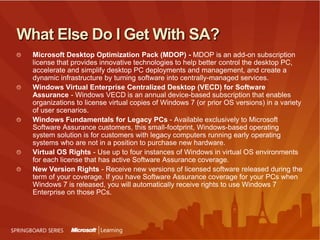
What Else Do I Get With SA?Microsoft Desktop Optimization Pack (MDOP) - MDOP is an add-on subscription license that provides innovative technologies to help better control the desktop PC, accelerate and simplify desktop PC deployments and management, and create a dynamic infrastructure by turning software into centrally-managed services. Windows Virtual Enterprise Centralized Desktop (VECD) for Software Assurance - Windows VECD is an annual device-based subscription that enables organizations to license virtual copies of Windows 7 (or prior OS versions) in a variety of user scenarios.Windows Fundamentals for Legacy PCs - Available exclusively to Microsoft Software Assurance customers, this small-footprint, Windows-based operating system solution is for customers with legacy computers running early operating systems who are not in a position to purchase new hardware.Virtual OS Rights - Use up to four instances of Windows in virtual OS environments for each license that has active Software Assurance coverage.New Version Rights - Receive new versions of licensed software released during the term of your coverage. If you have Software Assurance coverage for your PCs when Windows 7 is released, you will automatically receive rights to use Windows 7 Enterprise on those PCs.
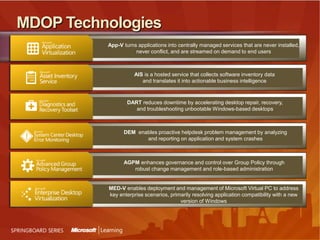
MDOP TechnologiesApp-V turns applications into centrally managed services that are never installed, never conflict, and are streamed on demand to end usersAIS is a hosted service that collects software inventory data and translates it into actionable business intelligenceDART reduces downtime by accelerating desktop repair, recovery, and troubleshooting unbootable Windows-based desktopsDEM  enables proactive helpdesk problem management by analyzing and reporting on application and system crashesAGPM enhances governance and control over Group Policy through robust change management and role-based administrationMED-V enables deployment and management of Microsoft Virtual PC to address key enterprise scenarios, primarily resolving application compatibility with a new version of Windows
What’s The Killer Feature In Windows 7?
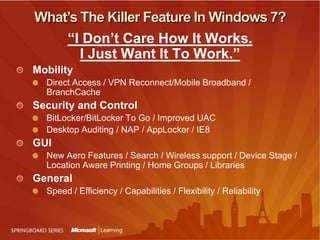
What’s The Killer Feature In Windows 7?“I Don’t Care How It Works. I Just Want It To Work.”MobilityDirect Access / VPN Reconnect/Mobile Broadband / BranchCacheSecurity and ControlBitLocker/BitLocker To Go / Improved UACDesktop Auditing / NAP / AppLocker / IE8GUINew Aero Features / Search / Wireless support / Device Stage / Location Aware Printing / Home Groups / Libraries GeneralSpeed / Efficiency / Capabilities / Flexibility / Reliability
Windows 7 and Access Anywhere
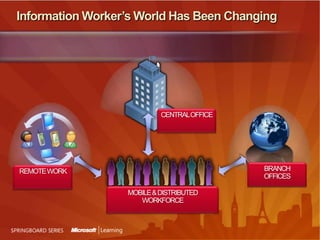
Information Worker’s World Has Been ChangingCENTRAL OFFICEBRANCH OFFICESREMOTE WORKMOBILE & DISTRIBUTED WORKFORCE
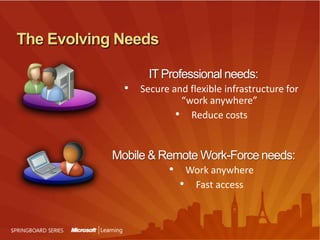
The Evolving NeedsIT Professional needs:Secure and flexible infrastructure for“work anywhere”
Reduce costsMobile & Remote Work-Force needs:Work anywhere
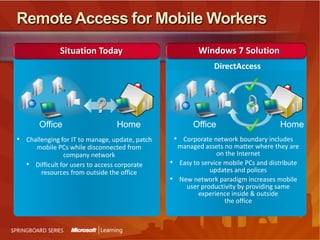
Fast accessRemote Access for Mobile WorkersWindows 7 SolutionSituation TodayDirectAccessHomeOfficeHomeOfficeCorporate network boundary includes managed assets no matter where they are on the Internet
Easy to service mobile PCs and distribute updates and polices
New network paradigm increases mobile user productivity by providing same experience inside & outsidethe office
Challenging for IT to manage, update, patch mobile PCs while disconnected from company network
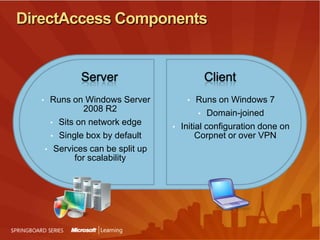
Difficult for users to access corporate resources from outside the officeDirectAccess ComponentsServerClientRuns on Windows 7
Domain-joined
Initial configuration done on Corpnet or over VPN
Runs on Windows Server 2008 R2
Sits on network edge
Single box by default
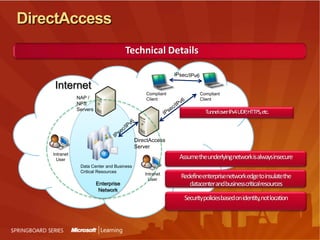
Services can be split up for scalabilityDirectAccessTechnical DetailsIPsec/IPv6InternetCompliant ClientCompliant ClientNAP / NPS ServersIPsec/IPv6IPsec/IPv6Tunnel over IPv4 UDP, HTTPS, etc.DirectAccess ServerIntranet UserAssume the underlying network is always insecureData Center and Business Critical ResourcesIntranet UserRedefine enterprise network edge to insulate the datacenter and business critical resourcesEnterprise NetworkSecurity policies based on identity, not location
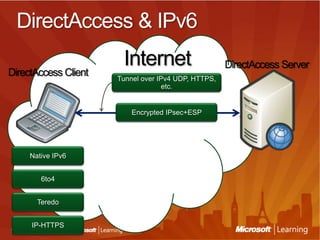
DirectAccess & IPv6InternetDirectAccessServerDirectAccessClientTunnel over IPv4 UDP, HTTPS, etc.Encrypted IPsec+ESPNative IPv66to4TeredoIP-HTTPS
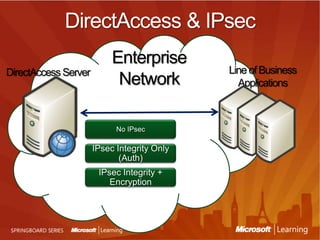
DirectAccess & IPsecEnterpriseNetworkLine of Business ApplicationsDirectAccess ServerNo IPsecIPsec Integrity Only (Auth)IPsec Integrity + Encryption
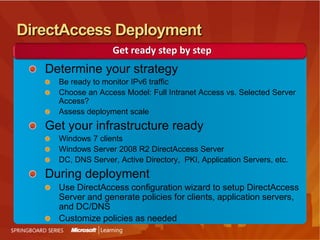
DirectAccess DeploymentGet ready step by stepDetermine your strategyBe ready to monitor IPv6 trafficChoose an Access Model: Full Intranet Access vs. Selected Server Access?Assess deployment scaleGet your infrastructure readyWindows 7 clientsWindows Server 2008 R2 DirectAccess ServerDC, DNS Server, Active Directory,  PKI, Application Servers, etc.During deploymentUse DirectAccess configuration wizard to setup DirectAccess Server and generate policies for clients, application servers, and DC/DNSCustomize policies as needed
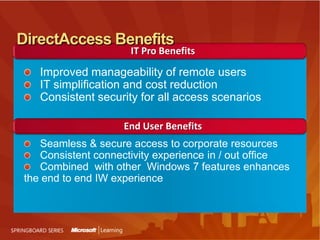
IT Pro BenefitsImproved manageability of remote users IT simplification and cost reductionConsistent security for all access scenariosSeamless & secure access to corporate resourcesConsistent connectivity experience in / out officeCombined  with other  Windows 7 features enhances the end to end IW experienceDirectAccess BenefitsEnd User Benefits
DirectAccess? Show Me!
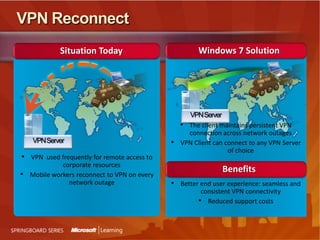
VPN ReconnectWindows 7 SolutionSituation TodayVPN ServerThe client maintains persistent VPN connection across network outages
VPN Client can connect to any VPN Server of choiceVPN ServerVPN  used frequently for remote access to corporate resources
Mobile workers reconnect to VPN on every network outageBenefitsBetter end user experience: seamless and consistent VPN connectivity
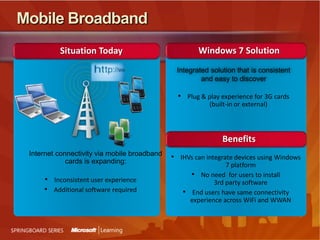
Reduced support costs Mobile BroadbandWindows 7 SolutionSituation TodayIntegrated solution that is consistent and easy to discoverPlug & play experience for 3G cards (built-in or external)Benefits	Internet connectivity via mobile broadband cards is expanding:Inconsistent user experience
Additional software required
IHVs can integrate devices using Windows 7 platform
No need  for users to install3rd party software
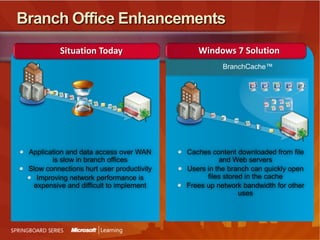
End users have same connectivity experience across WiFi and WWANBranch Office EnhancementsWindows 7 SolutionSituation TodayBranchCache™Caches content downloaded from file and Web serversUsers in the branch can quickly open files stored in the cacheFrees up network bandwidth for other usesApplication and data access over WAN is slow in branch officesSlow connections hurt user productivity Improving network performance is expensive and difficult to implement
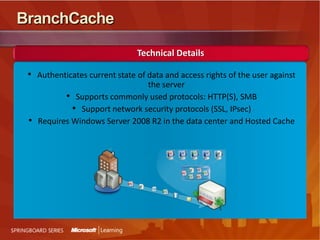
BranchCacheTechnical DetailsAuthenticates current state of data and access rights of the user against the server
Supports commonly used protocols: HTTP(S), SMB
Support network security protocols (SSL, IPsec)
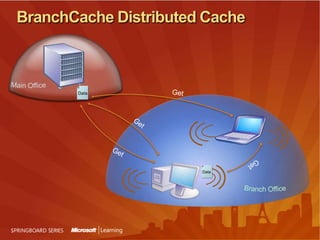
Requires Windows Server 2008 R2 in the data center and Hosted CacheBranchCache Distributed CacheMain OfficeDataGetGetIDIDDataDataGetGetBranch Office
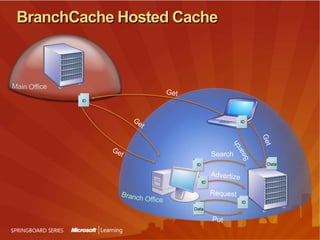
BranchCache Hosted CacheMain OfficeGetGetIDIDIDIDIDDataIDDataDataDataSearchSearchGetPutAdvertizeGetRequestBranch Office
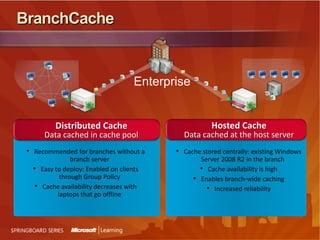
BranchCacheHosted CacheData cached at the host serverDistributed CacheData cached in cache poolCache stored centrally: existing Windows Server 2008 R2 in the branch
Cache availability is high
Enables branch-wide caching

Bus Tour Windows 7 Deck (Full)

  • 1.
    Welcome to Windows7Stephen L RoseWorldwide Community Manager – Windows Clientstros@microsoft.comhttp://microsoft.com/springboardBlog- http://windowsteamblog.comTwitter- @stephenlrose / @MSspringboard
  • 2.
    AgendaWho Am I?Resources,Resources, ResourcesWindows 7 OverviewWindows 7 AnywhereSecurity and Control in Windows 7Windows 7 DeploymentWrap-up
  • 3.
    What is theSpringboard Series?The Springboard Series is the resource for desktop IT pros www.microsoft.com/springboardSpringboard is localized in 10 languages Over 50 video walkthroughs on Windows 7 features, tools and tasksDedicated zones for Application Compatibility, Migration, Deployment and moreStraight-talk Monthly Feature Articles & Overview GuidesSpringboard Insider Monthly Newsletter and Windows Team BlogVirtual Roundtable EventsThe Springboard Series IT pro experience offers IT Pros dynamic content and structured guidance across the adoption lifecycleFollow us on Twitter @ MSSpringboard
  • 5.
    www.TalkingAboutWindows.com –The people , the backstories, and the events behind Windows 7.Join The Conversation!
  • 6.
  • 8.
    Windows 7 VersionsWindows7 Starter NoAeroNo 64 BitWindows 7 Home BasicEmerging Markets onlyWindows 7 Home PremiumIncludes Aero, Media Center and TouchWindows 7 ProfessionalDoes not support Direct Access, BitLocker, BitLocker To Go, BranchCache. Does have XP ModeWindows 7 EnterpriseSupports all features. Only available via Volume License to Software Assurance customers.Windows 7 UltimateSupports all features.
  • 10.
    Understanding VL andSAWhat is Volume Licensing?Volume Licensing is the most affordable way to upgrade your existing PCs to Windows 7Enterprise.Windows licenses available through Volume Licensing are upgrade-only licenses. They do not replace purchasing the initial Windows licenses for software that comes pre-installed on new PCs. Each desktop that runs the Windows 7 upgrade must first be licensed to run one of the qualifying operating systems (Windows Vista (Enterprise/Business/Ultimate) or Windows XP (Professional)—otherwise the PC will not have a valid, legal Windows license. What is Software Assurance?When you acquire Windows 7 Professional licenses, either through Volume Licensing upgrades or through an OEM, you can cover those licenses with Software Assurance to get rights to Windows 7 Enterprise.SA also applies to Office and other Microsoft products.
  • 11.
    What Else DoI Get With SA?Microsoft Desktop Optimization Pack (MDOP) - MDOP is an add-on subscription license that provides innovative technologies to help better control the desktop PC, accelerate and simplify desktop PC deployments and management, and create a dynamic infrastructure by turning software into centrally-managed services. Windows Virtual Enterprise Centralized Desktop (VECD) for Software Assurance - Windows VECD is an annual device-based subscription that enables organizations to license virtual copies of Windows 7 (or prior OS versions) in a variety of user scenarios.Windows Fundamentals for Legacy PCs - Available exclusively to Microsoft Software Assurance customers, this small-footprint, Windows-based operating system solution is for customers with legacy computers running early operating systems who are not in a position to purchase new hardware.Virtual OS Rights - Use up to four instances of Windows in virtual OS environments for each license that has active Software Assurance coverage.New Version Rights - Receive new versions of licensed software released during the term of your coverage. If you have Software Assurance coverage for your PCs when Windows 7 is released, you will automatically receive rights to use Windows 7 Enterprise on those PCs.
  • 12.
    MDOP TechnologiesApp-V turnsapplications into centrally managed services that are never installed, never conflict, and are streamed on demand to end usersAIS is a hosted service that collects software inventory data and translates it into actionable business intelligenceDART reduces downtime by accelerating desktop repair, recovery, and troubleshooting unbootable Windows-based desktopsDEM enables proactive helpdesk problem management by analyzing and reporting on application and system crashesAGPM enhances governance and control over Group Policy through robust change management and role-based administrationMED-V enables deployment and management of Microsoft Virtual PC to address key enterprise scenarios, primarily resolving application compatibility with a new version of Windows
  • 13.
    What’s The KillerFeature In Windows 7?
  • 14.
    What’s The KillerFeature In Windows 7?“I Don’t Care How It Works. I Just Want It To Work.”MobilityDirect Access / VPN Reconnect/Mobile Broadband / BranchCacheSecurity and ControlBitLocker/BitLocker To Go / Improved UACDesktop Auditing / NAP / AppLocker / IE8GUINew Aero Features / Search / Wireless support / Device Stage / Location Aware Printing / Home Groups / Libraries GeneralSpeed / Efficiency / Capabilities / Flexibility / Reliability
  • 15.
    Windows 7 andAccess Anywhere
  • 16.
    Information Worker’s WorldHas Been ChangingCENTRAL OFFICEBRANCH OFFICESREMOTE WORKMOBILE & DISTRIBUTED WORKFORCE
  • 17.
    The Evolving NeedsITProfessional needs:Secure and flexible infrastructure for“work anywhere”
  • 18.
    Reduce costsMobile &Remote Work-Force needs:Work anywhere
  • 19.
    Fast accessRemote Accessfor Mobile WorkersWindows 7 SolutionSituation TodayDirectAccessHomeOfficeHomeOfficeCorporate network boundary includes managed assets no matter where they are on the Internet
  • 20.
    Easy to servicemobile PCs and distribute updates and polices
  • 21.
    New network paradigmincreases mobile user productivity by providing same experience inside & outsidethe office
  • 22.
    Challenging for ITto manage, update, patch mobile PCs while disconnected from company network
  • 23.
    Difficult for usersto access corporate resources from outside the officeDirectAccess ComponentsServerClientRuns on Windows 7
  • 24.
  • 25.
    Initial configuration doneon Corpnet or over VPN
  • 26.
    Runs on WindowsServer 2008 R2
  • 27.
  • 28.
  • 29.
    Services can besplit up for scalabilityDirectAccessTechnical DetailsIPsec/IPv6InternetCompliant ClientCompliant ClientNAP / NPS ServersIPsec/IPv6IPsec/IPv6Tunnel over IPv4 UDP, HTTPS, etc.DirectAccess ServerIntranet UserAssume the underlying network is always insecureData Center and Business Critical ResourcesIntranet UserRedefine enterprise network edge to insulate the datacenter and business critical resourcesEnterprise NetworkSecurity policies based on identity, not location
  • 30.
    DirectAccess & IPv6InternetDirectAccessServerDirectAccessClientTunnelover IPv4 UDP, HTTPS, etc.Encrypted IPsec+ESPNative IPv66to4TeredoIP-HTTPS
  • 31.
    DirectAccess & IPsecEnterpriseNetworkLineof Business ApplicationsDirectAccess ServerNo IPsecIPsec Integrity Only (Auth)IPsec Integrity + Encryption
  • 32.
    DirectAccess DeploymentGet readystep by stepDetermine your strategyBe ready to monitor IPv6 trafficChoose an Access Model: Full Intranet Access vs. Selected Server Access?Assess deployment scaleGet your infrastructure readyWindows 7 clientsWindows Server 2008 R2 DirectAccess ServerDC, DNS Server, Active Directory, PKI, Application Servers, etc.During deploymentUse DirectAccess configuration wizard to setup DirectAccess Server and generate policies for clients, application servers, and DC/DNSCustomize policies as needed
  • 33.
    IT Pro BenefitsImprovedmanageability of remote users IT simplification and cost reductionConsistent security for all access scenariosSeamless & secure access to corporate resourcesConsistent connectivity experience in / out officeCombined with other Windows 7 features enhances the end to end IW experienceDirectAccess BenefitsEnd User Benefits
  • 34.
  • 35.
    VPN ReconnectWindows 7SolutionSituation TodayVPN ServerThe client maintains persistent VPN connection across network outages
  • 36.
    VPN Client canconnect to any VPN Server of choiceVPN ServerVPN used frequently for remote access to corporate resources
  • 37.
    Mobile workers reconnectto VPN on every network outageBenefitsBetter end user experience: seamless and consistent VPN connectivity
  • 38.
    Reduced support costsMobile BroadbandWindows 7 SolutionSituation TodayIntegrated solution that is consistent and easy to discoverPlug & play experience for 3G cards (built-in or external)Benefits Internet connectivity via mobile broadband cards is expanding:Inconsistent user experience
  • 39.
  • 40.
    IHVs can integratedevices using Windows 7 platform
  • 41.
    No need for users to install3rd party software
  • 42.
    End users havesame connectivity experience across WiFi and WWANBranch Office EnhancementsWindows 7 SolutionSituation TodayBranchCache™Caches content downloaded from file and Web serversUsers in the branch can quickly open files stored in the cacheFrees up network bandwidth for other usesApplication and data access over WAN is slow in branch officesSlow connections hurt user productivity Improving network performance is expensive and difficult to implement
  • 43.
    BranchCacheTechnical DetailsAuthenticates currentstate of data and access rights of the user against the server
  • 44.
    Supports commonly usedprotocols: HTTP(S), SMB
  • 45.
    Support network securityprotocols (SSL, IPsec)
  • 46.
    Requires Windows Server2008 R2 in the data center and Hosted CacheBranchCache Distributed CacheMain OfficeDataGetGetIDIDDataDataGetGetBranch Office
  • 47.
    BranchCache Hosted CacheMainOfficeGetGetIDIDIDIDIDDataIDDataDataDataSearchSearchGetPutAdvertizeGetRequestBranch Office
  • 48.
    BranchCacheHosted CacheData cachedat the host serverDistributed CacheData cached in cache poolCache stored centrally: existing Windows Server 2008 R2 in the branch
  • 49.
  • 50.

Editor's Notes

  • #4 The Springboard Series program was developed in response to primary research conducted with IT Pros worldwide (direct interviews, focus groups) and key MS field roles (TSPs, ATSs, ITEs, PAMs, TAMs, Architects). The findings fell into two areas—the need to make learning about how a new OS environment directly impacts the IT Pro more consumable (and the messages more relevant), and how the mis-handling of Vista to this audience has cost us in poor NSAT and perceptionsTo remedy this situation, the Win Client IT pro audience developed a program to provide the right information, at the right technical level, at the right point in the adoption lifecycle, and to do so in a frank, open and honest tone. This program has two major components—a breadth effort that touches IT pros directly (through Technet and related properties), and a depth component that supports field and partner engagements
  • #13 So what are the technologies within MDOP? Application Virtualization: this solves for application to application conflict issues within your organization. So say, for example, you’ve got a line of business application that will not run on your operating system. Using Application Virtualization you can sequence those applications. You can stream them to the desktops within your organization and there is no conflict with the applications, as nothing is actually installed on the desktop.   The Asset Inventory Service: this is a hosted service that enables you to collect software inventory data, as well as limited hardware data. And you can translate that data into actionable business intelligence. There is a catalog component to AIS, which assigns intuitive categorization to the information that’s flowing through the service. And it is the same catalog in AIS that is leveraged by Systems Center.   The Diagnostics and Recovery tool set: DART can reduce your users’ down time by accelerating your desktop repair process. So using the DART CD you can perform such tasks as resetting administrator passwords, scanning and solving for malware on your users’ desktops, repairing those desktops and even wiping those desktops.   Systems Center Desktop Error Monitoring: this enables proactive help desk problem management by allowing you to see the errors that are occurring within your organization at an aggregate level and reporting on application and system crashes as they’re occurring within your organization. So having visibility to those errors helps you solve for those errors occurring in future.   AGPM: We hear from our customers that they struggle with managing group policy within their organizations. With AGPM you can assign roles to people within your organization. For example, you can have some people that are reviewers of policies. You can have some people that are approvers of policies and you can also have people, for example, that have the ability to edit policies. In that way you can control who is managing group policy within your organization and you can also ensure that there is audit trail for group policy that is being deployed within your organization.   MED-V: MED-V enables you to solve for application to operating system conflicts within your organization. So using virtual PC at technology you can address key Enterprise scenarios and resolve for those application compatibility issues with new versions of Windows.
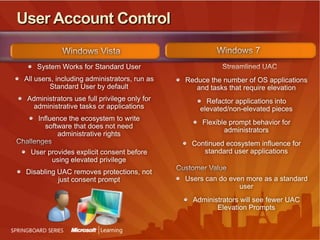
  • #38 UAC was introduced in Windows Vista to help provide customers more control of their system by enabling IT administrators to lock down the system for certain users by running them within standard, non privileged user accounts and to influence the ecosystem to write software that does not need administrative rights. Transitioning the ecosystem to create software that does not require administrative changes to the machine is a very good thing for overall reliability of the machine as well as for the overall security of the machine since it limits the potential damage. UAC has delivered successfully on this in the Windows Vista timeframe and customers continue to value the ability to create a standard user and be confident an administrator can make the decisions on what software is added to the system and what changes should be allowed. However, we have received substantial feedback about the number of notifications for change. In Windows 7, we have invested in addressing the key customer feedback around UAC, while still maintaining the ability for IT administrators to be confident about a standard user environmentand still maintaining the influence on the ecosystem to create software that does not require administrative rights.We have enabled the Windows operations that users do often to be done in a standard user environment with the goal of providing prompt free daily activities. For example, a standard user can now adjust the readability of the screen (dpi) without having to change it for the entire system. Additionally, we have reduced key duplicate notifications for common activities such as installing applications from IE. We have also made it easier for IT to look at key setting on the system without needing administrative privileges by refactoring many of our control panel applications into read only and write sections.In line with our overall Windows 7focus on user-in-control, we have enabled a person running as a protected administrator to determine the range of notifications s/he receives. Based on customer feedback and actual instrumented data from our customers’ response to UAC prompts, we default the initial setting for UAC such that administrators are notified when software other than Windows is requesting to change the overall system and such that standard users will receive a request for administrator authorization for any change to the overall system. We believe this default setting has the right balance of establishing an ecosystem where a broad range of ISV software can be run in a standard user environment while providing administrators with control over the experience of configuring Windows.