Technical Overview Thursday, July 23, 2009 Arlindo Alves IT Pro Evangelist Microsoft [email_address] http://blogs.technet.com/aralves
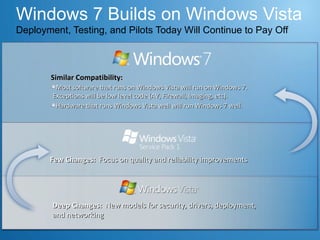
Windows 7 Builds on Windows Vista Deployment, Testing, and Pilots Today Will Continue to Pay Off Similar Compatibility:  Most software that runs on Windows Vista will run on Windows 7. Exceptions will be low level code (AV, Firewall, Imaging, etc).  Hardware that runs Windows Vista well will run Windows 7 well. Few Changes:  Focus on quality and reliability improvements Deep Changes:  New models for security, drivers, deployment, and networking
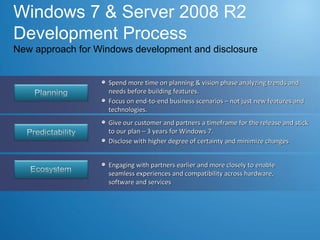
Windows 7 & Server 2008 R2 Development Process New approach for Windows development and disclosure Spend more time on planning & vision phase analyzing trends and needs before building features.  Focus on end-to-end business scenarios – not just new features and technologies.  Give our customer and partners a timeframe for the release and stick to our plan – 3 years for Windows 7. Disclose with higher degree of certainty and minimize changes  Engaging with partners earlier and more closely to enable seamless experiences and compatibility across hardware, software and services
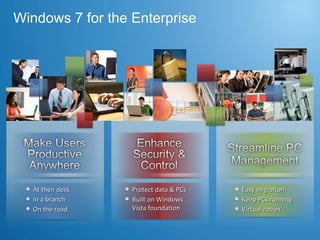
Windows 7 for the Enterprise At their desk In a branch On the road Protect data & PCs Built on Windows Vista foundation  Easy migration  Keep PCs running Virtualization
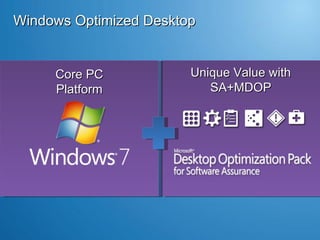
Windows Optimized Desktop  Unique Value with SA+MDOP Core PC Platform
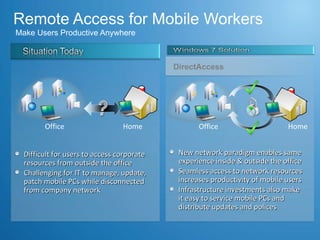
Remote Access for Mobile Workers  Make Users Productive Anywhere  New network paradigm enables same experience inside & outside the office Seamless access to network resources  increases productivity of mobile users Infrastructure investments also make  it easy to service mobile PCs and distribute updates and polices Difficult for users to access corporate resources from outside the office Challenging for IT to manage, update, patch mobile PCs while disconnected from company network Home Office Home DirectAccess Office
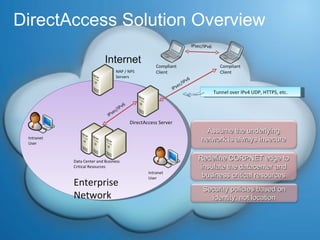
DirectAccess Solution Overview DirectAccess Server Compliant Client Compliant Client IPsec/IPv6 Data Center and Business Critical Resources NAP / NPS Servers Internet Intranet User Enterprise Network Intranet User IPsec/IPv6 IPsec/IPv6 Assume the underlying network is always insecure Redefine CORPNET edge to insulate the datacenter and business critical resources Tunnel over IPv4 UDP, HTTPS, etc. Security policies based on identity, not location
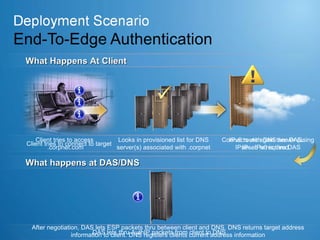
Client tries to access  .corpnet.com Looks in provisioned list for DNS server(s) associated with .corpnet Connects with DNS server (using IPsec. IPv6 is thru DAS Client tries to connect to target IPv6 route again thru DAS. IPsec is required. DAS lets thru AuthIP packets from client to DNS After negotiation, DAS lets ESP packets thru between client and DNS. DNS returns target address information to client. DNS registers clients current address information What Happens At Client What happens at DAS/DNS
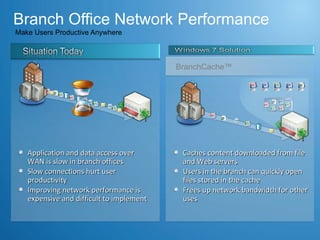
Branch Office Network Performance  Make Users Productive Anywhere  Caches content downloaded from file and Web servers Users in the branch can quickly open files stored in the cache Frees up network bandwidth for other uses BranchCache™ Application and data access over WAN is slow in branch offices Slow connections hurt user productivity  Improving network performance is expensive and difficult to implement
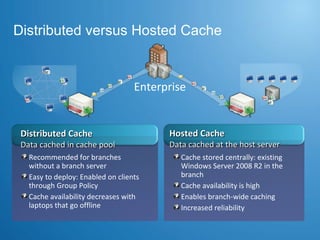
Distributed versus Hosted Cache Distributed Cache Data cached in cache pool Hosted Cache Data cached at the host server Cache stored centrally: existing Windows Server 2008 R2 in the branch Cache availability is high Enables branch-wide caching Increased reliability Recommended for branches without a branch server Easy to deploy: Enabled on clients through Group Policy Cache availability decreases with laptops that go offline Enterprise
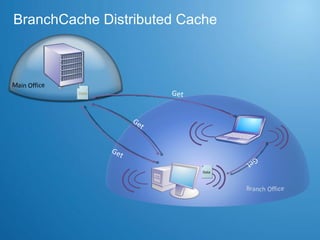
BranchCache Distributed Cache Get Get ID Get Data Get ID Data Data
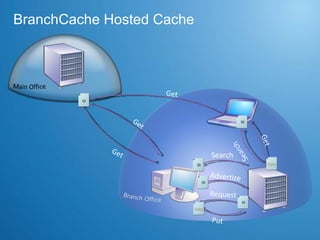
BranchCache Hosted Cache Get Get ID Put Data Get Data ID Search Get Search Request Advertize ID ID ID Data ID Data
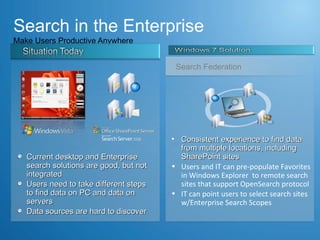
Search in the Enterprise Make Users Productive Anywhere  Consistent experience to find data from multiple locations, including SharePoint sites Users and IT can pre-populate Favorites in Windows Explorer  to remote search sites that support OpenSearch protocol  IT can point users to select search sites w/Enterprise Search Scopes     Search Federation Current desktop and Enterprise search solutions are good, but not integrated Users need to take different steps to find data on PC and data on servers Data sources are hard to discover
Demo Federated Search Thursday, July 23, 2009
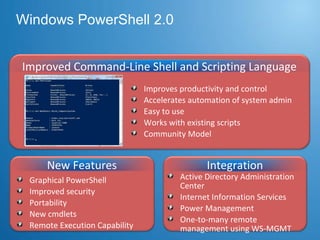
Windows PowerShell 2.0 New Features Graphical PowerShell Improved security Portability New cmdlets  Remote Execution Capability Active Directory Administration Center Internet Information Services  Power Management  One-to-many remote management using WS-MGMT Integration Improves productivity and control Accelerates automation of system admin Easy to use  Works with existing scripts Community Model Improved Command-Line Shell and Scripting Language
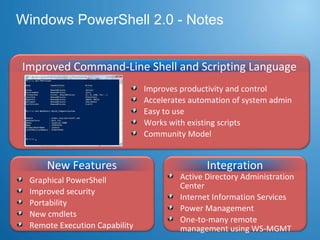
Windows PowerShell 2.0 - Notes New Features Graphical PowerShell Improved security Portability New cmdlets  Remote Execution Capability Active Directory Administration Center Internet Information Services  Power Management  One-to-many remote management using WS-MGMT Integration Improves productivity and control Accelerates automation of system admin Easy to use  Works with existing scripts Community Model Improved Command-Line Shell and Scripting Language
Demo PowerShell Remoting Thursday, July 23, 2009 Microsoft Confidential
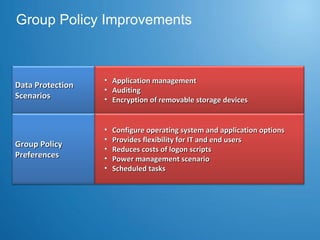
Group Policy Improvements Data Protection Scenarios Group Policy Preferences Application management Auditing Encryption of removable storage devices Configure operating system and application options Provides flexibility for IT and end users Reduces costs of logon scripts Power management scenario Scheduled tasks
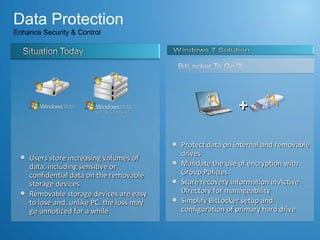
Data Protection Enhance Security & Control Protect data on internal and removable drives Mandate the use of encryption with Group Policies Store recovery information in Active Directory for manageability  Simplify BitLocker setup and configuration of primary hard drive Users store increasing volumes of data, including sensitive or confidential data on the removable storage devices Removable storage devices are easy to lose and, unlike PC, the loss may go unnoticed for a while +
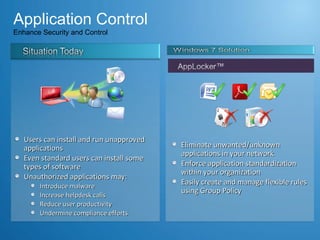
Application Control  Enhance Security and Control  Eliminate unwanted/unknown applications in your network Enforce application standardization within your organization Easily create and manage flexible rules using Group Policy Users can install and run unapproved applications Even standard users can install some types of software Unauthorized applications may: Introduce malware Increase helpdesk calls Reduce user productivity Undermine compliance efforts
Demo Data Protection Application Control Thursday, July 23, 2009
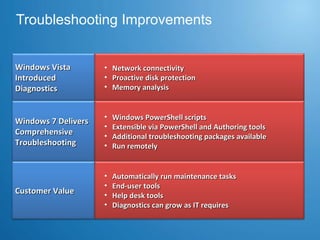
Troubleshooting Improvements Windows Vista Introduced Diagnostics Windows 7 Delivers  Comprehensive Troubleshooting Network connectivity Proactive disk protection Memory analysis Windows PowerShell scripts Extensible via PowerShell and Authoring tools Additional troubleshooting packages available  Run remotely  Customer Value Automatically run maintenance tasks  End-user tools Help desk tools Diagnostics can grow as IT requires
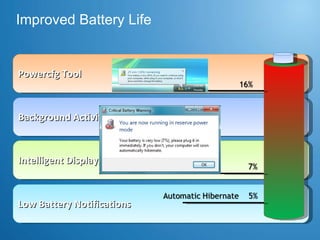
Improved Battery Life Powercfg Tool Background Activities Reduced Intelligent Display Brightness Low Battery Notifications
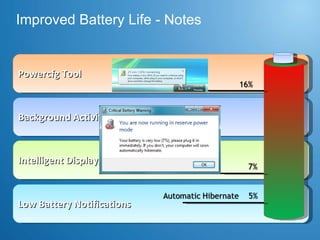
Improved Battery Life - Notes Powercfg Tool Background Activities Reduced Intelligent Display Brightness Low Battery Notifications
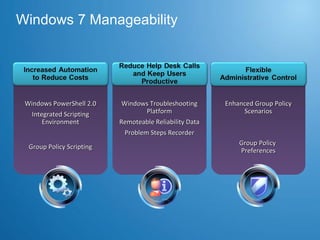
Windows 7 Manageability Windows PowerShell 2.0 Integrated Scripting Environment Windows Troubleshooting Platform Remoteable Reliability Data Problem Steps Recorder Enhanced Group Policy Scenarios Group Policy Scripting Group Policy  Preferences
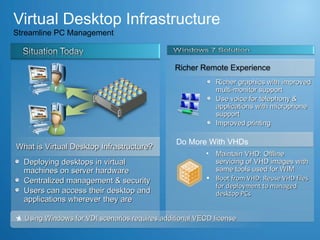
Virtual Desktop Infrastructure Streamline PC Management Deploying desktops in virtual machines on server hardware Centralized management & security Users can access their desktop and applications wherever they are Richer graphics with improved multi-monitor support Use voice for telephony & applications with microphone support Improved printing Using Windows for VDI scenarios requires additional VECD license  * Maintain VHD: Offline servicing of VHD images with same tools used for WIM Boot from VHD: Reuse VHD files for deployment to managed desktop PCs  Do More With VHDs Richer Remote Experience What is Virtual Desktop Infrastructure?
Windows XP Mode &  Windows Virtual PC
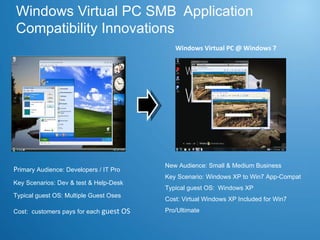
Windows Virtual PC SMB  Application Compatibility Innovations Virtual PC 2007 P rimary Audience: Developers / IT Pro Key Scenarios: Dev & test & Help-Desk Typical guest OS: Multiple Guest Oses Cost:  customers pays for each  guest OS Windows Virtual PC @ Windows 7 New Audience: Small & Medium Business Key Scenario: Windows XP to Win7 App-Compat Typical guest OS:  Windows XP Cost: Virtual Windows XP Included for Win7 Pro/Ultimate
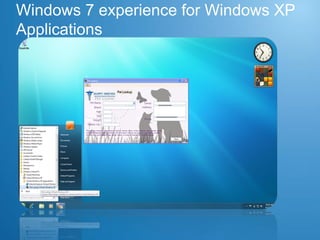
Windows 7 experience for Windows XP Applications
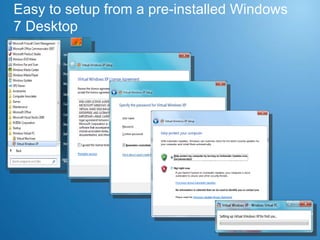
Easy to setup from a pre-installed Windows 7 Desktop
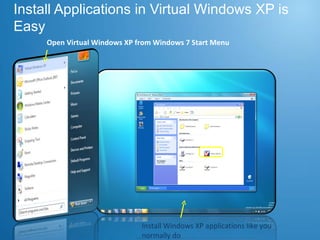
Install Applications in Virtual Windows XP is Easy Open Virtual Windows XP from Windows 7 Start Menu Install Windows XP applications like you normally do
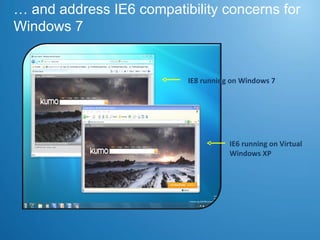
…  and address IE6 compatibility concerns for Windows 7 IE6 running on Virtual Windows XP  IE8 running on Windows 7
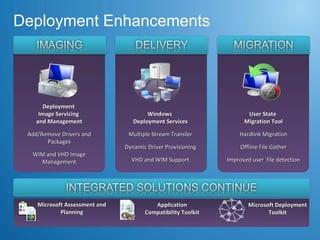
Deployment Enhancements Deployment  Image Servicing  and Management Add/Remove Drivers and Packages WIM and VHD Image Management User State  Migration Tool Hardlink Migration Offline File Gather Improved user  file detection Microsoft Assessment and Planning Windows  Deployment Services Multiple Stream Transfer Dynamic Driver Provisioning VHD and WIM Support Application Compatibility Toolkit Microsoft Deployment Toolkit
Thank You [email_address]

W7 for IT Professionals

  • 1.
    Technical Overview Thursday,July 23, 2009 Arlindo Alves IT Pro Evangelist Microsoft [email_address] http://blogs.technet.com/aralves
  • 2.
    Windows 7 Buildson Windows Vista Deployment, Testing, and Pilots Today Will Continue to Pay Off Similar Compatibility: Most software that runs on Windows Vista will run on Windows 7. Exceptions will be low level code (AV, Firewall, Imaging, etc). Hardware that runs Windows Vista well will run Windows 7 well. Few Changes: Focus on quality and reliability improvements Deep Changes: New models for security, drivers, deployment, and networking
  • 3.
    Windows 7 &Server 2008 R2 Development Process New approach for Windows development and disclosure Spend more time on planning & vision phase analyzing trends and needs before building features. Focus on end-to-end business scenarios – not just new features and technologies. Give our customer and partners a timeframe for the release and stick to our plan – 3 years for Windows 7. Disclose with higher degree of certainty and minimize changes Engaging with partners earlier and more closely to enable seamless experiences and compatibility across hardware, software and services
  • 4.
    Windows 7 forthe Enterprise At their desk In a branch On the road Protect data & PCs Built on Windows Vista foundation Easy migration Keep PCs running Virtualization
  • 5.
    Windows Optimized Desktop Unique Value with SA+MDOP Core PC Platform
  • 6.
    Remote Access forMobile Workers Make Users Productive Anywhere New network paradigm enables same experience inside & outside the office Seamless access to network resources increases productivity of mobile users Infrastructure investments also make it easy to service mobile PCs and distribute updates and polices Difficult for users to access corporate resources from outside the office Challenging for IT to manage, update, patch mobile PCs while disconnected from company network Home Office Home DirectAccess Office
  • 7.
    DirectAccess Solution OverviewDirectAccess Server Compliant Client Compliant Client IPsec/IPv6 Data Center and Business Critical Resources NAP / NPS Servers Internet Intranet User Enterprise Network Intranet User IPsec/IPv6 IPsec/IPv6 Assume the underlying network is always insecure Redefine CORPNET edge to insulate the datacenter and business critical resources Tunnel over IPv4 UDP, HTTPS, etc. Security policies based on identity, not location
  • 8.
    Client tries toaccess .corpnet.com Looks in provisioned list for DNS server(s) associated with .corpnet Connects with DNS server (using IPsec. IPv6 is thru DAS Client tries to connect to target IPv6 route again thru DAS. IPsec is required. DAS lets thru AuthIP packets from client to DNS After negotiation, DAS lets ESP packets thru between client and DNS. DNS returns target address information to client. DNS registers clients current address information What Happens At Client What happens at DAS/DNS
  • 9.
    Branch Office NetworkPerformance Make Users Productive Anywhere Caches content downloaded from file and Web servers Users in the branch can quickly open files stored in the cache Frees up network bandwidth for other uses BranchCache™ Application and data access over WAN is slow in branch offices Slow connections hurt user productivity Improving network performance is expensive and difficult to implement
  • 10.
    Distributed versus HostedCache Distributed Cache Data cached in cache pool Hosted Cache Data cached at the host server Cache stored centrally: existing Windows Server 2008 R2 in the branch Cache availability is high Enables branch-wide caching Increased reliability Recommended for branches without a branch server Easy to deploy: Enabled on clients through Group Policy Cache availability decreases with laptops that go offline Enterprise
  • 11.
    BranchCache Distributed CacheGet Get ID Get Data Get ID Data Data
  • 12.
    BranchCache Hosted CacheGet Get ID Put Data Get Data ID Search Get Search Request Advertize ID ID ID Data ID Data
  • 13.
    Search in theEnterprise Make Users Productive Anywhere Consistent experience to find data from multiple locations, including SharePoint sites Users and IT can pre-populate Favorites in Windows Explorer to remote search sites that support OpenSearch protocol IT can point users to select search sites w/Enterprise Search Scopes    Search Federation Current desktop and Enterprise search solutions are good, but not integrated Users need to take different steps to find data on PC and data on servers Data sources are hard to discover
  • 14.
    Demo Federated SearchThursday, July 23, 2009
  • 15.
    Windows PowerShell 2.0New Features Graphical PowerShell Improved security Portability New cmdlets Remote Execution Capability Active Directory Administration Center Internet Information Services Power Management One-to-many remote management using WS-MGMT Integration Improves productivity and control Accelerates automation of system admin Easy to use Works with existing scripts Community Model Improved Command-Line Shell and Scripting Language
  • 16.
    Windows PowerShell 2.0- Notes New Features Graphical PowerShell Improved security Portability New cmdlets Remote Execution Capability Active Directory Administration Center Internet Information Services Power Management One-to-many remote management using WS-MGMT Integration Improves productivity and control Accelerates automation of system admin Easy to use Works with existing scripts Community Model Improved Command-Line Shell and Scripting Language
  • 17.
    Demo PowerShell RemotingThursday, July 23, 2009 Microsoft Confidential
  • 18.
    Group Policy ImprovementsData Protection Scenarios Group Policy Preferences Application management Auditing Encryption of removable storage devices Configure operating system and application options Provides flexibility for IT and end users Reduces costs of logon scripts Power management scenario Scheduled tasks
  • 19.
    Data Protection EnhanceSecurity & Control Protect data on internal and removable drives Mandate the use of encryption with Group Policies Store recovery information in Active Directory for manageability Simplify BitLocker setup and configuration of primary hard drive Users store increasing volumes of data, including sensitive or confidential data on the removable storage devices Removable storage devices are easy to lose and, unlike PC, the loss may go unnoticed for a while +
  • 20.
    Application Control Enhance Security and Control Eliminate unwanted/unknown applications in your network Enforce application standardization within your organization Easily create and manage flexible rules using Group Policy Users can install and run unapproved applications Even standard users can install some types of software Unauthorized applications may: Introduce malware Increase helpdesk calls Reduce user productivity Undermine compliance efforts
  • 21.
    Demo Data ProtectionApplication Control Thursday, July 23, 2009
  • 22.
    Troubleshooting Improvements WindowsVista Introduced Diagnostics Windows 7 Delivers Comprehensive Troubleshooting Network connectivity Proactive disk protection Memory analysis Windows PowerShell scripts Extensible via PowerShell and Authoring tools Additional troubleshooting packages available Run remotely Customer Value Automatically run maintenance tasks End-user tools Help desk tools Diagnostics can grow as IT requires
  • 23.
    Improved Battery LifePowercfg Tool Background Activities Reduced Intelligent Display Brightness Low Battery Notifications
  • 24.
    Improved Battery Life- Notes Powercfg Tool Background Activities Reduced Intelligent Display Brightness Low Battery Notifications
  • 25.
    Windows 7 ManageabilityWindows PowerShell 2.0 Integrated Scripting Environment Windows Troubleshooting Platform Remoteable Reliability Data Problem Steps Recorder Enhanced Group Policy Scenarios Group Policy Scripting Group Policy Preferences
  • 26.
    Virtual Desktop InfrastructureStreamline PC Management Deploying desktops in virtual machines on server hardware Centralized management & security Users can access their desktop and applications wherever they are Richer graphics with improved multi-monitor support Use voice for telephony & applications with microphone support Improved printing Using Windows for VDI scenarios requires additional VECD license * Maintain VHD: Offline servicing of VHD images with same tools used for WIM Boot from VHD: Reuse VHD files for deployment to managed desktop PCs Do More With VHDs Richer Remote Experience What is Virtual Desktop Infrastructure?
  • 27.
    Windows XP Mode& Windows Virtual PC
  • 28.
    Windows Virtual PCSMB Application Compatibility Innovations Virtual PC 2007 P rimary Audience: Developers / IT Pro Key Scenarios: Dev & test & Help-Desk Typical guest OS: Multiple Guest Oses Cost: customers pays for each guest OS Windows Virtual PC @ Windows 7 New Audience: Small & Medium Business Key Scenario: Windows XP to Win7 App-Compat Typical guest OS: Windows XP Cost: Virtual Windows XP Included for Win7 Pro/Ultimate
  • 29.
    Windows 7 experiencefor Windows XP Applications
  • 30.
    Easy to setupfrom a pre-installed Windows 7 Desktop
  • 31.
    Install Applications inVirtual Windows XP is Easy Open Virtual Windows XP from Windows 7 Start Menu Install Windows XP applications like you normally do
  • 32.
    … andaddress IE6 compatibility concerns for Windows 7 IE6 running on Virtual Windows XP IE8 running on Windows 7
  • 33.
    Deployment Enhancements Deployment Image Servicing and Management Add/Remove Drivers and Packages WIM and VHD Image Management User State Migration Tool Hardlink Migration Offline File Gather Improved user file detection Microsoft Assessment and Planning Windows Deployment Services Multiple Stream Transfer Dynamic Driver Provisioning VHD and WIM Support Application Compatibility Toolkit Microsoft Deployment Toolkit
  • 34.

Editor's Notes

  • #4 Microsoft Confiential: Preliminary Information: NDA Only
  • #7 Microsoft Confiential: Preliminary Information: NDA Only
  • #10 Microsoft Confiential: Preliminary Information: NDA Only
  • #11 Microsoft Confiential: Preliminary Information: NDA Only
  • #14 Microsoft Confiential: Preliminary Information: NDA Only
  • #20 Microsoft Confidential: Preliminary Information: NDA Only
  • #21 Microsoft Confidential: Preliminary Information: NDA Only
  • #27 Microsoft Confidential: Preliminary Information: NDA Only
  • #28 07/23/09 09:26 © 2007 Microsoft Corporation. All rights reserved. Microsoft, Windows, Windows Vista and other product names are or may be registered trademarks and/or trademarks in the U.S. and/or other countries. The information herein is for informational purposes only and represents the current view of Microsoft Corporation as of the date of this presentation. Because Microsoft must respond to changing market conditions, it should not be interpreted to be a commitment on the part of Microsoft, and Microsoft cannot guarantee the accuracy of any information provided after the date of this presentation. MICROSOFT MAKES NO WARRANTIES, EXPRESS, IMPLIED OR STATUTORY, AS TO THE INFORMATION IN THIS PRESENTATION.
  • #34 07/23/09 09:26 © 2007 Microsoft Corporation. All rights reserved. Microsoft, Windows, Windows Vista and other product names are or may be registered trademarks and/or trademarks in the U.S. and/or other countries. The information herein is for informational purposes only and represents the current view of Microsoft Corporation as of the date of this presentation. Because Microsoft must respond to changing market conditions, it should not be interpreted to be a commitment on the part of Microsoft, and Microsoft cannot guarantee the accuracy of any information provided after the date of this presentation. MICROSOFT MAKES NO WARRANTIES, EXPRESS, IMPLIED OR STATUTORY, AS TO THE INFORMATION IN THIS PRESENTATION.