Media Query
CSS CODE FOR DIFFERENT SCREEN AND DEVICE SIZES
What is @media query ?
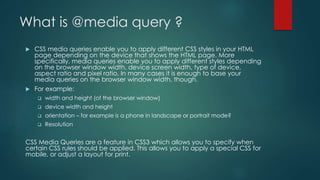
 CSS media queries enable you to apply different CSS styles in your HTML
page depending on the device that shows the HTML page. More
specifically, media queries enable you to apply different styles depending
on the browser window width, device screen width, type of device,
aspect ratio and pixel ratio. In many cases it is enough to base your
media queries on the browser window width, though.
 For example:
 width and height (of the browser window)
 device width and height
 orientation – for example is a phone in landscape or portrait mode?
 Resolution
CSS Media Queries are a feature in CSS3 which allows you to specify when
certain CSS rules should be applied. This allows you to apply a special CSS for
mobile, or adjust a layout for print.
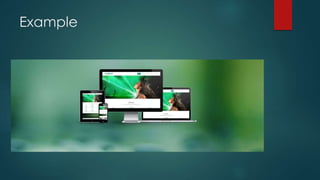
Example
Browsers that Support CSS Media Queries
 Firefox 3.5+
 Opera 9.5+
 Safari 3+
 Chrome
 Internet Explorer 9+
 Please note that Internet Explorer 8 and below do not support CSS
media queries. In those cases, you should use a JavaScript fallback.
Inserting Media Queries
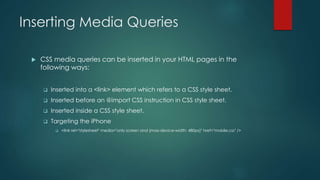
 CSS media queries can be inserted in your HTML pages in the
following ways:
 Inserted into a <link> element which refers to a CSS style sheet.
 Inserted before an @import CSS instruction in CSS style sheet.
 Inserted inside a CSS style sheet.
 Targeting the iPhone
 <link rel="stylesheet" media="only screen and (max-device-width: 480px)" href="mobile.css" />
Example
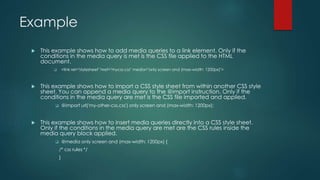
 This example shows how to add media queries to a link element. Only if the
conditions in the media query is met is the CSS file applied to the HTML
document.
 <link rel="stylesheet" href="mycss.css" media="only screen and (max-width: 1200px)">
 This example shows how to import a CSS style sheet from within another CSS style
sheet. You can append a media query to the @import instruction. Only if the
conditions in the media query are met is the CSS file imported and applied.
 @import url('my-other-css.css') only screen and (max-width: 1200px);
 This example shows how to insert media queries directly into a CSS style sheet.
Only if the conditions in the media query are met are the CSS rules inside the
media query block applied.
 @media only screen and (max-width: 1200px) {
/* css rules */
}
CSS Syntax of @media property
 The syntax of a media query is the same no matter if you use it inside
a link element, after an @import instruction, or inside a CSS style
sheet. Media queries follow this syntax:
 [logic] [media] [and (condition)] [and (condition)] ...
 Logic : only, not
 The value only means that this media query only matches a certain media type
 The value not means that this media query matches all other than a certain media type
 Media : screen, projection, print
 Screen: Matches all computer screens. Both on desktop computers, laptops, tablets, smart
phones and TVs.
 Projection: Matches projection devices (projectors used in meeting rooms etc.).
 Matches when a user clicks "print" for the page.
 and (condition) : The [and (condition)] blocks set conditions for the screen. For instance,
you can use these properties inside a condition block:
 Width, min-width, max-width, height, min-height, max-height, device-width, min-device-width,
max-device-width, device-height, min-device-height, max-device-height, orientation, aspect-
ratio, device-aspect-ratio, -webkit-device-pixel-ratio, -webkit-max-device-pixel-ratio, -webkit-min-
device-pixel-ratio
 As you might have spotted, the condition properties fall into two groups:
 The first group is related to the width and height of the browser window.
 The second group is related to the width and height of the physical device screen.
min-height, max-height
 min-width / min-height
 The min-width and min-height properties accept unit values the exact same way that the
height and width properties do, so there’s no difference in the syntax. You can use any
acceptable unit, including pixels, ems, and percentages.
 max-width / max-height
 Like the “min” properties, max-width and max-height accept the usual unit values. But this
time, instead of a minimum size for an element, these properties set the maximum size.
 min-height is useful if you want to give an element layout in IE7
 If you have a fluid header or footer that doesn’t expand properly, can be fixed
with min-width
CSS max-height Property
 The max-height property is used to set the maximum height of an element. This
prevents the value of the height property from becoming larger than max-
height.
 Note: The value of the max-height property overrides height.
 max-height: none|length|initial|inherit;
 none No maximum height. This is default
 Length Defines the maximum height in px, cm, etc
 % Defines the maximum height in percent of the containing block
 initial Sets this property to its default value.
 inherit Inherits this property from its parent element.
CSS min-height Property
 The min-height property is used to set the minimum height of an
element. This prevents the value of the height property from becoming
smaller than min-height.
 Note: The value of the min-height property overrides both max-height
and height.
 min-height: length|initial|inherit;
 length Default value is 0. Defines the minimum height in px, cm, etc.
 % Defines the minimum height in percent of the containing block
 initial Sets this property to its default value
 Inherit Inherits this property from its parent element.
Usage of @media query
 This helps when you want different layout for different media types
such as a screen or a printer, but also when you want different
layout for different devices, which is very useful when making web
pages with responsive design.
 You can also have different layout when a user resizes the browser
window up or down to a certain width, or height.
Media Types and Media Features
 By using the @media rule, a website can have a different layout for
screen, print, mobile phone, tablet, etc.
 Media Types :
 Certain CSS properties are only designed for certain media. For example the "voice-
family" property is designed for aural user agents.
 Some other properties can be used for different media types. For example, the
"font-size" property can be used for both screen and print media, but perhaps with
different values.
 A document usually needs a larger font-size on a screen than on paper, and sans-
serif fonts are easier to read on the screen, while serif fonts are easier to read on
paper.
Available media types
 All : All devices listen to this
 Braille : Used for braille tactile feedback
devices.
 Embossed : Used for paged braille printers.
 Handheld : Used for handheld devices
(Smartphones and tablets do NOT listen to
this!).
 Print : Used for paged material and for
documents viewed on screen in print
preview mode.
 Projection : Used for projected
presentations, for example projectors.
 Screen : Used primarily for color computer
screens and smartphones.
 Speech : Used for speech synthesizers..
(Whatever that may be)
 Tty : Used for media using a fixed-pitch
character grid (such as teletypes, terminals,
or portable devices with limited display
capabilities).
 Tv : Used for television-type devices (low
resolution, color, limited-scrollability screens,
sound available).
Available expressions
 width : The width of the current
window
 height : The height of the current
window
 device-width : The width of the
device
 device-height : The height of the
device
 orientation : Either landscape or
portrait
 aspect-ratio : The aspect ratio of the
current window
 device-aspect-ratio : The aspect
ratio of the device
 color : The number of color bits per
color component
 color-index : The number of
available colors on the device
 monochrome : The number of bits
per pixel in a monochrome frame
buffer
 resolution : The resolution of the
device
 scan : Either progressive or interlace
 grid : Is the device grid-based?
Lets Do our self
MAKES YOUR MIND & HANDS BE PRODUCTIVE BY DOING MISTAKE.
Thank You
DON’T GET AFRAID, DECIDE WHAT YOU WANT AND THEN DRIVE.

Media queries A to Z

  • 1.
    Media Query CSS CODEFOR DIFFERENT SCREEN AND DEVICE SIZES
  • 2.
    What is @mediaquery ?  CSS media queries enable you to apply different CSS styles in your HTML page depending on the device that shows the HTML page. More specifically, media queries enable you to apply different styles depending on the browser window width, device screen width, type of device, aspect ratio and pixel ratio. In many cases it is enough to base your media queries on the browser window width, though.  For example:  width and height (of the browser window)  device width and height  orientation – for example is a phone in landscape or portrait mode?  Resolution CSS Media Queries are a feature in CSS3 which allows you to specify when certain CSS rules should be applied. This allows you to apply a special CSS for mobile, or adjust a layout for print.
  • 3.
  • 4.
    Browsers that SupportCSS Media Queries  Firefox 3.5+  Opera 9.5+  Safari 3+  Chrome  Internet Explorer 9+  Please note that Internet Explorer 8 and below do not support CSS media queries. In those cases, you should use a JavaScript fallback.
  • 5.
    Inserting Media Queries CSS media queries can be inserted in your HTML pages in the following ways:  Inserted into a <link> element which refers to a CSS style sheet.  Inserted before an @import CSS instruction in CSS style sheet.  Inserted inside a CSS style sheet.  Targeting the iPhone  <link rel="stylesheet" media="only screen and (max-device-width: 480px)" href="mobile.css" />
  • 6.
    Example  This exampleshows how to add media queries to a link element. Only if the conditions in the media query is met is the CSS file applied to the HTML document.  <link rel="stylesheet" href="mycss.css" media="only screen and (max-width: 1200px)">  This example shows how to import a CSS style sheet from within another CSS style sheet. You can append a media query to the @import instruction. Only if the conditions in the media query are met is the CSS file imported and applied.  @import url('my-other-css.css') only screen and (max-width: 1200px);  This example shows how to insert media queries directly into a CSS style sheet. Only if the conditions in the media query are met are the CSS rules inside the media query block applied.  @media only screen and (max-width: 1200px) { /* css rules */ }
  • 7.
    CSS Syntax of@media property  The syntax of a media query is the same no matter if you use it inside a link element, after an @import instruction, or inside a CSS style sheet. Media queries follow this syntax:  [logic] [media] [and (condition)] [and (condition)] ...
  • 8.
     Logic :only, not  The value only means that this media query only matches a certain media type  The value not means that this media query matches all other than a certain media type  Media : screen, projection, print  Screen: Matches all computer screens. Both on desktop computers, laptops, tablets, smart phones and TVs.  Projection: Matches projection devices (projectors used in meeting rooms etc.).  Matches when a user clicks "print" for the page.  and (condition) : The [and (condition)] blocks set conditions for the screen. For instance, you can use these properties inside a condition block:  Width, min-width, max-width, height, min-height, max-height, device-width, min-device-width, max-device-width, device-height, min-device-height, max-device-height, orientation, aspect- ratio, device-aspect-ratio, -webkit-device-pixel-ratio, -webkit-max-device-pixel-ratio, -webkit-min- device-pixel-ratio  As you might have spotted, the condition properties fall into two groups:  The first group is related to the width and height of the browser window.  The second group is related to the width and height of the physical device screen.
  • 9.
    min-height, max-height  min-width/ min-height  The min-width and min-height properties accept unit values the exact same way that the height and width properties do, so there’s no difference in the syntax. You can use any acceptable unit, including pixels, ems, and percentages.  max-width / max-height  Like the “min” properties, max-width and max-height accept the usual unit values. But this time, instead of a minimum size for an element, these properties set the maximum size.  min-height is useful if you want to give an element layout in IE7  If you have a fluid header or footer that doesn’t expand properly, can be fixed with min-width
  • 10.
    CSS max-height Property The max-height property is used to set the maximum height of an element. This prevents the value of the height property from becoming larger than max- height.  Note: The value of the max-height property overrides height.  max-height: none|length|initial|inherit;  none No maximum height. This is default  Length Defines the maximum height in px, cm, etc  % Defines the maximum height in percent of the containing block  initial Sets this property to its default value.  inherit Inherits this property from its parent element.
  • 11.
    CSS min-height Property The min-height property is used to set the minimum height of an element. This prevents the value of the height property from becoming smaller than min-height.  Note: The value of the min-height property overrides both max-height and height.  min-height: length|initial|inherit;  length Default value is 0. Defines the minimum height in px, cm, etc.  % Defines the minimum height in percent of the containing block  initial Sets this property to its default value  Inherit Inherits this property from its parent element.
  • 12.
    Usage of @mediaquery  This helps when you want different layout for different media types such as a screen or a printer, but also when you want different layout for different devices, which is very useful when making web pages with responsive design.  You can also have different layout when a user resizes the browser window up or down to a certain width, or height.
  • 13.
    Media Types andMedia Features  By using the @media rule, a website can have a different layout for screen, print, mobile phone, tablet, etc.  Media Types :  Certain CSS properties are only designed for certain media. For example the "voice- family" property is designed for aural user agents.  Some other properties can be used for different media types. For example, the "font-size" property can be used for both screen and print media, but perhaps with different values.  A document usually needs a larger font-size on a screen than on paper, and sans- serif fonts are easier to read on the screen, while serif fonts are easier to read on paper.
  • 14.
    Available media types All : All devices listen to this  Braille : Used for braille tactile feedback devices.  Embossed : Used for paged braille printers.  Handheld : Used for handheld devices (Smartphones and tablets do NOT listen to this!).  Print : Used for paged material and for documents viewed on screen in print preview mode.  Projection : Used for projected presentations, for example projectors.  Screen : Used primarily for color computer screens and smartphones.  Speech : Used for speech synthesizers.. (Whatever that may be)  Tty : Used for media using a fixed-pitch character grid (such as teletypes, terminals, or portable devices with limited display capabilities).  Tv : Used for television-type devices (low resolution, color, limited-scrollability screens, sound available).
  • 15.
    Available expressions  width: The width of the current window  height : The height of the current window  device-width : The width of the device  device-height : The height of the device  orientation : Either landscape or portrait  aspect-ratio : The aspect ratio of the current window  device-aspect-ratio : The aspect ratio of the device  color : The number of color bits per color component  color-index : The number of available colors on the device  monochrome : The number of bits per pixel in a monochrome frame buffer  resolution : The resolution of the device  scan : Either progressive or interlace  grid : Is the device grid-based?
  • 16.
    Lets Do ourself MAKES YOUR MIND & HANDS BE PRODUCTIVE BY DOING MISTAKE.
  • 17.
    Thank You DON’T GETAFRAID, DECIDE WHAT YOU WANT AND THEN DRIVE.