Website Performance
Hugo Fonseca – Technical Lead
Thursday 5th February 2015
Why Should We Care about Website
Performance ?
“ Nearly half of the web users expect a site to load in 2
seconds or less, and they tend to abandon a site that isn’t
loaded within 3 seconds, according to Akamai and
Gomez.com”
WEBSITE PERFORMANCE – FACTS AND STATS
• 47% of consumers expect a web page to load in 2 seconds or
less
• 40% of people abandon a website that takes more than 3
seconds to load
• 75% of the 1,058 people asked would not return to websites that
took longer than four seconds to load
• A 1 second delay in page response can result in a 7% reduction
in conversions
• If an e-commerce site is making £100,000 per day, a 1 second
page delay could potentially cost you £2.5 million in lost sales
WEBSITE PERFORMANCE – FACTS AND STATS
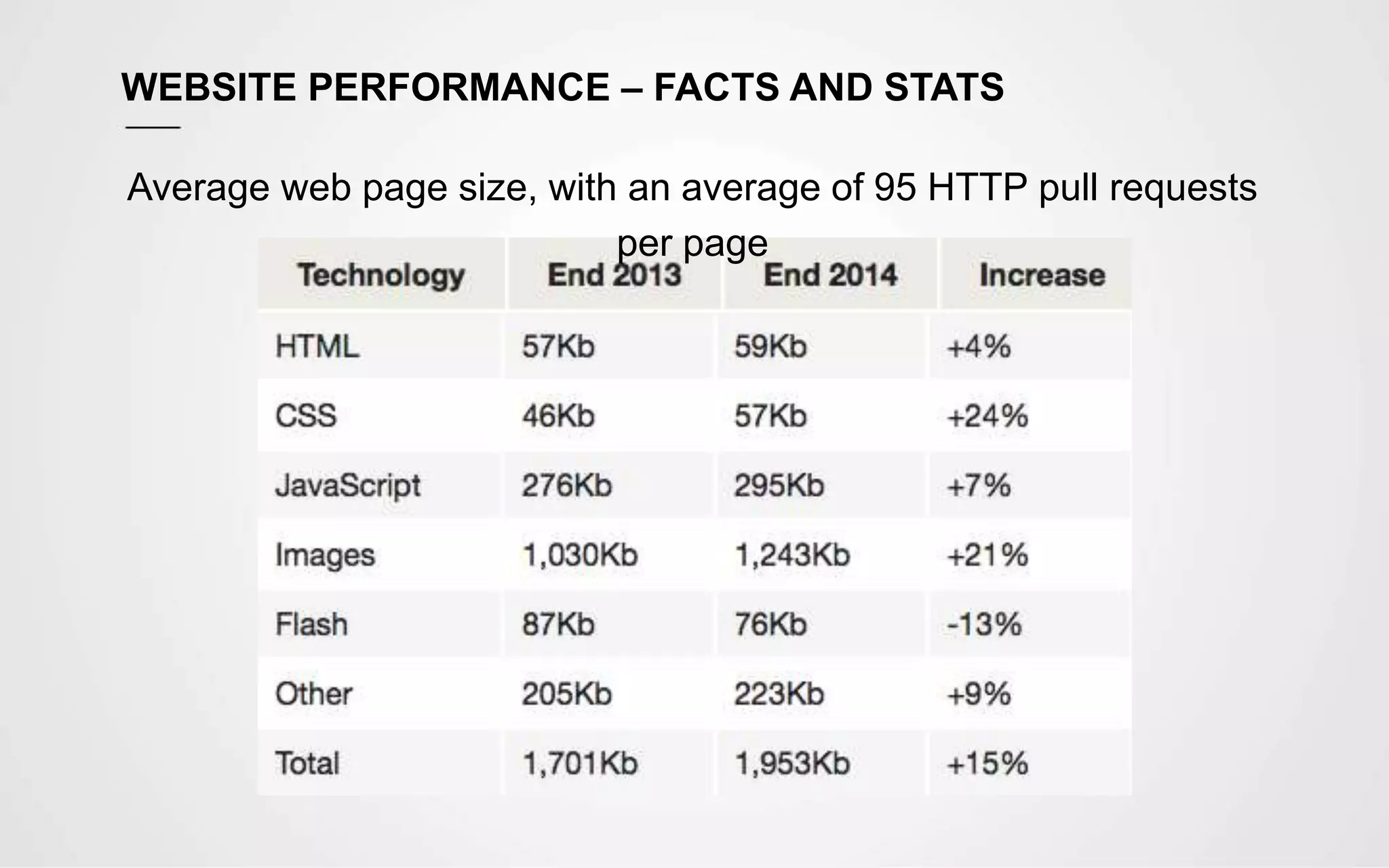
Average web page size, with an average of 95 HTTP pull requests
per page
Most Common Reasons For a Poor
Performance
MOST COMMON REASONS FOR A POOR PERFORMANCE
• Bloated CMS Templates
Typical WordPress themes are crammed full of features. Many will be third-party
styles and widgets the author has added to make the theme more useful or
attractive to buyers. Many features will not be used but the files are still present
• HTML5/CSS3 Boilerplates
A boilerplate may save time but it’s important to understand they are generic
templates. The styles and scripts contain features you’ll never use and the
HTML can be verbose with deeply-nested elements and long-winded,
descriptive class names. Few developers bother to remove redundant code
• Carelessness
Developers are inherently lazy; we write software to make tasks easier.
However, if you’re not concerned about the consequences of page weight, you
should have your web license revoked
• Too many requests
Each request takes time to process, as it includes time for DNS Lookup, SSL
Performance Optimisations
PERFORMANCE OPTIMISATIONS
• Cleanup Code
Remove comments, remove unnecessary HTML, JS and CSS
• Combine and Minify Assets (JS and CSS)
Combine the JS files and libraries into one JS file and minify. The same for CSS
to reduce number of requests
• Load CSS on the <head> and JS just before </body>
Loading CSS first, prevents additional repaints and reflows, and will make the
page look much better from the beginning and JS in the end to allow for the
page to be rendered without being blocked while loading the scripts
• Try to load scripts as asynchronous
This way, the page rendering won’t be blocked and triggers the
$(document).ready() ,much sooner. All social media plugins and analytics
should be loaded asynchronously
• Make use of sprites whenever possible
PERFORMANCE OPTIMISATIONS
• Cache
Make an effective use of cache. Cache assets, cache DB queries, cache
templates / pre-render templates. Also implement Cache Busters. The preferred
URL fingerprint is /assets/9833e4/css/style.css, as other solutions might have
problems with proxies and CDNs
• Download assets from cookieless domains
It saves a lot of time, when requesting the assets
• Download assets from multiple subdomains / CDNs
static.domain.com, static1.domain.com, etc, as browsers usually have a limit on
how many concurrent connections they establish with each domain, which
means, the first set of assets, needs to be downloaded before starting new
connections
• Consider using Google CDN
Google CDN is usually very fast, and physically close to the client. And the client
might already have the asset cached
PERFORMANCE OPTIMISATIONS
• Enable Compression
Enabling compression (e.g. GZIP) to make the file size much smaller to
download. With jQuery ou can get a gain of 88% when compared to the original
size – jQuery (273K), Minified (90k), Compressed (32K)
• Remove inline scripts and styles
Move them into files to make them cacheable
• Serve adequately sized images
If we only need a 50x50px image, just serve that image. Don’t rely on the
browser to resize, as it will still download the full size image
• Optimize images
Remove unnecessary data from images (strip irrelevant information), compress,
and if it is a JPEG, make use of the progressive version, as this will make the
image start appearing sooner
PERFORMANCE OPTIMISATIONS
• Prevent excessive redirects
Each redirect costs time, so avoid unnecessary redirections
• Consider using Nginx for serving static content
Nginx is very fast and optimised to serve static content
• Consider using techniques like lazy loading
If the content is not important for SEO or another reason, consider triggering the
load, only after the page is served
• Consider hosting images, web server and database server in a
different machines
This reduces the load on each server, which translates in faster response times
Real Speed vs Apparent Speed
“Even if we optimise all the aspects, we might still have a
website that’ll take longer than we wished for. We can make
use of several techniques to make the site apparently faster.”
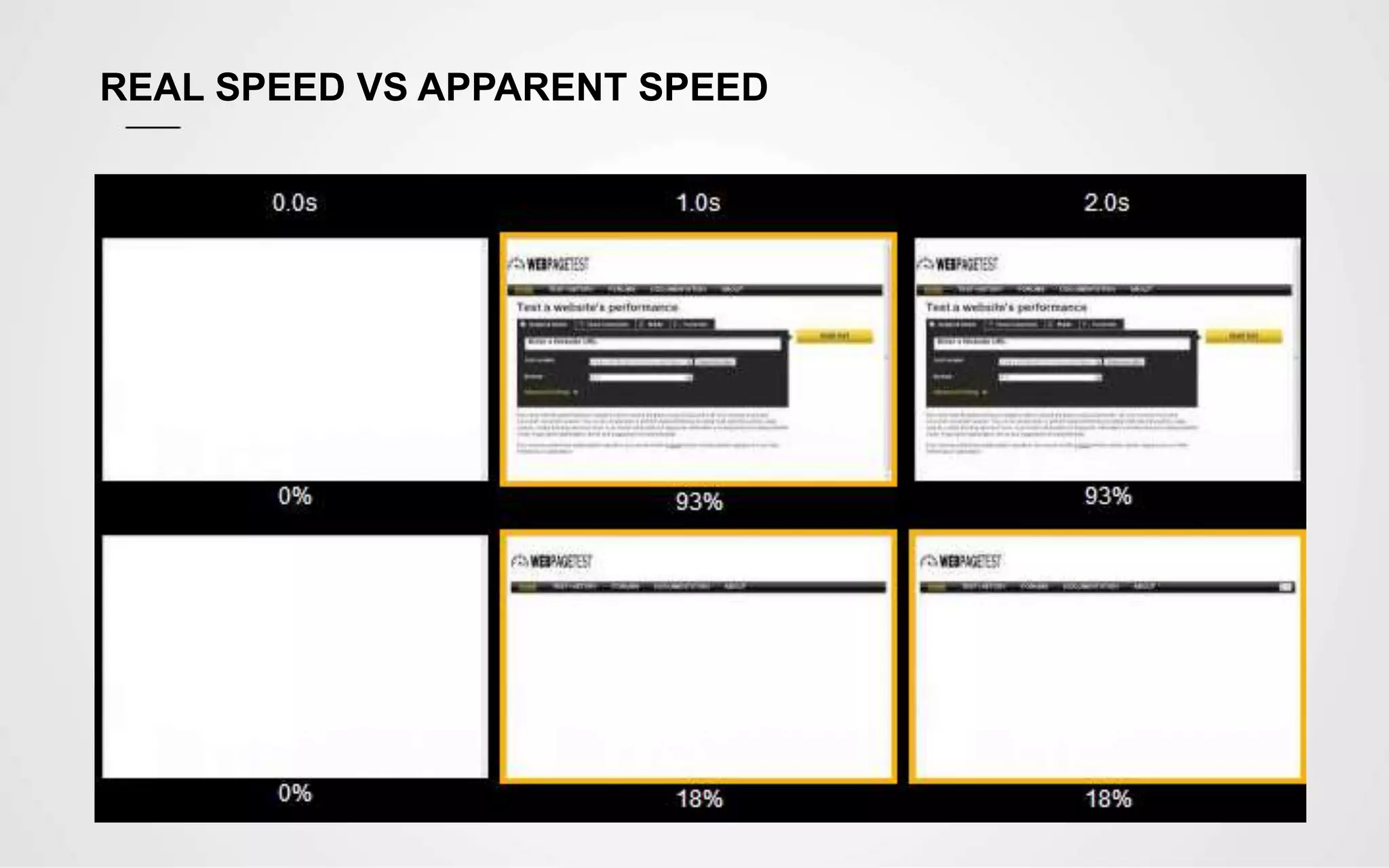
INTRODUCING WEBPAGETEST.ORG SPEED INDEX
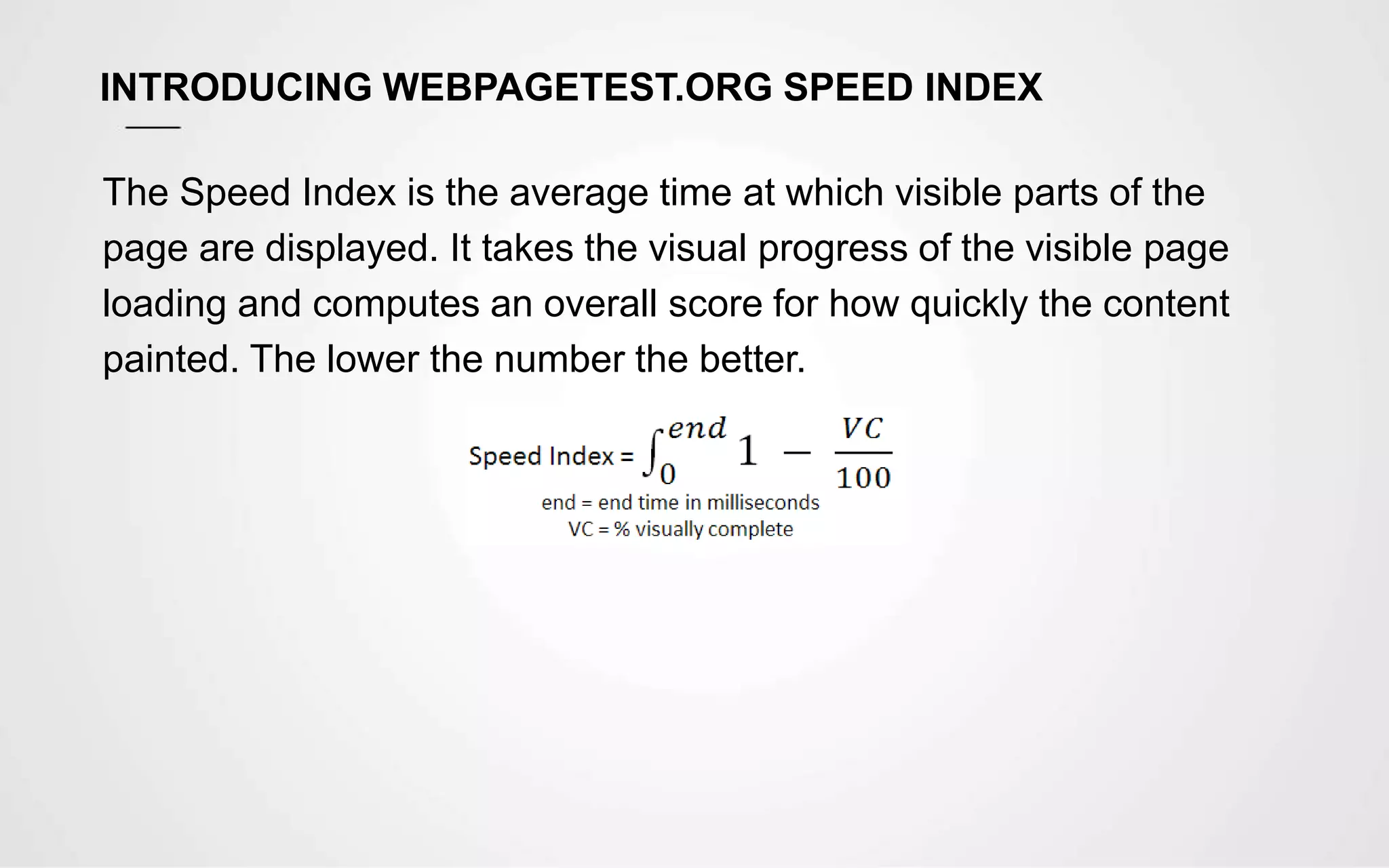
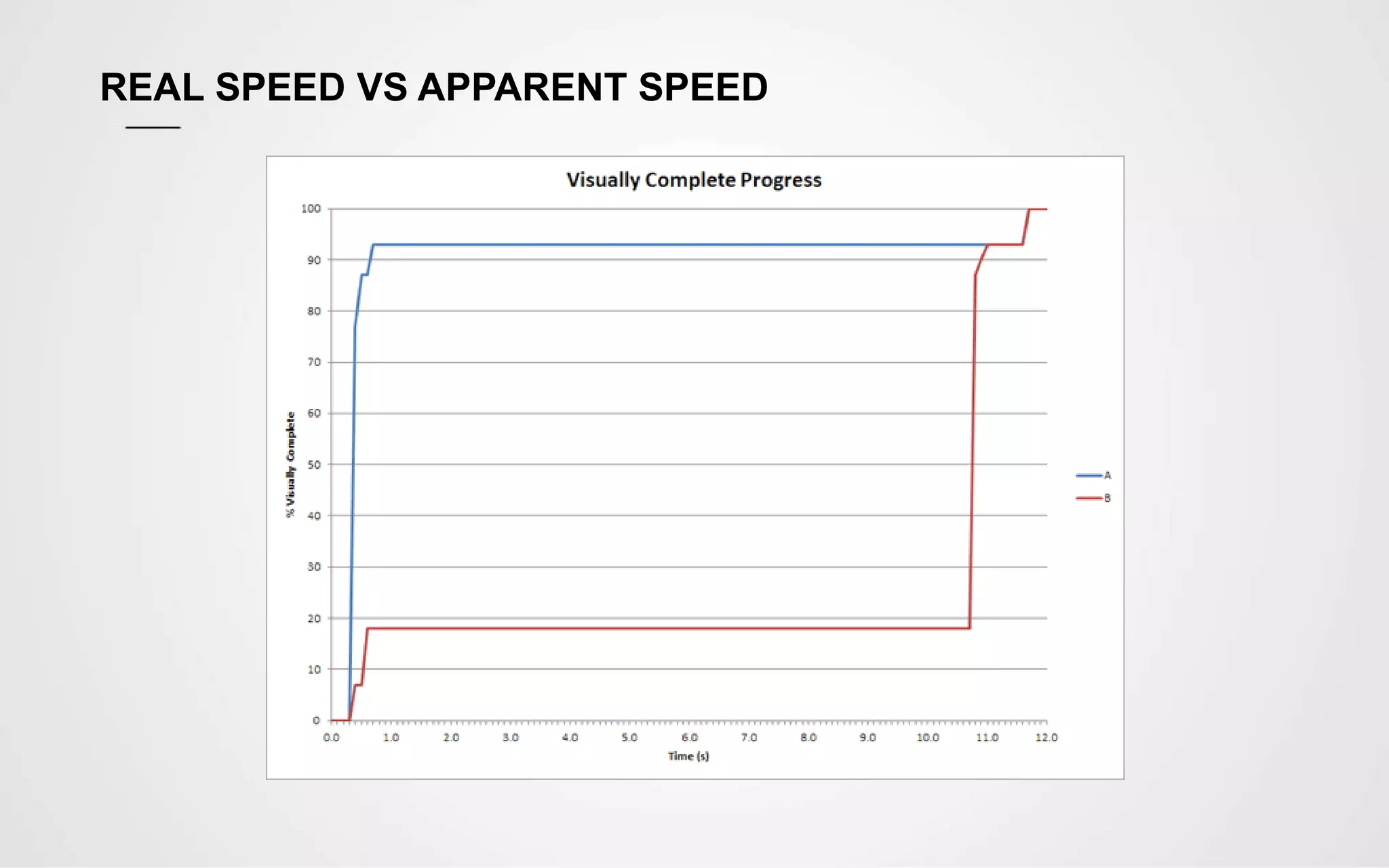
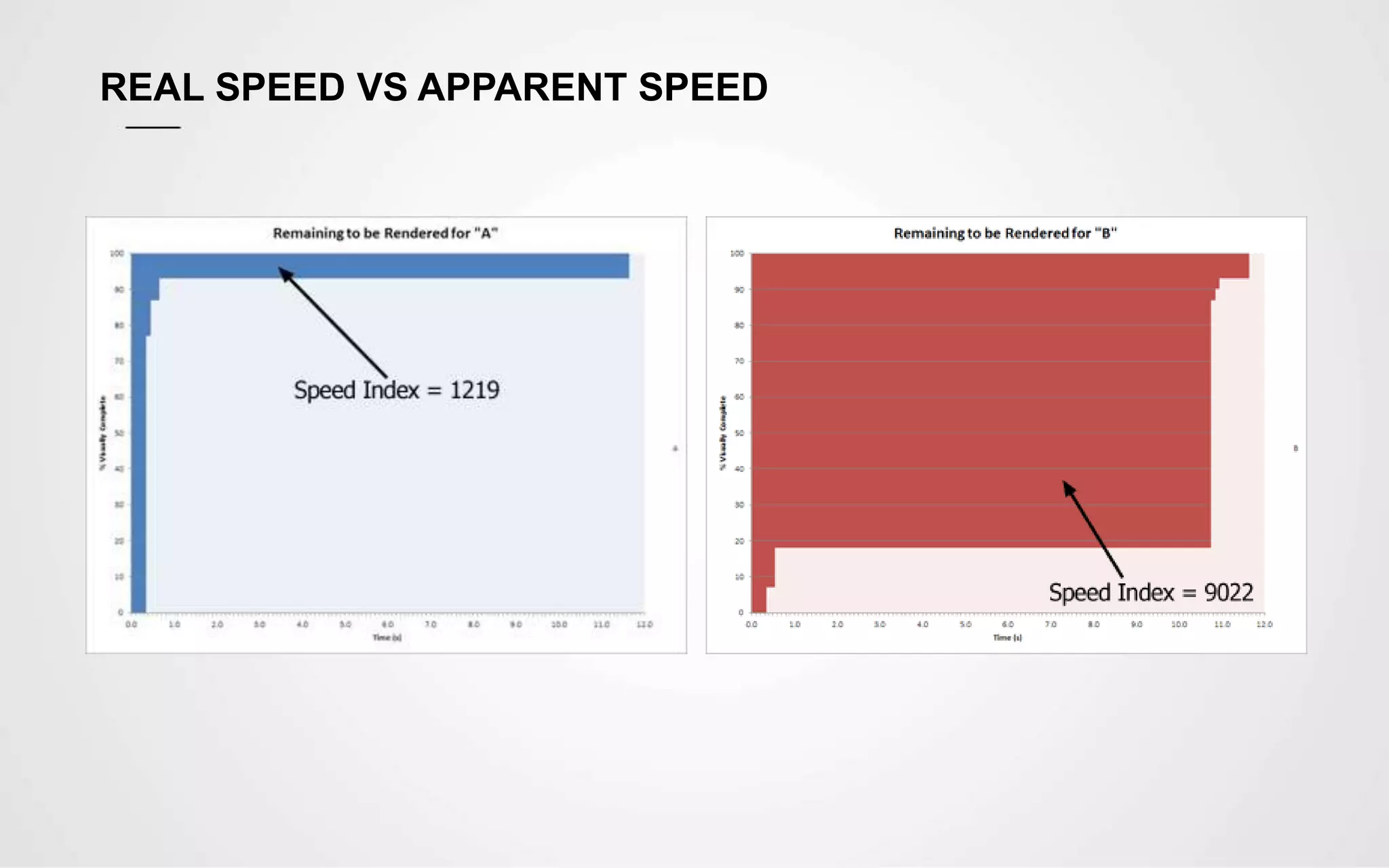
The Speed Index is the average time at which visible parts of the
page are displayed. It takes the visual progress of the visible page
loading and computes an overall score for how quickly the content
painted. The lower the number the better.
REAL SPEED VS APPARENT SPEED
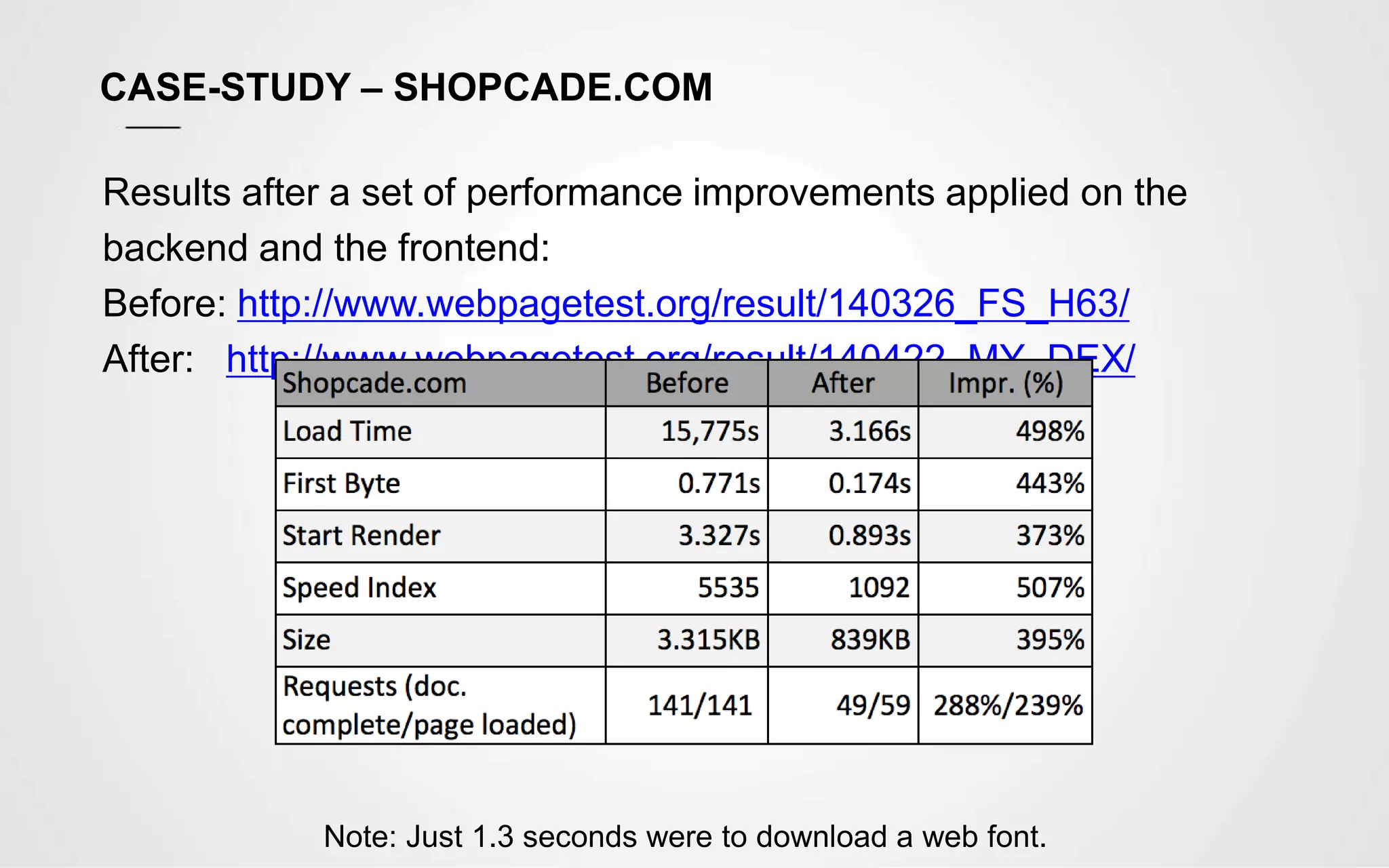
CASE-STUDY – SHOPCADE.COM
Results after a set of performance improvements applied on the
backend and the frontend:
Before: http://www.webpagetest.org/result/140326_FS_H63/
After: http://www.webpagetest.org/result/140422_MY_DEX/
Note: Just 1.3 seconds were to download a web font.
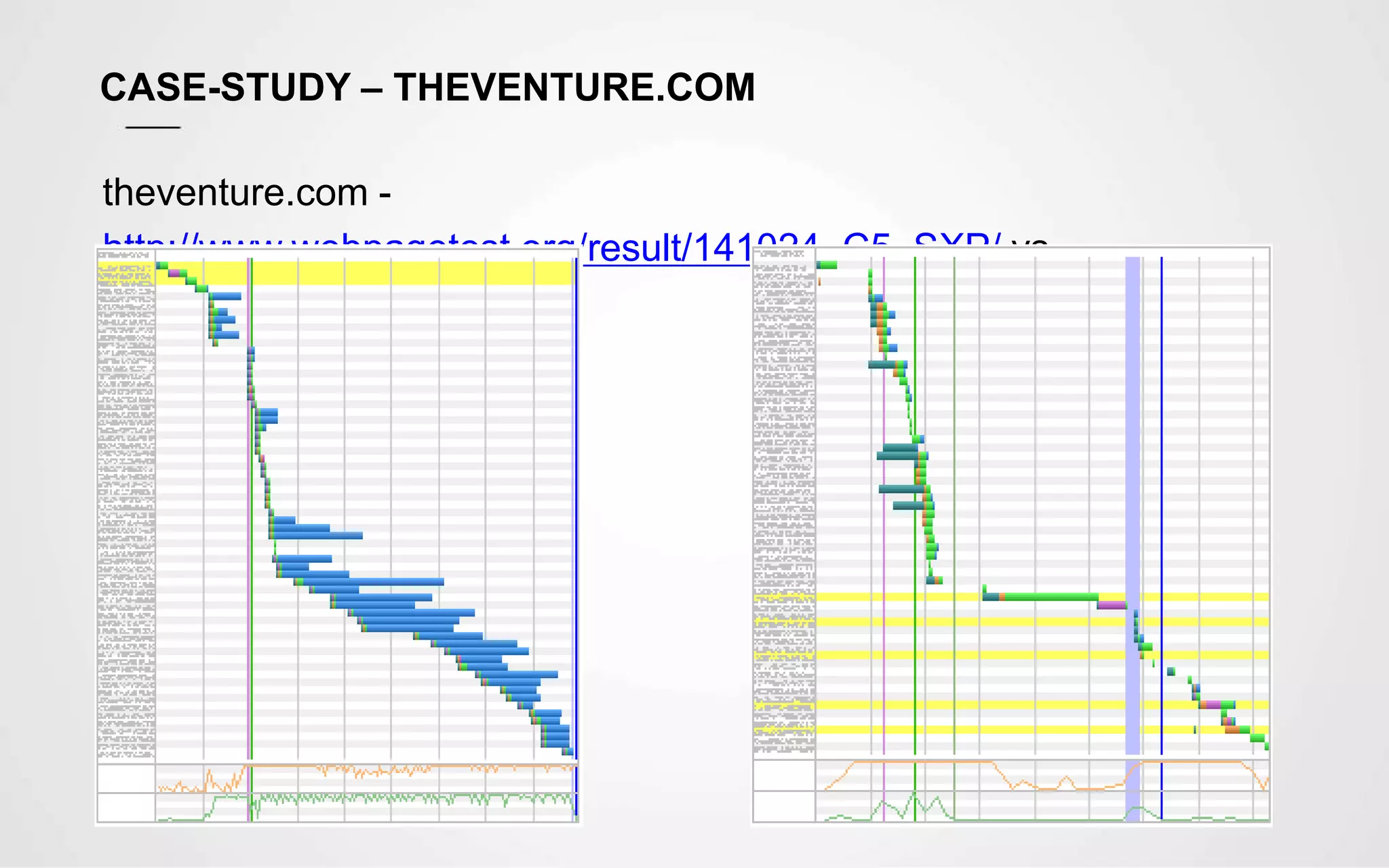
CASE-STUDY – THEVENTURE.COM
theventure.com -
http://www.webpagetest.org/result/141024_C5_SXP/ vs
shopcade.com
QUESTIONS & ANSWERS
USEFUL LINKS
• WebPageTest.Org
http://www.webpagetest.org
• Speed Index
https://sites.google.com/a/webpagetest.org/docs/using-
webpagetest/metrics/speed-index
• Using Site Speed in Web Search Ranking
http://googlewebmastercentral.blogspot.co.uk/2010/04/using-site-speed-in-web-
search-ranking.html
• Speed is a Killer
https://blog.kissmetrics.com/speed-is-a-killer/
• Google Web Fundamentals
https://developers.google.com/web/fundamentals/performance/
Thank
YOU

Website Performance

  • 1.
    Website Performance Hugo Fonseca– Technical Lead Thursday 5th February 2015
  • 2.
    Why Should WeCare about Website Performance ? “ Nearly half of the web users expect a site to load in 2 seconds or less, and they tend to abandon a site that isn’t loaded within 3 seconds, according to Akamai and Gomez.com”
  • 3.
    WEBSITE PERFORMANCE –FACTS AND STATS • 47% of consumers expect a web page to load in 2 seconds or less • 40% of people abandon a website that takes more than 3 seconds to load • 75% of the 1,058 people asked would not return to websites that took longer than four seconds to load • A 1 second delay in page response can result in a 7% reduction in conversions • If an e-commerce site is making £100,000 per day, a 1 second page delay could potentially cost you £2.5 million in lost sales
  • 4.
    WEBSITE PERFORMANCE –FACTS AND STATS Average web page size, with an average of 95 HTTP pull requests per page
  • 5.
    Most Common ReasonsFor a Poor Performance
  • 6.
    MOST COMMON REASONSFOR A POOR PERFORMANCE • Bloated CMS Templates Typical WordPress themes are crammed full of features. Many will be third-party styles and widgets the author has added to make the theme more useful or attractive to buyers. Many features will not be used but the files are still present • HTML5/CSS3 Boilerplates A boilerplate may save time but it’s important to understand they are generic templates. The styles and scripts contain features you’ll never use and the HTML can be verbose with deeply-nested elements and long-winded, descriptive class names. Few developers bother to remove redundant code • Carelessness Developers are inherently lazy; we write software to make tasks easier. However, if you’re not concerned about the consequences of page weight, you should have your web license revoked • Too many requests Each request takes time to process, as it includes time for DNS Lookup, SSL
  • 7.
  • 8.
    PERFORMANCE OPTIMISATIONS • CleanupCode Remove comments, remove unnecessary HTML, JS and CSS • Combine and Minify Assets (JS and CSS) Combine the JS files and libraries into one JS file and minify. The same for CSS to reduce number of requests • Load CSS on the <head> and JS just before </body> Loading CSS first, prevents additional repaints and reflows, and will make the page look much better from the beginning and JS in the end to allow for the page to be rendered without being blocked while loading the scripts • Try to load scripts as asynchronous This way, the page rendering won’t be blocked and triggers the $(document).ready() ,much sooner. All social media plugins and analytics should be loaded asynchronously • Make use of sprites whenever possible
  • 9.
    PERFORMANCE OPTIMISATIONS • Cache Makean effective use of cache. Cache assets, cache DB queries, cache templates / pre-render templates. Also implement Cache Busters. The preferred URL fingerprint is /assets/9833e4/css/style.css, as other solutions might have problems with proxies and CDNs • Download assets from cookieless domains It saves a lot of time, when requesting the assets • Download assets from multiple subdomains / CDNs static.domain.com, static1.domain.com, etc, as browsers usually have a limit on how many concurrent connections they establish with each domain, which means, the first set of assets, needs to be downloaded before starting new connections • Consider using Google CDN Google CDN is usually very fast, and physically close to the client. And the client might already have the asset cached
  • 10.
    PERFORMANCE OPTIMISATIONS • EnableCompression Enabling compression (e.g. GZIP) to make the file size much smaller to download. With jQuery ou can get a gain of 88% when compared to the original size – jQuery (273K), Minified (90k), Compressed (32K) • Remove inline scripts and styles Move them into files to make them cacheable • Serve adequately sized images If we only need a 50x50px image, just serve that image. Don’t rely on the browser to resize, as it will still download the full size image • Optimize images Remove unnecessary data from images (strip irrelevant information), compress, and if it is a JPEG, make use of the progressive version, as this will make the image start appearing sooner
  • 11.
    PERFORMANCE OPTIMISATIONS • Preventexcessive redirects Each redirect costs time, so avoid unnecessary redirections • Consider using Nginx for serving static content Nginx is very fast and optimised to serve static content • Consider using techniques like lazy loading If the content is not important for SEO or another reason, consider triggering the load, only after the page is served • Consider hosting images, web server and database server in a different machines This reduces the load on each server, which translates in faster response times
  • 12.
    Real Speed vsApparent Speed “Even if we optimise all the aspects, we might still have a website that’ll take longer than we wished for. We can make use of several techniques to make the site apparently faster.”
  • 13.
    INTRODUCING WEBPAGETEST.ORG SPEEDINDEX The Speed Index is the average time at which visible parts of the page are displayed. It takes the visual progress of the visible page loading and computes an overall score for how quickly the content painted. The lower the number the better.
  • 14.
    REAL SPEED VSAPPARENT SPEED
  • 15.
    REAL SPEED VSAPPARENT SPEED
  • 16.
    REAL SPEED VSAPPARENT SPEED
  • 17.
    CASE-STUDY – SHOPCADE.COM Resultsafter a set of performance improvements applied on the backend and the frontend: Before: http://www.webpagetest.org/result/140326_FS_H63/ After: http://www.webpagetest.org/result/140422_MY_DEX/ Note: Just 1.3 seconds were to download a web font.
  • 18.
    CASE-STUDY – THEVENTURE.COM theventure.com- http://www.webpagetest.org/result/141024_C5_SXP/ vs shopcade.com
  • 19.
  • 20.
    USEFUL LINKS • WebPageTest.Org http://www.webpagetest.org •Speed Index https://sites.google.com/a/webpagetest.org/docs/using- webpagetest/metrics/speed-index • Using Site Speed in Web Search Ranking http://googlewebmastercentral.blogspot.co.uk/2010/04/using-site-speed-in-web- search-ranking.html • Speed is a Killer https://blog.kissmetrics.com/speed-is-a-killer/ • Google Web Fundamentals https://developers.google.com/web/fundamentals/performance/
  • 21.

Editor's Notes

  • #3 Just to mention that this is on a project by project basis. Some improvements might not be worth considering, depending on bugdet, project duration, time schedules This is “extreme” optimisation
  • #5 Images are the greatest chunk
  • #7 Simultaneous connections (6) which means resources will have to finish download before starting a new connection. Alternative would be using parallel connections from different domains
  • #13 Since crawlers/spiders are robots, we need to help them to understand the content, by using the correct meta tags, semantic tags, alt attributes
  • #15 You can clearly see when they were implemented by looking at the graph
  • #18 See links and show the video feature, the dom load event vs page load, and even events loaded after the page load Talk about the number of requests, use sprites See webfont example
  • #19 Show comparison