Cascading Style Sheets CSS
Introduction to CSS CSS stands for Cascading Style Sheets  A style language that defines layout of HTML documents  CSS is supported by all browsers today
The benefits of CSS control layout of many documents from one single style sheet;  more precise control of layout;  apply different layout to different media-types (screen, print, etc.);  numerous advanced and sophisticated techniques.
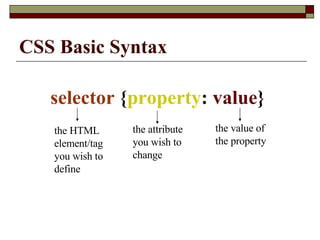
CSS Basic Syntax selector  { property :  value }  the HTML element/tag you wish to define  the attribute you wish to change   the value of the property
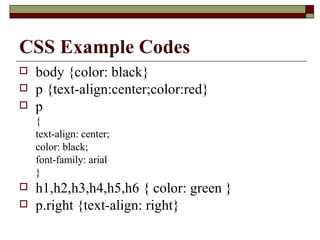
CSS Example Codes body {color: black}  p {text-align:center;color:red} p  {  text-align: center;  color: black;  font-family: arial  }  h1,h2,h3,h4,h5,h6 { color: green }   p.right {text-align: right}
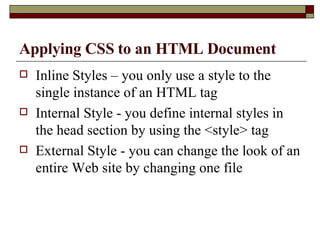
Applying CSS to an HTML Document Inline Styles – you only use a style to the single instance of an HTML tag Internal Style - you define internal styles in the head section by using the <style> tag  External Style - you can change the look of an entire Web site by changing one file
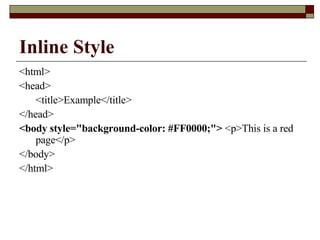
Inline Style <html>  <head>  <title>Example</title>  </head>  <body style=&quot;background-color: #FF0000;&quot;>  <p>This is a red page</p>  </body>  </html>
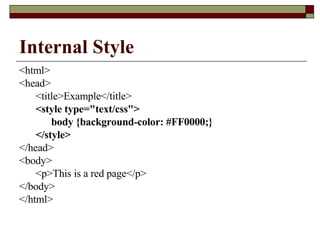
Internal Style <html>  <head>  <title>Example</title>  <style type=&quot;text/css&quot;>   body {background-color: #FF0000;}   </style> </head>  <body>  <p>This is a red page</p>  </body>  </html>
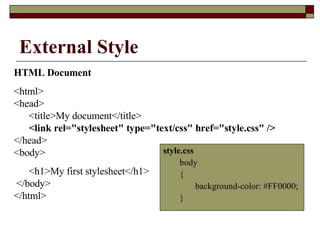
External Style style.css body  {  background-color: #FF0000;  }  HTML Document <html>  <head>   <title>My document</title>    <link rel=&quot;stylesheet&quot; type=&quot;text/css&quot; href=&quot;style.css&quot; />  </head>  <body>  <h1>My first stylesheet</h1>  </body>  </html>

CSS

  • 1.
  • 2.
    Introduction to CSSCSS stands for Cascading Style Sheets A style language that defines layout of HTML documents CSS is supported by all browsers today
  • 3.
    The benefits ofCSS control layout of many documents from one single style sheet; more precise control of layout; apply different layout to different media-types (screen, print, etc.); numerous advanced and sophisticated techniques.
  • 4.
    CSS Basic Syntaxselector { property : value } the HTML element/tag you wish to define the attribute you wish to change the value of the property
  • 5.
    CSS Example Codesbody {color: black} p {text-align:center;color:red} p { text-align: center; color: black; font-family: arial } h1,h2,h3,h4,h5,h6 { color: green } p.right {text-align: right}
  • 6.
    Applying CSS toan HTML Document Inline Styles – you only use a style to the single instance of an HTML tag Internal Style - you define internal styles in the head section by using the <style> tag External Style - you can change the look of an entire Web site by changing one file
  • 7.
    Inline Style <html> <head> <title>Example</title> </head> <body style=&quot;background-color: #FF0000;&quot;> <p>This is a red page</p> </body> </html>
  • 8.
    Internal Style <html> <head> <title>Example</title> <style type=&quot;text/css&quot;> body {background-color: #FF0000;} </style> </head> <body> <p>This is a red page</p> </body> </html>
  • 9.
    External Style style.cssbody { background-color: #FF0000; } HTML Document <html> <head> <title>My document</title> <link rel=&quot;stylesheet&quot; type=&quot;text/css&quot; href=&quot;style.css&quot; /> </head> <body> <h1>My first stylesheet</h1> </body> </html>