Prepared by
Manu Jayaraj K M
What is HTML5?
 HTML5 is the newest version of HTML, only recently gaining
partial support by the makers of web browsers.
 It incorporates all features from earlier versions of HTML,
including the stricter XHTML.
 It adds a diverse set of new tools for the web developer to
use.
 It is still a work in progress. No browsers have full HTML5
support. It will be many years – perhaps not until 2018 or
later - before being fully defined and supported.
Goals of HTML5
 Support all existing web pages. With HTML5, there is no requirement
to go back and revise older websites.
 Reduce the need for external plugins and scripts to show website
content.
 Improve the semantic definition (i.e. meaning and purpose) of page
elements.
 Make the rendering of web content universal and independent of the
device being used.
 Handle web documents errors in a better and more consistent fashion.
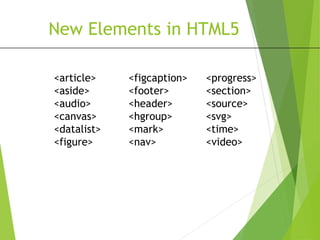
New Elements in HTML5
<figcaption>
<footer>
<header>
<hgroup>
<mark>
<nav>
<progress>
<section>
<source>
<svg>
<time>
<video>
<article>
<aside>
<audio>
<canvas>
<datalist>
<figure>
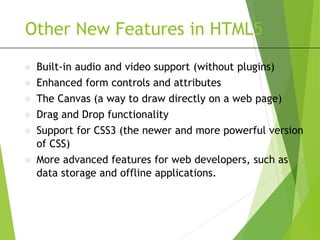
Other New Features in HTML5
 Built-in audio and video support (without plugins)
 Enhanced form controls and attributes
 The Canvas (a way to draw directly on a web page)
 Drag and Drop functionality
 Support for CSS3 (the newer and more powerful version
of CSS)
 More advanced features for web developers, such as
data storage and offline applications.
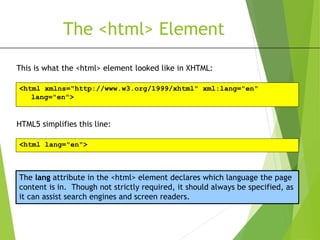
The <html> Element
This is what the <html> element looked like in XHTML:
<html xmlns="http://www.w3.org/1999/xhtml" xml:lang="en"
lang="en">
HTML5 simplifies this line:
<html lang="en">
The lang attribute in the <html> element declares which language the page
content is in. Though not strictly required, it should always be specified, as
it can assist search engines and screen readers.
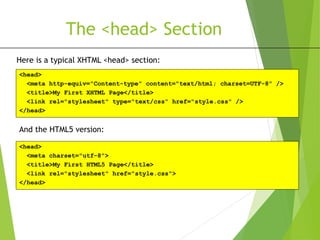
The <head> Section
Here is a typical XHTML <head> section:
<head>
<meta http-equiv="Content-type" content="text/html; charset=UTF-8" />
<title>My First XHTML Page</title>
<link rel="stylesheet" type="text/css" href="style.css" />
</head>
And the HTML5 version:
<head>
<meta charset="utf-8">
<title>My First HTML5 Page</title>
<link rel="stylesheet" href="style.css">
</head>
Basic HTML5 Web Page
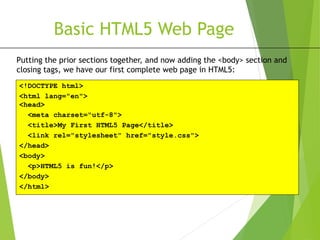
Putting the prior sections together, and now adding the <body> section and
closing tags, we have our first complete web page in HTML5:
<!DOCTYPE html>
<html lang="en">
<head>
<meta charset="utf-8">
<title>My First HTML5 Page</title>
<link rel="stylesheet" href="style.css">
</head>
<body>
<p>HTML5 is fun!</p>
</body>
</html>
5. Audio & video
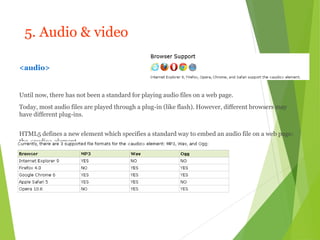
<audio>
Until now, there has not been a standard for playing audio files on a web page.
Today, most audio files are played through a plug-in (like flash). However, different browsers may
have different plug-ins.
HTML5 defines a new element which specifies a standard way to embed an audio file on a web page:
the <audio> element.
5. Audio & video
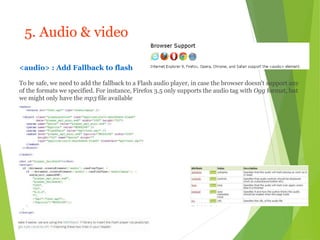
<audio> : Add Fallback to flash
To be safe, we need to add the fallback to a Flash audio player, in case the browser doesn't support any
of the formats we specified. For instance, Firefox 3.5 only supports the audio tag with Ogg format, but
we might only have the mp3 file available
5. Audio & video
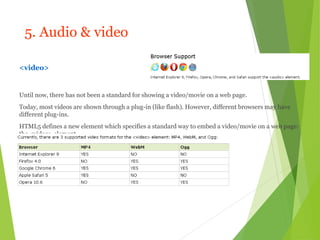
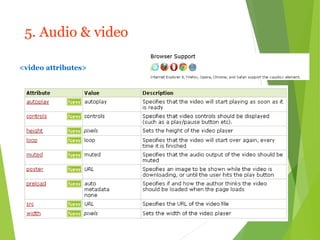
<video>
Until now, there has not been a standard for showing a video/movie on a web page.
Today, most videos are shown through a plug-in (like flash). However, different browsers may have
different plug-ins.
HTML5 defines a new element which specifies a standard way to embed a video/movie on a web page:
the <video> element.
5. Audio & video
<video attributes>
Canvas
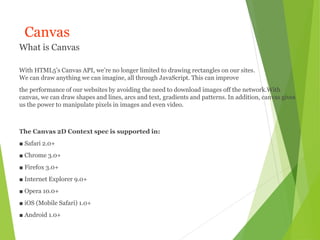
What is Canvas
With HTML5’s Canvas API, we’re no longer limited to drawing rectangles on our sites.
We can draw anything we can imagine, all through JavaScript. This can improve
the performance of our websites by avoiding the need to download images off the network.With
canvas, we can draw shapes and lines, arcs and text, gradients and patterns. In addition, canvas gives
us the power to manipulate pixels in images and even video.
The Canvas 2D Context spec is supported in:
■ Safari 2.0+
■ Chrome 3.0+
■ Firefox 3.0+
■ Internet Explorer 9.0+
■ Opera 10.0+
■ iOS (Mobile Safari) 1.0+
■ Android 1.0+
Canvas
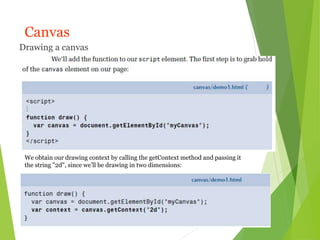
Drawing a canvas
We obtain our drawing context by calling the getContext method and passing it
the string "2d", since we’ll be drawing in two dimensions:
Canvas
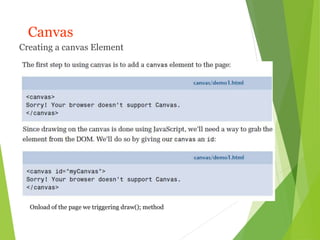
Creating a canvas Element
Onload of the page we triggering draw(); method
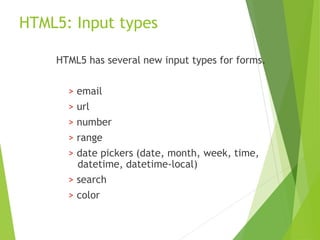
HTML5: Input types
HTML5 has several new input types for forms.
> email
> url
> number
> range
> date pickers (date, month, week, time,
datetime, datetime-local)
> search
> color
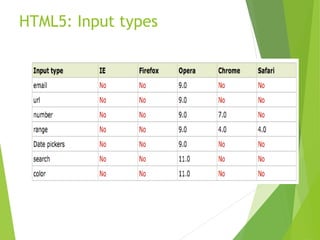
HTML5: Input types
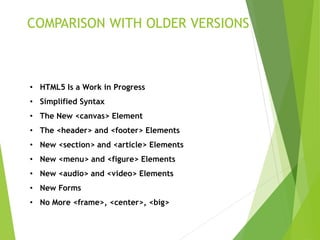
COMPARISON WITH OLDER VERSIONS
• HTML5 Is a Work in Progress
• Simplified Syntax
• The New <canvas> Element
• The <header> and <footer> Elements
• New <section> and <article> Elements
• New <menu> and <figure> Elements
• New <audio> and <video> Elements
• New Forms
• No More <frame>, <center>, <big>
Html 5

Html 5

  • 1.
  • 2.
    What is HTML5? HTML5 is the newest version of HTML, only recently gaining partial support by the makers of web browsers.  It incorporates all features from earlier versions of HTML, including the stricter XHTML.  It adds a diverse set of new tools for the web developer to use.  It is still a work in progress. No browsers have full HTML5 support. It will be many years – perhaps not until 2018 or later - before being fully defined and supported.
  • 3.
    Goals of HTML5 Support all existing web pages. With HTML5, there is no requirement to go back and revise older websites.  Reduce the need for external plugins and scripts to show website content.  Improve the semantic definition (i.e. meaning and purpose) of page elements.  Make the rendering of web content universal and independent of the device being used.  Handle web documents errors in a better and more consistent fashion.
  • 4.
    New Elements inHTML5 <figcaption> <footer> <header> <hgroup> <mark> <nav> <progress> <section> <source> <svg> <time> <video> <article> <aside> <audio> <canvas> <datalist> <figure>
  • 5.
    Other New Featuresin HTML5  Built-in audio and video support (without plugins)  Enhanced form controls and attributes  The Canvas (a way to draw directly on a web page)  Drag and Drop functionality  Support for CSS3 (the newer and more powerful version of CSS)  More advanced features for web developers, such as data storage and offline applications.
  • 6.
    The <html> Element Thisis what the <html> element looked like in XHTML: <html xmlns="http://www.w3.org/1999/xhtml" xml:lang="en" lang="en"> HTML5 simplifies this line: <html lang="en"> The lang attribute in the <html> element declares which language the page content is in. Though not strictly required, it should always be specified, as it can assist search engines and screen readers.
  • 7.
    The <head> Section Hereis a typical XHTML <head> section: <head> <meta http-equiv="Content-type" content="text/html; charset=UTF-8" /> <title>My First XHTML Page</title> <link rel="stylesheet" type="text/css" href="style.css" /> </head> And the HTML5 version: <head> <meta charset="utf-8"> <title>My First HTML5 Page</title> <link rel="stylesheet" href="style.css"> </head>
  • 8.
    Basic HTML5 WebPage Putting the prior sections together, and now adding the <body> section and closing tags, we have our first complete web page in HTML5: <!DOCTYPE html> <html lang="en"> <head> <meta charset="utf-8"> <title>My First HTML5 Page</title> <link rel="stylesheet" href="style.css"> </head> <body> <p>HTML5 is fun!</p> </body> </html>
  • 9.
    5. Audio &video <audio> Until now, there has not been a standard for playing audio files on a web page. Today, most audio files are played through a plug-in (like flash). However, different browsers may have different plug-ins. HTML5 defines a new element which specifies a standard way to embed an audio file on a web page: the <audio> element.
  • 10.
    5. Audio &video <audio> : Add Fallback to flash To be safe, we need to add the fallback to a Flash audio player, in case the browser doesn't support any of the formats we specified. For instance, Firefox 3.5 only supports the audio tag with Ogg format, but we might only have the mp3 file available
  • 11.
    5. Audio &video <video> Until now, there has not been a standard for showing a video/movie on a web page. Today, most videos are shown through a plug-in (like flash). However, different browsers may have different plug-ins. HTML5 defines a new element which specifies a standard way to embed a video/movie on a web page: the <video> element.
  • 12.
    5. Audio &video <video attributes>
  • 13.
    Canvas What is Canvas WithHTML5’s Canvas API, we’re no longer limited to drawing rectangles on our sites. We can draw anything we can imagine, all through JavaScript. This can improve the performance of our websites by avoiding the need to download images off the network.With canvas, we can draw shapes and lines, arcs and text, gradients and patterns. In addition, canvas gives us the power to manipulate pixels in images and even video. The Canvas 2D Context spec is supported in: ■ Safari 2.0+ ■ Chrome 3.0+ ■ Firefox 3.0+ ■ Internet Explorer 9.0+ ■ Opera 10.0+ ■ iOS (Mobile Safari) 1.0+ ■ Android 1.0+
  • 14.
    Canvas Drawing a canvas Weobtain our drawing context by calling the getContext method and passing it the string "2d", since we’ll be drawing in two dimensions:
  • 15.
    Canvas Creating a canvasElement Onload of the page we triggering draw(); method
  • 16.
    HTML5: Input types HTML5has several new input types for forms. > email > url > number > range > date pickers (date, month, week, time, datetime, datetime-local) > search > color
  • 17.
  • 18.
    COMPARISON WITH OLDERVERSIONS • HTML5 Is a Work in Progress • Simplified Syntax • The New <canvas> Element • The <header> and <footer> Elements • New <section> and <article> Elements • New <menu> and <figure> Elements • New <audio> and <video> Elements • New Forms • No More <frame>, <center>, <big>