SQL Concepts
Course:-MCA -II
Subject:-Database Management System
Unit:-3
1
Entity-Relationship(ER) Model
 The ER model is a high-level conceptual data model.
It has not been implemented in any commercial
DBMS (?), but is a powerful short hand often used in
database design for a first rendition of the miniworld.
 The ER model was introduced by Peter Chen in 1976,
and is now the most widely used conceptual data
model.
2
Entity-Relationship(ER) Model[1]
3
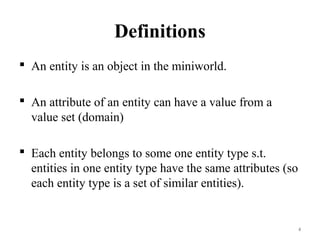
Definitions
 An entity is an object in the miniworld.
 An attribute of an entity can have a value from a
value set (domain)
 Each entity belongs to some one entity type s.t.
entities in one entity type have the same attributes (so
each entity type is a set of similar entities).
4
Definitions
 A key attribute of an entity type is one whose value
uniquely identifies an entity of that type.
 A combination of attributes may form a composite
key.
 If there is no applicable value for an attribute that
attribute is set to a null value.
5
6
Entity Type / Entity Set
Entity Type (Intension): EMPLOYEE
Attributes: Name, Age, Salary
Entity Set (Extension): e1 = (John Smith, 55, 80000)
e2 = (Joe Doe, 40, 20000)
e3 = (Jane Doe, 27, 30000)
.
.
.
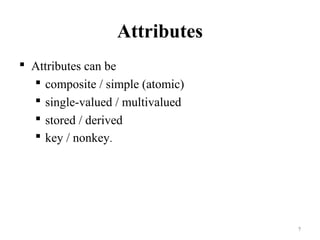
Attributes
 Attributes can be
 composite / simple (atomic)
 single-valued / multivalued
 stored / derived
 key / nonkey.
7
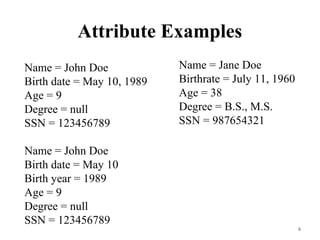
Attribute Examples
8
Name = John Doe
Birth date = May 10, 1989
Age = 9
Degree = null
SSN = 123456789
Name = John Doe
Birth date = May 10
Birth year = 1989
Age = 9
Degree = null
SSN = 123456789
Name = Jane Doe
Birthrate = July 11, 1960
Age = 38
Degree = B.S., M.S.
SSN = 987654321
Symbols
9
10
EMPLOYEE
Name, SSN, Sex, Address, Salary, Birth date, Department,
Supervisor, {Works on ( Project, Hours)}
WORKS_FOR
EMPLOYEE DEPARTMENT
1N
Name SSN . . .
Relationship instances of WORKS_FOR:
{(KV, CS), (Pan, EE), . . .}
ER Diagram for COMPANY
Database[2]
11
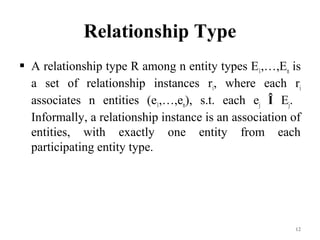
Relationship Type
 A relationship type R among n entity types E1,…,En is
a set of relationship instances ri, where each ri
associates n entities (e1,…,en), s.t. each ej Î Ej.
Informally, a relationship instance is an association of
entities, with exactly one entity from each
participating entity type.
12
Relationship Type
 The degree n of a relationship type is the number of
participating entity types.
 In the ER model relationships are explicitly
represented.
13
Entity Roles
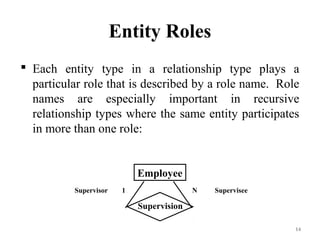
 Each entity type in a relationship type plays a
particular role that is described by a role name. Role
names are especially important in recursive
relationship types where the same entity participates
in more than one role:
14
Employee
Supervision
Supervisor 1 N Supervisee
Weak Entity Type
 A weak entity type is one without any key attributes
of its own. Entities belonging to a weak entity type
are identified by being related to another entity type
( called identifying owner) through a relationship type
( called identifying relationship), in combination with
values of a set of its own attributes (called partial
key). A weak entity type has total participation
constraint w.r.t. its identifying relationship.
15
Relationship Attributes
 Relationship types can have attributes as well. in
case of 1:1 or 1:N relationships, attributes can be
migrated to one of the participating entity types.
16
Relationship[3]
17
Relationship[4]
18
Relationship[5]
19
Structural Constraints
 Structural constraints of a relationship type:
 Cardinality ratio: Limits the number of
relationship instances an entity can participate in,
eg. 1:1, 1:N, M:N
 Participation constraint: If each entity of an
entity type is required to participate in some
instance of a relationship type, then that
participation is total; otherwise, it is partial.
20
Structural Constraint Min, Max
 A more complete specification of the structural
constraint on a relationship type can be given by the
integer pair (min, max), which means an entity must
participate in at least min and at most max
relationship instances.
21
A ternary relationship generally represents more
information than 3 binary relationships[6]
22
A Weak Entity with a Terary Identifying
Relationship[7]
23
Introduction
 Database – collection of persistent data
 Database Management System (DBMS) – software
system that supports creation, population, and
querying of a database
Relational Database
Relational Database Management System (RDBMS)
Consists of a number of tables and single schema
(definition of tables and attributes)
Students (Sid, name, login, age, gpa)
 Students identifies the table
 Sid, name, login, age, gpa identify attributes
 Sid is primary key
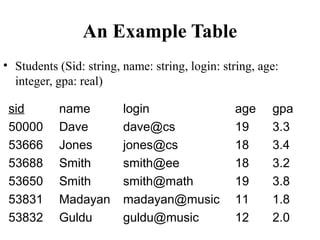
An Example Table
• Students (Sid: string, name: string, login: string, age:
integer, gpa: real)
sid name login age gpa
50000 Dave dave@cs 19 3.3
53666 Jones jones@cs 18 3.4
53688 Smith smith@ee 18 3.2
53650 Smith smith@math 19 3.8
53831 Madayan madayan@music 11 1.8
53832 Guldu guldu@music 12 2.0
Another example: Courses
• Courses (cid, instructor, quarter, dept)
cid instructor quarter dept
Carnatic101 Jane Fall 06 Music
Reggae203 Bob Summer 06 Music
Topology101 Mary Spring 06 Math
History105 Alice Fall 06 History
Keys
Primary key – minimal subset of fields that is unique
identifier for a tuple
Sid is primary key for Students
cid is primary key for Courses
Foreign key –connections between tables
Courses (cid, instructor, quarter, dept)
Students (Sid, name, login, age, gpa)
How do we express which students take each course?
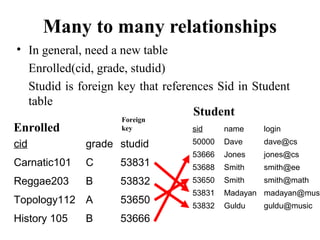
Many to many relationships
• In general, need a new table
Enrolled(cid, grade, studid)
Studid is foreign key that references Sid in Student
table
cid grade studid
Carnatic101 C 53831
Reggae203 B 53832
Topology112 A 53650
History 105 B 53666
sid name login
50000 Dave dave@cs
53666 Jones jones@cs
53688 Smith smith@ee
53650 Smith smith@math
53831 Madayan madayan@musi
53832 Guldu guldu@music
Enrolled
Student
Foreign
key
Relational Algebra
 Collection of operators for specifying queries
 Query describes step-by-step procedure for
computing answer (i.e., operational)
 Each operator accepts one or two relations as input
and returns a relation as output
 Relational algebra expression composed of multiple
operators
Basic operators
 Selection – return rows that meet some condition
 Projection – return column values
 Union
 Cross product
 Difference
 Other operators can be defined in terms of basic
operators
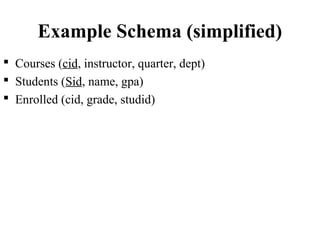
Example Schema (simplified)
 Courses (cid, instructor, quarter, dept)
 Students (Sid, name, gpa)
 Enrolled (cid, grade, studid)
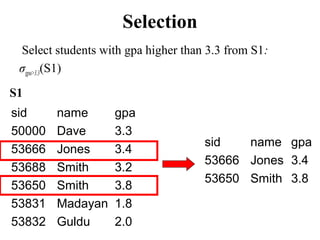
Selection
Select students with gpa higher than 3.3 from S1:
σgpa>3.3(S1)
S1
sid name gpa
50000 Dave 3.3
53666 Jones 3.4
53688 Smith 3.2
53650 Smith 3.8
53831 Madayan 1.8
53832 Guldu 2.0
sid name gpa
53666 Jones 3.4
53650 Smith 3.8
Projection
Project name and gpa of all students in S1:
Πname, gpa(S1)
S1
Sid name gpa
50000 Dave 3.3
53666 Jones 3.4
53688 Smith 3.2
53650 Smith 3.8
53831 Madayan 1.8
53832 Guldu 2.0
name gpa
Dave 3.3
Jones 3.4
Smith 3.2
Smith 3.8
Madayan 1.8
Guldu 2.0
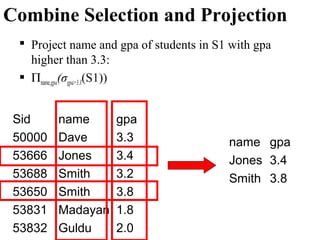
Combine Selection and Projection
 Project name and gpa of students in S1 with gpa
higher than 3.3:
 Πname,gpa(σgpa>3.3(S1))
Sid name gpa
50000 Dave 3.3
53666 Jones 3.4
53688 Smith 3.2
53650 Smith 3.8
53831 Madayan 1.8
53832 Guldu 2.0
name gpa
Jones 3.4
Smith 3.8
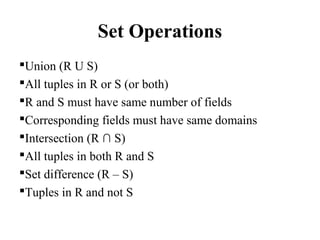
Set Operations
Union (R U S)
All tuples in R or S (or both)
R and S must have same number of fields
Corresponding fields must have same domains
Intersection (R ∩ S)
All tuples in both R and S
Set difference (R – S)
Tuples in R and not S
Set Operations
Cross product or Cartesian product (R x S)
All fields in R followed by all fields in S
One tuple (r,s) for each pair of tuples r ∈ R, s ∈ S
Example: Intersection
sid name gpa
50000 Dave 3.3
53666 Jones 3.4
53688 Smith 3.2
53650 Smith 3.8
53831 Madayan 1.8
53832 Guldu 2.0
sid name gpa
53666 Jones 3.4
53688 Smith 3.2
53700 Tom 3.5
53777 Jerry 2.8
53832 Guldu 2.0
S1 S2
S1 ∩ S2 =
sid name gpa
53666 Jones 3.4
53688 Smith 3.2
53832 Guldu 2.0
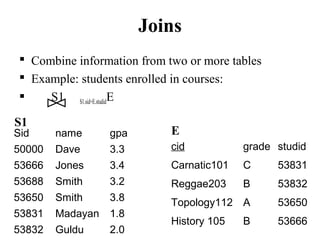
Joins
 Combine information from two or more tables
 Example: students enrolled in courses:
 S1 S1.sid=E.studidE
Sid name gpa
50000 Dave 3.3
53666 Jones 3.4
53688 Smith 3.2
53650 Smith 3.8
53831 Madayan 1.8
53832 Guldu 2.0
cid grade studid
Carnatic101 C 53831
Reggae203 B 53832
Topology112 A 53650
History 105 B 53666
S1
E
Joins
sid name gpa cid grade studid
53666 Jones 3.4 History105 B 53666
53650 Smith 3.8 Topology112 A 53650
53831 Madayan 1.8 Carnatic101 C 53831
53832 Guldu 2.0 Reggae203 B 53832
Sid name gpa
50000 Dave 3.3
53666 Jones 3.4
53688 Smith 3.2
53650 Smith 3.8
53831 Madayan 1.8
53832 Guldu 2.0
cid grade studid
Carnatic101 C 53831
Reggae203 B 53832
Topology112 A 53650
History 105 B 53666
S1
E
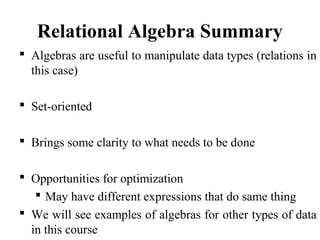
Relational Algebra Summary
 Algebras are useful to manipulate data types (relations in
this case)
 Set-oriented
 Brings some clarity to what needs to be done
 Opportunities for optimization
 May have different expressions that do same thing
 We will see examples of algebras for other types of data
in this course
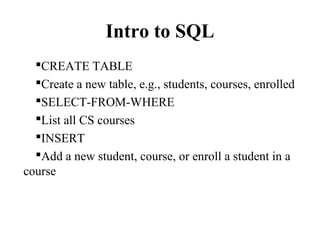
Intro to SQL
CREATE TABLE
Create a new table, e.g., students, courses, enrolled
SELECT-FROM-WHERE
List all CS courses
INSERT
Add a new student, course, or enroll a student in a
course
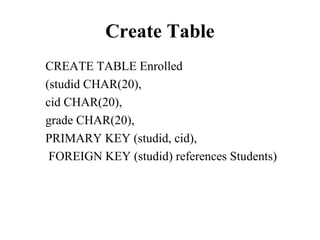
Create Table
CREATE TABLE Enrolled
(studid CHAR(20),
cid CHAR(20),
grade CHAR(20),
PRIMARY KEY (studid, cid),
FOREIGN KEY (studid) references Students)
Select-From-Where query
“Find all students who are under 18”
SELECT *
FROM Students S
WHERE S.age < 18
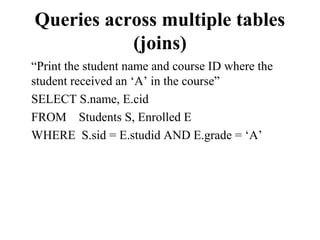
Queries across multiple tables
(joins)
“Print the student name and course ID where the
student received an ‘A’ in the course”
SELECT S.name, E.cid
FROM Students S, Enrolled E
WHERE S.sid = E.studid AND E.grade = ‘A’
Other SQL features
 MIN, MAX, AVG
 Find highest grade in fall database course
 COUNT, DISTINCT
 How many students enrolled in CS courses in the
fall?
 ORDER BY, GROUP BY
 Rank students by their grade in fall database
course
Views
 Virtual table defined on base tables defined by a query
 Single or multiple tables
 Security – “hide” certain attributes from users
 Show students in each course but hide their grades
 Ease of use – expression that is more intuitively
obvious to user
 Views can be materialized to improve query
performance
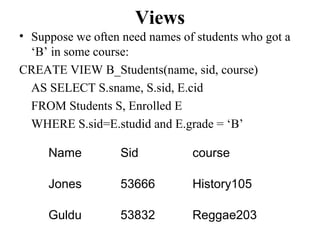
Views
• Suppose we often need names of students who got a
‘B’ in some course:
CREATE VIEW B_Students(name, sid, course)
AS SELECT S.sname, S.sid, E.cid
FROM Students S, Enrolled E
WHERE S.sid=E.studid and E.grade = ‘B’
Name Sid course
Jones 53666 History105
Guldu 53832 Reggae203
Indexes
 Idea: speed up access to desired data
 “Find all students with gpa > 3.3
 May need to scan entire table
 Index consists of a set of entries pointing to locations
of each search key
Types of Indexes
 Clustered vs. Unclustered
 Clustered- ordering of data records same as
ordering of data entries in the index
 Unclustered- data records in different order from
index
 Primary vs. Secondary
 Primary – index on fields that include primary key
 Secondary – other indexes
Example: Clustered Index
 Sorted by sid
sid name gpa
50000 Dave 3.3
53650 Smith 3.8
53666 Jones 3.4
53688 Smith 3.2
53831 Madayan 1.8
53832 Guldu 2.0
50000
53600
53800
Example: Unclustered Index
 Sorted by sid
 Index on gpa
sid name gpa
50000 Dave 3.3
53650 Smith 3.8
53666 Jones 3.4
53688 Smith 3.2
53831 Madayan 1.8
53832 Guldu 2.0
1.8
2.0
3.2
3.3
3.4
3.8
Comments on Indexes
 Indexes can significantly speed up query execution
 But inserts more costly
 May have high storage overhead
 Need to choose attributes to index wisely!
 What queries are run most frequently?
 What queries could benefit most from an index?
 Preview of things to come: SDSS
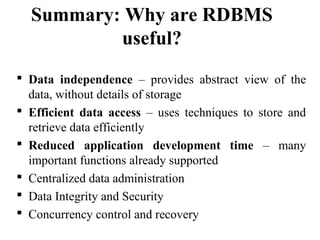
Summary: Why are RDBMS
useful?
 Data independence – provides abstract view of the
data, without details of storage
 Efficient data access – uses techniques to store and
retrieve data efficiently
 Reduced application development time – many
important functions already supported
 Centralized data administration
 Data Integrity and Security
 Concurrency control and recovery
So, why don’t scientists use them?
 “I tried to use databases in my project, but they were
just too [slow | hard-to-use | expensive | complex] . So
I use files”.
 Gray and Szalay, Where Rubber Meets the Sky:
Bridging the Gap Between Databases and Science
Some other limitations of
RDBMS
 Arrays
 Hierarchical data
Example: Taxonomy of
Organisms[8] Hierarchy of categories:
 Kingdom - phylum – class – order – family – genus – species
 How would you design a relational schema for this?
Animals
Chordates
Vertebrates
Arthropods
birds
insects spiders crustaceans
reptiles mammals
References
1. http://en.wikipedia.org/wiki/Entity
%E2%80%93relationship_model
2. http://simple.wikipedia.org/wiki/Entity-relationship_model
3. https://cs.uwaterloo.ca/~david/cs338/10%20ER%20Model.pdf
4. http://people.cs.pitt.edu/~chang/156/03ERmodel.html
5. http://www.aquafold.com/aquadatastudio/er_modeler.html
6. http://searchdatamanagement.techtarget.com/guide/Limitations-of-
entity-relationship-models-in-data-modeling
7. Database System Concepts: Abraham Silberschatz, Henry F. Korth
& S., Sudarshan, TATA Mcgraw Hill.
8. Database Systems Concepts, design and Applications 2/e, Singh S.
K, PearsonEducation
9. SQL- PL/SQL, Ivan bayross, BPB Publications. 58
Images References
1. 1.http://www.tutorialspoint.com/dbms/er_model_basic_concepts.ht
m
2. 2.http://www.tutorialspoint.com/dbms/er_diagram_representation.h
tm
3. https://www.google.co.in/search?
q=ER+Diagram+for+COMPANY+Database+images+in+database
+management+system&biw=1024&bih=643&tbm=isch&tbo=u&s
ource=univ&sa=X&ei=2a-
qVImcMciJuATmvYLYCQ&ved=0CBsQsAQ
Chapter 3 59

Mca ii-dbms- u-iii-sql concepts

  • 1.
  • 2.
    Entity-Relationship(ER) Model  TheER model is a high-level conceptual data model. It has not been implemented in any commercial DBMS (?), but is a powerful short hand often used in database design for a first rendition of the miniworld.  The ER model was introduced by Peter Chen in 1976, and is now the most widely used conceptual data model. 2
  • 3.
  • 4.
    Definitions  An entityis an object in the miniworld.  An attribute of an entity can have a value from a value set (domain)  Each entity belongs to some one entity type s.t. entities in one entity type have the same attributes (so each entity type is a set of similar entities). 4
  • 5.
    Definitions  A keyattribute of an entity type is one whose value uniquely identifies an entity of that type.  A combination of attributes may form a composite key.  If there is no applicable value for an attribute that attribute is set to a null value. 5
  • 6.
    6 Entity Type /Entity Set Entity Type (Intension): EMPLOYEE Attributes: Name, Age, Salary Entity Set (Extension): e1 = (John Smith, 55, 80000) e2 = (Joe Doe, 40, 20000) e3 = (Jane Doe, 27, 30000) . . .
  • 7.
    Attributes  Attributes canbe  composite / simple (atomic)  single-valued / multivalued  stored / derived  key / nonkey. 7
  • 8.
    Attribute Examples 8 Name =John Doe Birth date = May 10, 1989 Age = 9 Degree = null SSN = 123456789 Name = John Doe Birth date = May 10 Birth year = 1989 Age = 9 Degree = null SSN = 123456789 Name = Jane Doe Birthrate = July 11, 1960 Age = 38 Degree = B.S., M.S. SSN = 987654321
  • 9.
  • 10.
    10 EMPLOYEE Name, SSN, Sex,Address, Salary, Birth date, Department, Supervisor, {Works on ( Project, Hours)} WORKS_FOR EMPLOYEE DEPARTMENT 1N Name SSN . . . Relationship instances of WORKS_FOR: {(KV, CS), (Pan, EE), . . .}
  • 11.
    ER Diagram forCOMPANY Database[2] 11
  • 12.
    Relationship Type  Arelationship type R among n entity types E1,…,En is a set of relationship instances ri, where each ri associates n entities (e1,…,en), s.t. each ej Î Ej. Informally, a relationship instance is an association of entities, with exactly one entity from each participating entity type. 12
  • 13.
    Relationship Type  Thedegree n of a relationship type is the number of participating entity types.  In the ER model relationships are explicitly represented. 13
  • 14.
    Entity Roles  Eachentity type in a relationship type plays a particular role that is described by a role name. Role names are especially important in recursive relationship types where the same entity participates in more than one role: 14 Employee Supervision Supervisor 1 N Supervisee
  • 15.
    Weak Entity Type A weak entity type is one without any key attributes of its own. Entities belonging to a weak entity type are identified by being related to another entity type ( called identifying owner) through a relationship type ( called identifying relationship), in combination with values of a set of its own attributes (called partial key). A weak entity type has total participation constraint w.r.t. its identifying relationship. 15
  • 16.
    Relationship Attributes  Relationshiptypes can have attributes as well. in case of 1:1 or 1:N relationships, attributes can be migrated to one of the participating entity types. 16
  • 17.
  • 18.
  • 19.
  • 20.
    Structural Constraints  Structuralconstraints of a relationship type:  Cardinality ratio: Limits the number of relationship instances an entity can participate in, eg. 1:1, 1:N, M:N  Participation constraint: If each entity of an entity type is required to participate in some instance of a relationship type, then that participation is total; otherwise, it is partial. 20
  • 21.
    Structural Constraint Min,Max  A more complete specification of the structural constraint on a relationship type can be given by the integer pair (min, max), which means an entity must participate in at least min and at most max relationship instances. 21
  • 22.
    A ternary relationshipgenerally represents more information than 3 binary relationships[6] 22
  • 23.
    A Weak Entitywith a Terary Identifying Relationship[7] 23
  • 24.
    Introduction  Database –collection of persistent data  Database Management System (DBMS) – software system that supports creation, population, and querying of a database
  • 25.
    Relational Database Relational DatabaseManagement System (RDBMS) Consists of a number of tables and single schema (definition of tables and attributes) Students (Sid, name, login, age, gpa)  Students identifies the table  Sid, name, login, age, gpa identify attributes  Sid is primary key
  • 26.
    An Example Table •Students (Sid: string, name: string, login: string, age: integer, gpa: real) sid name login age gpa 50000 Dave dave@cs 19 3.3 53666 Jones jones@cs 18 3.4 53688 Smith smith@ee 18 3.2 53650 Smith smith@math 19 3.8 53831 Madayan madayan@music 11 1.8 53832 Guldu guldu@music 12 2.0
  • 27.
    Another example: Courses •Courses (cid, instructor, quarter, dept) cid instructor quarter dept Carnatic101 Jane Fall 06 Music Reggae203 Bob Summer 06 Music Topology101 Mary Spring 06 Math History105 Alice Fall 06 History
  • 28.
    Keys Primary key –minimal subset of fields that is unique identifier for a tuple Sid is primary key for Students cid is primary key for Courses Foreign key –connections between tables Courses (cid, instructor, quarter, dept) Students (Sid, name, login, age, gpa) How do we express which students take each course?
  • 29.
    Many to manyrelationships • In general, need a new table Enrolled(cid, grade, studid) Studid is foreign key that references Sid in Student table cid grade studid Carnatic101 C 53831 Reggae203 B 53832 Topology112 A 53650 History 105 B 53666 sid name login 50000 Dave dave@cs 53666 Jones jones@cs 53688 Smith smith@ee 53650 Smith smith@math 53831 Madayan madayan@musi 53832 Guldu guldu@music Enrolled Student Foreign key
  • 30.
    Relational Algebra  Collectionof operators for specifying queries  Query describes step-by-step procedure for computing answer (i.e., operational)  Each operator accepts one or two relations as input and returns a relation as output  Relational algebra expression composed of multiple operators
  • 31.
    Basic operators  Selection– return rows that meet some condition  Projection – return column values  Union  Cross product  Difference  Other operators can be defined in terms of basic operators
  • 32.
    Example Schema (simplified) Courses (cid, instructor, quarter, dept)  Students (Sid, name, gpa)  Enrolled (cid, grade, studid)
  • 33.
    Selection Select students withgpa higher than 3.3 from S1: σgpa>3.3(S1) S1 sid name gpa 50000 Dave 3.3 53666 Jones 3.4 53688 Smith 3.2 53650 Smith 3.8 53831 Madayan 1.8 53832 Guldu 2.0 sid name gpa 53666 Jones 3.4 53650 Smith 3.8
  • 34.
    Projection Project name andgpa of all students in S1: Πname, gpa(S1) S1 Sid name gpa 50000 Dave 3.3 53666 Jones 3.4 53688 Smith 3.2 53650 Smith 3.8 53831 Madayan 1.8 53832 Guldu 2.0 name gpa Dave 3.3 Jones 3.4 Smith 3.2 Smith 3.8 Madayan 1.8 Guldu 2.0
  • 35.
    Combine Selection andProjection  Project name and gpa of students in S1 with gpa higher than 3.3:  Πname,gpa(σgpa>3.3(S1)) Sid name gpa 50000 Dave 3.3 53666 Jones 3.4 53688 Smith 3.2 53650 Smith 3.8 53831 Madayan 1.8 53832 Guldu 2.0 name gpa Jones 3.4 Smith 3.8
  • 36.
    Set Operations Union (RU S) All tuples in R or S (or both) R and S must have same number of fields Corresponding fields must have same domains Intersection (R ∩ S) All tuples in both R and S Set difference (R – S) Tuples in R and not S
  • 37.
    Set Operations Cross productor Cartesian product (R x S) All fields in R followed by all fields in S One tuple (r,s) for each pair of tuples r ∈ R, s ∈ S
  • 38.
    Example: Intersection sid namegpa 50000 Dave 3.3 53666 Jones 3.4 53688 Smith 3.2 53650 Smith 3.8 53831 Madayan 1.8 53832 Guldu 2.0 sid name gpa 53666 Jones 3.4 53688 Smith 3.2 53700 Tom 3.5 53777 Jerry 2.8 53832 Guldu 2.0 S1 S2 S1 ∩ S2 = sid name gpa 53666 Jones 3.4 53688 Smith 3.2 53832 Guldu 2.0
  • 39.
    Joins  Combine informationfrom two or more tables  Example: students enrolled in courses:  S1 S1.sid=E.studidE Sid name gpa 50000 Dave 3.3 53666 Jones 3.4 53688 Smith 3.2 53650 Smith 3.8 53831 Madayan 1.8 53832 Guldu 2.0 cid grade studid Carnatic101 C 53831 Reggae203 B 53832 Topology112 A 53650 History 105 B 53666 S1 E
  • 40.
    Joins sid name gpacid grade studid 53666 Jones 3.4 History105 B 53666 53650 Smith 3.8 Topology112 A 53650 53831 Madayan 1.8 Carnatic101 C 53831 53832 Guldu 2.0 Reggae203 B 53832 Sid name gpa 50000 Dave 3.3 53666 Jones 3.4 53688 Smith 3.2 53650 Smith 3.8 53831 Madayan 1.8 53832 Guldu 2.0 cid grade studid Carnatic101 C 53831 Reggae203 B 53832 Topology112 A 53650 History 105 B 53666 S1 E
  • 41.
    Relational Algebra Summary Algebras are useful to manipulate data types (relations in this case)  Set-oriented  Brings some clarity to what needs to be done  Opportunities for optimization  May have different expressions that do same thing  We will see examples of algebras for other types of data in this course
  • 42.
    Intro to SQL CREATETABLE Create a new table, e.g., students, courses, enrolled SELECT-FROM-WHERE List all CS courses INSERT Add a new student, course, or enroll a student in a course
  • 43.
    Create Table CREATE TABLEEnrolled (studid CHAR(20), cid CHAR(20), grade CHAR(20), PRIMARY KEY (studid, cid), FOREIGN KEY (studid) references Students)
  • 44.
    Select-From-Where query “Find allstudents who are under 18” SELECT * FROM Students S WHERE S.age < 18
  • 45.
    Queries across multipletables (joins) “Print the student name and course ID where the student received an ‘A’ in the course” SELECT S.name, E.cid FROM Students S, Enrolled E WHERE S.sid = E.studid AND E.grade = ‘A’
  • 46.
    Other SQL features MIN, MAX, AVG  Find highest grade in fall database course  COUNT, DISTINCT  How many students enrolled in CS courses in the fall?  ORDER BY, GROUP BY  Rank students by their grade in fall database course
  • 47.
    Views  Virtual tabledefined on base tables defined by a query  Single or multiple tables  Security – “hide” certain attributes from users  Show students in each course but hide their grades  Ease of use – expression that is more intuitively obvious to user  Views can be materialized to improve query performance
  • 48.
    Views • Suppose weoften need names of students who got a ‘B’ in some course: CREATE VIEW B_Students(name, sid, course) AS SELECT S.sname, S.sid, E.cid FROM Students S, Enrolled E WHERE S.sid=E.studid and E.grade = ‘B’ Name Sid course Jones 53666 History105 Guldu 53832 Reggae203
  • 49.
    Indexes  Idea: speedup access to desired data  “Find all students with gpa > 3.3  May need to scan entire table  Index consists of a set of entries pointing to locations of each search key
  • 50.
    Types of Indexes Clustered vs. Unclustered  Clustered- ordering of data records same as ordering of data entries in the index  Unclustered- data records in different order from index  Primary vs. Secondary  Primary – index on fields that include primary key  Secondary – other indexes
  • 51.
    Example: Clustered Index Sorted by sid sid name gpa 50000 Dave 3.3 53650 Smith 3.8 53666 Jones 3.4 53688 Smith 3.2 53831 Madayan 1.8 53832 Guldu 2.0 50000 53600 53800
  • 52.
    Example: Unclustered Index Sorted by sid  Index on gpa sid name gpa 50000 Dave 3.3 53650 Smith 3.8 53666 Jones 3.4 53688 Smith 3.2 53831 Madayan 1.8 53832 Guldu 2.0 1.8 2.0 3.2 3.3 3.4 3.8
  • 53.
    Comments on Indexes Indexes can significantly speed up query execution  But inserts more costly  May have high storage overhead  Need to choose attributes to index wisely!  What queries are run most frequently?  What queries could benefit most from an index?  Preview of things to come: SDSS
  • 54.
    Summary: Why areRDBMS useful?  Data independence – provides abstract view of the data, without details of storage  Efficient data access – uses techniques to store and retrieve data efficiently  Reduced application development time – many important functions already supported  Centralized data administration  Data Integrity and Security  Concurrency control and recovery
  • 55.
    So, why don’tscientists use them?  “I tried to use databases in my project, but they were just too [slow | hard-to-use | expensive | complex] . So I use files”.  Gray and Szalay, Where Rubber Meets the Sky: Bridging the Gap Between Databases and Science
  • 56.
    Some other limitationsof RDBMS  Arrays  Hierarchical data
  • 57.
    Example: Taxonomy of Organisms[8]Hierarchy of categories:  Kingdom - phylum – class – order – family – genus – species  How would you design a relational schema for this? Animals Chordates Vertebrates Arthropods birds insects spiders crustaceans reptiles mammals
  • 58.
    References 1. http://en.wikipedia.org/wiki/Entity %E2%80%93relationship_model 2. http://simple.wikipedia.org/wiki/Entity-relationship_model 3.https://cs.uwaterloo.ca/~david/cs338/10%20ER%20Model.pdf 4. http://people.cs.pitt.edu/~chang/156/03ERmodel.html 5. http://www.aquafold.com/aquadatastudio/er_modeler.html 6. http://searchdatamanagement.techtarget.com/guide/Limitations-of- entity-relationship-models-in-data-modeling 7. Database System Concepts: Abraham Silberschatz, Henry F. Korth & S., Sudarshan, TATA Mcgraw Hill. 8. Database Systems Concepts, design and Applications 2/e, Singh S. K, PearsonEducation 9. SQL- PL/SQL, Ivan bayross, BPB Publications. 58
  • 59.
    Images References 1. 1.http://www.tutorialspoint.com/dbms/er_model_basic_concepts.ht m 2.2.http://www.tutorialspoint.com/dbms/er_diagram_representation.h tm 3. https://www.google.co.in/search? q=ER+Diagram+for+COMPANY+Database+images+in+database +management+system&biw=1024&bih=643&tbm=isch&tbo=u&s ource=univ&sa=X&ei=2a- qVImcMciJuATmvYLYCQ&ved=0CBsQsAQ Chapter 3 59

Editor's Notes

  • #7 Point out that each e are entity
  • #9 Show examples of attribute types: composite / simple (atomic) single-valued / multivalued stored / derived key / nonkey.
  • #12 Point out what each item is
  • #23 Prepare a discussion
  • #24 Compare with weak entity with multiple identifying relationships
  • #41 Note that join can also be thought of as cross product and select