DATABASE
MANAGEMENT SYSTEMS
Unit / Topic: II /I
Relational Model
• Primary data model for commercial data processing
applications.
• Consists of relational databases.
• Advantages:
Simplicity
Easier for accessing data
Structure of Relational Databases
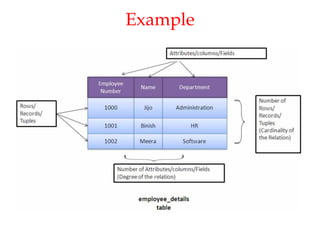
• Relational database  collection of tables with unique
names
• Tables  called as relations
• Rows of the table  records or tuples
• Columns of the table  attributes or fields
Contd..
• Set of permitted values of the attributes  domain
values
• Null value  special value that signifies that the
value is unknown or does not exist
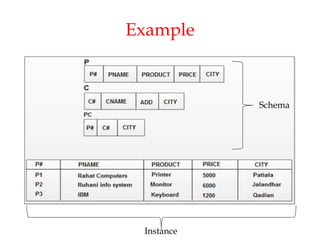
Example
Database Schema and Instance
• Database schema:
Logical design or overall design of the database
Does not change frequently
Eg: university (instructor, student)
• Database instance:
Snapshot of the data in the database at a given
instant in time.
Changes frequently
Relation Schema and Instance
Relation schema:
• Consists of a list of attributes and their corresponding
domains.
• Similar to a variable in programming language.
• Does not change frequently
• Eg: instructor = (ID, name, dept_name, salary)
Relation instance:
• Set of domain values in a relation at a particular point of
time or current values
• Similar to value of a variable in programming language
• Changes frequently
Example
Schema
Instance
Keys
Types of keys:
Super key
Candidate key
Primary key
Foreign key
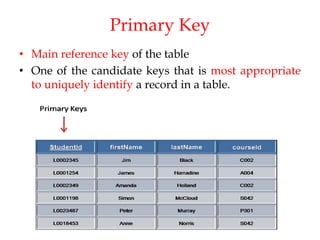
Primary Key
• Main reference key of the table
• One of the candidate keys that is most appropriate
to uniquely identify a record in a table.
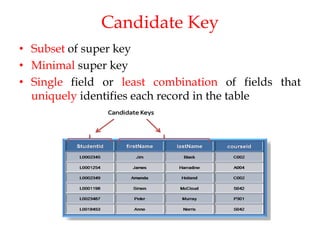
Candidate Key
• Subset of super key
• Minimal super key
• Single field or least combination of fields that
uniquely identifies each record in the table
Super Key
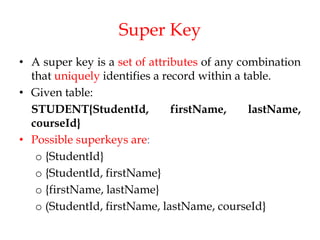
• A super key is a set of attributes of any combination
that uniquely identifies a record within a table.
• Given table:
STUDENT{StudentId, firstName, lastName,
courseId}
• Possible superkeys are:
o {StudentId}
o {StudentId, firstName}
o {firstName, lastName}
o (StudentId, firstName, lastName, courseId}
Foreign key
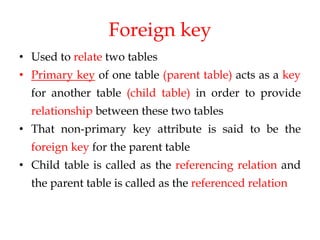
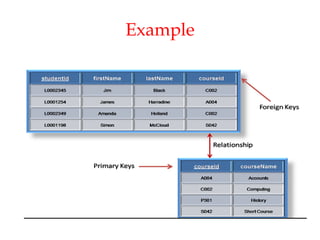
• Used to relate two tables
• Primary key of one table (parent table) acts as a key
for another table (child table) in order to provide
relationship between these two tables
• That non-primary key attribute is said to be the
foreign key for the parent table
• Child table is called as the referencing relation and
the parent table is called as the referenced relation
Example
Referential Integrity Constraints
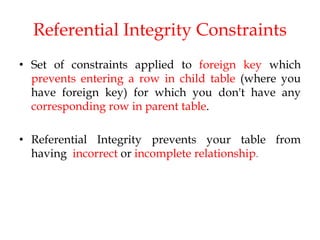
• Set of constraints applied to foreign key which
prevents entering a row in child table (where you
have foreign key) for which you don't have any
corresponding row in parent table.
• Referential Integrity prevents your table from
having incorrect or incomplete relationship.
Schema Diagrams
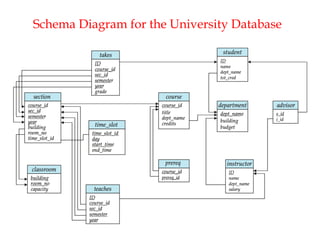
• Pictorial representation of database schemas
• A database schema along with primary key and
foreign key dependencies can be depicted by
schema diagrams
Schema Diagram for the University Database
Formal Query Languages
Relational Algebra
Introduction
• Query  retrieval of information
• Query language  language that is used for
information retrieval
• Formal query languages  based upon which SQL
is developed
• Types:
Relational Algebra
Relational Calculus
Tuple Relational Calculus
Domain Relational Calculus
Relational Algebra
• Procedural query language
• Consists of a set of operations that take one or two
relations as input and produce a new single relation as
their output
Fundamental Operations
• Select
• Project
• Union
• Set difference
• Cartesian product
• Rename
Note: select, project, rename – called as ‘unary’
operators and the remaining are ‘binary’ operators
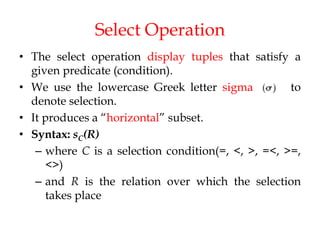
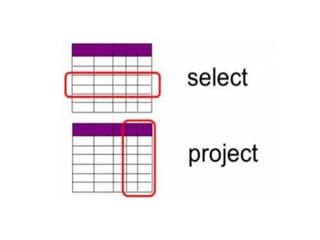
Select Operation
• The select operation display tuples that satisfy a
given predicate (condition).
• We use the lowercase Greek letter sigma to
denote selection.
• It produces a “horizontal” subset.
• Syntax: sC(R)
– where C is a selection condition(=, <, >, =<, >=,
<>)
– and R is the relation over which the selection
takes place
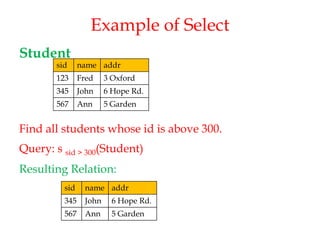
Example of Select
Student
Find all students whose id is above 300.
Query: s sid > 300(Student)
Resulting Relation:
sid name addr
123 Fred 3 Oxford
345 John 6 Hope Rd.
567 Ann 5 Garden
sid name addr
345 John 6 Hope Rd.
567 Ann 5 Garden
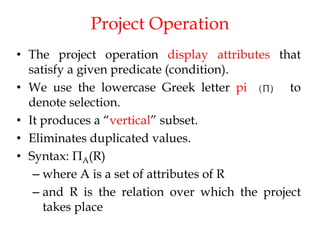
Project Operation
• The project operation display attributes that
satisfy a given predicate (condition).
• We use the lowercase Greek letter pi to
denote selection.
• It produces a “vertical” subset.
• Eliminates duplicated values.
• Syntax: ПA(R)
– where A is a set of attributes of R
– and R is the relation over which the project
takes place
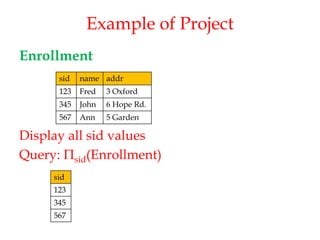
Example of Project
Enrollment
Display all sid values
Query: Пsid(Enrollment)
sid name addr
123 Fred 3 Oxford
345 John 6 Hope Rd.
567 Ann 5 Garden
sid
123
345
567
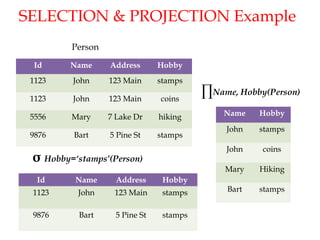
SELECTION & PROJECTION Example
Id Name Address Hobby
1123 John 123 Main stamps
1123 John 123 Main coins
5556 Mary 7 Lake Dr hiking
9876 Bart 5 Pine St stamps
Id Name Address Hobby
1123 John 123 Main stamps
9876 Bart 5 Pine St stamps
σ Hobby=‘stamps’(Person)
Person
∏Name, Hobby(Person)
Name Hobby
John stamps
John coins
Mary Hiking
Bart stamps
28
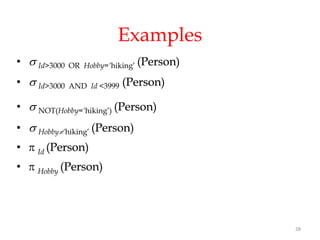
Examples
•  Id>3000 OR Hobby=‘hiking’ (Person)
•  Id>3000 AND Id <3999 (Person)
•  NOT(Hobby=‘hiking’) (Person)
•  Hobby‘hiking’ (Person)
•  Id (Person)
•  Hobby (Person)
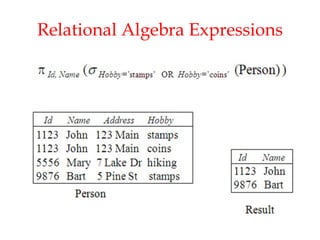
Relational Algebra Expressions
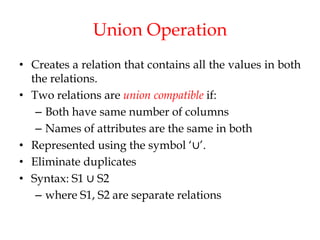
Union Operation
• Creates a relation that contains all the values in both
the relations.
• Two relations are union compatible if:
– Both have same number of columns
– Names of attributes are the same in both
• Represented using the symbol ‘∪’.
• Eliminate duplicates
• Syntax: S1 ∪ S2
– where S1, S2 are separate relations
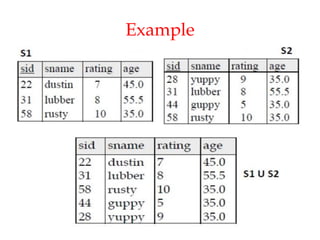
Example
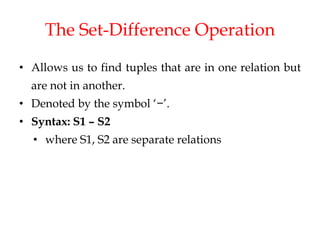
The Set-Difference Operation
• Allows us to find tuples that are in one relation but
are not in another.
• Denoted by the symbol ‘−’.
• Syntax: S1 – S2
• where S1, S2 are separate relations
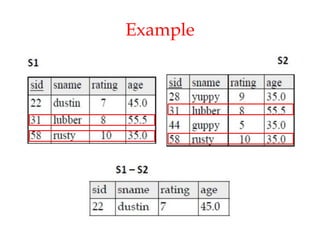
Example
Example
SUMMARY
INTRODUCTION TO RELATIONAL MODEL
• Structure of Relational Databases
o Tables
o Records or tuples
o Attributes or fields
o Domain values
o Null values
• Difference b/w database schema and database instance
• Difference b/w relation schema and relation instance
• Keys
o Super key
o Candidate key
o Primary key
o Foreign key
• Referential integrity constraint
• Fundamental database operations

19IS305_U2_LP4_LM4-22-23.pdf

  • 1.
  • 2.
    Relational Model • Primarydata model for commercial data processing applications. • Consists of relational databases. • Advantages: Simplicity Easier for accessing data
  • 3.
    Structure of RelationalDatabases • Relational database  collection of tables with unique names • Tables  called as relations • Rows of the table  records or tuples • Columns of the table  attributes or fields
  • 4.
    Contd.. • Set ofpermitted values of the attributes  domain values • Null value  special value that signifies that the value is unknown or does not exist
  • 5.
  • 6.
    Database Schema andInstance • Database schema: Logical design or overall design of the database Does not change frequently Eg: university (instructor, student) • Database instance: Snapshot of the data in the database at a given instant in time. Changes frequently
  • 7.
    Relation Schema andInstance Relation schema: • Consists of a list of attributes and their corresponding domains. • Similar to a variable in programming language. • Does not change frequently • Eg: instructor = (ID, name, dept_name, salary) Relation instance: • Set of domain values in a relation at a particular point of time or current values • Similar to value of a variable in programming language • Changes frequently
  • 8.
  • 9.
    Keys Types of keys: Superkey Candidate key Primary key Foreign key
  • 10.
    Primary Key • Mainreference key of the table • One of the candidate keys that is most appropriate to uniquely identify a record in a table.
  • 11.
    Candidate Key • Subsetof super key • Minimal super key • Single field or least combination of fields that uniquely identifies each record in the table
  • 12.
    Super Key • Asuper key is a set of attributes of any combination that uniquely identifies a record within a table. • Given table: STUDENT{StudentId, firstName, lastName, courseId} • Possible superkeys are: o {StudentId} o {StudentId, firstName} o {firstName, lastName} o (StudentId, firstName, lastName, courseId}
  • 13.
    Foreign key • Usedto relate two tables • Primary key of one table (parent table) acts as a key for another table (child table) in order to provide relationship between these two tables • That non-primary key attribute is said to be the foreign key for the parent table • Child table is called as the referencing relation and the parent table is called as the referenced relation
  • 14.
  • 15.
    Referential Integrity Constraints •Set of constraints applied to foreign key which prevents entering a row in child table (where you have foreign key) for which you don't have any corresponding row in parent table. • Referential Integrity prevents your table from having incorrect or incomplete relationship.
  • 16.
    Schema Diagrams • Pictorialrepresentation of database schemas • A database schema along with primary key and foreign key dependencies can be depicted by schema diagrams
  • 17.
    Schema Diagram forthe University Database
  • 18.
  • 19.
    Introduction • Query retrieval of information • Query language  language that is used for information retrieval • Formal query languages  based upon which SQL is developed • Types: Relational Algebra Relational Calculus Tuple Relational Calculus Domain Relational Calculus
  • 20.
    Relational Algebra • Proceduralquery language • Consists of a set of operations that take one or two relations as input and produce a new single relation as their output
  • 21.
    Fundamental Operations • Select •Project • Union • Set difference • Cartesian product • Rename Note: select, project, rename – called as ‘unary’ operators and the remaining are ‘binary’ operators
  • 22.
    Select Operation • Theselect operation display tuples that satisfy a given predicate (condition). • We use the lowercase Greek letter sigma to denote selection. • It produces a “horizontal” subset. • Syntax: sC(R) – where C is a selection condition(=, <, >, =<, >=, <>) – and R is the relation over which the selection takes place
  • 23.
    Example of Select Student Findall students whose id is above 300. Query: s sid > 300(Student) Resulting Relation: sid name addr 123 Fred 3 Oxford 345 John 6 Hope Rd. 567 Ann 5 Garden sid name addr 345 John 6 Hope Rd. 567 Ann 5 Garden
  • 24.
    Project Operation • Theproject operation display attributes that satisfy a given predicate (condition). • We use the lowercase Greek letter pi to denote selection. • It produces a “vertical” subset. • Eliminates duplicated values. • Syntax: ПA(R) – where A is a set of attributes of R – and R is the relation over which the project takes place
  • 25.
    Example of Project Enrollment Displayall sid values Query: Пsid(Enrollment) sid name addr 123 Fred 3 Oxford 345 John 6 Hope Rd. 567 Ann 5 Garden sid 123 345 567
  • 27.
    SELECTION & PROJECTIONExample Id Name Address Hobby 1123 John 123 Main stamps 1123 John 123 Main coins 5556 Mary 7 Lake Dr hiking 9876 Bart 5 Pine St stamps Id Name Address Hobby 1123 John 123 Main stamps 9876 Bart 5 Pine St stamps σ Hobby=‘stamps’(Person) Person ∏Name, Hobby(Person) Name Hobby John stamps John coins Mary Hiking Bart stamps
  • 28.
    28 Examples •  Id>3000OR Hobby=‘hiking’ (Person) •  Id>3000 AND Id <3999 (Person) •  NOT(Hobby=‘hiking’) (Person) •  Hobby‘hiking’ (Person) •  Id (Person) •  Hobby (Person)
  • 29.
  • 30.
    Union Operation • Createsa relation that contains all the values in both the relations. • Two relations are union compatible if: – Both have same number of columns – Names of attributes are the same in both • Represented using the symbol ‘∪’. • Eliminate duplicates • Syntax: S1 ∪ S2 – where S1, S2 are separate relations
  • 31.
  • 32.
    The Set-Difference Operation •Allows us to find tuples that are in one relation but are not in another. • Denoted by the symbol ‘−’. • Syntax: S1 – S2 • where S1, S2 are separate relations
  • 33.
  • 34.
  • 35.
    SUMMARY INTRODUCTION TO RELATIONALMODEL • Structure of Relational Databases o Tables o Records or tuples o Attributes or fields o Domain values o Null values • Difference b/w database schema and database instance • Difference b/w relation schema and relation instance • Keys o Super key o Candidate key o Primary key o Foreign key • Referential integrity constraint • Fundamental database operations