Break Out Session 3 Disaster Recovery and  Data Backup PRESENTED BY:  Kris Bushover, Spiceworks Inc Eric Osterholm, OuterNet
Session Overview Data Backup – Why and How Identifying Critical Data Systems Planning for backup Implementing, Monitoring, and Testing
Backup – Why do it? Increasingly, even the smallest businesses have become reliant upon the data they generate Critical data drives sales, tracks students, monitors inventories, and assists in the delivery of healthcare
Backup – Why do it? Bottom line, in business today, you are your data Lose data, lose business Lost productivity, customer relationships, etc
Backup – Planning I already have RAID protection, why should I back the data up? I already copy the data I need to disks/other systems/a CD in my desk drawer.....
Backup – Planning Can you recover it when you need it?
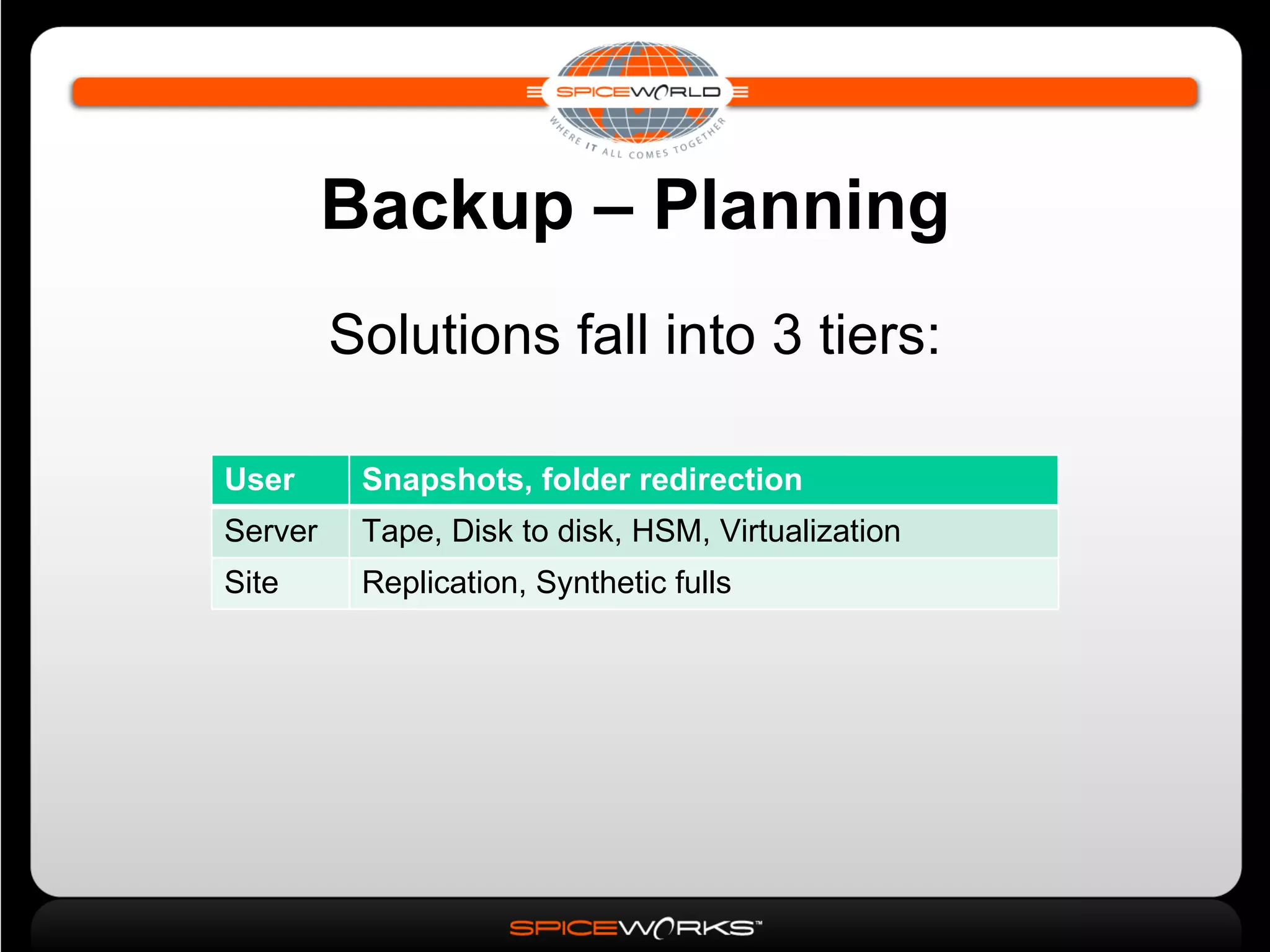
Backup – Planning Solutions fall into 3 tiers: User Snapshots, folder redirection Server Tape, Disk to disk, HSM, Virtualization Site Replication, Synthetic fulls
Backup – Planning Start backup planning by identifying the critical data systems What relies on that data? Get together with the business process owners and identify the data that they need to drive their business functions
Backup – Planning Determine “criticality” of data Work with process owners Begin determining RTO/RPO RTO – recovery time objective: the amount of time that can pass between data system failure and restoration of functionality RPO – recovery point objective: the reflected point in time of recovered data or the most recent version of the data that will be restored
Backup – Planning Based on this information, determine capacity requirements   How much data needs to be backed up? How much will the data set grow? What is the acceptable backup window? System utilization Peak and ebb periods
Backup – Planning Individual high-capacity systems may require dedicated backup resources; determine this now Based on RTO/RPO, determine where offsite backup storage fits
Developing the Backup Plan Determine the repository type Full Full+Incremental Full+Differential Continous Data Protection (CDP)‏ Virtualization Snapshots Replication
Developing the Backup Plan Full Backup Complete backup of the entire targeted data set Restores are simple: restore using the single backup Takes up the most space (of traditional backups)‏
Developing the Backup Plan Full+Incremental Backup Full backup made, followed by backups of only the data that has changed since the last full or incremental backup Restores are more complicated: requires all backups and all incrementals Complex storage requirements
Developing the Backup Plan Full+Differential Backup Make a full backup, followed by a backup that captures all changes made since the last full backup Data may be (probably will be) duplicated throughout the backup sets Recovery requires last full backup and last differential
Developing the Backup Plan Continuous Data Protection (CDP)‏ Backup system logs all changes to the system Most often a block-level function Dedicated hardware appliances and storage systems Normally yields highest confidence in recovery, lowest RTO
Developing the Backup Plan Virtualization Not directly a backup solution Used in conjunction with snapshots or replication Can provide fastest and most flexible recovery options
Developing the Backup Plan Snapshots Keeps ‘point in time’ images of live system Enables user accessible restore options Based on base image + ‘differences’ = susceptible to corruption of all images NetApp ‘.snapshot’ and Microsoft VSS
Developing the Backup Plan Replication Copies file system changes as they are made Bandwidth requirements play a big part: Synchronous = delayed commit Asynchronous = image latency Used extensively for hosted offsite DR scenarios
Developing the Backup Plan Determine Media Type(s)‏ Tape Disk-based backup More on this in a moment Optical Offsite/Internet-based systems Hybrids
Developing the Backup Plan Tape Magnetic tape is the classic backup medium Sequential access: very fast writing of new data, really slow access for reading data Numerous formats LTO, DLT, AIT, DAT, etc
Developing the Backup Plan Tape Tape drives/robotic libraries can be extremely expensive, but also very high capacity Provide a good cost/capacity ratio Tape is portable Can be stored offsite for DR purposes
Developing the Backup Plan Disk Faster backups Can eliminate streaming issues often seen when using tape to back up many small files Shorter restore times Seeking on disk is much faster than seeking on linear tape
Developing the Backup Plan Disk Physically managing disks can be less complex than managing multiple tapes Disk reliability can be higher Mainly because it is not handled as much However.....
Developing the Backup Plan Disk Since tapes normally contain a single backup, it is often just a matter of locating the tape that contains the needed data Disk,on the other hand, will contain many sets of backup data, so coherent catalogs are of utmost importance
Developing the Backup Plan Disk Other strategies exist for disk Virtual Tape Libraries Emulate tape to eliminate some of the previously mentioned complexity Snapshot storage
Developing the Backup Plan Optical Good for archiving (WORM)‏ Not much else Offsite/Internet-based Data is shipped offsite over the internet to a hosting/storage provider Replication
Developing the Backup Plan Determine Backup Windows Normally, when systems are at lowest utilization (ie, middle of the night)‏ Backup windows must be monitored More on this in a minute
Developing the Backup Plan RTO/RPO can affect the above decisions Aggressive RTO may call for high-capacity, fast tape or disk systems Less aggressive RTOs may call for single tape systems with simple media rotation schemes RTOs approaching 0 may require complex CDP/backup/replication systems
Implement the Backup Plan Implement the plan As soon as the backup plan is in place and implemented, begin monitoring Monitor conditions such as: Backup window violations (excessive run times)‏ Errors/missed files Unplanned media consumption rates Bandwidth consumption Affect on system performance
Implement the Backup Plan Backup Window Violations If backup windows are missed, decide whether to abort the backup or increase the window Could be a capacity issue Increase capacity of backup system Change media type (tape to disk)‏ Change strategy (differential to incremental or CDP)‏
Implement the Backup Plan Backup Window Violations Change to a Disk-to-Disk-to-Tape scheme Data is backed up to disk (staged), and then from there backed up to tape Can have benefits in network systems where latency is affecting backup run times Other benefits include being able to compress the data on the disk prior to backing up to tape and possibly encrypting
Implement the Backup Plan Test Your Backups Once again.... test your backups Test for errors and completeness If available, periodically restore to secondary/test systems Address any and all errors thrown by backup systems immediately Discard media that shows excessive errors
Implement the Backup Plan Maintain Contacts Check in with business process owners to ensure that objectives have not changed Brief stake-holders on quality control methods in place to ensure their data is safe and secure
Implement the Backup Plan Document Document how all of the backup systems work Backup strategies for various systems Restore procedures Where media is stored and how it is rotated What to do in case of a missed backup window Emergency contacts  Vendors, OEMs, backup specialists, etc
Questions?

Disaster Recovery & Data Backup Strategies

  • 1.
    Break Out Session3 Disaster Recovery and Data Backup PRESENTED BY: Kris Bushover, Spiceworks Inc Eric Osterholm, OuterNet
  • 2.
    Session Overview DataBackup – Why and How Identifying Critical Data Systems Planning for backup Implementing, Monitoring, and Testing
  • 3.
    Backup – Whydo it? Increasingly, even the smallest businesses have become reliant upon the data they generate Critical data drives sales, tracks students, monitors inventories, and assists in the delivery of healthcare
  • 4.
    Backup – Whydo it? Bottom line, in business today, you are your data Lose data, lose business Lost productivity, customer relationships, etc
  • 5.
    Backup – PlanningI already have RAID protection, why should I back the data up? I already copy the data I need to disks/other systems/a CD in my desk drawer.....
  • 6.
    Backup – PlanningCan you recover it when you need it?
  • 7.
    Backup – PlanningSolutions fall into 3 tiers: User Snapshots, folder redirection Server Tape, Disk to disk, HSM, Virtualization Site Replication, Synthetic fulls
  • 8.
    Backup – PlanningStart backup planning by identifying the critical data systems What relies on that data? Get together with the business process owners and identify the data that they need to drive their business functions
  • 9.
    Backup – PlanningDetermine “criticality” of data Work with process owners Begin determining RTO/RPO RTO – recovery time objective: the amount of time that can pass between data system failure and restoration of functionality RPO – recovery point objective: the reflected point in time of recovered data or the most recent version of the data that will be restored
  • 10.
    Backup – PlanningBased on this information, determine capacity requirements How much data needs to be backed up? How much will the data set grow? What is the acceptable backup window? System utilization Peak and ebb periods
  • 11.
    Backup – PlanningIndividual high-capacity systems may require dedicated backup resources; determine this now Based on RTO/RPO, determine where offsite backup storage fits
  • 12.
    Developing the BackupPlan Determine the repository type Full Full+Incremental Full+Differential Continous Data Protection (CDP)‏ Virtualization Snapshots Replication
  • 13.
    Developing the BackupPlan Full Backup Complete backup of the entire targeted data set Restores are simple: restore using the single backup Takes up the most space (of traditional backups)‏
  • 14.
    Developing the BackupPlan Full+Incremental Backup Full backup made, followed by backups of only the data that has changed since the last full or incremental backup Restores are more complicated: requires all backups and all incrementals Complex storage requirements
  • 15.
    Developing the BackupPlan Full+Differential Backup Make a full backup, followed by a backup that captures all changes made since the last full backup Data may be (probably will be) duplicated throughout the backup sets Recovery requires last full backup and last differential
  • 16.
    Developing the BackupPlan Continuous Data Protection (CDP)‏ Backup system logs all changes to the system Most often a block-level function Dedicated hardware appliances and storage systems Normally yields highest confidence in recovery, lowest RTO
  • 17.
    Developing the BackupPlan Virtualization Not directly a backup solution Used in conjunction with snapshots or replication Can provide fastest and most flexible recovery options
  • 18.
    Developing the BackupPlan Snapshots Keeps ‘point in time’ images of live system Enables user accessible restore options Based on base image + ‘differences’ = susceptible to corruption of all images NetApp ‘.snapshot’ and Microsoft VSS
  • 19.
    Developing the BackupPlan Replication Copies file system changes as they are made Bandwidth requirements play a big part: Synchronous = delayed commit Asynchronous = image latency Used extensively for hosted offsite DR scenarios
  • 20.
    Developing the BackupPlan Determine Media Type(s)‏ Tape Disk-based backup More on this in a moment Optical Offsite/Internet-based systems Hybrids
  • 21.
    Developing the BackupPlan Tape Magnetic tape is the classic backup medium Sequential access: very fast writing of new data, really slow access for reading data Numerous formats LTO, DLT, AIT, DAT, etc
  • 22.
    Developing the BackupPlan Tape Tape drives/robotic libraries can be extremely expensive, but also very high capacity Provide a good cost/capacity ratio Tape is portable Can be stored offsite for DR purposes
  • 23.
    Developing the BackupPlan Disk Faster backups Can eliminate streaming issues often seen when using tape to back up many small files Shorter restore times Seeking on disk is much faster than seeking on linear tape
  • 24.
    Developing the BackupPlan Disk Physically managing disks can be less complex than managing multiple tapes Disk reliability can be higher Mainly because it is not handled as much However.....
  • 25.
    Developing the BackupPlan Disk Since tapes normally contain a single backup, it is often just a matter of locating the tape that contains the needed data Disk,on the other hand, will contain many sets of backup data, so coherent catalogs are of utmost importance
  • 26.
    Developing the BackupPlan Disk Other strategies exist for disk Virtual Tape Libraries Emulate tape to eliminate some of the previously mentioned complexity Snapshot storage
  • 27.
    Developing the BackupPlan Optical Good for archiving (WORM)‏ Not much else Offsite/Internet-based Data is shipped offsite over the internet to a hosting/storage provider Replication
  • 28.
    Developing the BackupPlan Determine Backup Windows Normally, when systems are at lowest utilization (ie, middle of the night)‏ Backup windows must be monitored More on this in a minute
  • 29.
    Developing the BackupPlan RTO/RPO can affect the above decisions Aggressive RTO may call for high-capacity, fast tape or disk systems Less aggressive RTOs may call for single tape systems with simple media rotation schemes RTOs approaching 0 may require complex CDP/backup/replication systems
  • 30.
    Implement the BackupPlan Implement the plan As soon as the backup plan is in place and implemented, begin monitoring Monitor conditions such as: Backup window violations (excessive run times)‏ Errors/missed files Unplanned media consumption rates Bandwidth consumption Affect on system performance
  • 31.
    Implement the BackupPlan Backup Window Violations If backup windows are missed, decide whether to abort the backup or increase the window Could be a capacity issue Increase capacity of backup system Change media type (tape to disk)‏ Change strategy (differential to incremental or CDP)‏
  • 32.
    Implement the BackupPlan Backup Window Violations Change to a Disk-to-Disk-to-Tape scheme Data is backed up to disk (staged), and then from there backed up to tape Can have benefits in network systems where latency is affecting backup run times Other benefits include being able to compress the data on the disk prior to backing up to tape and possibly encrypting
  • 33.
    Implement the BackupPlan Test Your Backups Once again.... test your backups Test for errors and completeness If available, periodically restore to secondary/test systems Address any and all errors thrown by backup systems immediately Discard media that shows excessive errors
  • 34.
    Implement the BackupPlan Maintain Contacts Check in with business process owners to ensure that objectives have not changed Brief stake-holders on quality control methods in place to ensure their data is safe and secure
  • 35.
    Implement the BackupPlan Document Document how all of the backup systems work Backup strategies for various systems Restore procedures Where media is stored and how it is rotated What to do in case of a missed backup window Emergency contacts Vendors, OEMs, backup specialists, etc
  • 36.

Editor's Notes

  • #2 Myriad Pro Regular 48pt Presented By:  Myriad Pro Semibold 30pt (all caps) Presenter: Myriad Pro Semibold 48pt Company: Myriad Pro Regular 48pt Date: Myriad Pro Regular 24pt