

MANAGEMENT INFORMATION
SYSTEM
Introduction and
Applications
What is an Information System?
 Set of interrelated components
 Collect, process, store, and distribute
information
 Support decision making, coordination, and
control
Data vs Information
 Data are streams of raw facts
 Information is data shaped into meaningful
form
 Three activities of information systems
produce information organizations need
1. Input: Captures raw data from organization or
external environment
2. Processing: Converts raw data into
meaningful form
3. Output: Transfers processed information to
people or activities that use it
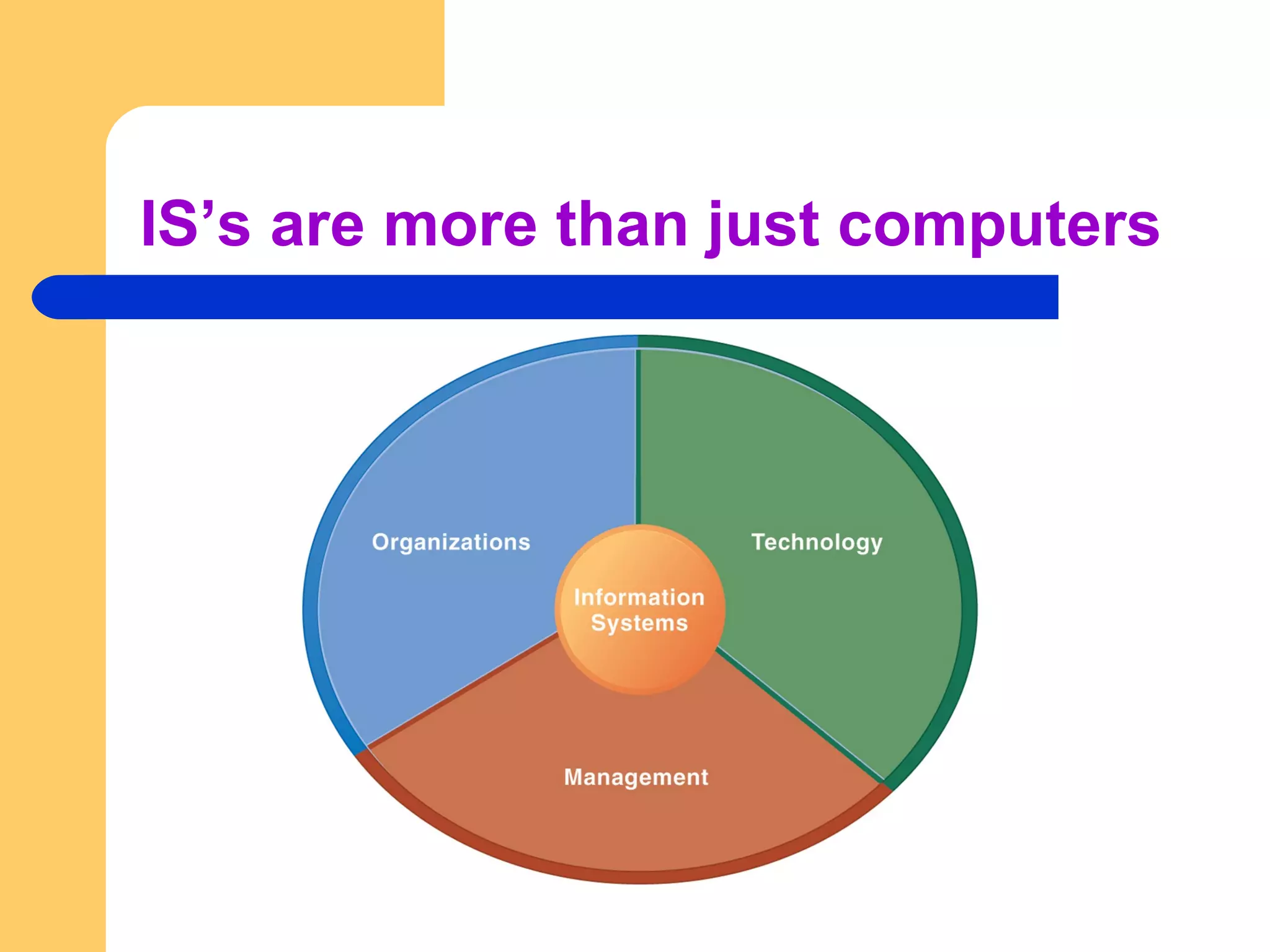
IS’s are more than just computers
 An information system creates value for the
firm as an organizational and management
solution to challenges posed by the
environment.
The role of IS in business today
 Growing interdependence between ability to
use information technology and ability to
implement corporate strategies and achieve
corporate goals
 Business firms invest heavily in information
systems to achieve six strategic business
objectives:
1. Operational excellence
2. New products, services, and business models
3. Customer and supplier intimacy
4. Improved decision making
5. Competitive advantage
6. Survival
Operational Excellence
Improvement of efficiency to attain
higher profitability
Information systems, technology an
important tool in achieving greater
efficiency and productivity
– Walmart’s RetailLink system links
suppliers to stores for superior
replenishment system
New products, services, and
business models
Business model: describes how
company produces, delivers, and sells
product or service to create wealth
Information systems and technology a
major enabling tool for new products,
services, business models
– Examples: Apple’s iPod, iTunes, iPhone,
iPad, Google’s Android OS
Customer and Supplier Intimacy
 Serving customers well leads to customers
returning, which raises revenues and profits
– Example: High-end hotels that use computers
to track customer preferences and use to
monitor and customize environment
 Intimacy with suppliers allows them to provide
vital inputs, which lowers costs
– Example: J.C.Penney’s information system
which links sales records to contract
manufacturer
Improved Decision Making
 Accurate information is a must for better decision
making
 Without accurate information:
– Managers must use forecasts, best guesses, luck
– This leads to:
 Overproduction, underproduction of goods and services
 Misallocation of resources
 Poor response times
– Poor outcomes raise costs, lose customers
 Example: Verizon’s Web-based digital dashboard to provide
managers with real-time data on customer complaints,
network performance, line outages, etc.
Survival
Information technologies as necessity of
business
May be:
– Industry-level changes, e.g. Albaraka
– Governmental regulations requiring
record-keeping
Competitive Advantage
Delivering better performance
Charging less for superior products
Responding to customers and suppliers
in real time
– Examples: Apple, Walmart
Questions??
MANAGEMENT INFORMATION
SYSTEM
Introduction Cont’d
Business Processes & IS’s
 Business processes:
– Workflows of material, information, knowledge
– Sets of activities, steps
– May be tied to functional area or be cross-
functional
 Businesses: Can be seen as collection of
business processes
 Business processes may be assets or
liabilities
Examples of functional business
processes
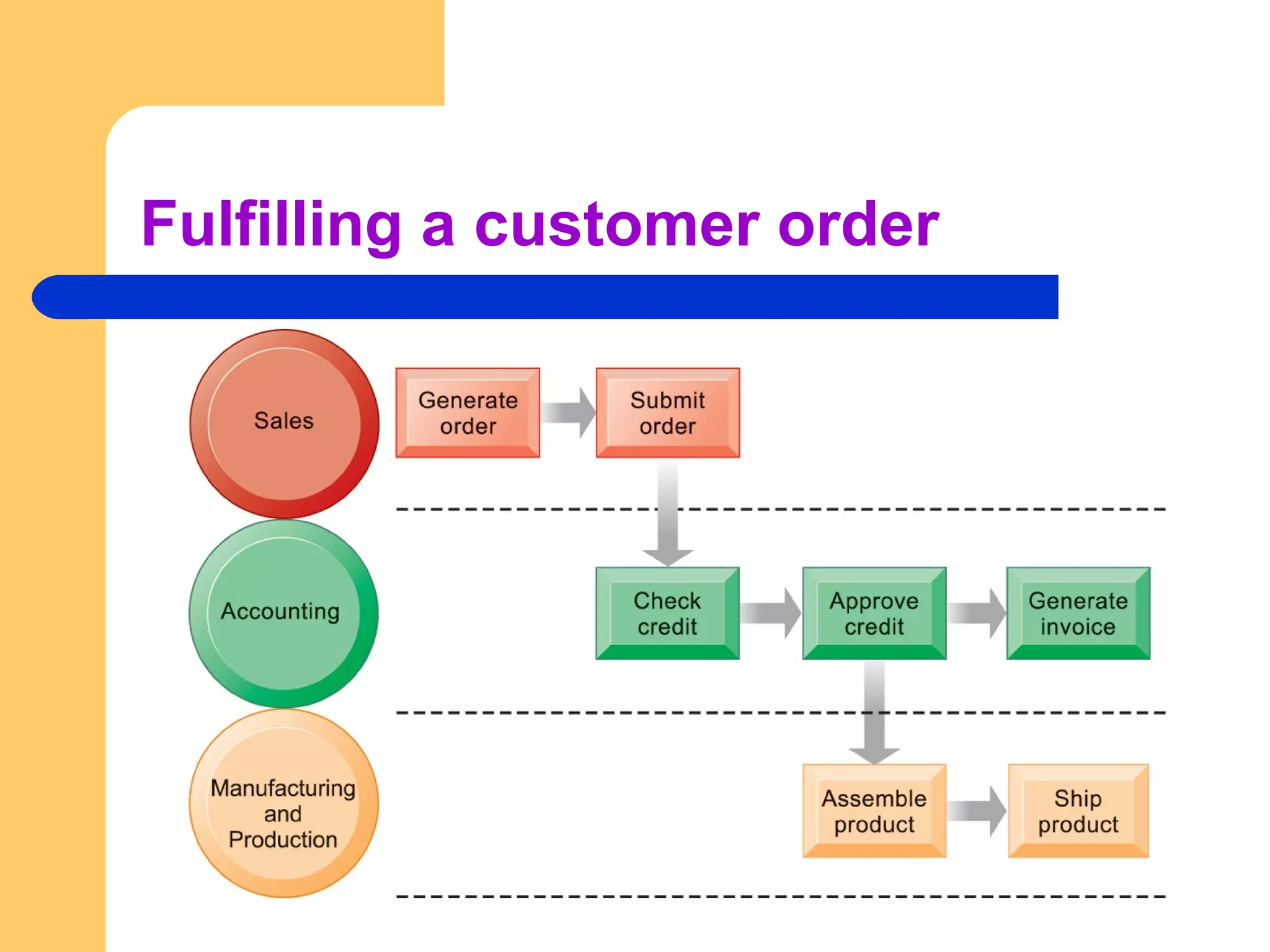
 Manufacturing and production
– Assembling the product
 Sales and marketing
– Identifying customers
 Finance and accounting
– Creating financial statements
 Human resources
– Hiring employees
Fulfilling a customer order
How can Information technology enhance
business processes?
1. Increasing efficiency of existing processes
Automating steps that were manual
1. Enabling entirely new processes that are
capable of transforming the businesses
Change flow of information
Replace sequential steps with parallel steps
Eliminate delays in decision making
– Example, e-books
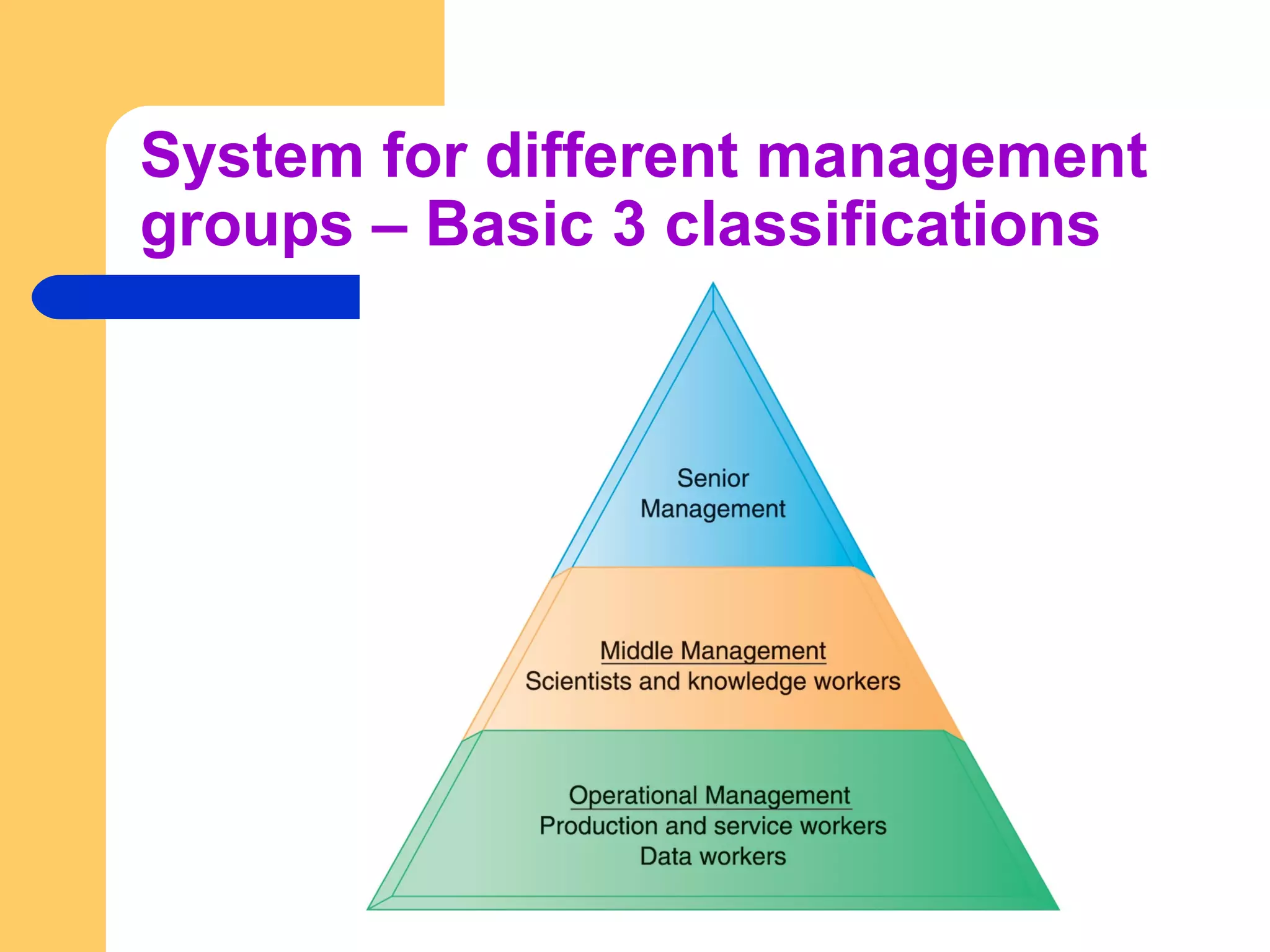
System for different management
groups – Basic 3 classifications
Transaction Processing Systems
(TPS)
 Perform and record daily routine transactions
necessary to conduct business
– Examples: sales order entry, payroll, shipping
 Allow managers to monitor status of operations
and relations with external environment
 Serve operational levels
 Serve predefined, structured goals and
decision making
Business Intelligence Systems
 Management information systems (MIS)
– Serve middle management
– Provide reports on firm’s current performance,
based on data from TPS
– Provide answers to routine questions with
predefined procedure for answering them
– Typically have little analytic capability
Business Intelligence Systems
Decision support systems (DSS)
– Serve middle management
– Support non-routine decision making
 Example: What is impact on production schedule if
December sales doubled?
– Often use external information as well from TPS and
MIS
 Example - extracting useful information from
massive quantities of data, establishing trends
Business Intelligence Systems
 Executive support systems (ESS)
– Support senior management
– Address non-routine decisions
 Requiring judgment, evaluation, and insight
– Incorporate data about external events (e.g. new tax
laws or competitors) as well as summarized information
from internal MIS and DSS
– Example: Digital dashboard with real-time view of firm’s
financial performance: working capital, accounts
receivable, accounts payable, cash flow, and inventory
How a business can manage all the information
in these different systems?
Enterprise Applications
 Systems for linking the enterprise
 Span functional areas
 Execute business processes across firm
 Include all levels of management
 Four major applications:
– Enterprise systems
– Supply chain management systems
– Customer relationship management systems
– Knowledge management systems
Enterprise Systems (or ERP)
 Collects data from different firm functions and
stores data in single central data repository
 Resolves problem of fragmented, redundant data
sets and systems
 Enable:
– Coordination of daily activities
– Efficient response to customer orders (production,
inventory)
– Provide valuable information for improving management
decision making
Supply Chain Management (SCM)
Systems
 Manage firm’s relationships with suppliers
 Share information about
– Orders, production, inventory levels,
delivery of products and services
 Goal:
– Right amount of products to destination
with least amount of time and lowest cost
Customer Relationship
Management (CRM) Systems
– Provide information to coordinate all of the
business processes that deal with customers
in sales, marketing, and service to optimize
revenue, customer satisfaction, and
customer retention
– Integrate firm’s customer-related processes
and consolidate customer information from
multiple communication channels
Knowledge Management Systems
(KMS)
 Support processes for acquiring, creating,
storing, distributing, applying, integrating
knowledge
– How to create, produce, distribute products
and services
 Collect internal knowledge and experience within
firm and make it available to employees
 Link to external sources of knowledge
Alternative tools that increase integration
and expedite the flow of information
 Intranets:
– Internal company Web sites accessible
only by employees
 Extranets:
– Company Web sites accessible externally
only to customers, vendors, suppliers, etc
 How do people working in firms pull it all
together, work towards common goals, and
coordinate plans and actions?
 Information systems can’t make decisions, hire
or fire people, sign contracts, agree on deals,
or adjust the price of goods to the marketplace.
Business benefits of collaboration
and teamwork
 Investments in collaboration technology can
produce organizational improvements returning
high ROI
 Benefits:
– Productivity
– Quality
– Innovation
– Customer service
– Financial performance
 Profitability, sales, sales growth
 Successful collaboration requires an appropriate organizational
structure and culture, along with appropriate collaboration
technology.
Technology for collaboration and
teamwork
 15 categories of collaborative software tools
Email and instant messaging White boarding
Collaborative writing Web presenting
Collaborative reviewing Work scheduling
Event scheduling Document sharing /wikis
File sharing Mind mapping
Screen sharing Large audience Webinars
Audio conferencing Co-browsing
Video conferencing
 Social Networking
 Wikis
 Virtual Worlds
 Internet-Based Collaboration Environments
– Virtual meeting systems (telepresence)
– Google Apps/Google sites
– Microsoft SharePoint
– Lotus Notes
Questions??

Management Information System - MIS - Application

  • 1.
  • 2.
    What is anInformation System?  Set of interrelated components  Collect, process, store, and distribute information  Support decision making, coordination, and control
  • 3.
    Data vs Information Data are streams of raw facts  Information is data shaped into meaningful form
  • 4.
     Three activitiesof information systems produce information organizations need 1. Input: Captures raw data from organization or external environment 2. Processing: Converts raw data into meaningful form 3. Output: Transfers processed information to people or activities that use it
  • 5.
    IS’s are morethan just computers
  • 6.
     An informationsystem creates value for the firm as an organizational and management solution to challenges posed by the environment.
  • 7.
    The role ofIS in business today  Growing interdependence between ability to use information technology and ability to implement corporate strategies and achieve corporate goals
  • 8.
     Business firmsinvest heavily in information systems to achieve six strategic business objectives: 1. Operational excellence 2. New products, services, and business models 3. Customer and supplier intimacy 4. Improved decision making 5. Competitive advantage 6. Survival
  • 9.
    Operational Excellence Improvement ofefficiency to attain higher profitability Information systems, technology an important tool in achieving greater efficiency and productivity – Walmart’s RetailLink system links suppliers to stores for superior replenishment system
  • 10.
    New products, services,and business models Business model: describes how company produces, delivers, and sells product or service to create wealth Information systems and technology a major enabling tool for new products, services, business models – Examples: Apple’s iPod, iTunes, iPhone, iPad, Google’s Android OS
  • 11.
    Customer and SupplierIntimacy  Serving customers well leads to customers returning, which raises revenues and profits – Example: High-end hotels that use computers to track customer preferences and use to monitor and customize environment  Intimacy with suppliers allows them to provide vital inputs, which lowers costs – Example: J.C.Penney’s information system which links sales records to contract manufacturer
  • 12.
    Improved Decision Making Accurate information is a must for better decision making  Without accurate information: – Managers must use forecasts, best guesses, luck – This leads to:  Overproduction, underproduction of goods and services  Misallocation of resources  Poor response times – Poor outcomes raise costs, lose customers  Example: Verizon’s Web-based digital dashboard to provide managers with real-time data on customer complaints, network performance, line outages, etc.
  • 13.
    Survival Information technologies asnecessity of business May be: – Industry-level changes, e.g. Albaraka – Governmental regulations requiring record-keeping
  • 14.
    Competitive Advantage Delivering betterperformance Charging less for superior products Responding to customers and suppliers in real time – Examples: Apple, Walmart
  • 15.
  • 16.
  • 17.
    Business Processes &IS’s  Business processes: – Workflows of material, information, knowledge – Sets of activities, steps – May be tied to functional area or be cross- functional  Businesses: Can be seen as collection of business processes  Business processes may be assets or liabilities
  • 18.
    Examples of functionalbusiness processes  Manufacturing and production – Assembling the product  Sales and marketing – Identifying customers  Finance and accounting – Creating financial statements  Human resources – Hiring employees
  • 19.
  • 20.
    How can Informationtechnology enhance business processes?
  • 21.
    1. Increasing efficiencyof existing processes Automating steps that were manual 1. Enabling entirely new processes that are capable of transforming the businesses Change flow of information Replace sequential steps with parallel steps Eliminate delays in decision making – Example, e-books
  • 22.
    System for differentmanagement groups – Basic 3 classifications
  • 23.
    Transaction Processing Systems (TPS) Perform and record daily routine transactions necessary to conduct business – Examples: sales order entry, payroll, shipping  Allow managers to monitor status of operations and relations with external environment  Serve operational levels  Serve predefined, structured goals and decision making
  • 24.
    Business Intelligence Systems Management information systems (MIS) – Serve middle management – Provide reports on firm’s current performance, based on data from TPS – Provide answers to routine questions with predefined procedure for answering them – Typically have little analytic capability
  • 26.
    Business Intelligence Systems Decisionsupport systems (DSS) – Serve middle management – Support non-routine decision making  Example: What is impact on production schedule if December sales doubled? – Often use external information as well from TPS and MIS  Example - extracting useful information from massive quantities of data, establishing trends
  • 27.
    Business Intelligence Systems Executive support systems (ESS) – Support senior management – Address non-routine decisions  Requiring judgment, evaluation, and insight – Incorporate data about external events (e.g. new tax laws or competitors) as well as summarized information from internal MIS and DSS – Example: Digital dashboard with real-time view of firm’s financial performance: working capital, accounts receivable, accounts payable, cash flow, and inventory
  • 28.
    How a businesscan manage all the information in these different systems?
  • 29.
    Enterprise Applications  Systemsfor linking the enterprise  Span functional areas  Execute business processes across firm  Include all levels of management  Four major applications: – Enterprise systems – Supply chain management systems – Customer relationship management systems – Knowledge management systems
  • 30.
    Enterprise Systems (orERP)  Collects data from different firm functions and stores data in single central data repository  Resolves problem of fragmented, redundant data sets and systems  Enable: – Coordination of daily activities – Efficient response to customer orders (production, inventory) – Provide valuable information for improving management decision making
  • 31.
    Supply Chain Management(SCM) Systems  Manage firm’s relationships with suppliers  Share information about – Orders, production, inventory levels, delivery of products and services  Goal: – Right amount of products to destination with least amount of time and lowest cost
  • 32.
    Customer Relationship Management (CRM)Systems – Provide information to coordinate all of the business processes that deal with customers in sales, marketing, and service to optimize revenue, customer satisfaction, and customer retention – Integrate firm’s customer-related processes and consolidate customer information from multiple communication channels
  • 33.
    Knowledge Management Systems (KMS) Support processes for acquiring, creating, storing, distributing, applying, integrating knowledge – How to create, produce, distribute products and services  Collect internal knowledge and experience within firm and make it available to employees  Link to external sources of knowledge
  • 34.
    Alternative tools thatincrease integration and expedite the flow of information  Intranets: – Internal company Web sites accessible only by employees  Extranets: – Company Web sites accessible externally only to customers, vendors, suppliers, etc
  • 35.
     How dopeople working in firms pull it all together, work towards common goals, and coordinate plans and actions?  Information systems can’t make decisions, hire or fire people, sign contracts, agree on deals, or adjust the price of goods to the marketplace.
  • 36.
    Business benefits ofcollaboration and teamwork  Investments in collaboration technology can produce organizational improvements returning high ROI  Benefits: – Productivity – Quality – Innovation – Customer service – Financial performance  Profitability, sales, sales growth
  • 37.
     Successful collaborationrequires an appropriate organizational structure and culture, along with appropriate collaboration technology.
  • 38.
    Technology for collaborationand teamwork  15 categories of collaborative software tools Email and instant messaging White boarding Collaborative writing Web presenting Collaborative reviewing Work scheduling Event scheduling Document sharing /wikis File sharing Mind mapping Screen sharing Large audience Webinars Audio conferencing Co-browsing Video conferencing
  • 39.
     Social Networking Wikis  Virtual Worlds  Internet-Based Collaboration Environments – Virtual meeting systems (telepresence) – Google Apps/Google sites – Microsoft SharePoint – Lotus Notes
  • 40.