E-Business: How Businesses
Use Information Systems
Key Terms Introduce in this Session
Business intelligence Executive support systems (ESS)
E-government Information systems department
Chief information officer (CIO) Information systems managers
Enterprise applications Interorganizational system
Transaction processing systems (TPS) IT governance
End users Knowledge management systems (KMS)
Collaboration Management information systems (MIS)
Customer relationship management (CRM) Portal
Decision-support systems (DSS) Programmers
Digital dashboard Social business
Electronic business (e-business) Supply chain management (SCM) systems
Electronic commerce (e-commerce) Systems analysts
Learning Objectives
• 1. What are business processes? How are they
related to information systems?
• 2. How do systems serve the different
management groups in a business, and how do
systems that link the enterprise improve
organizational performance?
• 3. Why are systems for collaboration and social
business so important, and what technologies do
they use?
• 4. What is the role of the information systems
function in a business?
Video Cases
• Case 1: How it Works: Greenwell Couture
• Case 2: CEMEX: Becoming a Social Business
• Case 3: IS in Action-WalMart Supply Chain
Questions
• 1. Why might social business be especially useful
for global companies?
• 2. What were some of the benefits that IBM social
tools can provide for businesses like the fictitious
Greenwell Couture?
• 3. What made Cemex a good candidate for a
company-wide social network?
• 4. What types of things can go wrong when
changing the culture of an organization to be more
social and collaborative?
IS in Action-WalMart Supply Chain
• 1. Where does Walmart’s supply chain start?
What triggers Walmart’s Retail Link system to ship
goods to local Walmart Stores?
• 2. Why is a detailed knowledge of consumer
purchases at each store important to Walmart’s
success?
• 3. Why can’t other large retailers easily duplicate
Walmart’s Retail Link?
• 4. Why does Walmart encourage its vendors to
learn how to use Retail Link?
Enterprise Social Networking Helps ABB
Innovate and Grow (1 of 2)
• Problem
– Outdated static technology
– Geographically dispersed
• Solutions
– Develop knowledge sharing strategy and goals
– Change knowledge and collaboration processes
– Change organizational culture
– Deploy Inside+, with Yammer, Office 365, and Sharepoint
Enterprise Social Networking Helps ABB
Innovate and Grow (2 of 2)
• ABB uses Inside+ to provide new channels for
knowledge acquisition, innovation, and
collaboration
• Demonstrates IT’s role in helping organizations
improve performance and remain competitive
• Illustrates the ability of IT systems to support
collaboration and teamwork
Business Processes (1 of 2)
• Business processes
– Flows of material, information, knowledge
– Sets of activities, steps
– May be tied to functional area or be cross-
functional
• Businesses: Can be seen as collection of
business processes
• Business processes may be assets or liabilities
Business Processes (2 of 2)
• Examples of functional business processes
– Manufacturing and production
 Assembling the product
– Sales and marketing
 Identifying customers
– Finance and accounting
 Creating financial statements
– Human resources
 Hiring employees
Figure - The Order Fulfillment Process
How Information Technology Improves
Business Processes
• Increasing efficiency of existing processes
– Automating steps that were manual
• Enabling entirely new processes
– Changing flow of information
– Replacing sequential steps with parallel steps
– Eliminating delays in decision making
– Supporting new business models
Systems for Different Management Groups
(1 of 2)
• Transaction processing systems
– Serve operational managers and staff
– Perform and record daily routine transactions necessary to
conduct business
 Examples: sales order entry, payroll, shipping
– Allow managers to monitor status of operations and relations with
external environment
– Serve predefined, structured goals and decision making
Figure - A Payroll TPS
Systems for Different Management Groups
(2 of 2)
• Systems for business intelligence
– Data and software tools for organizing and analyzing data
– Used to help managers and users make improved decisions
• Management Information systems
• Decision Support systems
• Executive Support systems
Management Information Systems
• Serve middle management
• Provide reports on firm’s current performance,
based on data from TPS
• Provide answers to routine questions with
predefined procedure for answering them
• Typically have little analytic capability
Figure - How Management Information
Systems Obtain Their Data from
the Organization’s TPS
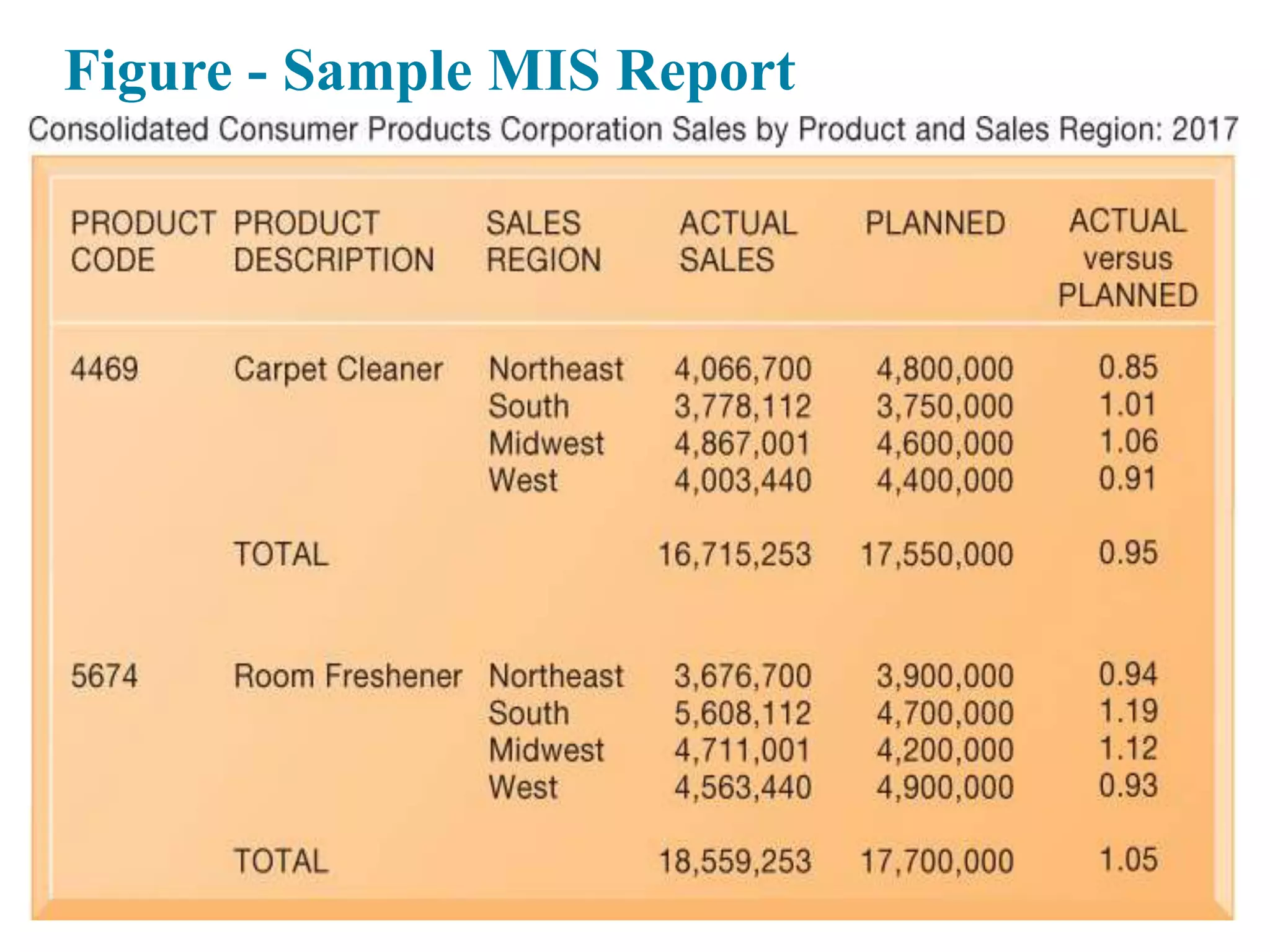
Figure - Sample MIS Report
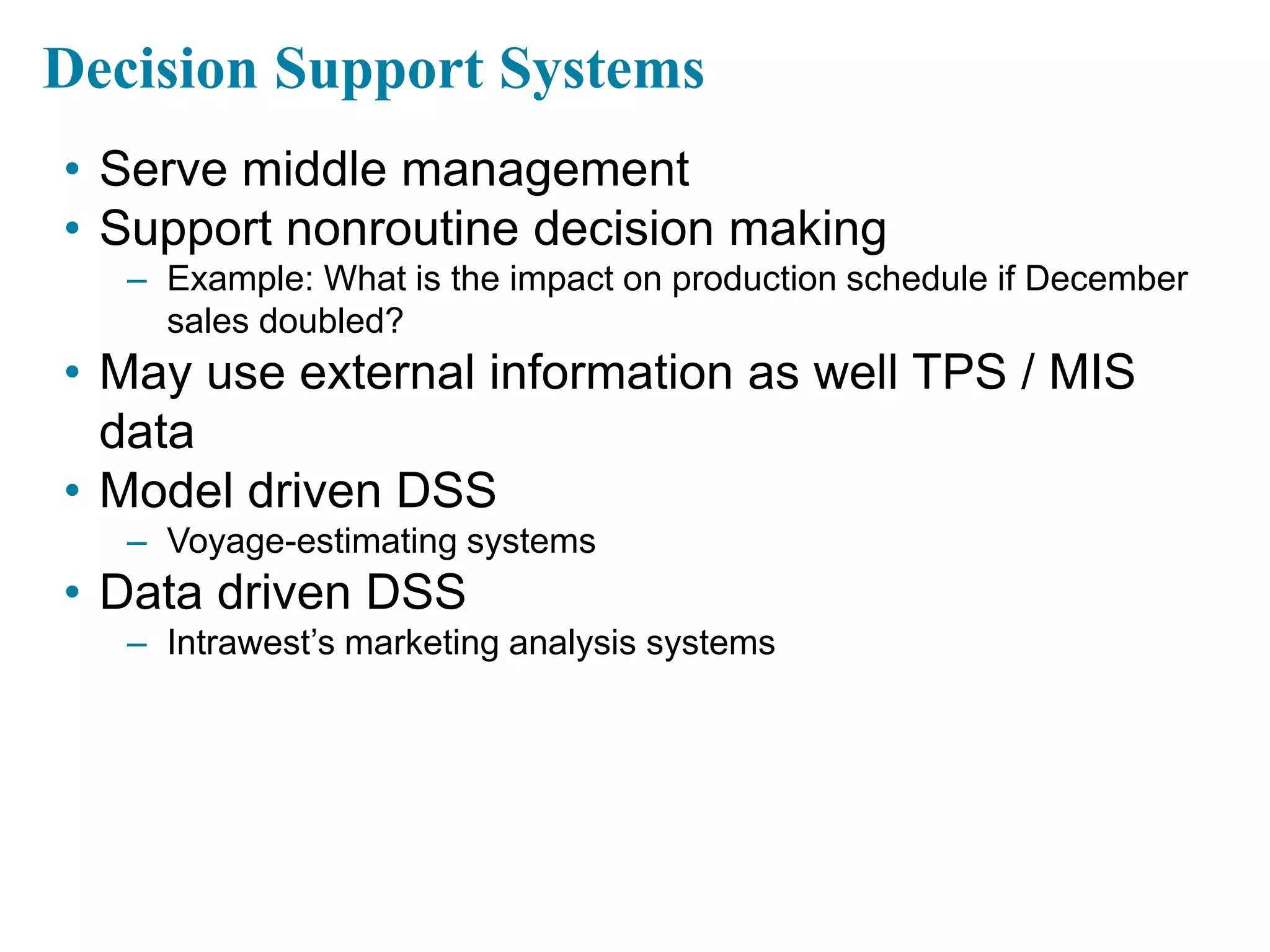
Decision Support Systems
• Serve middle management
• Support nonroutine decision making
– Example: What is the impact on production schedule if December
sales doubled?
• May use external information as well TPS / MIS
data
• Model driven DSS
– Voyage-estimating systems
• Data driven DSS
– Intrawest’s marketing analysis systems
Figure - Voyage-Estimating Decision-
Support System
Executive Support Systems
• Support senior management
• Address nonroutine decisions
– Requiring judgment, evaluation, and insight
• Incorporate data about external events (e.g., new
tax laws or competitors) as well as summarized
information from internal MIS and DSS
• Example: Digital dashboard with real-time view of
firm’s financial performance
Type of System Information Inputs Information Outputs Users
Transaction
Processing
Systems (TPS)
Transactions; daily
events
Detailed reports;
lists; summaries
Operations
personnel; first-
line supervisors
Management
Information
Systems (MIS)
Summary
transaction data;
high-volume data;
simple models
Summary and
exception reports
Middle managers
Decision Support
Systems (DSS)
Optimized for data
analysis, analytic
models, and data
analysis tools
Interactive;
simulations; analysis
Professionals;
staff managers
Executive Support
Systems (ESS)
Aggregate data;
external, internal
Projections;
responses to
queries
Senior managers
Interactive Session: Organizations: New
Systems Help Plan International Manage Its
Human Resources (1 of 2)
• Class discussion
– Describe the problem faced by Plan International. What
management, organization, and technology factors contributed to
this problem?
– Describe the system solution to this problem. Describe the types
of systems used for the solution.
– Why is human resources so important at Plan International?
Interactive Session: Organizations: New
Systems Help Plan International Manage Its
Human Resources (2 of 2)
• Class discussion
– How did these systems improve operational efficiency?
– How did these systems improve decision making? Give examples
of two decisions improved by Plan’s new systems.
Enterprise Applications
• Systems for linking the enterprise
• Span functional areas
• Execute business processes across the firm
• Include all levels of management
• Four major applications
– Enterprise systems
– Supply chain management systems
– Customer relationship management systems
– Knowledge management systems
Figure 2.6: Enterprise Application
Architecture
Enterprise Systems
• Collect data from different firm functions and store
data in single central data repository
• Resolve problems of fragmented data
• Enable:
– Coordination of daily activities
– Efficient response to customer orders (production, inventory)
– Decision making by managers about daily operations and longer-
term planning
Supply Chain Management (SCM) Systems
• Manage firm’s relationships with suppliers
• Share information about:
– Orders, production, inventory levels, delivery of products and
services
• Goal:
– Right amount of products to destination with least amount of time
and lowest cost
Customer Relationship Management (CRM)
Systems
• Provide information to coordinate all of the
business processes that deal with customers
– Sales
– Marketing
– Customer service
• Helps firms identify, attract, and retain most
profitable customers
Knowledge Management Systems (KMS)
• Support processes for capturing and applying
knowledge and expertise
– How to create, produce, and deliver products and services
• Collect internal knowledge and experience within
firm and make it available to employees
• Link to external sources of knowledge
Intranets and Extranets
• Also used to increase integration and expedite the
flow of information
• Intranets
– Internal company websites accessible only by employees
• Extranets
– Company websites accessible externally only to vendors and
suppliers
– Often used to coordinate supply chain
E-business, E-commerce, and E-government
• E-business
– Use of digital technology and Internet to drive major business
processes
• E-commerce
– Subset of e-business
– Buying and selling goods and services through Internet
• E-government
– Using Internet technology to deliver information and services to
citizens, employees, and businesses
What Is Collaboration?
• Collaboration
– Short lived or long term
– Informal or formal (teams)
• Growing importance of collaboration
– Changing nature of work
– Growth of professional work—“interaction jobs”
– Changing organization of the firm
– Changing scope of the firm
– Emphasis on innovation
– Changing culture of work
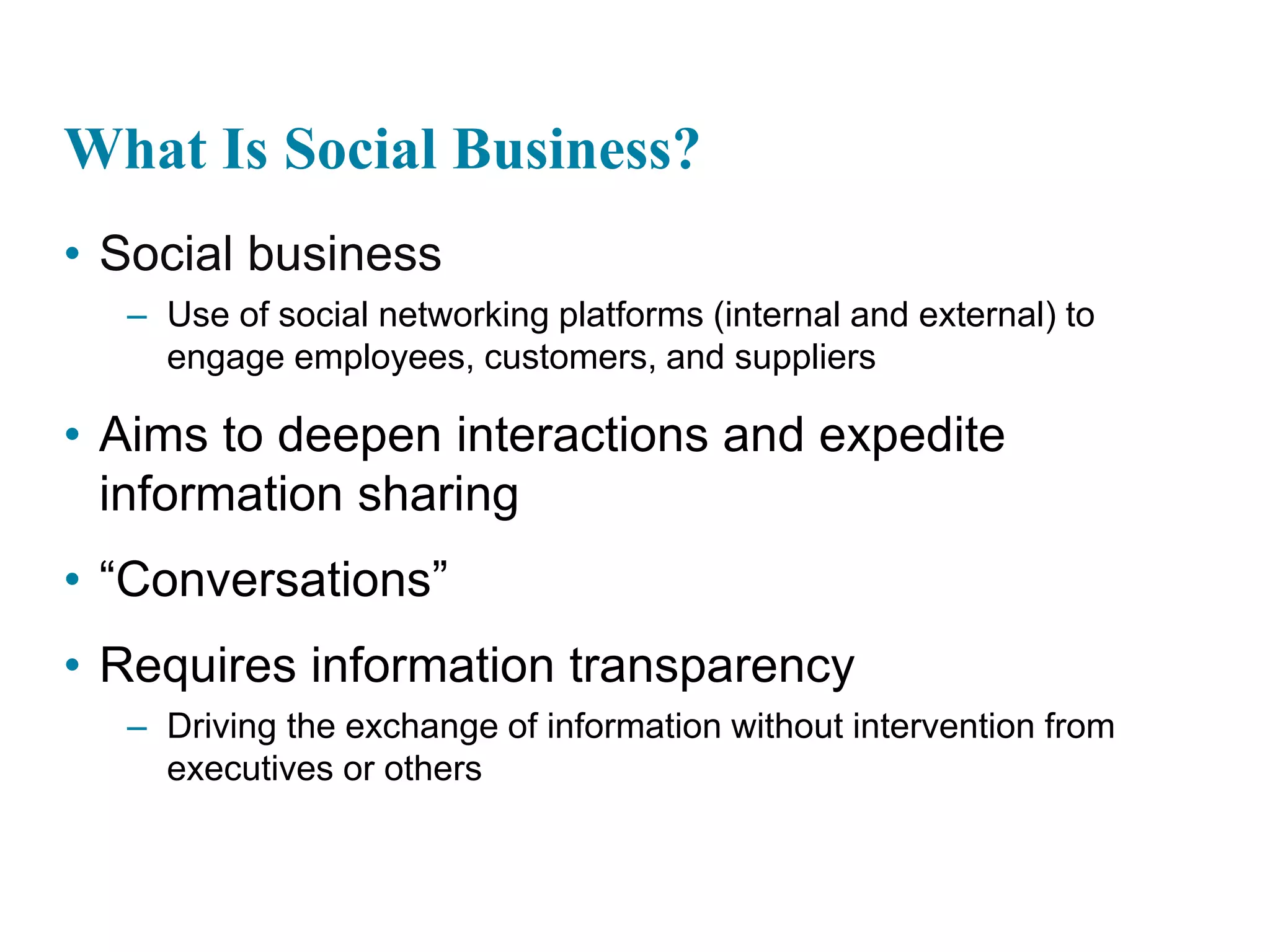
What Is Social Business?
• Social business
– Use of social networking platforms (internal and external) to
engage employees, customers, and suppliers
• Aims to deepen interactions and expedite
information sharing
• “Conversations”
• Requires information transparency
– Driving the exchange of information without intervention from
executives or others
Business Benefits of Collaboration and
Teamwork
• Investments in collaboration technology can bring
organization improvements, returning high ROI
• Benefits
– Productivity
– Quality
– Innovation
– Customer service
– Financial performance
 Profitability, sales, sales growth
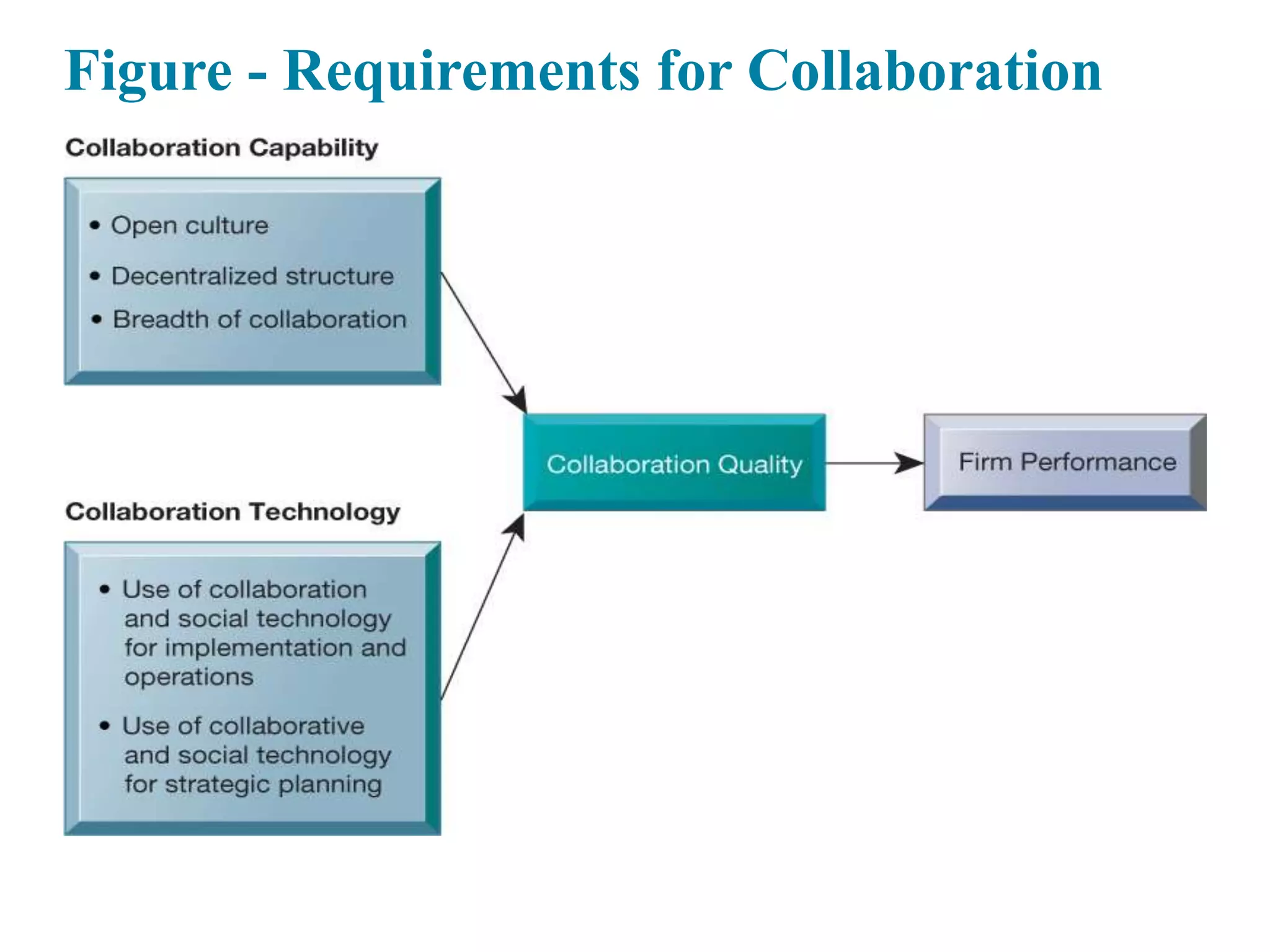
Figure - Requirements for Collaboration
Building a Collaborative Culture and
Business Processes
• “Command and control” organizations
– No value placed on teamwork or lower-level participation in
decisions
• Collaborative business culture
– Senior managers rely on teams of employees
– Policies, products, designs, processes, and systems rely on teams
– The managers purpose is to build teams
Tools and Technologies for Collaboration
and Social Business
• E-mail and instant messaging (IM)
• Wikis
• Virtual worlds
• Collaboration and social business platforms
– Virtual meeting systems (telepresence)
– Cloud collaboration services (Google Drive, Google Docs, etc.)
– Microsoft SharePoint and IBM Notes
– Enterprise social networking tools
Interactive Session: Technology: Cisco
IX5000: What State-of-the-Art Telepresence
Can Do for Collaboration
• Class discussion
– Describe the capabilities of Cisco’s IX5000 telepresence system.
How do they promote collaboration and innovation?
– Why would a company like Produban want to invest in a
telepresence system such as Cisco’s IX5000? How are
videoconferencing technology and telepresence related to
Produban’s business model and business strategy?
– What kinds of other companies might benefit from a telepresence
service such as IX5000? Why?
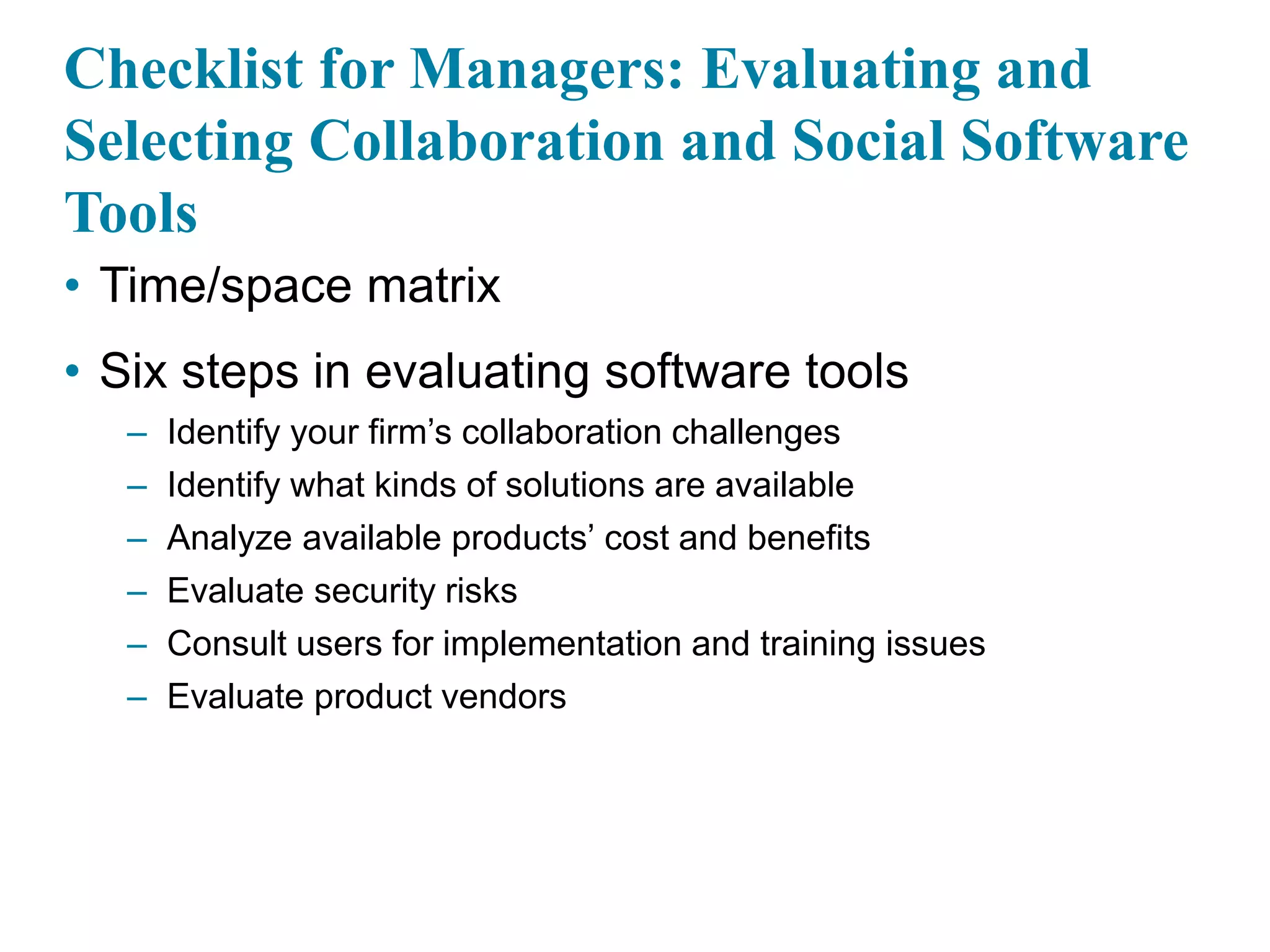
Checklist for Managers: Evaluating and
Selecting Collaboration and Social Software
Tools
• Time/space matrix
• Six steps in evaluating software tools
– Identify your firm’s collaboration challenges
– Identify what kinds of solutions are available
– Analyze available products’ cost and benefits
– Evaluate security risks
– Consult users for implementation and training issues
– Evaluate product vendors
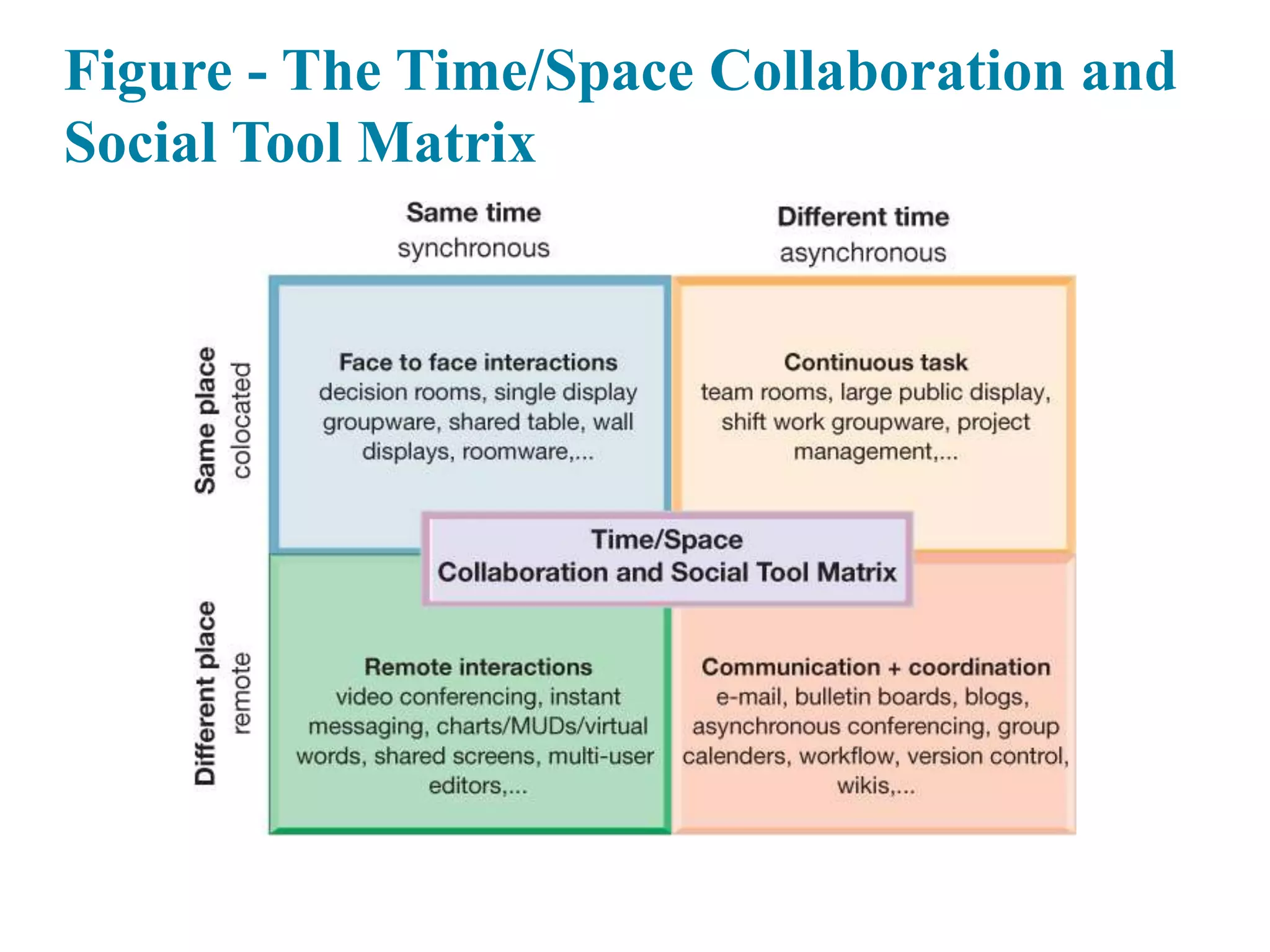
Figure - The Time/Space Collaboration and
Social Tool Matrix
The Information Systems Department
• Often headed by chief information officer (CIO)
– Other senior positions include chief security officer (CSO), chief
knowledge officer (CKO), chief privacy officer (CPO), chief data
officer (CDO)
• Programmers
• Systems analysts
• Information systems managers
• End users
Organizing the Information Systems
Function
• IT governance
– Strategies and policies for using IT in the organization
– Decision rights
– Accountability
– Organization of information systems function
 Centralized, decentralized, and so on

E- business how businesses use information systems

  • 1.
    E-Business: How Businesses UseInformation Systems
  • 2.
    Key Terms Introducein this Session Business intelligence Executive support systems (ESS) E-government Information systems department Chief information officer (CIO) Information systems managers Enterprise applications Interorganizational system Transaction processing systems (TPS) IT governance End users Knowledge management systems (KMS) Collaboration Management information systems (MIS) Customer relationship management (CRM) Portal Decision-support systems (DSS) Programmers Digital dashboard Social business Electronic business (e-business) Supply chain management (SCM) systems Electronic commerce (e-commerce) Systems analysts
  • 3.
    Learning Objectives • 1.What are business processes? How are they related to information systems? • 2. How do systems serve the different management groups in a business, and how do systems that link the enterprise improve organizational performance? • 3. Why are systems for collaboration and social business so important, and what technologies do they use? • 4. What is the role of the information systems function in a business?
  • 4.
    Video Cases • Case1: How it Works: Greenwell Couture • Case 2: CEMEX: Becoming a Social Business • Case 3: IS in Action-WalMart Supply Chain
  • 5.
    Questions • 1. Whymight social business be especially useful for global companies? • 2. What were some of the benefits that IBM social tools can provide for businesses like the fictitious Greenwell Couture? • 3. What made Cemex a good candidate for a company-wide social network? • 4. What types of things can go wrong when changing the culture of an organization to be more social and collaborative?
  • 6.
    IS in Action-WalMartSupply Chain • 1. Where does Walmart’s supply chain start? What triggers Walmart’s Retail Link system to ship goods to local Walmart Stores? • 2. Why is a detailed knowledge of consumer purchases at each store important to Walmart’s success? • 3. Why can’t other large retailers easily duplicate Walmart’s Retail Link? • 4. Why does Walmart encourage its vendors to learn how to use Retail Link?
  • 7.
    Enterprise Social NetworkingHelps ABB Innovate and Grow (1 of 2) • Problem – Outdated static technology – Geographically dispersed • Solutions – Develop knowledge sharing strategy and goals – Change knowledge and collaboration processes – Change organizational culture – Deploy Inside+, with Yammer, Office 365, and Sharepoint
  • 8.
    Enterprise Social NetworkingHelps ABB Innovate and Grow (2 of 2) • ABB uses Inside+ to provide new channels for knowledge acquisition, innovation, and collaboration • Demonstrates IT’s role in helping organizations improve performance and remain competitive • Illustrates the ability of IT systems to support collaboration and teamwork
  • 9.
    Business Processes (1of 2) • Business processes – Flows of material, information, knowledge – Sets of activities, steps – May be tied to functional area or be cross- functional • Businesses: Can be seen as collection of business processes • Business processes may be assets or liabilities
  • 10.
    Business Processes (2of 2) • Examples of functional business processes – Manufacturing and production  Assembling the product – Sales and marketing  Identifying customers – Finance and accounting  Creating financial statements – Human resources  Hiring employees
  • 11.
    Figure - TheOrder Fulfillment Process
  • 12.
    How Information TechnologyImproves Business Processes • Increasing efficiency of existing processes – Automating steps that were manual • Enabling entirely new processes – Changing flow of information – Replacing sequential steps with parallel steps – Eliminating delays in decision making – Supporting new business models
  • 13.
    Systems for DifferentManagement Groups (1 of 2) • Transaction processing systems – Serve operational managers and staff – Perform and record daily routine transactions necessary to conduct business  Examples: sales order entry, payroll, shipping – Allow managers to monitor status of operations and relations with external environment – Serve predefined, structured goals and decision making
  • 14.
    Figure - APayroll TPS
  • 15.
    Systems for DifferentManagement Groups (2 of 2) • Systems for business intelligence – Data and software tools for organizing and analyzing data – Used to help managers and users make improved decisions • Management Information systems • Decision Support systems • Executive Support systems
  • 16.
    Management Information Systems •Serve middle management • Provide reports on firm’s current performance, based on data from TPS • Provide answers to routine questions with predefined procedure for answering them • Typically have little analytic capability
  • 17.
    Figure - HowManagement Information Systems Obtain Their Data from the Organization’s TPS
  • 18.
    Figure - SampleMIS Report
  • 19.
    Decision Support Systems •Serve middle management • Support nonroutine decision making – Example: What is the impact on production schedule if December sales doubled? • May use external information as well TPS / MIS data • Model driven DSS – Voyage-estimating systems • Data driven DSS – Intrawest’s marketing analysis systems
  • 20.
    Figure - Voyage-EstimatingDecision- Support System
  • 21.
    Executive Support Systems •Support senior management • Address nonroutine decisions – Requiring judgment, evaluation, and insight • Incorporate data about external events (e.g., new tax laws or competitors) as well as summarized information from internal MIS and DSS • Example: Digital dashboard with real-time view of firm’s financial performance
  • 22.
    Type of SystemInformation Inputs Information Outputs Users Transaction Processing Systems (TPS) Transactions; daily events Detailed reports; lists; summaries Operations personnel; first- line supervisors Management Information Systems (MIS) Summary transaction data; high-volume data; simple models Summary and exception reports Middle managers Decision Support Systems (DSS) Optimized for data analysis, analytic models, and data analysis tools Interactive; simulations; analysis Professionals; staff managers Executive Support Systems (ESS) Aggregate data; external, internal Projections; responses to queries Senior managers
  • 23.
    Interactive Session: Organizations:New Systems Help Plan International Manage Its Human Resources (1 of 2) • Class discussion – Describe the problem faced by Plan International. What management, organization, and technology factors contributed to this problem? – Describe the system solution to this problem. Describe the types of systems used for the solution. – Why is human resources so important at Plan International?
  • 24.
    Interactive Session: Organizations:New Systems Help Plan International Manage Its Human Resources (2 of 2) • Class discussion – How did these systems improve operational efficiency? – How did these systems improve decision making? Give examples of two decisions improved by Plan’s new systems.
  • 25.
    Enterprise Applications • Systemsfor linking the enterprise • Span functional areas • Execute business processes across the firm • Include all levels of management • Four major applications – Enterprise systems – Supply chain management systems – Customer relationship management systems – Knowledge management systems
  • 26.
    Figure 2.6: EnterpriseApplication Architecture
  • 27.
    Enterprise Systems • Collectdata from different firm functions and store data in single central data repository • Resolve problems of fragmented data • Enable: – Coordination of daily activities – Efficient response to customer orders (production, inventory) – Decision making by managers about daily operations and longer- term planning
  • 28.
    Supply Chain Management(SCM) Systems • Manage firm’s relationships with suppliers • Share information about: – Orders, production, inventory levels, delivery of products and services • Goal: – Right amount of products to destination with least amount of time and lowest cost
  • 29.
    Customer Relationship Management(CRM) Systems • Provide information to coordinate all of the business processes that deal with customers – Sales – Marketing – Customer service • Helps firms identify, attract, and retain most profitable customers
  • 30.
    Knowledge Management Systems(KMS) • Support processes for capturing and applying knowledge and expertise – How to create, produce, and deliver products and services • Collect internal knowledge and experience within firm and make it available to employees • Link to external sources of knowledge
  • 31.
    Intranets and Extranets •Also used to increase integration and expedite the flow of information • Intranets – Internal company websites accessible only by employees • Extranets – Company websites accessible externally only to vendors and suppliers – Often used to coordinate supply chain
  • 32.
    E-business, E-commerce, andE-government • E-business – Use of digital technology and Internet to drive major business processes • E-commerce – Subset of e-business – Buying and selling goods and services through Internet • E-government – Using Internet technology to deliver information and services to citizens, employees, and businesses
  • 33.
    What Is Collaboration? •Collaboration – Short lived or long term – Informal or formal (teams) • Growing importance of collaboration – Changing nature of work – Growth of professional work—“interaction jobs” – Changing organization of the firm – Changing scope of the firm – Emphasis on innovation – Changing culture of work
  • 34.
    What Is SocialBusiness? • Social business – Use of social networking platforms (internal and external) to engage employees, customers, and suppliers • Aims to deepen interactions and expedite information sharing • “Conversations” • Requires information transparency – Driving the exchange of information without intervention from executives or others
  • 35.
    Business Benefits ofCollaboration and Teamwork • Investments in collaboration technology can bring organization improvements, returning high ROI • Benefits – Productivity – Quality – Innovation – Customer service – Financial performance  Profitability, sales, sales growth
  • 36.
    Figure - Requirementsfor Collaboration
  • 37.
    Building a CollaborativeCulture and Business Processes • “Command and control” organizations – No value placed on teamwork or lower-level participation in decisions • Collaborative business culture – Senior managers rely on teams of employees – Policies, products, designs, processes, and systems rely on teams – The managers purpose is to build teams
  • 38.
    Tools and Technologiesfor Collaboration and Social Business • E-mail and instant messaging (IM) • Wikis • Virtual worlds • Collaboration and social business platforms – Virtual meeting systems (telepresence) – Cloud collaboration services (Google Drive, Google Docs, etc.) – Microsoft SharePoint and IBM Notes – Enterprise social networking tools
  • 39.
    Interactive Session: Technology:Cisco IX5000: What State-of-the-Art Telepresence Can Do for Collaboration • Class discussion – Describe the capabilities of Cisco’s IX5000 telepresence system. How do they promote collaboration and innovation? – Why would a company like Produban want to invest in a telepresence system such as Cisco’s IX5000? How are videoconferencing technology and telepresence related to Produban’s business model and business strategy? – What kinds of other companies might benefit from a telepresence service such as IX5000? Why?
  • 40.
    Checklist for Managers:Evaluating and Selecting Collaboration and Social Software Tools • Time/space matrix • Six steps in evaluating software tools – Identify your firm’s collaboration challenges – Identify what kinds of solutions are available – Analyze available products’ cost and benefits – Evaluate security risks – Consult users for implementation and training issues – Evaluate product vendors
  • 41.
    Figure - TheTime/Space Collaboration and Social Tool Matrix
  • 42.
    The Information SystemsDepartment • Often headed by chief information officer (CIO) – Other senior positions include chief security officer (CSO), chief knowledge officer (CKO), chief privacy officer (CPO), chief data officer (CDO) • Programmers • Systems analysts • Information systems managers • End users
  • 43.
    Organizing the InformationSystems Function • IT governance – Strategies and policies for using IT in the organization – Decision rights – Accountability – Organization of information systems function  Centralized, decentralized, and so on