MAIL MERGE IN
PAGE MAKER 7.0
MS. T.K. ANUSUYA
ASSISTANT PROFESSOR
DEPARTMENT OF COMPUTER SCIENCE
BON SECOURS COLLEGE FOR WOMEN, THANJAVUR-6
MAIL MERGE FEATURES
• Mail merge feature is used to combine a data source
which contains all addresses with the main document
• It saves our time and energy to send letters at multiple
addresses.
DATA SOURCE
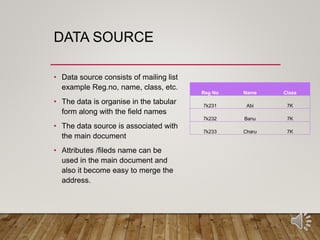
• Data source consists of mailing list
example Reg.no, name, class, etc.
• The data is organise in the tabular
form along with the field names
• The data source is associated with
the main document
• Attributes /fileds name can be
used in the main document and
also it become easy to merge the
address.
Reg No Name Class
7k231 Abi 7K
7k232 Banu 7K
7k233 Charu 7K
MERGE FIELDS
• Data items such as Reg.no,name, class etc
• Mail merge involves various steps
• Creating a main document in pagemaker
• Specifying the data source
• Merging the data source with in the main document
CREATING A MAIL MERGE IN
PAGEMAKER 7.0
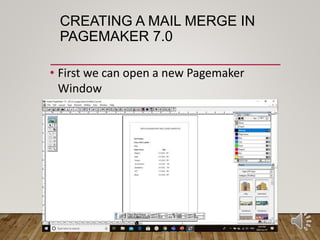
• First we can open a new Pagemaker
Window
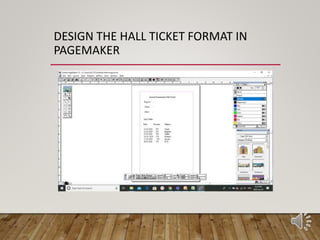
DESIGN THE HALL TICKET FORMAT IN
PAGEMAKER
OPEN A NEW EXCEL FILE
CREATING A DATA SOURCE -TYPE THE TABLE FORMAT
AS YOU GIVEN IN THE PAGEMAKER FILE(HALL TICKET)
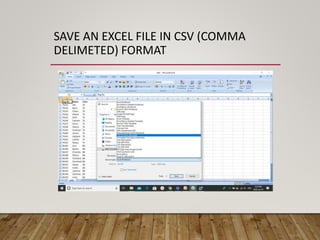
SAVE AN EXCEL FILE IN CSV (COMMA
DELIMETED) FORMAT
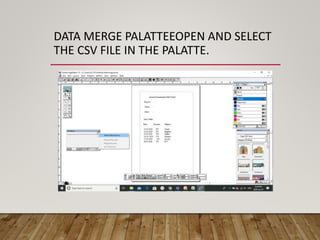
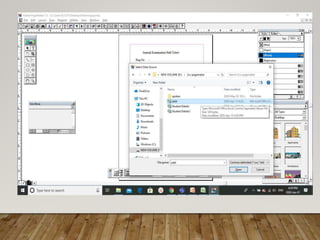
DATA MERGE PALATTEEOPEN AND SELECT
THE CSV FILE IN THE PALATTE.
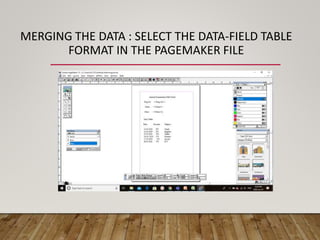
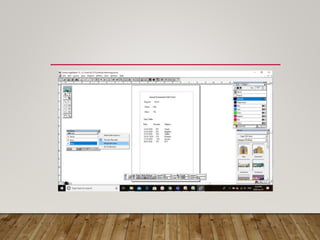
MERGING THE DATA : SELECT THE DATA-FIELD TABLE
FORMAT IN THE PAGEMAKER FILE
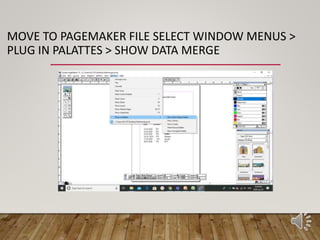
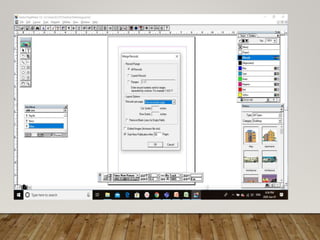
MOVE TO PAGEMAKER FILE SELECT WINDOW MENUS >
PLUG IN PALATTES > SHOW DATA MERGE
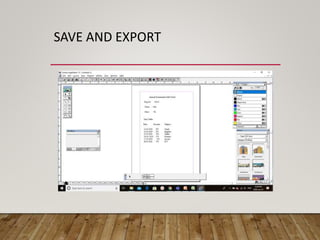
SAVE AND EXPORT
THANK YOU!..

Mail merge in page maker 7

  • 1.
    MAIL MERGE IN PAGEMAKER 7.0 MS. T.K. ANUSUYA ASSISTANT PROFESSOR DEPARTMENT OF COMPUTER SCIENCE BON SECOURS COLLEGE FOR WOMEN, THANJAVUR-6
  • 2.
    MAIL MERGE FEATURES •Mail merge feature is used to combine a data source which contains all addresses with the main document • It saves our time and energy to send letters at multiple addresses.
  • 3.
    DATA SOURCE • Datasource consists of mailing list example Reg.no, name, class, etc. • The data is organise in the tabular form along with the field names • The data source is associated with the main document • Attributes /fileds name can be used in the main document and also it become easy to merge the address. Reg No Name Class 7k231 Abi 7K 7k232 Banu 7K 7k233 Charu 7K
  • 4.
    MERGE FIELDS • Dataitems such as Reg.no,name, class etc • Mail merge involves various steps • Creating a main document in pagemaker • Specifying the data source • Merging the data source with in the main document
  • 5.
    CREATING A MAILMERGE IN PAGEMAKER 7.0 • First we can open a new Pagemaker Window
  • 6.
    DESIGN THE HALLTICKET FORMAT IN PAGEMAKER
  • 7.
    OPEN A NEWEXCEL FILE CREATING A DATA SOURCE -TYPE THE TABLE FORMAT AS YOU GIVEN IN THE PAGEMAKER FILE(HALL TICKET)
  • 8.
    SAVE AN EXCELFILE IN CSV (COMMA DELIMETED) FORMAT
  • 9.
    DATA MERGE PALATTEEOPENAND SELECT THE CSV FILE IN THE PALATTE.
  • 11.
    MERGING THE DATA: SELECT THE DATA-FIELD TABLE FORMAT IN THE PAGEMAKER FILE
  • 13.
    MOVE TO PAGEMAKERFILE SELECT WINDOW MENUS > PLUG IN PALATTES > SHOW DATA MERGE
  • 15.
  • 16.