Selected Topics for e-
Learning Technologies
(Mobile Learning)
Timothy K. Shih
• Overview of Mobile Learning
• Related Researches
• Mobile Learning Researches in MINE.
Lab
• Novel equipments and terminologies
– Hardware
– Mobile Learning 2.0
• Discussion
What is mobile learning?
Mobile learning originally
referred to the use of laptop
computers, which freed learners
from the desktop
Mobile phones opened
up the concept of
wireless learning (via
GPRS and GSM)
“Learning has moved
from the classroom
onto your desktop
and into your pocket”
Always on
Always on you
Independent of time and space
Pocket PCs and other
devices used for
learning purposes led to
the term handheld
learning
GSM/
GPRS
WifFi
Who is the buyer? 2006~2011 US
Market for Mobile Learning Products
and Services by Customer Segment
What are They Buying? Three Types of
Mobile Learning Products and Services
Next-generation Learning Technology
Trends: Mobile Learning Expands Reach
of Learning Technology
Judy Brown
• Judy was the Founder and Director of the Academic
Advanced Distributed Learning (ADL) Co-Lab in
partnership with the Department of Defense
• She was named one of the Top 100 women in
computing by McGraw Hill's Open Computing
magazine (December 1994) http://www.judybrown.com
Challenges
• Cost and Compatibility
– Cost
• Managing learning through intermittent connection
• Dial-up access to a network, small screens, slow
processing and limited storage capabilities
• The application must be able to link to a Learning
Management System
• Learners need to access all materials and exchange
information that is independent of system preferences
• If the Web connection is broken, any information will be lost
until connectivity is restored
– Compatibility
• Platform-specific solution
– SCORM
– Be able to run any compliant content on any compliant
system
Challenges
• Device-independent delivery
– M-Learning solution must work for a broad
range of devices, not only for one set
– Broad range of devices precludes specific
solutions
– One of the typical solutions:
• Broaden the capabilities and flexibility of web
browsers that separate the content from the
format
Related Research Issues
• Develop a mobile learning system applied to
specific domain.
– Tour guide in museum
– Outdoor learning activities (bird watching)
• Ubiquitous Learning
– Utilize the context awareness and adaptation
strategies to make mobile learning environments more
available
• Game Learning with mobile devices
• Related concepts and applications
– M-Learning 2.0
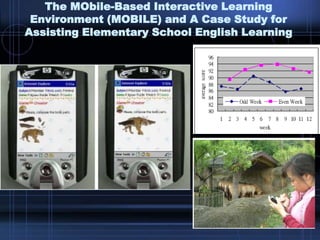
The MObile-Based Interactive Learning
Environment (MOBILE) and A Case Study for
Assisting Elementary School English Learning
A Mobile Butterfly-Watching Learning System
for Supporting Independent Learning
• The features of these systems
– Contents had been stored at mobile devices in
advance
• Museum Guide
• Designed for specific areas and users.
– Good performance and acceptable results
– Ignore the potential problems
• Network connection
• Storage capability
Pocket SCORM
Pocket SCORM
• The system received the 2005 Brandon
Hall Excellence in Learning Awards.
• The customized version of pocket
SCORM has been adopted by a
domestic airways (TransAsia) to perform
pilot training and aircraft security routines.
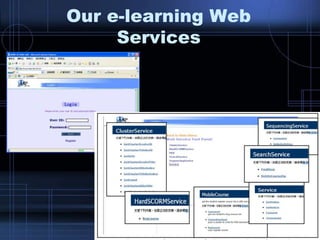
Our e-learning Web
Services
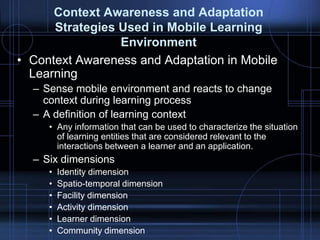
Context Awareness and Adaptation
Strategies Used in Mobile Learning
Environment
• Context Awareness and Adaptation in Mobile
Learning
– Sense mobile environment and reacts to change
context during learning process
– A definition of learning context
• Any information that can be used to characterize the situation
of learning entities that are considered relevant to the
interactions between a learner and an application.
– Six dimensions
• Identity dimension
• Spatio-temporal dimension
• Facility dimension
• Activity dimension
• Learner dimension
• Community dimension
Select
Request
&
Response
Request
&
Response
Request
&
Response
Request
&
Response
XML XSL
CC/PP
For Note
Book
CC/PP
For
Tablet
CC/PP
For PDA
CC/PP
For Mobile
Phone
Search
Generate
Personalized Metadata
Teacher’s personalized metadata
Basic metadata
Student’s personalized metadata
Mobile learning with a mobile game: design
and motivational effects
• Design of the MobileGame prototype, exploring
the opportunities to support learning through an
orientation game in a university setting.
• Mobile learning Scenario
– Used to support the orientation days at a university
– Significant place tasks
• Library, laboratories
– Significant people tasks
• Interview with important people
– Significant event tasks
• Events can scheduled or come as surprise
Interface
• Mobile game system
– Position information.
• Indoor: Ekahau positioning engine
• Outdoor: GPS (inaccurate)
• Major interface versions
2004 spring (second version)
2004 summer (third version)
Conclusion
• Technical design issues for the MobileGame
prototype
– Accuracy of positioning
– Play on the move
– Offline areas and response time
– Interface Design
• Conclusions and outlook
– Serious limitations
• Mobile user interface
• Accuracy of positioning systems
• Accompanying content have not yet been carefully
designed
– Users still liked the gaming features best.
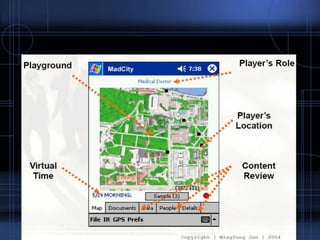
Mad City Murder: Augmented Reality
Scientific Role Play Environments
Key Findings
• Learners more enthusiastic about
learning
• 80% felt mobile learning games could
help reading or spelling; 78% felt could
improve math
• An iterative approach to development is
best, and developing learning materials
specifically for mobile is better than re-
using materials developed for delivery to
a regular PC
Mobile Learning today and in
the future
1. Mobile Learning is able to support new
trends in workplace learning.
2. New, ubiquitous and more functional
mobile devices are helping to make
mobile learning more successful
3. Mobile Learning embraces the concepts
of Web 2.0, which are already changing
e-learning.
• Jane Knight
– Proposed the concept of Mobile Learning 2.0
– The founder of the e-Learning Centre
– Head of Research Services, Organisational
Learning Technologies, at Learning Light
• Learning Light
– Non-profit organisation that builds relationships
between learning technology researchers, suppliers,
buyers and learners providing learner-centric
information to encourage the growth of learning
technologies
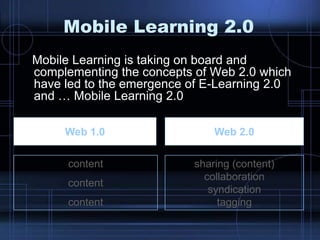
Mobile Learning 2.0
Mobile Learning is taking on board and
complementing the concepts of Web 2.0 which
have led to the emergence of E-Learning 2.0
and … Mobile Learning 2.0
Web 1.0 Web 2.0
content
content
content
sharing (content)
collaboration
syndication
tagging
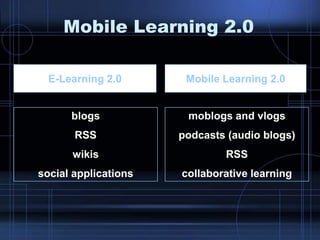
Mobile Learning 2.0
E-Learning 2.0 Mobile Learning 2.0
blogs
RSS
wikis
social applications
moblogs and vlogs
podcasts (audio blogs)
RSS
collaborative learning
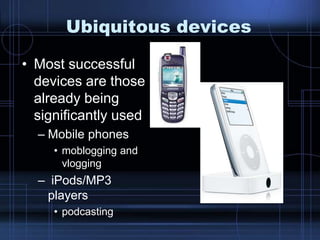
Ubiquitous devices
• Most successful
devices are those
already being
significantly used
– Mobile phones
• moblogging and
vlogging
– iPods/MP3
players
• podcasting
Moblogging and Vblogging
• A Video blog, sometimes shortened to vblog,
is a blog that comprises video
• Moblog is a blend of the words mobile and
weblog
– Consists of content posted to the Internet from a
mobile or portable device, such as a cellular phone
or PDA
• Moblogs generally involve technology which
allows publishing from a mobile device
Moblog and vblog
Podcast
• A podcast is a digital media file, or a series of
such files, that is distributed over the Internet
using syndication feeds for playback on
portable media players and personal
computers
• A specific type of webcast which, like 'radio„
• The term "podcast" is a portmanteau of the
name of Apple's portable music player, the
iPod, and broadcast; a "pod" refers to a
container of some sort, and "cast" to the idea
of broadcasting
http://en.wikipedia.org/wiki/Podcasting
Podcast
• Podcast is a collection of files (usually audio and video)
residing at a unique web feed address. People can
"subscribe" to this feed by submitting the feed address to
an aggregator (like itunes). When new "episodes"
become available in the podcast they will be
automatically downloaded to that users computer
• Podcasting is an automatic mechanism whereby
multimedia computer files are transferred from a server
to a client, which pulls down XML files containing the
Internet addresses of the media files. In general, these
files contain audio (MP3) or video, but also could be
images, text, PDF, or any file type.
http://en.wikipedia.org/wiki/Podcasting
New podcasting
terminology
• Podogogy = “pedagogical podcasting”
• Learncasting
• Coursecasting
– audio lectures
– video lectures (audio + PowerPoint slides)
Various Devices
Readius
Phillips
Nintendo’s DS and Sony’s
PSP
Add on Devices
Quick Response (QR) Code
Benefits to Business
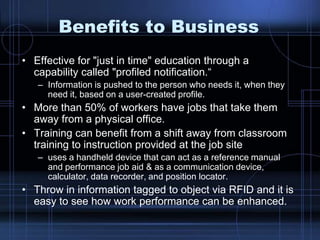
• Effective for "just in time" education through a
capability called "profiled notification.“
– Information is pushed to the person who needs it, when they
need it, based on a user-created profile.
• More than 50% of workers have jobs that take them
away from a physical office.
• Training can benefit from a shift away from classroom
training to instruction provided at the job site
– uses a handheld device that can act as a reference manual
and performance job aid & as a communication device,
calculator, data recorder, and position locator.
• Throw in information tagged to object via RFID and it is
easy to see how work performance can be enhanced.
Let’s Discuss
• How could learning change?
– What if I had immediate access to
communicate or search?
– What if I could speak to my device?
– What if my location were known?
– What if my device knew my interests and
expertise?
Operating Systems
• Palm OS
– fits in devices with less memory
– runs faster
– most users say it is easier to use
• PocketPC (formerly called Windows CE, Microsoft)
– easily supports colour displays, graphics
– miniaturized Windows packages (Word, Excel), even
PowerPoint nowadays
– takes up more memory and is slower
– users say it is more complicated
– The newest PocketPC version customized by Windows CE is
“Mobile 6”
• The Symbian OS
– major system in European markets
– offers better communications capabilities
– mostly customized for phone-like platforms
Resources
• http://en.wikipedia.org/wiki/
• http://www.judybrown.com/
• http://mobileresources.html
• http://www.mlearnopedia.com
• http://mobilelearn.pbwiki.com
• http://www.learninglight.com
• Mobile Learning
Researches in MINE. lab
An Adaptive Caching Strategy for m-
Learning Based on SCORM Sequencing
and Navigation
• Main problems
– impermanent network environment
– weak computing power and very limited
network bandwidth
Introduction
• Predict the required contents and
download the contents in advance
• How to predict the incoming learning
resources precisely
– SCORM Sequencing and Navigation
– Specific devices
• COD (caching on dish) mode
• VMM (virtual memory management) mode
– Learning record
Caching System Architecture
• Two Components of Caching Strategy
– Download Management Model
• On the Server Side
• Predict Data for Downloading
– Replacement Management Model
• On the Client Side
• Predict Data for Dropping
Download Algorithm
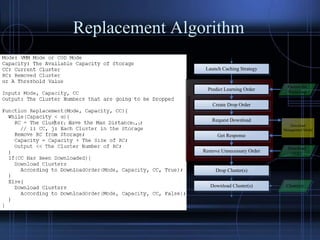
Replacement Algorithm
ReplacementManagementModel
Launch Caching Strategy
Predict Learning Order
Create Drop Order
Get Response
Drop Cluster(s)
Factors for
Predicting
Download
Order
Request Download
Remove Unnecessary Order
Download Cluster(s) Cluster(s)
Download
Management Model
Photoshop_None
Total Waiting Time (seconds) Internet Reconnection Frequency (times)
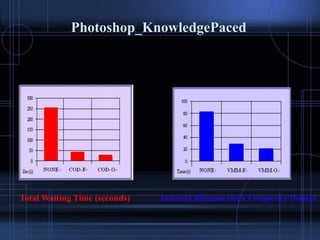
Photoshop_KnowledgePaced
Total Waiting Time (seconds) Internet Reconnection Frequency (times)
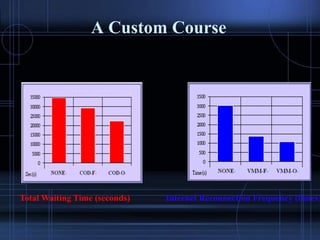
A Custom Course
Total Waiting Time (seconds) Internet Reconnection Frequency (times)
An authoring tool for mobile
learning content using Web 2.0
technology
Hsuan Pu Chang
Motivation
• There are a lot of learning contents have been designed for
regular PCs.
• The restriction of small screen of mobile learning platforms has
always influenced the user‟s learning will and learning effect
• The researches of overcoming the insufficient browsing and
Interactions on handheld devices have been studied for years
– Simplify the content presentation style
• Transform the content according to the predefined and specific
rules
• Utilize the spatial and temporal features to reorganized the
content presentation
– Modify the interactive operations
• Add the number of hyperlinks to reduce the complexity of
content‟s presentation but increase the depth of content‟s
structure
– Most of studies focus on content adaptation for usual Internet
web pages such as Yahoo rather than learning or educational
relevant contents
Goal
• The Main Goals
– Develop an authoring tool which can
• Easily adapt the existent learning contents for
user‟s specific handheld devices
– Abundant and exceptional learning contents have been
designed and published for regular PCs.
• Assist authors to produce a new mobile learning
material
– Quizzes
– Knowledge Tips
– Information Announcement
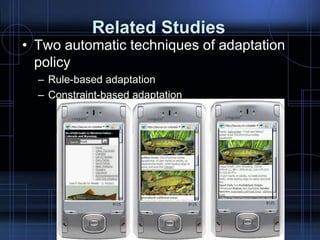
Related Studies
• Two automatic techniques of adaptation
policy
– Rule-based adaptation
– Constraint-based adaptation
Select
Request
&
Response
Request
&
Response
Request
&
Response
Request
&
Response
XML XSL
CC/PP
For Note
Book
CC/PP
For
Tablet
CC/PP
For PDA
CC/PP
For Mobile
Phone
Search
Generate
Context-Aware Interactive Content
Adaptation
• User takes the control of the adaptation
process
• Make changes until the content is suitably
adapted for user‟s purposes.
• Leverage user interaction (to correct the
adaptation) to learning how to adapt the
content based on the user‟s usage semantics
• Allow users to adjust the present object until
the requirements are satisfied
LMS
Regular Contents
Regular Contents
Repository
Instructor
SCORM
Compliant
Course
Authoring
Tool
Learner Learner Learner
Adapt
Contents
Regular Contents
Corresponding
Content Version
Corresponding
Content Version
Adapt
Contents
Adapt
Contents
Pocket
SCORM
• Questions
– If the adaptation is not proper?
– Is it possible to find a method to adapt all kinds
of learning subjects or learning contents?
– How to preserve the educational essence of
the original learning contents after the
modification by an individual user or adaptation
implemented according to a specific algorithm.
LMS
Regular Contents
Repository
Instructor
Regular
Contents
Authoring
Tool
Learner
Learner
Learner
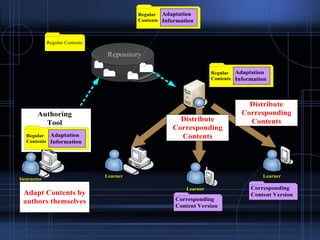
Adapt Contents by
authors themselves
Adaptation
Information
Regular
Contents
Adaptation
Information
Distribute
Corresponding
Contents
Distribute
Corresponding
Contents
Regular
Contents
Adaptation
Information
Corresponding
Content Version
Corresponding
Content Version
Benefits
• Offer the better performance during the
learning process
• Authors can preview the content adaptation
result and decide whether the adapted
contents could be published or not
• Allow professional educators ensure the quality
of the adapted contents instead of totally
adapting all kinds of contents according to the
same algorithm proposed by a computer
engineer.
The new authoring tool
• Web-based authoring tool
– Accomplish the editing process only with Internet
browser
– No more installation requirements
– With Web 2.0 technology
• How to reduce the overload of
reproducing the required contents for
mobile learning version
• Provide the semi-automatic transforming
function
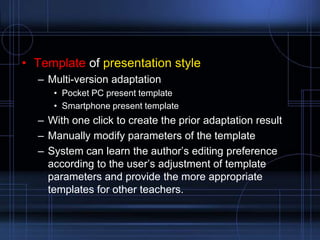
• Template of presentation style
– Multi-version adaptation
• Pocket PC present template
• Smartphone present template
– With one click to create the prior adaptation result
– Manually modify parameters of the template
– System can learn the author‟s editing preference
according to the user‟s adjustment of template
parameters and provide the more appropriate
templates for other teachers.
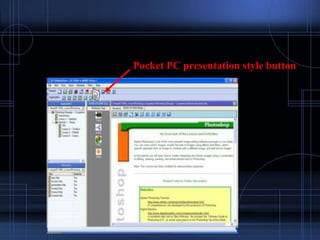
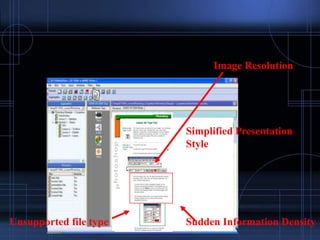
Pocket PC presentation style button
Image Resolution
Simplified Presentation
Style
Unsupported file type Sudden Information Density
Pocket PC Smartphone
Text Text/Audio Text/Audio
Image Image (resolution) Image (resolution)
Video Video, Image,
Audio
(resolution/frame
rate)
Video, Image,
Audio
(resolution/frame
rate)
Flash Flash, Video,
Image, Audio
Video, Image,
Audio
Summary

13 selected topics for e-learning technologies (ml).pptx

  • 1.
    Selected Topics fore- Learning Technologies (Mobile Learning) Timothy K. Shih
  • 2.
    • Overview ofMobile Learning • Related Researches • Mobile Learning Researches in MINE. Lab • Novel equipments and terminologies – Hardware – Mobile Learning 2.0 • Discussion
  • 3.
    What is mobilelearning? Mobile learning originally referred to the use of laptop computers, which freed learners from the desktop Mobile phones opened up the concept of wireless learning (via GPRS and GSM) “Learning has moved from the classroom onto your desktop and into your pocket” Always on Always on you Independent of time and space Pocket PCs and other devices used for learning purposes led to the term handheld learning GSM/ GPRS WifFi
  • 4.
    Who is thebuyer? 2006~2011 US Market for Mobile Learning Products and Services by Customer Segment
  • 5.
    What are TheyBuying? Three Types of Mobile Learning Products and Services
  • 6.
    Next-generation Learning Technology Trends:Mobile Learning Expands Reach of Learning Technology
  • 7.
    Judy Brown • Judywas the Founder and Director of the Academic Advanced Distributed Learning (ADL) Co-Lab in partnership with the Department of Defense • She was named one of the Top 100 women in computing by McGraw Hill's Open Computing magazine (December 1994) http://www.judybrown.com
  • 8.
    Challenges • Cost andCompatibility – Cost • Managing learning through intermittent connection • Dial-up access to a network, small screens, slow processing and limited storage capabilities • The application must be able to link to a Learning Management System • Learners need to access all materials and exchange information that is independent of system preferences • If the Web connection is broken, any information will be lost until connectivity is restored – Compatibility • Platform-specific solution – SCORM – Be able to run any compliant content on any compliant system
  • 9.
    Challenges • Device-independent delivery –M-Learning solution must work for a broad range of devices, not only for one set – Broad range of devices precludes specific solutions – One of the typical solutions: • Broaden the capabilities and flexibility of web browsers that separate the content from the format
  • 10.
  • 11.
    Related Research Issues •Develop a mobile learning system applied to specific domain. – Tour guide in museum – Outdoor learning activities (bird watching) • Ubiquitous Learning – Utilize the context awareness and adaptation strategies to make mobile learning environments more available • Game Learning with mobile devices • Related concepts and applications – M-Learning 2.0
  • 12.
    The MObile-Based InteractiveLearning Environment (MOBILE) and A Case Study for Assisting Elementary School English Learning
  • 13.
    A Mobile Butterfly-WatchingLearning System for Supporting Independent Learning
  • 16.
    • The featuresof these systems – Contents had been stored at mobile devices in advance • Museum Guide • Designed for specific areas and users. – Good performance and acceptable results – Ignore the potential problems • Network connection • Storage capability
  • 17.
  • 18.
    Pocket SCORM • Thesystem received the 2005 Brandon Hall Excellence in Learning Awards. • The customized version of pocket SCORM has been adopted by a domestic airways (TransAsia) to perform pilot training and aircraft security routines.
  • 19.
  • 20.
    Context Awareness andAdaptation Strategies Used in Mobile Learning Environment • Context Awareness and Adaptation in Mobile Learning – Sense mobile environment and reacts to change context during learning process – A definition of learning context • Any information that can be used to characterize the situation of learning entities that are considered relevant to the interactions between a learner and an application. – Six dimensions • Identity dimension • Spatio-temporal dimension • Facility dimension • Activity dimension • Learner dimension • Community dimension
  • 21.
  • 22.
    Personalized Metadata Teacher’s personalizedmetadata Basic metadata Student’s personalized metadata
  • 23.
    Mobile learning witha mobile game: design and motivational effects • Design of the MobileGame prototype, exploring the opportunities to support learning through an orientation game in a university setting. • Mobile learning Scenario – Used to support the orientation days at a university – Significant place tasks • Library, laboratories – Significant people tasks • Interview with important people – Significant event tasks • Events can scheduled or come as surprise
  • 24.
    Interface • Mobile gamesystem – Position information. • Indoor: Ekahau positioning engine • Outdoor: GPS (inaccurate) • Major interface versions 2004 spring (second version) 2004 summer (third version)
  • 25.
    Conclusion • Technical designissues for the MobileGame prototype – Accuracy of positioning – Play on the move – Offline areas and response time – Interface Design • Conclusions and outlook – Serious limitations • Mobile user interface • Accuracy of positioning systems • Accompanying content have not yet been carefully designed – Users still liked the gaming features best.
  • 26.
    Mad City Murder:Augmented Reality Scientific Role Play Environments
  • 28.
    Key Findings • Learnersmore enthusiastic about learning • 80% felt mobile learning games could help reading or spelling; 78% felt could improve math • An iterative approach to development is best, and developing learning materials specifically for mobile is better than re- using materials developed for delivery to a regular PC
  • 29.
    Mobile Learning todayand in the future 1. Mobile Learning is able to support new trends in workplace learning. 2. New, ubiquitous and more functional mobile devices are helping to make mobile learning more successful 3. Mobile Learning embraces the concepts of Web 2.0, which are already changing e-learning.
  • 30.
    • Jane Knight –Proposed the concept of Mobile Learning 2.0 – The founder of the e-Learning Centre – Head of Research Services, Organisational Learning Technologies, at Learning Light • Learning Light – Non-profit organisation that builds relationships between learning technology researchers, suppliers, buyers and learners providing learner-centric information to encourage the growth of learning technologies
  • 31.
    Mobile Learning 2.0 MobileLearning is taking on board and complementing the concepts of Web 2.0 which have led to the emergence of E-Learning 2.0 and … Mobile Learning 2.0 Web 1.0 Web 2.0 content content content sharing (content) collaboration syndication tagging
  • 32.
    Mobile Learning 2.0 E-Learning2.0 Mobile Learning 2.0 blogs RSS wikis social applications moblogs and vlogs podcasts (audio blogs) RSS collaborative learning
  • 33.
    Ubiquitous devices • Mostsuccessful devices are those already being significantly used – Mobile phones • moblogging and vlogging – iPods/MP3 players • podcasting
  • 34.
    Moblogging and Vblogging •A Video blog, sometimes shortened to vblog, is a blog that comprises video • Moblog is a blend of the words mobile and weblog – Consists of content posted to the Internet from a mobile or portable device, such as a cellular phone or PDA • Moblogs generally involve technology which allows publishing from a mobile device
  • 35.
  • 36.
    Podcast • A podcastis a digital media file, or a series of such files, that is distributed over the Internet using syndication feeds for playback on portable media players and personal computers • A specific type of webcast which, like 'radio„ • The term "podcast" is a portmanteau of the name of Apple's portable music player, the iPod, and broadcast; a "pod" refers to a container of some sort, and "cast" to the idea of broadcasting http://en.wikipedia.org/wiki/Podcasting
  • 37.
    Podcast • Podcast isa collection of files (usually audio and video) residing at a unique web feed address. People can "subscribe" to this feed by submitting the feed address to an aggregator (like itunes). When new "episodes" become available in the podcast they will be automatically downloaded to that users computer • Podcasting is an automatic mechanism whereby multimedia computer files are transferred from a server to a client, which pulls down XML files containing the Internet addresses of the media files. In general, these files contain audio (MP3) or video, but also could be images, text, PDF, or any file type. http://en.wikipedia.org/wiki/Podcasting
  • 39.
    New podcasting terminology • Podogogy= “pedagogical podcasting” • Learncasting • Coursecasting – audio lectures – video lectures (audio + PowerPoint slides)
  • 40.
  • 41.
  • 42.
    Nintendo’s DS andSony’s PSP
  • 43.
  • 44.
  • 45.
    Benefits to Business •Effective for "just in time" education through a capability called "profiled notification.“ – Information is pushed to the person who needs it, when they need it, based on a user-created profile. • More than 50% of workers have jobs that take them away from a physical office. • Training can benefit from a shift away from classroom training to instruction provided at the job site – uses a handheld device that can act as a reference manual and performance job aid & as a communication device, calculator, data recorder, and position locator. • Throw in information tagged to object via RFID and it is easy to see how work performance can be enhanced.
  • 46.
    Let’s Discuss • Howcould learning change? – What if I had immediate access to communicate or search? – What if I could speak to my device? – What if my location were known? – What if my device knew my interests and expertise?
  • 47.
    Operating Systems • PalmOS – fits in devices with less memory – runs faster – most users say it is easier to use • PocketPC (formerly called Windows CE, Microsoft) – easily supports colour displays, graphics – miniaturized Windows packages (Word, Excel), even PowerPoint nowadays – takes up more memory and is slower – users say it is more complicated – The newest PocketPC version customized by Windows CE is “Mobile 6” • The Symbian OS – major system in European markets – offers better communications capabilities – mostly customized for phone-like platforms
  • 48.
    Resources • http://en.wikipedia.org/wiki/ • http://www.judybrown.com/ •http://mobileresources.html • http://www.mlearnopedia.com • http://mobilelearn.pbwiki.com • http://www.learninglight.com
  • 49.
  • 50.
    An Adaptive CachingStrategy for m- Learning Based on SCORM Sequencing and Navigation • Main problems – impermanent network environment – weak computing power and very limited network bandwidth
  • 51.
    Introduction • Predict therequired contents and download the contents in advance • How to predict the incoming learning resources precisely – SCORM Sequencing and Navigation – Specific devices • COD (caching on dish) mode • VMM (virtual memory management) mode – Learning record
  • 52.
    Caching System Architecture •Two Components of Caching Strategy – Download Management Model • On the Server Side • Predict Data for Downloading – Replacement Management Model • On the Client Side • Predict Data for Dropping
  • 53.
  • 54.
    Replacement Algorithm ReplacementManagementModel Launch CachingStrategy Predict Learning Order Create Drop Order Get Response Drop Cluster(s) Factors for Predicting Download Order Request Download Remove Unnecessary Order Download Cluster(s) Cluster(s) Download Management Model
  • 55.
    Photoshop_None Total Waiting Time(seconds) Internet Reconnection Frequency (times)
  • 56.
    Photoshop_KnowledgePaced Total Waiting Time(seconds) Internet Reconnection Frequency (times)
  • 57.
    A Custom Course TotalWaiting Time (seconds) Internet Reconnection Frequency (times)
  • 58.
    An authoring toolfor mobile learning content using Web 2.0 technology Hsuan Pu Chang
  • 59.
    Motivation • There area lot of learning contents have been designed for regular PCs. • The restriction of small screen of mobile learning platforms has always influenced the user‟s learning will and learning effect • The researches of overcoming the insufficient browsing and Interactions on handheld devices have been studied for years – Simplify the content presentation style • Transform the content according to the predefined and specific rules • Utilize the spatial and temporal features to reorganized the content presentation – Modify the interactive operations • Add the number of hyperlinks to reduce the complexity of content‟s presentation but increase the depth of content‟s structure – Most of studies focus on content adaptation for usual Internet web pages such as Yahoo rather than learning or educational relevant contents
  • 60.
    Goal • The MainGoals – Develop an authoring tool which can • Easily adapt the existent learning contents for user‟s specific handheld devices – Abundant and exceptional learning contents have been designed and published for regular PCs. • Assist authors to produce a new mobile learning material – Quizzes – Knowledge Tips – Information Announcement
  • 61.
    Related Studies • Twoautomatic techniques of adaptation policy – Rule-based adaptation – Constraint-based adaptation
  • 62.
  • 63.
    Context-Aware Interactive Content Adaptation •User takes the control of the adaptation process • Make changes until the content is suitably adapted for user‟s purposes. • Leverage user interaction (to correct the adaptation) to learning how to adapt the content based on the user‟s usage semantics • Allow users to adjust the present object until the requirements are satisfied
  • 64.
    LMS Regular Contents Regular Contents Repository Instructor SCORM Compliant Course Authoring Tool LearnerLearner Learner Adapt Contents Regular Contents Corresponding Content Version Corresponding Content Version Adapt Contents Adapt Contents Pocket SCORM
  • 65.
    • Questions – Ifthe adaptation is not proper? – Is it possible to find a method to adapt all kinds of learning subjects or learning contents? – How to preserve the educational essence of the original learning contents after the modification by an individual user or adaptation implemented according to a specific algorithm.
  • 66.
    LMS Regular Contents Repository Instructor Regular Contents Authoring Tool Learner Learner Learner Adapt Contentsby authors themselves Adaptation Information Regular Contents Adaptation Information Distribute Corresponding Contents Distribute Corresponding Contents Regular Contents Adaptation Information Corresponding Content Version Corresponding Content Version
  • 67.
    Benefits • Offer thebetter performance during the learning process • Authors can preview the content adaptation result and decide whether the adapted contents could be published or not • Allow professional educators ensure the quality of the adapted contents instead of totally adapting all kinds of contents according to the same algorithm proposed by a computer engineer.
  • 68.
    The new authoringtool • Web-based authoring tool – Accomplish the editing process only with Internet browser – No more installation requirements – With Web 2.0 technology • How to reduce the overload of reproducing the required contents for mobile learning version • Provide the semi-automatic transforming function
  • 69.
    • Template ofpresentation style – Multi-version adaptation • Pocket PC present template • Smartphone present template – With one click to create the prior adaptation result – Manually modify parameters of the template – System can learn the author‟s editing preference according to the user‟s adjustment of template parameters and provide the more appropriate templates for other teachers.
  • 70.
  • 71.
  • 72.
    Pocket PC Smartphone TextText/Audio Text/Audio Image Image (resolution) Image (resolution) Video Video, Image, Audio (resolution/frame rate) Video, Image, Audio (resolution/frame rate) Flash Flash, Video, Image, Audio Video, Image, Audio
  • 73.