Data matters conference, London, 16th January 2019 Marieke Guy (staff) and Alex Norris (student)
The RAU
Student digital
experience tracker 2018
Your presenters
Marieke Guy,
Learning Technologist
IT Services
Alex Norris,
2nd year student
BSc Rural Land Management
The Royal Agricultural University
Cirencester, Gloucestershire
The Royal Agricultural
University
• At the forefront of agricultural education for more than 170 years
• Around 1,200 students – undergraduate, postgraduate, international
• Courses cover agriculture, animal science, business, environment,
equine science, farm management, food, real estate and rural land
management
• New blended learning courses being developed
• Have digital aspirations - https://digitalrau.wordpress.com/
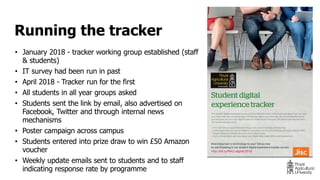
• January 2018 - tracker working group established (staff
& students)
• IT survey had been run in past
• April 2018 - Tracker run for the first
• All students in all year groups asked
• Students sent the link by email, also advertised on
Facebook, Twitter and through internal news
mechanisms
• Poster campaign across campus
• Students entered into prize draw to win £50 Amazon
voucher
• Weekly update emails sent to students and to staff
indicating response rate by programme
Running the tracker
• 218 of our students responded to the tracker (18% response rate)
• Gender split (Q2)
• Male (44%)
• Female (56%)
• Stages of study (Q3)
• 1st year (56%)
• Middle year (15%)
• Final year (18%)
• Masters/postgrad (10%)
• 20% self-identify as needing to use assistive technologies (Q6)
Student sample
Tracker results
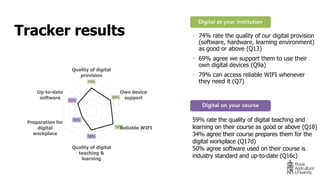
59% rate the quality of digital teaching and
learning on their course as good or above (Q18)
34% agree their course prepares them for the
digital workplace (Q17d)
50% agree software used on their course is
industry standard and up-to-date (Q16c)
• 74% rate the quality of our digital provision
(software, hardware, learning environment)
as good or above (Q13)
• 69% agree we support them to use their
own digital devices (Q9a)
• 79% can access reliable WIFI whenever
they need it (Q7)74%
69%
79%
59%
34%
50%
Quality of digital
provision
Own device
support
Reliable WIFI
Quality of digital
teaching &
learning
Preparation for
digital
workplace
Up-to-date
software
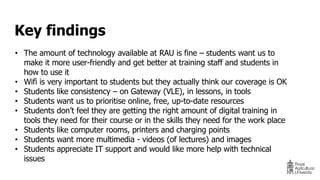
• The amount of technology available at RAU is fine – students want us to
make it more user-friendly and get better at training staff and students in
how to use it
• Wifi is very important to students but they actually think our coverage is OK
• Students like consistency – on Gateway (VLE), in lessons, in tools
• Students want us to prioritise online, free, up-to-date resources
• Students don’t feel they are getting the right amount of digital training in
tools they need for their course or in the skills they need for the work place
• Students like computer rooms, printers and charging points
• Students want more multimedia - videos (of lectures) and images
• Students appreciate IT support and would like more help with technical
issues
Key findings
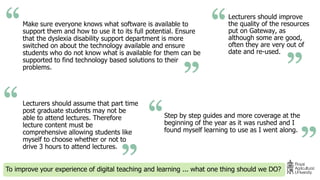
Make sure everyone knows what software is available to
support them and how to use it to its full potential. Ensure
that the dyslexia disability support department is more
switched on about the technology available and ensure
students who do not know what is available for them can be
supported to find technology based solutions to their
problems.
To improve your experience of digital teaching and learning ... what one thing should we DO?
Lecturers should improve
the quality of the resources
put on Gateway, as
although some are good,
often they are very out of
date and re-used.
Step by step guides and more coverage at the
beginning of the year as it was rushed and I
found myself learning to use as I went along.
Lecturers should assume that part time
post graduate students may not be
able to attend lectures. Therefore
lecture content must be
comprehensive allowing students like
myself to choose whether or not to
drive 3 hours to attend lectures.
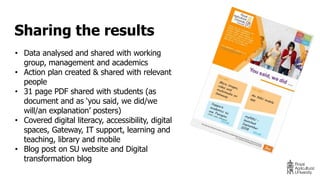
• Data analysed and shared with working
group, management and academics
• Action plan created & shared with relevant
people
• 31 page PDF shared with students (as
document and as ‘you said, we did/we
will/an explanation’ posters)
• Covered digital literacy, accessibility, digital
spaces, Gateway, IT support, learning and
teaching, library and mobile
• Blog post on SU website and Digital
transformation blog
Sharing the results
Student experience
• Simplicity
• Practicality
• Professional Software
• Good IT Support
Next steps
• Plan to run the tracker again
• Want to add in additional questions on digital skills, RAU Resource lists
and app
• Improved internal communications – will integrate with app
• New GDPR requirements – need to rethink prize situation
• Possible eChamps work
• Understanding expectations and experiences of digital should become
a more integrated part of student voice cycle
Twitter: @mariekeguy
marieke.guy@rau.ac.uk

The RAU Student digital experience tracker 2018

  • 1.
    Data matters conference,London, 16th January 2019 Marieke Guy (staff) and Alex Norris (student) The RAU Student digital experience tracker 2018
  • 2.
    Your presenters Marieke Guy, LearningTechnologist IT Services Alex Norris, 2nd year student BSc Rural Land Management
  • 3.
    The Royal AgriculturalUniversity Cirencester, Gloucestershire
  • 4.
    The Royal Agricultural University •At the forefront of agricultural education for more than 170 years • Around 1,200 students – undergraduate, postgraduate, international • Courses cover agriculture, animal science, business, environment, equine science, farm management, food, real estate and rural land management • New blended learning courses being developed • Have digital aspirations - https://digitalrau.wordpress.com/
  • 5.
    • January 2018- tracker working group established (staff & students) • IT survey had been run in past • April 2018 - Tracker run for the first • All students in all year groups asked • Students sent the link by email, also advertised on Facebook, Twitter and through internal news mechanisms • Poster campaign across campus • Students entered into prize draw to win £50 Amazon voucher • Weekly update emails sent to students and to staff indicating response rate by programme Running the tracker
  • 6.
    • 218 ofour students responded to the tracker (18% response rate) • Gender split (Q2) • Male (44%) • Female (56%) • Stages of study (Q3) • 1st year (56%) • Middle year (15%) • Final year (18%) • Masters/postgrad (10%) • 20% self-identify as needing to use assistive technologies (Q6) Student sample
  • 7.
    Tracker results 59% ratethe quality of digital teaching and learning on their course as good or above (Q18) 34% agree their course prepares them for the digital workplace (Q17d) 50% agree software used on their course is industry standard and up-to-date (Q16c) • 74% rate the quality of our digital provision (software, hardware, learning environment) as good or above (Q13) • 69% agree we support them to use their own digital devices (Q9a) • 79% can access reliable WIFI whenever they need it (Q7)74% 69% 79% 59% 34% 50% Quality of digital provision Own device support Reliable WIFI Quality of digital teaching & learning Preparation for digital workplace Up-to-date software
  • 8.
    • The amountof technology available at RAU is fine – students want us to make it more user-friendly and get better at training staff and students in how to use it • Wifi is very important to students but they actually think our coverage is OK • Students like consistency – on Gateway (VLE), in lessons, in tools • Students want us to prioritise online, free, up-to-date resources • Students don’t feel they are getting the right amount of digital training in tools they need for their course or in the skills they need for the work place • Students like computer rooms, printers and charging points • Students want more multimedia - videos (of lectures) and images • Students appreciate IT support and would like more help with technical issues Key findings
  • 9.
    Make sure everyoneknows what software is available to support them and how to use it to its full potential. Ensure that the dyslexia disability support department is more switched on about the technology available and ensure students who do not know what is available for them can be supported to find technology based solutions to their problems. To improve your experience of digital teaching and learning ... what one thing should we DO? Lecturers should improve the quality of the resources put on Gateway, as although some are good, often they are very out of date and re-used. Step by step guides and more coverage at the beginning of the year as it was rushed and I found myself learning to use as I went along. Lecturers should assume that part time post graduate students may not be able to attend lectures. Therefore lecture content must be comprehensive allowing students like myself to choose whether or not to drive 3 hours to attend lectures.
  • 10.
    • Data analysedand shared with working group, management and academics • Action plan created & shared with relevant people • 31 page PDF shared with students (as document and as ‘you said, we did/we will/an explanation’ posters) • Covered digital literacy, accessibility, digital spaces, Gateway, IT support, learning and teaching, library and mobile • Blog post on SU website and Digital transformation blog Sharing the results
  • 11.
    Student experience • Simplicity •Practicality • Professional Software • Good IT Support
  • 12.
    Next steps • Planto run the tracker again • Want to add in additional questions on digital skills, RAU Resource lists and app • Improved internal communications – will integrate with app • New GDPR requirements – need to rethink prize situation • Possible eChamps work • Understanding expectations and experiences of digital should become a more integrated part of student voice cycle
  • 13.

Editor's Notes

  • #12 As student all we want is easily navigated and simple to use technology. Pretty much a system that does what it says on the tin. The RAU does this by simplistic means of having a easily navigated and simplistic website called Gateway, this allows for students to find information themselves. The System incorporates the use of Module pages this is where course and module specific information can be found, including the PPTs for lectures, coursework briefs as well extra reading. This means that as students we don’t have to chase our tails around looking for information, and that the lectures can easily communicate with us. The University also has a policy of realising PPTs the day before this allows the students to assimilate the information before it is delivered, it also allows for easier note taking, especially for myself as I have DSA’s which allow for recordings, this coupled with the PPTs means I have exceptionally comprehensive notes. Due to the RAU’s courses being rather practical the use of professional software is essential to prepare students for the job roles they’ll be undertaking. For myself the RAU allows me to have access to Promap, mapping software, Metropix for creating floorplans and Argus a valuation software. The lecturers do teach us how to use these software's however an aspect the RAU could improve is by educating students on how to use basic word and excel skills. As during some course works it was trail and error as well as the long route to the answer. The Library also has extensive online resources and the access to them anywhere in the world is great, as I have written coursework in a multitude of random places including on the English Channel. The Ability to reserve as well as read books also means that you can quickly and efficient gather resources, the variety of course specific material as well as general knowledge is great and allows for extra reading in many spheres. Overall the centralised system the RAU uses means that the Student IT experience is great for a IT Idiot like myself, icing on the cake is the contact you can have with IT if you don’t understand or cant find any information and their long opening hours and range of communication methods means that there is always an answer.