Create a Blog Tell the world your news  and point of view!
What is a Blog? First, watch the following video Blogging in Plain English Blogs are used for: A) Finding friends B) Sharing news and point of view C) an encyclopedia Blog stands for: A) bologna B) news page C) a web log Blogs: Through the eyes of 6 & 7 year olds...
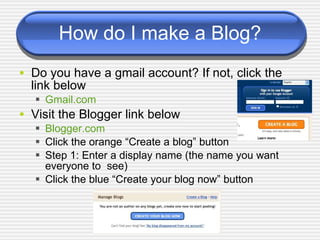
How do I make a Blog? Do you have a gmail account? If not, click the link below Gmail.com Visit the Blogger link below Blogger.com Click the orange “Create a blog” button Step 1: Enter a display name (the name you want  everyone to  see) Click the blue “Create your blog now” button
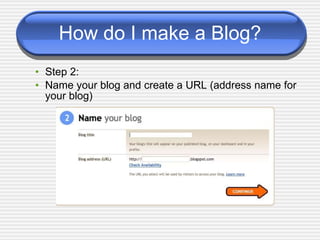
How do I make a Blog? Step 2: Name your blog and create a URL (address name for your blog)
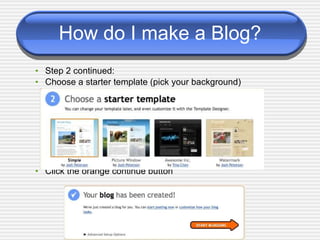
How do I make a Blog? Step 2 continued: Choose a starter template (pick your background) Click the orange continue button
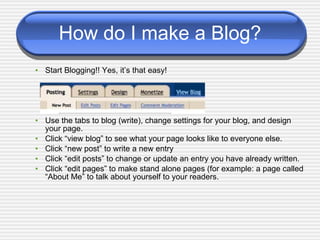
How do I make a Blog? Start Blogging!! Yes, it’s that easy! Use the tabs to blog (write), change settings for your blog, and design your page. Click “view blog” to see what your page looks like to everyone else. Click “new post” to write a new entry Click “edit posts” to change or update an entry you have already written. Click “edit pages” to make stand alone pages (for example: a page called “About Me” to talk about yourself to your readers.
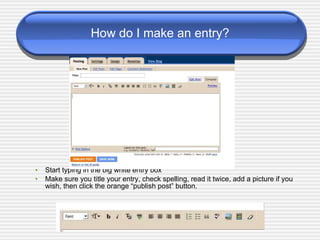
How do I make an entry? Start typing in the big white entry box Make sure you title your entry, check spelling, read it twice, add a picture if you wish, then click the orange “publish post” button.
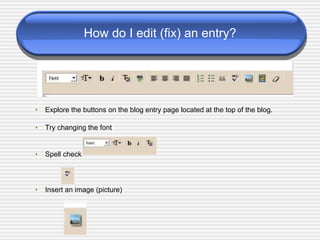
How do I edit (fix) an entry? Explore the buttons on the blog entry page located at the top of the blog. Try changing the font Spell check  Insert an image (picture)
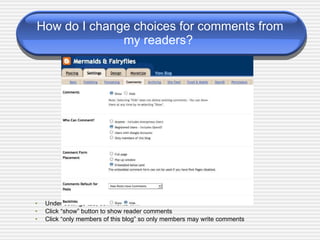
How do I change choices for comments from my readers?  Under settings tab, comments link Click “show” button to show reader comments Click “only members of this blog” so only members may write comments
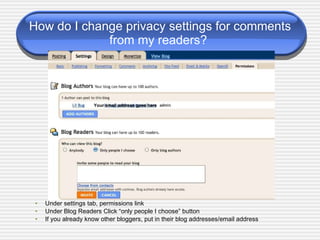
How do I change privacy settings for comments from my readers?  Under settings tab, permissions link Under Blog Readers Click “only people I choose” button If you already know other bloggers, put in their blog addresses/email address Your email address goes here
Why let students blog? Teachers and parents: Click me and please watch this video! Blogging in the elementary classroom
Blogging Basics You are the director Blogging  Basics 101 When you get the hang of blogging, use the blogging basics link above to give you more choices with making your blog unique. Try adding interesting graphics Make Wordles - word clouds
References Blogger .com Gmail.com Blogs in the Elementary Classroom By Blythe Heisey, teachertube.com Blogging in plain English By Lee and Sachi LeFever, teachertube.com 6 & 7 Year olds and Blogs By Rachel Boyd, teachertube.com Why Let Students Blog? By Rachel Boyd, teachertube.com Blogging Basics 101 Wordles
The End Thank you for your interest in blogging! Have fun trying it out! You are on your way to publishing your writing.
TRY AGAIN!
Correct! Blogs are used for sharing information Information can be personal news, personal views, images, world events and much more Blogs are logs kept on the web

Ls591 yarbrough interactive_presentation_july2

  • 1.
    Create a BlogTell the world your news and point of view!
  • 2.
    What is aBlog? First, watch the following video Blogging in Plain English Blogs are used for: A) Finding friends B) Sharing news and point of view C) an encyclopedia Blog stands for: A) bologna B) news page C) a web log Blogs: Through the eyes of 6 & 7 year olds...
  • 3.
    How do Imake a Blog? Do you have a gmail account? If not, click the link below Gmail.com Visit the Blogger link below Blogger.com Click the orange “Create a blog” button Step 1: Enter a display name (the name you want everyone to see) Click the blue “Create your blog now” button
  • 4.
    How do Imake a Blog? Step 2: Name your blog and create a URL (address name for your blog)
  • 5.
    How do Imake a Blog? Step 2 continued: Choose a starter template (pick your background) Click the orange continue button
  • 6.
    How do Imake a Blog? Start Blogging!! Yes, it’s that easy! Use the tabs to blog (write), change settings for your blog, and design your page. Click “view blog” to see what your page looks like to everyone else. Click “new post” to write a new entry Click “edit posts” to change or update an entry you have already written. Click “edit pages” to make stand alone pages (for example: a page called “About Me” to talk about yourself to your readers.
  • 7.
    How do Imake an entry? Start typing in the big white entry box Make sure you title your entry, check spelling, read it twice, add a picture if you wish, then click the orange “publish post” button.
  • 8.
    How do Iedit (fix) an entry? Explore the buttons on the blog entry page located at the top of the blog. Try changing the font Spell check Insert an image (picture)
  • 9.
    How do Ichange choices for comments from my readers? Under settings tab, comments link Click “show” button to show reader comments Click “only members of this blog” so only members may write comments
  • 10.
    How do Ichange privacy settings for comments from my readers? Under settings tab, permissions link Under Blog Readers Click “only people I choose” button If you already know other bloggers, put in their blog addresses/email address Your email address goes here
  • 11.
    Why let studentsblog? Teachers and parents: Click me and please watch this video! Blogging in the elementary classroom
  • 12.
    Blogging Basics Youare the director Blogging Basics 101 When you get the hang of blogging, use the blogging basics link above to give you more choices with making your blog unique. Try adding interesting graphics Make Wordles - word clouds
  • 13.
    References Blogger .comGmail.com Blogs in the Elementary Classroom By Blythe Heisey, teachertube.com Blogging in plain English By Lee and Sachi LeFever, teachertube.com 6 & 7 Year olds and Blogs By Rachel Boyd, teachertube.com Why Let Students Blog? By Rachel Boyd, teachertube.com Blogging Basics 101 Wordles
  • 14.
    The End Thankyou for your interest in blogging! Have fun trying it out! You are on your way to publishing your writing.
  • 15.
  • 16.
    Correct! Blogs areused for sharing information Information can be personal news, personal views, images, world events and much more Blogs are logs kept on the web