TLPI - 6
Processes
Shu-Yu Fu (shuyufu@gmail.com)
In This Chapter
● the structure of a process
● the attributes of a process
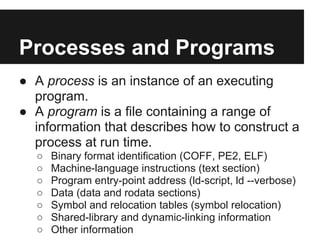
Processes and Programs
● A process is an instance of an executing
  program.
● A program is a file containing a range of
  information that describes how to construct a
  process at run time.
  ○   Binary format identification (COFF, PE2, ELF)
  ○   Machine-language instructions (text section)
  ○   Program entry-point address (ld-script, ld --verbose)
  ○   Data (data and rodata sections)
  ○   Symbol and relocation tables (symbol relocation)
  ○   Shared-library and dynamic-linking information
  ○   Other information
Process ID and Parent
Process ID
#include <unistd.h>
pid_t getpid(void);
pid_t getppid(void);
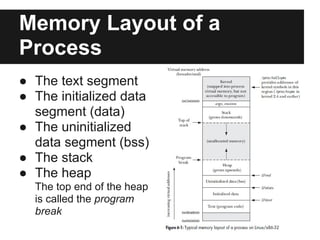
Memory Layout of a
Process
● The text segment
● The initialized data
  segment (data)
● The uninitialized
  data segment (bss)
● The stack
● The heap
  The top end of the heap
  is called the program
  break
Locations of program variables in
process memory segments
#include <stdio.h>                                           static void
#include <stdlib.h>                                          doCalc (int val) { /* Allocated in frame for doCalc() */
                                                               printf ("The square of %d is %dn", val, square
/* Uninitialized data segment */                             (val));

char globBuf[65536];                                             if (val < 1000) {
                                                                     int t; /* Allocated in frame for doCalc() */

/* Initialized data segment */                                       t = val * val * val;

int primes[] = {2, 3, 5, 7};                                         printf ("The cube of %d is %dn", val, t);
                                                                 }

static int                                                   }

square (int x) { /* Allocated in frame for square() */
    int result;    /* Allocated in frame for square() */     int

    result = x * x;                                          main (int argc, char *argv[]) { /* Allocated in frame
                                                             for main() */
    return result; /* Return value passed via register) */
                                                                 static int key = 993; /* Initialized data segment */
}
                                                                 static char mbuf[64]; /* Uninitialized data segment */
                                                                 char *p; /* Allocated in frame for main() */
                                                                 p = malloc (8); /* Points to memory in heap segment */
                                                                 doCalc (key);
                                                                 exit (EXIT_SUCCESS);
                                                             }
Virtual Memory
Management
● A virtual memory scheme splits the memory
  used by each program into small, fixed-size
  units called pages.
● At any one time, only some of the pages of a
  program need to be resident in physical
  memory page frames; these pages form the
  so-called resident set.
Virtual Memory
Management (cont.)
● Copies of the unused pages of a program
  are maintained in the swap area--a reserved
  area of disk space used to supplement the
  computer's RAM--and loaded into physical
  memory only as required.
● When a process reference a page that is not
  currently resident in physical memory, a
  page fault occurs.
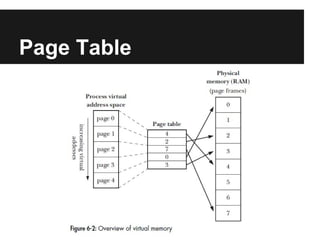
● The kernel maintains a page table for each
  process.
Page Table
Virtual Memory
Management (cont.)
● The page table describes the location of
  each page in the process's virtual address
  space.
● If a process tries to access an address for
  which there is no corresponding page-table
  entry, it receives a SIGSEGV signal.
● A process's range of valid virtual addresses
  can change over its lifetime.
  ○ stack grows, brk(), sbrk(), malloc() family, shmat(),
    shmdt(), mmap(), munmap()
Advantages
● Processes are isolated from one another and from the
  kernel.
● Where appropriate, two or more processes can share
  memory.
● Page-table entries can be marked to indicate that the
  contents of the corresponding page are readable,
  writable, executable, or some combination of these
  protections.
● Programmers don't need to be concerned with the
  physical layout of the program in RAM.
● Because only a part of a program needs to reside in
  memory, the program loads and runs faster.
The Stack and Stack
Frames
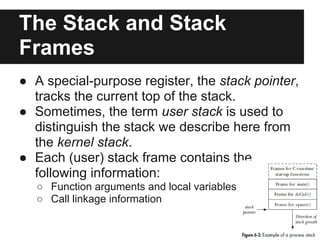
● A special-purpose register, the stack pointer,
  tracks the current top of the stack.
● Sometimes, the term user stack is used to
  distinguish the stack we describe here from
  the kernel stack.
● Each (user) stack frame contains the
  following information:
   ○ Function arguments and local variables
   ○ Call linkage information
Command-Line Arguments
(cont.)
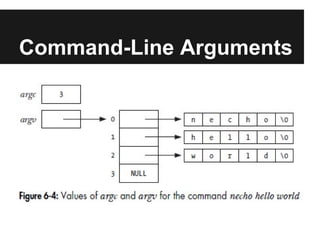
● The fact that argv[0] contains the name used
  to invoke the program can be employed to
  perform a useful trick.
● The command-line arguments of any
  process can be read via the Linux-specific
  /proc/PID/cmdline file.
● The argv and environ arrays reside in a
  single continuous area of memory which has
  an upper limit on the total number of bytes
  that can be stored in this area.
Echoing Command-Line
Arguments
#include <stdlib.h>

int main (int argc, char * argv[])
{
  int j;

    for (j = 0; j < argc; j++)
      printf ("argv[%d] = %sn", j, argv[j]);

    return (EXIT_SUCCESS);
}
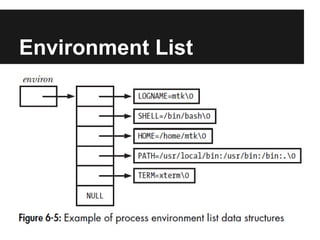
Environment List
Environment List (cont.)
● Each process has an associated array of
  strings called the environment list.
● Each of these strings is a definition of the
  form name=value.
● When a new process is created, it inherits a
  copy of its parent's environment.
● The environment list of any process can be
  examined via the Linux-specific
  /proc/PID/environ file.
Displaying the Process
Environment
#include <stdlib.h>

extern char **environ;

int main (int argc, char * argv[])
{
  char **ep;

    for (ep = environ; *ep; ep++)
      puts (*ep);

    return (EXIT_SUCCESS);
}
Accessing the Environment From a
Program
● #define _BSD_SOURCE
● #include <stdlib.h>
● int main(int argc, char *argv[], char *envp[]);
● char * getenv(const char *name);
● int putenv(char *string);
● int setenv(const char *name, const char
  *value, int overwrite);
● int unsetenv(const char *name);
● int clearenv(void);
Accessing the Environment From a
Program (cont.)
● In some circumstances, the use of setenv()
  and clearenv() can lead to memory leaks in
  a proram.
● We noted above the setenv() allocates a
  memory buffer that is then made part of the
  environment.
● When we call clearenv(), it doesn't free this
  buffer.
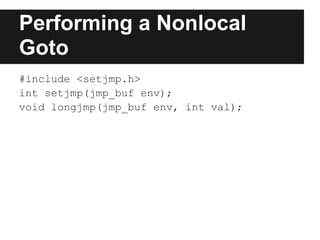
Performing a Nonlocal
Goto
#include <setjmp.h>
int setjmp(jmp_buf env);
void longjmp(jmp_buf env, int val);
Demonstrate the Use of
setjmp() and longjmp()
#include <setjmp.h>
                                                             $./longjmp
static jmp_buf env;
static void f2(void) {                                       Calling f1() after initial setjmp()
    longjmp(env, 2);
                                                             We jumped back from f1()
}
static void f1(int argc) {
    if (argc == 1) longjmp(env, 1);
                                                             $./longjmp x
    f2();
}                                                            Calling f1() after initial setjmp()
int main(int argc, char *argv[]) {
                                                             We jumped back from f2()
    switch (setjmp(env)) {
        case 0:
          printf("Calling f2() after initial setjmp()n");
          f1(argc);
          break;
        case 1:
          printf("We jumped back from f1()n");
          break;
        case 2:
          printf("We jumped back from f2()n");
          break;
    }
    exit(EXIT_SUCCESS);
}
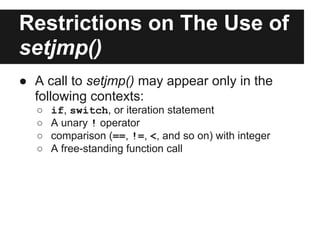
Restrictions on The Use of
setjmp()
● A call to setjmp() may appear only in the
  following contexts:
  ○   if, switch, or iteration statement
  ○   A unary ! operator
  ○   comparison (==, !=, <, and so on) with integer
  ○   A free-standing function call
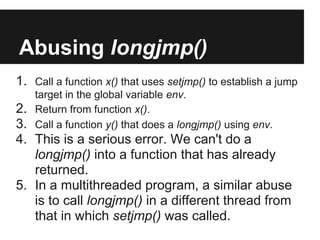
Abusing longjmp()
1. Call a function x() that uses setjmp() to establish a jump
    target in the global variable env.
2.  Return from function x().
3.  Call a function y() that does a longjmp() using env.
4. This is a serious error. We can't do a
   longjmp() into a function that has already
   returned.
5. In a multithreaded program, a similar abuse
   is to call longjmp() in a different thread from
   that in which setjmp() was called.
Problems with Optimizing
   Compilers
   #include <stdio.h>                                 int main(int argc, char *argv[])
   #include <stdlib.h>                                {
   #include <setjmp.h>                                    int nvar;
   static jmp_buf env;                                    register int rvar;
   static void doJump(int nvar, int rvar, int vvar)       volatile int vvar;
   {                                                      nvar = 111;
       printf("Inside doJump(): nvar=%d rvar=%d           rvar = 222;
          vvar=%dn", nvar, rvar, vvar);                  vvar = 333;
       longjmp(env, 1);                                   if (setjmp(env) == 0) {
   }                                                          nvar = 777;
                                                              rvar = 888;
                                                              vvar = 999;
                                                              doJump(nvar, rvar, vvar);
                                                          } else {
                                                              printf("After longjmp(): nvar=%d rvar=%d
$ cc -o setjmp_vars setjmp_vars.c                                 vvar=%dn", nvar, rvar, vvar);
$ ./setjmp_vars                                           }
Inside doJump(): nvar=777 rvar=888 vvar=999               exit(EXIT_SUCCESS);
After longjmp(): nvar=777 rvar=888 vvar=999           }

$ cc -O =o setjmp_vars setjmp_vars.c
$ ./setjmp_vars
Inside doJump(): nvar=777 rvar=888 vvar=999
After longjmp(): nvar=111 rvar=222 vvar=999
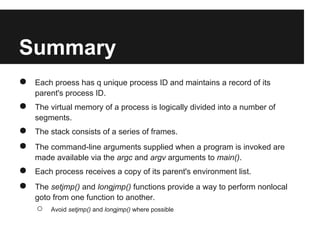
Summary
●   Each proess has q unique process ID and maintains a record of its
    parent's process ID.
●   The virtual memory of a process is logically divided into a number of
    segments.
●   The stack consists of a series of frames.
●   The command-line arguments supplied when a program is invoked are
    made available via the argc and argv arguments to main().
●   Each process receives a copy of its parent's environment list.
●   The setjmp() and longjmp() functions provide a way to perform nonlocal
    goto from one function to another.
    ○   Avoid setjmp() and longjmp() where possible

TLPI - 6 Process

  • 1.
    TLPI - 6 Processes Shu-YuFu (shuyufu@gmail.com)
  • 2.
    In This Chapter ●the structure of a process ● the attributes of a process
  • 3.
    Processes and Programs ●A process is an instance of an executing program. ● A program is a file containing a range of information that describes how to construct a process at run time. ○ Binary format identification (COFF, PE2, ELF) ○ Machine-language instructions (text section) ○ Program entry-point address (ld-script, ld --verbose) ○ Data (data and rodata sections) ○ Symbol and relocation tables (symbol relocation) ○ Shared-library and dynamic-linking information ○ Other information
  • 4.
    Process ID andParent Process ID #include <unistd.h> pid_t getpid(void); pid_t getppid(void);
  • 5.
    Memory Layout ofa Process ● The text segment ● The initialized data segment (data) ● The uninitialized data segment (bss) ● The stack ● The heap The top end of the heap is called the program break
  • 6.
    Locations of programvariables in process memory segments #include <stdio.h> static void #include <stdlib.h> doCalc (int val) { /* Allocated in frame for doCalc() */ printf ("The square of %d is %dn", val, square /* Uninitialized data segment */ (val)); char globBuf[65536]; if (val < 1000) { int t; /* Allocated in frame for doCalc() */ /* Initialized data segment */ t = val * val * val; int primes[] = {2, 3, 5, 7}; printf ("The cube of %d is %dn", val, t); } static int } square (int x) { /* Allocated in frame for square() */ int result; /* Allocated in frame for square() */ int result = x * x; main (int argc, char *argv[]) { /* Allocated in frame for main() */ return result; /* Return value passed via register) */ static int key = 993; /* Initialized data segment */ } static char mbuf[64]; /* Uninitialized data segment */ char *p; /* Allocated in frame for main() */ p = malloc (8); /* Points to memory in heap segment */ doCalc (key); exit (EXIT_SUCCESS); }
  • 7.
    Virtual Memory Management ● Avirtual memory scheme splits the memory used by each program into small, fixed-size units called pages. ● At any one time, only some of the pages of a program need to be resident in physical memory page frames; these pages form the so-called resident set.
  • 8.
    Virtual Memory Management (cont.) ●Copies of the unused pages of a program are maintained in the swap area--a reserved area of disk space used to supplement the computer's RAM--and loaded into physical memory only as required. ● When a process reference a page that is not currently resident in physical memory, a page fault occurs. ● The kernel maintains a page table for each process.
  • 9.
  • 10.
    Virtual Memory Management (cont.) ●The page table describes the location of each page in the process's virtual address space. ● If a process tries to access an address for which there is no corresponding page-table entry, it receives a SIGSEGV signal. ● A process's range of valid virtual addresses can change over its lifetime. ○ stack grows, brk(), sbrk(), malloc() family, shmat(), shmdt(), mmap(), munmap()
  • 11.
    Advantages ● Processes areisolated from one another and from the kernel. ● Where appropriate, two or more processes can share memory. ● Page-table entries can be marked to indicate that the contents of the corresponding page are readable, writable, executable, or some combination of these protections. ● Programmers don't need to be concerned with the physical layout of the program in RAM. ● Because only a part of a program needs to reside in memory, the program loads and runs faster.
  • 12.
    The Stack andStack Frames ● A special-purpose register, the stack pointer, tracks the current top of the stack. ● Sometimes, the term user stack is used to distinguish the stack we describe here from the kernel stack. ● Each (user) stack frame contains the following information: ○ Function arguments and local variables ○ Call linkage information
  • 13.
  • 14.
    Command-Line Arguments (cont.) ● Thefact that argv[0] contains the name used to invoke the program can be employed to perform a useful trick. ● The command-line arguments of any process can be read via the Linux-specific /proc/PID/cmdline file. ● The argv and environ arrays reside in a single continuous area of memory which has an upper limit on the total number of bytes that can be stored in this area.
  • 15.
    Echoing Command-Line Arguments #include <stdlib.h> intmain (int argc, char * argv[]) { int j; for (j = 0; j < argc; j++) printf ("argv[%d] = %sn", j, argv[j]); return (EXIT_SUCCESS); }
  • 16.
  • 17.
    Environment List (cont.) ●Each process has an associated array of strings called the environment list. ● Each of these strings is a definition of the form name=value. ● When a new process is created, it inherits a copy of its parent's environment. ● The environment list of any process can be examined via the Linux-specific /proc/PID/environ file.
  • 18.
    Displaying the Process Environment #include<stdlib.h> extern char **environ; int main (int argc, char * argv[]) { char **ep; for (ep = environ; *ep; ep++) puts (*ep); return (EXIT_SUCCESS); }
  • 19.
    Accessing the EnvironmentFrom a Program ● #define _BSD_SOURCE ● #include <stdlib.h> ● int main(int argc, char *argv[], char *envp[]); ● char * getenv(const char *name); ● int putenv(char *string); ● int setenv(const char *name, const char *value, int overwrite); ● int unsetenv(const char *name); ● int clearenv(void);
  • 20.
    Accessing the EnvironmentFrom a Program (cont.) ● In some circumstances, the use of setenv() and clearenv() can lead to memory leaks in a proram. ● We noted above the setenv() allocates a memory buffer that is then made part of the environment. ● When we call clearenv(), it doesn't free this buffer.
  • 21.
    Performing a Nonlocal Goto #include<setjmp.h> int setjmp(jmp_buf env); void longjmp(jmp_buf env, int val);
  • 22.
    Demonstrate the Useof setjmp() and longjmp() #include <setjmp.h> $./longjmp static jmp_buf env; static void f2(void) { Calling f1() after initial setjmp() longjmp(env, 2); We jumped back from f1() } static void f1(int argc) { if (argc == 1) longjmp(env, 1); $./longjmp x f2(); } Calling f1() after initial setjmp() int main(int argc, char *argv[]) { We jumped back from f2() switch (setjmp(env)) { case 0: printf("Calling f2() after initial setjmp()n"); f1(argc); break; case 1: printf("We jumped back from f1()n"); break; case 2: printf("We jumped back from f2()n"); break; } exit(EXIT_SUCCESS); }
  • 23.
    Restrictions on TheUse of setjmp() ● A call to setjmp() may appear only in the following contexts: ○ if, switch, or iteration statement ○ A unary ! operator ○ comparison (==, !=, <, and so on) with integer ○ A free-standing function call
  • 24.
    Abusing longjmp() 1. Calla function x() that uses setjmp() to establish a jump target in the global variable env. 2. Return from function x(). 3. Call a function y() that does a longjmp() using env. 4. This is a serious error. We can't do a longjmp() into a function that has already returned. 5. In a multithreaded program, a similar abuse is to call longjmp() in a different thread from that in which setjmp() was called.
  • 25.
    Problems with Optimizing Compilers #include <stdio.h> int main(int argc, char *argv[]) #include <stdlib.h> { #include <setjmp.h> int nvar; static jmp_buf env; register int rvar; static void doJump(int nvar, int rvar, int vvar) volatile int vvar; { nvar = 111; printf("Inside doJump(): nvar=%d rvar=%d rvar = 222; vvar=%dn", nvar, rvar, vvar); vvar = 333; longjmp(env, 1); if (setjmp(env) == 0) { } nvar = 777; rvar = 888; vvar = 999; doJump(nvar, rvar, vvar); } else { printf("After longjmp(): nvar=%d rvar=%d $ cc -o setjmp_vars setjmp_vars.c vvar=%dn", nvar, rvar, vvar); $ ./setjmp_vars } Inside doJump(): nvar=777 rvar=888 vvar=999 exit(EXIT_SUCCESS); After longjmp(): nvar=777 rvar=888 vvar=999 } $ cc -O =o setjmp_vars setjmp_vars.c $ ./setjmp_vars Inside doJump(): nvar=777 rvar=888 vvar=999 After longjmp(): nvar=111 rvar=222 vvar=999
  • 26.
    Summary ● Each proess has q unique process ID and maintains a record of its parent's process ID. ● The virtual memory of a process is logically divided into a number of segments. ● The stack consists of a series of frames. ● The command-line arguments supplied when a program is invoked are made available via the argc and argv arguments to main(). ● Each process receives a copy of its parent's environment list. ● The setjmp() and longjmp() functions provide a way to perform nonlocal goto from one function to another. ○ Avoid setjmp() and longjmp() where possible