Colloquium - awk
v1.0
A. Magee
April 4, 2010
1 / 19
Colloquium - awk, v1.0
A. Magee
Outline
1 Introduction
What does awk offer?
When should I use awk?
2 Learning by example
Sample File
Polling a Field
Doing a Little Math
2 / 19
Colloquium - awk, v1.0
A. Magee
Outline
1 Introduction
What does awk offer?
When should I use awk?
2 Learning by example
Sample File
Polling a Field
Doing a Little Math
2 / 19
Colloquium - awk, v1.0
A. Magee
Introduction What?
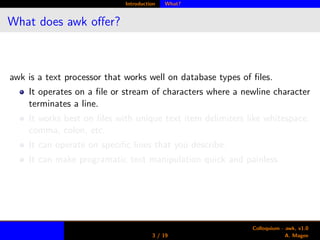
What does awk offer?
awk is a text processor that works well on database types of files.
It operates on a file or stream of characters where a newline character
terminates a line.
It works best on files with unique text item delimiters like whitespace,
comma, colon, etc.
It can operate on specific lines that you describe.
It can make programatic text manipulation quick and painless.
3 / 19
Colloquium - awk, v1.0
A. Magee
Introduction What?
What does awk offer?
awk is a text processor that works well on database types of files.
It operates on a file or stream of characters where a newline character
terminates a line.
It works best on files with unique text item delimiters like whitespace,
comma, colon, etc.
It can operate on specific lines that you describe.
It can make programatic text manipulation quick and painless.
3 / 19
Colloquium - awk, v1.0
A. Magee
Introduction What?
What does awk offer?
awk is a text processor that works well on database types of files.
It operates on a file or stream of characters where a newline character
terminates a line.
It works best on files with unique text item delimiters like whitespace,
comma, colon, etc.
It can operate on specific lines that you describe.
It can make programatic text manipulation quick and painless.
3 / 19
Colloquium - awk, v1.0
A. Magee
Introduction When?
When should I use awk?
For parsing well structured data.
For editing a file at precisely defined places.
When you are too lazy (or smart) to open a WYSIWYG editor.
4 / 19
Colloquium - awk, v1.0
A. Magee
Introduction When?
When should I use awk?
For parsing well structured data.
For editing a file at precisely defined places.
When you are too lazy (or smart) to open a WYSIWYG editor.
4 / 19
Colloquium - awk, v1.0
A. Magee
Introduction When?
When should I use awk?
For parsing well structured data.
For editing a file at precisely defined places.
When you are too lazy (or smart) to open a WYSIWYG editor.
4 / 19
Colloquium - awk, v1.0
A. Magee
Examples Sample File
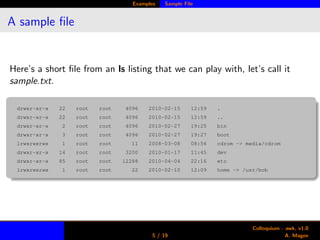
A sample file
Here’s a short file from an ls listing that we can play with, let’s call it
sample.txt.
drwxr-xr-x 22 root root 4096 2010-02-15 12:59 .
drwxr-xr-x 22 root root 4096 2010-02-15 12:59 ..
drwxr-xr-x 2 root root 4096 2010-02-27 19:25 bin
drwxr-xr-x 3 root root 4096 2010-02-27 19:27 boot
lrwxrwxrwx 1 root root 11 2008-03-08 08:56 cdrom -> media/cdrom
drwxr-xr-x 14 root root 3200 2010-01-17 11:45 dev
drwxr-xr-x 85 root root 12288 2010-04-04 22:16 etc
lrwxrwxrwx 1 root root 22 2010-02-10 12:09 home -> /usr/bob
5 / 19
Colloquium - awk, v1.0
A. Magee
Examples Sample File
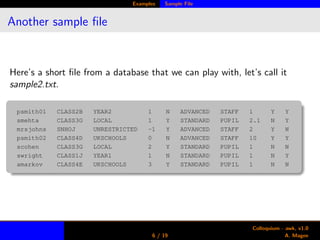
Another sample file
Here’s a short file from a database that we can play with, let’s call it
sample2.txt.
psmith01 CLASS2B YEAR2 1 N ADVANCED STAFF 1 Y Y
smehta CLASS3G LOCAL 1 Y STANDARD PUPIL 2.1 N Y
mrsjohns SNHOJ UNRESTRICTED -1 Y ADVANCED STAFF 2 Y N
psmith02 CLASS4D UKSCHOOLS 0 N ADVANCED STAFF 10 Y Y
scohen CLASS3G LOCAL 2 Y STANDARD PUPIL 1 N N
swright CLASS1J YEAR1 1 N STANDARD PUPIL 1 N Y
amarkov CLASS4E UKSCHOOLS 3 Y STANDARD PUPIL 1 N N
6 / 19
Colloquium - awk, v1.0
A. Magee
Examples Polling
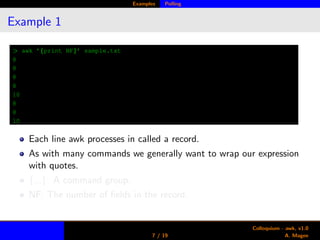
Example 1
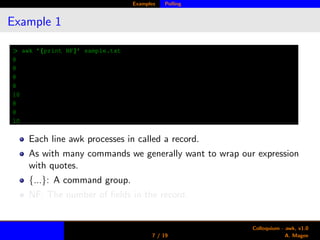
> awk ’{print NF}’ sample.txt
8
8
8
8
10
8
8
10
Each line awk processes in called a record.
As with many commands we generally want to wrap our expression
with quotes.
{...}: A command group.
NF: The number of fields in the record.
7 / 19
Colloquium - awk, v1.0
A. Magee
Examples Polling
Example 1
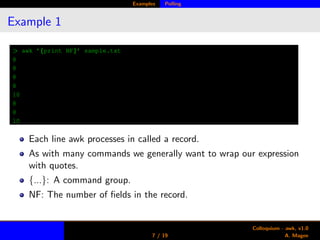
> awk ’{print NF}’ sample.txt
8
8
8
8
10
8
8
10
Each line awk processes in called a record.
As with many commands we generally want to wrap our expression
with quotes.
{...}: A command group.
NF: The number of fields in the record.
7 / 19
Colloquium - awk, v1.0
A. Magee
Examples Polling
Example 1
> awk ’{print NF}’ sample.txt
8
8
8
8
10
8
8
10
Each line awk processes in called a record.
As with many commands we generally want to wrap our expression
with quotes.
{...}: A command group.
NF: The number of fields in the record.
7 / 19
Colloquium - awk, v1.0
A. Magee
Examples Polling
Example 2
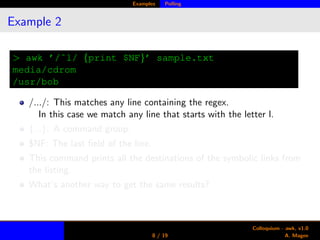
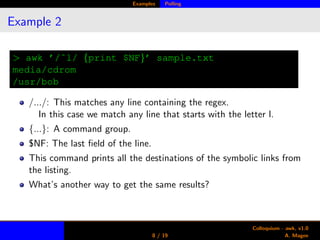
> awk ’/ˆl/ {print $NF}’ sample.txt
media/cdrom
/usr/bob
/.../: This matches any line containing the regex.
In this case we match any line that starts with the letter l.
{...}: A command group.
$NF: The last field of the line.
This command prints all the destinations of the symbolic links from
the listing.
What’s another way to get the same results?
8 / 19
Colloquium - awk, v1.0
A. Magee
Examples Polling
Example 2
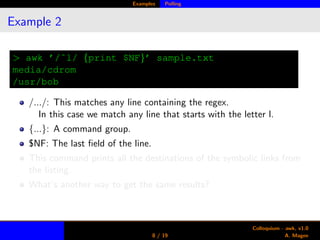
> awk ’/ˆl/ {print $NF}’ sample.txt
media/cdrom
/usr/bob
/.../: This matches any line containing the regex.
In this case we match any line that starts with the letter l.
{...}: A command group.
$NF: The last field of the line.
This command prints all the destinations of the symbolic links from
the listing.
What’s another way to get the same results?
8 / 19
Colloquium - awk, v1.0
A. Magee
Examples Polling
Example 2
> awk ’/ˆl/ {print $NF}’ sample.txt
media/cdrom
/usr/bob
/.../: This matches any line containing the regex.
In this case we match any line that starts with the letter l.
{...}: A command group.
$NF: The last field of the line.
This command prints all the destinations of the symbolic links from
the listing.
What’s another way to get the same results?
8 / 19
Colloquium - awk, v1.0
A. Magee
Examples Polling
Example 3
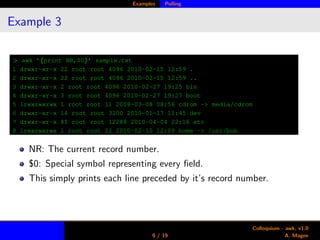
> awk ’{print NR,$0}’ sample.txt
1 drwxr-xr-x 22 root root 4096 2010-02-15 12:59 .
2 drwxr-xr-x 22 root root 4096 2010-02-15 12:59 ..
3 drwxr-xr-x 2 root root 4096 2010-02-27 19:25 bin
4 drwxr-xr-x 3 root root 4096 2010-02-27 19:27 boot
5 lrwxrwxrwx 1 root root 11 2008-03-08 08:56 cdrom -> media/cdrom
6 drwxr-xr-x 14 root root 3200 2010-01-17 11:45 dev
7 drwxr-xr-x 85 root root 12288 2010-04-04 22:16 etc
8 lrwxrwxrwx 1 root root 22 2010-02-10 12:09 home -> /usr/bob
NR: The current record number.
$0: Special symbol representing every field.
This simply prints each line preceded by it’s record number.
9 / 19
Colloquium - awk, v1.0
A. Magee
Examples Polling
Example 4
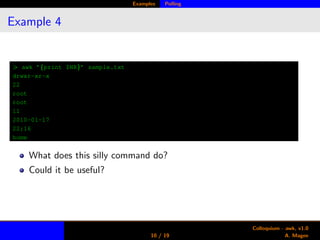
> awk ’{print $NR}’ sample.txt
drwxr-xr-x
22
root
root
11
2010-01-17
22:16
home
What does this silly command do?
Could it be useful?
10 / 19
Colloquium - awk, v1.0
A. Magee
Examples Math
Example 5
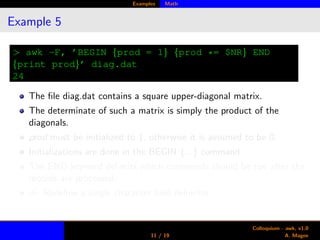
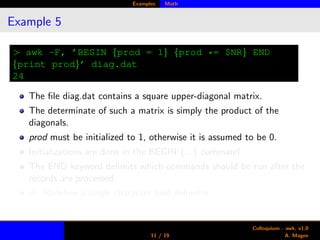
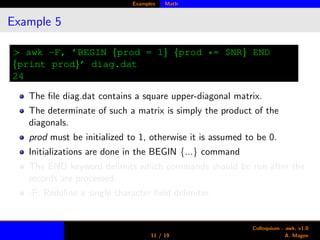
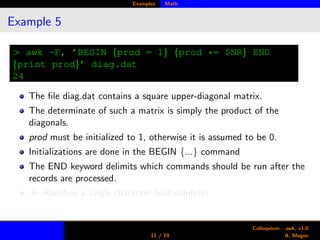
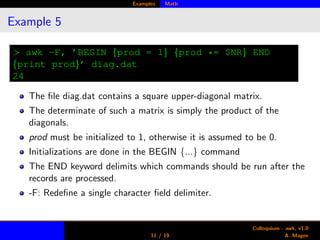
> awk -F, ’BEGIN {prod = 1} {prod *= $NR} END
{print prod}’ diag.dat
24
The file diag.dat contains a square upper-diagonal matrix.
The determinate of such a matrix is simply the product of the
diagonals.
prod must be initialized to 1, otherwise it is assumed to be 0.
Initializations are done in the BEGIN {...} command
The END keyword delimits which commands should be run after the
records are processed.
-F: Redefine a single character field delimiter.
11 / 19
Colloquium - awk, v1.0
A. Magee
Examples Math
Example 5
> awk -F, ’BEGIN {prod = 1} {prod *= $NR} END
{print prod}’ diag.dat
24
The file diag.dat contains a square upper-diagonal matrix.
The determinate of such a matrix is simply the product of the
diagonals.
prod must be initialized to 1, otherwise it is assumed to be 0.
Initializations are done in the BEGIN {...} command
The END keyword delimits which commands should be run after the
records are processed.
-F: Redefine a single character field delimiter.
11 / 19
Colloquium - awk, v1.0
A. Magee
Examples Math
Example 5
> awk -F, ’BEGIN {prod = 1} {prod *= $NR} END
{print prod}’ diag.dat
24
The file diag.dat contains a square upper-diagonal matrix.
The determinate of such a matrix is simply the product of the
diagonals.
prod must be initialized to 1, otherwise it is assumed to be 0.
Initializations are done in the BEGIN {...} command
The END keyword delimits which commands should be run after the
records are processed.
-F: Redefine a single character field delimiter.
11 / 19
Colloquium - awk, v1.0
A. Magee
Examples Math
Example 5
> awk -F, ’BEGIN {prod = 1} {prod *= $NR} END
{print prod}’ diag.dat
24
The file diag.dat contains a square upper-diagonal matrix.
The determinate of such a matrix is simply the product of the
diagonals.
prod must be initialized to 1, otherwise it is assumed to be 0.
Initializations are done in the BEGIN {...} command
The END keyword delimits which commands should be run after the
records are processed.
-F: Redefine a single character field delimiter.
11 / 19
Colloquium - awk, v1.0
A. Magee
Examples Math
Example 5
> awk -F, ’BEGIN {prod = 1} {prod *= $NR} END
{print prod}’ diag.dat
24
The file diag.dat contains a square upper-diagonal matrix.
The determinate of such a matrix is simply the product of the
diagonals.
prod must be initialized to 1, otherwise it is assumed to be 0.
Initializations are done in the BEGIN {...} command
The END keyword delimits which commands should be run after the
records are processed.
-F: Redefine a single character field delimiter.
11 / 19
Colloquium - awk, v1.0
A. Magee
Examples Math
Non-explicit Details
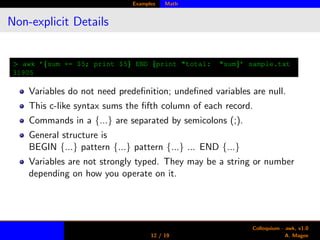
> awk ’{sum += $5; print $5} END {print "total: "sum}’ sample.txt
31905
Variables do not need predefinition; undefined variables are null.
This c-like syntax sums the fifth column of each record.
Commands in a {...} are separated by semicolons (;).
General structure is
BEGIN {...} pattern {...} pattern {...} ... END {...}
Variables are not strongly typed. They may be a string or number
depending on how you operate on it.
12 / 19
Colloquium - awk, v1.0
A. Magee
Examples Math
Example 6 & 7
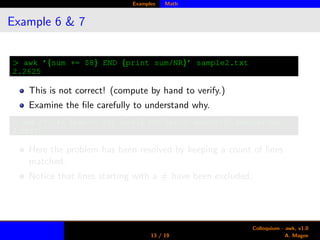
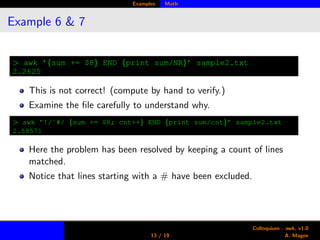
> awk ’{sum += $8} END {print sum/NR}’ sample2.txt
2.2625
This is not correct! (compute by hand to verify.)
Examine the file carefully to understand why.
> awk ’!/ˆ#/ {sum += $8; cnt++} END {print sum/cnt}’ sample2.txt
2.58571
Here the problem has been resolved by keeping a count of lines
matched.
Notice that lines starting with a # have been excluded.
13 / 19
Colloquium - awk, v1.0
A. Magee
Examples Math
Example 6 & 7
> awk ’{sum += $8} END {print sum/NR}’ sample2.txt
2.2625
This is not correct! (compute by hand to verify.)
Examine the file carefully to understand why.
> awk ’!/ˆ#/ {sum += $8; cnt++} END {print sum/cnt}’ sample2.txt
2.58571
Here the problem has been resolved by keeping a count of lines
matched.
Notice that lines starting with a # have been excluded.
13 / 19
Colloquium - awk, v1.0
A. Magee
Examples Math
Example 8
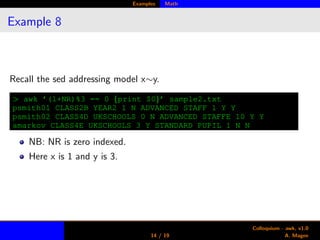
Recall the sed addressing model x∼y.
> awk ’(1+NR)%3 == 0 {print $0}’ sample2.txt
psmith01 CLASS2B YEAR2 1 N ADVANCED STAFF 1 Y Y
psmith02 CLASS4D UKSCHOOLS 0 N ADVANCED STAFFE 10 Y Y
amarkov CLASS4E UKSCHOOLS 3 Y STANDARD PUPIL 1 N N
NB: NR is zero indexed.
Here x is 1 and y is 3.
14 / 19
Colloquium - awk, v1.0
A. Magee
Appendix
3 Appendix
Tons of Control
15 / 19
Colloquium - awk, v1.0
A. Magee
Appendix Tons of Control
More Built-Ins
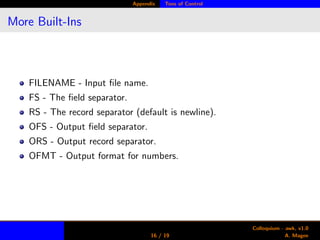
FILENAME - Input file name.
FS - The field separator.
RS - The record separator (default is newline).
OFS - Output field separator.
ORS - Output record separator.
OFMT - Output format for numbers.
16 / 19
Colloquium - awk, v1.0
A. Magee
Appendix Tons of Control
Math Functions
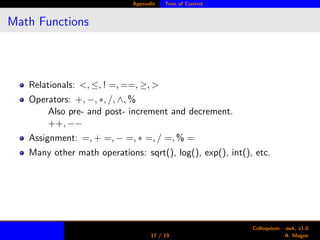
Relationals: <, ≤, ! =, ==, ≥, >
Operators: +, −, ∗, /, ∧, %
Also pre- and post- increment and decrement.
++, −−
Assignment: =, + =, − =, ∗ =, / =, % =
Many other math operations: sqrt(), log(), exp(), int(), etc.
17 / 19
Colloquium - awk, v1.0
A. Magee
Appendix Tons of Control
String Functions
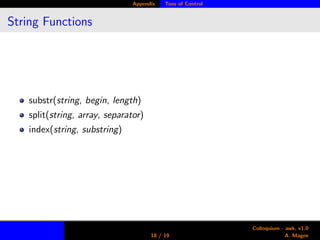
substr(string, begin, length)
split(string, array, separator)
index(string, substring)
18 / 19
Colloquium - awk, v1.0
A. Magee
Appendix Tons of Control
Control Structures
if ... else
while
for
19 / 19
Colloquium - awk, v1.0
A. Magee

Awk Introduction

  • 1.
    Colloquium - awk v1.0 A.Magee April 4, 2010 1 / 19 Colloquium - awk, v1.0 A. Magee
  • 2.
    Outline 1 Introduction What doesawk offer? When should I use awk? 2 Learning by example Sample File Polling a Field Doing a Little Math 2 / 19 Colloquium - awk, v1.0 A. Magee
  • 3.
    Outline 1 Introduction What doesawk offer? When should I use awk? 2 Learning by example Sample File Polling a Field Doing a Little Math 2 / 19 Colloquium - awk, v1.0 A. Magee
  • 4.
    Introduction What? What doesawk offer? awk is a text processor that works well on database types of files. It operates on a file or stream of characters where a newline character terminates a line. It works best on files with unique text item delimiters like whitespace, comma, colon, etc. It can operate on specific lines that you describe. It can make programatic text manipulation quick and painless. 3 / 19 Colloquium - awk, v1.0 A. Magee
  • 5.
    Introduction What? What doesawk offer? awk is a text processor that works well on database types of files. It operates on a file or stream of characters where a newline character terminates a line. It works best on files with unique text item delimiters like whitespace, comma, colon, etc. It can operate on specific lines that you describe. It can make programatic text manipulation quick and painless. 3 / 19 Colloquium - awk, v1.0 A. Magee
  • 6.
    Introduction What? What doesawk offer? awk is a text processor that works well on database types of files. It operates on a file or stream of characters where a newline character terminates a line. It works best on files with unique text item delimiters like whitespace, comma, colon, etc. It can operate on specific lines that you describe. It can make programatic text manipulation quick and painless. 3 / 19 Colloquium - awk, v1.0 A. Magee
  • 7.
    Introduction When? When shouldI use awk? For parsing well structured data. For editing a file at precisely defined places. When you are too lazy (or smart) to open a WYSIWYG editor. 4 / 19 Colloquium - awk, v1.0 A. Magee
  • 8.
    Introduction When? When shouldI use awk? For parsing well structured data. For editing a file at precisely defined places. When you are too lazy (or smart) to open a WYSIWYG editor. 4 / 19 Colloquium - awk, v1.0 A. Magee
  • 9.
    Introduction When? When shouldI use awk? For parsing well structured data. For editing a file at precisely defined places. When you are too lazy (or smart) to open a WYSIWYG editor. 4 / 19 Colloquium - awk, v1.0 A. Magee
  • 10.
    Examples Sample File Asample file Here’s a short file from an ls listing that we can play with, let’s call it sample.txt. drwxr-xr-x 22 root root 4096 2010-02-15 12:59 . drwxr-xr-x 22 root root 4096 2010-02-15 12:59 .. drwxr-xr-x 2 root root 4096 2010-02-27 19:25 bin drwxr-xr-x 3 root root 4096 2010-02-27 19:27 boot lrwxrwxrwx 1 root root 11 2008-03-08 08:56 cdrom -> media/cdrom drwxr-xr-x 14 root root 3200 2010-01-17 11:45 dev drwxr-xr-x 85 root root 12288 2010-04-04 22:16 etc lrwxrwxrwx 1 root root 22 2010-02-10 12:09 home -> /usr/bob 5 / 19 Colloquium - awk, v1.0 A. Magee
  • 11.
    Examples Sample File Anothersample file Here’s a short file from a database that we can play with, let’s call it sample2.txt. psmith01 CLASS2B YEAR2 1 N ADVANCED STAFF 1 Y Y smehta CLASS3G LOCAL 1 Y STANDARD PUPIL 2.1 N Y mrsjohns SNHOJ UNRESTRICTED -1 Y ADVANCED STAFF 2 Y N psmith02 CLASS4D UKSCHOOLS 0 N ADVANCED STAFF 10 Y Y scohen CLASS3G LOCAL 2 Y STANDARD PUPIL 1 N N swright CLASS1J YEAR1 1 N STANDARD PUPIL 1 N Y amarkov CLASS4E UKSCHOOLS 3 Y STANDARD PUPIL 1 N N 6 / 19 Colloquium - awk, v1.0 A. Magee
  • 12.
    Examples Polling Example 1 >awk ’{print NF}’ sample.txt 8 8 8 8 10 8 8 10 Each line awk processes in called a record. As with many commands we generally want to wrap our expression with quotes. {...}: A command group. NF: The number of fields in the record. 7 / 19 Colloquium - awk, v1.0 A. Magee
  • 13.
    Examples Polling Example 1 >awk ’{print NF}’ sample.txt 8 8 8 8 10 8 8 10 Each line awk processes in called a record. As with many commands we generally want to wrap our expression with quotes. {...}: A command group. NF: The number of fields in the record. 7 / 19 Colloquium - awk, v1.0 A. Magee
  • 14.
    Examples Polling Example 1 >awk ’{print NF}’ sample.txt 8 8 8 8 10 8 8 10 Each line awk processes in called a record. As with many commands we generally want to wrap our expression with quotes. {...}: A command group. NF: The number of fields in the record. 7 / 19 Colloquium - awk, v1.0 A. Magee
  • 15.
    Examples Polling Example 2 >awk ’/ˆl/ {print $NF}’ sample.txt media/cdrom /usr/bob /.../: This matches any line containing the regex. In this case we match any line that starts with the letter l. {...}: A command group. $NF: The last field of the line. This command prints all the destinations of the symbolic links from the listing. What’s another way to get the same results? 8 / 19 Colloquium - awk, v1.0 A. Magee
  • 16.
    Examples Polling Example 2 >awk ’/ˆl/ {print $NF}’ sample.txt media/cdrom /usr/bob /.../: This matches any line containing the regex. In this case we match any line that starts with the letter l. {...}: A command group. $NF: The last field of the line. This command prints all the destinations of the symbolic links from the listing. What’s another way to get the same results? 8 / 19 Colloquium - awk, v1.0 A. Magee
  • 17.
    Examples Polling Example 2 >awk ’/ˆl/ {print $NF}’ sample.txt media/cdrom /usr/bob /.../: This matches any line containing the regex. In this case we match any line that starts with the letter l. {...}: A command group. $NF: The last field of the line. This command prints all the destinations of the symbolic links from the listing. What’s another way to get the same results? 8 / 19 Colloquium - awk, v1.0 A. Magee
  • 18.
    Examples Polling Example 3 >awk ’{print NR,$0}’ sample.txt 1 drwxr-xr-x 22 root root 4096 2010-02-15 12:59 . 2 drwxr-xr-x 22 root root 4096 2010-02-15 12:59 .. 3 drwxr-xr-x 2 root root 4096 2010-02-27 19:25 bin 4 drwxr-xr-x 3 root root 4096 2010-02-27 19:27 boot 5 lrwxrwxrwx 1 root root 11 2008-03-08 08:56 cdrom -> media/cdrom 6 drwxr-xr-x 14 root root 3200 2010-01-17 11:45 dev 7 drwxr-xr-x 85 root root 12288 2010-04-04 22:16 etc 8 lrwxrwxrwx 1 root root 22 2010-02-10 12:09 home -> /usr/bob NR: The current record number. $0: Special symbol representing every field. This simply prints each line preceded by it’s record number. 9 / 19 Colloquium - awk, v1.0 A. Magee
  • 19.
    Examples Polling Example 4 >awk ’{print $NR}’ sample.txt drwxr-xr-x 22 root root 11 2010-01-17 22:16 home What does this silly command do? Could it be useful? 10 / 19 Colloquium - awk, v1.0 A. Magee
  • 20.
    Examples Math Example 5 >awk -F, ’BEGIN {prod = 1} {prod *= $NR} END {print prod}’ diag.dat 24 The file diag.dat contains a square upper-diagonal matrix. The determinate of such a matrix is simply the product of the diagonals. prod must be initialized to 1, otherwise it is assumed to be 0. Initializations are done in the BEGIN {...} command The END keyword delimits which commands should be run after the records are processed. -F: Redefine a single character field delimiter. 11 / 19 Colloquium - awk, v1.0 A. Magee
  • 21.
    Examples Math Example 5 >awk -F, ’BEGIN {prod = 1} {prod *= $NR} END {print prod}’ diag.dat 24 The file diag.dat contains a square upper-diagonal matrix. The determinate of such a matrix is simply the product of the diagonals. prod must be initialized to 1, otherwise it is assumed to be 0. Initializations are done in the BEGIN {...} command The END keyword delimits which commands should be run after the records are processed. -F: Redefine a single character field delimiter. 11 / 19 Colloquium - awk, v1.0 A. Magee
  • 22.
    Examples Math Example 5 >awk -F, ’BEGIN {prod = 1} {prod *= $NR} END {print prod}’ diag.dat 24 The file diag.dat contains a square upper-diagonal matrix. The determinate of such a matrix is simply the product of the diagonals. prod must be initialized to 1, otherwise it is assumed to be 0. Initializations are done in the BEGIN {...} command The END keyword delimits which commands should be run after the records are processed. -F: Redefine a single character field delimiter. 11 / 19 Colloquium - awk, v1.0 A. Magee
  • 23.
    Examples Math Example 5 >awk -F, ’BEGIN {prod = 1} {prod *= $NR} END {print prod}’ diag.dat 24 The file diag.dat contains a square upper-diagonal matrix. The determinate of such a matrix is simply the product of the diagonals. prod must be initialized to 1, otherwise it is assumed to be 0. Initializations are done in the BEGIN {...} command The END keyword delimits which commands should be run after the records are processed. -F: Redefine a single character field delimiter. 11 / 19 Colloquium - awk, v1.0 A. Magee
  • 24.
    Examples Math Example 5 >awk -F, ’BEGIN {prod = 1} {prod *= $NR} END {print prod}’ diag.dat 24 The file diag.dat contains a square upper-diagonal matrix. The determinate of such a matrix is simply the product of the diagonals. prod must be initialized to 1, otherwise it is assumed to be 0. Initializations are done in the BEGIN {...} command The END keyword delimits which commands should be run after the records are processed. -F: Redefine a single character field delimiter. 11 / 19 Colloquium - awk, v1.0 A. Magee
  • 25.
    Examples Math Non-explicit Details >awk ’{sum += $5; print $5} END {print "total: "sum}’ sample.txt 31905 Variables do not need predefinition; undefined variables are null. This c-like syntax sums the fifth column of each record. Commands in a {...} are separated by semicolons (;). General structure is BEGIN {...} pattern {...} pattern {...} ... END {...} Variables are not strongly typed. They may be a string or number depending on how you operate on it. 12 / 19 Colloquium - awk, v1.0 A. Magee
  • 26.
    Examples Math Example 6& 7 > awk ’{sum += $8} END {print sum/NR}’ sample2.txt 2.2625 This is not correct! (compute by hand to verify.) Examine the file carefully to understand why. > awk ’!/ˆ#/ {sum += $8; cnt++} END {print sum/cnt}’ sample2.txt 2.58571 Here the problem has been resolved by keeping a count of lines matched. Notice that lines starting with a # have been excluded. 13 / 19 Colloquium - awk, v1.0 A. Magee
  • 27.
    Examples Math Example 6& 7 > awk ’{sum += $8} END {print sum/NR}’ sample2.txt 2.2625 This is not correct! (compute by hand to verify.) Examine the file carefully to understand why. > awk ’!/ˆ#/ {sum += $8; cnt++} END {print sum/cnt}’ sample2.txt 2.58571 Here the problem has been resolved by keeping a count of lines matched. Notice that lines starting with a # have been excluded. 13 / 19 Colloquium - awk, v1.0 A. Magee
  • 28.
    Examples Math Example 8 Recallthe sed addressing model x∼y. > awk ’(1+NR)%3 == 0 {print $0}’ sample2.txt psmith01 CLASS2B YEAR2 1 N ADVANCED STAFF 1 Y Y psmith02 CLASS4D UKSCHOOLS 0 N ADVANCED STAFFE 10 Y Y amarkov CLASS4E UKSCHOOLS 3 Y STANDARD PUPIL 1 N N NB: NR is zero indexed. Here x is 1 and y is 3. 14 / 19 Colloquium - awk, v1.0 A. Magee
  • 29.
    Appendix 3 Appendix Tons ofControl 15 / 19 Colloquium - awk, v1.0 A. Magee
  • 30.
    Appendix Tons ofControl More Built-Ins FILENAME - Input file name. FS - The field separator. RS - The record separator (default is newline). OFS - Output field separator. ORS - Output record separator. OFMT - Output format for numbers. 16 / 19 Colloquium - awk, v1.0 A. Magee
  • 31.
    Appendix Tons ofControl Math Functions Relationals: <, ≤, ! =, ==, ≥, > Operators: +, −, ∗, /, ∧, % Also pre- and post- increment and decrement. ++, −− Assignment: =, + =, − =, ∗ =, / =, % = Many other math operations: sqrt(), log(), exp(), int(), etc. 17 / 19 Colloquium - awk, v1.0 A. Magee
  • 32.
    Appendix Tons ofControl String Functions substr(string, begin, length) split(string, array, separator) index(string, substring) 18 / 19 Colloquium - awk, v1.0 A. Magee
  • 33.
    Appendix Tons ofControl Control Structures if ... else while for 19 / 19 Colloquium - awk, v1.0 A. Magee