awk – Essentials and Examples
              1

       Logan Palanisamy
Agenda
                            2

 Elements of awk
 Optional Bio Break
 Examples and one-liners
 Q&A
What is awk
                          3

 An acronym of the last names of the three authors
 General purpose pattern-scanning and processing
  language
 Used for filtering, transforming and reporting
 More advanced than sed, but less complicated than
  C; less cryptic than Perl.
 gawk, nawk
awk syntax
                             4

 awk [-Ffield_sep] 'cmd' infile(s)
 awk [-Ffield_sep] –f cmd_file infile(s)
 infile can be the output of pipeline.
 Space is the default field_sep
awk mechanics
                             5

 [pattern] [{action} …]
 Input files processed a line at a time
 Every line is processed if there is no pattern
 Lines split into fields based on field-sep
 Print is the default action.
 Input files not affected in anyway
Field Names
                             6

 Lines split into fields based on field-sep
 $0 represents the whole line
 $1, $2, … $n represent different fields
 Field names could be used as variables
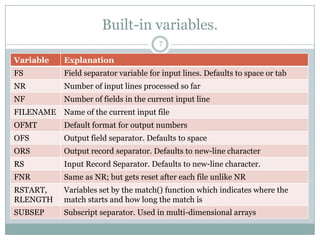
Built-in variables.
                                        7

Variable    Explanation
FS          Field separator variable for input lines. Defaults to space or tab
NR          Number of input lines processed so far
NF          Number of fields in the current input line
FILENAME Name of the current input file
OFMT        Default format for output numbers
OFS         Output field separator. Defaults to space
ORS         Output record separator. Defaults to new-line character
RS          Input Record Separator. Defaults to new-line character.
FNR         Same as NR; but gets reset after each file unlike NR
RSTART,     Variables set by the match() function which indicates where the
RLENGTH     match starts and how long the match is
SUBSEP      Subscript separator. Used in multi-dimensional arrays
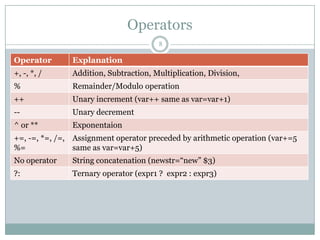
Operators
                                       8

Operator       Explanation
+, -, *, /     Addition, Subtraction, Multiplication, Division,
%              Remainder/Modulo operation
++             Unary increment (var++ same as var=var+1)
--             Unary decrement
^ or **        Exponentaion
+=, -=, *=, /=, Assignment operator preceded by arithmetic operation (var+=5
%=              same as var=var+5)
No operator    String concatenation (newstr=“new” $3)
?:             Ternary operator (expr1 ? expr2 : expr3)
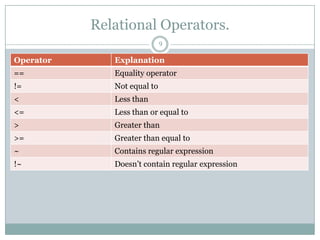
Relational Operators.
                             9

Operator      Explanation
==            Equality operator
!=            Not equal to
<             Less than
<=            Less than or equal to
>             Greater than
>=            Greater than equal to
~             Contains regular expression
!~            Doesn‟t contain regular expression
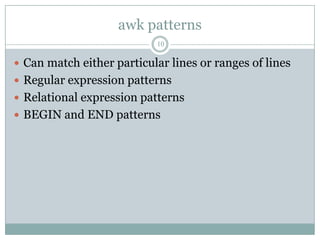
awk patterns
                           10

 Can match either particular lines or ranges of lines
 Regular expression patterns
 Relational expression patterns
 BEGIN and END patterns
Regular Expressions
                                    11

Meta character Meaning
.             Matches any single character except newline
*             Matches zero or more of the character preceding it
              e.g.: bugs*, table.*
^             Denotes the beginning of the line. ^A denotes lines starting
              with A
$             Denotes the end of the line. :$ denotes lines ending with :
             Escape character (., *, [, , etc)
[]            matches one or more characters within the brackets. e.g.
              [aeiou], [a-z], [a-zA-Z], [0-9], [[:alpha:]], [a-z?,!]
[^]           matches any characters others than the ones inside brackets.
              eg. ^[^13579] denotes all lines not starting with odd numbers,
              [^02468]$ denotes all lines not ending with even numbers
<, >        Matches characters at the beginning or end of words
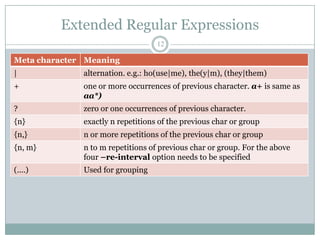
Extended Regular Expressions
                                   12

Meta character Meaning
|             alternation. e.g.: ho(use|me), the(y|m), (they|them)
+             one or more occurrences of previous character. a+ is same as
              aa*)
?             zero or one occurrences of previous character.
{n}           exactly n repetitions of the previous char or group
{n,}          n or more repetitions of the previous char or group
{n, m}        n to m repetitions of previous char or group. For the above
              four –re-interval option needs to be specified
(....)        Used for grouping
Regular Expressions – Examples
                                     13

Example                       Meaning
.{10,}                        10 or more characters. Curly braces have to
                              escaped
[0-9]{3}-[0-9]{2}-[0-9]{4}    Social Security number
([2-9][0-9]{2})[0-9]{3}-[0-   Phone number (xxx)yyy-zzzz
9]{4}
[0-9]{3}[ ]*[0-9]{3}          Postal code in India
[0-9]{5}(-[0-9]{4})?          US ZIP Code with optional four-digit extension
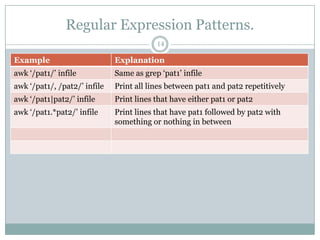
Regular Expression Patterns.
                                          14

Example                       Explanation
awk „/pat1/‟ infile           Same as grep „pat1‟ infile
awk „/pat1/, /pat2/‟ infile   Print all lines between pat1 and pat2 repetitively
awk „/pat1|pat2/‟ infile      Print lines that have either pat1 or pat2
awk „/pat1.*pat2/‟ infile     Print lines that have pat1 followed by pat2 with
                              something or nothing in between
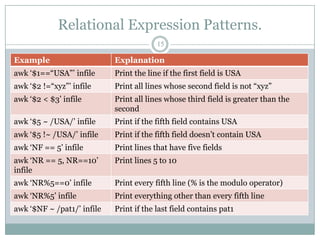
Relational Expression Patterns.
                                         15

Example                     Explanation
awk „$1==“USA”‟ infile      Print the line if the first field is USA
awk „$2 !=“xyz”‟ infile     Print all lines whose second field is not “xyz”
awk „$2 < $3‟ infile        Print all lines whose third field is greater than the
                            second
awk „$5 ~ /USA/‟ infile     Print if the fifth field contains USA
awk „$5 !~ /USA/‟ infile    Print if the fifth field doesn‟t contain USA
awk „NF == 5‟ infile        Print lines that have five fields
awk „NR == 5, NR==10‟       Print lines 5 to 10
infile
awk „NR%5==0‟ infile        Print every fifth line (% is the modulo operator)
awk „NR%5‟ infile           Print everything other than every fifth line
awk „$NF ~ /pat1/‟ infile   Print if the last field contains pat1
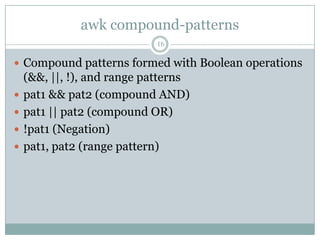
awk compound-patterns
                            16

 Compound patterns formed with Boolean operations
    (&&, ||, !), and range patterns
   pat1 && pat2 (compound AND)
   pat1 || pat2 (compound OR)
   !pat1 (Negation)
   pat1, pat2 (range pattern)
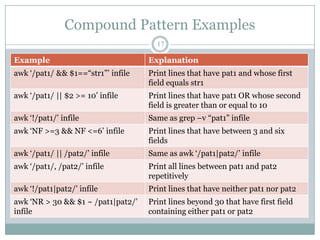
Compound Pattern Examples
                                      17

Example                             Explanation
awk „/pat1/ && $1==“str1”‟ infile   Print lines that have pat1 and whose first
                                    field equals str1
awk „/pat1/ || $2 >= 10‟ infile     Print lines that have pat1 OR whose second
                                    field is greater than or equal to 10
awk „!/pat1/‟ infile                Same as grep –v “pat1” infile
awk „NF >=3 && NF <=6‟ infile       Print lines that have between 3 and six
                                    fields
awk „/pat1/ || /pat2/‟ infile       Same as awk „/pat1|pat2/‟ infile
awk „/pat1/, /pat2/‟ infile         Print all lines between pat1 and pat2
                                    repetitively
awk „!/pat1|pat2/‟ infile           Print lines that have neither pat1 nor pat2
awk „NR > 30 && $1 ~ /pat1|pat2/‟   Print lines beyond 30 that have first field
infile                              containing either pat1 or pat2
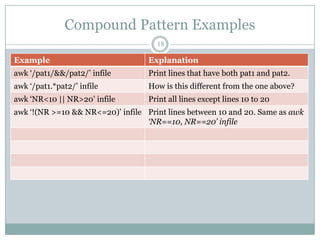
Compound Pattern Examples
                                     18

Example                            Explanation
awk „/pat1/&&/pat2/‟ infile        Print lines that have both pat1 and pat2.
awk „/pat1.*pat2/‟ infile          How is this different from the one above?
awk „NR<10 || NR>20‟ infile        Print all lines except lines 10 to 20
awk „!(NR >=10 && NR<=20)‟ infile Print lines between 10 and 20. Same as awk
                                  ‘NR==10, NR==20’ infile
BEGIN and END patterns
                            19

 BEGIN allows actions before any lines are processed.
 END allows actions after all lines have been
  processed
 Either or both optional
     BEGIN {action}
     [Pattern] {action}
     END {action}
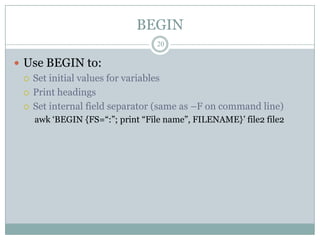
BEGIN
                                 20

 Use BEGIN to:
   Set initial values for variables

   Print headings

   Set internal field separator (same as –F on command line)
    awk „BEGIN {FS=“:”; print “File name”, FILENAME}‟ file2 file2
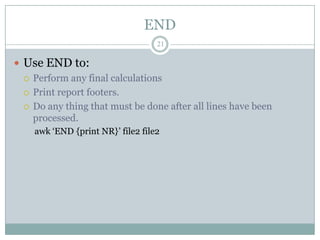
END
                                   21

 Use END to:
   Perform any final calculations

   Print report footers.

   Do any thing that must be done after all lines have been
    processed.
    awk „END {print NR}‟ file2 file2
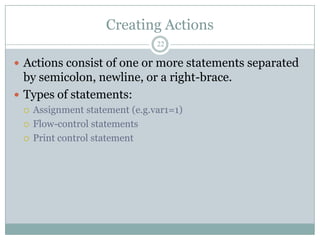
Creating Actions
                                22

 Actions consist of one or more statements separated
  by semicolon, newline, or a right-brace.
 Types of statements:
    Assignment statement (e.g.var1=1)
    Flow-control statements
    Print control statement
Flow-control statements
                                       23

Statement                   Explanation
if (conditional)            Perform statement_list1 if conditional is true.
{statement_list1}           Otherwise statement_list2 if specified
[else {statement_listt2}]
while (conditional)         Perform statement_list while conditional is true
{statement_list}
for                          Perform int_expr firt. While conditional_expr is
(int_expr;conditional_expr true, perform statement_list and execute ctrl_expr.
;ctrl_expr) {statement_list}
break                       Break from the containing loop and continue with
                            the next statement
continue                    Go to the next iteration of the containing loop without
                            executing the remaining statements in loop
next                        Skip remaining patterns on this line
exit                        Skip the rest of the input and go to the END pattern
                            if one exists or exit.
Print-control statements
                                    24

Statement                 Explanation
print [expression_list]   Print the expression on stdout unless redirected to
[>filename]               filename.
printf format [,          Prints the output as specified in format (like printf
expression_list]          in C). Has a rich set of format specifiers.
[>filename]
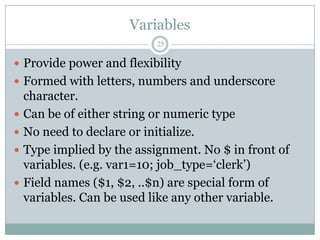
Variables
                            25

 Provide power and flexibility
 Formed with letters, numbers and underscore
    character.
   Can be of either string or numeric type
   No need to declare or initialize.
   Type implied by the assignment. No $ in front of
    variables. (e.g. var1=10; job_type=„clerk‟)
   Field names ($1, $2, ..$n) are special form of
    variables. Can be used like any other variable.
Arrays
                          26

 One-dimensional arrays: array_name[index]
 Index can be either numeric or string. Starts with 1
  if numeric
 No special declaration needed. Simply assign
  values to an array element.
 No set size. Limited only by the amount of memory
  on the machine.
  phone[“home”],  phone[“mobile”], phone[var1],
   phone[$1], ranks[1]
Multi-Dimensional arrays
                                27

 Arrays are one-dimensional.
 Array_name[1,2] not supported
 Concatenate the subscripts to form a string which
 could be used as the index:
     array_name[1”,”2]
   Space is the concatenation operator. “1,2”, a three character
    string is the index.
 Use SUBSEP, subscript separator, variable to
 eliminate the need to have double quotes around
 the comma.
Built-in functions
                                                28

Function                           Explanation
cos(awk_expr)                      Cosine of awk_expr
exp(awk_expr)                      Returns the exponential of awk_expr (as in e raised to the
                                   power of awk_expr)
index(str1, str2)                  Returns the position of strt2 in str1.
length(str)                        Returns the length of str
log(awk_expr)                      Base-e log of awk_expr
sin(awk_expr)                      Sine of awk_expr
sprintf(frmt, awk_expr)            Returns the value of awk_expr formatted as per frmt
sqrt(awk_expr)                     Square root of awk_expr
split(str, array, [field_sep])     Splits a string into its elements and stores into an array
substr(str, start, length)         Returns a substring of str starting at position “start” for
                                   “length” characters.
toupper(), tolower()               Useful when doing case-insensitive searches
Built-in functions contd.
                                            29

Function                       Explanation
sub(pat1, “pat2”, [string])    Substitute the first occurrence of pat1 with pat2 in string.
                               String by default is the entire line
gsub(pat1, “pat2”, [string])   Same as above, but replace all occurrences of pat1 with
                               pat2.
match(string, pat1)            Finds the regular expression pat1, and sets two special
                               variables (RSTART, RLENGTH) that indicate where the
                               regular expression begins and ends
systime()                      returns the current time of day as the number of seconds
                               since Midnight, January 1, 1970
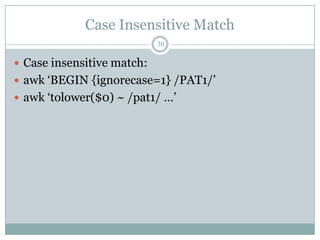
Case Insensitive Match
                            30

 Case insensitive match:
 awk „BEGIN {ignorecase=1} /PAT1/‟
 awk „tolower($0) ~ /pat1/ …‟
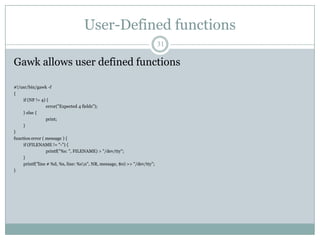
User-Defined functions
                                                                           31

Gawk allows user defined functions

#!/usr/bin/gawk -f
{
     if (NF != 4) {
                 error("Expected 4 fields");
     } else {
                 print;
     }
}
function error ( message ) {
     if (FILENAME != "-") {
                 printf("%s: ", FILENAME) > "/dev/tty";
     }
     printf("line # %d, %s, line: %sn", NR, message, $0) >> "/dev/tty";
}
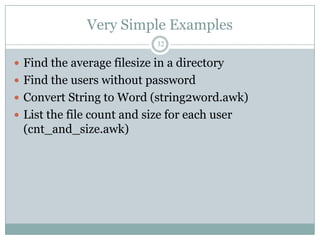
Very Simple Examples
                            32

 Find the average filesize in a directory
 Find the users without password
 Convert String to Word (string2word.awk)
 List the file count and size for each user
 (cnt_and_size.awk)
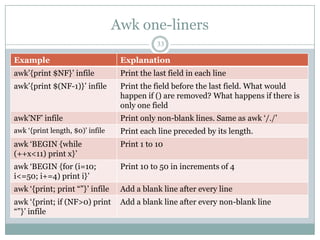
Awk one-liners
                                              33

Example                            Explanation
awk‟{print $NF}‟ infile            Print the last field in each line
awk‟{print $(NF-1)}‟ infile        Print the field before the last field. What would
                                   happen if () are removed? What happens if there is
                                   only one field
awk‟NF‟ infile                     Print only non-blank lines. Same as awk „/./‟
awk „{print length, $0)‟ infile    Print each line preceded by its length.
awk „BEGIN {while                  Print 1 to 10
(++x<11) print x}‟
awk „BEGIN {for (i=10;             Print 10 to 50 in increments of 4
i<=50; i+=4) print i}‟
awk „{print; print “”}‟ infile     Add a blank line after every line
awk „{print; if (NF>0) print       Add a blank line after every non-blank line
“”}‟ infile
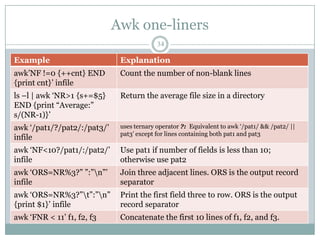
Awk one-liners
                                           34

Example                       Explanation
awk‟NF !=0 {++cnt} END        Count the number of non-blank lines
{print cnt}‟ infile
ls –l | awk „NR>1 {s+=$5}     Return the average file size in a directory
END {print “Average:”
s/(NR-1)}‟
awk „/pat1/?/pat2/:/pat3/‟    uses ternary operator ?: Equivalent to awk „/pat1/ && /pat2/ ||
                              pat3‟ except for lines containing both pat1 and pat3
infile
awk „NF<10?/pat1/:/pat2/‟     Use pat1 if number of fields is less than 10;
infile                        otherwise use pat2
awk „ORS=NR%3?” ”:”n”‟       Join three adjacent lines. ORS is the output record
infile                        separator
awk „ORS=NR%3?”t”:”n”       Print the first field three to row. ORS is the output
{print $1}‟ infile            record separator
awk „FNR < 11‟ f1, f2, f3     Concatenate the first 10 lines of f1, f2, and f3.
Awk one-liners
                                        35

Example                       Explanation
awk „length < 81‟             Print lines that are shorter than 81 characters
awk „/pat1/, 0‟               Print all lines between the line containing pat1 and
                              end of file
awk „NR==10, 0‟               Print lines 10 to the end of file. The end condition
                              “0” represents “false”.
awk '{ sub(/^[ t]+/, "");    Trim the leading tabs or spaces. Called ltrim
print }'
awk '{ sub(/[ t]+$/, "");    Trim the trailing tabs or spaces. Called rtrim
print }'
awk '{ gsub(/^[ t]+|[        Trim the white spaces on both sides
t]+$/, ""); print }'
Awk one-liners
                                         36

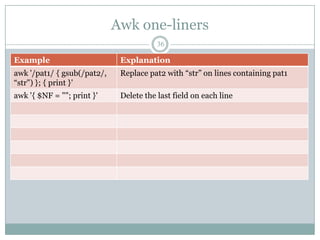
Example                       Explanation
awk '/pat1/ { gsub(/pat2/,    Replace pat2 with “str” on lines containing pat1
“str") }; { print }'
awk '{ $NF = ""; print }'     Delete the last field on each line
Awk one-liners
                        37

 http://www.catonmat.net/blog/awk-one-liners-
 explained-part-one/
Translators
                         38

 awk2c – Translates awk programs to C
 awk2p – Translates awk progrms to Perl
References
                        39

 sed & awk by Dale Dougherty & Arnold Robins
 http://www.grymoire.com/Unix/Awk.html
 http://www.vectorsite.net/tsawk.html
 http://snap.nlc.dcccd.edu/reference/awkref/gawk
 _toc.html
Q&A
                            40

 devel-awk@yahoo-inc.com
Unanswered questions
                            41

 How to print lines that are outside a block of lines?
  (print lines that are not enclosed by /pat1/,/pat2/
 Does awk support grouping and back-referencing
  (e.g. identify adjacent duplicate words)?

Awk essentials

  • 1.
    awk – Essentialsand Examples 1 Logan Palanisamy
  • 2.
    Agenda 2  Elements of awk  Optional Bio Break  Examples and one-liners  Q&A
  • 3.
    What is awk 3  An acronym of the last names of the three authors  General purpose pattern-scanning and processing language  Used for filtering, transforming and reporting  More advanced than sed, but less complicated than C; less cryptic than Perl.  gawk, nawk
  • 4.
    awk syntax 4  awk [-Ffield_sep] 'cmd' infile(s)  awk [-Ffield_sep] –f cmd_file infile(s)  infile can be the output of pipeline.  Space is the default field_sep
  • 5.
    awk mechanics 5  [pattern] [{action} …]  Input files processed a line at a time  Every line is processed if there is no pattern  Lines split into fields based on field-sep  Print is the default action.  Input files not affected in anyway
  • 6.
    Field Names 6  Lines split into fields based on field-sep  $0 represents the whole line  $1, $2, … $n represent different fields  Field names could be used as variables
  • 7.
    Built-in variables. 7 Variable Explanation FS Field separator variable for input lines. Defaults to space or tab NR Number of input lines processed so far NF Number of fields in the current input line FILENAME Name of the current input file OFMT Default format for output numbers OFS Output field separator. Defaults to space ORS Output record separator. Defaults to new-line character RS Input Record Separator. Defaults to new-line character. FNR Same as NR; but gets reset after each file unlike NR RSTART, Variables set by the match() function which indicates where the RLENGTH match starts and how long the match is SUBSEP Subscript separator. Used in multi-dimensional arrays
  • 8.
    Operators 8 Operator Explanation +, -, *, / Addition, Subtraction, Multiplication, Division, % Remainder/Modulo operation ++ Unary increment (var++ same as var=var+1) -- Unary decrement ^ or ** Exponentaion +=, -=, *=, /=, Assignment operator preceded by arithmetic operation (var+=5 %= same as var=var+5) No operator String concatenation (newstr=“new” $3) ?: Ternary operator (expr1 ? expr2 : expr3)
  • 9.
    Relational Operators. 9 Operator Explanation == Equality operator != Not equal to < Less than <= Less than or equal to > Greater than >= Greater than equal to ~ Contains regular expression !~ Doesn‟t contain regular expression
  • 10.
    awk patterns 10  Can match either particular lines or ranges of lines  Regular expression patterns  Relational expression patterns  BEGIN and END patterns
  • 11.
    Regular Expressions 11 Meta character Meaning . Matches any single character except newline * Matches zero or more of the character preceding it e.g.: bugs*, table.* ^ Denotes the beginning of the line. ^A denotes lines starting with A $ Denotes the end of the line. :$ denotes lines ending with : Escape character (., *, [, , etc) [] matches one or more characters within the brackets. e.g. [aeiou], [a-z], [a-zA-Z], [0-9], [[:alpha:]], [a-z?,!] [^] matches any characters others than the ones inside brackets. eg. ^[^13579] denotes all lines not starting with odd numbers, [^02468]$ denotes all lines not ending with even numbers <, > Matches characters at the beginning or end of words
  • 12.
    Extended Regular Expressions 12 Meta character Meaning | alternation. e.g.: ho(use|me), the(y|m), (they|them) + one or more occurrences of previous character. a+ is same as aa*) ? zero or one occurrences of previous character. {n} exactly n repetitions of the previous char or group {n,} n or more repetitions of the previous char or group {n, m} n to m repetitions of previous char or group. For the above four –re-interval option needs to be specified (....) Used for grouping
  • 13.
    Regular Expressions –Examples 13 Example Meaning .{10,} 10 or more characters. Curly braces have to escaped [0-9]{3}-[0-9]{2}-[0-9]{4} Social Security number ([2-9][0-9]{2})[0-9]{3}-[0- Phone number (xxx)yyy-zzzz 9]{4} [0-9]{3}[ ]*[0-9]{3} Postal code in India [0-9]{5}(-[0-9]{4})? US ZIP Code with optional four-digit extension
  • 14.
    Regular Expression Patterns. 14 Example Explanation awk „/pat1/‟ infile Same as grep „pat1‟ infile awk „/pat1/, /pat2/‟ infile Print all lines between pat1 and pat2 repetitively awk „/pat1|pat2/‟ infile Print lines that have either pat1 or pat2 awk „/pat1.*pat2/‟ infile Print lines that have pat1 followed by pat2 with something or nothing in between
  • 15.
    Relational Expression Patterns. 15 Example Explanation awk „$1==“USA”‟ infile Print the line if the first field is USA awk „$2 !=“xyz”‟ infile Print all lines whose second field is not “xyz” awk „$2 < $3‟ infile Print all lines whose third field is greater than the second awk „$5 ~ /USA/‟ infile Print if the fifth field contains USA awk „$5 !~ /USA/‟ infile Print if the fifth field doesn‟t contain USA awk „NF == 5‟ infile Print lines that have five fields awk „NR == 5, NR==10‟ Print lines 5 to 10 infile awk „NR%5==0‟ infile Print every fifth line (% is the modulo operator) awk „NR%5‟ infile Print everything other than every fifth line awk „$NF ~ /pat1/‟ infile Print if the last field contains pat1
  • 16.
    awk compound-patterns 16  Compound patterns formed with Boolean operations (&&, ||, !), and range patterns  pat1 && pat2 (compound AND)  pat1 || pat2 (compound OR)  !pat1 (Negation)  pat1, pat2 (range pattern)
  • 17.
    Compound Pattern Examples 17 Example Explanation awk „/pat1/ && $1==“str1”‟ infile Print lines that have pat1 and whose first field equals str1 awk „/pat1/ || $2 >= 10‟ infile Print lines that have pat1 OR whose second field is greater than or equal to 10 awk „!/pat1/‟ infile Same as grep –v “pat1” infile awk „NF >=3 && NF <=6‟ infile Print lines that have between 3 and six fields awk „/pat1/ || /pat2/‟ infile Same as awk „/pat1|pat2/‟ infile awk „/pat1/, /pat2/‟ infile Print all lines between pat1 and pat2 repetitively awk „!/pat1|pat2/‟ infile Print lines that have neither pat1 nor pat2 awk „NR > 30 && $1 ~ /pat1|pat2/‟ Print lines beyond 30 that have first field infile containing either pat1 or pat2
  • 18.
    Compound Pattern Examples 18 Example Explanation awk „/pat1/&&/pat2/‟ infile Print lines that have both pat1 and pat2. awk „/pat1.*pat2/‟ infile How is this different from the one above? awk „NR<10 || NR>20‟ infile Print all lines except lines 10 to 20 awk „!(NR >=10 && NR<=20)‟ infile Print lines between 10 and 20. Same as awk ‘NR==10, NR==20’ infile
  • 19.
    BEGIN and ENDpatterns 19  BEGIN allows actions before any lines are processed.  END allows actions after all lines have been processed  Either or both optional BEGIN {action} [Pattern] {action} END {action}
  • 20.
    BEGIN 20  Use BEGIN to:  Set initial values for variables  Print headings  Set internal field separator (same as –F on command line) awk „BEGIN {FS=“:”; print “File name”, FILENAME}‟ file2 file2
  • 21.
    END 21  Use END to:  Perform any final calculations  Print report footers.  Do any thing that must be done after all lines have been processed. awk „END {print NR}‟ file2 file2
  • 22.
    Creating Actions 22  Actions consist of one or more statements separated by semicolon, newline, or a right-brace.  Types of statements:  Assignment statement (e.g.var1=1)  Flow-control statements  Print control statement
  • 23.
    Flow-control statements 23 Statement Explanation if (conditional) Perform statement_list1 if conditional is true. {statement_list1} Otherwise statement_list2 if specified [else {statement_listt2}] while (conditional) Perform statement_list while conditional is true {statement_list} for Perform int_expr firt. While conditional_expr is (int_expr;conditional_expr true, perform statement_list and execute ctrl_expr. ;ctrl_expr) {statement_list} break Break from the containing loop and continue with the next statement continue Go to the next iteration of the containing loop without executing the remaining statements in loop next Skip remaining patterns on this line exit Skip the rest of the input and go to the END pattern if one exists or exit.
  • 24.
    Print-control statements 24 Statement Explanation print [expression_list] Print the expression on stdout unless redirected to [>filename] filename. printf format [, Prints the output as specified in format (like printf expression_list] in C). Has a rich set of format specifiers. [>filename]
  • 25.
    Variables 25  Provide power and flexibility  Formed with letters, numbers and underscore character.  Can be of either string or numeric type  No need to declare or initialize.  Type implied by the assignment. No $ in front of variables. (e.g. var1=10; job_type=„clerk‟)  Field names ($1, $2, ..$n) are special form of variables. Can be used like any other variable.
  • 26.
    Arrays 26  One-dimensional arrays: array_name[index]  Index can be either numeric or string. Starts with 1 if numeric  No special declaration needed. Simply assign values to an array element.  No set size. Limited only by the amount of memory on the machine.  phone[“home”], phone[“mobile”], phone[var1], phone[$1], ranks[1]
  • 27.
    Multi-Dimensional arrays 27  Arrays are one-dimensional.  Array_name[1,2] not supported  Concatenate the subscripts to form a string which could be used as the index: array_name[1”,”2] Space is the concatenation operator. “1,2”, a three character string is the index.  Use SUBSEP, subscript separator, variable to eliminate the need to have double quotes around the comma.
  • 28.
    Built-in functions 28 Function Explanation cos(awk_expr) Cosine of awk_expr exp(awk_expr) Returns the exponential of awk_expr (as in e raised to the power of awk_expr) index(str1, str2) Returns the position of strt2 in str1. length(str) Returns the length of str log(awk_expr) Base-e log of awk_expr sin(awk_expr) Sine of awk_expr sprintf(frmt, awk_expr) Returns the value of awk_expr formatted as per frmt sqrt(awk_expr) Square root of awk_expr split(str, array, [field_sep]) Splits a string into its elements and stores into an array substr(str, start, length) Returns a substring of str starting at position “start” for “length” characters. toupper(), tolower() Useful when doing case-insensitive searches
  • 29.
    Built-in functions contd. 29 Function Explanation sub(pat1, “pat2”, [string]) Substitute the first occurrence of pat1 with pat2 in string. String by default is the entire line gsub(pat1, “pat2”, [string]) Same as above, but replace all occurrences of pat1 with pat2. match(string, pat1) Finds the regular expression pat1, and sets two special variables (RSTART, RLENGTH) that indicate where the regular expression begins and ends systime() returns the current time of day as the number of seconds since Midnight, January 1, 1970
  • 30.
    Case Insensitive Match 30  Case insensitive match:  awk „BEGIN {ignorecase=1} /PAT1/‟  awk „tolower($0) ~ /pat1/ …‟
  • 31.
    User-Defined functions 31 Gawk allows user defined functions #!/usr/bin/gawk -f { if (NF != 4) { error("Expected 4 fields"); } else { print; } } function error ( message ) { if (FILENAME != "-") { printf("%s: ", FILENAME) > "/dev/tty"; } printf("line # %d, %s, line: %sn", NR, message, $0) >> "/dev/tty"; }
  • 32.
    Very Simple Examples 32  Find the average filesize in a directory  Find the users without password  Convert String to Word (string2word.awk)  List the file count and size for each user (cnt_and_size.awk)
  • 33.
    Awk one-liners 33 Example Explanation awk‟{print $NF}‟ infile Print the last field in each line awk‟{print $(NF-1)}‟ infile Print the field before the last field. What would happen if () are removed? What happens if there is only one field awk‟NF‟ infile Print only non-blank lines. Same as awk „/./‟ awk „{print length, $0)‟ infile Print each line preceded by its length. awk „BEGIN {while Print 1 to 10 (++x<11) print x}‟ awk „BEGIN {for (i=10; Print 10 to 50 in increments of 4 i<=50; i+=4) print i}‟ awk „{print; print “”}‟ infile Add a blank line after every line awk „{print; if (NF>0) print Add a blank line after every non-blank line “”}‟ infile
  • 34.
    Awk one-liners 34 Example Explanation awk‟NF !=0 {++cnt} END Count the number of non-blank lines {print cnt}‟ infile ls –l | awk „NR>1 {s+=$5} Return the average file size in a directory END {print “Average:” s/(NR-1)}‟ awk „/pat1/?/pat2/:/pat3/‟ uses ternary operator ?: Equivalent to awk „/pat1/ && /pat2/ || pat3‟ except for lines containing both pat1 and pat3 infile awk „NF<10?/pat1/:/pat2/‟ Use pat1 if number of fields is less than 10; infile otherwise use pat2 awk „ORS=NR%3?” ”:”n”‟ Join three adjacent lines. ORS is the output record infile separator awk „ORS=NR%3?”t”:”n” Print the first field three to row. ORS is the output {print $1}‟ infile record separator awk „FNR < 11‟ f1, f2, f3 Concatenate the first 10 lines of f1, f2, and f3.
  • 35.
    Awk one-liners 35 Example Explanation awk „length < 81‟ Print lines that are shorter than 81 characters awk „/pat1/, 0‟ Print all lines between the line containing pat1 and end of file awk „NR==10, 0‟ Print lines 10 to the end of file. The end condition “0” represents “false”. awk '{ sub(/^[ t]+/, ""); Trim the leading tabs or spaces. Called ltrim print }' awk '{ sub(/[ t]+$/, ""); Trim the trailing tabs or spaces. Called rtrim print }' awk '{ gsub(/^[ t]+|[ Trim the white spaces on both sides t]+$/, ""); print }'
  • 36.
    Awk one-liners 36 Example Explanation awk '/pat1/ { gsub(/pat2/, Replace pat2 with “str” on lines containing pat1 “str") }; { print }' awk '{ $NF = ""; print }' Delete the last field on each line
  • 37.
    Awk one-liners 37  http://www.catonmat.net/blog/awk-one-liners- explained-part-one/
  • 38.
    Translators 38  awk2c – Translates awk programs to C  awk2p – Translates awk progrms to Perl
  • 39.
    References 39  sed & awk by Dale Dougherty & Arnold Robins  http://www.grymoire.com/Unix/Awk.html  http://www.vectorsite.net/tsawk.html  http://snap.nlc.dcccd.edu/reference/awkref/gawk _toc.html
  • 40.
    Q&A 40  devel-awk@yahoo-inc.com
  • 41.
    Unanswered questions 41  How to print lines that are outside a block of lines? (print lines that are not enclosed by /pat1/,/pat2/  Does awk support grouping and back-referencing (e.g. identify adjacent duplicate words)?