PL/Python	
  
PostgreSQL	
  +	
  PostGIS	
  
phil.bar6e@s6r.ac.uk	
  
Crea6ng	
  Func6ons	
  in	
  PostgreSQL	
  
Other	
  than	
  SQL	
  and	
  C	
  PostgreSQL	
  allows	
  func6ons	
  to	
  
be	
  wriBen	
  in:	


•  PL/pgSQL	
  –	
  SQL	
  procedural	
  language	
  
•  PL/Tcl	
  –	
  Tcl	
  Procedural	
  language	
  
•  PL/Perl	
  –	
  Perl	
  Procedural	
  language	
  
•  PL/Python	
  –	
  Python	
  procedural	
  language	


  +	
  addi&onal	
  	
  (eg	
  R,	
  Ruby,	
  Java,	
  PHP,	
  Unix	
  shell)	
  
h+p://www.postgresql.org/docs/9.3/sta&c/xplang.html	
  
standard	
  
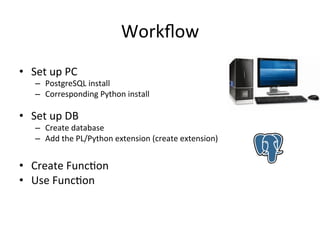
Workflow	
  
•  Set	
  up	
  PC	
  	
  
–  PostgreSQL	
  install	
  
–  Corresponding	
  Python	
  install	


•  Set	
  up	
  DB	
  	
  
–  Create	
  database	
  
–  Add	
  the	
  PL/Python	
  extension	
  (create	
  extension)	
  
•  Create	
  Func6on	
  
•  Use	
  Func6on	
  
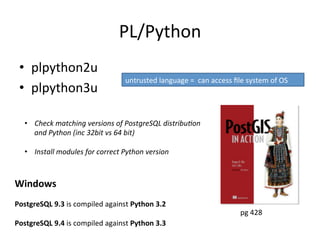
PL/Python	
  
•  plpython2u	
  
•  plpython3u	
  
Windows	


PostgreSQL	
  9.3	
  is	
  compiled	
  against	
  Python	
  3.2	


PostgreSQL	
  9.4	
  is	
  compiled	
  against	
  Python	
  3.3	


pg	
  428	
  
untrusted	
  language	
  =	
  	
  can	
  access	
  file	
  system	
  of	
  OS	
  
•  Check	
  matching	
  versions	
  of	
  PostgreSQL	
  distribu&on	
  
and	
  Python	
  (inc	
  32bit	
  vs	
  64	
  bit)	
  
•  Install	
  modules	
  for	
  correct	
  Python	
  version	
  
Installa6on	
  on	
  Ubuntu	
  
Add	
  plpython	
  to	
  exsi6ng	
  PostgreSQL	
  install	


  sudo apt-get install postgresql-plpython-9.3
Adding	
  extension	
  to	
  a	
  DB	
  
Create	
  DB
CREATE DATABASE test WITH OWNER = postgres ;	


Add	
  PostGIS	
  
CREATE EXTENSION postgis;
	
  
Add	
  Python	
  
CREATE EXTENSION plpython3u;


Adding	
  Python	
  Modules	
  (op6onal)	
  
Install	
  PIP	
  	
  	
  (search	
  Google	
  for	
  getpip.py)	
  
Then	
  use	
  pip	
  to	
  install	
  modules….	


pip install [module]


Windows	
  	
  
(if	
  need	
  to	
  add	
  pip	
  for	
  Python	
  3.x	
  when	
  already	
  have	
  Python	
  2.x	
  on	
  PC)	


hBps://sites.google.com/site/pydatalog/python/pip-­‐for-­‐windows	


(updated	
  March	
  2015)	


(run	
  as	
  administrator)	
  
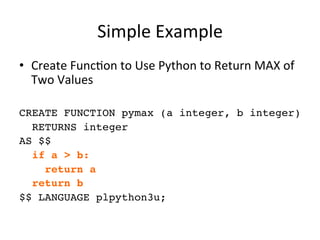
Simple	
  Example	
  
•  Create	
  Func6on	
  to	
  Use	
  Python	
  to	
  Return	
  MAX	
  of	
  
Two	
  Values	
  
CREATE FUNCTION pymax (a integer, b integer)
RETURNS integer
AS $$
if a  b:
return a
return b
$$ LANGUAGE plpython3u;
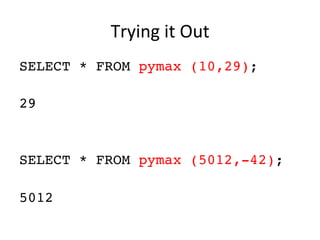
Trying	
  it	
  Out	
  
SELECT * FROM pymax (10,29);
29
SELECT * FROM pymax (5012,-42);
5012
	
  
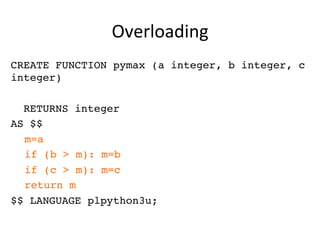
Overloading	
  
CREATE FUNCTION pymax (a integer, b integer, c
integer)
RETURNS integer
AS $$
m=a
if (b  m): m=b
if (c  m): m=c
return m
$$ LANGUAGE plpython3u;
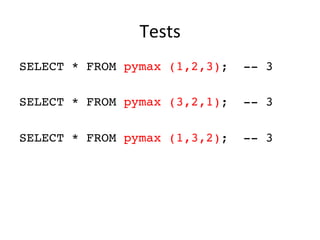
Tests	
  
SELECT * FROM pymax (1,2,3); -- 3
SELECT * FROM pymax (3,2,1); -- 3
SELECT * FROM pymax (1,3,2); -- 3
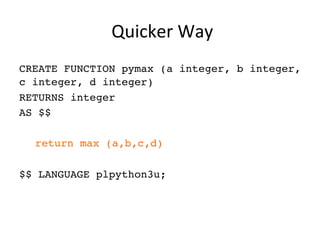
 Quicker	
  Way	
  
CREATE FUNCTION pymax (a integer, b integer,
c integer, d integer)
RETURNS integer
AS $$
return max (a,b,c,d)
$$ LANGUAGE plpython3u;
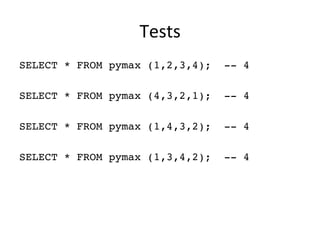
Tests	
  
SELECT * FROM pymax (1,2,3,4); -- 4
SELECT * FROM pymax (4,3,2,1); -- 4
SELECT * FROM pymax (1,4,3,2); -- 4
SELECT * FROM pymax (1,3,4,2); -- 4
Other	
  Data	
  Types	
  
CREATE OR REPLACE FUNCTION py_reverse (t text)
RETURNS text AS
$$
return t[::-1]
$$
LANGUAGE plpython3u;
SELECT py_reverse ('spam, spam, spam');
maps, maps ,maps
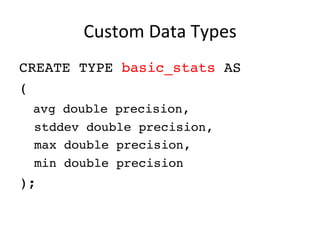
Custom	
  Data	
  Types	
  
CREATE TYPE basic_stats AS
(
avg double precision,
stddev double precision,
max double precision,
min double precision
);
Returning	
  Custom	
  Type	
  
CREATE OR REPLACE FUNCTION py_stats (a integer,
b integer, c integer)
RETURNS SETOF basic_stats
AS $$
import numpy as np
l = [a,b,c]
result=[]
item=[]
item.append(np.mean(l)) #mean
item.append(np.std(l)) #standard deviation
item.append(np.max(l)) #max
item.append(np.min(l)) #min
result.append(item)return result
$$
LANGUAGE plpython3u;
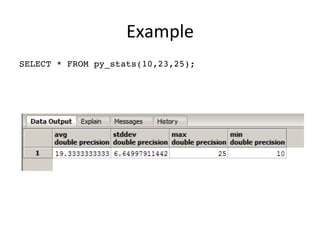
Example	
  
SELECT * FROM py_stats(10,23,25);
Return	
  a	
  Table	
  
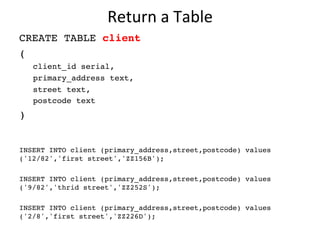
CREATE TABLE client
(
client_id serial,
primary_address text,
street text,
postcode text
)
INSERT INTO client (primary_address,street,postcode) values
('12/82','first street','ZZ156B');
INSERT INTO client (primary_address,street,postcode) values
('9/82','thrid street','ZZ252S');
INSERT INTO client (primary_address,street,postcode) values
('2/8','first street','ZZ226D');
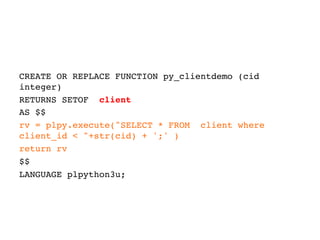
CREATE OR REPLACE FUNCTION py_clientdemo (cid
integer)
RETURNS SETOF client
AS $$
rv = plpy.execute(SELECT * FROM client where
client_id  +str(cid) + ';' )
return rv
$$
LANGUAGE plpython3u;
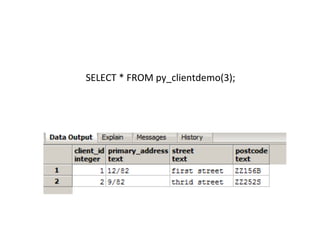
SELECT	
  *	
  FROM	
  py_clientdemo(3);	
  
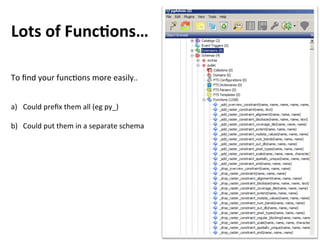
Lots	
  of	
  FuncGons…	
  
To	
  find	
  your	
  func6ons	
  more	
  easily..	


a)  Could	
  prefix	
  them	
  all	
  (eg	
  py_)	
  
b)  Could	
  put	
  them	
  in	
  a	
  separate	
  schema	
  
Using	
  Schemas	
  
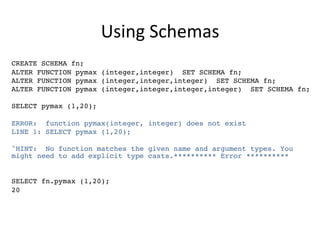
CREATE SCHEMA fn;
ALTER FUNCTION pymax (integer,integer) SET SCHEMA fn;
ALTER FUNCTION pymax (integer,integer,integer) SET SCHEMA fn;
ALTER FUNCTION pymax (integer,integer,integer,integer) SET SCHEMA fn;
SELECT pymax (1,20);
ERROR: function pymax(integer, integer) does not exist
LINE 1: SELECT pymax (1,20);
^HINT: No function matches the given name and argument types. You
might need to add explicit type casts.********** Error **********
SELECT fn.pymax (1,20);
20
Read	
  from	
  an	
  XL	
  spreadsheet	
  
DROP	
  FUNCTION	
  py_readxl(text);	


CREATE	
  OR	
  REPLACE	
  FUNCTION	
  py_readxl	
  (fn	
  text,	
  OUT	
  x	
  float,	
  OUT	
  y	
  float)	
  
RETURNS	
  SETOF	
  RECORD	
  AS	
  
$$	
  
import	
  xlrd	
  
book=xlrd.open_workbook	
  (fn)	
  
sh=book.sheet_by_index(0)	
  
for	
  rx	
  in	
  range	
  (1,sh.nrows):	


  yield(	


  sh.cell_value(rowx=rx,colx=0),	


  sh.cell_value(rowx=rx,colx=1)	


  )	
  
$$	
  
LANGUAGE	
  'plpython3u'	
  VOLATILE	


SELECT	
  x,y,st_makepoint(x,y)	
  FROM	
  py_readxl('c:/data/python/points.xlsx');	
  
Export	
  PNG	
  file	


CREATE	
  OR	
  REPLACE	
  FUNCTION	
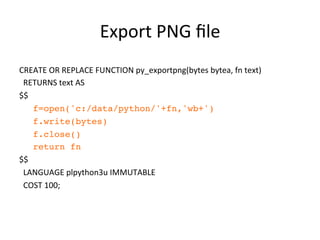
  py_exportpng(bytes	
  bytea,	
  fn	
  text)	


  RETURNS	
  text	
  AS	
  
$$	
  
f=open('c:/data/python/'+fn,'wb+')
f.write(bytes)
f.close()
return fn	
  
$$	


  LANGUAGE	
  plpython3u	
  IMMUTABLE	


  COST	
  100;	
  
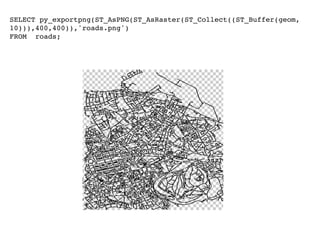
SELECT py_exportpng(ST_AsPNG(ST_AsRaster(ST_Collect((ST_Buffer(geom,
10))),400,400)),'roads.png')
FROM roads;
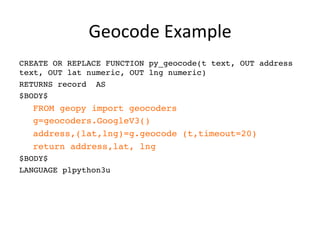
Geocode	
  Example	
  
CREATE OR REPLACE FUNCTION py_geocode(t text, OUT address
text, OUT lat numeric, OUT lng numeric)
RETURNS record AS
$BODY$
FROM geopy import geocoders
g=geocoders.GoogleV3()
address,(lat,lng)=g.geocode (t,timeout=20)
return address,lat, lng
$BODY$
LANGUAGE plpython3u
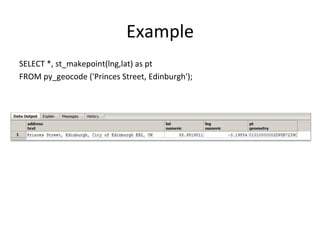
Example	
  
SELECT	
  *,	
  st_makepoint(lng,lat)	
  as	
  pt	
  
FROM	
  py_geocode	
  ('Princes	
  Street,	
  Edinburgh');	
  
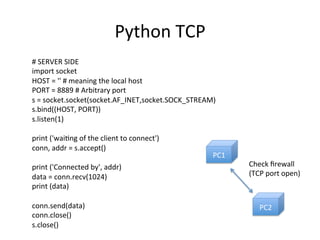
Python	
  TCP	
  
#	
  SERVER	
  SIDE	
  
import	
  socket	
  
HOST	
  =	
  ''	
  #	
  meaning	
  the	
  local	
  host	
  
PORT	
  =	
  8889	
  #	
  Arbitrary	
  port	
  
s	
  =	
  socket.socket(socket.AF_INET,socket.SOCK_STREAM)	
  
s.bind((HOST,	
  PORT))	
  
s.listen(1)	


print	
  ('wai6ng	
  of	
  the	
  client	
  to	
  connect')	
  
conn,	
  addr	
  =	
  s.accept()	


print	
  ('Connected	
  by',	
  addr)	
  
data	
  =	
  conn.recv(1024)	
  
print	
  (data)	


conn.send(data)	
  
conn.close()	
  
s.close()	
  
PC1	
  
PC2	
  
Check	
  firewall	
  
(TCP	
  port	
  open)	
  
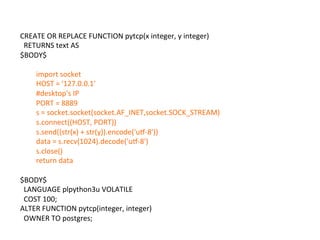
CREATE	
  OR	
  REPLACE	
  FUNCTION	
  pytcp(x	
  integer,	
  y	
  integer)	


  RETURNS	
  text	
  AS	
  
$BODY$	


import	
  socket	
  
HOST	
  =	
  '127.0.0.1'	
  
#desktop's	
  IP	
  
PORT	
  =	
  8889	
  
s	
  =	
  socket.socket(socket.AF_INET,socket.SOCK_STREAM)	
  
s.connect((HOST,	
  PORT))	
  	
  
s.send((str(x)	
  +	
  str(y)).encode('ur-­‐8'))	
  
data	
  =	
  s.recv(1024).decode('ur-­‐8')	
  
s.close()	
  
return	
  data	


$BODY$	


  LANGUAGE	
  plpython3u	
  VOLATILE	


  COST	
  100;	
  
ALTER	
  FUNCTION	
  pytcp(integer,	
  integer)	


  OWNER	
  TO	
  postgres;	
  
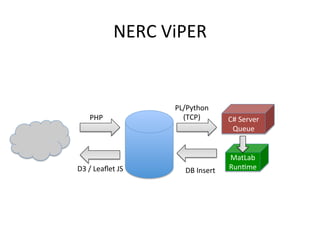
NERC	
  ViPER	
  
C#	
  Server	
  
Queue	
  
PL/Python	
  	
  
(TCP)	
  
D3	
  /	
  Leaflet	
  JS	
   DB	
  Insert	
  
PHP	
  
MatLab	
  
Run6me	
  
Python	
  Send	
  Email	
  
CREATE OR REPLACE FUNCTION
sendemail(r text, s text, m text)
RETURNS void AS
$BODY$
import smtplib
import time
session = smtplib.SMTP('smtp.gmail.com',
587)
session.ehlo()
session.starttls()
GMAIL_USERNAME =
'your_send_email_address@gmail.com’
GMAIL_PASSWORD = '**********’
recipient = str(r)
email_subject= str(s)
body_of_email = str(m)
session.login(GMAIL_USERNAME,
GMAIL_PASSWORD)
headers = rn.join([FROM:  +
'noreply@noreply.com',
subject:  +
email_subject,
to:  + recipient,
mime-version: 1.0,
content-type: text/
html])
# body_of_email can be plaintext or html!
content = headers + rnrn + body_of_email
session.sendmail(GMAIL_USERNAME, recipient,
content)
session.quit()
time.sleep(2)
return ;
$BODY$
LANGUAGE plpython3u VOLATILE
COST 250;
ALTER FUNCTION sendemail(text, text, text)
OWNER TO postgres;
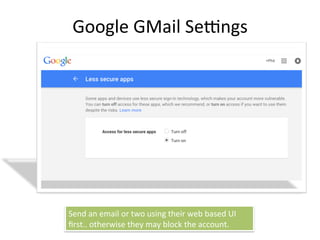
Google	
  GMail	
  Sesngs	
  
Send	
  an	
  email	
  or	
  two	
  using	
  their	
  web	
  based	
  UI	
  
first..	
  otherwise	
  they	
  may	
  block	
  the	
  account.	
  
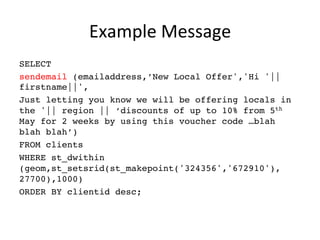
Example	
  Message	
  
SELECT
sendemail (emailaddress,’New Local Offer','Hi '||
firstname||',
Just letting you know we will be offering locals in
the '|| region || ‘discounts of up to 10% from 5th
May for 2 weeks by using this voucher code …blah
blah blah’)
FROM clients
WHERE st_dwithin
(geom,st_setsrid(st_makepoint('324356','672910'),
27700),1000)
ORDER BY clientid desc;
Raspberry	
  PI	
  2	
  
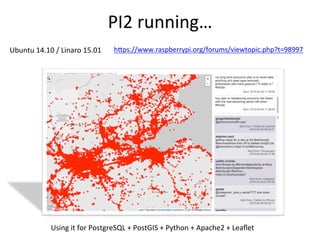
PI2	
  running…	
  
hBps://www.raspberrypi.org/forums/viewtopic.php?t=98997	


Using	
  it	
  for	
  PostgreSQL	
  +	
  PostGIS	
  +	
  Python	
  +	
  Apache2	
  +	
  Leaflet	
  
Ubuntu	
  14.10	
  /	
  Linaro	
  15.01	
  	
  
(University	
  of	
  S6rling)	
  
phil.bar6e@s6r.ac.uk	
  

Phil Bartie QGIS PLPython

  • 1.
    PL/Python   PostgreSQL  +  PostGIS   phil.bar6e@s6r.ac.uk  
  • 2.
    Crea6ng  Func6ons  in  PostgreSQL   Other  than  SQL  and  C  PostgreSQL  allows  func6ons  to   be  wriBen  in:     •  PL/pgSQL  –  SQL  procedural  language   •  PL/Tcl  –  Tcl  Procedural  language   •  PL/Perl  –  Perl  Procedural  language   •  PL/Python  –  Python  procedural  language              +  addi&onal    (eg  R,  Ruby,  Java,  PHP,  Unix  shell)   h+p://www.postgresql.org/docs/9.3/sta&c/xplang.html   standard  
  • 3.
    Workflow   •  Set  up  PC     –  PostgreSQL  install   –  Corresponding  Python  install     •  Set  up  DB     –  Create  database   –  Add  the  PL/Python  extension  (create  extension)   •  Create  Func6on   •  Use  Func6on  
  • 4.
    PL/Python   •  plpython2u   •  plpython3u   Windows       PostgreSQL  9.3  is  compiled  against  Python  3.2     PostgreSQL  9.4  is  compiled  against  Python  3.3     pg  428   untrusted  language  =    can  access  file  system  of  OS   •  Check  matching  versions  of  PostgreSQL  distribu&on   and  Python  (inc  32bit  vs  64  bit)   •  Install  modules  for  correct  Python  version  
  • 5.
    Installa6on  on  Ubuntu   Add  plpython  to  exsi6ng  PostgreSQL  install                sudo apt-get install postgresql-plpython-9.3
  • 6.
    Adding  extension  to  a  DB   Create  DB CREATE DATABASE test WITH OWNER = postgres ;             Add  PostGIS   CREATE EXTENSION postgis;   Add  Python   CREATE EXTENSION plpython3u;    
  • 7.
    Adding  Python  Modules  (op6onal)   Install  PIP      (search  Google  for  getpip.py)   Then  use  pip  to  install  modules….     pip install [module]       Windows     (if  need  to  add  pip  for  Python  3.x  when  already  have  Python  2.x  on  PC)     hBps://sites.google.com/site/pydatalog/python/pip-­‐for-­‐windows       (updated  March  2015)     (run  as  administrator)  
  • 8.
    Simple  Example   • Create  Func6on  to  Use  Python  to  Return  MAX  of   Two  Values   CREATE FUNCTION pymax (a integer, b integer) RETURNS integer AS $$ if a b: return a return b $$ LANGUAGE plpython3u;
  • 9.
    Trying  it  Out   SELECT * FROM pymax (10,29); 29 SELECT * FROM pymax (5012,-42); 5012  
  • 10.
    Overloading   CREATE FUNCTIONpymax (a integer, b integer, c integer) RETURNS integer AS $$ m=a if (b m): m=b if (c m): m=c return m $$ LANGUAGE plpython3u;
  • 11.
    Tests   SELECT *FROM pymax (1,2,3); -- 3 SELECT * FROM pymax (3,2,1); -- 3 SELECT * FROM pymax (1,3,2); -- 3
  • 12.
     Quicker  Way   CREATEFUNCTION pymax (a integer, b integer, c integer, d integer) RETURNS integer AS $$ return max (a,b,c,d) $$ LANGUAGE plpython3u;
  • 13.
    Tests   SELECT *FROM pymax (1,2,3,4); -- 4 SELECT * FROM pymax (4,3,2,1); -- 4 SELECT * FROM pymax (1,4,3,2); -- 4 SELECT * FROM pymax (1,3,4,2); -- 4
  • 14.
    Other  Data  Types   CREATE OR REPLACE FUNCTION py_reverse (t text) RETURNS text AS $$ return t[::-1] $$ LANGUAGE plpython3u; SELECT py_reverse ('spam, spam, spam'); maps, maps ,maps
  • 15.
    Custom  Data  Types   CREATE TYPE basic_stats AS ( avg double precision, stddev double precision, max double precision, min double precision );
  • 16.
    Returning  Custom  Type   CREATE OR REPLACE FUNCTION py_stats (a integer, b integer, c integer) RETURNS SETOF basic_stats AS $$ import numpy as np l = [a,b,c] result=[] item=[] item.append(np.mean(l)) #mean item.append(np.std(l)) #standard deviation item.append(np.max(l)) #max item.append(np.min(l)) #min result.append(item)return result $$ LANGUAGE plpython3u;
  • 17.
    Example   SELECT *FROM py_stats(10,23,25);
  • 18.
    Return  a  Table   CREATE TABLE client ( client_id serial, primary_address text, street text, postcode text ) INSERT INTO client (primary_address,street,postcode) values ('12/82','first street','ZZ156B'); INSERT INTO client (primary_address,street,postcode) values ('9/82','thrid street','ZZ252S'); INSERT INTO client (primary_address,street,postcode) values ('2/8','first street','ZZ226D');
  • 19.
    CREATE OR REPLACEFUNCTION py_clientdemo (cid integer) RETURNS SETOF client AS $$ rv = plpy.execute(SELECT * FROM client where client_id +str(cid) + ';' ) return rv $$ LANGUAGE plpython3u;
  • 20.
    SELECT  *  FROM  py_clientdemo(3);  
  • 21.
    Lots  of  FuncGons…   To  find  your  func6ons  more  easily..       a)  Could  prefix  them  all  (eg  py_)   b)  Could  put  them  in  a  separate  schema  
  • 22.
    Using  Schemas   CREATESCHEMA fn; ALTER FUNCTION pymax (integer,integer) SET SCHEMA fn; ALTER FUNCTION pymax (integer,integer,integer) SET SCHEMA fn; ALTER FUNCTION pymax (integer,integer,integer,integer) SET SCHEMA fn; SELECT pymax (1,20); ERROR: function pymax(integer, integer) does not exist LINE 1: SELECT pymax (1,20); ^HINT: No function matches the given name and argument types. You might need to add explicit type casts.********** Error ********** SELECT fn.pymax (1,20); 20
  • 24.
    Read  from  an  XL  spreadsheet   DROP  FUNCTION  py_readxl(text);     CREATE  OR  REPLACE  FUNCTION  py_readxl  (fn  text,  OUT  x  float,  OUT  y  float)   RETURNS  SETOF  RECORD  AS   $$   import  xlrd   book=xlrd.open_workbook  (fn)   sh=book.sheet_by_index(0)   for  rx  in  range  (1,sh.nrows):          yield(                  sh.cell_value(rowx=rx,colx=0),                  sh.cell_value(rowx=rx,colx=1)                  )   $$   LANGUAGE  'plpython3u'  VOLATILE       SELECT  x,y,st_makepoint(x,y)  FROM  py_readxl('c:/data/python/points.xlsx');  
  • 25.
    Export  PNG  file     CREATE  OR  REPLACE  FUNCTION  py_exportpng(bytes  bytea,  fn  text)      RETURNS  text  AS   $$   f=open('c:/data/python/'+fn,'wb+') f.write(bytes) f.close() return fn   $$      LANGUAGE  plpython3u  IMMUTABLE      COST  100;  
  • 26.
  • 27.
    Geocode  Example   CREATEOR REPLACE FUNCTION py_geocode(t text, OUT address text, OUT lat numeric, OUT lng numeric) RETURNS record AS $BODY$ FROM geopy import geocoders g=geocoders.GoogleV3() address,(lat,lng)=g.geocode (t,timeout=20) return address,lat, lng $BODY$ LANGUAGE plpython3u
  • 28.
    Example   SELECT  *,  st_makepoint(lng,lat)  as  pt   FROM  py_geocode  ('Princes  Street,  Edinburgh');  
  • 29.
    Python  TCP   #  SERVER  SIDE   import  socket   HOST  =  ''  #  meaning  the  local  host   PORT  =  8889  #  Arbitrary  port   s  =  socket.socket(socket.AF_INET,socket.SOCK_STREAM)   s.bind((HOST,  PORT))   s.listen(1)     print  ('wai6ng  of  the  client  to  connect')   conn,  addr  =  s.accept()     print  ('Connected  by',  addr)   data  =  conn.recv(1024)   print  (data)     conn.send(data)   conn.close()   s.close()   PC1   PC2   Check  firewall   (TCP  port  open)  
  • 30.
    CREATE  OR  REPLACE  FUNCTION  pytcp(x  integer,  y  integer)      RETURNS  text  AS   $BODY$     import  socket   HOST  =  '127.0.0.1'   #desktop's  IP   PORT  =  8889   s  =  socket.socket(socket.AF_INET,socket.SOCK_STREAM)   s.connect((HOST,  PORT))     s.send((str(x)  +  str(y)).encode('ur-­‐8'))   data  =  s.recv(1024).decode('ur-­‐8')   s.close()   return  data     $BODY$      LANGUAGE  plpython3u  VOLATILE      COST  100;   ALTER  FUNCTION  pytcp(integer,  integer)      OWNER  TO  postgres;  
  • 31.
    NERC  ViPER   C#  Server   Queue   PL/Python     (TCP)   D3  /  Leaflet  JS   DB  Insert   PHP   MatLab   Run6me  
  • 34.
    Python  Send  Email   CREATE OR REPLACE FUNCTION sendemail(r text, s text, m text) RETURNS void AS $BODY$ import smtplib import time session = smtplib.SMTP('smtp.gmail.com', 587) session.ehlo() session.starttls() GMAIL_USERNAME = 'your_send_email_address@gmail.com’ GMAIL_PASSWORD = '**********’ recipient = str(r) email_subject= str(s) body_of_email = str(m) session.login(GMAIL_USERNAME, GMAIL_PASSWORD) headers = rn.join([FROM: + 'noreply@noreply.com', subject: + email_subject, to: + recipient, mime-version: 1.0, content-type: text/ html]) # body_of_email can be plaintext or html! content = headers + rnrn + body_of_email session.sendmail(GMAIL_USERNAME, recipient, content) session.quit() time.sleep(2) return ; $BODY$ LANGUAGE plpython3u VOLATILE COST 250; ALTER FUNCTION sendemail(text, text, text) OWNER TO postgres;
  • 35.
    Google  GMail  Sesngs   Send  an  email  or  two  using  their  web  based  UI   first..  otherwise  they  may  block  the  account.  
  • 36.
    Example  Message   SELECT sendemail(emailaddress,’New Local Offer','Hi '|| firstname||', Just letting you know we will be offering locals in the '|| region || ‘discounts of up to 10% from 5th May for 2 weeks by using this voucher code …blah blah blah’) FROM clients WHERE st_dwithin (geom,st_setsrid(st_makepoint('324356','672910'), 27700),1000) ORDER BY clientid desc;
  • 37.
  • 38.
    PI2  running…   hBps://www.raspberrypi.org/forums/viewtopic.php?t=98997       Using  it  for  PostgreSQL  +  PostGIS  +  Python  +  Apache2  +  Leaflet   Ubuntu  14.10  /  Linaro  15.01    
  • 39.
    (University  of  S6rling)   phil.bar6e@s6r.ac.uk