Lessons Learned From
Dockerizing Spark Workloads
Thomas Phelan Nanda Vijaydev
Chief Architect, BlueData Data Scientist, BlueData
@tapbluedata @nandavijaydev
February 8, 2017
Outline
• Docker Containers and Big Data
• Spark on Docker: Challenges
• How We Did It: Lessons Learned
• Key Takeaways
• Q & A
Distributed Spark Environments
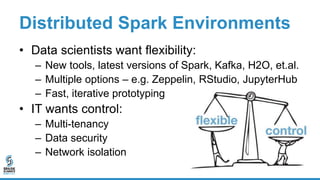
• Data scientists want flexibility:
– New tools, latest versions of Spark, Kafka, H2O, et.al.
– Multiple options – e.g. Zeppelin, RStudio, JupyterHub
– Fast, iterative prototyping
• IT wants control:
– Multi-tenancy
– Data security
– Network isolation
Why “Dockerize”?
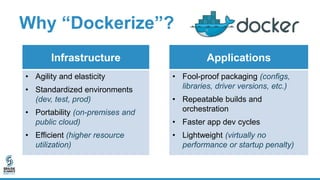
Infrastructure
• Agility and elasticity
• Standardized environments
(dev, test, prod)
• Portability (on-premises and
public cloud)
• Efficient (higher resource
utilization)
Applications
• Fool-proof packaging (configs,
libraries, driver versions, etc.)
• Repeatable builds and
orchestration
• Faster app dev cycles
• Lightweight (virtually no
performance or startup penalty)
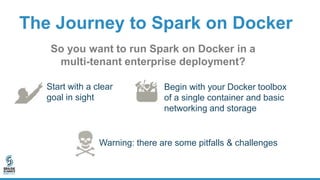
The Journey to Spark on Docker
Start with a clear
goal in sight
Begin with your Docker toolbox
of a single container and basic
networking and storage
So you want to run Spark on Docker in a
multi-tenant enterprise deployment?
Warning: there are some pitfalls & challenges
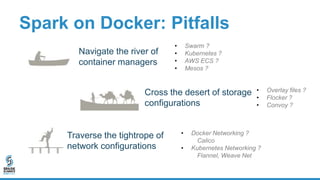
Spark on Docker: Pitfalls
Traverse the tightrope of
network configurations
Navigate the river of
container managers
• Swarm ?
• Kubernetes ?
• AWS ECS ?
• Mesos ?
• Overlay files ?
• Flocker ?
• Convoy ?
• Docker Networking ?
Calico
• Kubernetes Networking ?
Flannel, Weave Net
Cross the desert of storage
configurations
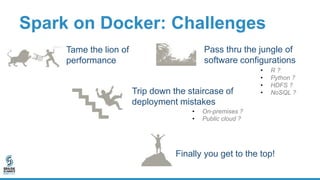
Spark on Docker: Challenges
Pass thru the jungle of
software configurations
Tame the lion of
performance
Finally you get to the top!
Trip down the staircase of
deployment mistakes
• R ?
• Python ?
• HDFS ?
• NoSQL ?
• On-premises ?
• Public cloud ?
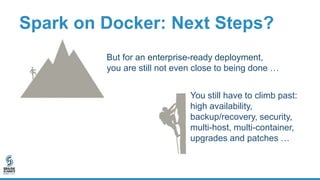
Spark on Docker: Next Steps?
But for an enterprise-ready deployment,
you are still not even close to being done …
You still have to climb past:
high availability,
backup/recovery, security,
multi-host, multi-container,
upgrades and patches …
Spark on Docker: Quagmire
You realize it’s time
to get some help!
How We Did It: Spark on Docker
• Docker containers provide a powerful option for greater agility
and flexibility – whether on-premises or in the public cloud
• Running a complex, multi-service platform such as Spark in
containers in a distributed enterprise-grade environment can
be daunting
• Here is how we did it for the BlueData platform ... while
maintaining performance comparable to bare-metal
How We Did It: Design Decisions
• Run Spark (any version) with related models,
tools / applications, and notebooks unmodified
• Deploy all relevant services that typically run on
a single Spark host in a single Docker container
• Multi-tenancy support is key
– Network and storage security
– User management and access control
How We Did It: Design Decisions
• Docker images built to “auto-configure”
themselves at time of instantiation
– Not all instances of a single image run the same set
of services when instantiated
• Master vs. worker cluster nodes
How We Did It: Design Decisions
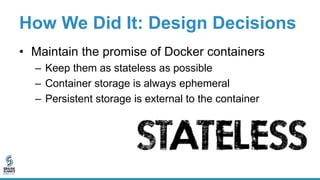
• Maintain the promise of Docker containers
– Keep them as stateless as possible
– Container storage is always ephemeral
– Persistent storage is external to the container
How We Did It: CPU & Network
• Resource Utilization
– CPU cores vs. CPU shares
– Over-provisioning of CPU recommended
– No over-provisioning of memory
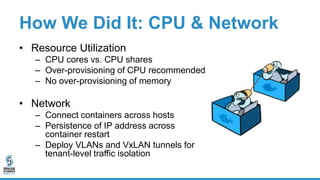
• Network
– Connect containers across hosts
– Persistence of IP address across
container restart
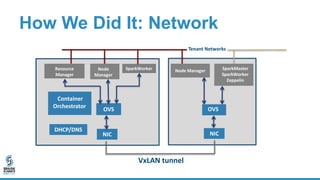
– Deploy VLANs and VxLAN tunnels for
tenant-level traffic isolation
How We Did It: Network
OVS
Container
Orchestrator
DHCP/DNS
VxLAN tunnel
NIC
Tenant Networks
OVS
NIC
Resource
Manager
Node
Manager
Node Manager SparkMaster
SparkWorker
Zeppelin
SparkWorker
How We Did It: Storage
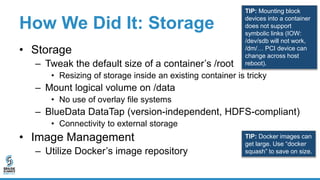
• Storage
– Tweak the default size of a container’s /root
• Resizing of storage inside an existing container is tricky
– Mount logical volume on /data
• No use of overlay file systems
– BlueData DataTap (version-independent, HDFS-compliant)
• Connectivity to external storage
• Image Management
– Utilize Docker’s image repository
TIP: Mounting block
devices into a container
does not support
symbolic links (IOW:
/dev/sdb will not work,
/dm/… PCI device can
change across host
reboot).
TIP: Docker images can
get large. Use “docker
squash” to save on size.
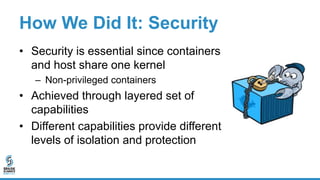
How We Did It: Security
• Security is essential since containers
and host share one kernel
– Non-privileged containers
• Achieved through layered set of
capabilities
• Different capabilities provide different
levels of isolation and protection
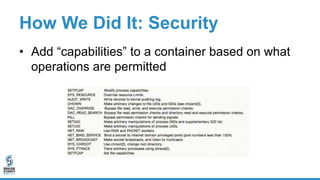
How We Did It: Security
• Add “capabilities” to a container based on what
operations are permitted
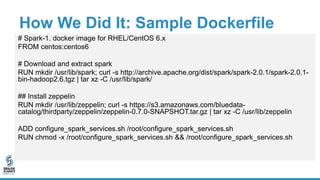
How We Did It: Sample Dockerfile
# Spark-1. docker image for RHEL/CentOS 6.x
FROM centos:centos6
# Download and extract spark
RUN mkdir /usr/lib/spark; curl -s http://archive.apache.org/dist/spark/spark-2.0.1/spark-2.0.1-
bin-hadoop2.6.tgz | tar xz -C /usr/lib/spark/
## Install zeppelin
RUN mkdir /usr/lib/zeppelin; curl -s https://s3.amazonaws.com/bluedata-
catalog/thirdparty/zeppelin/zeppelin-0.7.0-SNAPSHOT.tar.gz | tar xz -C /usr/lib/zeppelin
ADD configure_spark_services.sh /root/configure_spark_services.sh
RUN chmod -x /root/configure_spark_services.sh && /root/configure_spark_services.sh
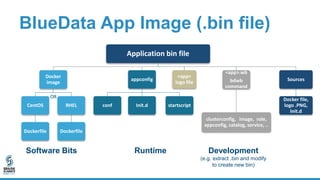
BlueData App Image (.bin file)
Application bin file
Docker
image
CentOS
Dockerfile
RHEL
Dockerfile
appconfig
conf Init.d startscript
<app>
logo file
<app>.wb
bdwb
command
clusterconfig, image, role,
appconfig, catalog, service, ..
Sources
Docker file,
logo .PNG,
Init.d
RuntimeSoftware Bits
OR
Development
(e.g. extract .bin and modify
to create new bin)
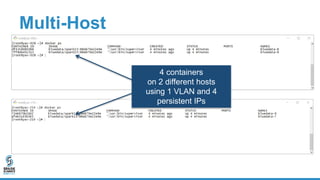
Multi-Host
4 containers
on 2 different hosts
using 1 VLAN and 4
persistent IPs
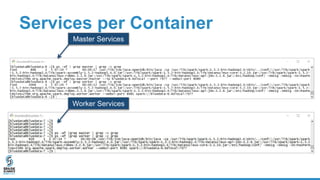
Services per Container
Master Services
Worker Services
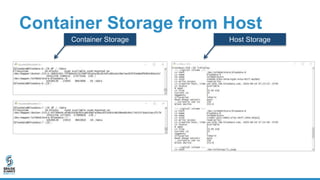
Container Storage from Host
Container Storage Host Storage
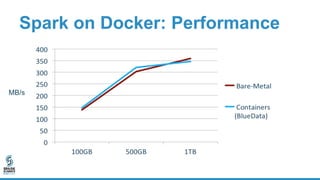
Performance Testing: Spark
• Spark 1.x on YARN
• HiBench - Terasort
• Data sizes: 100Gb, 500GB, 1TB
• 10 node physical/virtual cluster
• 36 cores and112GB memory per node
• 2TB HDFS storage per node (SSDs)
• 800GB ephemeral storage
Spark on Docker: Performance
MB/s
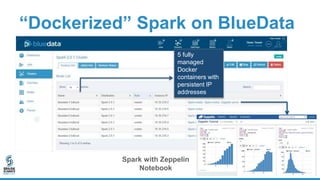
“Dockerized” Spark on BlueData
Spark with Zeppelin
Notebook
5 fully
managed
Docker
containers with
persistent IP
addresses
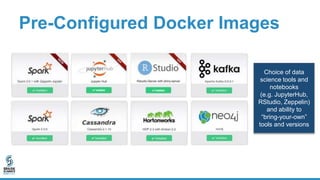
Pre-Configured Docker Images
Choice of data
science tools and
notebooks
(e.g. JupyterHub,
RStudio, Zeppelin)
and ability to
“bring-your-own”
tools and versions
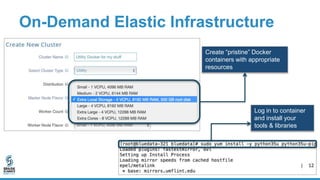
On-Demand Elastic Infrastructure
Create “pristine” Docker
containers with appropriate
resources
Log in to container
and install your
tools & libraries
Spark on Docker: Key Takeaways
• All apps can be “Dockerized”, including Spark
– Docker containers enable a more flexible and agile
deployment model
– Faster app dev cycles for Spark app developers,
data scientists, & engineers
– Enables DevOps for data science teams
Spark on Docker: Key Takeaways
• Deployment requirements:
– Docker base images include all needed Spark
libraries and jar files
– Container orchestration, including networking and
storage
– Resource-aware runtime environment, including
CPU and RAM
Spark on Docker: Key Takeaways
• Data scientist considerations:
– Access to data with full fidelity
– Access to data processing and modeling tools
– Ability to run, rerun, and scale analysis
– Ability to compare and contrast various techniques
– Ability to deploy & integrate enterprise-ready solution
Spark on Docker: Key Takeaways
• Enterprise deployment challenges:
– Access to container secured with ssh keypair or
PAM module (LDAP/AD)
– Fast access to external storage
– Management agents in Docker images
– Runtime injection of resource and configuration
information
Spark on Docker: Key Takeaways
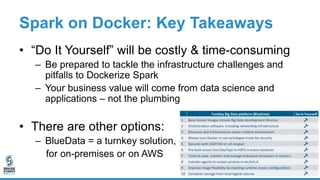
• “Do It Yourself” will be costly & time-consuming
– Be prepared to tackle the infrastructure challenges and
pitfalls to Dockerize Spark
– Your business value will come from data science and
applications – not the plumbing
• There are other options:
– BlueData = a turnkey solution,
for on-premises or on AWS
Thank You
Contact Info:
@tapbluedata
@nandavijaydev
tap@bluedata.com
nanda@bluedata.com
www.bluedata.com
Visit BlueData’s booth in the expo hall

Lessons Learned from Dockerizing Spark Workloads

  • 1.
    Lessons Learned From DockerizingSpark Workloads Thomas Phelan Nanda Vijaydev Chief Architect, BlueData Data Scientist, BlueData @tapbluedata @nandavijaydev February 8, 2017
  • 2.
    Outline • Docker Containersand Big Data • Spark on Docker: Challenges • How We Did It: Lessons Learned • Key Takeaways • Q & A
  • 3.
    Distributed Spark Environments •Data scientists want flexibility: – New tools, latest versions of Spark, Kafka, H2O, et.al. – Multiple options – e.g. Zeppelin, RStudio, JupyterHub – Fast, iterative prototyping • IT wants control: – Multi-tenancy – Data security – Network isolation
  • 4.
    Why “Dockerize”? Infrastructure • Agilityand elasticity • Standardized environments (dev, test, prod) • Portability (on-premises and public cloud) • Efficient (higher resource utilization) Applications • Fool-proof packaging (configs, libraries, driver versions, etc.) • Repeatable builds and orchestration • Faster app dev cycles • Lightweight (virtually no performance or startup penalty)
  • 5.
    The Journey toSpark on Docker Start with a clear goal in sight Begin with your Docker toolbox of a single container and basic networking and storage So you want to run Spark on Docker in a multi-tenant enterprise deployment? Warning: there are some pitfalls & challenges
  • 6.
    Spark on Docker:Pitfalls Traverse the tightrope of network configurations Navigate the river of container managers • Swarm ? • Kubernetes ? • AWS ECS ? • Mesos ? • Overlay files ? • Flocker ? • Convoy ? • Docker Networking ? Calico • Kubernetes Networking ? Flannel, Weave Net Cross the desert of storage configurations
  • 7.
    Spark on Docker:Challenges Pass thru the jungle of software configurations Tame the lion of performance Finally you get to the top! Trip down the staircase of deployment mistakes • R ? • Python ? • HDFS ? • NoSQL ? • On-premises ? • Public cloud ?
  • 8.
    Spark on Docker:Next Steps? But for an enterprise-ready deployment, you are still not even close to being done … You still have to climb past: high availability, backup/recovery, security, multi-host, multi-container, upgrades and patches …
  • 9.
    Spark on Docker:Quagmire You realize it’s time to get some help!
  • 10.
    How We DidIt: Spark on Docker • Docker containers provide a powerful option for greater agility and flexibility – whether on-premises or in the public cloud • Running a complex, multi-service platform such as Spark in containers in a distributed enterprise-grade environment can be daunting • Here is how we did it for the BlueData platform ... while maintaining performance comparable to bare-metal
  • 11.
    How We DidIt: Design Decisions • Run Spark (any version) with related models, tools / applications, and notebooks unmodified • Deploy all relevant services that typically run on a single Spark host in a single Docker container • Multi-tenancy support is key – Network and storage security – User management and access control
  • 12.
    How We DidIt: Design Decisions • Docker images built to “auto-configure” themselves at time of instantiation – Not all instances of a single image run the same set of services when instantiated • Master vs. worker cluster nodes
  • 13.
    How We DidIt: Design Decisions • Maintain the promise of Docker containers – Keep them as stateless as possible – Container storage is always ephemeral – Persistent storage is external to the container
  • 14.
    How We DidIt: CPU & Network • Resource Utilization – CPU cores vs. CPU shares – Over-provisioning of CPU recommended – No over-provisioning of memory • Network – Connect containers across hosts – Persistence of IP address across container restart – Deploy VLANs and VxLAN tunnels for tenant-level traffic isolation
  • 15.
    How We DidIt: Network OVS Container Orchestrator DHCP/DNS VxLAN tunnel NIC Tenant Networks OVS NIC Resource Manager Node Manager Node Manager SparkMaster SparkWorker Zeppelin SparkWorker
  • 16.
    How We DidIt: Storage • Storage – Tweak the default size of a container’s /root • Resizing of storage inside an existing container is tricky – Mount logical volume on /data • No use of overlay file systems – BlueData DataTap (version-independent, HDFS-compliant) • Connectivity to external storage • Image Management – Utilize Docker’s image repository TIP: Mounting block devices into a container does not support symbolic links (IOW: /dev/sdb will not work, /dm/… PCI device can change across host reboot). TIP: Docker images can get large. Use “docker squash” to save on size.
  • 17.
    How We DidIt: Security • Security is essential since containers and host share one kernel – Non-privileged containers • Achieved through layered set of capabilities • Different capabilities provide different levels of isolation and protection
  • 18.
    How We DidIt: Security • Add “capabilities” to a container based on what operations are permitted
  • 19.
    How We DidIt: Sample Dockerfile # Spark-1. docker image for RHEL/CentOS 6.x FROM centos:centos6 # Download and extract spark RUN mkdir /usr/lib/spark; curl -s http://archive.apache.org/dist/spark/spark-2.0.1/spark-2.0.1- bin-hadoop2.6.tgz | tar xz -C /usr/lib/spark/ ## Install zeppelin RUN mkdir /usr/lib/zeppelin; curl -s https://s3.amazonaws.com/bluedata- catalog/thirdparty/zeppelin/zeppelin-0.7.0-SNAPSHOT.tar.gz | tar xz -C /usr/lib/zeppelin ADD configure_spark_services.sh /root/configure_spark_services.sh RUN chmod -x /root/configure_spark_services.sh && /root/configure_spark_services.sh
  • 20.
    BlueData App Image(.bin file) Application bin file Docker image CentOS Dockerfile RHEL Dockerfile appconfig conf Init.d startscript <app> logo file <app>.wb bdwb command clusterconfig, image, role, appconfig, catalog, service, .. Sources Docker file, logo .PNG, Init.d RuntimeSoftware Bits OR Development (e.g. extract .bin and modify to create new bin)
  • 21.
    Multi-Host 4 containers on 2different hosts using 1 VLAN and 4 persistent IPs
  • 22.
    Services per Container MasterServices Worker Services
  • 23.
    Container Storage fromHost Container Storage Host Storage
  • 24.
    Performance Testing: Spark •Spark 1.x on YARN • HiBench - Terasort • Data sizes: 100Gb, 500GB, 1TB • 10 node physical/virtual cluster • 36 cores and112GB memory per node • 2TB HDFS storage per node (SSDs) • 800GB ephemeral storage
  • 25.
    Spark on Docker:Performance MB/s
  • 26.
    “Dockerized” Spark onBlueData Spark with Zeppelin Notebook 5 fully managed Docker containers with persistent IP addresses
  • 27.
    Pre-Configured Docker Images Choiceof data science tools and notebooks (e.g. JupyterHub, RStudio, Zeppelin) and ability to “bring-your-own” tools and versions
  • 28.
    On-Demand Elastic Infrastructure Create“pristine” Docker containers with appropriate resources Log in to container and install your tools & libraries
  • 29.
    Spark on Docker:Key Takeaways • All apps can be “Dockerized”, including Spark – Docker containers enable a more flexible and agile deployment model – Faster app dev cycles for Spark app developers, data scientists, & engineers – Enables DevOps for data science teams
  • 30.
    Spark on Docker:Key Takeaways • Deployment requirements: – Docker base images include all needed Spark libraries and jar files – Container orchestration, including networking and storage – Resource-aware runtime environment, including CPU and RAM
  • 31.
    Spark on Docker:Key Takeaways • Data scientist considerations: – Access to data with full fidelity – Access to data processing and modeling tools – Ability to run, rerun, and scale analysis – Ability to compare and contrast various techniques – Ability to deploy & integrate enterprise-ready solution
  • 32.
    Spark on Docker:Key Takeaways • Enterprise deployment challenges: – Access to container secured with ssh keypair or PAM module (LDAP/AD) – Fast access to external storage – Management agents in Docker images – Runtime injection of resource and configuration information
  • 33.
    Spark on Docker:Key Takeaways • “Do It Yourself” will be costly & time-consuming – Be prepared to tackle the infrastructure challenges and pitfalls to Dockerize Spark – Your business value will come from data science and applications – not the plumbing • There are other options: – BlueData = a turnkey solution, for on-premises or on AWS
  • 34.