Microservices on AWS using
AWS Lambda and Docker Containers
Danilo Poccia ‒ AWS Technical Evangelist
@danilop
Why AWS Lambda?
AWS Lambda
Event driven,
fully managed compute
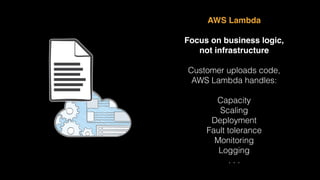
AWS Lambda
Focus on business logic,
not infrastructure
Customer uploads code,
AWS Lambda handles:
Capacity
Scaling
Deployment
Fault tolerance
Monitoring
Logging
. . .
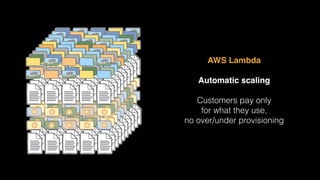
AWS Lambda
Automatic scaling
Customers pay only
for what they use,
no over/under provisioning
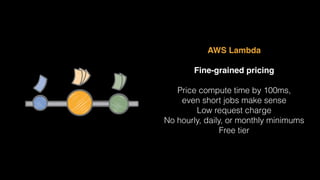
AWS Lambda
Fine-grained pricing
Price compute time by 100ms,
even short jobs make sense
Low request charge
No hourly, daily, or monthly minimums
Free tier
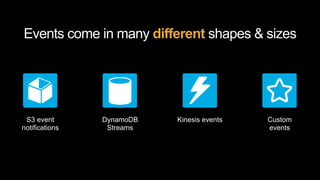
Events come in many different shapes & sizes
S3 event
notifications
DynamoDB
Streams
Kinesis events Custom
events
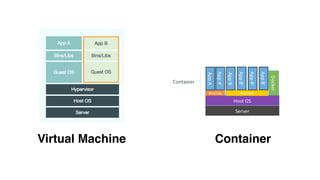
Why Docker?
Virtual Machine Container
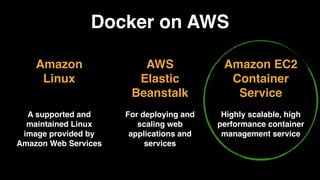
Docker on AWS
Amazon
Linux
A supported and
maintained Linux
image provided by
Amazon Web Services
Amazon EC2
Container
Service
Highly scalable, high
performance container
management service
AWS
Elastic
Beanstalk
For deploying and
scaling web
applications and
services
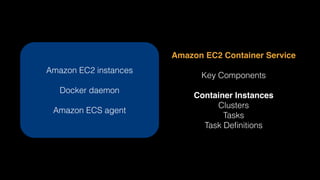
Amazon EC2 Container Service
Key Components
Container Instances
Clusters
Tasks
Task Definitions
Amazon EC2 instances
Docker daemon
Amazon ECS agent
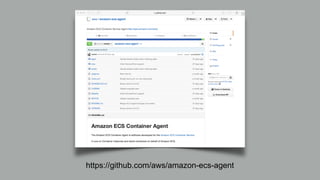
https://github.com/aws/amazon-ecs-agent
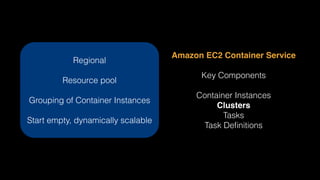
Amazon EC2 Container Service
Key Components
Container Instances
Clusters
Tasks
Task Definitions
Regional
Resource pool
Grouping of Container Instances
Start empty, dynamically scalable
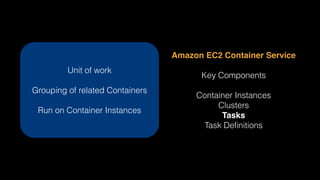
Amazon EC2 Container Service
Key Components
Container Instances
Clusters
Tasks
Task Definitions
Unit of work
Grouping of related Containers
Run on Container Instances
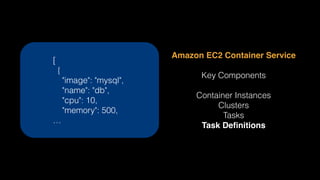
Amazon EC2 Container Service
Key Components
Container Instances
Clusters
Tasks
Task Definitions
[
{
"image": "mysql",
"name": "db",
"cpu": 10,
"memory": 500,
…
Tasks are defined via Task Definitions
[
{
"image": "tutum/wordpress-stackable",
"name": "wordpress",
"cpu": 10,
"memory": 500,
"essential": true,
"links": [
"db"
],
"entryPoint": [
"/bin/sh",
"-c"
],
"environment": [
…
],
"portMappings": [
{
"containerPort": 80,
"hostPort": 80
}
]
},
{
"image": "mysql",
"name": "db",
"cpu": 10,
"memory": 500,
"essential": true,
"entryPoint": [
"/entrypoint.sh"
],
"environment": [
{
"name": "MYSQL_ROOT_PASSWORD",
"value": "pass"
}
],
"portMappings": []
}
]
[
{
"image": "tutum/wordpress-stackable",
"name": "wordpress",
"cpu": 10,
"memory": 500,
"essential": true,
"links": [
"db"
],
"entryPoint": [
"/bin/sh",
"-c"
],
"environment": [
…
],
"portMappings": [
{
"containerPort": 80,
"hostPort": 80
}
]
},
]
{
"image": "mysql",
"name": "db",
"cpu": 10,
"memory": 500,
"essential": true,
"entryPoint": [
"/entrypoint.sh"
],
"environment": [
{
"name": "MYSQL_ROOT_PASSWORD",
"value": "pass"
}
],
"portMappings": []
}
]
From Docker Hub
10 CPU Units (1024 is full CPU),
500 Megabytes of Memory
Environment Variables
No external ports exposed
Tasks are defined via Task Definitions
[
{
"image": "tutum/wordpress-stackable",
"name": "wordpress",
"cpu": 10,
"memory": 500,
"essential": true,
"links": [
"db"
],
"entryPoint": [
"/bin/sh",
"-c"
],
"environment": [
…
],
"portMappings": [
{
"containerPort": 80,
"hostPort": 80
}
]
},
[
{
"image": "mysql",
"name": "db",
"cpu": 10,
"memory": 500,
"essential": true,
"entryPoint": [
"/entrypoint.sh"
],
"environment": [
{
"name": "MYSQL_ROOT_PASSWORD",
"value": "pass"
}
],
"portMappings": []
}
]
Essential to our Task
Docker link to mysql container
Expose port 80 in container
to port 80 on host
Tasks are defined via Task Definitions
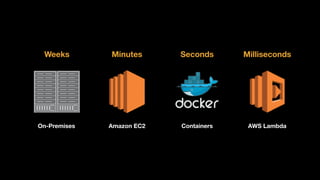
Amazon EC2 Containers AWS LambdaOn-Premises
Weeks Minutes Seconds Milliseconds
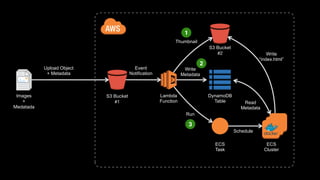
Demo Architecture
Content Management System
Prototype
Lambda
Function
S3 Bucket

#1
S3 Bucket

#2
DynamoDB

Table
ECS

Task
ECS

Cluster
Images
+

Medatada
Upload Object
+ Metadata
Event
Notification
Thumbnail
Write
Metadata
Run
Schedule
Read
Metadata
Write
“index.html”
1
2
3
<demo>
…
</demo>
@danilop

Microservices on AWS using AWS Lambda and Docker Containers

  • 1.
    Microservices on AWSusing AWS Lambda and Docker Containers Danilo Poccia ‒ AWS Technical Evangelist @danilop
  • 2.
  • 3.
  • 4.
    AWS Lambda Focus onbusiness logic, not infrastructure Customer uploads code, AWS Lambda handles: Capacity Scaling Deployment Fault tolerance Monitoring Logging . . .
  • 5.
    AWS Lambda Automatic scaling Customerspay only for what they use, no over/under provisioning
  • 6.
    AWS Lambda Fine-grained pricing Pricecompute time by 100ms, even short jobs make sense Low request charge No hourly, daily, or monthly minimums Free tier
  • 7.
    Events come inmany different shapes & sizes S3 event notifications DynamoDB Streams Kinesis events Custom events
  • 8.
  • 9.
  • 10.
    Docker on AWS Amazon Linux Asupported and maintained Linux image provided by Amazon Web Services Amazon EC2 Container Service Highly scalable, high performance container management service AWS Elastic Beanstalk For deploying and scaling web applications and services
  • 11.
    Amazon EC2 ContainerService Key Components Container Instances Clusters Tasks Task Definitions Amazon EC2 instances Docker daemon Amazon ECS agent
  • 12.
  • 13.
    Amazon EC2 ContainerService Key Components Container Instances Clusters Tasks Task Definitions Regional Resource pool Grouping of Container Instances Start empty, dynamically scalable
  • 14.
    Amazon EC2 ContainerService Key Components Container Instances Clusters Tasks Task Definitions Unit of work Grouping of related Containers Run on Container Instances
  • 15.
    Amazon EC2 ContainerService Key Components Container Instances Clusters Tasks Task Definitions [ { "image": "mysql", "name": "db", "cpu": 10, "memory": 500, …
  • 16.
    Tasks are definedvia Task Definitions [ { "image": "tutum/wordpress-stackable", "name": "wordpress", "cpu": 10, "memory": 500, "essential": true, "links": [ "db" ], "entryPoint": [ "/bin/sh", "-c" ], "environment": [ … ], "portMappings": [ { "containerPort": 80, "hostPort": 80 } ] }, { "image": "mysql", "name": "db", "cpu": 10, "memory": 500, "essential": true, "entryPoint": [ "/entrypoint.sh" ], "environment": [ { "name": "MYSQL_ROOT_PASSWORD", "value": "pass" } ], "portMappings": [] } ]
  • 17.
    [ { "image": "tutum/wordpress-stackable", "name": "wordpress", "cpu":10, "memory": 500, "essential": true, "links": [ "db" ], "entryPoint": [ "/bin/sh", "-c" ], "environment": [ … ], "portMappings": [ { "containerPort": 80, "hostPort": 80 } ] }, ] { "image": "mysql", "name": "db", "cpu": 10, "memory": 500, "essential": true, "entryPoint": [ "/entrypoint.sh" ], "environment": [ { "name": "MYSQL_ROOT_PASSWORD", "value": "pass" } ], "portMappings": [] } ] From Docker Hub 10 CPU Units (1024 is full CPU), 500 Megabytes of Memory Environment Variables No external ports exposed Tasks are defined via Task Definitions
  • 18.
    [ { "image": "tutum/wordpress-stackable", "name": "wordpress", "cpu":10, "memory": 500, "essential": true, "links": [ "db" ], "entryPoint": [ "/bin/sh", "-c" ], "environment": [ … ], "portMappings": [ { "containerPort": 80, "hostPort": 80 } ] }, [ { "image": "mysql", "name": "db", "cpu": 10, "memory": 500, "essential": true, "entryPoint": [ "/entrypoint.sh" ], "environment": [ { "name": "MYSQL_ROOT_PASSWORD", "value": "pass" } ], "portMappings": [] } ] Essential to our Task Docker link to mysql container Expose port 80 in container to port 80 on host Tasks are defined via Task Definitions
  • 19.
    Amazon EC2 ContainersAWS LambdaOn-Premises Weeks Minutes Seconds Milliseconds
  • 20.
  • 21.
    Lambda Function S3 Bucket #1 S3 Bucket #2 DynamoDB
 Table ECS
 Task ECS
 Cluster Images + Medatada UploadObject + Metadata Event Notification Thumbnail Write Metadata Run Schedule Read Metadata Write “index.html” 1 2 3
  • 22.
  • 23.