Introduction to Data-flow Analysis

Last Time
 – Control flow analysis
 – BT discussion

Today
 – Introduce iterative data-flow analysis
     – Liveness analysis
     – Introduce other useful concepts


CIS570 Lecture 4           Introduction to Data-flow Analysis                   2


Data-flow Analysis

 Idea
  – Data-flow analysis derives information about the dynamic
    behavior of a program by only examining the static code

Example
 – How many registers do we need
                                                1        a := 0
   for the program on the right?
                                                2    L1: b := a   +   1
 – Easy bound: the number of
   variables used (3)                           3        c := c   +   b
 – Better answer is found by                    4        a := b   *   2
   considering the dynamic                      5        if a <   9   goto L1
   requirements of the program                  6        return   c


CIS570 Lecture 4           Introduction to Data-flow Analysis                   3


                                                                                    1
Liveness Analysis

Definition
 – A variable is live at a particular point in the program if its value at that
   point will be used in the future (dead, otherwise).
   ∴ To compute liveness at a given point, we need to look into the future

Motivation: Register Allocation
 – A program contains an unbounded number of variables
 – Must execute on a machine with a bounded number of registers
 – Two variables can use the same register if they are never in use at the same
   time (i.e, never simultaneously live).
  ∴ Register allocation uses liveness information


CIS570 Lecture 4            Introduction to Data-flow Analysis                          4


Control Flow Graphs (CFGs)

Simplification
 – For now, we will use CFG’s in which nodes represent program
   statements rather than basic blocks

Example                                                          1        a = 0

1       a := 0                                                   2    b = a + 1
2   L1: b := a       +   1
3       c := c       +   b                                       3    c = c + b
4       a := b       *   2
5       if a <       9   goto L1                                 4    a = b * 2
6       return       c
                                                                 5        a<9
                                                                     No           Yes
                                            6   return c

CIS570 Lecture 4            Introduction to Data-flow Analysis                          5


                                                                                            2
Liveness by Example

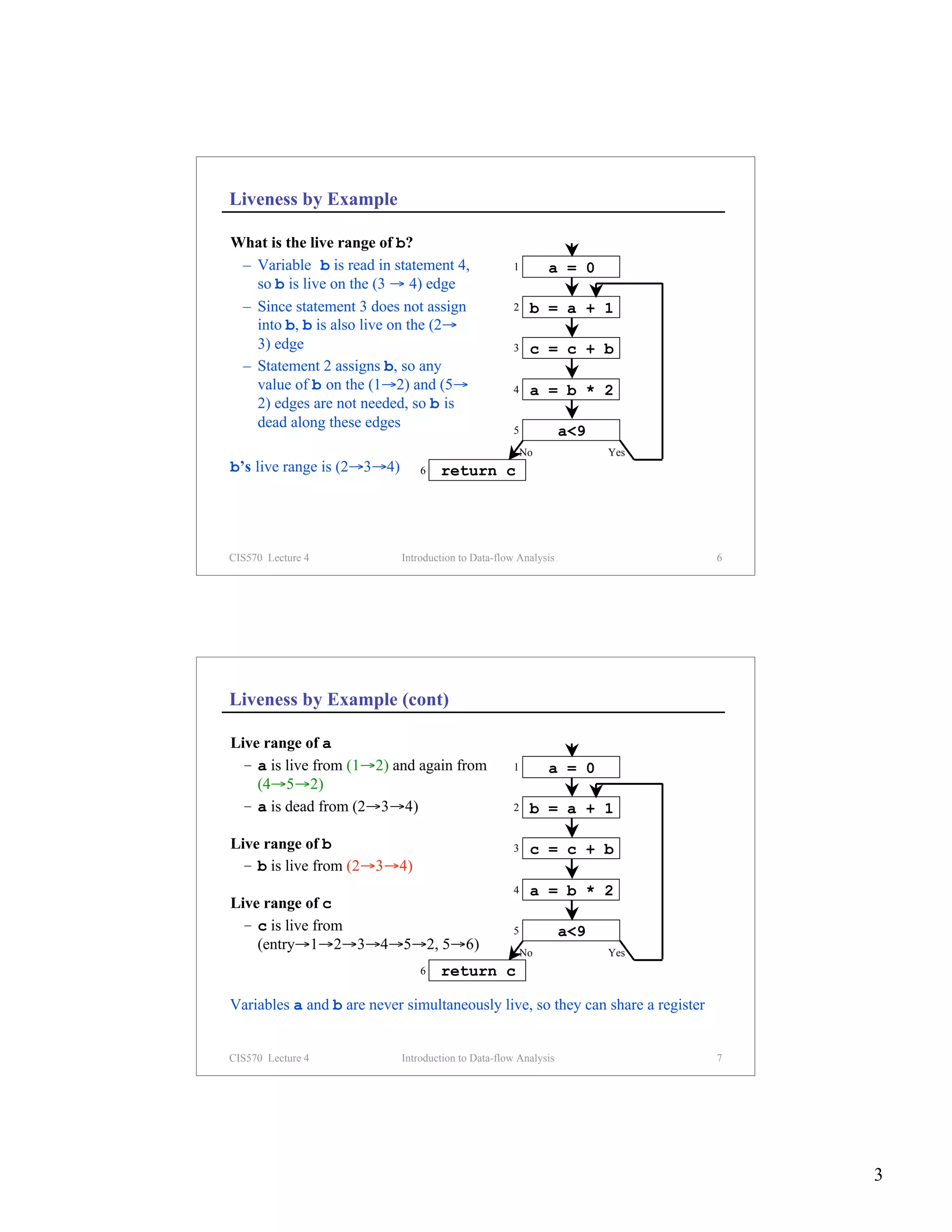
What is the live range of b?
 – Variable b is read in statement 4,               1        a = 0
   so b is live on the (3 → 4) edge
 – Since statement 3 does not assign                2    b = a + 1
   into b, b is also live on the (2→
   3) edge                                          3    c = c + b
 – Statement 2 assigns b, so any
   value of b on the (1→2) and (5→                  4    a = b * 2
   2) edges are not needed, so b is
   dead along these edges                           5            a<9
                                                        No             Yes
b’s live range is (2→3→4)       6   return c


CIS570 Lecture 4            Introduction to Data-flow Analysis                  6


Liveness by Example (cont)

Live range of a
  – a is live from (1→2) and again from             1        a = 0
    (4→5→2)
  – a is dead from (2→3→4)                          2    b = a + 1

Live range of b                                     3    c = c + b
  – b is live from (2→3→4)
                                                    4    a = b * 2
Live range of c
  – c is live from                                  5            a<9
    (entry→1→2→3→4→5→2, 5→6)                            No             Yes
                                6   return c

Variables a and b are never simultaneously live, so they can share a register


CIS570 Lecture 4            Introduction to Data-flow Analysis                  7


                                                                                    3
Terminology

Flow Graph Terms
  – A CFG node has out-edges that lead to successor nodes and in-edges that
    come from predecessor nodes
  – pred[n] is the set of all predecessors of node n 1  a = 0
    succ[n] is the set of all successors of node n
                                                                 2    b = a + 1
Examples
 – Out-edges of node 5:       (5→6) and (5→2)                    3    c = c + b
 – succ[5] = {2,6}
 – pred[5] = {4}                                                 4    a = b * 2
 – pred[2] = {1,5}
                                                                 5        a<9
                                                                     No         Yes
                                            6   return c

CIS570 Lecture 4            Introduction to Data-flow Analysis                           8


Uses and Defs

Def (or definition)                                                             a = 0
 – An assignment of a value to a variable
 – def[v] = set of CFG nodes that define variable v
 – def[n] = set of variables that are defined at node n
                                                                      a < 9?
Use
 – A read of a variable’s value
                                                                                v live
 – use[v] = set of CFG nodes that use variable v
 – use[n] = set of variables that are used at node n
                                                                                  ∉ def[v]
More precise definition of liveness
 – A variable v is live on a CFG edge if                                ∈ use[v]
   (1) ∃ a directed path from that edge to a use of v (node in use[v]), and
   (2) that path does not go through any def of v (no nodes in def[v])
CIS570 Lecture 4            Introduction to Data-flow Analysis                           9


                                                                                             4
The Flow of Liveness

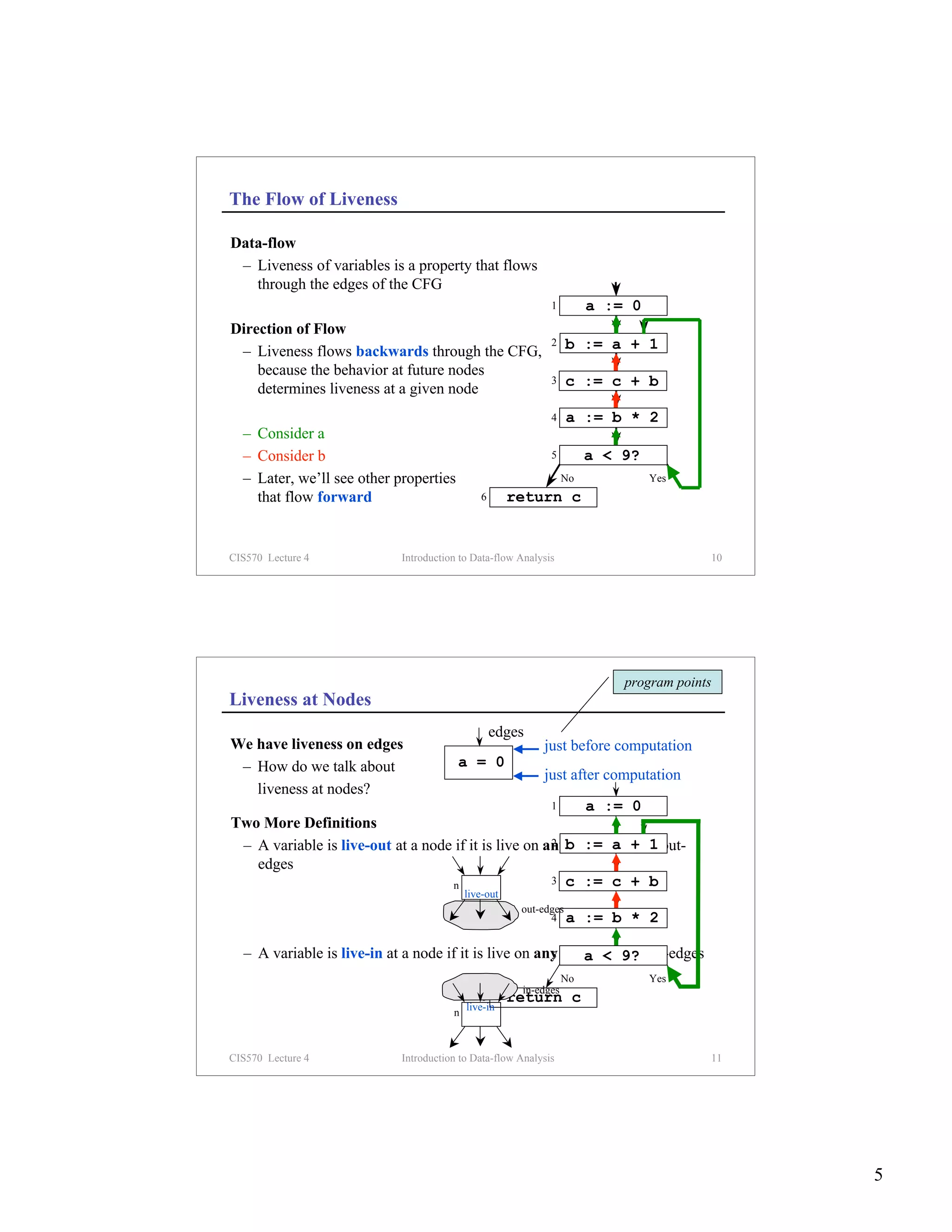
Data-flow
 – Liveness of variables is a property that flows
   through the edges of the CFG
                                                             1         a := 0
Direction of Flow
 – Liveness flows backwards through the CFG,
                                                             2    b := a + 1
    because the behavior at future nodes
                                                             3    c := c + b
    determines liveness at a given node
                                                             4    a := b * 2
  – Consider a
  – Consider b                                               5         a < 9?
  – Later, we’ll see other properties                             No            Yes
    that flow forward                         6       return c


CIS570 Lecture 4            Introduction to Data-flow Analysis                          10


                                                                           program points
Liveness at Nodes
                                                  edges
We have liveness on edges                                  just before computation
 – How do we talk about                 a = 0
                                                           just after computation
   liveness at nodes?
                                                      1   a := 0
Two More Definitions
 – A variable is live-out at a node if it is live on anyb := a + 1 out-
                                                      2 of that node’s

   edges
                                   n                  3 c := c + b
                                           live-out
                                                       out-edges
                                                             4 a       := b * 2

  – A variable is live-in at a node if it is live on any of that < 9? in-edges
                                                       5     a node’s
                                                                  No            Yes
                                                       in-edges
                                               6      return c
                                           live-in
                                       n


CIS570 Lecture 4            Introduction to Data-flow Analysis                          11


                                                                                             5
Computing Liveness
Rules for computing liveness
(1) Generate liveness:                           live-in
    If a variable is in use[n],              n     use

    it is live-in at node n
 (2) Push liveness across edges:                                                                     pred[n]
                                                                  live-out live-out       live-out
     If a variable is live-in at a node n
     then it is live-out at all nodes in pred[n]                         n live-in

 (3) Push liveness across nodes:
     If a variable is live-out at node n and not in def[n]                                 live-in
                                                                                      n
     then the variable is also live-in at n                                               live-out

Data-flow equations
    (1) in[n] = use[n]      ∪       (out[n] – def[n]) (3)

          out[n] =      ∪          in[s]
                                           (2)
                     s ∈ succ[n]

CIS570 Lecture 4                   Introduction to Data-flow Analysis                                    12


Solving the Data-flow Equations

Algorithm

    for each node n in CFG
         in[n] = ∅; out[n] = ∅                                   initialize solutions
    repeat
         for each node n in CFG
              in’[n] = in[n]                                     save current results
              out’[n] = out[n]
              in[n] = use[n] ∪ (out[n] – def[n])
                                                                 solve data-flow equations
              out[n] = ∪        in[s]
                         s ∈ succ[n]

    until in’[n]=in[n] and out’[n]=out[n] for all n                     test for convergence

This is iterative data-flow analysis (for liveness analysis)

CIS570 Lecture 4                   Introduction to Data-flow Analysis                                    13


                                                                                                               6
Example
              1st     2nd    3rd   4th    5th    6th    7th
node use def in out in out in out in out in out in out in out
 #                                                                                  1        a := 0
  1         a                   a       a         ac   c ac     c ac    c ac
  2     a   b    a        a bc ac bc ac bc ac bc ac bc ac bc                        2   b := a + 1
  3    bc   c    bc       bc b      bc b      bc b     bc b    bc bc bc bc
  4     b   a    b        b a  b a b ac bc ac bc ac bc ac                           3   c := c + b
  5     a        a a      a ac ac ac ac ac ac ac ac ac ac ac
  6     c        c        c         c         c        c       c        c           4   a := b * 2

Data-flow Equations for Liveness                                                    5        a < 9?
                                                                                        No            Yes
      in[n] = use[n] ∪ (out[n] – def[n])
                                                                   6        return c
      out[n] =        ∪         in[s]
                  s ∈ succ[n]


CIS570 Lecture 4                            Introduction to Data-flow Analysis                              14


Example (cont)
Data-flow Equations for Liveness
      in[n] = use[n] ∪ (out[n] – def[n])                                            1        a := 0

      out[n] =       ∪         in[s]                                                2   b := a + 1
                 s ∈ succ[n]

                                                                                    3   c := c + b
Improving Performance                                                   out[3]
  Consider the (3→4) edge in the graph:                                     in[4]
                                                                                    4   a := b * 2
                                                                        out[4]
  out[4] is used to compute in[4]
  in[4] is used to compute out[3] . . .                                             5        a < 9?
  So we should compute the sets in the                                                  No            Yes
  order: out[4], in[4], out[3], in[3], . . .                       6        return c


The order of computation should follow the direction of flow

CIS570 Lecture 4                            Introduction to Data-flow Analysis                              15


                                                                                                                 7
Iterating Through the Flow Graph Backwards

                             1st     2nd    3rd
               node use def out in out in out in                        1        a := 0
                #
                   6    c          c      c        c
                                                                        2   b := a + 1
                   5    a       c ac   ac ac ac ac
                   4    b   a   ac bc ac bc ac bc                       3   c := c + b
                   3   bc   c   bc bc bc bc bc bc
                   2    a   b   bc ac bc ac bc ac                       4   a := b * 2
                   1        a   ac c   ac c   ac    c
                                                                        5        a < 9?
              Converges much faster!
                                                                            No            Yes
                                                          6     return c


CIS570 Lecture 4                   Introduction to Data-flow Analysis                           16


Solving the Data-flow Equations (reprise)

Algorithm

    for each node n in CFG
         in[n] = ∅; out[n] = ∅                     Initialize solutions
    repeat
         for each node n in CFG in reverse topsort order
              in’[n] = in[n]                       Save current results
              out’[n] = out[n]
              out[n] = s ∈ succ[n] in[s]
                            ∪
                                                   Solve data-flow equations
              in[n] = use[n] ∪ (out[n] – def[n])
    until in’[n]=in[n] and out’[n]=out[n] for all n      Test for convergence


CIS570 Lecture 4                   Introduction to Data-flow Analysis                           17


                                                                                                     8
Time Complexity

Consider a program of size N
 – Has N nodes in the flow graph (and at most N variables)
 – Each live-in or live-out set has at most N elements
 – Each set-union operation takes O(N) time
 – The for loop body
     – constant # of set operations per node
     – O(N) nodes ⇒ O(N2) time for the loop
 – Each iteration of the repeat loop can only make the set larger
 – Each set can contain at most N variables ⇒ 2N2 iterations

Worst case:        O(N4)
Typical case:      2 to 3 iterations with good ordering & sparse sets
                   ⇒ O(N) to O(N2)


CIS570 Lecture 4             Introduction to Data-flow Analysis                      18


More Performance Considerations

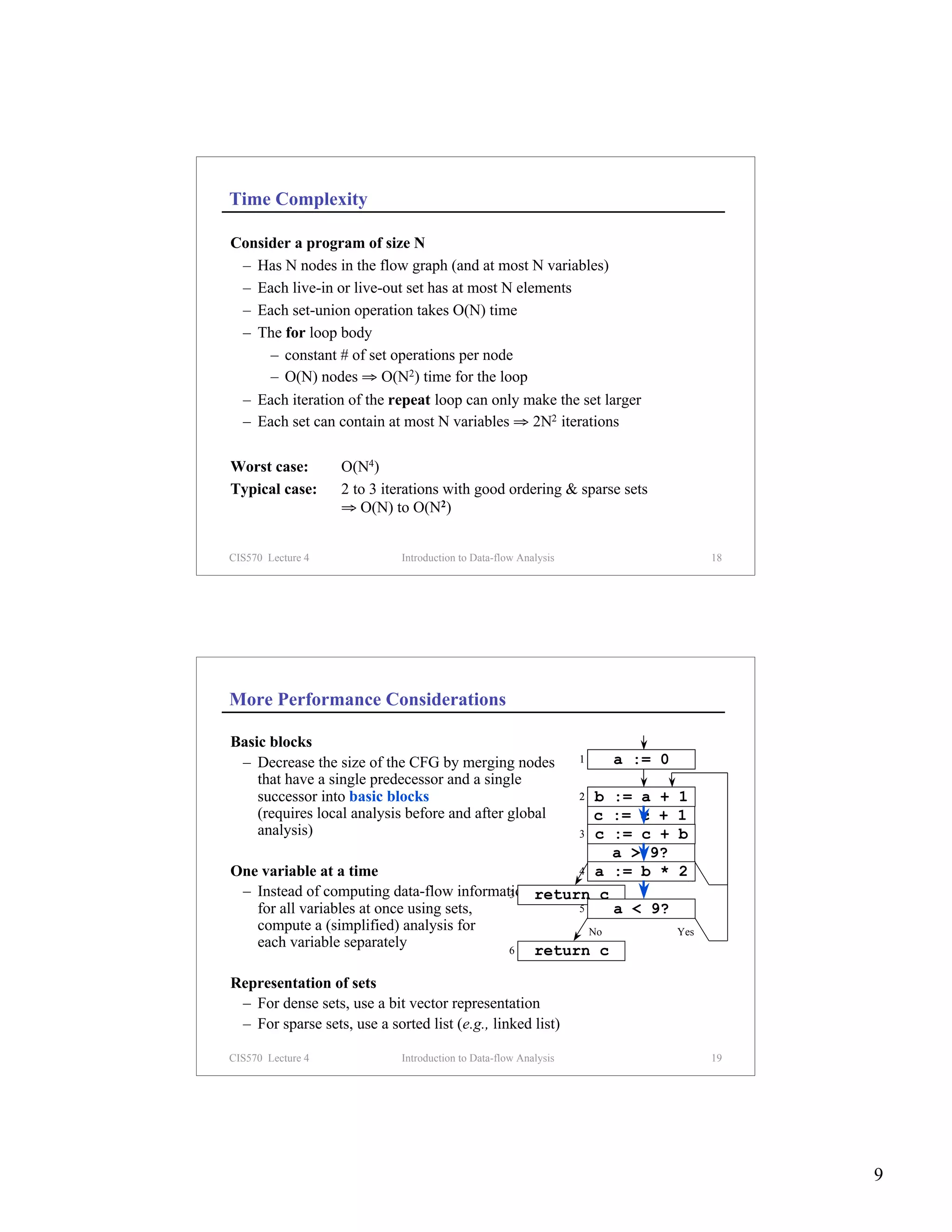
Basic blocks
 – Decrease the size of the CFG by merging nodes                  1   a := 0
    that have a single predecessor and a single
    successor into basic blocks                       b := a +    2            1
    (requires local analysis before and after global  c := c +                 1
    analysis)                                      3 a := b *
                                                      c    c +                 2
                                                                               b
                                                        a > 9?
One variable at a time                             4 No := b *
                                                      a                        2
                                                                               Yes
 – Instead of computing data-flow information return c
                                          3
   for all variables at once using sets,           5    a < 9?
   compute a (simplified) analysis for               No                        Yes
   each variable separately               6   return c

Representation of sets
 – For dense sets, use a bit vector representation
 – For sparse sets, use a sorted list (e.g., linked list)

CIS570 Lecture 4             Introduction to Data-flow Analysis                      19


                                                                                          9
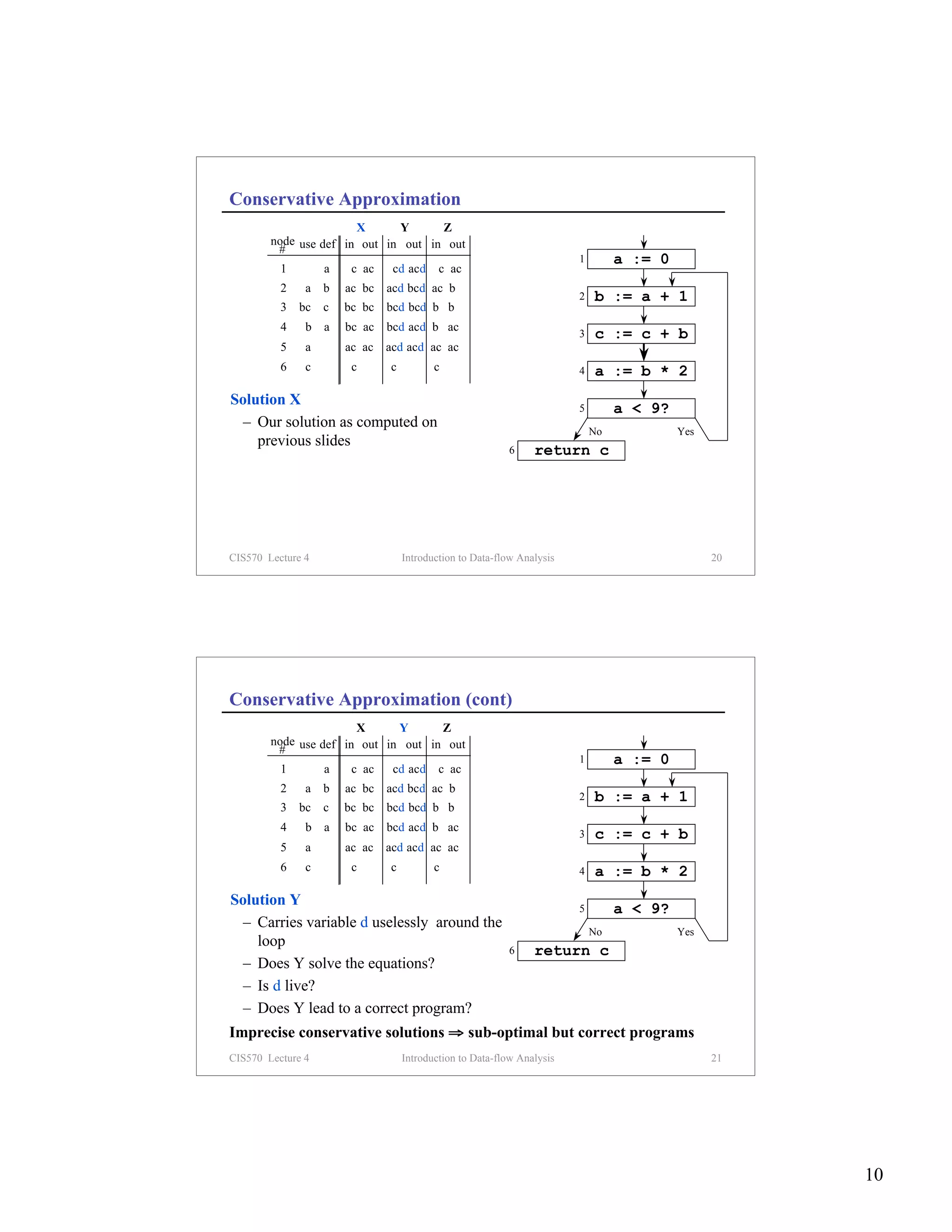
Conservative Approximation
                       X      Y      Z
        node use def in out in out in out
         #
                                                                        1        a := 0
          1        a    c ac    cd acd     c ac
          2    a   b   ac bc   acd bcd ac b
                                                                        2   b := a + 1
          3   bc   c   bc bc   bcd bcd b b
          4    b   a   bc ac   bcd acd b ac
                                                                        3   c := c + b
          5    a       ac ac   acd acd ac ac
          6    c        c      c          c                             4   a := b * 2
Solution X                                                              5        a < 9?
  – Our solution as computed on
                                                                            No            Yes
    previous slides
                                                          6     return c


CIS570 Lecture 4                   Introduction to Data-flow Analysis                           20


Conservative Approximation (cont)
                       X      Y      Z
        node use def in out in out in out
         #
                                                                        1        a := 0
          1        a    c ac    cd acd     c ac
          2    a   b   ac bc   acd bcd ac b
                                                                        2   b := a + 1
          3   bc   c   bc bc   bcd bcd b b
          4    b   a   bc ac   bcd acd b ac
                                                                        3   c := c + b
          5    a       ac ac   acd acd ac ac
          6    c        c      c          c                             4   a := b * 2
Solution Y                                                              5        a < 9?
  – Carries variable d uselessly around the
                                                                            No            Yes
    loop
                                                          6     return c
  – Does Y solve the equations?
  – Is d live?
  – Does Y lead to a correct program?
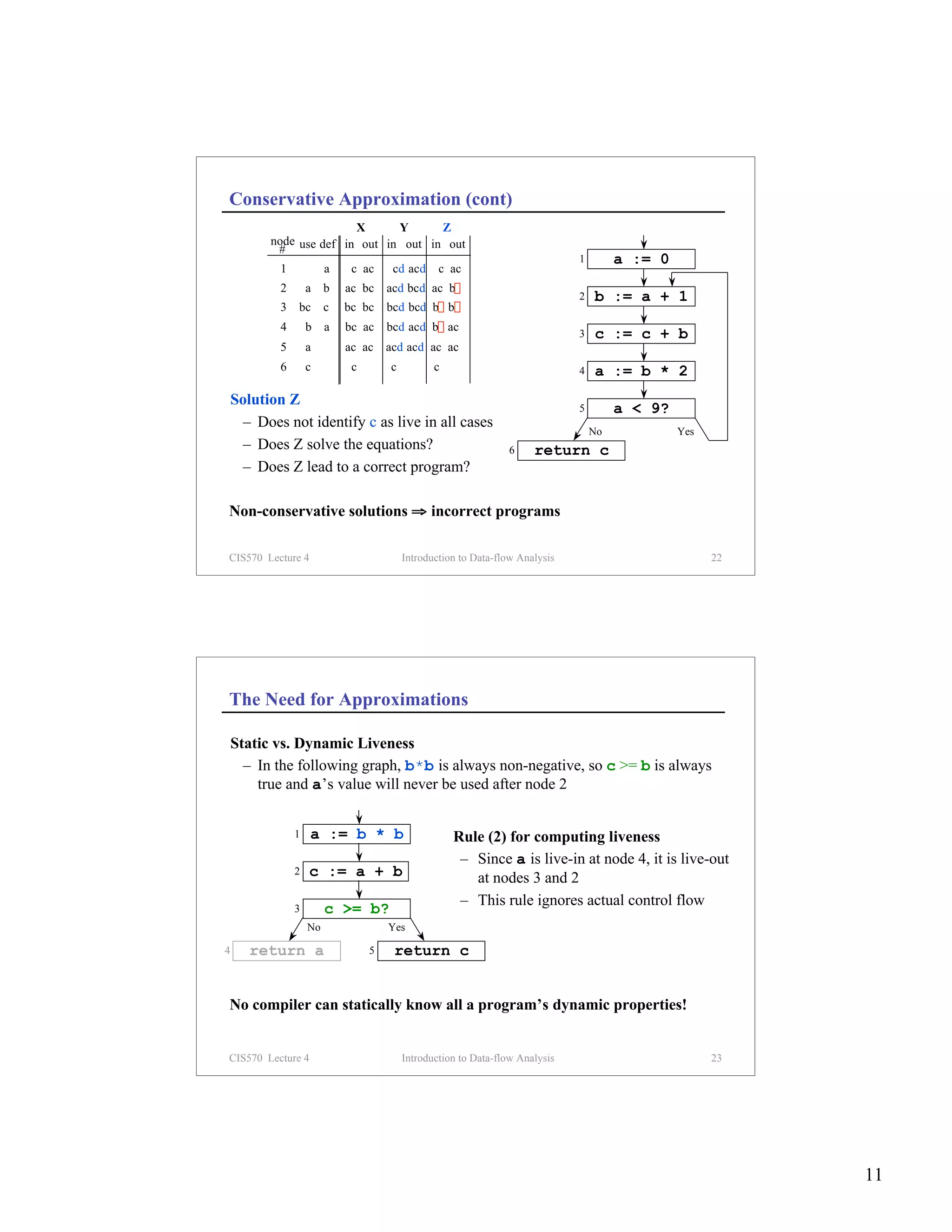
Imprecise conservative solutions ⇒ sub-optimal but correct programs
CIS570 Lecture 4                   Introduction to Data-flow Analysis                           21


                                                                                                     10
Conservative Approximation (cont)
                         X      Y      Z
          node use def in out in out in out
           #
                                                                               1        a := 0
            1            a    c ac     cd acd     c ac
            2       a    b   ac bc    acd bcd ac b
                                                                               2   b := a + 1
            3   bc       c   bc bc    bcd bcd b b
            4       b    a   bc ac    bcd acd b ac
                                                                               3   c := c + b
            5       a        ac ac    acd acd ac ac
            6       c         c       c          c                             4   a := b * 2
    Solution Z                                                                 5        a < 9?
      – Does not identify c as live in all cases
                                                                                   No            Yes
      – Does Z solve the equations?                              6     return c
      – Does Z lead to a correct program?

Non-conservative solutions ⇒ incorrect programs

CIS570 Lecture 4                          Introduction to Data-flow Analysis                           22


The Need for Approximations

    Static vs. Dynamic Liveness
      – In the following graph, b*b is always non-negative, so c >= b is always
        true and a’s value will never be used after node 2


                1   a := b * b                       Rule (2) for computing liveness
                                                      – Since a is live-in at node 4, it is live-out
                2   c := a + b                          at nodes 3 and 2
                                                      – This rule ignores actual control flow
                3        c >= b?
                    No                Yes

4      return a                   5    return c


No compiler can statically know all a program’s dynamic properties!


CIS570 Lecture 4                          Introduction to Data-flow Analysis                           23


                                                                                                            11
Concepts

Liveness
  – Use in register allocation
  – Generating liveness
  – Flow and direction
  – Data-flow equations and analysis
  – Complexity
  – Improving performance (basic blocks, single variable, bit sets)

Control flow graphs
 – Predecessors and successors

Defs and uses

Conservative approximation
 – Static versus dynamic liveness
CIS570 Lecture 4           Introduction to Data-flow Analysis         24


Next Time

Lecture
 – Generalizing data-flow analysis


CIS570 Lecture 4           Introduction to Data-flow Analysis         25


                                                                           12

Lecture04

  • 1.
    Introduction to Data-flowAnalysis Last Time – Control flow analysis – BT discussion Today – Introduce iterative data-flow analysis – Liveness analysis – Introduce other useful concepts CIS570 Lecture 4 Introduction to Data-flow Analysis 2 Data-flow Analysis Idea – Data-flow analysis derives information about the dynamic behavior of a program by only examining the static code Example – How many registers do we need 1 a := 0 for the program on the right? 2 L1: b := a + 1 – Easy bound: the number of variables used (3) 3 c := c + b – Better answer is found by 4 a := b * 2 considering the dynamic 5 if a < 9 goto L1 requirements of the program 6 return c CIS570 Lecture 4 Introduction to Data-flow Analysis 3 1
  • 2.
    Liveness Analysis Definition –A variable is live at a particular point in the program if its value at that point will be used in the future (dead, otherwise). ∴ To compute liveness at a given point, we need to look into the future Motivation: Register Allocation – A program contains an unbounded number of variables – Must execute on a machine with a bounded number of registers – Two variables can use the same register if they are never in use at the same time (i.e, never simultaneously live). ∴ Register allocation uses liveness information CIS570 Lecture 4 Introduction to Data-flow Analysis 4 Control Flow Graphs (CFGs) Simplification – For now, we will use CFG’s in which nodes represent program statements rather than basic blocks Example 1 a = 0 1 a := 0 2 b = a + 1 2 L1: b := a + 1 3 c := c + b 3 c = c + b 4 a := b * 2 5 if a < 9 goto L1 4 a = b * 2 6 return c 5 a<9 No Yes 6 return c CIS570 Lecture 4 Introduction to Data-flow Analysis 5 2
  • 3.
    Liveness by Example Whatis the live range of b? – Variable b is read in statement 4, 1 a = 0 so b is live on the (3 → 4) edge – Since statement 3 does not assign 2 b = a + 1 into b, b is also live on the (2→ 3) edge 3 c = c + b – Statement 2 assigns b, so any value of b on the (1→2) and (5→ 4 a = b * 2 2) edges are not needed, so b is dead along these edges 5 a<9 No Yes b’s live range is (2→3→4) 6 return c CIS570 Lecture 4 Introduction to Data-flow Analysis 6 Liveness by Example (cont) Live range of a – a is live from (1→2) and again from 1 a = 0 (4→5→2) – a is dead from (2→3→4) 2 b = a + 1 Live range of b 3 c = c + b – b is live from (2→3→4) 4 a = b * 2 Live range of c – c is live from 5 a<9 (entry→1→2→3→4→5→2, 5→6) No Yes 6 return c Variables a and b are never simultaneously live, so they can share a register CIS570 Lecture 4 Introduction to Data-flow Analysis 7 3
  • 4.
    Terminology Flow Graph Terms – A CFG node has out-edges that lead to successor nodes and in-edges that come from predecessor nodes – pred[n] is the set of all predecessors of node n 1 a = 0 succ[n] is the set of all successors of node n 2 b = a + 1 Examples – Out-edges of node 5: (5→6) and (5→2) 3 c = c + b – succ[5] = {2,6} – pred[5] = {4} 4 a = b * 2 – pred[2] = {1,5} 5 a<9 No Yes 6 return c CIS570 Lecture 4 Introduction to Data-flow Analysis 8 Uses and Defs Def (or definition) a = 0 – An assignment of a value to a variable – def[v] = set of CFG nodes that define variable v – def[n] = set of variables that are defined at node n a < 9? Use – A read of a variable’s value v live – use[v] = set of CFG nodes that use variable v – use[n] = set of variables that are used at node n ∉ def[v] More precise definition of liveness – A variable v is live on a CFG edge if ∈ use[v] (1) ∃ a directed path from that edge to a use of v (node in use[v]), and (2) that path does not go through any def of v (no nodes in def[v]) CIS570 Lecture 4 Introduction to Data-flow Analysis 9 4
  • 5.
    The Flow ofLiveness Data-flow – Liveness of variables is a property that flows through the edges of the CFG 1 a := 0 Direction of Flow – Liveness flows backwards through the CFG, 2 b := a + 1 because the behavior at future nodes 3 c := c + b determines liveness at a given node 4 a := b * 2 – Consider a – Consider b 5 a < 9? – Later, we’ll see other properties No Yes that flow forward 6 return c CIS570 Lecture 4 Introduction to Data-flow Analysis 10 program points Liveness at Nodes edges We have liveness on edges just before computation – How do we talk about a = 0 just after computation liveness at nodes? 1 a := 0 Two More Definitions – A variable is live-out at a node if it is live on anyb := a + 1 out- 2 of that node’s edges n 3 c := c + b live-out out-edges 4 a := b * 2 – A variable is live-in at a node if it is live on any of that < 9? in-edges 5 a node’s No Yes in-edges 6 return c live-in n CIS570 Lecture 4 Introduction to Data-flow Analysis 11 5
  • 6.
    Computing Liveness Rules forcomputing liveness (1) Generate liveness: live-in If a variable is in use[n], n use it is live-in at node n (2) Push liveness across edges: pred[n] live-out live-out live-out If a variable is live-in at a node n then it is live-out at all nodes in pred[n] n live-in (3) Push liveness across nodes: If a variable is live-out at node n and not in def[n] live-in n then the variable is also live-in at n live-out Data-flow equations (1) in[n] = use[n] ∪ (out[n] – def[n]) (3) out[n] = ∪ in[s] (2) s ∈ succ[n] CIS570 Lecture 4 Introduction to Data-flow Analysis 12 Solving the Data-flow Equations Algorithm for each node n in CFG in[n] = ∅; out[n] = ∅ initialize solutions repeat for each node n in CFG in’[n] = in[n] save current results out’[n] = out[n] in[n] = use[n] ∪ (out[n] – def[n]) solve data-flow equations out[n] = ∪ in[s] s ∈ succ[n] until in’[n]=in[n] and out’[n]=out[n] for all n test for convergence This is iterative data-flow analysis (for liveness analysis) CIS570 Lecture 4 Introduction to Data-flow Analysis 13 6
  • 7.
    Example 1st 2nd 3rd 4th 5th 6th 7th node use def in out in out in out in out in out in out in out # 1 a := 0 1 a a a ac c ac c ac c ac 2 a b a a bc ac bc ac bc ac bc ac bc ac bc 2 b := a + 1 3 bc c bc bc b bc b bc b bc b bc bc bc bc 4 b a b b a b a b ac bc ac bc ac bc ac 3 c := c + b 5 a a a a ac ac ac ac ac ac ac ac ac ac ac 6 c c c c c c c c 4 a := b * 2 Data-flow Equations for Liveness 5 a < 9? No Yes in[n] = use[n] ∪ (out[n] – def[n]) 6 return c out[n] = ∪ in[s] s ∈ succ[n] CIS570 Lecture 4 Introduction to Data-flow Analysis 14 Example (cont) Data-flow Equations for Liveness in[n] = use[n] ∪ (out[n] – def[n]) 1 a := 0 out[n] = ∪ in[s] 2 b := a + 1 s ∈ succ[n] 3 c := c + b Improving Performance out[3] Consider the (3→4) edge in the graph: in[4] 4 a := b * 2 out[4] out[4] is used to compute in[4] in[4] is used to compute out[3] . . . 5 a < 9? So we should compute the sets in the No Yes order: out[4], in[4], out[3], in[3], . . . 6 return c The order of computation should follow the direction of flow CIS570 Lecture 4 Introduction to Data-flow Analysis 15 7
  • 8.
    Iterating Through theFlow Graph Backwards 1st 2nd 3rd node use def out in out in out in 1 a := 0 # 6 c c c c 2 b := a + 1 5 a c ac ac ac ac ac 4 b a ac bc ac bc ac bc 3 c := c + b 3 bc c bc bc bc bc bc bc 2 a b bc ac bc ac bc ac 4 a := b * 2 1 a ac c ac c ac c 5 a < 9? Converges much faster! No Yes 6 return c CIS570 Lecture 4 Introduction to Data-flow Analysis 16 Solving the Data-flow Equations (reprise) Algorithm for each node n in CFG in[n] = ∅; out[n] = ∅ Initialize solutions repeat for each node n in CFG in reverse topsort order in’[n] = in[n] Save current results out’[n] = out[n] out[n] = s ∈ succ[n] in[s] ∪ Solve data-flow equations in[n] = use[n] ∪ (out[n] – def[n]) until in’[n]=in[n] and out’[n]=out[n] for all n Test for convergence CIS570 Lecture 4 Introduction to Data-flow Analysis 17 8
  • 9.
    Time Complexity Consider aprogram of size N – Has N nodes in the flow graph (and at most N variables) – Each live-in or live-out set has at most N elements – Each set-union operation takes O(N) time – The for loop body – constant # of set operations per node – O(N) nodes ⇒ O(N2) time for the loop – Each iteration of the repeat loop can only make the set larger – Each set can contain at most N variables ⇒ 2N2 iterations Worst case: O(N4) Typical case: 2 to 3 iterations with good ordering & sparse sets ⇒ O(N) to O(N2) CIS570 Lecture 4 Introduction to Data-flow Analysis 18 More Performance Considerations Basic blocks – Decrease the size of the CFG by merging nodes 1 a := 0 that have a single predecessor and a single successor into basic blocks b := a + 2 1 (requires local analysis before and after global c := c + 1 analysis) 3 a := b * c c + 2 b a > 9? One variable at a time 4 No := b * a 2 Yes – Instead of computing data-flow information return c 3 for all variables at once using sets, 5 a < 9? compute a (simplified) analysis for No Yes each variable separately 6 return c Representation of sets – For dense sets, use a bit vector representation – For sparse sets, use a sorted list (e.g., linked list) CIS570 Lecture 4 Introduction to Data-flow Analysis 19 9
  • 10.
    Conservative Approximation X Y Z node use def in out in out in out # 1 a := 0 1 a c ac cd acd c ac 2 a b ac bc acd bcd ac b 2 b := a + 1 3 bc c bc bc bcd bcd b b 4 b a bc ac bcd acd b ac 3 c := c + b 5 a ac ac acd acd ac ac 6 c c c c 4 a := b * 2 Solution X 5 a < 9? – Our solution as computed on No Yes previous slides 6 return c CIS570 Lecture 4 Introduction to Data-flow Analysis 20 Conservative Approximation (cont) X Y Z node use def in out in out in out # 1 a := 0 1 a c ac cd acd c ac 2 a b ac bc acd bcd ac b 2 b := a + 1 3 bc c bc bc bcd bcd b b 4 b a bc ac bcd acd b ac 3 c := c + b 5 a ac ac acd acd ac ac 6 c c c c 4 a := b * 2 Solution Y 5 a < 9? – Carries variable d uselessly around the No Yes loop 6 return c – Does Y solve the equations? – Is d live? – Does Y lead to a correct program? Imprecise conservative solutions ⇒ sub-optimal but correct programs CIS570 Lecture 4 Introduction to Data-flow Analysis 21 10
  • 11.
    Conservative Approximation (cont) X Y Z node use def in out in out in out # 1 a := 0 1 a c ac cd acd c ac 2 a b ac bc acd bcd ac b 2 b := a + 1 3 bc c bc bc bcd bcd b b 4 b a bc ac bcd acd b ac 3 c := c + b 5 a ac ac acd acd ac ac 6 c c c c 4 a := b * 2 Solution Z 5 a < 9? – Does not identify c as live in all cases No Yes – Does Z solve the equations? 6 return c – Does Z lead to a correct program? Non-conservative solutions ⇒ incorrect programs CIS570 Lecture 4 Introduction to Data-flow Analysis 22 The Need for Approximations Static vs. Dynamic Liveness – In the following graph, b*b is always non-negative, so c >= b is always true and a’s value will never be used after node 2 1 a := b * b Rule (2) for computing liveness – Since a is live-in at node 4, it is live-out 2 c := a + b at nodes 3 and 2 – This rule ignores actual control flow 3 c >= b? No Yes 4 return a 5 return c No compiler can statically know all a program’s dynamic properties! CIS570 Lecture 4 Introduction to Data-flow Analysis 23 11
  • 12.
    Concepts Liveness –Use in register allocation – Generating liveness – Flow and direction – Data-flow equations and analysis – Complexity – Improving performance (basic blocks, single variable, bit sets) Control flow graphs – Predecessors and successors Defs and uses Conservative approximation – Static versus dynamic liveness CIS570 Lecture 4 Introduction to Data-flow Analysis 24 Next Time Lecture – Generalizing data-flow analysis CIS570 Lecture 4 Introduction to Data-flow Analysis 25 12