Internet Technology
Saman M. Almufti
Lecture 6
HTTP • HTTP stands for HyperText Transfer Protocol.
• It is a protocol used in TCP/IP Application layer to access the data on the World Wide
Web (www).
• The HTTP protocol can be used to transfer the data in the form of (Multipurpose
Internet Mail Extensions) MIME-like format such as plain text, hypertext,
audio, video, and so on.
• This protocol is known as HyperText Transfer Protocol because of its efficiency that
allows us to use in a hypertext environment where there are rapid jumps from one
document to another document.
Features of HTTP
• Connectionless protocol: HTTP is a connectionless protocol. HTTP client initiates a request and waits
for a response from the server. When the server receives the request, the server processes the request and
sends back the response to the HTTP client after that the client disconnects the connection. The
connection between client and server exist only during the current request and response time only.
• Media independent: HTTP protocol is a media independent as data can be sent as long as both the
client and server know how to handle the data content. It is required for both the client and server to
specify the content type in MIME-type header.
• Stateless: HTTP is a stateless protocol as both the client and server know each other only during the
current request. Due to this nature of the protocol, both the client and server do not retain the
information between various requests of the web pages.
HTTP Request / Response cycle
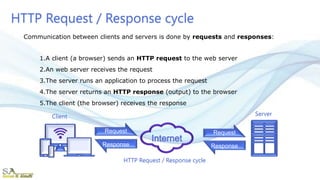
1.A client (a browser) sends an HTTP request to the web server
2.An web server receives the request
3.The server runs an application to process the request
4.The server returns an HTTP response (output) to the browser
5.The client (the browser) receives the response
Communication between clients and servers is done by requests and responses:
Request
Response
Request
Response
HTTP Request / Response cycle
Client Server
HTTP request /response to browse a website
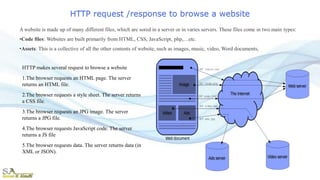
HTTP makes several request to browse a website
1.The browser requests an HTML page. The server
returns an HTML file.
2.The browser requests a style sheet. The server returns
a CSS file.
3.The browser requests an JPG image. The server
returns a JPG file.
4.The browser requests JavaScript code. The server
returns a JS file
5.The browser requests data. The server returns data (in
XML or JSON).
A website is made up of many different files, which are sored in a server or in varies servers. These files come in two main types:
•Code files: Websites are built primarily from HTML, CSS, JavaScript, php,…etc.
•Assets: This is a collective of all the other contents of website, such as images, music, video, Word documents,
HTTP Request
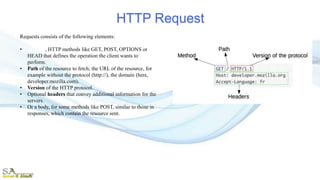
Requests consists of the following elements:
• Method, HTTP methods like GET, POST, OPTIONS or
HEAD that defines the operation the client wants to
perform.
• Path of the resource to fetch; the URL of the resource, for
example without the protocol (http://), the domain (here,
developer.mozilla.com).
• Version of the HTTP protocol.
• Optional headers that convey additional information for the
servers.
• Or a body, for some methods like POST, similar to those in
responses, which contain the resource sent.
HTTP Response
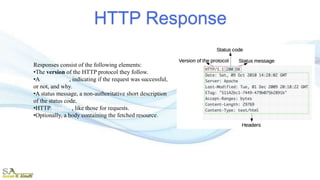
Responses consist of the following elements:
•The version of the HTTP protocol they follow.
•A status code, indicating if the request was successful,
or not, and why.
•A status message, a non-authoritative short description
of the status code.
•HTTP headers, like those for requests.
•Optionally, a body containing the fetched resource.
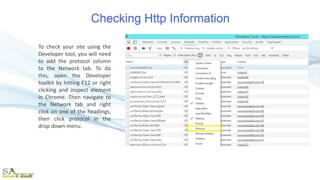
Checking Http Information
To check your site using the
Developer tool, you will need
to add the protocol column
to the Network tab. To do
this, open the Developer
toolkit by hitting F12 or right
clicking and inspect element
in Chrome. Then navigate to
the Network tab and right
click on one of the headings,
then click protocol in the
drop down menu.
HTTPS
• HTTPS is Hypertext Transfer Protocol Secure.
• The HTTP protocol does not provide the security of the data, while HTTPS ensures the
security of the data. Therefore, we can say that HTTPS is a secure version of the HTTP
protocol.
• This protocol allows transferring the data in an encrypted form. The use of HTTPS
protocol is mainly required where we need to enter the bank account details. The HTTPS
protocol is mainly used where we require to enter the login credentials. In modern
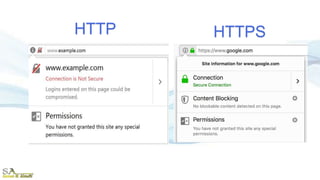
browsers such as chrome, both the protocols, i.e., HTTP and HTTPS, are marked
differently.
• To provide encryption, HTTPS uses an encryption protocol known as Transport Layer
Security (TSL), and Secure Sockets Layer (SSL). This protocol uses a mechanism
known as asymmetric public key infrastructure, and it uses two different keys which are
given below:
• Private key: This key is available on the web server, which is managed by the
owner of a website. It decrypts the information which is encrypted by the public
key.
• Public key: This key is available to everyone. It converts the data into an encrypted
form.
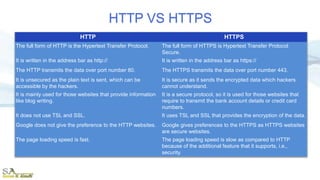
HTTP VS HTTPS
HTTP HTTPS
The full form of HTTP is the Hypertext Transfer Protocol. The full form of HTTPS is Hypertext Transfer Protocol
Secure.
It is written in the address bar as http:// It is written in the address bar as https://
The HTTP transmits the data over port number 80. The HTTPS transmits the data over port number 443.
It is unsecured as the plain text is sent, which can be
accessible by the hackers.
It is secure as it sends the encrypted data which hackers
cannot understand.
It is mainly used for those websites that provide information
like blog writing.
It is a secure protocol, so it is used for those websites that
require to transmit the bank account details or credit card
numbers.
It does not use TSL and SSL. It uses TSL and SSL that provides the encryption of the data.
Google does not give the preference to the HTTP websites. Google gives preferences to the HTTPS as HTTPS websites
are secure websites.
The page loading speed is fast. The page loading speed is slow as compared to HTTP
because of the additional feature that it supports, i.e.,
security.
HTTPSHTTP
• Transport Layer Security (TLS)
• Secure Sockets Layer (SSL)
• TLS/SSL Protocols adds a layer of security on top of the TCP/IP transport protocols.
they uses both symmetric encryption and public key encryption for securely sending
private data, and adds additional security features, such as authentication and message
tampering detection.
• Are standard security technology for establishing an encrypted link between a server and
a client—typically a web server (website) and a browser, or a mail server and a mail
client (e.g., Outlook).
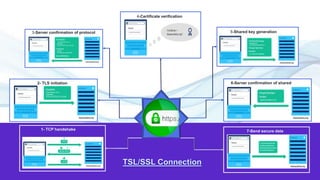
2- TLS initiation
3-Server confirmation of protocol
1- TCP handshake
5-Shared key generation
4-Certificate verification
6-Server confirmation of shared
key
7-Send secure data
IP Address
Lecture  6- http
Lecture  6- http

Lecture 6- http

  • 1.
  • 3.
    HTTP • HTTPstands for HyperText Transfer Protocol. • It is a protocol used in TCP/IP Application layer to access the data on the World Wide Web (www). • The HTTP protocol can be used to transfer the data in the form of (Multipurpose Internet Mail Extensions) MIME-like format such as plain text, hypertext, audio, video, and so on. • This protocol is known as HyperText Transfer Protocol because of its efficiency that allows us to use in a hypertext environment where there are rapid jumps from one document to another document.
  • 4.
    Features of HTTP •Connectionless protocol: HTTP is a connectionless protocol. HTTP client initiates a request and waits for a response from the server. When the server receives the request, the server processes the request and sends back the response to the HTTP client after that the client disconnects the connection. The connection between client and server exist only during the current request and response time only. • Media independent: HTTP protocol is a media independent as data can be sent as long as both the client and server know how to handle the data content. It is required for both the client and server to specify the content type in MIME-type header. • Stateless: HTTP is a stateless protocol as both the client and server know each other only during the current request. Due to this nature of the protocol, both the client and server do not retain the information between various requests of the web pages.
  • 5.
    HTTP Request /Response cycle 1.A client (a browser) sends an HTTP request to the web server 2.An web server receives the request 3.The server runs an application to process the request 4.The server returns an HTTP response (output) to the browser 5.The client (the browser) receives the response Communication between clients and servers is done by requests and responses: Request Response Request Response HTTP Request / Response cycle Client Server
  • 6.
    HTTP request /responseto browse a website HTTP makes several request to browse a website 1.The browser requests an HTML page. The server returns an HTML file. 2.The browser requests a style sheet. The server returns a CSS file. 3.The browser requests an JPG image. The server returns a JPG file. 4.The browser requests JavaScript code. The server returns a JS file 5.The browser requests data. The server returns data (in XML or JSON). A website is made up of many different files, which are sored in a server or in varies servers. These files come in two main types: •Code files: Websites are built primarily from HTML, CSS, JavaScript, php,…etc. •Assets: This is a collective of all the other contents of website, such as images, music, video, Word documents,
  • 7.
    HTTP Request Requests consistsof the following elements: • Method, HTTP methods like GET, POST, OPTIONS or HEAD that defines the operation the client wants to perform. • Path of the resource to fetch; the URL of the resource, for example without the protocol (http://), the domain (here, developer.mozilla.com). • Version of the HTTP protocol. • Optional headers that convey additional information for the servers. • Or a body, for some methods like POST, similar to those in responses, which contain the resource sent.
  • 8.
    HTTP Response Responses consistof the following elements: •The version of the HTTP protocol they follow. •A status code, indicating if the request was successful, or not, and why. •A status message, a non-authoritative short description of the status code. •HTTP headers, like those for requests. •Optionally, a body containing the fetched resource.
  • 9.
    Checking Http Information Tocheck your site using the Developer tool, you will need to add the protocol column to the Network tab. To do this, open the Developer toolkit by hitting F12 or right clicking and inspect element in Chrome. Then navigate to the Network tab and right click on one of the headings, then click protocol in the drop down menu.
  • 10.
    HTTPS • HTTPS isHypertext Transfer Protocol Secure. • The HTTP protocol does not provide the security of the data, while HTTPS ensures the security of the data. Therefore, we can say that HTTPS is a secure version of the HTTP protocol. • This protocol allows transferring the data in an encrypted form. The use of HTTPS protocol is mainly required where we need to enter the bank account details. The HTTPS protocol is mainly used where we require to enter the login credentials. In modern browsers such as chrome, both the protocols, i.e., HTTP and HTTPS, are marked differently. • To provide encryption, HTTPS uses an encryption protocol known as Transport Layer Security (TSL), and Secure Sockets Layer (SSL). This protocol uses a mechanism known as asymmetric public key infrastructure, and it uses two different keys which are given below: • Private key: This key is available on the web server, which is managed by the owner of a website. It decrypts the information which is encrypted by the public key. • Public key: This key is available to everyone. It converts the data into an encrypted form.
  • 11.
    HTTP VS HTTPS HTTPHTTPS The full form of HTTP is the Hypertext Transfer Protocol. The full form of HTTPS is Hypertext Transfer Protocol Secure. It is written in the address bar as http:// It is written in the address bar as https:// The HTTP transmits the data over port number 80. The HTTPS transmits the data over port number 443. It is unsecured as the plain text is sent, which can be accessible by the hackers. It is secure as it sends the encrypted data which hackers cannot understand. It is mainly used for those websites that provide information like blog writing. It is a secure protocol, so it is used for those websites that require to transmit the bank account details or credit card numbers. It does not use TSL and SSL. It uses TSL and SSL that provides the encryption of the data. Google does not give the preference to the HTTP websites. Google gives preferences to the HTTPS as HTTPS websites are secure websites. The page loading speed is fast. The page loading speed is slow as compared to HTTP because of the additional feature that it supports, i.e., security.
  • 12.
  • 13.
    • Transport LayerSecurity (TLS) • Secure Sockets Layer (SSL) • TLS/SSL Protocols adds a layer of security on top of the TCP/IP transport protocols. they uses both symmetric encryption and public key encryption for securely sending private data, and adds additional security features, such as authentication and message tampering detection. • Are standard security technology for establishing an encrypted link between a server and a client—typically a web server (website) and a browser, or a mail server and a mail client (e.g., Outlook).
  • 14.
    2- TLS initiation 3-Serverconfirmation of protocol 1- TCP handshake 5-Shared key generation 4-Certificate verification 6-Server confirmation of shared key 7-Send secure data
  • 15.