Learn Perl at
AMC Square Learning
Perl
• "Practical Extraction and Reporting Language"
• written by Larry Wall and first released in 1987
• Perl has become a very large system of modules
• name came first, then the acronym
• designed to be a "glue" language to fill the gap
between compiled programs (output of "gcc", etc.)
and scripting languages
• "Perl is a language for easily manipulating text, files
and processes": originally aimed at systems
administrators and developers
What is Perl?
Perl is a High-level Scripting language
Faster than sh or csh, slower than C
No need for sed, awk, head, wc, tr, …
Compiles at run-time
Available for Unix, PC, Mac
Best Regular Expressions on Earth
Executing Perl scripts
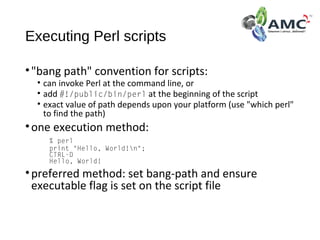
•"bang path" convention for scripts:
• can invoke Perl at the command line, or
• add #!/public/bin/perl at the beginning of the script
• exact value of path depends upon your platform (use "which perl"
to find the path)
•one execution method:
% perl
print "Hello, World!n";
CTRL-D
Hello, World!
•preferred method: set bang-path and ensure
executable flag is set on the script file
Perl Basics
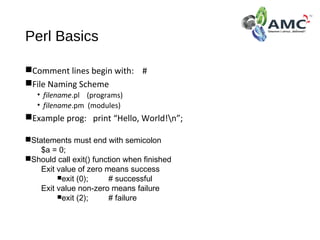
Comment lines begin with: #
File Naming Scheme
• filename.pl (programs)
• filename.pm (modules)
Example prog: print “Hello, World!n”;
Statements must end with semicolon
$a = 0;
Should call exit() function when finished
Exit value of zero means success
exit (0); # successful
Exit value non-zero means failure
exit (2); # failure
Data Types
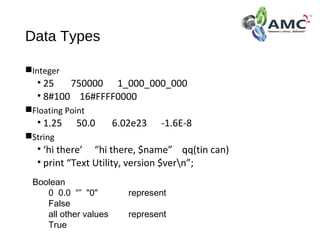
Integer
• 25 750000 1_000_000_000
• 8#100 16#FFFF0000
Floating Point
• 1.25 50.0 6.02e23 -1.6E-8
String
• ‘hi there’ “hi there, $name” qq(tin can)
• print “Text Utility, version $vern”;
Boolean
0 0.0 “” "0" represent
False
all other values represent
True
Variable Types
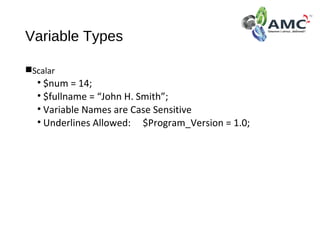
Scalar
• $num = 14;
• $fullname = “John H. Smith”;
• Variable Names are Case Sensitive
• Underlines Allowed: $Program_Version = 1.0;
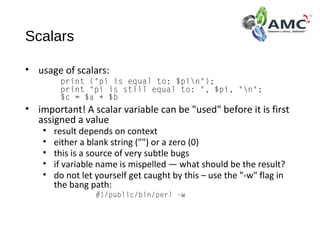
Scalars
• usage of scalars:
print ("pi is equal to: $pin");
print "pi is still equal to: ", $pi, "n";
$c = $a + $b
• important! A scalar variable can be "used" before it is first
assigned a value
• result depends on context
• either a blank string ("") or a zero (0)
• this is a source of very subtle bugs
• if variable name is mispelled — what should be the result?
• do not let yourself get caught by this – use the "-w" flag in
the bang path:
#!/public/bin/perl -w
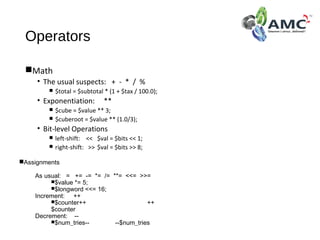
Operators
Math
• The usual suspects: + - * / %
 $total = $subtotal * (1 + $tax / 100.0);
• Exponentiation: **
 $cube = $value ** 3;
 $cuberoot = $value ** (1.0/3);
• Bit-level Operations
 left-shift: << $val = $bits << 1;
 right-shift: >> $val = $bits >> 8;
Assignments
As usual: = += -= *= /= **= <<= >>=
$value *= 5;
$longword <<= 16;
Increment: ++
$counter++ ++
$counter
Decrement: --
$num_tries-- --$num_tries
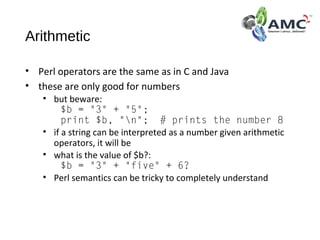
Arithmetic
• Perl operators are the same as in C and Java
• these are only good for numbers
• but beware:
$b = "3" + "5";
print $b, "n"; # prints the number 8
• if a string can be interpreted as a number given arithmetic
operators, it will be
• what is the value of $b?:
$b = "3" + "five" + 6?
• Perl semantics can be tricky to completely understand
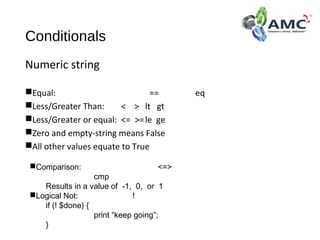
Conditionals
Numeric string
Equal: == eq
Less/Greater Than: < > lt gt
Less/Greater or equal: <= >=le ge
Zero and empty-string means False
All other values equate to True
Comparison: <=>
cmp
Results in a value of -1, 0, or 1
Logical Not: !
if (! $done) {
print “keep going”;
}
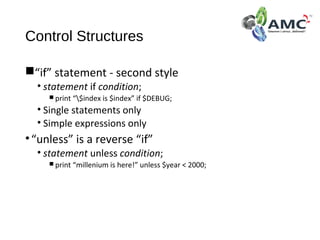
Control Structures
“if” statement - second style
• statement if condition;
 print “$index is $index” if $DEBUG;
• Single statements only
• Simple expressions only
•“unless” is a reverse “if”
• statement unless condition;
 print “millenium is here!” unless $year < 2000;
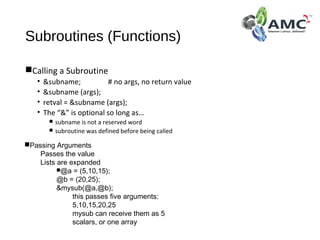
Subroutines (Functions)
Calling a Subroutine
• &subname; # no args, no return value
• &subname (args);
• retval = &subname (args);
• The “&” is optional so long as…
 subname is not a reserved word
 subroutine was defined before being called
Passing Arguments
Passes the value
Lists are expanded
@a = (5,10,15);
@b = (20,25);
&mysub(@a,@b);
this passes five arguments:
5,10,15,20,25
mysub can receive them as 5
scalars, or one array
Command Line Args
$0 = program name
@ARGV array of arguments to program
zero-based index (default for all arrays)
Example
• yourprog -a somefile
 $0 is “yourprog”
 $ARGV[0] is “-a”
 $ARGV[1] is “somefile”
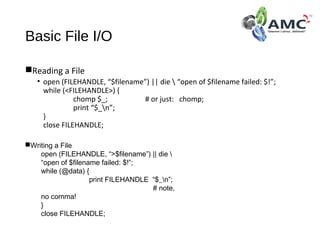
Basic File I/O
Reading a File
• open (FILEHANDLE, “$filename”) || die  “open of $filename failed: $!”;
while (<FILEHANDLE>) {
chomp $_; # or just: chomp;
print “$_n”;
}
close FILEHANDLE;
Writing a File
open (FILEHANDLE, “>$filename”) || die 
“open of $filename failed: $!”;
while (@data) {
print FILEHANDLE “$_n”;
# note,
no comma!
}
close FILEHANDLE;
Debugging in Perl
-w option is great!
• #!/bin/perl -w
• tells you about…
 misused variables
 using uninitialized data/varables
 identifiers that are used only once
 and more
Debug mode: perl -d filename [args]
Display Commands
h
Extended help
h h
Abbreviated help
l (lowercase-L) list lines of code
l sub list subroutine sub
l 5 list line 5
l 3-6 list lines 3 through 6
inclusive
l list next
window of lines
Thank you

Learn perl in amc square learning

  • 1.
    Learn Perl at AMCSquare Learning
  • 2.
    Perl • "Practical Extractionand Reporting Language" • written by Larry Wall and first released in 1987 • Perl has become a very large system of modules • name came first, then the acronym • designed to be a "glue" language to fill the gap between compiled programs (output of "gcc", etc.) and scripting languages • "Perl is a language for easily manipulating text, files and processes": originally aimed at systems administrators and developers
  • 3.
    What is Perl? Perlis a High-level Scripting language Faster than sh or csh, slower than C No need for sed, awk, head, wc, tr, … Compiles at run-time Available for Unix, PC, Mac Best Regular Expressions on Earth
  • 4.
    Executing Perl scripts •"bangpath" convention for scripts: • can invoke Perl at the command line, or • add #!/public/bin/perl at the beginning of the script • exact value of path depends upon your platform (use "which perl" to find the path) •one execution method: % perl print "Hello, World!n"; CTRL-D Hello, World! •preferred method: set bang-path and ensure executable flag is set on the script file
  • 5.
    Perl Basics Comment linesbegin with: # File Naming Scheme • filename.pl (programs) • filename.pm (modules) Example prog: print “Hello, World!n”; Statements must end with semicolon $a = 0; Should call exit() function when finished Exit value of zero means success exit (0); # successful Exit value non-zero means failure exit (2); # failure
  • 6.
    Data Types Integer • 25750000 1_000_000_000 • 8#100 16#FFFF0000 Floating Point • 1.25 50.0 6.02e23 -1.6E-8 String • ‘hi there’ “hi there, $name” qq(tin can) • print “Text Utility, version $vern”; Boolean 0 0.0 “” "0" represent False all other values represent True
  • 7.
    Variable Types Scalar • $num= 14; • $fullname = “John H. Smith”; • Variable Names are Case Sensitive • Underlines Allowed: $Program_Version = 1.0;
  • 8.
    Scalars • usage ofscalars: print ("pi is equal to: $pin"); print "pi is still equal to: ", $pi, "n"; $c = $a + $b • important! A scalar variable can be "used" before it is first assigned a value • result depends on context • either a blank string ("") or a zero (0) • this is a source of very subtle bugs • if variable name is mispelled — what should be the result? • do not let yourself get caught by this – use the "-w" flag in the bang path: #!/public/bin/perl -w
  • 9.
    Operators Math • The usualsuspects: + - * / %  $total = $subtotal * (1 + $tax / 100.0); • Exponentiation: **  $cube = $value ** 3;  $cuberoot = $value ** (1.0/3); • Bit-level Operations  left-shift: << $val = $bits << 1;  right-shift: >> $val = $bits >> 8; Assignments As usual: = += -= *= /= **= <<= >>= $value *= 5; $longword <<= 16; Increment: ++ $counter++ ++ $counter Decrement: -- $num_tries-- --$num_tries
  • 10.
    Arithmetic • Perl operatorsare the same as in C and Java • these are only good for numbers • but beware: $b = "3" + "5"; print $b, "n"; # prints the number 8 • if a string can be interpreted as a number given arithmetic operators, it will be • what is the value of $b?: $b = "3" + "five" + 6? • Perl semantics can be tricky to completely understand
  • 11.
    Conditionals Numeric string Equal: ==eq Less/Greater Than: < > lt gt Less/Greater or equal: <= >=le ge Zero and empty-string means False All other values equate to True Comparison: <=> cmp Results in a value of -1, 0, or 1 Logical Not: ! if (! $done) { print “keep going”; }
  • 12.
    Control Structures “if” statement- second style • statement if condition;  print “$index is $index” if $DEBUG; • Single statements only • Simple expressions only •“unless” is a reverse “if” • statement unless condition;  print “millenium is here!” unless $year < 2000;
  • 13.
    Subroutines (Functions) Calling aSubroutine • &subname; # no args, no return value • &subname (args); • retval = &subname (args); • The “&” is optional so long as…  subname is not a reserved word  subroutine was defined before being called Passing Arguments Passes the value Lists are expanded @a = (5,10,15); @b = (20,25); &mysub(@a,@b); this passes five arguments: 5,10,15,20,25 mysub can receive them as 5 scalars, or one array
  • 14.
    Command Line Args $0= program name @ARGV array of arguments to program zero-based index (default for all arrays) Example • yourprog -a somefile  $0 is “yourprog”  $ARGV[0] is “-a”  $ARGV[1] is “somefile”
  • 15.
    Basic File I/O Readinga File • open (FILEHANDLE, “$filename”) || die “open of $filename failed: $!”; while (<FILEHANDLE>) { chomp $_; # or just: chomp; print “$_n”; } close FILEHANDLE; Writing a File open (FILEHANDLE, “>$filename”) || die “open of $filename failed: $!”; while (@data) { print FILEHANDLE “$_n”; # note, no comma! } close FILEHANDLE;
  • 16.
    Debugging in Perl -woption is great! • #!/bin/perl -w • tells you about…  misused variables  using uninitialized data/varables  identifiers that are used only once  and more Debug mode: perl -d filename [args] Display Commands h Extended help h h Abbreviated help l (lowercase-L) list lines of code l sub list subroutine sub l 5 list line 5 l 3-6 list lines 3 through 6 inclusive l list next window of lines
  • 17.