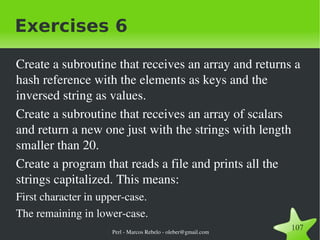
Perl Welcome Pratical Extraction and Reporting Language Marcos Rebelo oleber@gmail.com
Perl - Larry Wall Larry Wall, programmer, linguist, author, born March 10, 1949 in Duncan, British Columbia, Canada. Perl computer language creation in 1987.
Quotes: The three chief virtues of a programmer are: Laziness, Impatience and Hubris
There's More Than One Way to Do It
What is Perl? Perl is a general-purpose programming language originally developed for text manipulation and now used for a wide range of tasks including web development, system administration, network programming, code generation and more. It's intended to be practical rather than beautiful.
Supports both procedural and OO programming.
It has powerful built-in support for text processing
It has one of the world's most impressive collections of third-party modules (http://www.cpan.org).
Perl – Pros Quick development phases
Open Source, and free licencing
Excellent text handling and regular expressions
Large experienced active user base
Fast, for an interpreted language
Code developed is generally cross plaform
Very easy to write powerful programs in a few lines of code
Perl – Cons Limited GUI support
Can look complicated, initially, particularly if you're not familiar with regular expressions
Consider using for Web applications
System administration
Most command line applications
Batch processing
Reports
Database access and manipulation
Any application involving significant text processing
Hello World in a file: print "Hello, World!\n" on the shell #> perl -e 'print "Hello, World!\n"' with perl 5.10 #> perl -E 'say "Hello, World!"'
Basic syntax overview Perl statements end in a semi-colon. say("Hello, world!") ;
You can use parentheses for subroutines arguments or omit them according to your personal taste.  say "Hello, world!";
Comments start with a  #  and run to the end of the line. # This is a comment
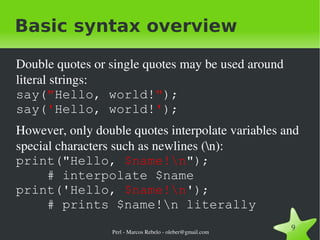
Basic syntax overview Double quotes or single quotes may be used around literal strings: say( " Hello, world! " ); say( ' Hello, world! ' );
However, only double quotes interpolate variables and special characters such as newlines (\n): print("Hello,  $name!\n ");    # interpolate $name print('Hello,  $name!\n ');    # prints $name!\n literally
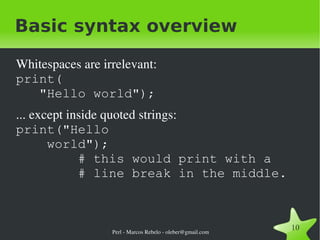
Basic syntax overview Whitespaces are irrelevant: print(    "Hello world");
... except inside quoted strings: print("Hello    world");   # this would print with a   # line break in the middle.
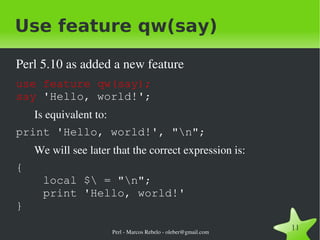
Use feature qw(say) Perl 5.10 as added a new feature use feature qw(say); say  'Hello, world!'; Is equivalent to: print 'Hello, world!', "\n"; We will see later that the correct expression is: {   local $\ = "\n";    print 'Hello, world!' }
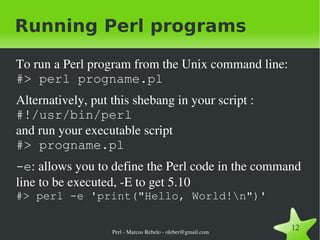
Running Perl programs To run a Perl program from the Unix command line: #> perl progname.pl
Alternatively, put this shebang in your script : #!/usr/bin/perl and run your executable script #> progname.pl
-e : allows you to define the Perl code in the command line to be executed, -E to get 5.10  #> perl -e 'print("Hello, World!\n")'
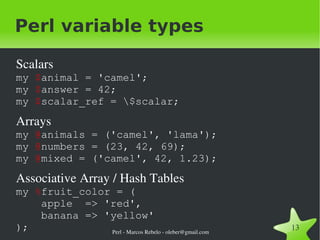
Perl variable types Scalars my  $ animal = 'camel'; my  $ answer = 42; my  $ scalar_ref = \$scalar;
Arrays my  @ animals = ('camel', 'lama'); my  @ numbers = (23, 42, 69); my  @ mixed = ('camel', 42, 1.23);
Associative Array / Hash Tables my  % fruit_color = (   apple  => 'red',   banana => 'yellow' );
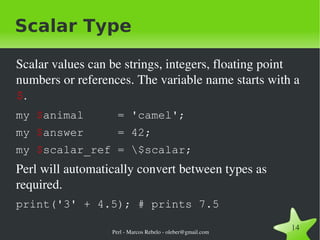
Scalar Type Scalar values can be strings, integers, floating point numbers or references. The variable name starts with a  $ . my  $ animal  = 'camel';
my  $ answer  = 42;
my  $ scalar_ref = \$scalar; Perl will automatically convert between types as required. print('3' + 4.5); # prints 7.5
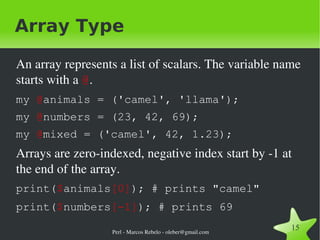
Array Type An array represents a list of scalars. The variable name starts with a  @ . my  @ animals = ('camel', 'llama');
my  @ numbers = (23, 42, 69);
my  @ mixed = ('camel', 42, 1.23); Arrays are zero-indexed, negative index start by -1 at the end of the array.  print( $ animals [0] ); # prints "camel"
print( $ numbers [-1] ); # prints 69
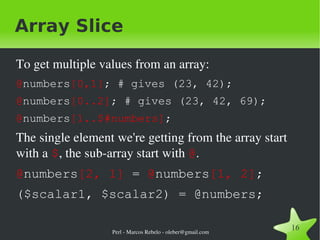
Array Slice To get multiple values from an array: @ numbers [0,1] ; # gives (23, 42);
@ numbers [0..2] ; # gives (23, 42, 69);
@ numbers [1..$#numbers] ;  The single element we're getting from the array start with a  $ , the sub-array start with  @ .
@ numbers [2, 1]  =  @ numbers [1, 2] ;
($scalar1, $scalar2) = @numbers;
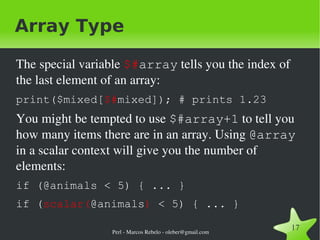
Array Type The special variable  $# array  tells you the index of the last element of an array: print($mixed[ $# mixed]); # prints 1.23 You might be tempted to use  $#array+1  to tell you how many items there are in an array. Using  @array  in a scalar context will give you the number of elements: if (@animals < 5) { ... }
if ( scalar( @animals )  < 5) { ... }
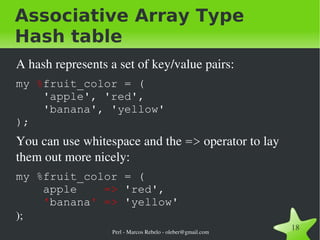
Associative Array Type Hash table A hash represents a set of key/value pairs: my  % fruit_color = (   'apple', 'red',    'banana', 'yellow' ); You can use whitespace and the  =>  operator to lay them out more nicely: my  % fruit_color = (   apple  =>  'red',    ' banana '   =>  'yellow' );
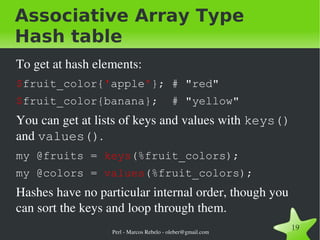
Associative Array Type Hash table To get at hash elements: $ fruit_color{ ' apple ' }; # &quot;red&quot;
$ fruit_color{banana};  # &quot;yellow&quot; You can get at lists of keys and values with  keys()  and  values() . my @fruits =  keys (%fruit_colors);
my @colors =  values (%fruit_colors); Hashes have no particular internal order, though you can sort the keys and loop through them.
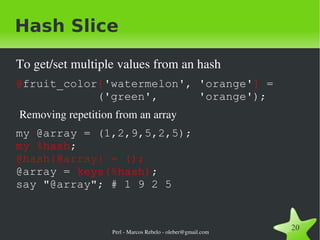
Hash Slice To get/set multiple values from an hash @ fruit_color { 'watermelon', 'orange' }  =   ('green',  'orange'); Removing repetition from an array my @array = (1,2,9,5,2,5); my %hash ; @hash{@array} = (); @array =  keys(%hash) ; say &quot;@array&quot;; # 1 9 2 5
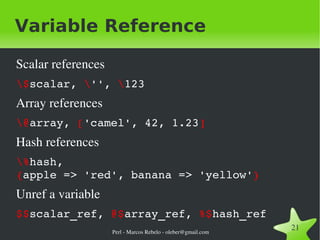
Variable Reference Scalar references \$ scalar,  \ '' ,  \ 123 Array references \@ array,  [ 'camel', 42, 1.23 ] Hash references \% hash,  { apple => 'red', banana => 'yellow' } Unref a variable $$ scalar_ref,  @$ array_ref,  %$ hash_ref
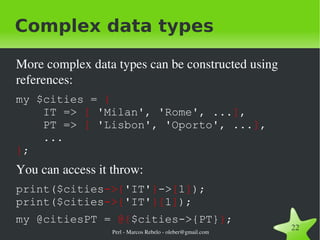
Complex data types More complex data types can be constructed using references: my $cities =  {   IT =>  [  'Milan', 'Rome', ... ] ,   PT =>  [  'Lisbon', 'Oporto', ... ] ,   ... } ; You can access it throw: print($cities ->{ ' IT' } -> [ 1 ] ); print($cities ->{ ' IT' }[ 1 ] );
my @citiesPT =  @{ $cities->{PT} } ;
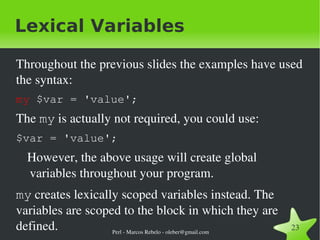
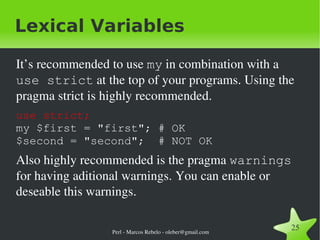
Lexical Variables Throughout the previous slides the examples have used the syntax: my  $var = 'value'; The  my  is actually not required, you could use: $var = 'value'; However, the above usage will create global variables throughout your program.  my  creates lexically scoped variables instead. The variables are scoped to the block in which they are defined.
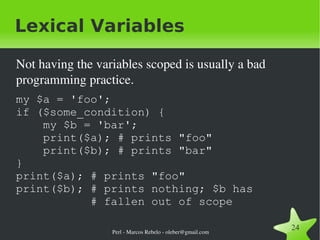
Lexical Variables Not having the variables scoped is usually a bad programming practice. my $a = 'foo'; if ($some_condition) {   my $b = 'bar';   print($a); # prints &quot;foo&quot;   print($b); # prints &quot;bar&quot; } print($a); # prints &quot;foo&quot; print($b); # prints nothing; $b has   # fallen out of scope
Lexical Variables It’s recommended to use  my  in combination with a  use strict  at the top of your programs. Using the pragma strict is highly recommended.  use strict; my $first = &quot;first&quot;; # OK $second = &quot;second&quot;;  # NOT OK Also highly recommended is the pragma  warnings  for having aditional warnings. You can enable or deseable this warnings.
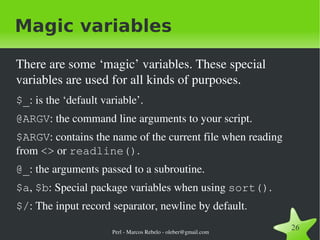
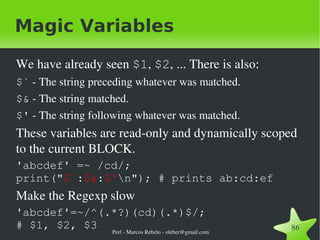
Magic variables There are some ‘magic’ variables. These special variables are used for all kinds of purposes. $_ : is the ‘default variable’.
@ARGV : the command line arguments to your script.
$ARGV : contains the name of the current file when reading from  <>  or  readline() .
@_ : the arguments passed to a subroutine.
$a ,  $b : Special package variables when using  sort() .
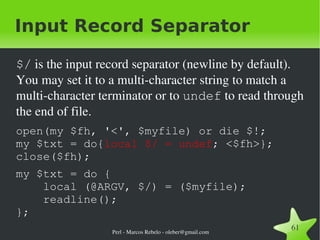
$/ : The input record separator, newline by default.
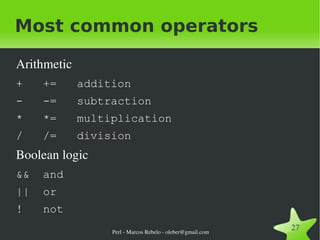
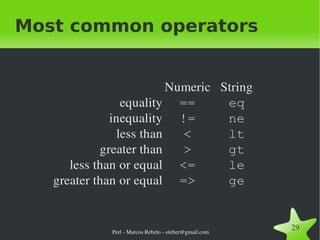
Most common operators Arithmetic +  +=  addition
-  -=  subtraction
*  *=  multiplication
/  /=  division Boolean logic &&  and
||  or
!  not
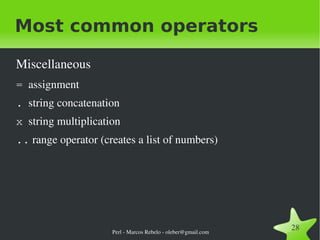
Most common operators Miscellaneous =   assignment
.   string concatenation
x   string multiplication
..  range operator (creates a list of numbers)
Most common operators
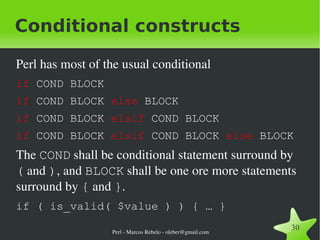
Conditional constructs Perl has most of the usual conditional if  COND BLOCK
if  COND BLOCK  else  BLOCK
if  COND BLOCK  elsif  COND BLOCK
if  COND BLOCK  elsif  COND BLOCK  else  BLOCK The  COND  shall be conditional statement surround by  (  and  ) , and  BLOCK  shall be one ore more statements surround by  {  and  } . if ( is_valid( $value ) ) { … }
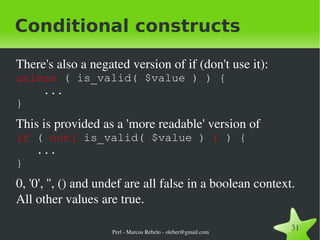
Conditional constructs There's also a negated version of if (don't use it): unless  ( is_valid( $value ) ) {    ...  }
This is provided as a 'more readable' version of  if  (  not(  is_valid( $value )   )  ) {    ...  }
0, '0', '', () and undef are all false in a boolean context. All other values are true.
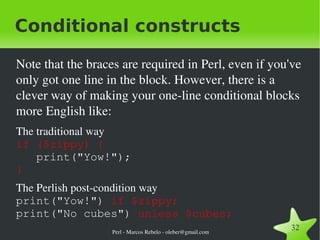
Conditional constructs Note that the braces are required in Perl, even if you've only got one line in the block. However, there is a clever way of making your one-line conditional blocks more English like: The traditional way if ($zippy) {     print(&quot;Yow!&quot;);  }
The Perlish post-condition way print(&quot;Yow!&quot;)  if $zippy; print(&quot;No cubes&quot;)  unless $cubes;
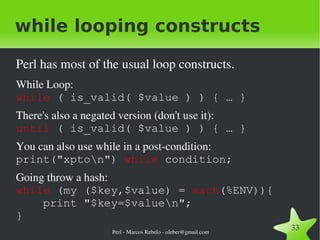
while looping constructs Perl has most of the usual loop constructs. While Loop: while   ( is_valid( $value ) ) { … }
There's also a negated version (don't use it): until   ( is_valid( $value ) ) { … }
You can also use while in a post-condition: print(&quot;xpto\n&quot;)  while  condition;
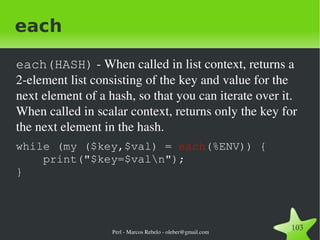
Going throw a hash: while  (my ($key,$value) =  each (%ENV)){   print &quot;$key=$value\n&quot;; }
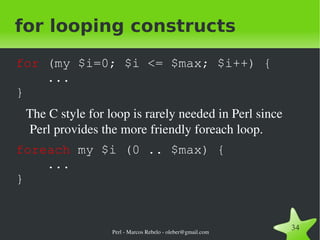
for looping constructs for  (my $i=0; $i <= $max; $i++) {   ... } The C style for loop is rarely needed in Perl since Perl provides the more friendly foreach loop. foreach  my $i (0 .. $max) {   ... }
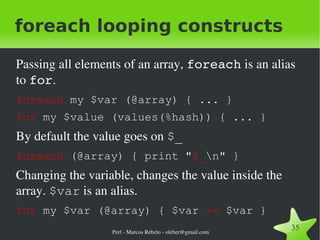
foreach looping constructs Passing all elements of an array,  foreach  is an alias to  for . foreach  my $var (@array) { ... }
for  my $value (values(%hash)) { ... }  By default the value goes on  $_ foreach  (@array) { print &quot; $_ \n&quot; }  Changing the variable, changes the value inside the array.  $var  is an alias. for  my $var (@array) { $var  +=  $var }
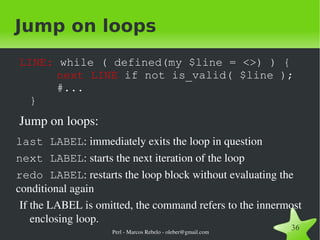
Jump on loops LINE:  while ( defined(my $line = <>) ) {   next LINE  if not is_valid( $line );   #... }
Jump on loops: last LABEL : immediately exits the loop in question
next LABEL : starts the next iteration of the loop
redo LABEL : restarts the loop block without evaluating the conditional again If the LABEL is omitted, the command refers to the innermost enclosing loop.
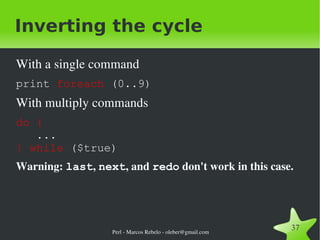
Inverting the cycle With a single command print  foreach  (0..9) With multiply commands do {   ... }   while  ($true)
Warning:  last ,  next , and  redo  don't work in this case.
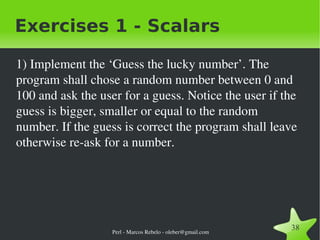
Exercises 1 - Scalars 1) Implement the ‘Guess the lucky number’. The program shall chose a random number between 0 and 100 and ask the user for a guess. Notice the user if the guess is bigger, smaller or equal to the random number. If the guess is correct the program shall leave otherwise re-ask for a number.
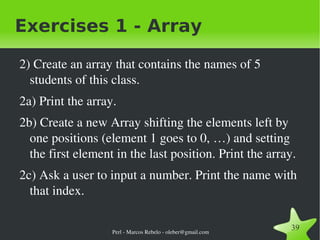
Exercises 1 - Array 2) Create an array that contains the names of 5 students of this class.  2a) Print the array.  2b) Create a new Array shifting the elements left by one positions (element 1 goes to 0, …) and setting the first element in the last position. Print the array.  2c) Ask a user to input a number. Print the name with that index.
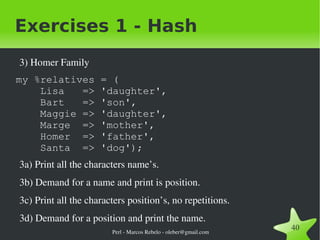
Exercises 1 - Hash 3) Homer Family my %relatives = (   Lisa  => 'daughter',    Bart  => 'son',    Maggie => 'daughter',    Marge  => 'mother',    Homer  => 'father',    Santa  => 'dog'); 3a) Print all the characters name’s.  3b) Demand for a name and print is position. 3c) Print all the characters position’s, no repetitions.  3d) Demand for a position and print the name.
Subroutines
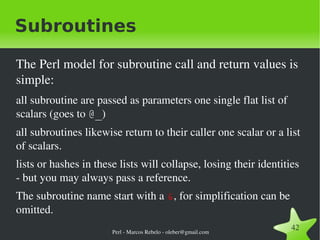
Subroutines The Perl model for subroutine call and return values is simple:  all subroutine are passed as parameters one single flat list of scalars (goes to  @_ )
all subroutines likewise return to their caller one scalar or a list of scalars.
lists or hashes in these lists will collapse, losing their identities - but you may always pass a reference.
The subroutine name start with a  & , for simplification can be omitted.
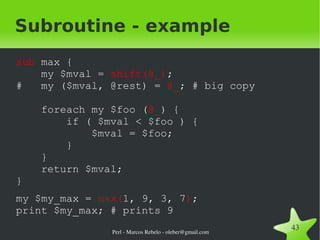
Subroutine - example sub  max {   my $mval =  shift(@_) ; #  my ($mval, @rest) =  @_ ; # big copy   foreach my $foo ( @_ ) {   if ( $mval < $foo ) {   $mval = $foo;   }   }   return $mval; }
my $my_max =  max( 1, 9, 3, 7 ) ; print $my_max; # prints 9
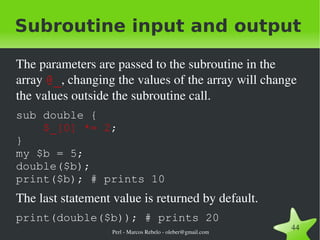
Subroutine input and output The parameters are passed to the subroutine in the array  @_ , changing the values of the array will change the values outside the subroutine call. sub double {    $_[0] *= 2 ;  } my $b = 5; double($b); print($b); # prints 10 The last statement value is returned by default. print(double($b)); # prints 20
Subroutine input and output Using  @_  is dangerouse and shall be carefully considered. It's always possible to do a copy. sub double {   my ($a) = @_;   $a *= 2;   return $a; } my $b = 5; print( double( $b ) ); # prints 10 print($b);  # prints  5
Persistent Private Variables Just because a lexical variable is statically scoped to its enclosing block, eval, or file. {   my $secretVal = 0;   sub gimmeAnother {   return ++$secretVal;   } } print gimmeAnother; # OK ++$secretVal;  # NOT OK
state variables From perl 5.10 you may use static variables. use feature 'state'; sub gimmeAnother {   state  $secretVal = 0;   return ++$secretVal; } print gimmeAnother; # OK Some features in perl 5.10 have to be activated to avoid colisions with old code. Activating all them: use feature ':5.10'; use v5.10; # use perl 5.10
Named Parameters We can implement named parameters using a hash. This provides an elegant way to pass in parameters without having to define them formally.  sub login {   my %param = @_;   ... } login(   user=>'User',    pass=>'Pass' );
Named Parameters We may pass the hash directly.  sub login {   my ($param) = @_;   ... } login({   user=>'User',    pass=>'Pass' });
Named Parameters We can easily give default values by checking the hash. sub login {   my ($param) = @_;    $param->{user} = $DEFAULT_USER   if not exists $param->{user};   $param -> {pass} = $DEFAULT_PASS   if not exists $param->{pass};   $param->{host} = $DEFAULT_HOST   if not exists $param->{host};   ... }
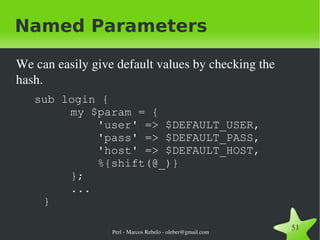
Named Parameters We can easily give default values by checking the hash. sub login {   my $param = {   'user' => $DEFAULT_USER,   'pass' => $DEFAULT_PASS,   'host' => $DEFAULT_HOST,    %{shift(@_)}   };   ... }
Named Parameters We can also write the subroutine so that it accepts both named parameters and a simple list. sub login {   my $param;    if ( ref($_[0]) eq 'HASH' ) {    $param = $_[0];    } else {    @{$param}{qw(user pass host)}=@_;    }   ... } login('Login', 'Pass'); login({user => 'Login', pass => 'Pass'});
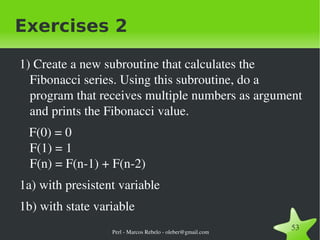
Exercises 2 1) Create a new subroutine that calculates the Fibonacci series. Using this subroutine, do a program that receives multiple numbers as argument and prints the Fibonacci value. F(0) = 0 F(1) = 1 F(n) = F(n-1) + F(n-2) 1a) with presistent variable 1b) with state variable
IO
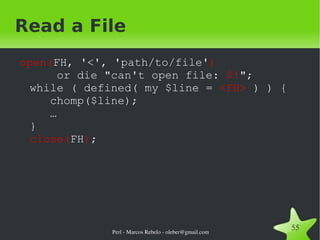
Read a File open( FH, '<', 'path/to/file' )     or die &quot;can't open file:  $! &quot;; while ( defined( my $line =  <FH>  ) ) {   chomp($line);   … } close( FH ) ;
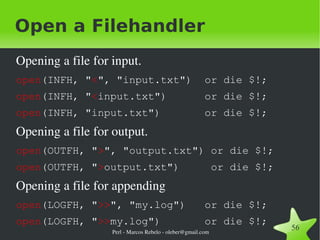
Open a Filehandler Opening a file for input. open (INFH, &quot; < &quot;, &quot;input.txt&quot;)  or die $!;
open (INFH, &quot; < input.txt&quot;)  or die $!;
open (INFH, &quot;input.txt&quot;)  or die $!; Opening a file for output. open (OUTFH, &quot; > &quot;, &quot;output.txt&quot;) or die $!;
open (OUTFH, &quot; > output.txt&quot;)  or die $!; Opening a file for appending open (LOGFH, &quot; >> &quot;, &quot;my.log&quot;)  or die $!;
open (LOGFH, &quot; >> my.log&quot;)  or die $!;
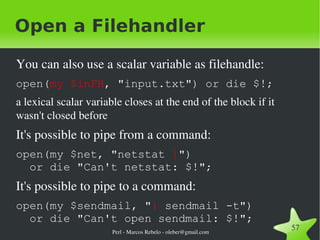
Open a Filehandler You can also use a scalar variable as filehandle: open( my $inFH , &quot;input.txt&quot;) or die $!;
a lexical scalar variable closes at the end of the block if it wasn't closed before It's possible to pipe from a command: open(my $net, &quot;netstat  | &quot;)    or die &quot;Can't netstat: $!&quot;; It's possible to pipe to a command: open(my $sendmail, &quot; |  sendmail -t&quot;)    or die &quot;Can't open sendmail: $!&quot;;
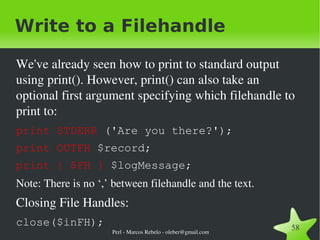
Write to a Filehandle We've already seen how to print to standard output using print(). However, print() can also take an optional first argument specifying which filehandle to print to: print STDERR  ('Are you there?');
print OUTFH  $record;
print { $FH }  $logMessage;
Note: There is no ‘,’ between filehandle and the text. Closing File Handles: close($inFH);
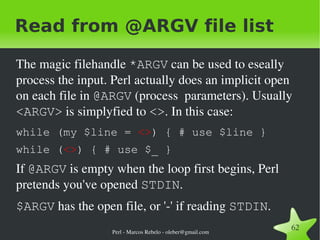
Read from a Filehandle You can read from an open filehandle using the  <>  operator or the  readline()  subroutine. Line by line: my $line  =  <$fh> ; my $line  =  readline($fh) ;

Perl Introduction

  • 1.
    Perl Welcome PraticalExtraction and Reporting Language Marcos Rebelo oleber@gmail.com
  • 2.
    Perl - LarryWall Larry Wall, programmer, linguist, author, born March 10, 1949 in Duncan, British Columbia, Canada. Perl computer language creation in 1987.
  • 3.
    Quotes: The threechief virtues of a programmer are: Laziness, Impatience and Hubris
  • 4.
    There's More ThanOne Way to Do It
  • 5.
    What is Perl?Perl is a general-purpose programming language originally developed for text manipulation and now used for a wide range of tasks including web development, system administration, network programming, code generation and more. It's intended to be practical rather than beautiful.
  • 6.
    Supports both proceduraland OO programming.
  • 7.
    It has powerfulbuilt-in support for text processing
  • 8.
    It has oneof the world's most impressive collections of third-party modules (http://www.cpan.org).
  • 9.
    Perl – ProsQuick development phases
  • 10.
    Open Source, andfree licencing
  • 11.
    Excellent text handlingand regular expressions
  • 12.
  • 13.
    Fast, for aninterpreted language
  • 14.
    Code developed isgenerally cross plaform
  • 15.
    Very easy towrite powerful programs in a few lines of code
  • 16.
    Perl – ConsLimited GUI support
  • 17.
    Can look complicated,initially, particularly if you're not familiar with regular expressions
  • 18.
    Consider using forWeb applications
  • 19.
  • 20.
    Most command lineapplications
  • 21.
  • 22.
  • 23.
    Database access andmanipulation
  • 24.
    Any application involvingsignificant text processing
  • 25.
    Hello World ina file: print &quot;Hello, World!\n&quot; on the shell #> perl -e 'print &quot;Hello, World!\n&quot;' with perl 5.10 #> perl -E 'say &quot;Hello, World!&quot;'
  • 26.
    Basic syntax overviewPerl statements end in a semi-colon. say(&quot;Hello, world!&quot;) ;
  • 27.
    You can useparentheses for subroutines arguments or omit them according to your personal taste. say &quot;Hello, world!&quot;;
  • 28.
    Comments start witha # and run to the end of the line. # This is a comment
  • 29.
    Basic syntax overviewDouble quotes or single quotes may be used around literal strings: say( &quot; Hello, world! &quot; ); say( ' Hello, world! ' );
  • 30.
    However, only doublequotes interpolate variables and special characters such as newlines (\n): print(&quot;Hello, $name!\n &quot;); # interpolate $name print('Hello, $name!\n '); # prints $name!\n literally
  • 31.
    Basic syntax overviewWhitespaces are irrelevant: print( &quot;Hello world&quot;);
  • 32.
    ... except insidequoted strings: print(&quot;Hello world&quot;); # this would print with a # line break in the middle.
  • 33.
    Use feature qw(say)Perl 5.10 as added a new feature use feature qw(say); say 'Hello, world!'; Is equivalent to: print 'Hello, world!', &quot;\n&quot;; We will see later that the correct expression is: { local $\ = &quot;\n&quot;; print 'Hello, world!' }
  • 34.
    Running Perl programsTo run a Perl program from the Unix command line: #> perl progname.pl
  • 35.
    Alternatively, put thisshebang in your script : #!/usr/bin/perl and run your executable script #> progname.pl
  • 36.
    -e : allowsyou to define the Perl code in the command line to be executed, -E to get 5.10 #> perl -e 'print(&quot;Hello, World!\n&quot;)'
  • 37.
    Perl variable typesScalars my $ animal = 'camel'; my $ answer = 42; my $ scalar_ref = \$scalar;
  • 38.
    Arrays my @ animals = ('camel', 'lama'); my @ numbers = (23, 42, 69); my @ mixed = ('camel', 42, 1.23);
  • 39.
    Associative Array /Hash Tables my % fruit_color = ( apple => 'red', banana => 'yellow' );
  • 40.
    Scalar Type Scalarvalues can be strings, integers, floating point numbers or references. The variable name starts with a $ . my $ animal = 'camel';
  • 41.
    my $answer = 42;
  • 42.
    my $scalar_ref = \$scalar; Perl will automatically convert between types as required. print('3' + 4.5); # prints 7.5
  • 43.
    Array Type Anarray represents a list of scalars. The variable name starts with a @ . my @ animals = ('camel', 'llama');
  • 44.
    my @numbers = (23, 42, 69);
  • 45.
    my @mixed = ('camel', 42, 1.23); Arrays are zero-indexed, negative index start by -1 at the end of the array. print( $ animals [0] ); # prints &quot;camel&quot;
  • 46.
    print( $ numbers[-1] ); # prints 69
  • 47.
    Array Slice Toget multiple values from an array: @ numbers [0,1] ; # gives (23, 42);
  • 48.
    @ numbers [0..2]; # gives (23, 42, 69);
  • 49.
    @ numbers [1..$#numbers]; The single element we're getting from the array start with a $ , the sub-array start with @ .
  • 50.
    @ numbers [2,1] = @ numbers [1, 2] ;
  • 51.
  • 52.
    Array Type Thespecial variable $# array tells you the index of the last element of an array: print($mixed[ $# mixed]); # prints 1.23 You might be tempted to use $#array+1 to tell you how many items there are in an array. Using @array in a scalar context will give you the number of elements: if (@animals < 5) { ... }
  • 53.
    if ( scalar(@animals ) < 5) { ... }
  • 54.
    Associative Array TypeHash table A hash represents a set of key/value pairs: my % fruit_color = ( 'apple', 'red', 'banana', 'yellow' ); You can use whitespace and the => operator to lay them out more nicely: my % fruit_color = ( apple => 'red', ' banana ' => 'yellow' );
  • 55.
    Associative Array TypeHash table To get at hash elements: $ fruit_color{ ' apple ' }; # &quot;red&quot;
  • 56.
    $ fruit_color{banana}; # &quot;yellow&quot; You can get at lists of keys and values with keys() and values() . my @fruits = keys (%fruit_colors);
  • 57.
    my @colors = values (%fruit_colors); Hashes have no particular internal order, though you can sort the keys and loop through them.
  • 58.
    Hash Slice Toget/set multiple values from an hash @ fruit_color { 'watermelon', 'orange' } = ('green', 'orange'); Removing repetition from an array my @array = (1,2,9,5,2,5); my %hash ; @hash{@array} = (); @array = keys(%hash) ; say &quot;@array&quot;; # 1 9 2 5
  • 59.
    Variable Reference Scalarreferences \$ scalar, \ '' , \ 123 Array references \@ array, [ 'camel', 42, 1.23 ] Hash references \% hash, { apple => 'red', banana => 'yellow' } Unref a variable $$ scalar_ref, @$ array_ref, %$ hash_ref
  • 60.
    Complex data typesMore complex data types can be constructed using references: my $cities = { IT => [ 'Milan', 'Rome', ... ] , PT => [ 'Lisbon', 'Oporto', ... ] , ... } ; You can access it throw: print($cities ->{ ' IT' } -> [ 1 ] ); print($cities ->{ ' IT' }[ 1 ] );
  • 61.
    my @citiesPT = @{ $cities->{PT} } ;
  • 62.
    Lexical Variables Throughoutthe previous slides the examples have used the syntax: my $var = 'value'; The my is actually not required, you could use: $var = 'value'; However, the above usage will create global variables throughout your program. my creates lexically scoped variables instead. The variables are scoped to the block in which they are defined.
  • 63.
    Lexical Variables Nothaving the variables scoped is usually a bad programming practice. my $a = 'foo'; if ($some_condition) { my $b = 'bar'; print($a); # prints &quot;foo&quot; print($b); # prints &quot;bar&quot; } print($a); # prints &quot;foo&quot; print($b); # prints nothing; $b has # fallen out of scope
  • 64.
    Lexical Variables It’srecommended to use my in combination with a use strict at the top of your programs. Using the pragma strict is highly recommended. use strict; my $first = &quot;first&quot;; # OK $second = &quot;second&quot;; # NOT OK Also highly recommended is the pragma warnings for having aditional warnings. You can enable or deseable this warnings.
  • 65.
    Magic variables Thereare some ‘magic’ variables. These special variables are used for all kinds of purposes. $_ : is the ‘default variable’.
  • 66.
    @ARGV : thecommand line arguments to your script.
  • 67.
    $ARGV : containsthe name of the current file when reading from <> or readline() .
  • 68.
    @_ : thearguments passed to a subroutine.
  • 69.
    $a , $b : Special package variables when using sort() .
  • 70.
    $/ : Theinput record separator, newline by default.
  • 71.
    Most common operatorsArithmetic + += addition
  • 72.
    - -= subtraction
  • 73.
    * *= multiplication
  • 74.
    / /= division Boolean logic && and
  • 75.
  • 76.
  • 77.
    Most common operatorsMiscellaneous = assignment
  • 78.
    . string concatenation
  • 79.
    x string multiplication
  • 80.
    .. rangeoperator (creates a list of numbers)
  • 81.
  • 82.
    Conditional constructs Perlhas most of the usual conditional if COND BLOCK
  • 83.
    if CONDBLOCK else BLOCK
  • 84.
    if CONDBLOCK elsif COND BLOCK
  • 85.
    if CONDBLOCK elsif COND BLOCK else BLOCK The COND shall be conditional statement surround by ( and ) , and BLOCK shall be one ore more statements surround by { and } . if ( is_valid( $value ) ) { … }
  • 86.
    Conditional constructs There'salso a negated version of if (don't use it): unless ( is_valid( $value ) ) { ... }
  • 87.
    This is providedas a 'more readable' version of if ( not( is_valid( $value ) ) ) { ... }
  • 88.
    0, '0', '',() and undef are all false in a boolean context. All other values are true.
  • 89.
    Conditional constructs Notethat the braces are required in Perl, even if you've only got one line in the block. However, there is a clever way of making your one-line conditional blocks more English like: The traditional way if ($zippy) { print(&quot;Yow!&quot;); }
  • 90.
    The Perlish post-conditionway print(&quot;Yow!&quot;) if $zippy; print(&quot;No cubes&quot;) unless $cubes;
  • 91.
    while looping constructsPerl has most of the usual loop constructs. While Loop: while ( is_valid( $value ) ) { … }
  • 92.
    There's also anegated version (don't use it): until ( is_valid( $value ) ) { … }
  • 93.
    You can alsouse while in a post-condition: print(&quot;xpto\n&quot;) while condition;
  • 94.
    Going throw ahash: while (my ($key,$value) = each (%ENV)){ print &quot;$key=$value\n&quot;; }
  • 95.
    for looping constructsfor (my $i=0; $i <= $max; $i++) { ... } The C style for loop is rarely needed in Perl since Perl provides the more friendly foreach loop. foreach my $i (0 .. $max) { ... }
  • 96.
    foreach looping constructsPassing all elements of an array, foreach is an alias to for . foreach my $var (@array) { ... }
  • 97.
    for my$value (values(%hash)) { ... } By default the value goes on $_ foreach (@array) { print &quot; $_ \n&quot; } Changing the variable, changes the value inside the array. $var is an alias. for my $var (@array) { $var += $var }
  • 98.
    Jump on loopsLINE: while ( defined(my $line = <>) ) { next LINE if not is_valid( $line ); #... }
  • 99.
    Jump on loops:last LABEL : immediately exits the loop in question
  • 100.
    next LABEL :starts the next iteration of the loop
  • 101.
    redo LABEL :restarts the loop block without evaluating the conditional again If the LABEL is omitted, the command refers to the innermost enclosing loop.
  • 102.
    Inverting the cycleWith a single command print foreach (0..9) With multiply commands do { ... } while ($true)
  • 103.
    Warning: last, next , and redo don't work in this case.
  • 104.
    Exercises 1 -Scalars 1) Implement the ‘Guess the lucky number’. The program shall chose a random number between 0 and 100 and ask the user for a guess. Notice the user if the guess is bigger, smaller or equal to the random number. If the guess is correct the program shall leave otherwise re-ask for a number.
  • 105.
    Exercises 1 -Array 2) Create an array that contains the names of 5 students of this class. 2a) Print the array. 2b) Create a new Array shifting the elements left by one positions (element 1 goes to 0, …) and setting the first element in the last position. Print the array. 2c) Ask a user to input a number. Print the name with that index.
  • 106.
    Exercises 1 -Hash 3) Homer Family my %relatives = ( Lisa => 'daughter', Bart => 'son', Maggie => 'daughter', Marge => 'mother', Homer => 'father', Santa => 'dog'); 3a) Print all the characters name’s. 3b) Demand for a name and print is position. 3c) Print all the characters position’s, no repetitions. 3d) Demand for a position and print the name.
  • 107.
  • 108.
    Subroutines The Perlmodel for subroutine call and return values is simple: all subroutine are passed as parameters one single flat list of scalars (goes to @_ )
  • 109.
    all subroutines likewisereturn to their caller one scalar or a list of scalars.
  • 110.
    lists or hashesin these lists will collapse, losing their identities - but you may always pass a reference.
  • 111.
    The subroutine namestart with a & , for simplification can be omitted.
  • 112.
    Subroutine - examplesub max { my $mval = shift(@_) ; # my ($mval, @rest) = @_ ; # big copy foreach my $foo ( @_ ) { if ( $mval < $foo ) { $mval = $foo; } } return $mval; }
  • 113.
    my $my_max = max( 1, 9, 3, 7 ) ; print $my_max; # prints 9
  • 114.
    Subroutine input andoutput The parameters are passed to the subroutine in the array @_ , changing the values of the array will change the values outside the subroutine call. sub double { $_[0] *= 2 ; } my $b = 5; double($b); print($b); # prints 10 The last statement value is returned by default. print(double($b)); # prints 20
  • 115.
    Subroutine input andoutput Using @_ is dangerouse and shall be carefully considered. It's always possible to do a copy. sub double { my ($a) = @_; $a *= 2; return $a; } my $b = 5; print( double( $b ) ); # prints 10 print($b); # prints 5
  • 116.
    Persistent Private VariablesJust because a lexical variable is statically scoped to its enclosing block, eval, or file. { my $secretVal = 0; sub gimmeAnother { return ++$secretVal; } } print gimmeAnother; # OK ++$secretVal; # NOT OK
  • 117.
    state variables Fromperl 5.10 you may use static variables. use feature 'state'; sub gimmeAnother { state $secretVal = 0; return ++$secretVal; } print gimmeAnother; # OK Some features in perl 5.10 have to be activated to avoid colisions with old code. Activating all them: use feature ':5.10'; use v5.10; # use perl 5.10
  • 118.
    Named Parameters Wecan implement named parameters using a hash. This provides an elegant way to pass in parameters without having to define them formally. sub login { my %param = @_; ... } login( user=>'User', pass=>'Pass' );
  • 119.
    Named Parameters Wemay pass the hash directly. sub login { my ($param) = @_; ... } login({ user=>'User', pass=>'Pass' });
  • 120.
    Named Parameters Wecan easily give default values by checking the hash. sub login { my ($param) = @_; $param->{user} = $DEFAULT_USER if not exists $param->{user}; $param -> {pass} = $DEFAULT_PASS if not exists $param->{pass}; $param->{host} = $DEFAULT_HOST if not exists $param->{host}; ... }
  • 121.
    Named Parameters Wecan easily give default values by checking the hash. sub login { my $param = { 'user' => $DEFAULT_USER, 'pass' => $DEFAULT_PASS, 'host' => $DEFAULT_HOST, %{shift(@_)} }; ... }
  • 122.
    Named Parameters Wecan also write the subroutine so that it accepts both named parameters and a simple list. sub login { my $param; if ( ref($_[0]) eq 'HASH' ) { $param = $_[0]; } else { @{$param}{qw(user pass host)}=@_; } ... } login('Login', 'Pass'); login({user => 'Login', pass => 'Pass'});
  • 123.
    Exercises 2 1)Create a new subroutine that calculates the Fibonacci series. Using this subroutine, do a program that receives multiple numbers as argument and prints the Fibonacci value. F(0) = 0 F(1) = 1 F(n) = F(n-1) + F(n-2) 1a) with presistent variable 1b) with state variable
  • 124.
  • 125.
    Read a Fileopen( FH, '<', 'path/to/file' ) or die &quot;can't open file: $! &quot;; while ( defined( my $line = <FH> ) ) { chomp($line); … } close( FH ) ;
  • 126.
    Open a FilehandlerOpening a file for input. open (INFH, &quot; < &quot;, &quot;input.txt&quot;) or die $!;
  • 127.
    open (INFH, &quot;< input.txt&quot;) or die $!;
  • 128.
    open (INFH, &quot;input.txt&quot;) or die $!; Opening a file for output. open (OUTFH, &quot; > &quot;, &quot;output.txt&quot;) or die $!;
  • 129.
    open (OUTFH, &quot;> output.txt&quot;) or die $!; Opening a file for appending open (LOGFH, &quot; >> &quot;, &quot;my.log&quot;) or die $!;
  • 130.
    open (LOGFH, &quot;>> my.log&quot;) or die $!;
  • 131.
    Open a FilehandlerYou can also use a scalar variable as filehandle: open( my $inFH , &quot;input.txt&quot;) or die $!;
  • 132.
    a lexical scalarvariable closes at the end of the block if it wasn't closed before It's possible to pipe from a command: open(my $net, &quot;netstat | &quot;) or die &quot;Can't netstat: $!&quot;; It's possible to pipe to a command: open(my $sendmail, &quot; | sendmail -t&quot;) or die &quot;Can't open sendmail: $!&quot;;
  • 133.
    Write to aFilehandle We've already seen how to print to standard output using print(). However, print() can also take an optional first argument specifying which filehandle to print to: print STDERR ('Are you there?');
  • 134.
    print OUTFH $record;
  • 135.
    print { $FH} $logMessage;
  • 136.
    Note: There isno ‘,’ between filehandle and the text. Closing File Handles: close($inFH);
  • 137.
    Read from aFilehandle You can read from an open filehandle using the <> operator or the readline() subroutine. Line by line: my $line = <$fh> ; my $line = readline($fh) ;

Editor's Notes

  • #4 Perl is a general-purpose programming language originally developed for text manipulation and now used for a wide range of tasks including system administration, web development, network programming, code generation and more. The language is intended to be practical (easy to use, efficient, complete) rather than beautiful (tiny, elegant, minimal). Its major features are: it&apos;s easy to use. Supports both procedural and object-oriented (OO) programming. It has powerful built-in support for text processing. it has one of the world&apos;s most impressive collections of third-party modules (http://www.cpan.org).
  • #20 $ perldoc -f keys $ perldoc -f values
  • #23 $ perldoc perlref Array reference: $refArray1 = @array; $refArray2 = [ &amp;quot;Milan&amp;quot;, &amp;quot;Rome&amp;quot;]; Hash reference $refHash1 = \%hash; $refHash2 = { apple =&gt; &amp;quot;red&amp;quot;, banana =&gt; &amp;quot;yellow&amp;quot; };
  • #24 $ perldoc -f my Check the local and our manpages as well. $ perldoc -f our $ perldoc -f local
  • #26 $ perldoc strict $ perldoc warnings Good practice Start your script files with: use strict; use warnings
  • #27 $ perldoc perlvar
  • #28 and , or and not are also supported as operators in their own right. They&apos;re more readable than the C-style operators, but have different precedence to &amp;&amp; and friends.
  • #29 ” ab” . ”cd” is ”abcd” ” ab” x 3 is ”ababab” ( 1 .. 5 ) is (1, 2, 3, 4, 5)
  • #30 $ perldoc perlop Why do we have separate numeric and string comparisons? Because we don&apos;t have special variable types and Perl needs to know whether to sort numerically (where 99 is less than 100) or alphabetically (where 100 comes before 99).
  • #34 $ perldoc -f each
  • #35 $ perldoc perlsyn In th foreach loop the value in $var is really the value in the array, so something like $var += 2; would change the value in the @array. Using the magic variable $_ foreach ( 0 .. $max-1) { print(&amp;quot;This element is $_ &amp;quot;); }
  • #39 Read from the STDIN my $line = &lt;&gt;; chomp($line); Random Number $value = int(rand(1000));
  • #54 Remember: The Fibonacci series is formed by starting with 0 and 1 and then adding the latest two numbers to get the next one: fib(0) = 0 # definition fib(1) = 1 # definition fib(2) = fib(0) + fib(1) = 1 fib(3) = fib(1) + fib(2) = 2 fib(4) = fib(2) + fib(3) = 3 ...
  • #57 $ perldoc -f open $ perldoc perlfunc $ perldoc perlopentut open() is documented in extravagant detail in the perlfunc manpage and the perlopentut manpage.
  • #59 $ perldoc -f close When you&apos;re done with your filehandles, you should close() them. When using scalar variables, file handls will be closed automaticaly when you come out of the variable scope.
  • #62 $ perldoc -f local $/ works like awk&apos;s RS variable. The value of $/ is a string, not a regex. awk has to be better for something.
  • #69 Some examples: &amp;quot;hotdog&amp;quot; =~ /dog/; # matches &amp;quot;hotdog&amp;quot; =~ /^dog/; # doesn&apos;t match &amp;quot;hotdog&amp;quot; =~ /dog$/; # matches &amp;quot;hotdog &amp;quot; =~ /dog$/; # matches &amp;quot;hotdog&amp;quot; =~ /^hotdog$/; # matches
  • #86 $ perldoc -f split
  • #87 The use of this variable anywhere in a program imposes a considerable performance penalty on all regular expression matches. Most punctuation names have reasonable mnemonics. Nevertheless, if you wish to use long variable names, you need only say use English; at the top of your program. For $` , $&amp; and $&apos; you could use $PREMATCH , $MATCH or $POSTMATCH
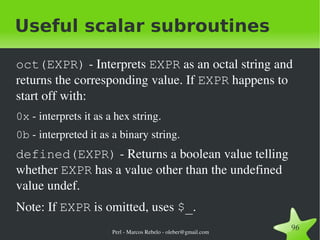
  • #97 $perldoc -f oct $perldoc -f defined
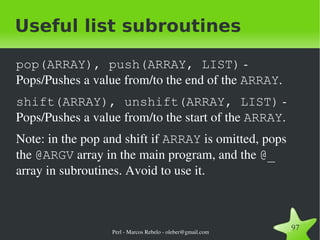
  • #98 $perldoc -f pop $perldoc -f push $perldoc -f shift $perldoc -f unshift
  • #99 $perldoc -f join $perldoc -f sort
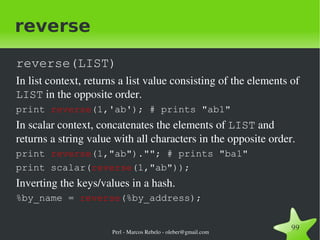
  • #100 $perldoc -f reverse
  • #101 $perldoc -f map
  • #102 $perldoc -f grep
  • #104 $perldoc -f each
  • #105 $perldoc -f exists The element is not autovivified if it doesn’t exist.
  • #110 $ perldoc -f our An our declares the variables to be valid globals within the enclosing block, file or eval. That is, it has the same scoping rules as a my declaration, but does not create a local variable.
  • #113 $ perldoc base $ perldoc Exporter
  • #116 $ perldoc perlmod $ perldoc perlmodlib $ perldoc perlmodinstall
  • #118 $ perldoc -f bless
  • #123 $ perldoc perlboot $ perldoc perltoot $ perldoc perlobj