Learn C++ at
AMC Square Learning
Introduction to C++
•C is a programming language developed in the
1970's alongside the UNIX operating system.
•C provides a comprehensive set of features for
handling a wide variety of applications, such as
systems development and scientific computation.
•C++ is an “extension” of the C language, in that
most C programs are also C++ programs.
•C++, as opposed to C, supports “object-oriented
programming.”
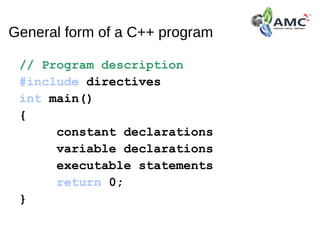
General form of a C++ program
// Program description
#include directives
int main()
{
constant declarations
variable declarations
executable statements
return 0;
}
C++ keywords
• Keywords appear in blue in Visual C++.
• Each keyword has a predefined purpose in the language.
• Do not use keywords as variable and constant names!!
• The complete list of keywords is on page 673 of the textbook.
• We shall cover the following keywords in this class:
bool, break, case, char, const, continue,
do, default, double, else, extern, false,
float, for, if, int, long, namespace,
return, short, static, struct, switch,
typedef, true, unsigned, void, while
C++ identifiers
Identifiers appear in black in Visual C++.
• An identifier is a name for a variable, constant, function, etc.
• It consists of a letter followed by any sequence of letters, digits, and
underscores.
• Examples of valid identifiers: First_name, age, y2000,
y2k
• Examples of invalid identifiers: 2000y
• Identifiers cannot have special characters in them. For example:
X=Y, J-20, ~Ricky,*Michael are invalid identifiers.
• Identifiers are case-sensitive. For example: Hello, hello,
WHOAMI, WhoAmI, whoami are unique identifiers.
C++ comments
• Comments appear in green in Visual C++.
• Comments are explanatory notes; they are ignored by the
compiler.
• There are two ways to include comments in a program:
// A double slash marks the start of a
//single line comment.
/* A slash followed by an asterisk marks
the start of a multiple line comment. It
ends with an asterisk followed by a slash.
*/
C++ compiler directives
• Compiler directives appear in blue in Visual C++.
• The #include directive tells the compiler to include some already
existing C++ code in your program.
• The included file is then linked with the program.
• There are two forms of #include statements:
#include <iostream> //for pre-defined files
#include "my_lib.h" //for user-defined files
Programming Style
C++ is a free-format language, which means that:
•Extra blanks (spaces) or tabs before or after
identifiers/operators are ignored.
•Blank lines are ignored by the compiler just like
comments.
•Code can be indented in any way.
•There can be more than one statement on a single line.
•A single statement can continue over several lines.
Thank you
Thank you

Learn cpp at amc square learning

  • 1.
    Learn C++ at AMCSquare Learning
  • 2.
    Introduction to C++ •Cis a programming language developed in the 1970's alongside the UNIX operating system. •C provides a comprehensive set of features for handling a wide variety of applications, such as systems development and scientific computation. •C++ is an “extension” of the C language, in that most C programs are also C++ programs. •C++, as opposed to C, supports “object-oriented programming.”
  • 3.
    General form ofa C++ program // Program description #include directives int main() { constant declarations variable declarations executable statements return 0; }
  • 4.
    C++ keywords • Keywordsappear in blue in Visual C++. • Each keyword has a predefined purpose in the language. • Do not use keywords as variable and constant names!! • The complete list of keywords is on page 673 of the textbook. • We shall cover the following keywords in this class: bool, break, case, char, const, continue, do, default, double, else, extern, false, float, for, if, int, long, namespace, return, short, static, struct, switch, typedef, true, unsigned, void, while
  • 5.
    C++ identifiers Identifiers appearin black in Visual C++. • An identifier is a name for a variable, constant, function, etc. • It consists of a letter followed by any sequence of letters, digits, and underscores. • Examples of valid identifiers: First_name, age, y2000, y2k • Examples of invalid identifiers: 2000y • Identifiers cannot have special characters in them. For example: X=Y, J-20, ~Ricky,*Michael are invalid identifiers. • Identifiers are case-sensitive. For example: Hello, hello, WHOAMI, WhoAmI, whoami are unique identifiers.
  • 6.
    C++ comments • Commentsappear in green in Visual C++. • Comments are explanatory notes; they are ignored by the compiler. • There are two ways to include comments in a program: // A double slash marks the start of a //single line comment. /* A slash followed by an asterisk marks the start of a multiple line comment. It ends with an asterisk followed by a slash. */
  • 7.
    C++ compiler directives •Compiler directives appear in blue in Visual C++. • The #include directive tells the compiler to include some already existing C++ code in your program. • The included file is then linked with the program. • There are two forms of #include statements: #include <iostream> //for pre-defined files #include "my_lib.h" //for user-defined files
  • 8.
    Programming Style C++ isa free-format language, which means that: •Extra blanks (spaces) or tabs before or after identifiers/operators are ignored. •Blank lines are ignored by the compiler just like comments. •Code can be indented in any way. •There can be more than one statement on a single line. •A single statement can continue over several lines.
  • 9.
  • 10.