

MIHIR SHAH | SHAHENSHAH
Twitter: shahenshah9999
www.github.com/shahenshah99
medium.com/@shahenshah
WHY KUBERNETES?
Kubernetes Vs. Docker Swarm
UNDERSTANDING THE KUBERNETES
ARCHITECTURE
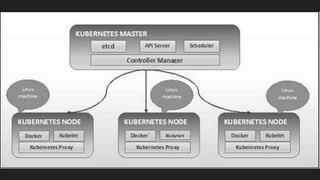
Components in the architecture
1. Etcd
2. API Server
3. Controller manager
4. Scheduler
5. Docker containers
6. Kubelet Service
7. Proxy Service
Etcd
It stores the configuration information which can
be used by each of the nodes in the cluster.
API Server
Kubernetes is an API server which provides all the
operation on cluster using the API
Kubeconfig is a package along with the server side tools
that can be used for communication. It exposes
Kubernetes API.
Controller Manager
This component is responsible for most of the collectors that regulates the
state of cluster and performs a task.
The key controllers are replication controller, endpoint controller,
namespace controller, and service account controller. The controller
manager runs different kind of controllers to handle nodes, endpoints, etc.
Schedulers
It is a service in master responsible for distributing the
workload. It is responsible for tracking utilization of working
load on cluster nodes and then placing the workload on
which resources are available and accept the workload.
Docker Containers
The first requirement of each node is Docker which helps
in running the encapsulated application containers in a
relatively isolated but lightweight operating environment.
Kubelets
This is a small service in each node responsible for
relaying information to and from control plane service. It
interacts with etcd store to read configuration details and
write values.
It manages network rules, port forwarding, etc.
Proxy
It helps in forwarding the request to correct containers and
is capable of performing primitive load balancing. It makes
sure that the networking environment is predictable and
accessible and at the same time it is isolated as well. It
manages pods on node, volumes, secrets, creating new
containers’ health checkup, etc.
Master-Node Structure
ENOUGH OF IT ALREADY, LETS GET HANDS-ON
Deploying a single node cluster using Minikube
Let’s kick in some colors
Enabling Web Dashboard
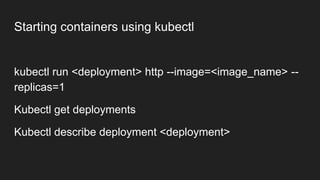
Starting containers using kubectl
kubectl run <deployment> http --image=<image_name> --
replicas=1
Kubectl get deployments
Kubectl describe deployment <deployment>
Exposing Ports
kubectl expose deployment <deployment_name> --
external-ip="172.17.0.32" --port=8000 --target-port=80
Try Curl-ing at the IP
Monitor the Services
Kubectl get svc
Docker ps | grep ‘<image>’

Kubernetes

  • 2.
    MIHIR SHAH |SHAHENSHAH Twitter: shahenshah9999 www.github.com/shahenshah99 medium.com/@shahenshah
  • 3.
  • 4.
  • 5.
  • 7.
    Components in thearchitecture 1. Etcd 2. API Server 3. Controller manager 4. Scheduler 5. Docker containers 6. Kubelet Service 7. Proxy Service
  • 8.
    Etcd It stores theconfiguration information which can be used by each of the nodes in the cluster.
  • 9.
    API Server Kubernetes isan API server which provides all the operation on cluster using the API Kubeconfig is a package along with the server side tools that can be used for communication. It exposes Kubernetes API.
  • 10.
    Controller Manager This componentis responsible for most of the collectors that regulates the state of cluster and performs a task. The key controllers are replication controller, endpoint controller, namespace controller, and service account controller. The controller manager runs different kind of controllers to handle nodes, endpoints, etc.
  • 11.
    Schedulers It is aservice in master responsible for distributing the workload. It is responsible for tracking utilization of working load on cluster nodes and then placing the workload on which resources are available and accept the workload.
  • 12.
    Docker Containers The firstrequirement of each node is Docker which helps in running the encapsulated application containers in a relatively isolated but lightweight operating environment.
  • 13.
    Kubelets This is asmall service in each node responsible for relaying information to and from control plane service. It interacts with etcd store to read configuration details and write values. It manages network rules, port forwarding, etc.
  • 14.
    Proxy It helps inforwarding the request to correct containers and is capable of performing primitive load balancing. It makes sure that the networking environment is predictable and accessible and at the same time it is isolated as well. It manages pods on node, volumes, secrets, creating new containers’ health checkup, etc.
  • 15.
  • 17.
    ENOUGH OF ITALREADY, LETS GET HANDS-ON
  • 18.
    Deploying a singlenode cluster using Minikube
  • 19.
    Let’s kick insome colors Enabling Web Dashboard
  • 20.
    Starting containers usingkubectl kubectl run <deployment> http --image=<image_name> -- replicas=1 Kubectl get deployments Kubectl describe deployment <deployment>
  • 21.
    Exposing Ports kubectl exposedeployment <deployment_name> -- external-ip="172.17.0.32" --port=8000 --target-port=80 Try Curl-ing at the IP
  • 22.
    Monitor the Services Kubectlget svc Docker ps | grep ‘<image>’

Editor's Notes

  • #17 K8s general overview