What you needto know?
• Basic understanding and dealing with packages
of Windows, Linux, or MacOS
• Internet access and terminal (Powershell, bash)
• Understanding of basic linux commands: cd,
mkdir
• Understanding of container technologies and
tools like Docker
• A Text editor like Visual Studio Code
3.
What is containers?
•Atechnology that bundles the
code for an application, and
configuration required to run the
code itself, in one unite
4.
Container Advantages
• Portable
•Run in ay Linux, Windows or macOS machine
• Use less CPU, memory and saving money
• Self contained, can be spun up or down in seconds
• Quick replications and elasticity scale up and down
5.
Recap on
Containers
• Image:a container image is a file with
executable code that can be run as a
container
• Container registry: a database that stores
container images; these images can be
available to public or private for those
propel or service accounts with
permissions. Examples:
• Docker hub
• Quay
• Google Container Registry
• Container: is a running instance of an image
What is cloudnative?
• Cloud-native technologies are open-source projects
designed to let technologists use cloud computing to
automatically deploy and scale applications
YAML Ain’t
Markup
Language
(YAML)
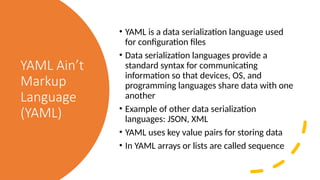
• YAMLis a data serialization language used
for configuration files
• Data serialization languages provide a
standard syntax for communicating
information so that devices, OS, and
programming languages share data with one
another
• Example of other data serialization
languages: JSON, XML
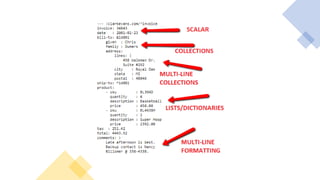
• YAML uses key value pairs for storing data
• In YAML arrays or lists are called sequence
Try it
yourself
• Createa new deployment in a file called quote.yaml
• Name the deployment and name the app label
“quote-service”
• Use “development” namespace, create it if not
created
• Name the container “quote-container”
• Run two replicas
• Use the image “datawire/quote:0.5.0”
• Set the container to accept traffic at port 8080
• Create the pods using kubectl apply –f quote.yaml
• Use BusyBox to test that application can accept
traffic from inside the cluster
15.
Kubernetes
“service”
resource
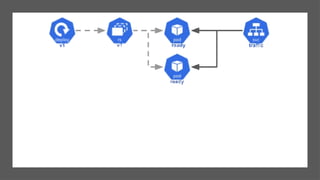
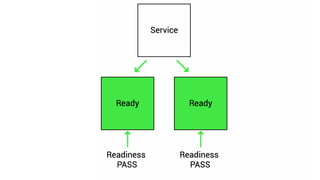
• A Serviceis a method for exposing a
network application that is running as
one or more Pods in your cluster
• When doing rollout updates for
‘deployment’ or scaling in or out pod
IP changes, so the easy way to use a
fixed pointer to backend deployment
pods is to use Kubernetes ‘service’
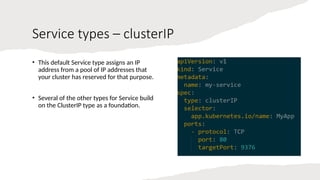
Service types –clusterIP
• This default Service type assigns an IP
address from a pool of IP addresses that
your cluster has reserved for that purpose.
• Several of the other types for Service build
on the ClusterIP type as a foundation.
21.
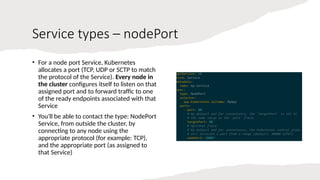
Service types –nodePort
• For a node port Service, Kubernetes
allocates a port (TCP, UDP or SCTP to match
the protocol of the Service). Every node in
the cluster configures itself to listen on that
assigned port and to forward traffic to one
of the ready endpoints associated with that
Service
• You'll be able to contact the type: NodePort
Service, from outside the cluster, by
connecting to any node using the
appropriate protocol (for example: TCP),
and the appropriate port (as assigned to
that Service)
22.
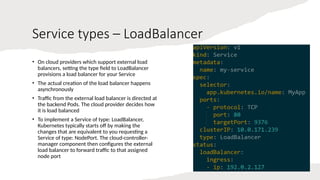
Service types –LoadBalancer
• On cloud providers which support external load
balancers, setting the type field to LoadBalancer
provisions a load balancer for your Service
• The actual creation of the load balancer happens
asynchronously
• Traffic from the external load balancer is directed at
the backend Pods. The cloud provider decides how
it is load balanced
• To implement a Service of type: LoadBalancer,
Kubernetes typically starts off by making the
changes that are equivalent to you requesting a
Service of type: NodePort. The cloud-controller-
manager component then configures the external
load balancer to forward traffic to that assigned
node port
23.
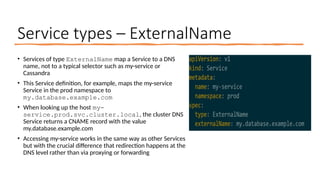
Service types –ExternalName
• Services of type ExternalName map a Service to a DNS
name, not to a typical selector such as my-service or
Cassandra
• This Service definition, for example, maps the my-service
Service in the prod namespace to
my.database.example.com
• When looking up the host my-
service.prod.svc.cluster.local, the cluster DNS
Service returns a CNAME record with the value
my.database.example.com
• Accessing my-service works in the same way as other Services
but with the crucial difference that redirection happens at the
DNS level rather than via proxying or forwarding
K8S Control plane
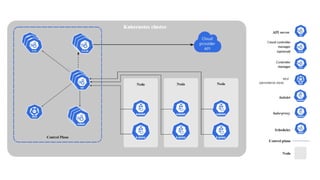
•An instance of Kubernetes is called a cluster
• A Kubernetes cluster has a control plane and at least one worker node
• Kubernetes control plane is made up of several components:
• Kube API Server
• ETCD
• Scheduler
• Controller Manager
• Cloud Controller Manager
27.
K8S Control
plane –API
Server
• The API server exposes the Kubernetes API
• Each Kubernetes object like pods, deployments,
and horizontal pod auto scaler have an API
endpoint
• Kubernetes API has a REST interface and kubectl
and kubeadm are CLI tools that communicates with
Kubernetes API via HTTP requests
• Kubernetes API is a containerized application runs
as pod in kube-system namespace
kubectl get po -n kube-system -l
component=kube-apiserver
• Kube API server is the Kubernetes components that
handles the most requests from the user inside the
cluster
28.
K8S Control
plane –etcd
• etcd is an open-source, highly available key-value
store
• It saves all data about the state of the cluster
• Only the Kube API server can communicate directly
with etcd
• etcd runs as pod in kube-system namespce
29.
K8S Control
plane –
Scheduler
•Identifies newly created pod and choses a node for
the pod to run up
• Factors taken into account for scheduling decisions
include individual and collective resource
requirements, hardware/software/policy
constraints, affinity and anti-affinity specifications,
data locality, inter-workload interference, and
deadlines
• Runs as pod in kube-system namespace
30.
K8S Control
plane –
Controller
Manager
•The controller-manager runs controller processes
• Controller process is a loop that runs continually and
checks the status of the cluster to make sure things are
running properly
• Logically, each controller is a separate process, but to
reduce complexity, they are all compiled into a single
binary and run in a single process
• There are many different types of controllers. Some
examples of them are:
• Node controller: Responsible for noticing and
responding when nodes go down.
• Job controller: Watches for Job objects that represent
one-off tasks, then creates Pods to run those tasks to
completion.
• EndpointSlice controller: Populates EndpointSlice
objects (to provide a link between Services and Pods).
• ServiceAccount controller: Create default
ServiceAccounts for new namespaces.
Kubelet
An agent thatruns on every
worker node
Make sure that containers in a
pod are running and healthy
Communicates directly with the
api-server in the control plane
34.
Container
Runtime
• A kubeletassigned to new pod starts a container
using Container Runtime Interface (CRI)
• CRI enables the kubelet to create containers with
the container engines like:
• Containerd
• CRI-O
• Kata Containers
• AWS Firecracker
• In Kubernetes v1.24 Dockershim was removed
which means docker engine can’t be used as
container runtime but docker images still work in
Kubernetes
35.
Kube-proxy
• kube-proxy isa network proxy that runs on each
node in your cluster, implementing part of the
Kubernetes Service concept
• Makes sure pods and services can communicate
• Each kube-proxy communicates directly with kube-
apiserver
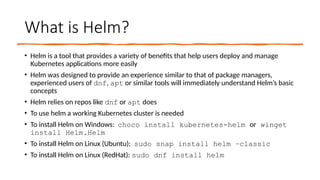
What is Helm?
•Helm is a tool that provides a variety of benefits that help users deploy and manage
Kubernetes applications more easily
• Helm was designed to provide an experience similar to that of package managers,
experienced users of dnf, apt or similar tools will immediately understand Helm’s basic
concepts
• Helm relies on repos like dnf or apt does
• To use helm a working Kubernetes cluster is needed
• To install Helm on Windows: choco install kubernetes-helm or winget
install Helm.Helm
• To install Helm on Linux (Ubuntu): sudo snap install helm –classic
• To install Helm on Linux (RedHat): sudo dnf install helm
40.
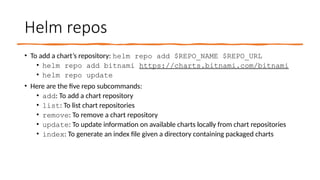
Helm repos
• Toadd a chart’s repository: helm repo add $REPO_NAME $REPO_URL
• helm repo add bitnami https://charts.bitnami.com/bitnami
• helm repo update
• Here are the five repo subcommands:
• add: To add a chart repository
• list: To list chart repositories
• remove: To remove a chart repository
• update: To update information on available charts locally from chart repositories
• index: To generate an index file given a directory containing packaged charts
41.
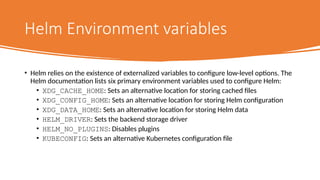
Helm Environment variables
•Helm relies on the existence of externalized variables to configure low-level options. The
Helm documentation lists six primary environment variables used to configure Helm:
• XDG_CACHE_HOME: Sets an alternative location for storing cached files
• XDG_CONFIG_HOME: Sets an alternative location for storing Helm configuration
• XDG_DATA_HOME: Sets an alternative location for storing Helm data
• HELM_DRIVER: Sets the backend storage driver
• HELM_NO_PLUGINS: Disables plugins
• KUBECONFIG: Sets an alternative Kubernetes configuration file
42.
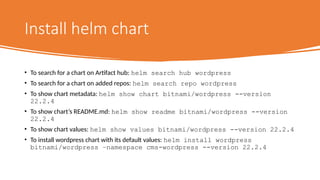
Install helm chart
•To search for a chart on Artifact hub: helm search hub wordpress
• To search for a chart on added repos: helm search repo wordpress
• To show chart metadata: helm show chart bitnami/wordpress --version
22.2.4
• To show chart’s README.md: helm show readme bitnami/wordpress --version
22.2.4
• To show chart values: helm show values bitnami/wordpress --version 22.2.4
• To install wordpress chart with its default values: helm install wordpress
bitnami/wordpress –namespace cms-wordpress --version 22.2.4
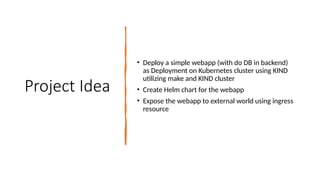
Project Idea
• Deploya simple webapp (with do DB in backend)
as Deployment on Kubernetes cluster using KIND
utilizing make and KIND cluster
• Create Helm chart for the webapp
• Expose the webapp to external world using ingress
resource
StatefulSets
• StatefulSet isthe workload API object used to
manage stateful applications
• Manages the deployment and scaling of a set of
Pods, and provides guarantees about the ordering
and uniqueness of these Pods
• Like a Deployment, a StatefulSet manages Pods
that are based on an identical container spec
• Unlike a Deployment, a StatefulSet maintains a
sticky identity for each of its Pods. These pods are
created from the same spec, but are not
interchangeable: each has a persistent identifier
that it maintains across any rescheduling
47.
Let’s play alittle with
Statefulsets
https://kubernetes.io/docs/tutorials/stateless-application/guestbook/
Service internals
• TheService API, part of Kubernetes, is an abstraction to help you expose
groups of Pods over a network. Each Service object defines a logical set of
endpoints (usually these endpoints are Pods) along with a policy about how
to make those pods accessible
• A Service is an object (the same way that a Pod or a ConfigMap is an
object). You can create, view or modify Service definitions using the
Kubernetes API. Usually, you use a tool such as kubectl to make those API
calls for you
52.
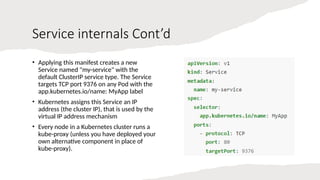
Service internals Cont’d
•Applying this manifest creates a new
Service named "my-service" with the
default ClusterIP service type. The Service
targets TCP port 9376 on any Pod with the
app.kubernetes.io/name: MyApp label
• Kubernetes assigns this Service an IP
address (the cluster IP), that is used by the
virtual IP address mechanism
• Every node in a Kubernetes cluster runs a
kube-proxy (unless you have deployed your
own alternative component in place of
kube-proxy).
53.
Service internals Cont’d
•The kube-proxy component is responsible for implementing a virtual IP
mechanism for Services of type other than ExternalName
• Each instance of kube-proxy watches the Kubernetes control plane for the
addition and removal of Service and EndpointSlice objects
• For each Service, kube-proxy calls appropriate APIs (depending on the kube-
proxy mode) to configure the node to capture traffic to the Service's
clusterIP and port and redirect that traffic to one of the Service's endpoints
(usually a Pod, but possibly an arbitrary user-provided IP address)
• A control loop ensures that the rules on each node are reliably synchronized
with the Service and EndpointSlice state as indicated by the API server.
54.
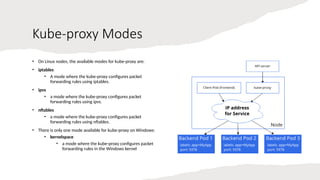
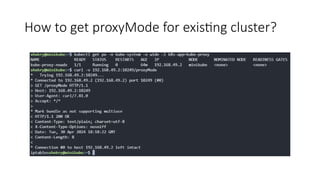
Kube-proxy Modes
• OnLinux nodes, the available modes for kube-proxy are:
• iptables
• A mode where the kube-proxy configures packet
forwarding rules using iptables.
• ipvs
• a mode where the kube-proxy configures packet
forwarding rules using ipvs.
• nftables
• a mode where the kube-proxy configures packet
forwarding rules using nftables.
• There is only one mode available for kube-proxy on Windows:
• kernelspace
• a mode where the kube-proxy configures packet
forwarding rules in the Windows kernel
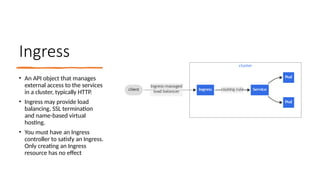
Ingress
• An APIobject that manages
external access to the services
in a cluster, typically HTTP.
• Ingress may provide load
balancing, SSL termination
and name-based virtual
hosting.
• You must have an Ingress
controller to satisfy an Ingress.
Only creating an Ingress
resource has no effect
59.
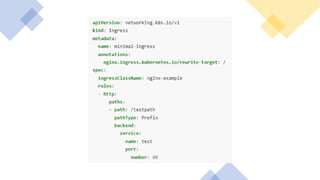
Ingress rules
• EachHTTP rule contains the following information:
• An optional host. In this example, no host is
specified, so the rule applies to all inbound HTTP
traffic through the IP address specified. If a host is
provided (for example, foo.bar.com), the rules
apply to that host
• A list of paths (for example, /testpath), each of
which has an associated backend defined with a
service.name and a service.port.name or
service.port.number. Both the host and path must
match the content of an incoming request before
the load balancer directs traffic to the referenced
Service
• A backend is a combination of Service and port
names or a custom resource backend by way of a
CRD. HTTP (and HTTPS) requests to the Ingress
that match the host and path of the rule are sent
to the listed backend
60.
Ingress
DefaultBackend
• An Ingresswith no rules sends all traffic to a single
default backend and .spec.defaultBackend is
the backend that should handle requests in that case
• The defaultBackend is conventionally a configuration
option of the Ingress controller and is not specified in
your Ingress resources
• If no .spec.rules are
specified, .spec.defaultBackend must be
specified. If defaultBackend is not set, the handling of
requests that do not match any of the rules will be up
to the ingress controller
61.
Resource
backends
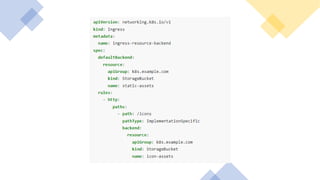
• A Resourcebackend is an ObjectRef to another
Kubernetes resource within the same namespace as
the Ingress object
• A Resource is a mutually exclusive setting with Service,
and will fail validation if both are specified
• A common usage for a Resource backend is to ingress
data to an object storage backend with static assets
Cluster
Networking
• Networking isa central part of Kubernetes, but it
can be challenging to understand exactly how it is
expected to work. There are 4 distinct networking
problems to address:
1. Highly-coupled container-to-container
communications: this is solved by Pods and
localhost communications
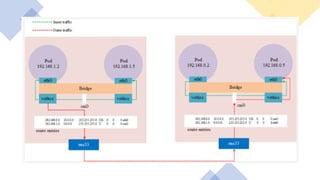
2. Pod-to-Pod communications: This is what
CNI is developed for addressing
3. Pod-to-Service communications: this is
covered by Services
4. External-to-Service communications: this is
also covered by Services
65.
How to
implement the
Kubernetes
networkmodel
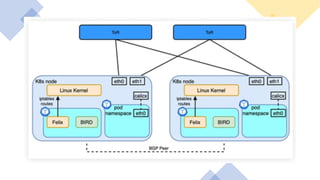
• The network model is implemented by the
container runtime on each node
• The most common container runtimes use
Container Network Interface (CNI) plugins
to manage their network and security
capabilities
• Many different CNI plugins exist from many
different vendors
• Some of these provide only basic features
of adding and removing network interfaces,
while others provide more sophisticated
solutions, such as integration with other
container orchestration systems, running
multiple CNI plugins, advanced IPAM
features etc.
66.
The Kubernetes
network model
•Every Pod in a cluster gets its own unique cluster-wide
IP address. This means you do not need to explicitly
create links between Pods and you almost never need
to deal with mapping container ports to host ports
• This creates a clean, backwards-compatible model
where Pods can be treated much like VMs or physical
hosts from the perspectives of port allocation,
naming, service discovery, load balancing, application
configuration, and migration
• Kubernetes imposes the following fundamental
requirements on any networking implementation:
• pods can communicate with all other pods on any
other node without NAT
• agents on a node (e.g. system daemons, kubelet)
can communicate with all pods on that node
67.
CNI Plugins
• Main:interface-creating
• bridge: Creates a bridge, adds the host and the container to it
• ipvlan: Adds an ipvlan interface in the container
• loopback: Set the state of loopback interface to up
• macvlan: Creates a new MAC address, forwards all traffic to that to the container
• ptp: Creates a veth pair
• vlan: Allocates a vlan device
• host-device: Move an already-existing device into a container
• dummy: Creates a new Dummy device in the container
68.
CNI Plugins Cont’d
•IPAM: IP address allocation
• dhcp: Runs a daemon on the host to make DHCP requests on behalf of the container
• host-local: Maintains a local database of allocated IPs
• static: Allocate a single static IPv4/IPv6 address to container. It's useful in debugging purpose.
• Meta: other plugins
• tuning: Tweaks sysctl parameters of an existing interface
• portmap: An iptables-based port mapping plugin. Maps ports from the host's address space
to the container.
• bandwidth: Allows bandwidth-limiting through use of traffic control tbf (ingress/egress).
• sbr: A plugin that configures source-based routing for an interface (from which it is chained).
• firewall: A firewall plugin which uses iptables or firewalld to add rules to allow traffic to/from
the container.
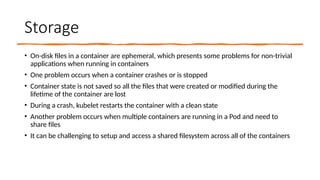
Storage
• On-disk filesin a container are ephemeral, which presents some problems for non-trivial
applications when running in containers
• One problem occurs when a container crashes or is stopped
• Container state is not saved so all the files that were created or modified during the
lifetime of the container are lost
• During a crash, kubelet restarts the container with a clean state
• Another problem occurs when multiple containers are running in a Pod and need to
share files
• It can be challenging to setup and access a shared filesystem across all of the containers
Kubernetes
volumes
• Kubernetes supportsmany types of volumes
• A Pod can use any number of volume types
simultaneously
• Ephemeral volume types have a lifetime of a pod,
but persistent volumes exist beyond the lifetime of
a pod
• When a pod ceases to exist, Kubernetes destroys
ephemeral volumes; however, Kubernetes does not
destroy persistent volumes
• For any kind of volume in each pod, data is
preserved across container restarts
76.
Persistent
Volumes
• PersistentVolume subsystemprovides an API for users and
administrators that abstracts details of how storage is
provided from how it is consumed. To do this, we introduce
two new API resources: PersistentVolume and
PersistentVolumeClaim
• A PersistentVolume (PV) is a piece of storage in the cluster
that has been provisioned by an administrator or
dynamically provisioned using Storage Classes. It is a
resource in the cluster just like a node is a cluster resource.
PVs are volume plugins like Volumes, but have a lifecycle
independent of any individual Pod that uses the PV
• A PersistentVolumeClaim (PVC) is a request for storage by
a user. It is similar to a Pod. Pods consume node resources
and PVCs consume PV resources. Pods can request specific
levels of resources (CPU and Memory). Claims can request
specific size and access modes (e.g., they can be mounted
ReadWriteOnce, ReadOnlyMany, ReadWriteMany, or
ReadWriteOncePod)
77.
Persistent
Volumes
Types
• PersistentVolume typesare implemented as
plugins. Kubernetes currently supports the
following plugins:
• csi - Container Storage Interface (CSI)
• fc - Fibre Channel (FC) storage
• hostPath - HostPath volume (for single node
testing only; WILL NOT WORK in a multi-node
cluster; consider using local volume instead)
• iscsi - iSCSI (SCSI over IP) storage
• local - local storage devices mounted on nodes.
• nfs - Network File System (NFS) storage
78.
Ephemeral
Volumes
• Some applicationsneed additional storage but don't
care whether that data is stored persistently across
restarts. For example, caching services are often limited
by memory size and can move infrequently used data
into storage that is slower than memory with little
impact on overall performance
• Other applications expect some read-only input data to
be present in files, like configuration data or secret keys.
• Ephemeral volumes are designed for these use cases.
Because volumes follow the Pod's lifetime and get
created and deleted along with the Pod, Pods can be
stopped and restarted without being limited to where
some persistent volume is available
• Ephemeral volumes are specified inline in the Pod spec,
which simplifies application deployment and
management
79.
Ephemeral
Volumes
Types
• Kubernetes supportsseveral different kinds of
ephemeral volumes for different purposes:
• emptyDir: empty at Pod startup, with storage
coming locally from the kubelet base directory
(usually the root disk) or RAM
• configMap, downwardAPI, secret: inject
different kinds of Kubernetes data into a Pod
• CSI ephemeral volumes: like the previous
volume kinds, but provided by special CSI
drivers which specifically support this feature
• generic ephemeral volumes, which can be
provided by all storage drivers that also
support persistent volumes
80.
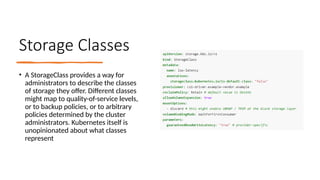
Storage Classes
• AStorageClass provides a way for
administrators to describe the classes
of storage they offer. Different classes
might map to quality-of-service levels,
or to backup policies, or to arbitrary
policies determined by the cluster
administrators. Kubernetes itself is
unopinionated about what classes
represent
Feature Gates
• Featuregates are a set of key=value pairs that describe Kubernetes
features. You can turn these features on or off using the --feature-
gates command line flag on each Kubernetes component.
• Each Kubernetes component lets you enable or disable a set of
feature gates that are relevant to that component. Use -h flag to see a
full set of feature gates for all components
• To set feature gates for a component, such as kubelet, use the --
feature-gates flag assigned to a list of feature pairs:
--feature-gates=...,GracefulNodeShutdown=true
Editor's Notes
#14 kubectl create deployment quote --dry-run=client -n development --replicas=2 --image=“docker.io/datawire/quote:0.5.0" --port=8080 -o yaml > quote.yaml
kubectl run -it busybox --image=docker.io/busybox --command --restart=Never -- sh
![Install Docker (Ubuntu Linux)
• There are two ways to install
• Using convenience scripts provided by Docker:
curl -fsSL https://get.docker.com -o get-docker.sh
sudo sh ./get-docker.sh --dry-run
• Using Docker repositories
# Add Docker's official GPG key:
sudo apt-get update
sudo apt-get install ca-certificates curl
sudo install -m 0755 -d /etc/apt/keyrings
sudo curl -fsSL https://download.docker.com/linux/ubuntu/gpg -o /etc/apt/keyrings/docker.asc
sudo chmod a+r /etc/apt/keyrings/docker.asc
# Add the repository to Apt sources:
echo
"deb [arch=$(dpkg --print-architecture) signed-by=/etc/apt/keyrings/docker.asc]
https://download.docker.com/linux/ubuntu
$(. /etc/os-release && echo "$VERSION_CODENAME") stable" |
sudo tee /etc/apt/sources.list.d/docker.list > /dev/null
sudo apt-get update
sudo apt-get install docker-ce docker-ce-cli containerd.io docker-buildx-plugin docker-compose-plugin](https://image.slidesharecdn.com/kubernetes-250321125101-ec373b8e/85/KubernetSADASDASDASDSADASDASDASDASDes-pptx-9-320.jpg)