Kubernetes
Container Orchestration
Email us at contact@crevise.com
2
K8s? What is this ?
● Kubernetes is an open-source system for automating
deployment, scaling and management of containerised
applications
● It groups containers that make up up an application into
logical units for east management and discovery.
● In easy terms, it is container orchestration tool.
● Supports multiple public cloud provider and bare metal
environment.
Kubernetes Features
3
4
Automatic binpacking
Automatically places containers based on their resource requirements
and other constraints, while not sacrificing availability. Mix critical and
best-effort workloads in order to drive up utilization and save even more
resources.
5
Horizontal scaling
Scale your application up and down with a simple command,
with a UI, or automatically based on CPU usage.
6
Automated rollouts and rollbacks
Kubernetes progressively rolls out changes to your application or its configuration,
while monitoring application health to ensure it doesn't kill all your instances at
the same time. If something goes wrong, Kubernetes will rollback the change for
you. Take advantage of a growing ecosystem of deployment solutions.
7
Self-healing
● Restarts containers that fail
● Replaces and reschedules containers when nodes die
● Kills containers that don't respond to your user-defined health check
8
Service discovery and load balancing
● No need to modify your application to use an unfamiliar service
discovery mechanism.
● Kubernetes gives containers their own IP addresses and a single
DNS name for a set of containers, and can load-balance across them.
9
Secret and Configuration management
Deploy and update secrets and application configuration without
rebuilding your image and without exposing secrets in your stack
configuration.
Architecture and Key
Concepts
10
11
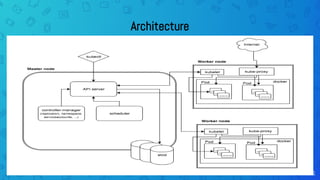
Architecture
12
Master Node
● The Kubernetes Master is a collection of three processes that run on a single node in your
cluster, which is designated as the master node.
● Responsible for maintaining the desired state for your cluster.
● Master can also be replicated for availability and redundancy.
● Kube Api Server
● ETCD
● Kube Controller manager
● Kube scheduler
13
Worker Node
● The nodes in a cluster are the machines (VMs, physical servers etc) that
run your applications and cloud workflows.
● Kubelet
● Kube-proxy
● Container runtime engine -docker
14
Pods
● Basic building block of Kubernetes–the smallest and simplest unit in the
Kubernetes object model that you create or deploy
● Presents a running process on your cluster.
● Group of containers would share storage, Linux namespaces, IP
addresses.
● Co-located, hence share resources and are always scheduled together.
● Created, destroyed and re-created on demand, based on the state of the
server and the service itself.
● “one-container-per-Pod” model is the most common Kubernetes use case
15
Deployments
● Level of abstraction above pods
● Define the desired scale and state of a group of pods
● To rollout a replicas
● Rollback to earlier version
● Scaling your pods /application
● Pause deployment
16
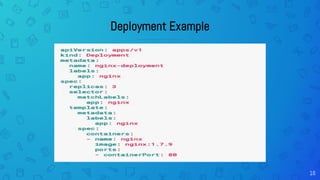
Deployment Example
17
Services
● Kubernetes Pods are mortal.
● A Kubernetes Service is an abstraction which defines a logical set of Pods
● The set of Pods targeted by a Service is determined by a Label Selector
● Define a DNS entry that can be used to refer to a group of pods
● Provide a consistent endpoint for the group of pods
● Similar in functionality to load balancers
18
Ingresses
● Define how traffic outside the cluster is routed to inside the cluster
● Used to expose Kubernetes services to the world
● Route traffic to internal services based on factors such as host and path

Kubernetes Presentation

  • 1.
  • 2.
    2 K8s? What isthis ? ● Kubernetes is an open-source system for automating deployment, scaling and management of containerised applications ● It groups containers that make up up an application into logical units for east management and discovery. ● In easy terms, it is container orchestration tool. ● Supports multiple public cloud provider and bare metal environment.
  • 3.
  • 4.
    4 Automatic binpacking Automatically placescontainers based on their resource requirements and other constraints, while not sacrificing availability. Mix critical and best-effort workloads in order to drive up utilization and save even more resources.
  • 5.
    5 Horizontal scaling Scale yourapplication up and down with a simple command, with a UI, or automatically based on CPU usage.
  • 6.
    6 Automated rollouts androllbacks Kubernetes progressively rolls out changes to your application or its configuration, while monitoring application health to ensure it doesn't kill all your instances at the same time. If something goes wrong, Kubernetes will rollback the change for you. Take advantage of a growing ecosystem of deployment solutions.
  • 7.
    7 Self-healing ● Restarts containersthat fail ● Replaces and reschedules containers when nodes die ● Kills containers that don't respond to your user-defined health check
  • 8.
    8 Service discovery andload balancing ● No need to modify your application to use an unfamiliar service discovery mechanism. ● Kubernetes gives containers their own IP addresses and a single DNS name for a set of containers, and can load-balance across them.
  • 9.
    9 Secret and Configurationmanagement Deploy and update secrets and application configuration without rebuilding your image and without exposing secrets in your stack configuration.
  • 10.
  • 11.
  • 12.
    12 Master Node ● TheKubernetes Master is a collection of three processes that run on a single node in your cluster, which is designated as the master node. ● Responsible for maintaining the desired state for your cluster. ● Master can also be replicated for availability and redundancy. ● Kube Api Server ● ETCD ● Kube Controller manager ● Kube scheduler
  • 13.
    13 Worker Node ● Thenodes in a cluster are the machines (VMs, physical servers etc) that run your applications and cloud workflows. ● Kubelet ● Kube-proxy ● Container runtime engine -docker
  • 14.
    14 Pods ● Basic buildingblock of Kubernetes–the smallest and simplest unit in the Kubernetes object model that you create or deploy ● Presents a running process on your cluster. ● Group of containers would share storage, Linux namespaces, IP addresses. ● Co-located, hence share resources and are always scheduled together. ● Created, destroyed and re-created on demand, based on the state of the server and the service itself. ● “one-container-per-Pod” model is the most common Kubernetes use case
  • 15.
    15 Deployments ● Level ofabstraction above pods ● Define the desired scale and state of a group of pods ● To rollout a replicas ● Rollback to earlier version ● Scaling your pods /application ● Pause deployment
  • 16.
  • 17.
    17 Services ● Kubernetes Podsare mortal. ● A Kubernetes Service is an abstraction which defines a logical set of Pods ● The set of Pods targeted by a Service is determined by a Label Selector ● Define a DNS entry that can be used to refer to a group of pods ● Provide a consistent endpoint for the group of pods ● Similar in functionality to load balancers
  • 18.
    18 Ingresses ● Define howtraffic outside the cluster is routed to inside the cluster ● Used to expose Kubernetes services to the world ● Route traffic to internal services based on factors such as host and path