KUBERNETES:
K U B E R N E T E S
K 8S
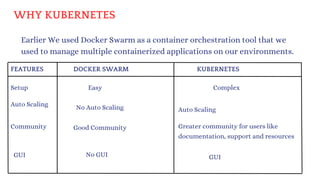
WHY KUBERNETES
Earlier We used Docker Swarm as a container orchestration tool that we
used to manage multiple containerized applications on our environments.
FEATURES DOCKER SWARM KUBERNETES
GUI
Community
Setup
Auto Scaling
Easy
No GUI
No Auto Scaling
Good Community
GUI
Complex
Auto Scaling
Greater community for users like
documentation, support and resources
KUBERNETES:
why KUBERNETES:
IT is an open-source container orchestration platform.
It is used to automates many of the manual processes like deploying, managing,
and scaling containerized applications.
Kubernetes was developed by GOOGLE using GO Language.
Google donated K8's to CNCF in 2014.
1st version was released in 2015.
Containers are a good and easy way to bundle and run your applications. In a
production environment, you need to manage the containers that run the applications
and ensure that there is no downtime. In docker we used docker swarm for this. but any
how docker has drawbacks!
so we moved to KUBERNETES.
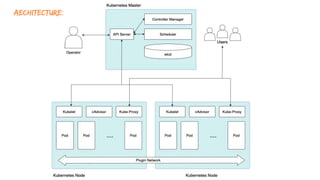
aechitecture:
API-SERVER
ETCD
CLUSTER
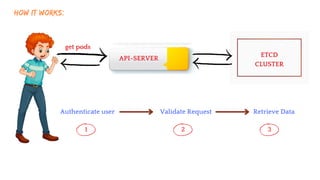
HOW IT WORKS:
get pods
Authenticate user Validate Request Retrieve Data
1 2 3
API-SERVER
Scheduler Kubelet
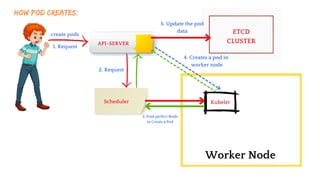
How Pod creates:
create pods ETCD
CLUSTER
Worker Node
1. Request
2. Request
3. Find perfect Node
to Create a Pod
4. Creates a pod in
worker node
5. Update the pod
data
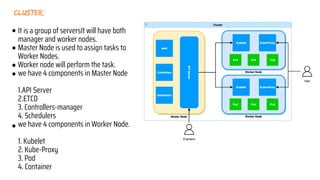
cluster:
It is a group of serversIt will have both
manager and worker nodes.
Master Node is used to assign tasks to
Worker Nodes.
Worker node will perform the task.
we have 4 components in Master Node
1.API Server
2.ETCD
3. Controllers-manager
4. Schedulers
we have 4 components in Worker Node.
1. Kubelet
2. Kube-Proxy
3. Pod
4. Container
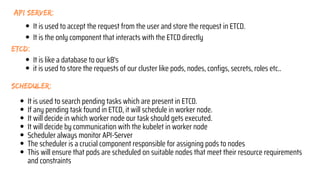
ETCD:
scheduler:
api server:
It is used to search pending tasks which are present in ETCD.
If any pending task found in ETCD, it will schedule in worker node.
It will decide in which worker node our task should gets executed.
It will decide by communication with the kubelet in worker node
Scheduler always monitor API-Server
The scheduler is a crucial component responsible for assigning pods to nodes
This will ensure that pods are scheduled on suitable nodes that meet their resource requirements
and constraints
It is like a database to our k8's
it is used to store the requests of our cluster like pods, nodes, configs, secrets, roles etc..
It is used to accept the request from the user and store the request in ETCD.
It is the only component that interacts with the ETCD directly
HOW SCHEDULER DECIDES
The scheduler is going to decide the put the right pod in right node based on Size, Memory,
CPU etc..
pod-1 pod-2
pod-3
NODE-1 NODE-2 NODE-3
Just assume that we have 1 pod and 4 nodes just like the below image
pod
6 cpu
Node-1
2 CPU’s
Node-2
4 CPU’s
Node-3
10 CPU’s
Node-4
14 CPU’s
Lets see How its decides
It Eliminates Node-1 & Node-2 because Node contains less CPU that pod
pod
6 cpu
Node-1
2 CPU’s
Node-2
4 CPU’s
Node-3
10 CPU’s
Node-4
14 CPU’s
In the rest of these 2 nodes, scheduler decides based on CPU
Ex: If scheduler places the pod on Node-3 then Node-3 contains only 2 CPU’s only
If scheduler places the pod on Node-4 then Node-4 contains only 4 CPU’s.
So scheduler selects Node-4 to place a pod.
pod
6 cpu
Node-3
10 CPU’s
Node-4
14 CPU’s
Not only CPU it selects based on different parameters like
Resource Requirement limits
Taints & Tolerations
Node selector
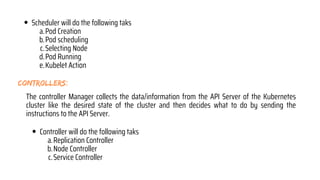
controllers:
The controller Manager collects the data/information from the API Server of the Kubernetes
cluster like the desired state of the cluster and then decides what to do by sending the
instructions to the API Server.
Scheduler will do the following taks
Pod Creation
a.
Pod scheduling
b.
Selecting Node
c.
Pod Running
d.
Kubelet Action
e.
Controller will do the following taks
Replication Controller
a.
Node Controller
b.
Service Controller
c.
API-SERVER
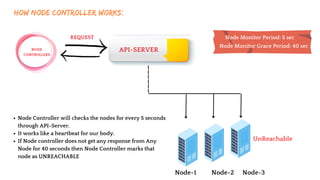
HOW NODE CONTROLLER WORKS:
REQUEST
NODE
CONTROLLERS
Node-1 Node-2 Node-3
UnReachable
Node Controller will checks the nodes for every 5 seconds
through API-Server.
It works like a heartbeat for our body.
If Node controller does not get any response from Any
Node for 40 seconds then Node Controller marks that
node as UNREACHABLE
Node Monitor Period: 5 sec
Node Monitor Grace Period: 40 sec
API-SERVER
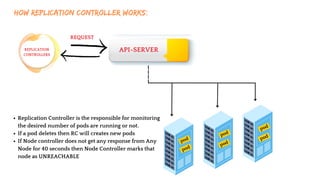
HOW REPLICATION CONTROLLER WORKS:
REQUEST
REPLICATION
CONTROLLERS
pod
pod
pod
pod
pod
pod
Replication Controller is the responsible for monitoring
the desired number of pods are running or not.
If a pod deletes then RC will creates new pods
If Node controller does not get any response from Any
Node for 40 seconds then Node Controller marks that
node as UNREACHABLE
kubelet:
kube-proxy
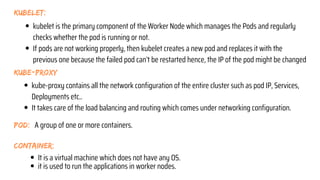
kubelet is the primary component of the Worker Node which manages the Pods and regularly
checks whether the pod is running or not.
If pods are not working properly, then kubelet creates a new pod and replaces it with the
previous one because the failed pod can’t be restarted hence, the IP of the pod might be changed
kube-proxy contains all the network configuration of the entire cluster such as pod IP, Services,
Deployments etc..
It takes care of the load balancing and routing which comes under networking configuration.
pod: A group of one or more containers.
container:
It is a virtual machine which does not have any OS.
it is used to run the applications in worker nodes.
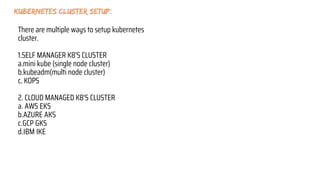
kubernetes cluster setup:
There are multiple ways to setup kubernetes
cluster.
1.SELF MANAGER K8'S CLUSTER
a.mini kube (single node cluster)
b.kubeadm(multi node cluster)
c. KOPS
2. CLOUD MANAGED K8'S CLUSTER
a. AWS EKS
b.AZURE AKS
c.GCP GKS
d.IBM IKE
MINIKUBE:
It is a tool used to setup single node cluster on K8's.
It contains API Servers, ETCD database and container runtime
It helps you to containerized applications.
It is used for development, testing, and experimentation purposes on local.
Here Master and worker runs on same machine
It is a platform Independent.
By default it will create one node only.
Installing Minikube is simple compared to other tools.
NOTE: But we dont implement this in real-time
MINIKUBE SETUP:
REQUIREMENTS:
2 CPUs or more
2GB of free memory
20GB of free disk space
Internet connection
Container or virtual machine manager, such as:
Docker.
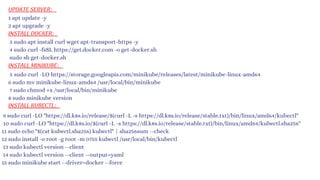
UPDATE SERVER:
INSTALL DOCKER:
INSTALL KUBECTL:
INSTALL MINIKUBE:
1 apt update -y
2 apt upgrade -y
3 sudo apt install curl wget apt-transport-https -y
4 sudo curl -fsSL https://get.docker.com -o get-docker.sh
sudo sh get-docker.sh
5 sudo curl -LO https://storage.googleapis.com/minikube/releases/latest/minikube-linux-amd64
6 sudo mv minikube-linux-amd64 /usr/local/bin/minikube
7 sudo chmod +x /usr/local/bin/minikube
8 sudo minikube version
9 sudo curl -LO "https://dl.k8s.io/release/$(curl -L -s https://dl.k8s.io/release/stable.txt)/bin/linux/amd64/kubectl"
10 sudo curl -LO "https://dl.k8s.io/$(curl -L -s https://dl.k8s.io/release/stable.txt)/bin/linux/amd64/kubectl.sha256"
11 sudo echo "$(cat kubectl.sha256) kubectl" | sha256sum --check
12 sudo install -o root -g root -m 0755 kubectl /usr/local/bin/kubectl
13 sudo kubectl version --client
14 sudo kubectl version --client --output=yaml
15 sudo minikube start --driver=docker --force
KUBECTL:
kubectl [command] [TYPE] [NAME] [flags]
kubectl api-resources : to list all api resources
kubectl is the CLI which is used to interact with a Kubernetes cluster.
We can create, manage pods, services, deployments, and other resources
We can also monitoring, troubleshooting, scaling and updating the pods.
To perform these tasks it communicates with the Kubernetes API server.
It has many options and commands, to work on.
The configuration of kubectl is in the $HOME/.kube directory.
The latest version is 1.28
SYNTAX:
Lets start working on kubernetes!
Kubernetes will not deploy the containers directly on worker nodes.
Kubernetes has a object called POD which contains containers.
Lets learn about PODS
Note:
POD:
It is a smallest object that we can create in K8's.
It is a group of containers.
Pod acts like a single instance for our application.
Pods are ephemeral (short living objects)
Mostly we can use single container inside a pod but if we required, we can create
multiple containers inside a same pod.
when we create a pod, containers inside pods can share the same network
namespace, and can share the same storage volumes .
While creating pod, we must specify the image, along with any necessary
configuration and resource limits.
K8's cannot communicate with containers, they can communicate with only pods.
We can create this pod in two ways,
1. Imperative(command)
2. Declarative (Manifest file)
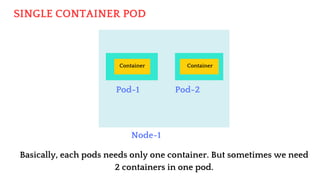
SINGLE CONTAINER POD
Node-1
Pod-1 Pod-2
Container Container
Basically, each pods needs only one container. But sometimes we need
2 containers in one pod.
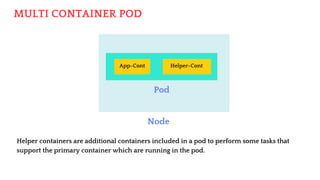
MULTI CONTAINER POD
Node
Pod
App-Cont
Helper containers are additional containers included in a pod to perform some tasks that
support the primary container which are running in the pod.
Helper-Cont
A helper container is used to collect the logs from the primary container.
Helper containers can be used to run monitoring and metrics collection agents from
the main application container.
Helper containers can assist in syncing files or data between containers in a pod. For
example, a pod might have a main application container and a helper container
responsible for syncing configuration files or other shared resources.
Security-related tasks, such as handling secrets, encryption, or authentication, can be
done by helper container.
How Helper container works:
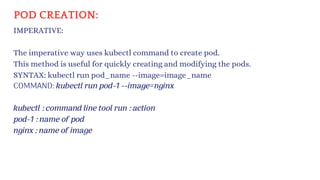
POD CREATION:
IMPERATIVE:
The imperative way uses kubectl command to create pod.
This method is useful for quickly creating and modifying the pods.
SYNTAX: kubectl run pod_name --image=image_name
COMMAND: kubectl run pod-1 --image=nginx
kubectl : command line tool run : action
pod-1 : name of pod
nginx : name of image
KUBECTL:
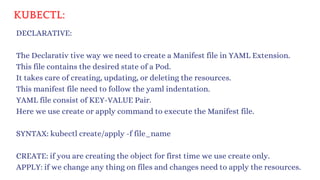
DECLARATIVE:
SYNTAX: kubectl create/apply -f file_name
The Declarativ tive way we need to create a Manifest file in YAML Extension.
This file contains the desired state of a Pod.
It takes care of creating, updating, or deleting the resources.
This manifest file need to follow the yaml indentation.
YAML file consist of KEY-VALUE Pair.
Here we use create or apply command to execute the Manifest file.
CREATE: if you are creating the object for first time we use create only.
APPLY: if we change any thing on files and changes need to apply the resources.
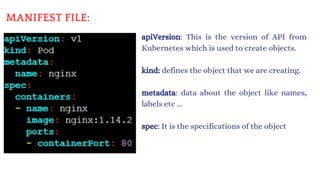
MANIFEST FILE:
apiVersion: This is the version of API from
Kubernetes which is used to create objects.
kind: defines the object that we are creating.
metadata: data about the object like names,
labels etc ...
spec: It is the specifications of the object
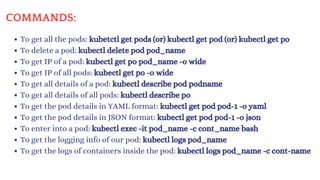
COMMANDS:
To get all the pods: kubetctl get pods (or) kubectl get pod (or) kubectl get po
To delete a pod: kubectl delete pod pod_name
To get IP of a pod: kubectl get po pod_name -o wide
To get IP of all pods: kubectl get po -o wide
To get all details of a pod: kubectl describe pod podname
To get all details of all pods: kubectl describe po
To get the pod details in YAML format: kubectl get pod pod-1 -o yaml
To get the pod details in JSON format: kubectl get pod pod-1 -o json
To enter into a pod: kubectl exec -it pod_name -c cont_name bash
To get the logging info of our pod: kubectl logs pod_name
To get the logs of containers inside the pod: kubectl logs pod_name -c cont-name
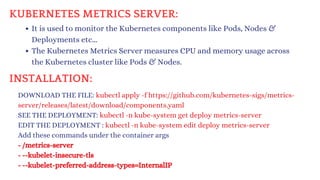
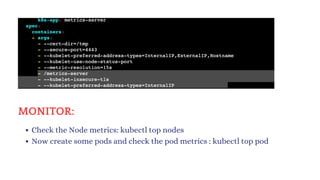
KUBERNETES METRICS SERVER:
It is used to monitor the Kubernetes components like Pods, Nodes &
Deployments etc...
The Kubernetes Metrics Server measures CPU and memory usage across
the Kubernetes cluster like Pods & Nodes.
DOWNLOAD THE FILE: kubectl apply -f https://github.com/kubernetes-sigs/metrics-
server/releases/latest/download/components.yaml
SEE THE DEPLOYMENT: kubectl -n kube-system get deploy metrics-server
EDIT THE DEPLOYMENT : kubectl -n kube-system edit deploy metrics-server
Add these commands under the container args
- /metrics-server
- --kubelet-insecure-tls
- --kubelet-preferred-address-types=InternalIP
INSTALLATION:
Check the Node metrics: kubectl top nodes
Now create some pods and check the pod metrics : kubectl top pod
MONITOR:
Labels, Selectors, and Node Selectors:
Labels:
Labels are used to organize Kubernetes Objects such as Pods, nodes, etc.
You can add multiple labels over the Kubernetes Objects.
Labels are defined in key-value pairs.
Labels are similar to tags in AWS or Azure where you give a name to filter
the resources quickly.
You can add labels like environment, department or anything else
according to you.
Label-Selectors:
Once the labels are attached to the Kubernetes objects those objects will
be filtered out with the help of labels-Selectors known as Selectors.
The API currently supports two types of label-selectors equality-based
and set-based. Label selectors can be made of multiple selectors that are
comma-separated.
Node Selector:
Node selector means selecting the nodes. Node selector is used to choose the
node to apply a particular command.
This is done by Labels where in the manifest file, we mentioned the node label
name. While running the manifest file, master nodes find the node that has
the same label and create the pod on that container.
Make sure that the node must have the label. If the node doesn’t have any
label then, the manifest file will jump to the next node.
To see the list of pods with labels: kubectl get pods --show-labels
Now, I want to list those pods that have the label env=testing.
kubectl get pods -l env=testing
kubectl get pods -l depar
tment!=DevOps
As we have discussed earlier, there are two types of label-selectors
equality and set-based.
This is the example of equality based where we used equalsTo(=).
apiVersion: v1
kind: Pod
metadata:
name: pod-1
labels:
env: testing
department: DevOps
spec:
containers:
- name: containers1
image: ubuntu
command: ["/bin/bash", "-c", "while true; do echo This is our Pod; sleep 5 ; done"]
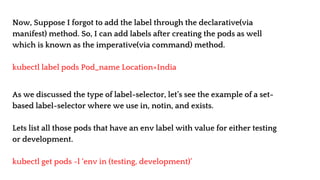
Now, Suppose I forgot to add the label through the declarative(via
manifest) method. So, I can add labels after creating the pods as well
which is known as the imperative(via command) method.
kubectl label pods Pod_name Location=India
As we discussed the type of label-selector, let’s see the example of a set-
based label-selector where we use in, notin, and exists.
Lets list all those pods that have an env label with value for either testing
or development.
kubectl get pods -l ‘env in (testing, development)’
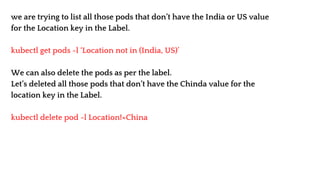
we are trying to list all those pods that don’t have the India or US value
for the Location key in the Label.
kubectl get pods -l ‘Location not in (India, US)’
We can also delete the pods as per the label.
Let’s deleted all those pods that don’t have the Chinda value for the
location key in the Label.
kubectl delete pod -l Location!=China
WE DEPLOYED THE POD
LETS ACCESS OUR APPLICATION
I CANT ABLE TO ACCESS MY APPLICATION
The reason why we are not able to access the application: In Kubernetes, if you
want to access the application we have to expose our pod. To Expose these pods
we use Kubernetes services.
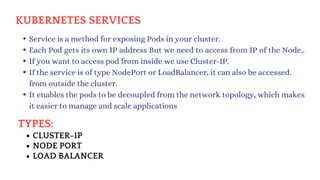
TYPES:
KUBERNETES SERVICES
Service is a method for exposing Pods in your cluster.
Each Pod gets its own IP address But we need to access from IP of the Node..
If you want to access pod from inside we use Cluster-IP.
If the service is of type NodePort or LoadBalancer, it can also be accessed.
from outside the cluster.
It enables the pods to be decoupled from the network topology, which makes
it easier to manage and scale applications
CLUSTER-IP
NODE PORT
LOAD BALANCER
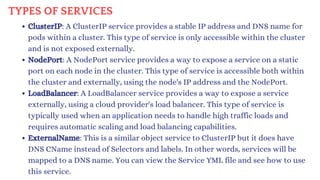
TYPES OF SERVICES
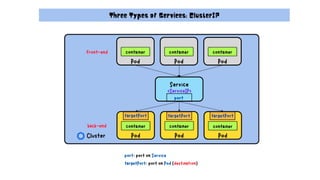
ClusterIP: A ClusterIP service provides a stable IP address and DNS name for
pods within a cluster. This type of service is only accessible within the cluster
and is not exposed externally.
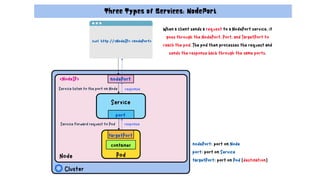
NodePort: A NodePort service provides a way to expose a service on a static
port on each node in the cluster. This type of service is accessible both within
the cluster and externally, using the node's IP address and the NodePort.
LoadBalancer: A LoadBalancer service provides a way to expose a service
externally, using a cloud provider's load balancer. This type of service is
typically used when an application needs to handle high traffic loads and
requires automatic scaling and load balancing capabilities.
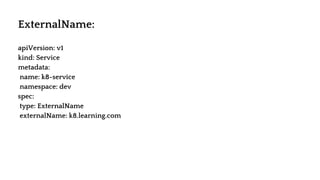
ExternalName: This is a similar object service to ClusterIP but it does have
DNS CName instead of Selectors and labels. In other words, services will be
mapped to a DNS name. You can view the Service YML file and see how to use
this service.
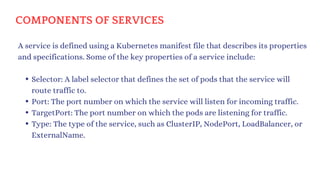
Selector: A label selector that defines the set of pods that the service will
route traffic to.
Port: The port number on which the service will listen for incoming traffic.
TargetPort: The port number on which the pods are listening for traffic.
Type: The type of the service, such as ClusterIP, NodePort, LoadBalancer, or
ExternalName.
A service is defined using a Kubernetes manifest file that describes its properties
and specifications. Some of the key properties of a service include:
COMPONENTS OF SERVICES
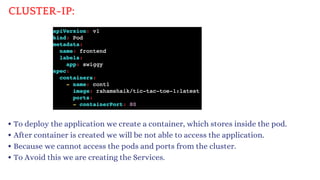
CLUSTER-IP:
To deploy the application we create a container, which stores inside the pod.
After container is created we will be not able to access the application.
Because we cannot access the pods and ports from the cluster.
To Avoid this we are creating the Services.
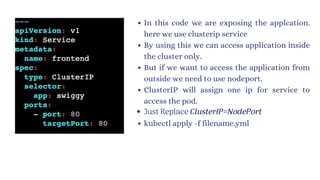
In this code we are exposing the applcation.
here we use clusterip service
By using this we can access application inside
the cluster only.
But if we want to access the application from
outside we need to use nodeport.
ClusterIP will assign one ip for service to
access the pod.
Just Replace ClusterIP=NodePort
kubectl apply -f filename.yml
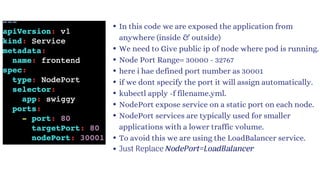
In this code we are exposed the application from
anywhere (inside & outside)
We need to Give public ip of node where pod is running.
Node Port Range= 30000 - 32767
here i hae defined port number as 30001
if we dont specify the port it will assign automatically.
kubectl apply -f filename.yml.
NodePort expose service on a static port on each node.
NodePort services are typically used for smaller
applications with a lower traffic volume.
To avoid this we are using the LoadBalancer service.
Just Replace NodePort=LoadBalancer
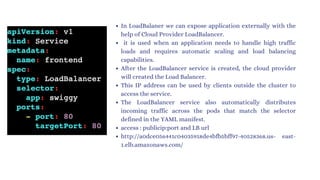
In LoadBalaner we can expose application externally with the
help of Cloud Provider LoadBalancer.
it is used when an application needs to handle high traffic
loads and requires automatic scaling and load balancing
capabilities.
After the LoadBalancer service is created, the cloud provider
will created the Load Balancer.
This IP address can be used by clients outside the cluster to
access the service.
The LoadBalancer service also automatically distributes
incoming traffic across the pods that match the selector
defined in the YAML manifest.
access : publicip:port and LB url
http://a0dce056441c04035918de4bfb5bff97-40528368.us- east-
1.elb.amazonaws.com/
apiVersion: v1
kind: Service
metadata:
name: k8-service
namespace: dev
spec:
type: ExternalName
externalName: k8.learning.com
ExternalName:
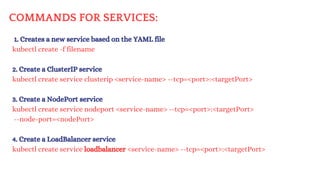
COMMANDS FOR SERVICES:
1. Creates a new service based on the YAML file
kubectl create -f filename
2. Create a ClusterIP service
kubectl create service clusterip <service-name> --tcp=<port>:<targetPort>
3. Create a NodePort service
kubectl create service nodeport <service-name> --tcp=<port>:<targetPort>
--node-port=<nodePort>
4. Create a LoadBalancer service
kubectl create service loadbalancer <service-name> --tcp=<port>:<targetPort>
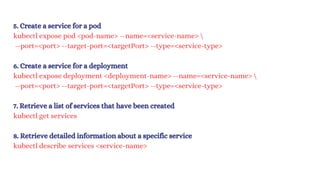
5. Create a service for a pod
kubectl expose pod <pod-name> --name=<service-name> 
--port=<port> --target-port=<targetPort> --type=<service-type>
6. Create a service for a deployment
kubectl expose deployment <deployment-name> --name=<service-name> 
--port=<port> --target-port=<targetPort> --type=<service-type>
7. Retrieve a list of services that have been created
kubectl get services
8. Retrieve detailed information about a specific service
kubectl describe services <service-name>
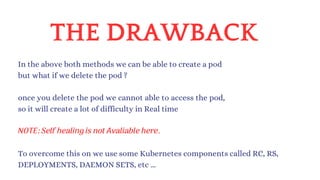
THE DRAWBACK
In the above both methods we can be able to create a pod
but what if we delete the pod ?
once you delete the pod we cannot able to access the pod,
so it will create a lot of difficulty in Real time
To overcome this on we use some Kubernetes components called RC, RS,
DEPLOYMENTS, DAEMON SETS, etc ...
NOTE: Self healing is not Avaliable here.
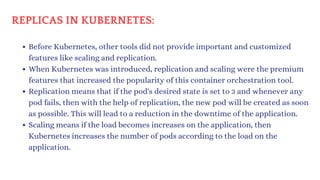
REPLICAS IN KUBERNETES:
Before Kubernetes, other tools did not provide important and customized
features like scaling and replication.
When Kubernetes was introduced, replication and scaling were the premium
features that increased the popularity of this container orchestration tool.
Replication means that if the pod's desired state is set to 3 and whenever any
pod fails, then with the help of replication, the new pod will be created as soon
as possible. This will lead to a reduction in the downtime of the application.
Scaling means if the load becomes increases on the application, then
Kubernetes increases the number of pods according to the load on the
application.
ReplicationController is an object in Kubernetes that was introduced in v1 of
Kubernetes which helps to meet the desired state of the Kubernetes cluster
from the current state. ReplicationController works on equality-based
controllers only.
ReplicaSet is an object in Kubernetes and it is an advanced version of
ReplicationController. ReplicaSet works on both equality-based controllers
and set-based controllers.
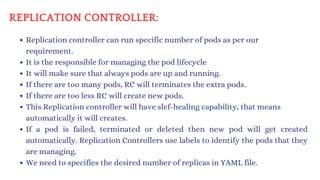
REPLICATION CONTROLLER:
Replication controller can run specific number of pods as per our
requirement.
It is the responsible for managing the pod lifecycle
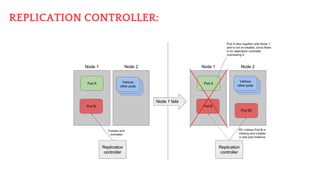
It will make sure that always pods are up and running.
If there are too many pods, RC will terminates the extra pods.
If there are too less RC will create new pods.
This Replication controller will have slef-healing capability, that means
automatically it will creates.
If a pod is failed, terminated or deleted then new pod will get created
automatically. Replication Controllers use labels to identify the pods that they
are managing.
We need to specifies the desired number of replicas in YAML file.
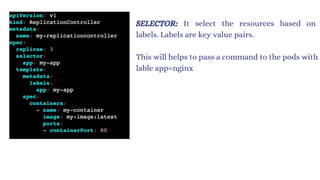
REPLICATION CONTROLLER:
This will helps to pass a command to the pods with
lable app=nginx
SELECTOR: It select the resources based on
labels. Labels are key value pairs.
apiVersion: v1
kind: ReplicationController
metadata:
name: myreplica
spec:
replicas: 2
selector:
Location: India
template:
metadata:
name: testpod6
labels:
Location: India
spec:
containers:
- name: c00
image: ubuntu
command: ["/bin/bash", "-c", "while true; do echo ReplicationController Example; sleep 5 ; done"]
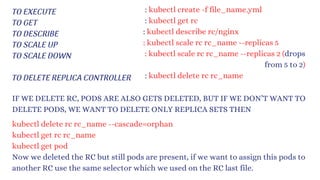
TO EXECUTE
TO GET
TO DESCRIBE
TO SCALE UP
TO SCALE DOWN
TO DELETE REPLICA CONTROLLER
: kubectl create -f file_name.yml
: kubectl get rc
: kubectl describe rc/nginx
: kubectl scale rc rc_name --replicas 5
: kubectl scale rc rc_name --replicas 2 (drops
from 5 to 2)
: kubectl delete rc rc_name
IF WE DELETE RC, PODS ARE ALSO GETS DELETED, BUT IF WE DON’T WANT TO
DELETE PODS, WE WANT TO DELETE ONLY REPLICA SETS THEN
kubectl delete rc rc_name --cascade=orphan
kubectl get rc rc_name
kubectl get pod
Now we deleted the RC but still pods are present, if we want to assign this pods to
another RC use the same selector which we used on the RC last file.
THE DRAWBACK
RC used only equality based selector
ex: env=prod
here we can assign only one value (equality based selector)
We are not using these RC in recent times, because RC is replaced by RS(Replica
Set)
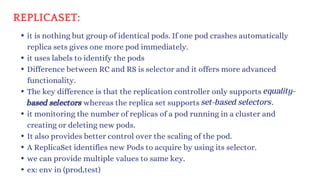
REPLICASET:
it is nothing but group of identical pods. If one pod crashes automatically
replica sets gives one more pod immediately.
it uses labels to identify the pods
Difference between RC and RS is selector and it offers more advanced
functionality.
The key difference is that the replication controller only supports
based selectors whereas the replica set supports
it monitoring the number of replicas of a pod running in a cluster and
creating or deleting new pods.
It also provides better control over the scaling of the pod.
A ReplicaSet identifies new Pods to acquire by using its selector.
we can provide multiple values to same key.
ex: env in (prod,test)
equality-
set-based selectors.
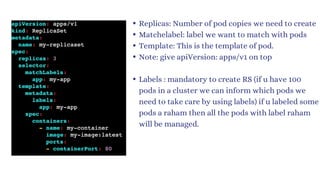
Replicas: Number of pod copies we need to create
Matchelabel: label we want to match with pods
Template: This is the template of pod.
Note: give apiVersion: apps/v1 on top
Labels : mandatory to create RS (if u have 100
pods in a cluster we can inform which pods we
need to take care by using labels) if u labeled some
pods a raham then all the pods with label raham
will be managed.
apiVersion: apps/v1
kind: ReplicaSet
metadata:
name: myrs
spec:
replicas: 2
selector:
matchExpressions:
- {key: Location, operator: In, values: [India, US, Russia]}
- {key: env, operator: NotIn, values: [testing]}
template:
metadata:
name: testpod7
labels:
Location: Russia
spec:
containers:
- name: container1
image: ubuntu
command: ["/bin/bash", "-c", "while true; do echo ReplicaSet Example; sleep 5 ; done"]
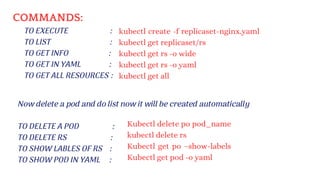
COMMANDS:
TO EXECUTE :
TO LIST :
TO GET INFO :
TO GET IN YAML :
TO GET ALL RESOURCES :
TO DELETE A POD :
TO DELETE RS :
TO SHOW LABLES OF RS :
TO SHOW POD IN YAML :
Now delete a pod and do list now it will be created automatically
Kubectl delete po pod_name
kubectl delete rs
Kubectl get po –show-labels
Kubectl get pod -o yaml
kubectl create -f replicaset-nginx.yaml
kubectl get replicaset/rs
kubectl get rs -o wide
kubectl get rs -o yaml
kubectl get all
THE DRAWBACK
Here Replica set is an lower level object which focus on maintaining desired
number of replica pods.
Deployments use ReplicaSets under the hood to manage the actual pods that run
the application.
To manage this replica set we need a higher-level object called deployment which
provide additional functionality like rolling updates and roll backs.
DEPLOYMENT:
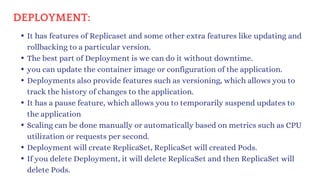
It has features of Replicaset and some other extra features like updating and
rollbacking to a particular version.
The best part of Deployment is we can do it without downtime.
you can update the container image or configuration of the application.
Deployments also provide features such as versioning, which allows you to
track the history of changes to the application.
It has a pause feature, which allows you to temporarily suspend updates to
the application
Scaling can be done manually or automatically based on metrics such as CPU
utilization or requests per second.
Deployment will create ReplicaSet, ReplicaSet will created Pods.
If you delete Deployment, it will delete ReplicaSet and then ReplicaSet will
delete Pods.
Replicas: Number of pod copies we need to create
Matchelabel: label we want to match with pods
Template: This is the template of pod.
Labels : mandatory to create RS (if u have 100
pods in a cluster we can inform which pods we
need to take care by using labels) if u labeled some
pods a raham then all the pods with label raham
will be managed.
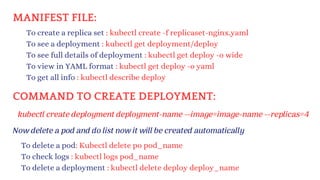
MANIFEST FILE:
Now delete a pod and do list now it will be created automatically
To delete a pod: Kubectl delete po pod_name
To check logs : kubectl logs pod_name
To delete a deployment : kubectl delete deploy deploy_name
To create a replica set : kubectl create -f replicaset-nginx.yaml
To see a deployment : kubectl get deployment/deploy
To see full details of deployment : kubectl get deploy -o wide
To view in YAML format : kubectl get deploy -o yaml
To get all info : kubectl describe deploy
COMMAND TO CREATE DEPLOYMENT:
kubectl create deployment deployment-name --image=image-name --replicas=4
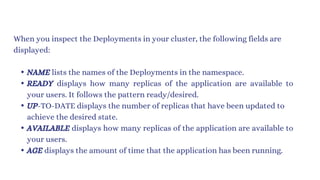
When you inspect the Deployments in your cluster, the following fields are
displayed:
NAME lists the names of the Deployments in the namespace.
READY displays how many replicas of the application are available to
your users. It follows the pattern ready/desired.
UP-TO-DATE displays the number of replicas that have been updated to
achieve the desired state.
AVAILABLE displays how many replicas of the application are available to
your users.
AGE displays the amount of time that the application has been running.
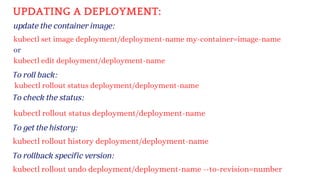
To roll back:
update the container image:
kubectl rollout status deployment/deployment-name
kubectl set image deployment/deployment-name my-container=image-name
or
kubectl edit deployment/deployment-name
UPDATING A DEPLOYMENT:
kubectl rollout status deployment/deployment-name
To check the status:
To get the history:
kubectl rollout history deployment/deployment-name
To rollback specific version:
kubectl rollout undo deployment/deployment-name --to-revision=number
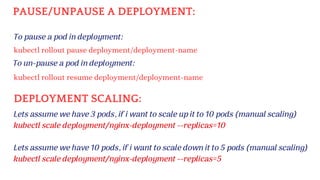
To pause a pod in deployment:
kubectl rollout pause deployment/deployment-name
PAUSE/UNPAUSE A DEPLOYMENT:
To un-pause a pod in deployment:
kubectl rollout resume deployment/deployment-name
DEPLOYMENT SCALING:
Lets assume we have 3 pods, if i want to scale up it to 10 pods (manual scaling)
kubectl scale deployment/nginx-deployment --replicas=10
Lets assume we have 10 pods, if i want to scale down it to 5 pods (manual scaling)
kubectl scale deployment/nginx-deployment --replicas=5
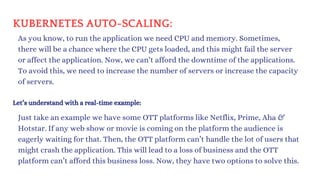
KUBERNETES AUTO-SCALING:
As you know, to run the application we need CPU and memory. Sometimes,
there will be a chance where the CPU gets loaded, and this might fail the server
or affect the application. Now, we can’t afford the downtime of the applications.
To avoid this, we need to increase the number of servers or increase the capacity
of servers.
Let’s understand with a real-time example:
Just take an example we have some OTT platforms like Netflix, Prime, Aha &
Hotstar. If any web show or movie is coming on the platform the audience is
eagerly waiting for that. Then, the OTT platform can’t handle the lot of users that
might crash the application. This will lead to a loss of business and the OTT
platform can’t afford this business loss. Now, they have two options to solve this.
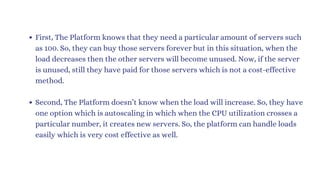
First, The Platform knows that they need a particular amount of servers such
as 100. So, they can buy those servers forever but in this situation, when the
load decreases then the other servers will become unused. Now, if the server
is unused, still they have paid for those servers which is not a cost-effective
method.
Second, The Platform doesn’t know when the load will increase. So, they have
one option which is autoscaling in which when the CPU utilization crosses a
particular number, it creates new servers. So, the platform can handle loads
easily which is very cost effective as well.
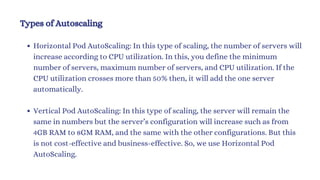
Types of Autoscaling
Horizontal Pod AutoScaling: In this type of scaling, the number of servers will
increase according to CPU utilization. In this, you define the minimum
number of servers, maximum number of servers, and CPU utilization. If the
CPU utilization crosses more than 50% then, it will add the one server
automatically.
Vertical Pod AutoScaling: In this type of scaling, the server will remain the
same in numbers but the server’s configuration will increase such as from
4GB RAM to 8GM RAM, and the same with the other configurations. But this
is not cost-effective and business-effective. So, we use Horizontal Pod
AutoScaling.
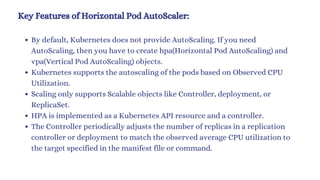
Key Features of Horizontal Pod AutoScaler:
By default, Kubernetes does not provide AutoScaling. If you need
AutoScaling, then you have to create hpa(Horizontal Pod AutoScaling) and
vpa(Vertical Pod AutoScaling) objects.
Kubernetes supports the autoscaling of the pods based on Observed CPU
Utilization.
Scaling only supports Scalable objects like Controller, deployment, or
ReplicaSet.
HPA is implemented as a Kubernetes API resource and a controller.
The Controller periodically adjusts the number of replicas in a replication
controller or deployment to match the observed average CPU utilization to
the target specified in the manifest file or command.
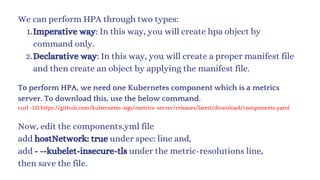
We can perform HPA through two types:
Imperative way: In this way, you will create hpa object by
command only.
1.
Declarative way: In this way, you will create a proper manifest file
and then create an object by applying the manifest file.
2.
To perform HPA, we need one Kubernetes component which is a metrics
server. To download this, use the below command.
curl -LO https://github.com/kubernetes-sigs/metrics-server/releases/latest/download/components.yaml
Now, edit the components.yml file
add hostNetwork: true under spec: line and,
add - --kubelet-insecure-tls under the metric-resolutions line,
then save the file.
Now, you have to apply this by the below command
kubectl apply -f components.yml
To validate, run the command below
kubectl get pods -n kube-system
If the metrics-server pod is running then, you are ready to scale.
DEPLOYMENT SCALING:
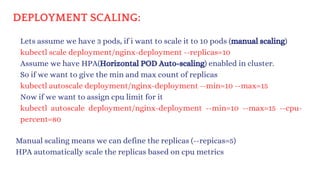
Lets assume we have 3 pods, if i want to scale it to 10 pods (manual scaling)
kubectl scale deployment/nginx-deployment --replicas=10
Assume we have HPA(Horizontal POD Auto-scaling) enabled in cluster.
So if we want to give the min and max count of replicas
kubectl autoscale deployment/nginx-deployment --min=10 --max=15
Now if we want to assign cpu limit for it
kubectl autoscale deployment/nginx-deployment --min=10 --max=15 --cpu-
percent=80
Manual scaling means we can define the replicas (--repicas=5)
HPA automatically scale the replicas based on cpu metrics
DEPLOYMENT SCALING:
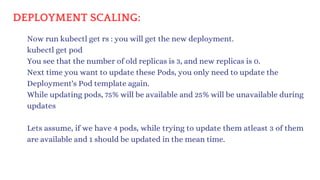
Now run kubectl get rs : you will get the new deployment.
kubectl get pod
You see that the number of old replicas is 3, and new replicas is 0.
Next time you want to update these Pods, you only need to update the
Deployment's Pod template again.
While updating pods, 75% will be available and 25% will be unavailable during
updates
Lets assume, if we have 4 pods, while trying to update them atleast 3 of them
are available and 1 should be updated in the mean time.
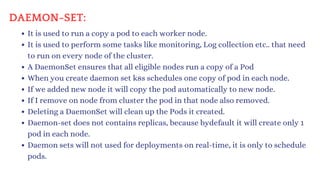
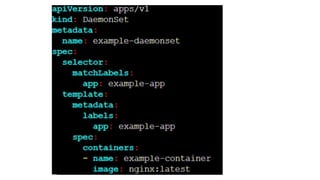
DAEMON-SET:
It is used to run a copy a pod to each worker node.
It is used to perform some tasks like monitoring, Log collection etc.. that need
to run on every node of the cluster.
A DaemonSet ensures that all eligible nodes run a copy of a Pod
When you create daemon set k8s schedules one copy of pod in each node.
If we added new node it will copy the pod automatically to new node.
If I remove on node from cluster the pod in that node also removed.
Deleting a DaemonSet will clean up the Pods it created.
Daemon-set does not contains replicas, because bydefault it will create only 1
pod in each node.
Daemon sets will not used for deployments on real-time, it is only to schedule
pods.
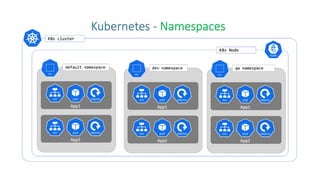
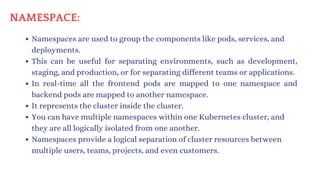
Namespaces are used to group the components like pods, services, and
deployments.
This can be useful for separating environments, such as development,
staging, and production, or for separating different teams or applications.
In real-time all the frontend pods are mapped to one namespace and
backend pods are mapped to another namespace.
It represents the cluster inside the cluster.
You can have multiple namespaces within one Kubernetes cluster, and
they are all logically isolated from one another.
Namespaces provide a logical separation of cluster resources between
multiple users, teams, projects, and even customers.
NAMESPACE:
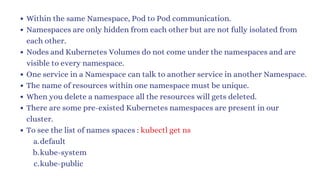
Within the same Namespace, Pod to Pod communication.
Namespaces are only hidden from each other but are not fully isolated from
each other.
Nodes and Kubernetes Volumes do not come under the namespaces and are
visible to every namespace.
One service in a Namespace can talk to another service in another Namespace.
The name of resources within one namespace must be unique.
When you delete a namespace all the resources will gets deleted.
There are some pre-existed Kubernetes namespaces are present in our
cluster.
To see the list of names spaces : kubectl get ns
default
a.
kube-system
b.
kube-public
c.
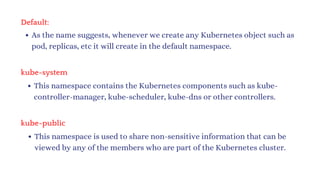
Default:
As the name suggests, whenever we create any Kubernetes object such as
pod, replicas, etc it will create in the default namespace.
kube-system
This namespace contains the Kubernetes components such as kube-
controller-manager, kube-scheduler, kube-dns or other controllers.
kube-public
This namespace is used to share non-sensitive information that can be
viewed by any of the members who are part of the Kubernetes cluster.
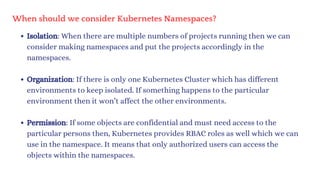
When should we consider Kubernetes Namespaces?
Isolation: When there are multiple numbers of projects running then we can
consider making namespaces and put the projects accordingly in the
namespaces.
Organization: If there is only one Kubernetes Cluster which has different
environments to keep isolated. If something happens to the particular
environment then it won’t affect the other environments.
Permission: If some objects are confidential and must need access to the
particular persons then, Kubernetes provides RBAC roles as well which we can
use in the namespace. It means that only authorized users can access the
objects within the namespaces.
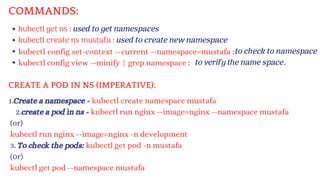
kubectl get ns : used to get namespaces
kubectl create ns mustafa : used to create new namespace
kubectl config set-context --current --namespace=mustafa :
kubectl config view --minify | grep namespace :
1.Create a namespace - kubectl create namespace mustafa
2.create a pod in ns - kubectl run nginx --image=nginx --namespace mustafa
(or)
kubectl run nginx --image=nginx -n development
3. To check the pods: kubectl get pod -n mustafa
(0r)
kubectl get pod --namespace mustafa
to check to namespace
to verify the name space.
COMMANDS:
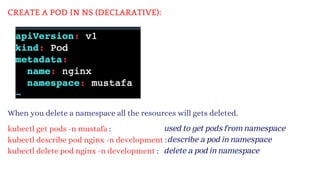
CREATE A POD IN NS (IMPERATIVE):
CREATE A POD IN NS (DECLARATIVE):
When you delete a namespace all the resources will gets deleted.
kubectl get pods -n mustafa :
kubectl describe pod nginx -n development :
kubectl delete pod nginx -n development :
used to get pods from namespace
describe a pod in namespace
delete a pod in namespace
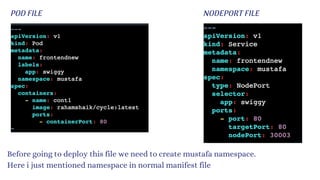
POD FILE NODEPORT FILE
Before going to deploy this file we need to create mustafa namespace.
Here i just mentioned namespace in normal manifest file
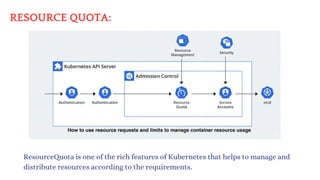
RESOURCE QUOTA:
ResourceQuota is one of the rich features of Kubernetes that helps to manage and
distribute resources according to the requirements.
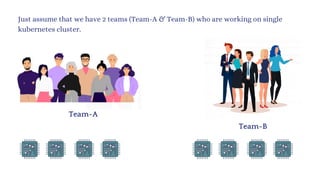
Just assume that we have 2 teams (Team-A & Team-B) who are working on single
kubernetes cluster.
Team-A
Team-B
Team-A
Team-B
In this situation Team-A needs more CPU’s & Memory because of heavy workload
tasks.
We need more CPU’s & Memory,
Because we have more work to do
Team-A
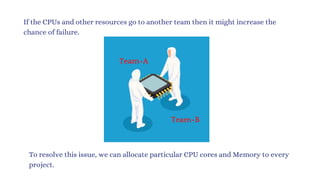
If the CPUs and other resources go to another team then it might increase the
chance of failure.
Team-B
To resolve this issue, we can allocate particular CPU cores and Memory to every
project.
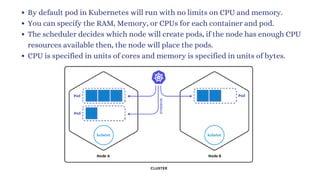
By default pod in Kubernetes will run with no limits on CPU and memory.
You can specify the RAM, Memory, or CPUs for each container and pod.
The scheduler decides which node will create pods, if the node has enough CPU
resources available then, the node will place the pods.
CPU is specified in units of cores and memory is specified in units of bytes.
As you know, the Kubernetes cluster can be divided into namespaces and if we
create a container with no CPU limits then the container will have default limits.
A namespace can be assigned to ResourceQuota objects, this will help to limit
the amount of usage to the objects within the namespaces. You can limit the
computer (CPU), Memory, and Storage.
Restrictions that a resource-quotas imposes on namespaces
Every container that is running on the namespace must have its own CPU limit.
The total amount of CPU used by all the containers in the namespace should not
exceed a specified limit.
Lets understand the ResourceQuota with funny scenario. Assume that there is
medical college which has 25 seats only. So the college management assigned 10
seats for girls and 15 seats for boys who has more than 80% in Intermediate.
15 seats 10 seats
College (cluster)
NameSpace-1 (boys) NameSpace-2 (girls)
Also we have a condition that students must has min 80% in Intermediate. In the same
way pod/container must contains the CPU limits. All the pods/containers in the
namespace should not exceed a specified limit.
CPU limit = 8 Cores
Memory = 200 MB
CPU limit = 6 Cores
Memory = 150 MB
2 cores
50 MB
2 cores
50 MB
4 cores
100 MB
2 cores
50 MB
2 cores
50 MB
2 cores
50 MB
There are two types of restrictions that need to be mentioned while using ResourceQuota
Limit: Limit specifies that the container, pod, or namespace will have the limit
resources where if the objects will exceed the limit then, the object won’t create.
Request: The request specifies that the container, pod, or namespace needs a
particular amount of resources such as CPU and memory. But if the request is
greater than the limit then, Kubernetes won’t allow the creation of pods or
containers.
Now, there are some conditions or principles for requests and limit which needs to be
understood.
If the requests and limits are given in the manifest file, it works accordingly.
1.
If the requests are given but the limit is not provided then, the default requests will be used.
2.
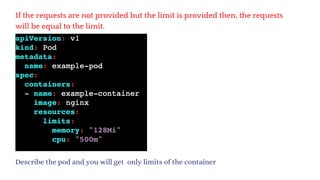
If the requests are not provided but the limit is provided then, the requests will be equal to
the limit.
3.
If the requests and limits are given in the manifest file, it works accordingly.
Describe the pod and you will get limits and requests of the container
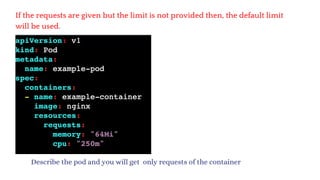
If the requests are given but the limit is not provided then, the default limit
will be used.
Describe the pod and you will get only requests of the container
If the requests are not provided but the limit is provided then, the requests
will be equal to the limit.
Describe the pod and you will get only limits of the container
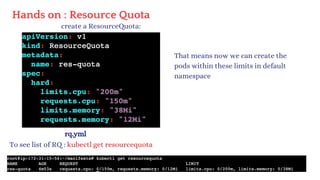
Hands on : Resource Quota
create a ResourceQuota:
rq.yml
To see list of RQ : kubectl get resourcequota
That means now we can create the
pods within these limits in default
namespace
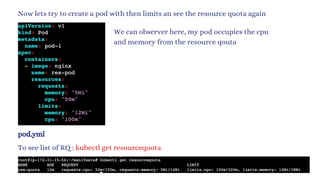
Now lets try to create a pod with then limits an see the resource quota again
pod.yml
To see list of RQ : kubectl get resourcequota
We can observer here, my pod occupies the cpu
and memory from the resource qouta
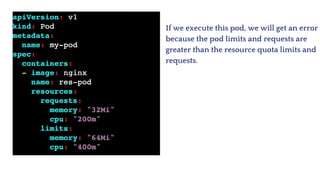
If we execute this pod, we will get an error
because the pod limits and requests are
greater than the resource quota limits and
requests.
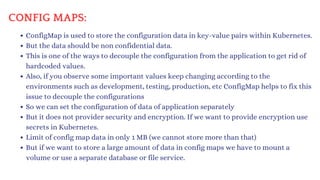
CONFIG MAPS:
ConfigMap is used to store the configuration data in key-value pairs within Kubernetes.
But the data should be non confidential data.
This is one of the ways to decouple the configuration from the application to get rid of
hardcoded values.
Also, if you observe some important values keep changing according to the
environments such as development, testing, production, etc ConfigMap helps to fix this
issue to decouple the configurations
So we can set the configuration of data of application separately
But it does not provider security and encryption. If we want to provide encryption use
secrets in Kubernetes.
Limit of config map data in only 1 MB (we cannot store more than that)
But if we want to store a large amount of data in config maps we have to mount a
volume or use a separate database or file service.
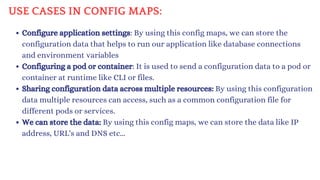
USE CASES IN CONFIG MAPS:
Configure application settings: By using this config maps, we can store the
configuration data that helps to run our application like database connections
and environment variables
Configuring a pod or container: It is used to send a configuration data to a pod or
container at runtime like CLI or files.
Sharing configuration data across multiple resources: By using this configuration
data multiple resources can access, such as a common configuration file for
different pods or services.
We can store the data: By using this config maps, we can store the data like IP
address, URL's and DNS etc...
SOME POINTS ABOUT CONFIGMAPS:
Creating the configMap is the first process which can be done by commands
only or a YAML file.
After creating the configMap, we use the data in the pod by injecting the pods.
After injecting the pods, if there is any update in the configuration we can
modify the configMap, and the changes will be reflected in the injected pod.
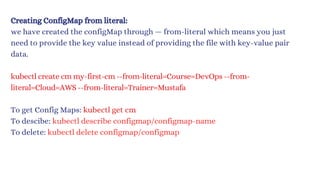
Creating ConfigMap from literal:
we have created the configMap through — from-literal which means you just
need to provide the key value instead of providing the file with key-value pair
data.
kubectl create cm my-first-cm --from-literal=Course=DevOps --from-
literal=Cloud=AWS --from-literal=Trainer=Mustafa
To get Config Maps: kubectl get cm
To descibe: kubectl describe configmap/configmap-name
To delete: kubectl delete configmap/configmap
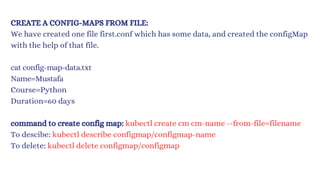
CREATE A CONFIG-MAPS FROM FILE:
We have created one file first.conf which has some data, and created the configMap
with the help of that file.
cat config-map-data.txt
Name=Mustafa
Course=Python
Duration=60 days
command to create config map: kubectl create cm cm-name --from-file=filename
To descibe: kubectl describe configmap/configmap-name
To delete: kubectl delete configmap/configmap
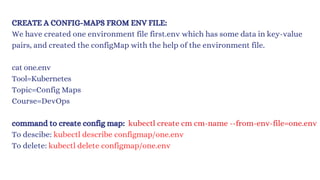
CREATE A CONFIG-MAPS FROM ENV FILE:
We have created one environment file first.env which has some data in key-value
pairs, and created the configMap with the help of the environment file.
cat one.env
Tool=Kubernetes
Topic=Config Maps
Course=DevOps
command to create config map: kubectl create cm cm-name --from-env-file=one.env
To descibe: kubectl describe configmap/one.env
To delete: kubectl delete configmap/one.env
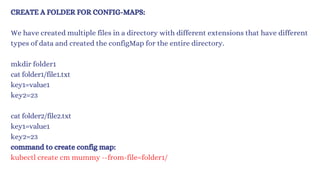
CREATE A FOLDER FOR CONFIG-MAPS:
We have created multiple files in a directory with different extensions that have different
types of data and created the configMap for the entire directory.
mkdir folder1
cat folder1/file1.txt
key1=value1
key2=23
cat folder2/file2.txt
key1=value1
key2=23
command to create config map:
kubectl create cm mummy --from-file=folder1/
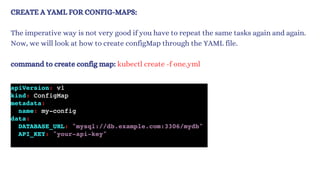
CREATE A YAML FOR CONFIG-MAPS:
The imperative way is not very good if you have to repeat the same tasks again and again.
Now, we will look at how to create configMap through the YAML file.
command to create config map: kubectl create -f one.yml
Injecting CM into the pod with specific key pairs:
POD.YML
we have created four types of configMaps
but here, we will learn how to use those
configMaps by injecting configMaps into the
pods.
Create a file for pod and execute it
Inside the pod.yml we have to declare any
valuefrom our configmap
kubectl apply -f pod.yml
After creating the pod, enter into the pod using
kubectl exec -it pod_name /bin/bash
Once you entered into pod give a command env
That will print the list of environments.
Injecting multiple CMs with specific and multiple values:
Lets add multiple key pairs from different
files.
Create a file for pod and execute it
Inside the pod.yml we have to declare any value
from any configmaps
After creating the pod, enter into the pod using
kubectl exec -it pod_name /bin/bash
Once you entered into pod give a command env
That will print the list of environments.
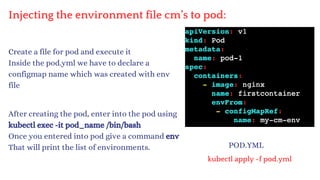
Injecting the environment file cm’s to pod:
Create a file for pod and execute it
Inside the pod.yml we have to declare a
configmap name which was created with env
file
After creating the pod, enter into the pod using
kubectl exec -it pod_name /bin/bash
Once you entered into pod give a command env
That will print the list of environments. POD.YML
kubectl apply -f pod.yml
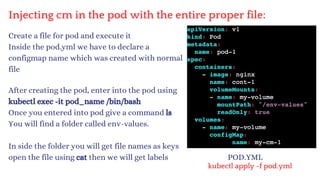
Injecting cm in the pod with the entire proper file:
Create a file for pod and execute it
Inside the pod.yml we have to declare a
configmap name which was created with normal
file
After creating the pod, enter into the pod using
kubectl exec -it pod_name /bin/bash
Once you entered into pod give a command ls
You will find a folder called env-values.
In side the folder you will get file names as keys
open the file using cat then we will get labels POD.YML
kubectl apply -f pod.yml
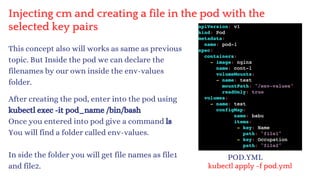
Injecting cm and creating a file in the pod with the
selected key pairs
This concept also will works as same as previous
topic. But Inside the pod we can declare the
filenames by our own inside the env-values
folder.
After creating the pod, enter into the pod using
kubectl exec -it pod_name /bin/bash
Once you entered into pod give a command ls
You will find a folder called env-values.
In side the folder you will get file names as file1
and file2.
POD.YML
kubectl apply -f pod.yml
SECRETS:
There are lot of confidential information that needs to be stored on the server
such as database usernames, passwords, or API Keys.
To keep all the important data secure, Kubernetes has a Secrets feature that
encrypts the data.
Secrets can store data up to 1MB which would be enough.
Secrets can be created via imperative or declarative ways.
Secrets are stored in the /tmps directory and can be accessible to pods only.
After creating the Secrets, applications need to use the credentials or database
credentials which will be done by injecting with the pods.
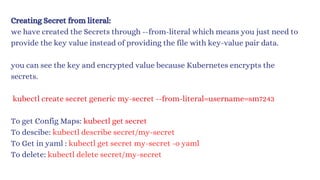
Creating Secret from literal:
we have created the Secrets through --from-literal which means you just need to
provide the key value instead of providing the file with key-value pair data.
you can see the key and encrypted value because Kubernetes encrypts the
secrets.
kubectl create secret generic my-secret --from-literal=username=sm7243
To get Config Maps: kubectl get secret
To descibe: kubectl describe secret/my-secret
To Get in yaml : kubectl get secret my-secret -o yaml
To delete: kubectl delete secret/my-secret
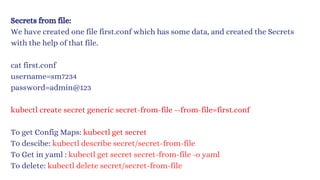
Secrets from file:
We have created one file first.conf which has some data, and created the Secrets
with the help of that file.
cat first.conf
username=sm7234
password=admin@123
kubectl create secret generic secret-from-file --from-file=first.conf
To get Config Maps: kubectl get secret
To descibe: kubectl describe secret/secret-from-file
To Get in yaml : kubec
tl get secret secret-from-file -o yaml
To delete: kubectl delete secret/secret-from-file
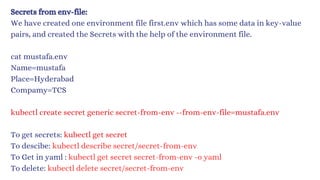
Secrets from env-file:
We have created one environment file first.env which has some data in key-value
pairs, and created the Secrets with the help of the environment file.
cat mustafa.env
Name=mustafa
Place=Hyderabad
Compamy=TCS
kubectl create secret generic secret-from-env --from-env-file=mustafa.env
To get secrets: kubectl get secret
To descibe: kubectl describe secret/secret-fro
m-env
To Get in yaml : kubec
tl get secret secret-fro
m-env -o yaml
To delete: kubectl delete secret/secret-fro
m-env
CREATE A FOLDER FOR SECRETS:
We have created multiple files in a directory with a different extension that has different
types of data and created the Secrets for the entire directory.
mkdir folder1
cat folder1/file1.txt
Name=Mustafa
Place=Hyderabad=23
cat folder2/file2.txt
database=mysq1
password=mypassword
command to create secret:
kubectl create secret generic secret-from-folder --from-file=folder1/
To Get in yaml : ku
bec
tl get secret secret-fro
m-env -o yaml
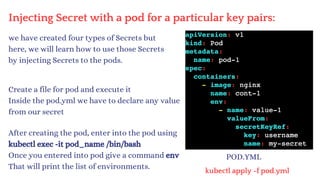
Injecting Secret with a pod for a particular key pairs:
POD.YML
we have created four types of Secrets but
here, we will learn how to use those Secrets
by injecting Secrets to the pods.
Create a file for pod and execute it
Inside the pod.yml we have to declare any value
from our secret
kubectl apply -f pod.yml
After creating the pod, enter into the pod using
kubectl exec -it pod_name /bin/bash
Once you entered into pod give a command env
That will print the list of environments.
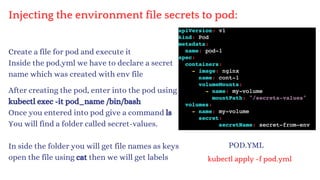
Injecting the environment file secrets to pod:
Create a file for pod and execute it
Inside the pod.yml we have to declare a secret
name which was created with env file
POD.YML
kubectl apply -f pod.yml
After creating the pod, enter into the pod using
kubectl exec -it pod_name /bin/bash
Once you entered into pod give a command ls
You will find a folder called secret-values.
In side the folder you will get file names as keys
open the file using cat then we will get labels
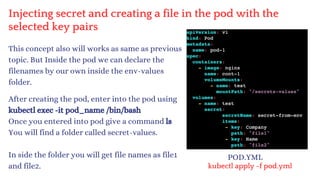
Injecting secret and creating a file in the pod with the
selected key pairs
This concept also will works as same as previous
topic. But Inside the pod we can declare the
filenames by our own inside the env-values
folder.
After creating the pod, enter into the pod using
kubectl exec -it pod_name /bin/bash
Once you entered into pod give a command ls
You will find a folder called secret-values.
In side the folder you will get file names as file1
and file2.
POD.YML
kubectl apply -f pod.yml
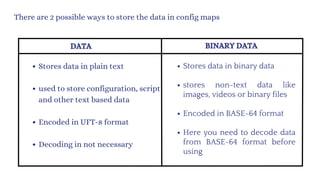
DATA BINARY DATA
Stores data in plain text
used to store configuration, script
and other text based data
Encoded in UFT-8 format
Decoding in not necessary
Stores data in binary data
stores non-text data like
images, videos or binary files
Encoded in BASE-64 format
Here you need to decode data
from BASE-64 format before
using
There are 2 possible ways to store the data in config maps
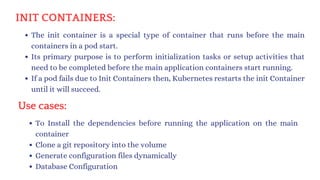
INIT CONTAINERS:
The init container is a special type of container that runs before the main
containers in a pod start.
Its primary purpose is to perform initialization tasks or setup activities that
need to be completed before the main application containers start running.
If a pod fails due to Init Containers then, Kubernetes restarts the init Container
until it will succeed.
Use cases:
To Install the dependencies before running the application on the main
container
Clone a git repository into the volume
Generate configuration files dynamically
Database Configuration
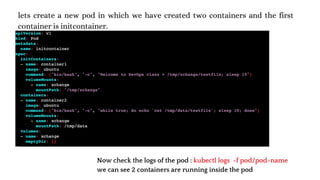
lets create a new pod in which we have created two containers and the first
container is initcontainer.
Now check the logs of the pod : kubectl logs -f pod/pod-name
we can see 2 containers are running inside the pod
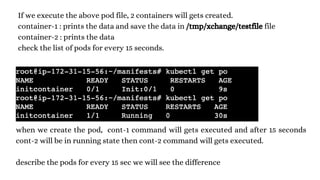
If we execute the above pod file, 2 containers will gets created.
container-1 : prints the data and save the data in /tmp/xchange/testfile file
container-2 : prints the data
check the list of pods for every 15 seconds.
when we create the pod, cont-1 command will gets executed and after 15 seconds
cont-2 will be in running state then cont-2 command will gets executed.
describe the pods for every 15 sec we will see the difference
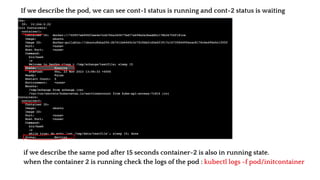
If we describe the pod, we can see cont-1 status is running and cont-2 status is waiting
if we describe the same pod after 15 seconds container-2 is also in running state.
when the container 2 is running check the logs of the pod : kubectl logs -f pod/initcontainer
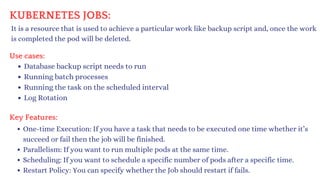
KUBERNETES JOBS:
It is a resource that is used to achieve a particular work like backup script and, once the work
is completed the pod will be deleted.
Use cases:
Database backup script needs to run
Running batch processes
Running the task on the scheduled interval
Log Rotation
Key Features:
One-time Execution: If you have a task that needs to be executed one time whether it’s
succeed or fail then the job will be finished.
Parallelism: If you want to run multiple pods at the same time.
Scheduling: If you want to schedule a specific number of pods after a specific time.
Restart Policy: You can specify whether the Job should restart if fails.
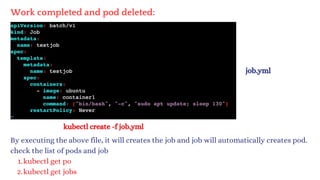
kubectl create -f job.yml
By executing the above file, it will creates the job and job will automatically creates pod.
check the list of pods and job
kubectl get po
1.
kubectl get jobs
2.
Work completed and pod deleted:
job.yml
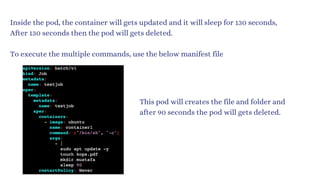
Inside the pod, the container will gets updated and it will sleep for 130 seconds,
After 130 seconds then the pod will gets deleted.
To execute the multiple commands, use the below manifest file
This pod will creates the file and folder and
after 90 seconds the pod will gets deleted.
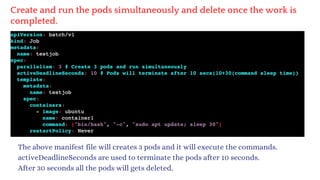
Create and run the pods simultaneously and delete once the work is
completed.
The above manifest file will creates 3 pods and it will execute the commands.
activeDeadlineSeconds are used to terminate the pods after 10 seconds.
After 30 seconds all the pods will gets deleted.
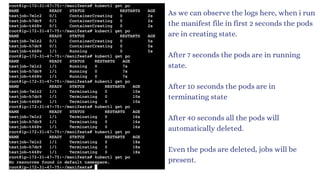
As we can observe the logs here, when i run
the manifest file in first 2 seconds the pods
are in creating state.
After 7 seconds the pods are in running
state.
After 10 seconds the pods are in
terminating state
After 40 seconds all the pods will
automatically deleted.
Even the pods are deleted, jobs will be
present.
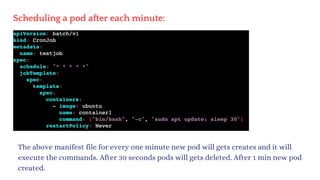
Scheduling a pod after each minute:
The above manifest file for every one minute new pod will gets creates and it will
execute the commands. After 30 seconds pods will gets deleted. After 1 min new pod
created.
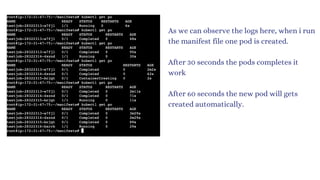
As we can observe the logs here, when i run
the manifest file one pod is created.
After 30 seconds the pods completes it
work
After 60 seconds the new pod will gets
created automatically.
STATELESS APPLICATION
Last night i had a call with mobile customer care, and i explained my issue
with her and requested to resolve the issue. She asked to stay on call for some time.
Meanwhile the call was dropped due to network issues
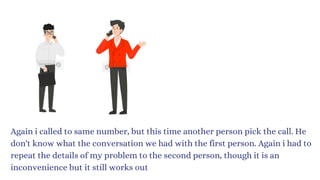
Again i called to same number, but this time another person pick the call. He
don't know what the conversation we had with the first person. Again i had to
repeat the details of my problem to the second person, though it is an
inconvenience but it still works out
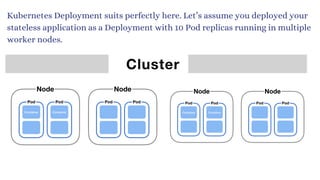
Kubernetes Deployment suits perfectly here. Let’s assume you deployed your
stateless application as a Deployment with 10 Pod replicas running in multiple
worker nodes.
Here replicaSet's will only take care of those 10 pods are running in the cluster
or not.
It doesn't take care of in which worker node they are running!
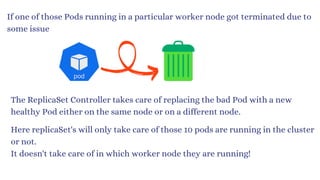
The ReplicaSet Controller takes care of replacing the bad Pod with a new
healthy Pod either on the same node or on a different node.
If one of those Pods running in a particular worker node got terminated due to
some issue
If pod 1 got terminated from node 1, then new pod will gets replaced on
either node 2 or node 1 or anywhere in the cluster.
This is possible because, the stateless application Pod 1 hasn’t stored any data
on worker node 1, hence can be easily replaced by new pod running on a
different worker node 2
If the pod is not storing the data then we called it as STATELESS
STATELESS APPLICATION:
It can't store the data permanently.
The word STATELESS means no past data.
It depends on non-persistent data means data is removed when Pod, Node or
Cluster is stopped.
Non-persistent mainly used for logging info (ex: system log, container log etc..)
In order to avoid this problem, we are using stateful application.
A stateless application can be deployed as a set of identical replicas, and each
replica can handle incoming requests independently without the need to
coordinate with other replicas.
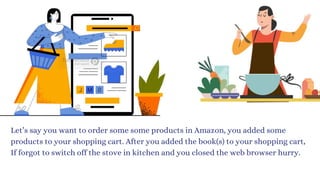
Let’s say you want to order some some products in Amazon, you added some
products to your shopping cart. After you added the book(s) to your shopping cart,
If forgot to switch off the stove in kitchen and you closed the web browser hurry.
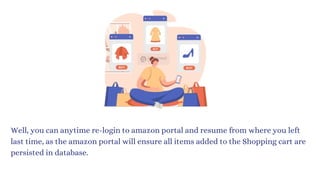
Well, you can anytime re-login to amazon portal and resume from where you left
last time, as the amazon portal will ensure all items added to the Shopping cart are
persisted in database.
Technically, if Amazon is using a ShoppingCart that runs in a Pod,
When i added some products on my cart that will stores on one pod and after some
time when i resumed back to the amazon portal that will shows all the products
from the different pod.
The interesting thing to understand here is, the StatefulSet Controller managed to
bind the exact same Persistent Volume to two Shopping Cart Pods associated to
that customer at two different point of time.
Stateful applications are applications that store data and keep tracking it.
STATEFUL APPLICATION:
Example of stateful applications:
All RDS databases (MySQL, SQL)
Elastic search, Kafka , Mongo DB, Redis etc…
Any applicaiton that stores data
To get the code for stateful application use this link:
https://github.com/devops0014/k8s-stateful-set-application.git
A StatefulSet is the Kubernetes controller used to run the stateful application
as containers (Pods) in the Kubernetes cluster.
StatefulSets assign a sticky identity-an orginal number starting from zero-to
each Pod instead of assigning random IDs for each replica Pod.
A new Pod is created by cloning the previous Pod's data. If the previous Pod is
in the pending state, then the new Pod will not be created.
If you delete a Pod, it will delete the Pod in reverse order, not in random order.
STATEFUL SET
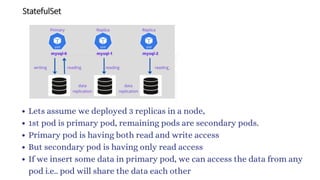
Lets assume we deployed 3 replicas in a node,
1st pod is primary pod, remaining pods are secondary pods.
Primary pod is having both read and write access
But secondary pod is having only read access
If we insert some data in primary pod, we can access the data from any
pod i.e.. pod will share the data each other
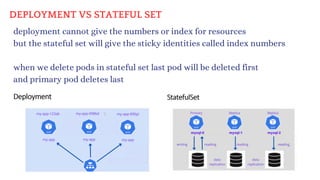
deployment cannot give the numbers or index for resources
but the stateful set will give the sticky identities called index numbers
when we delete pods in stateful set last pod will be deleted first
and primary pod deletes last
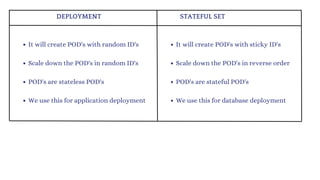
DEPLOYMENT VS STATEFUL SET
DEPLOYMENT STATEFUL SET
It will create POD's with random ID's
Scale down the POD's in random ID's
POD's are stateless POD's
We use this for application deployment
It will create POD's with sticky ID's
Scale down the POD's in reverse order
POD's are stateful POD's
We use this for database deployment
K8'S VOLUME AND LIVENESS PROBES:
Basically these K8's will works on short living data. So lets unveil the power of
volumes like EmptyDir, HostPath, PV & PVC.
The data is a very important thing for an application. In K8's, data is kept for a
short time in the applications in the pods/containers. By default the data will no
longer available. To overcome this we will use Kubernetes Volumes.
But before going into the types of Volumes. Let’s understand some facts about
pods and containers' short live data.
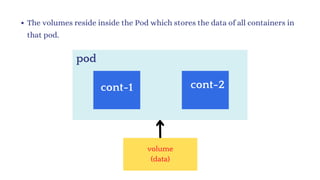
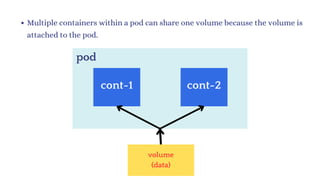
The volumes reside inside the Pod which stores the data of all containers in
that pod.
pod
cont-1 cont-2
volume
(data)
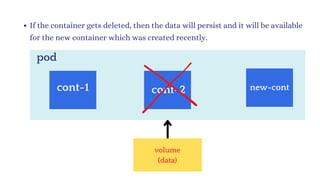
If the container gets deleted, then the data will persist and it will be available
for the new container which was created recently.
pod
cont-1 new-cont
cont-2
volume
(data)
Multiple containers within a pod can share one volume because the volume is
attached to the pod.
pod
cont-1 cont-2
volume
(data)
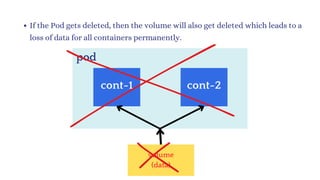
If the Pod gets deleted, then the volume will also get deleted which leads to a
loss of data for all containers permanently.
pod
cont-1 cont-2
volume
(data)
After deleting the pod, the new pod will be created with volume but this time
volumes don’t have any previous data or any data.
pod
cont-1 cont-2
volume
(no-data)
Types of volumes:
EmptyDir
1.
HostPath
2.
Persistent Volume
3.
Persistent Volume Claim(PVC)
4.
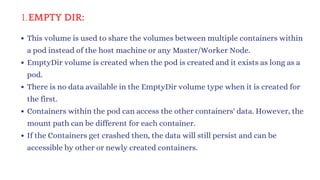
EMPTY DIR:
1.
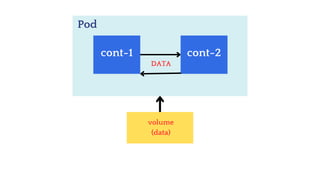
This volume is used to share the volumes between multiple containers within
a pod instead of the host machine or any Master/Worker Node.
EmptyDir volume is created when the pod is created and it exists as long as a
pod.
There is no data available in the EmptyDir volume type when it is created for
the first.
Containers within the pod can access the other containers' data. However, the
mount path can be different for each container.
If the Containers get crashed then, the data will still persist and can be
accessible by other or newly created containers.
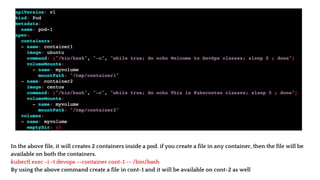
In the above file, it will creates 2 containers inside a pod. if you create a file in any container, then the file will be
available on both the containers.
kubectl exec -i -t devops --container cont-1 -- /bin/bash
By using the above command create a file in cont-1 and it will be available on cont-2 as well
Pod
cont-1 cont-2
volume
(data)
DATA
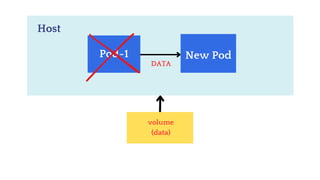
2. HOSTPATH:
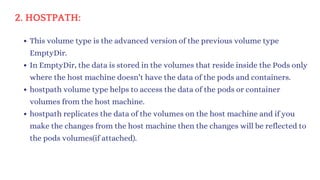
This volume type is the advanced version of the previous volume type
EmptyDir.
In EmptyDir, the data is stored in the volumes that reside inside the Pods only
where the host machine doesn’t have the data of the pods and containers.
hostpath volume type helps to access the data of the pods or container
volumes from the host machine.
hostpath replicates the data of the volumes on the host machine and if you
make the changes from the host machine then the changes will be reflected to
the pods volumes(if attached).
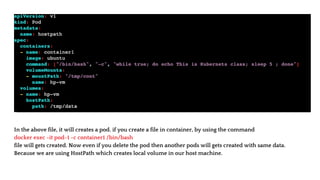
In the above file, it will creates a pod. if you create a file in container, by using the command
docker exec -it pod-1 -c container1 /bin/bash
file will gets created. Now even if you delete the pod then another pods will gets created with same data.
Because we are using HostPath which creates local volume in our host machine.
Host
Pod-1 New Pod
volume
(data)
DATA
Persistent means always available.
Persistent Volume is an advanced version of EmptyDir and hostPath volume
types.
Persistent Volume does not store the data over the local server. It stores the data
on the cloud or some other place where the data is highly available.
In previous volume types, if pods get deleted then the data will be deleted as
well. But with the help of Persistent Volume, the data can be shared with other
pods or other worker node’s pods as well after the deletion of pods.
PVs are independent of the pod lifecycle, which means they can exist even if no
pod is using them.
With the help of Persistent Volume, the data will be stored on a central location
such as EBS, Azure Disks, etc.
PERSISTENT VOLUME:
PERSISTENT VOLUME:
One Persistent Volume is distributed across the entire Kubernetes Cluster. So
that, any node or any node’s pod can access the data from the volume
accordingly.
In K8S, a PV is a piece of storage in the cluster that has been provisioned by an
administrator.
If you want to use Persistent Volume, then you have to claim that volume with
the help of the manifest YAML file.
When a pod requests storage via a PVC, K8S will search for a suitable PV to
satisfy the request.
If a PV is found that matches the request, the PV is bound to the PVC and the pod
can use the storage.
If no suitable PV is found, K8S then PVC will remain unbound (pending).
To get the Persistent Volume, you have to claim the volume with the help of PVC.
When you create a PVC, Kubernetes finds the suitable PV to bind them together.
After a successful bound to the pod, you can mount it as a volume.
Once a user finishes its work, then the attached volume gets released and will be
used for recycling such as new pod creation for future usage.
If the pod is terminating due to some issue, the PV will be released but as you
know the new pod will be created quickly then the same PV will be attached to the
newly created Pod.
After bounding is done to pod you can mount it as a volume. The pod specifies the
amount and type of storage it needs, and the cluster provisions a persistent
volume that matches the request. If its not matches then it will be in pending
state.
PERSISTENT VOLUME CLAIM:
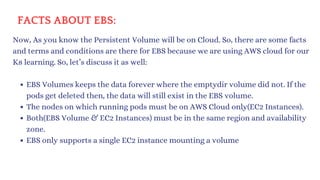
FACTS ABOUT EBS:
Now, As you know the Persistent Volume will be on Cloud. So, there are some facts
and terms and conditions are there for EBS because we are using AWS cloud for our
K8 learning. So, let’s discuss it as well:
EBS Volumes keeps the data forever where the emptydir volume did not. If the
pods get deleted then, the data will still exist in the EBS volume.
The nodes on which running pods must be on AWS Cloud only(EC2 Instances).
Both(EBS Volume & EC2 Instances) must be in the same region and availability
zone.
EBS only supports a single EC2 instance mounting a volume
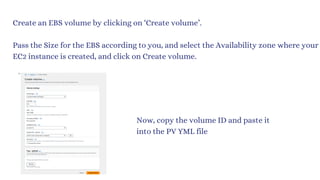
Create an EBS volume by clicking on ‘Create volume’.
Pass the Size for the EBS according to you, and select the Availability zone where your
EC2 instance is created, and click on Create volume.
Now, copy the volume ID and paste it
into the PV YML file
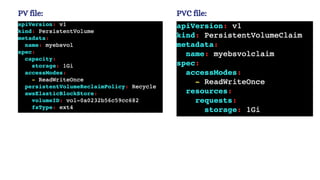
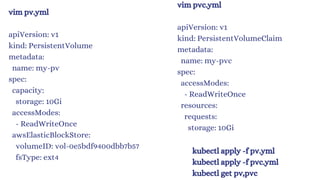
PV file: PVC file:
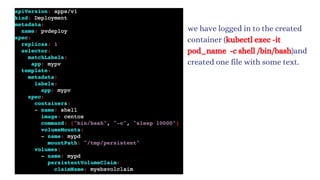
we have logged in to the created
container (kubectl exec -it
pod_name -c shell /bin/bash)and
created one file with some text.
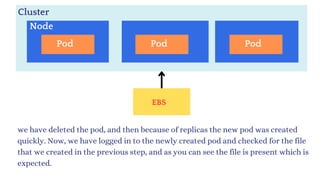
we have deleted the pod, and then because of replicas the new pod was created
quickly. Now, we have logged in to the newly created pod and checked for the file
that we created in the previous step, and as you can see the file is present which is
expected.
Cluster
EBS
Node
Pod Pod Pod
vim pv.yml
apiVersion: v1
kind: PersistentVolume
metadata:
name: my-pv
spec:
capacity:
storage: 10Gi
accessModes:
- ReadWriteOnce
awsElasticBlockStore:
volumeID: vol-0e5bdf9400dbb7b57
fsType: ext4
vim pvc.yml
apiVersion: v1
kind: PersistentVolumeClaim
metadata:
name: my-pvc
spec:
accessModes:
- ReadWriteOnce
resources:
requests:
storage: 10Gi
kubectl apply -f pv.yml
kubectl apply -f pvc.yml
kubectl get pv,pvc
vim deploy.yml
apiVersion: apps/v1
kind: Deployment
metadata:
name: pvdeploy
spec:
replicas: 1
selector:
matchLabels:
app: swiggy
template:
metadata:
labels:
app: swiggy
spec:
containers:
- name: raham
image: centos
command: ["bin/bash", "-c", "sleep 10000"]
volumeMounts:
- name: mypd
mountPath: "/tmp/persistent"
volumes:
- name: mypd
persistentVolumeClaim:
claimName: my-pvc
kubectl apply -f deploy.yml
kubectl get deploy
kubectl get rs
kubectl get po
kubectl exec pvdeploy-86c99cf54d-d8rj4 -it -- /bin/bash
cd /tmp/persistent/
ls
vim raham
exit
now delete the pod and new pod will created then in that
pod you will see the same content.
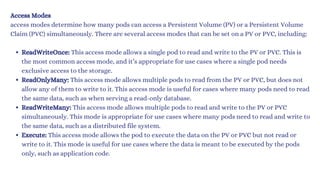
Access Modes
access modes determine how many pods can access a Persistent Volume (PV) or a Persistent Volume
Claim (PVC) simultaneously. There are several access modes that can be set on a PV or PVC, including:
ReadWriteOnce: This access mode allows a single pod to read and write to the PV or PVC. This is
the most common access mode, and it’s appropriate for use cases where a single pod needs
exclusive access to the storage.
ReadOnlyMany: This access mode allows multiple pods to read from the PV or PVC, but does not
allow any of them to write to it. This access mode is useful for cases where many pods need to read
the same data, such as when serving a read-only database.
ReadWriteMany: This access mode allows multiple pods to read and write to the PV or PVC
simultaneously. This mode is appropriate for use cases where many pods need to read and write to
the same data, such as a distributed file system.
Execute: This access mode allows the pod to execute the data on the PV or PVC but not read or
write to it. This mode is useful for use cases where the data is meant to be executed by the pods
only, such as application code.
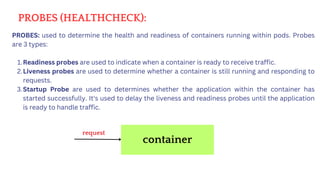
PROBES (HEALTHCHECK):
PROBES: used to determine the health and readiness of containers running within pods. Probes
are 3 types:
Readiness probes are used to indicate when a container is ready to receive traffic.
1.
Liveness probes are used to determine whether a container is still running and responding to
requests.
2.
Startup Probe are used to determines whether the application within the container has
started successfully. It's used to delay the liveness and readiness probes until the application
is ready to handle traffic.
3.
container
request
WHY PROBES?
In K8s, its common to scale up and scale down the pods. But when the pod is created newly it
will take some time to start the container and run the applications.
If a pod is not ready to receive traffic, it may receive requests that it cannot handle, that
causes downtime for our application.
Similarly, if a container is not running correctly, it may not be able to respond to requests,
resulting in the pod being terminated and replaced with a new one.
To overcome this issues, we are using Probes.
TYPES OF PROBES:
There are several types of probes that can be used in Kubernetes which includes HTTP, TCP, and
command probes.
If you see the YML file, there is one condition if the
file healthy is not present in /tmp directory then
livenessProbe will recreate the container. So, we
have deleted that file.
After deleting the file, if you run kubectl describe
pod <pod-name> you will see in the last two lines
that the container is failing because the condition is
not meeting.
Once you create a pod, then describe this pod using kubectl describe pod pod-name
After that enter into the pod kubectl exec -it pod_name -c cont_name /bin/bash
Check the file is created or not using cat /tmp/healthy
Now check the health status echo $? If it returns 0 then application is running into the
container.
there is one condition if the file healthy is not present in /tmp directory then livenessProbe
will recreate the container. So, we have deleted that file.
After deleting the file, if you run kubectl describe pod pod-name you will see in the last two
lines that the container is failing because the condition is not meeting.
RBAC (Role Based Access Control):
I am a Developer
I want to see the pods
I am a Developer
I want to delete the pods I am a DevOps Guy
I want to create, delete
the pods
Role-Based Access Control (RBAC) is a critical security feature in Kubernetes
that allows you to define and manage access to resources based on roles and
permissions. RBAC ensures that only authorized users, processes, or services
can interact with specific resources within a Kubernetes cluster.
In Kubernetes, there are two types of accounts
User Account
1.
Service Account
2.
User account: User accounts are used to log into a Kubernetes cluster and
manipulate resources therein. Each user account is associated with a unique set
of credentials, which are used to authenticate the service’s requests.
Service Account: Kubernetes Service Accounts are specialised accounts used by
applications and services running on Kubernetes to interact with the
Kubernetes API.
Which account type should you use?
Use a user account if:
You need to log into the cluster to administer it
You need to access resources that are owned by the user.
Use a service account if:
You are running a service and need to authenticate its requests
You need to access resources that are owned by the service
Lets do some hands on:
Lets create a user, But Kubernetes API will not allow us to create user directly. so there are
multiple ways to create user
client certificates
bearer tokens
authenticating proxy
HTTP basic auth.
I will choose client certificate to create a user which is very easy to create.
This certificates are used to create users. When a user perform any command like kubectl get
po then K8's API will authenticate and authorize the request.
authentication: permission to login
authorization: permission to work on resources
Steps to create certificate.
lets create a folder: mkdir mustafa-user && cd mustafa-user
Generate a key using openssl : openssl genrsa -out mustafa.key 2048
Generate a Client Sign Request (CSR) : openssl req -new -key mustafa.key -out
mustafa.csr -subj "/CN=mustafa/O=group1"
Generate the certificate (CRT): openssl x509 -req -in mustafa.csr -CA ~/.minikube/ca.crt
-CAkey ~/.minikube/ca.key -CAcreateserial -out mustafa.crt -days 500
Steps to create user.
lets create a user: kubectl config set-credentials mustafa --client-certificate=mustafa.crt
--client-key=mustafa.key
Till now we created user and certificates, but we didn’t add that user to our cluster. Lets do it!
Set a context entry in kubeconfig: kubectl config set-context my-context --
cluster=minikube --user=mustafa
Context is used to switch the users in K8s cluster. Because in K8s we cant switch using users,
we will add users to context and we will use context to switch b/w users.
To see the user: kubectl config view
Switch to devops user: kubectl config use-context my-context
Now lets check to create some resources
kubectl get po
kubectl run pod-1 --image=nginx
kubectl create ns dev
ok! thats cool, thats won’t work, just come back to minikube config and perform same
commands, that will work. (kubectl config use-context minikube)
because we created user and attached that user to cluster. But we didn’t mention
permissions for that user. minikube context is a admin user which will have all permissions
by default
so lets create a role and attach that role to user.
There are four components to RBAC in Kubernetes:
roles
1.
Cluster roles
2.
role bindings
3.
ClusterRoles
4.
1. Roles are the basic building blocks of RBAC. A role defines a set of permissions for a user or group.
For example, you might create a role called “admin” that gives the user or group full access to all
resources in the cluster.
(or)
Role is a set of permissions that define what actions (verbs) are allowed on specific resources (API
groups and resources) within a particular Namespace.
Roles are Namespace-scoped, meaning they apply only to resources within that Namespace.
2. ClusterRoles are special roles that apply to all users in the cluster. For example, you might create a
ClusterRole called “cluster-admin” that gives the user or group full access to all resources in the
cluster.
These are not Namespace-specific. They define permissions for cluster-wide resources.
3. Role bindings connect users/groups to roles. For example, you might bind the “admin” role to the
“admin” user. This would give the “admin” user all the permissions defined in the “admin” role.
It grants the permissions to particular namespaces only.
4. ClusterRoleBindings similar to RoleBindings, ClusterRoleBindings associate ClusterRoles with
users/groups across the entire cluster.
These are not Namespace-specific. They grants the permissions for cluster-wide resources.
Lets create a namespace called dev : kubectl create ns dev
Now lets create a role that gives permissions to K8s resources
Imperative way : kubectl create role admin --verb=get,list,watch,create,update,delete --
resource=pods,deployments -n dev
Check it : kubectl get role -n dev
Now attach this role to user (Role binding):
Imperative way : kubectl create rolebinding role-binding-name --role=role-name --user=user-name
Check it : kubectl get rolebinding -n dev
we can also check with the permissions : kubectl can-i delete pod --as mustafa
So far we added role and attached that role to user (role binding), Now when we go to dev namespace
and login as devops user, we will able to work with pods and deployments only.
Switch to dev ns: kubectl config set-context --current --namespace=dev
Login as devops user using context : kubectl config use-context my-context
make sure to check check the configs before going to test the role (kubectl config view --minify)
Now we can able to work with pods and
deployments.
Note: for only one namespace (dev).
Mustafa user cant get any resources from any
other namespaces because we used rolebinding.
If mustafa want to access the resources from all
namespaces we can use clusterrolebinding
Lets create cluster role:
First lets change the context to minikube and go to default namespace
Imperative way : kubectl create clusterrole my-cluster-role --verb=get,list,create,update,delete
--resource=pods,services
Check it : kubectl get clusterrole
Lets create cluster role binding:
Imperative way : kubectl create clusterrolebinding cluster-binding-name --clusterrole=role-name
--user=user-name
Check it : kubectl get clusterrolebinding
After creating the clusterrole and attached that role to cluster role binding, its time to check weather
mustafa user can have access to work with resources in all namespaces or not.
HELM
Helm is a Kubernetes package manager in which the multiple numbers of
YAML files such as the backend, and frontend come under one roof(helm) and
deploy using helm.
Frontend Backend Database
HELM = + +
Lets say if you want to deploy an application called paytm. It contains
multiple services. So we need to deploy each service, for that we have to
write 2 manifest(deployment & service) files for each service.
At the end we can see multiple YAML files which makes more confusion and
messy.
Instead of maintaining those multiple YAML files we can do this by
implementing HELM. It will deploy our entire application.
HELM is a package manager for kubernetes which makes deployment
simple.
Key Concepts of HEML:
Charts: In Helm, a chart is a collection of pre-configured Kubernetes
resources that describe a related set of services. Charts can include
deployment configurations, service definitions, ingress rules, and more.
Think of a chart as a package that encapsulates everything needed to run
a specific application.
Templates: Helm uses Go templating to dynamically generate Kubernetes
manifest files from chart templates. This means you can parameterize and
customize your resources based on user-defined values or other inputs.
This templating mechanism allows you to create reusable and flexible
configurations.
Values: Values are customizable parameters that can be injected into
chart templates during deployment. You can define default values in a
values.yaml file and override them when installing or upgrading a chart.
This allows you to configure your application differently for various
environments or use cases.
Repositories: Helm repositories are collections of packaged charts that
users can install. The Helm CLI can search, fetch, and install charts from
these repositories. You can also create your own private repository to
store custom charts.
Advatnages of HEML:
It will save the time
Helps to automate the application deployment
Better scalability
Perform rollback at anytime
Increase the speed of deployment.
Install HEML:
curl -fsSL -o get_helm.sh
https://raw.githubusercontent.com/helm/helm/main/scripts/get-helm-3
chmod 700 get_helm.sh
./get_helm.sh
helm version
HELM commands:
To list all helm repos : helm repo list
To download any repo : helm repo add repo_name url (helm repo add
myhelm https://charts.helm.sh/stable)
To remove a repo from helm : helm repo remove repo-names
Deploy a sample Nginx page using HELM:
Create a helm chart : helm create devops
1.
Now we can see devops folder will gets created.
2. Enter into the folder and open values.yml file
3. Change the service type from ClusterIP to NodePort on line 43
4. Now install helm : helm install mustafa .
here dot(.) represents that pwd where our Chart.yaml present
mustafa is release name
5. Now we can see pods, deployments, services will be created automatically.
Now we can access those nginx page using slaveip:node-port
6. To get helm release list : helm list (or) helm ls
6. Now lets scale up the replicas in values.yml (change value from 1 to 4)
7. To update those changes we will use : helm upgrade mustafa .
8. Now lets see the pods count, it will gets increased from 1 to 4.
9. Now we can see the release using the command helm list then revision(version)
will gets increased from 1 to 2
10. To rollback to prev revision : helm rollback mustafa 1
The above command will rollback to 1st version
Once we perform the above command we can see the pods count will be scaledown
from 4 to 1 again.
General commands about HELM:
To uninstall helm : helm uninstall mustafa
If you want to dry-run the chart before installation : helm install devops --
debug --dry-run .
Validate all the YAML files in our HELM charts : helm list .
To get template of our helm : helm template .
To see the history of a release : helm history mustafa
GITOPS:
GitOps is a way of managing software infrastructure and deployments using
Git as the source of truth.
Git as the Source of Truth: In GitOps, all our configurations like (deployments,
services, secrets etc..) are stored in git repository.
Automated Processes: Whenever we make any changes in those YAML files
gitops tools like (Argo CD/ Flux) will detects and apply those changes on
kubernetes cluster. It ensures that the live infrastructure matches the
configurations in the Git repository.
Here, we can clearly observe that continuous deployment. Whenever we
make any changes in git, it will automatically reflects in kubernetes cluster.
WITHOUT ARGO CD:
Before ARGO CD, we deployed applications manually by installing some third
party tools like kubectl, helm etc...
If we are working with KOPS, we need to provide our configuration details
(RBAC) or If we are working on EKS, we need to provide our IAM credentials.
If we deploy any application, there is no GUI to see the status of the deployment.
so we are facing some security challenges and need to install some third party
tools.
Points to be noted:
Once if we implement ArgoCD, if we make any changes manually in our
cluster using the kubectl command, Kubernetes will reject those request
from that user. Because when we apply changes manually, ArgoCD will check
the actual state of the cluster with the desired state of the cluster (GitHub).
1.
If we make any changes in the GitHub like increasing the replicas in
deployment ArgoCD will take the changes and applies in our cluster. So that
we can track each and every change and it will maintain the history.
2.
We can easily rollback using git if something went wrong.
3.
If our entire cluster gets deleted due to some network or other issues, we
don’t need to worry about it, because all our configuration files are safely
stored in GitHub. So we can easily re-apply those configuration files.
4.
Access controls:
In K8s, we use RBAC concept to give cluster permissions which is high
configurations and high maintenance. But in ArgoCD, just look over here
1.
fresher
devops
ops team
The boss
(Admin)
merge request
merge request
m
erge request
Person who accepts pull requst
FEATURES:
Automated deployment of applications to specified target environments
Ability to manage and deploy to multiple clusters
Multi-tenancy and RBAC policies for authorization
Rollback/Roll-anywhere to any application configuration committed in the Git repository
Health status analysis of application resources
Automated configuration drift detection and visualization
Automated or manual syncing of applications to its desired state
Web UI which provides a real-time view of application activity
CLI for automation and CI integration
Webhook integration (GitHub, BitBucket, GitLab)
Access tokens for automation
PreSync, Sync, PostSync hooks to support complex application rollouts (e.g.blue/green & canary
upgrades)
Audit trails for application events and API calls
Prometheus metrics
Parameter overrides for overriding helm parameters in Git.
FINAL PROJECT:
CREATE A CLUSTER IN KOPS WITH 1 MASTER & 2 WORKERS
CREATE A NAME SPACE
CREATE A DEPLOYMENT WITH IN THE NAMESPACE
INCREASE THE REPLICAS
EXPOSE IT USING NODE PORT
ACCESS THE APPLICATION

Kubernetes111111111111111111122233334334

  • 2.
    KUBERNETES: K U BE R N E T E S K 8S
  • 3.
    WHY KUBERNETES Earlier Weused Docker Swarm as a container orchestration tool that we used to manage multiple containerized applications on our environments. FEATURES DOCKER SWARM KUBERNETES GUI Community Setup Auto Scaling Easy No GUI No Auto Scaling Good Community GUI Complex Auto Scaling Greater community for users like documentation, support and resources
  • 4.
    KUBERNETES: why KUBERNETES: IT isan open-source container orchestration platform. It is used to automates many of the manual processes like deploying, managing, and scaling containerized applications. Kubernetes was developed by GOOGLE using GO Language. Google donated K8's to CNCF in 2014. 1st version was released in 2015. Containers are a good and easy way to bundle and run your applications. In a production environment, you need to manage the containers that run the applications and ensure that there is no downtime. In docker we used docker swarm for this. but any how docker has drawbacks! so we moved to KUBERNETES.
  • 5.
  • 6.
    API-SERVER ETCD CLUSTER HOW IT WORKS: getpods Authenticate user Validate Request Retrieve Data 1 2 3
  • 7.
    API-SERVER Scheduler Kubelet How Podcreates: create pods ETCD CLUSTER Worker Node 1. Request 2. Request 3. Find perfect Node to Create a Pod 4. Creates a pod in worker node 5. Update the pod data
  • 8.
    cluster: It is agroup of serversIt will have both manager and worker nodes. Master Node is used to assign tasks to Worker Nodes. Worker node will perform the task. we have 4 components in Master Node 1.API Server 2.ETCD 3. Controllers-manager 4. Schedulers we have 4 components in Worker Node. 1. Kubelet 2. Kube-Proxy 3. Pod 4. Container
  • 9.
    ETCD: scheduler: api server: It isused to search pending tasks which are present in ETCD. If any pending task found in ETCD, it will schedule in worker node. It will decide in which worker node our task should gets executed. It will decide by communication with the kubelet in worker node Scheduler always monitor API-Server The scheduler is a crucial component responsible for assigning pods to nodes This will ensure that pods are scheduled on suitable nodes that meet their resource requirements and constraints It is like a database to our k8's it is used to store the requests of our cluster like pods, nodes, configs, secrets, roles etc.. It is used to accept the request from the user and store the request in ETCD. It is the only component that interacts with the ETCD directly
  • 10.
    HOW SCHEDULER DECIDES Thescheduler is going to decide the put the right pod in right node based on Size, Memory, CPU etc.. pod-1 pod-2 pod-3 NODE-1 NODE-2 NODE-3
  • 11.
    Just assume thatwe have 1 pod and 4 nodes just like the below image pod 6 cpu Node-1 2 CPU’s Node-2 4 CPU’s Node-3 10 CPU’s Node-4 14 CPU’s Lets see How its decides
  • 12.
    It Eliminates Node-1& Node-2 because Node contains less CPU that pod pod 6 cpu Node-1 2 CPU’s Node-2 4 CPU’s Node-3 10 CPU’s Node-4 14 CPU’s
  • 13.
    In the restof these 2 nodes, scheduler decides based on CPU Ex: If scheduler places the pod on Node-3 then Node-3 contains only 2 CPU’s only If scheduler places the pod on Node-4 then Node-4 contains only 4 CPU’s. So scheduler selects Node-4 to place a pod. pod 6 cpu Node-3 10 CPU’s Node-4 14 CPU’s Not only CPU it selects based on different parameters like Resource Requirement limits Taints & Tolerations Node selector
  • 14.
    controllers: The controller Managercollects the data/information from the API Server of the Kubernetes cluster like the desired state of the cluster and then decides what to do by sending the instructions to the API Server. Scheduler will do the following taks Pod Creation a. Pod scheduling b. Selecting Node c. Pod Running d. Kubelet Action e. Controller will do the following taks Replication Controller a. Node Controller b. Service Controller c.
  • 15.
    API-SERVER HOW NODE CONTROLLERWORKS: REQUEST NODE CONTROLLERS Node-1 Node-2 Node-3 UnReachable Node Controller will checks the nodes for every 5 seconds through API-Server. It works like a heartbeat for our body. If Node controller does not get any response from Any Node for 40 seconds then Node Controller marks that node as UNREACHABLE Node Monitor Period: 5 sec Node Monitor Grace Period: 40 sec
  • 16.
    API-SERVER HOW REPLICATION CONTROLLERWORKS: REQUEST REPLICATION CONTROLLERS pod pod pod pod pod pod Replication Controller is the responsible for monitoring the desired number of pods are running or not. If a pod deletes then RC will creates new pods If Node controller does not get any response from Any Node for 40 seconds then Node Controller marks that node as UNREACHABLE
  • 17.
    kubelet: kube-proxy kubelet is theprimary component of the Worker Node which manages the Pods and regularly checks whether the pod is running or not. If pods are not working properly, then kubelet creates a new pod and replaces it with the previous one because the failed pod can’t be restarted hence, the IP of the pod might be changed kube-proxy contains all the network configuration of the entire cluster such as pod IP, Services, Deployments etc.. It takes care of the load balancing and routing which comes under networking configuration. pod: A group of one or more containers. container: It is a virtual machine which does not have any OS. it is used to run the applications in worker nodes.
  • 18.
    kubernetes cluster setup: Thereare multiple ways to setup kubernetes cluster. 1.SELF MANAGER K8'S CLUSTER a.mini kube (single node cluster) b.kubeadm(multi node cluster) c. KOPS 2. CLOUD MANAGED K8'S CLUSTER a. AWS EKS b.AZURE AKS c.GCP GKS d.IBM IKE
  • 19.
    MINIKUBE: It is atool used to setup single node cluster on K8's. It contains API Servers, ETCD database and container runtime It helps you to containerized applications. It is used for development, testing, and experimentation purposes on local. Here Master and worker runs on same machine It is a platform Independent. By default it will create one node only. Installing Minikube is simple compared to other tools. NOTE: But we dont implement this in real-time
  • 20.
    MINIKUBE SETUP: REQUIREMENTS: 2 CPUsor more 2GB of free memory 20GB of free disk space Internet connection Container or virtual machine manager, such as: Docker.
  • 21.
    UPDATE SERVER: INSTALL DOCKER: INSTALLKUBECTL: INSTALL MINIKUBE: 1 apt update -y 2 apt upgrade -y 3 sudo apt install curl wget apt-transport-https -y 4 sudo curl -fsSL https://get.docker.com -o get-docker.sh sudo sh get-docker.sh 5 sudo curl -LO https://storage.googleapis.com/minikube/releases/latest/minikube-linux-amd64 6 sudo mv minikube-linux-amd64 /usr/local/bin/minikube 7 sudo chmod +x /usr/local/bin/minikube 8 sudo minikube version 9 sudo curl -LO "https://dl.k8s.io/release/$(curl -L -s https://dl.k8s.io/release/stable.txt)/bin/linux/amd64/kubectl" 10 sudo curl -LO "https://dl.k8s.io/$(curl -L -s https://dl.k8s.io/release/stable.txt)/bin/linux/amd64/kubectl.sha256" 11 sudo echo "$(cat kubectl.sha256) kubectl" | sha256sum --check 12 sudo install -o root -g root -m 0755 kubectl /usr/local/bin/kubectl 13 sudo kubectl version --client 14 sudo kubectl version --client --output=yaml 15 sudo minikube start --driver=docker --force
  • 22.
    KUBECTL: kubectl [command] [TYPE][NAME] [flags] kubectl api-resources : to list all api resources kubectl is the CLI which is used to interact with a Kubernetes cluster. We can create, manage pods, services, deployments, and other resources We can also monitoring, troubleshooting, scaling and updating the pods. To perform these tasks it communicates with the Kubernetes API server. It has many options and commands, to work on. The configuration of kubectl is in the $HOME/.kube directory. The latest version is 1.28 SYNTAX:
  • 23.
    Lets start workingon kubernetes! Kubernetes will not deploy the containers directly on worker nodes. Kubernetes has a object called POD which contains containers. Lets learn about PODS Note:
  • 24.
    POD: It is asmallest object that we can create in K8's. It is a group of containers. Pod acts like a single instance for our application. Pods are ephemeral (short living objects) Mostly we can use single container inside a pod but if we required, we can create multiple containers inside a same pod. when we create a pod, containers inside pods can share the same network namespace, and can share the same storage volumes . While creating pod, we must specify the image, along with any necessary configuration and resource limits. K8's cannot communicate with containers, they can communicate with only pods. We can create this pod in two ways, 1. Imperative(command) 2. Declarative (Manifest file)
  • 25.
    SINGLE CONTAINER POD Node-1 Pod-1Pod-2 Container Container Basically, each pods needs only one container. But sometimes we need 2 containers in one pod.
  • 26.
    MULTI CONTAINER POD Node Pod App-Cont Helpercontainers are additional containers included in a pod to perform some tasks that support the primary container which are running in the pod. Helper-Cont
  • 27.
    A helper containeris used to collect the logs from the primary container. Helper containers can be used to run monitoring and metrics collection agents from the main application container. Helper containers can assist in syncing files or data between containers in a pod. For example, a pod might have a main application container and a helper container responsible for syncing configuration files or other shared resources. Security-related tasks, such as handling secrets, encryption, or authentication, can be done by helper container. How Helper container works:
  • 28.
    POD CREATION: IMPERATIVE: The imperativeway uses kubectl command to create pod. This method is useful for quickly creating and modifying the pods. SYNTAX: kubectl run pod_name --image=image_name COMMAND: kubectl run pod-1 --image=nginx kubectl : command line tool run : action pod-1 : name of pod nginx : name of image
  • 29.
    KUBECTL: DECLARATIVE: SYNTAX: kubectl create/apply-f file_name The Declarativ tive way we need to create a Manifest file in YAML Extension. This file contains the desired state of a Pod. It takes care of creating, updating, or deleting the resources. This manifest file need to follow the yaml indentation. YAML file consist of KEY-VALUE Pair. Here we use create or apply command to execute the Manifest file. CREATE: if you are creating the object for first time we use create only. APPLY: if we change any thing on files and changes need to apply the resources.
  • 30.
    MANIFEST FILE: apiVersion: Thisis the version of API from Kubernetes which is used to create objects. kind: defines the object that we are creating. metadata: data about the object like names, labels etc ... spec: It is the specifications of the object
  • 31.
    COMMANDS: To get allthe pods: kubetctl get pods (or) kubectl get pod (or) kubectl get po To delete a pod: kubectl delete pod pod_name To get IP of a pod: kubectl get po pod_name -o wide To get IP of all pods: kubectl get po -o wide To get all details of a pod: kubectl describe pod podname To get all details of all pods: kubectl describe po To get the pod details in YAML format: kubectl get pod pod-1 -o yaml To get the pod details in JSON format: kubectl get pod pod-1 -o json To enter into a pod: kubectl exec -it pod_name -c cont_name bash To get the logging info of our pod: kubectl logs pod_name To get the logs of containers inside the pod: kubectl logs pod_name -c cont-name
  • 32.
    KUBERNETES METRICS SERVER: Itis used to monitor the Kubernetes components like Pods, Nodes & Deployments etc... The Kubernetes Metrics Server measures CPU and memory usage across the Kubernetes cluster like Pods & Nodes. DOWNLOAD THE FILE: kubectl apply -f https://github.com/kubernetes-sigs/metrics- server/releases/latest/download/components.yaml SEE THE DEPLOYMENT: kubectl -n kube-system get deploy metrics-server EDIT THE DEPLOYMENT : kubectl -n kube-system edit deploy metrics-server Add these commands under the container args - /metrics-server - --kubelet-insecure-tls - --kubelet-preferred-address-types=InternalIP INSTALLATION:
  • 33.
    Check the Nodemetrics: kubectl top nodes Now create some pods and check the pod metrics : kubectl top pod MONITOR:
  • 34.
    Labels, Selectors, andNode Selectors: Labels: Labels are used to organize Kubernetes Objects such as Pods, nodes, etc. You can add multiple labels over the Kubernetes Objects. Labels are defined in key-value pairs. Labels are similar to tags in AWS or Azure where you give a name to filter the resources quickly. You can add labels like environment, department or anything else according to you.
  • 35.
    Label-Selectors: Once the labelsare attached to the Kubernetes objects those objects will be filtered out with the help of labels-Selectors known as Selectors. The API currently supports two types of label-selectors equality-based and set-based. Label selectors can be made of multiple selectors that are comma-separated.
  • 36.
    Node Selector: Node selectormeans selecting the nodes. Node selector is used to choose the node to apply a particular command. This is done by Labels where in the manifest file, we mentioned the node label name. While running the manifest file, master nodes find the node that has the same label and create the pod on that container. Make sure that the node must have the label. If the node doesn’t have any label then, the manifest file will jump to the next node.
  • 37.
    To see thelist of pods with labels: kubectl get pods --show-labels Now, I want to list those pods that have the label env=testing. kubectl get pods -l env=testing kubectl get pods -l depar tment!=DevOps As we have discussed earlier, there are two types of label-selectors equality and set-based. This is the example of equality based where we used equalsTo(=). apiVersion: v1 kind: Pod metadata: name: pod-1 labels: env: testing department: DevOps spec: containers: - name: containers1 image: ubuntu command: ["/bin/bash", "-c", "while true; do echo This is our Pod; sleep 5 ; done"]
  • 38.
    Now, Suppose Iforgot to add the label through the declarative(via manifest) method. So, I can add labels after creating the pods as well which is known as the imperative(via command) method. kubectl label pods Pod_name Location=India As we discussed the type of label-selector, let’s see the example of a set- based label-selector where we use in, notin, and exists. Lets list all those pods that have an env label with value for either testing or development. kubectl get pods -l ‘env in (testing, development)’
  • 39.
    we are tryingto list all those pods that don’t have the India or US value for the Location key in the Label. kubectl get pods -l ‘Location not in (India, US)’ We can also delete the pods as per the label. Let’s deleted all those pods that don’t have the Chinda value for the location key in the Label. kubectl delete pod -l Location!=China
  • 40.
    WE DEPLOYED THEPOD LETS ACCESS OUR APPLICATION
  • 41.
    I CANT ABLETO ACCESS MY APPLICATION The reason why we are not able to access the application: In Kubernetes, if you want to access the application we have to expose our pod. To Expose these pods we use Kubernetes services.
  • 42.
    TYPES: KUBERNETES SERVICES Service isa method for exposing Pods in your cluster. Each Pod gets its own IP address But we need to access from IP of the Node.. If you want to access pod from inside we use Cluster-IP. If the service is of type NodePort or LoadBalancer, it can also be accessed. from outside the cluster. It enables the pods to be decoupled from the network topology, which makes it easier to manage and scale applications CLUSTER-IP NODE PORT LOAD BALANCER
  • 43.
    TYPES OF SERVICES ClusterIP:A ClusterIP service provides a stable IP address and DNS name for pods within a cluster. This type of service is only accessible within the cluster and is not exposed externally. NodePort: A NodePort service provides a way to expose a service on a static port on each node in the cluster. This type of service is accessible both within the cluster and externally, using the node's IP address and the NodePort. LoadBalancer: A LoadBalancer service provides a way to expose a service externally, using a cloud provider's load balancer. This type of service is typically used when an application needs to handle high traffic loads and requires automatic scaling and load balancing capabilities. ExternalName: This is a similar object service to ClusterIP but it does have DNS CName instead of Selectors and labels. In other words, services will be mapped to a DNS name. You can view the Service YML file and see how to use this service.
  • 44.
    Selector: A labelselector that defines the set of pods that the service will route traffic to. Port: The port number on which the service will listen for incoming traffic. TargetPort: The port number on which the pods are listening for traffic. Type: The type of the service, such as ClusterIP, NodePort, LoadBalancer, or ExternalName. A service is defined using a Kubernetes manifest file that describes its properties and specifications. Some of the key properties of a service include: COMPONENTS OF SERVICES
  • 45.
    CLUSTER-IP: To deploy theapplication we create a container, which stores inside the pod. After container is created we will be not able to access the application. Because we cannot access the pods and ports from the cluster. To Avoid this we are creating the Services.
  • 46.
    In this codewe are exposing the applcation. here we use clusterip service By using this we can access application inside the cluster only. But if we want to access the application from outside we need to use nodeport. ClusterIP will assign one ip for service to access the pod. Just Replace ClusterIP=NodePort kubectl apply -f filename.yml
  • 48.
    In this codewe are exposed the application from anywhere (inside & outside) We need to Give public ip of node where pod is running. Node Port Range= 30000 - 32767 here i hae defined port number as 30001 if we dont specify the port it will assign automatically. kubectl apply -f filename.yml. NodePort expose service on a static port on each node. NodePort services are typically used for smaller applications with a lower traffic volume. To avoid this we are using the LoadBalancer service. Just Replace NodePort=LoadBalancer
  • 50.
    In LoadBalaner wecan expose application externally with the help of Cloud Provider LoadBalancer. it is used when an application needs to handle high traffic loads and requires automatic scaling and load balancing capabilities. After the LoadBalancer service is created, the cloud provider will created the Load Balancer. This IP address can be used by clients outside the cluster to access the service. The LoadBalancer service also automatically distributes incoming traffic across the pods that match the selector defined in the YAML manifest. access : publicip:port and LB url http://a0dce056441c04035918de4bfb5bff97-40528368.us- east- 1.elb.amazonaws.com/
  • 52.
    apiVersion: v1 kind: Service metadata: name:k8-service namespace: dev spec: type: ExternalName externalName: k8.learning.com ExternalName:
  • 53.
    COMMANDS FOR SERVICES: 1.Creates a new service based on the YAML file kubectl create -f filename 2. Create a ClusterIP service kubectl create service clusterip <service-name> --tcp=<port>:<targetPort> 3. Create a NodePort service kubectl create service nodeport <service-name> --tcp=<port>:<targetPort> --node-port=<nodePort> 4. Create a LoadBalancer service kubectl create service loadbalancer <service-name> --tcp=<port>:<targetPort>
  • 54.
    5. Create aservice for a pod kubectl expose pod <pod-name> --name=<service-name> --port=<port> --target-port=<targetPort> --type=<service-type> 6. Create a service for a deployment kubectl expose deployment <deployment-name> --name=<service-name> --port=<port> --target-port=<targetPort> --type=<service-type> 7. Retrieve a list of services that have been created kubectl get services 8. Retrieve detailed information about a specific service kubectl describe services <service-name>
  • 55.
    THE DRAWBACK In theabove both methods we can be able to create a pod but what if we delete the pod ? once you delete the pod we cannot able to access the pod, so it will create a lot of difficulty in Real time To overcome this on we use some Kubernetes components called RC, RS, DEPLOYMENTS, DAEMON SETS, etc ... NOTE: Self healing is not Avaliable here.
  • 56.
    REPLICAS IN KUBERNETES: BeforeKubernetes, other tools did not provide important and customized features like scaling and replication. When Kubernetes was introduced, replication and scaling were the premium features that increased the popularity of this container orchestration tool. Replication means that if the pod's desired state is set to 3 and whenever any pod fails, then with the help of replication, the new pod will be created as soon as possible. This will lead to a reduction in the downtime of the application. Scaling means if the load becomes increases on the application, then Kubernetes increases the number of pods according to the load on the application.
  • 57.
    ReplicationController is anobject in Kubernetes that was introduced in v1 of Kubernetes which helps to meet the desired state of the Kubernetes cluster from the current state. ReplicationController works on equality-based controllers only. ReplicaSet is an object in Kubernetes and it is an advanced version of ReplicationController. ReplicaSet works on both equality-based controllers and set-based controllers.
  • 58.
    REPLICATION CONTROLLER: Replication controllercan run specific number of pods as per our requirement. It is the responsible for managing the pod lifecycle It will make sure that always pods are up and running. If there are too many pods, RC will terminates the extra pods. If there are too less RC will create new pods. This Replication controller will have slef-healing capability, that means automatically it will creates. If a pod is failed, terminated or deleted then new pod will get created automatically. Replication Controllers use labels to identify the pods that they are managing. We need to specifies the desired number of replicas in YAML file.
  • 59.
  • 60.
    This will helpsto pass a command to the pods with lable app=nginx SELECTOR: It select the resources based on labels. Labels are key value pairs.
  • 61.
    apiVersion: v1 kind: ReplicationController metadata: name:myreplica spec: replicas: 2 selector: Location: India template: metadata: name: testpod6 labels: Location: India spec: containers: - name: c00 image: ubuntu command: ["/bin/bash", "-c", "while true; do echo ReplicationController Example; sleep 5 ; done"]
  • 62.
    TO EXECUTE TO GET TODESCRIBE TO SCALE UP TO SCALE DOWN TO DELETE REPLICA CONTROLLER : kubectl create -f file_name.yml : kubectl get rc : kubectl describe rc/nginx : kubectl scale rc rc_name --replicas 5 : kubectl scale rc rc_name --replicas 2 (drops from 5 to 2) : kubectl delete rc rc_name IF WE DELETE RC, PODS ARE ALSO GETS DELETED, BUT IF WE DON’T WANT TO DELETE PODS, WE WANT TO DELETE ONLY REPLICA SETS THEN kubectl delete rc rc_name --cascade=orphan kubectl get rc rc_name kubectl get pod Now we deleted the RC but still pods are present, if we want to assign this pods to another RC use the same selector which we used on the RC last file.
  • 63.
    THE DRAWBACK RC usedonly equality based selector ex: env=prod here we can assign only one value (equality based selector) We are not using these RC in recent times, because RC is replaced by RS(Replica Set)
  • 64.
    REPLICASET: it is nothingbut group of identical pods. If one pod crashes automatically replica sets gives one more pod immediately. it uses labels to identify the pods Difference between RC and RS is selector and it offers more advanced functionality. The key difference is that the replication controller only supports based selectors whereas the replica set supports it monitoring the number of replicas of a pod running in a cluster and creating or deleting new pods. It also provides better control over the scaling of the pod. A ReplicaSet identifies new Pods to acquire by using its selector. we can provide multiple values to same key. ex: env in (prod,test) equality- set-based selectors.
  • 65.
    Replicas: Number ofpod copies we need to create Matchelabel: label we want to match with pods Template: This is the template of pod. Note: give apiVersion: apps/v1 on top Labels : mandatory to create RS (if u have 100 pods in a cluster we can inform which pods we need to take care by using labels) if u labeled some pods a raham then all the pods with label raham will be managed.
  • 66.
    apiVersion: apps/v1 kind: ReplicaSet metadata: name:myrs spec: replicas: 2 selector: matchExpressions: - {key: Location, operator: In, values: [India, US, Russia]} - {key: env, operator: NotIn, values: [testing]} template: metadata: name: testpod7 labels: Location: Russia spec: containers: - name: container1 image: ubuntu command: ["/bin/bash", "-c", "while true; do echo ReplicaSet Example; sleep 5 ; done"]
  • 67.
    COMMANDS: TO EXECUTE : TOLIST : TO GET INFO : TO GET IN YAML : TO GET ALL RESOURCES : TO DELETE A POD : TO DELETE RS : TO SHOW LABLES OF RS : TO SHOW POD IN YAML : Now delete a pod and do list now it will be created automatically Kubectl delete po pod_name kubectl delete rs Kubectl get po –show-labels Kubectl get pod -o yaml kubectl create -f replicaset-nginx.yaml kubectl get replicaset/rs kubectl get rs -o wide kubectl get rs -o yaml kubectl get all
  • 68.
    THE DRAWBACK Here Replicaset is an lower level object which focus on maintaining desired number of replica pods. Deployments use ReplicaSets under the hood to manage the actual pods that run the application. To manage this replica set we need a higher-level object called deployment which provide additional functionality like rolling updates and roll backs.
  • 69.
    DEPLOYMENT: It has featuresof Replicaset and some other extra features like updating and rollbacking to a particular version. The best part of Deployment is we can do it without downtime. you can update the container image or configuration of the application. Deployments also provide features such as versioning, which allows you to track the history of changes to the application. It has a pause feature, which allows you to temporarily suspend updates to the application Scaling can be done manually or automatically based on metrics such as CPU utilization or requests per second. Deployment will create ReplicaSet, ReplicaSet will created Pods. If you delete Deployment, it will delete ReplicaSet and then ReplicaSet will delete Pods.
  • 70.
    Replicas: Number ofpod copies we need to create Matchelabel: label we want to match with pods Template: This is the template of pod. Labels : mandatory to create RS (if u have 100 pods in a cluster we can inform which pods we need to take care by using labels) if u labeled some pods a raham then all the pods with label raham will be managed.
  • 71.
    MANIFEST FILE: Now deletea pod and do list now it will be created automatically To delete a pod: Kubectl delete po pod_name To check logs : kubectl logs pod_name To delete a deployment : kubectl delete deploy deploy_name To create a replica set : kubectl create -f replicaset-nginx.yaml To see a deployment : kubectl get deployment/deploy To see full details of deployment : kubectl get deploy -o wide To view in YAML format : kubectl get deploy -o yaml To get all info : kubectl describe deploy COMMAND TO CREATE DEPLOYMENT: kubectl create deployment deployment-name --image=image-name --replicas=4
  • 72.
    When you inspectthe Deployments in your cluster, the following fields are displayed: NAME lists the names of the Deployments in the namespace. READY displays how many replicas of the application are available to your users. It follows the pattern ready/desired. UP-TO-DATE displays the number of replicas that have been updated to achieve the desired state. AVAILABLE displays how many replicas of the application are available to your users. AGE displays the amount of time that the application has been running.
  • 73.
    To roll back: updatethe container image: kubectl rollout status deployment/deployment-name kubectl set image deployment/deployment-name my-container=image-name or kubectl edit deployment/deployment-name UPDATING A DEPLOYMENT: kubectl rollout status deployment/deployment-name To check the status: To get the history: kubectl rollout history deployment/deployment-name To rollback specific version: kubectl rollout undo deployment/deployment-name --to-revision=number
  • 74.
    To pause apod in deployment: kubectl rollout pause deployment/deployment-name PAUSE/UNPAUSE A DEPLOYMENT: To un-pause a pod in deployment: kubectl rollout resume deployment/deployment-name DEPLOYMENT SCALING: Lets assume we have 3 pods, if i want to scale up it to 10 pods (manual scaling) kubectl scale deployment/nginx-deployment --replicas=10 Lets assume we have 10 pods, if i want to scale down it to 5 pods (manual scaling) kubectl scale deployment/nginx-deployment --replicas=5
  • 75.
    KUBERNETES AUTO-SCALING: As youknow, to run the application we need CPU and memory. Sometimes, there will be a chance where the CPU gets loaded, and this might fail the server or affect the application. Now, we can’t afford the downtime of the applications. To avoid this, we need to increase the number of servers or increase the capacity of servers. Let’s understand with a real-time example: Just take an example we have some OTT platforms like Netflix, Prime, Aha & Hotstar. If any web show or movie is coming on the platform the audience is eagerly waiting for that. Then, the OTT platform can’t handle the lot of users that might crash the application. This will lead to a loss of business and the OTT platform can’t afford this business loss. Now, they have two options to solve this.
  • 76.
    First, The Platformknows that they need a particular amount of servers such as 100. So, they can buy those servers forever but in this situation, when the load decreases then the other servers will become unused. Now, if the server is unused, still they have paid for those servers which is not a cost-effective method. Second, The Platform doesn’t know when the load will increase. So, they have one option which is autoscaling in which when the CPU utilization crosses a particular number, it creates new servers. So, the platform can handle loads easily which is very cost effective as well.
  • 77.
    Types of Autoscaling HorizontalPod AutoScaling: In this type of scaling, the number of servers will increase according to CPU utilization. In this, you define the minimum number of servers, maximum number of servers, and CPU utilization. If the CPU utilization crosses more than 50% then, it will add the one server automatically. Vertical Pod AutoScaling: In this type of scaling, the server will remain the same in numbers but the server’s configuration will increase such as from 4GB RAM to 8GM RAM, and the same with the other configurations. But this is not cost-effective and business-effective. So, we use Horizontal Pod AutoScaling.
  • 79.
    Key Features ofHorizontal Pod AutoScaler: By default, Kubernetes does not provide AutoScaling. If you need AutoScaling, then you have to create hpa(Horizontal Pod AutoScaling) and vpa(Vertical Pod AutoScaling) objects. Kubernetes supports the autoscaling of the pods based on Observed CPU Utilization. Scaling only supports Scalable objects like Controller, deployment, or ReplicaSet. HPA is implemented as a Kubernetes API resource and a controller. The Controller periodically adjusts the number of replicas in a replication controller or deployment to match the observed average CPU utilization to the target specified in the manifest file or command.
  • 80.
    We can performHPA through two types: Imperative way: In this way, you will create hpa object by command only. 1. Declarative way: In this way, you will create a proper manifest file and then create an object by applying the manifest file. 2. To perform HPA, we need one Kubernetes component which is a metrics server. To download this, use the below command. curl -LO https://github.com/kubernetes-sigs/metrics-server/releases/latest/download/components.yaml Now, edit the components.yml file add hostNetwork: true under spec: line and, add - --kubelet-insecure-tls under the metric-resolutions line, then save the file.
  • 81.
    Now, you haveto apply this by the below command kubectl apply -f components.yml To validate, run the command below kubectl get pods -n kube-system If the metrics-server pod is running then, you are ready to scale.
  • 84.
    DEPLOYMENT SCALING: Lets assumewe have 3 pods, if i want to scale it to 10 pods (manual scaling) kubectl scale deployment/nginx-deployment --replicas=10 Assume we have HPA(Horizontal POD Auto-scaling) enabled in cluster. So if we want to give the min and max count of replicas kubectl autoscale deployment/nginx-deployment --min=10 --max=15 Now if we want to assign cpu limit for it kubectl autoscale deployment/nginx-deployment --min=10 --max=15 --cpu- percent=80 Manual scaling means we can define the replicas (--repicas=5) HPA automatically scale the replicas based on cpu metrics
  • 85.
    DEPLOYMENT SCALING: Now runkubectl get rs : you will get the new deployment. kubectl get pod You see that the number of old replicas is 3, and new replicas is 0. Next time you want to update these Pods, you only need to update the Deployment's Pod template again. While updating pods, 75% will be available and 25% will be unavailable during updates Lets assume, if we have 4 pods, while trying to update them atleast 3 of them are available and 1 should be updated in the mean time.
  • 86.
    DAEMON-SET: It is usedto run a copy a pod to each worker node. It is used to perform some tasks like monitoring, Log collection etc.. that need to run on every node of the cluster. A DaemonSet ensures that all eligible nodes run a copy of a Pod When you create daemon set k8s schedules one copy of pod in each node. If we added new node it will copy the pod automatically to new node. If I remove on node from cluster the pod in that node also removed. Deleting a DaemonSet will clean up the Pods it created. Daemon-set does not contains replicas, because bydefault it will create only 1 pod in each node. Daemon sets will not used for deployments on real-time, it is only to schedule pods.
  • 89.
    Namespaces are usedto group the components like pods, services, and deployments. This can be useful for separating environments, such as development, staging, and production, or for separating different teams or applications. In real-time all the frontend pods are mapped to one namespace and backend pods are mapped to another namespace. It represents the cluster inside the cluster. You can have multiple namespaces within one Kubernetes cluster, and they are all logically isolated from one another. Namespaces provide a logical separation of cluster resources between multiple users, teams, projects, and even customers. NAMESPACE:
  • 90.
    Within the sameNamespace, Pod to Pod communication. Namespaces are only hidden from each other but are not fully isolated from each other. Nodes and Kubernetes Volumes do not come under the namespaces and are visible to every namespace. One service in a Namespace can talk to another service in another Namespace. The name of resources within one namespace must be unique. When you delete a namespace all the resources will gets deleted. There are some pre-existed Kubernetes namespaces are present in our cluster. To see the list of names spaces : kubectl get ns default a. kube-system b. kube-public c.
  • 91.
    Default: As the namesuggests, whenever we create any Kubernetes object such as pod, replicas, etc it will create in the default namespace. kube-system This namespace contains the Kubernetes components such as kube- controller-manager, kube-scheduler, kube-dns or other controllers. kube-public This namespace is used to share non-sensitive information that can be viewed by any of the members who are part of the Kubernetes cluster.
  • 92.
    When should weconsider Kubernetes Namespaces? Isolation: When there are multiple numbers of projects running then we can consider making namespaces and put the projects accordingly in the namespaces. Organization: If there is only one Kubernetes Cluster which has different environments to keep isolated. If something happens to the particular environment then it won’t affect the other environments. Permission: If some objects are confidential and must need access to the particular persons then, Kubernetes provides RBAC roles as well which we can use in the namespace. It means that only authorized users can access the objects within the namespaces.
  • 93.
    kubectl get ns: used to get namespaces kubectl create ns mustafa : used to create new namespace kubectl config set-context --current --namespace=mustafa : kubectl config view --minify | grep namespace : 1.Create a namespace - kubectl create namespace mustafa 2.create a pod in ns - kubectl run nginx --image=nginx --namespace mustafa (or) kubectl run nginx --image=nginx -n development 3. To check the pods: kubectl get pod -n mustafa (0r) kubectl get pod --namespace mustafa to check to namespace to verify the name space. COMMANDS: CREATE A POD IN NS (IMPERATIVE):
  • 94.
    CREATE A PODIN NS (DECLARATIVE): When you delete a namespace all the resources will gets deleted. kubectl get pods -n mustafa : kubectl describe pod nginx -n development : kubectl delete pod nginx -n development : used to get pods from namespace describe a pod in namespace delete a pod in namespace
  • 95.
    POD FILE NODEPORTFILE Before going to deploy this file we need to create mustafa namespace. Here i just mentioned namespace in normal manifest file
  • 96.
    RESOURCE QUOTA: ResourceQuota isone of the rich features of Kubernetes that helps to manage and distribute resources according to the requirements.
  • 97.
    Just assume thatwe have 2 teams (Team-A & Team-B) who are working on single kubernetes cluster. Team-A Team-B
  • 98.
    Team-A Team-B In this situationTeam-A needs more CPU’s & Memory because of heavy workload tasks. We need more CPU’s & Memory, Because we have more work to do
  • 99.
    Team-A If the CPUsand other resources go to another team then it might increase the chance of failure. Team-B To resolve this issue, we can allocate particular CPU cores and Memory to every project.
  • 100.
    By default podin Kubernetes will run with no limits on CPU and memory. You can specify the RAM, Memory, or CPUs for each container and pod. The scheduler decides which node will create pods, if the node has enough CPU resources available then, the node will place the pods. CPU is specified in units of cores and memory is specified in units of bytes.
  • 101.
    As you know,the Kubernetes cluster can be divided into namespaces and if we create a container with no CPU limits then the container will have default limits. A namespace can be assigned to ResourceQuota objects, this will help to limit the amount of usage to the objects within the namespaces. You can limit the computer (CPU), Memory, and Storage. Restrictions that a resource-quotas imposes on namespaces Every container that is running on the namespace must have its own CPU limit. The total amount of CPU used by all the containers in the namespace should not exceed a specified limit.
  • 102.
    Lets understand theResourceQuota with funny scenario. Assume that there is medical college which has 25 seats only. So the college management assigned 10 seats for girls and 15 seats for boys who has more than 80% in Intermediate. 15 seats 10 seats
  • 103.
    College (cluster) NameSpace-1 (boys)NameSpace-2 (girls) Also we have a condition that students must has min 80% in Intermediate. In the same way pod/container must contains the CPU limits. All the pods/containers in the namespace should not exceed a specified limit. CPU limit = 8 Cores Memory = 200 MB CPU limit = 6 Cores Memory = 150 MB 2 cores 50 MB 2 cores 50 MB 4 cores 100 MB 2 cores 50 MB 2 cores 50 MB 2 cores 50 MB
  • 104.
    There are twotypes of restrictions that need to be mentioned while using ResourceQuota Limit: Limit specifies that the container, pod, or namespace will have the limit resources where if the objects will exceed the limit then, the object won’t create. Request: The request specifies that the container, pod, or namespace needs a particular amount of resources such as CPU and memory. But if the request is greater than the limit then, Kubernetes won’t allow the creation of pods or containers. Now, there are some conditions or principles for requests and limit which needs to be understood. If the requests and limits are given in the manifest file, it works accordingly. 1. If the requests are given but the limit is not provided then, the default requests will be used. 2. If the requests are not provided but the limit is provided then, the requests will be equal to the limit. 3.
  • 105.
    If the requestsand limits are given in the manifest file, it works accordingly. Describe the pod and you will get limits and requests of the container
  • 106.
    If the requestsare given but the limit is not provided then, the default limit will be used. Describe the pod and you will get only requests of the container
  • 107.
    If the requestsare not provided but the limit is provided then, the requests will be equal to the limit. Describe the pod and you will get only limits of the container
  • 108.
    Hands on :Resource Quota create a ResourceQuota: rq.yml To see list of RQ : kubectl get resourcequota That means now we can create the pods within these limits in default namespace
  • 109.
    Now lets tryto create a pod with then limits an see the resource quota again pod.yml To see list of RQ : kubectl get resourcequota We can observer here, my pod occupies the cpu and memory from the resource qouta
  • 110.
    If we executethis pod, we will get an error because the pod limits and requests are greater than the resource quota limits and requests.
  • 111.
    CONFIG MAPS: ConfigMap isused to store the configuration data in key-value pairs within Kubernetes. But the data should be non confidential data. This is one of the ways to decouple the configuration from the application to get rid of hardcoded values. Also, if you observe some important values keep changing according to the environments such as development, testing, production, etc ConfigMap helps to fix this issue to decouple the configurations So we can set the configuration of data of application separately But it does not provider security and encryption. If we want to provide encryption use secrets in Kubernetes. Limit of config map data in only 1 MB (we cannot store more than that) But if we want to store a large amount of data in config maps we have to mount a volume or use a separate database or file service.
  • 112.
    USE CASES INCONFIG MAPS: Configure application settings: By using this config maps, we can store the configuration data that helps to run our application like database connections and environment variables Configuring a pod or container: It is used to send a configuration data to a pod or container at runtime like CLI or files. Sharing configuration data across multiple resources: By using this configuration data multiple resources can access, such as a common configuration file for different pods or services. We can store the data: By using this config maps, we can store the data like IP address, URL's and DNS etc...
  • 113.
    SOME POINTS ABOUTCONFIGMAPS: Creating the configMap is the first process which can be done by commands only or a YAML file. After creating the configMap, we use the data in the pod by injecting the pods. After injecting the pods, if there is any update in the configuration we can modify the configMap, and the changes will be reflected in the injected pod.
  • 114.
    Creating ConfigMap fromliteral: we have created the configMap through — from-literal which means you just need to provide the key value instead of providing the file with key-value pair data. kubectl create cm my-first-cm --from-literal=Course=DevOps --from- literal=Cloud=AWS --from-literal=Trainer=Mustafa To get Config Maps: kubectl get cm To descibe: kubectl describe configmap/configmap-name To delete: kubectl delete configmap/configmap
  • 115.
    CREATE A CONFIG-MAPSFROM FILE: We have created one file first.conf which has some data, and created the configMap with the help of that file. cat config-map-data.txt Name=Mustafa Course=Python Duration=60 days command to create config map: kubectl create cm cm-name --from-file=filename To descibe: kubectl describe configmap/configmap-name To delete: kubectl delete configmap/configmap
  • 116.
    CREATE A CONFIG-MAPSFROM ENV FILE: We have created one environment file first.env which has some data in key-value pairs, and created the configMap with the help of the environment file. cat one.env Tool=Kubernetes Topic=Config Maps Course=DevOps command to create config map: kubectl create cm cm-name --from-env-file=one.env To descibe: kubectl describe configmap/one.env To delete: kubectl delete configmap/one.env
  • 117.
    CREATE A FOLDERFOR CONFIG-MAPS: We have created multiple files in a directory with different extensions that have different types of data and created the configMap for the entire directory. mkdir folder1 cat folder1/file1.txt key1=value1 key2=23 cat folder2/file2.txt key1=value1 key2=23 command to create config map: kubectl create cm mummy --from-file=folder1/
  • 118.
    CREATE A YAMLFOR CONFIG-MAPS: The imperative way is not very good if you have to repeat the same tasks again and again. Now, we will look at how to create configMap through the YAML file. command to create config map: kubectl create -f one.yml
  • 119.
    Injecting CM intothe pod with specific key pairs: POD.YML we have created four types of configMaps but here, we will learn how to use those configMaps by injecting configMaps into the pods. Create a file for pod and execute it Inside the pod.yml we have to declare any valuefrom our configmap kubectl apply -f pod.yml After creating the pod, enter into the pod using kubectl exec -it pod_name /bin/bash Once you entered into pod give a command env That will print the list of environments.
  • 120.
    Injecting multiple CMswith specific and multiple values: Lets add multiple key pairs from different files. Create a file for pod and execute it Inside the pod.yml we have to declare any value from any configmaps After creating the pod, enter into the pod using kubectl exec -it pod_name /bin/bash Once you entered into pod give a command env That will print the list of environments.
  • 121.
    Injecting the environmentfile cm’s to pod: Create a file for pod and execute it Inside the pod.yml we have to declare a configmap name which was created with env file After creating the pod, enter into the pod using kubectl exec -it pod_name /bin/bash Once you entered into pod give a command env That will print the list of environments. POD.YML kubectl apply -f pod.yml
  • 122.
    Injecting cm inthe pod with the entire proper file: Create a file for pod and execute it Inside the pod.yml we have to declare a configmap name which was created with normal file After creating the pod, enter into the pod using kubectl exec -it pod_name /bin/bash Once you entered into pod give a command ls You will find a folder called env-values. In side the folder you will get file names as keys open the file using cat then we will get labels POD.YML kubectl apply -f pod.yml
  • 123.
    Injecting cm andcreating a file in the pod with the selected key pairs This concept also will works as same as previous topic. But Inside the pod we can declare the filenames by our own inside the env-values folder. After creating the pod, enter into the pod using kubectl exec -it pod_name /bin/bash Once you entered into pod give a command ls You will find a folder called env-values. In side the folder you will get file names as file1 and file2. POD.YML kubectl apply -f pod.yml
  • 124.
    SECRETS: There are lotof confidential information that needs to be stored on the server such as database usernames, passwords, or API Keys. To keep all the important data secure, Kubernetes has a Secrets feature that encrypts the data. Secrets can store data up to 1MB which would be enough. Secrets can be created via imperative or declarative ways. Secrets are stored in the /tmps directory and can be accessible to pods only. After creating the Secrets, applications need to use the credentials or database credentials which will be done by injecting with the pods.
  • 125.
    Creating Secret fromliteral: we have created the Secrets through --from-literal which means you just need to provide the key value instead of providing the file with key-value pair data. you can see the key and encrypted value because Kubernetes encrypts the secrets. kubectl create secret generic my-secret --from-literal=username=sm7243 To get Config Maps: kubectl get secret To descibe: kubectl describe secret/my-secret To Get in yaml : kubectl get secret my-secret -o yaml To delete: kubectl delete secret/my-secret
  • 126.
    Secrets from file: Wehave created one file first.conf which has some data, and created the Secrets with the help of that file. cat first.conf username=sm7234 password=admin@123 kubectl create secret generic secret-from-file --from-file=first.conf To get Config Maps: kubectl get secret To descibe: kubectl describe secret/secret-from-file To Get in yaml : kubec tl get secret secret-from-file -o yaml To delete: kubectl delete secret/secret-from-file
  • 127.
    Secrets from env-file: Wehave created one environment file first.env which has some data in key-value pairs, and created the Secrets with the help of the environment file. cat mustafa.env Name=mustafa Place=Hyderabad Compamy=TCS kubectl create secret generic secret-from-env --from-env-file=mustafa.env To get secrets: kubectl get secret To descibe: kubectl describe secret/secret-fro m-env To Get in yaml : kubec tl get secret secret-fro m-env -o yaml To delete: kubectl delete secret/secret-fro m-env
  • 128.
    CREATE A FOLDERFOR SECRETS: We have created multiple files in a directory with a different extension that has different types of data and created the Secrets for the entire directory. mkdir folder1 cat folder1/file1.txt Name=Mustafa Place=Hyderabad=23 cat folder2/file2.txt database=mysq1 password=mypassword command to create secret: kubectl create secret generic secret-from-folder --from-file=folder1/ To Get in yaml : ku bec tl get secret secret-fro m-env -o yaml
  • 129.
    Injecting Secret witha pod for a particular key pairs: POD.YML we have created four types of Secrets but here, we will learn how to use those Secrets by injecting Secrets to the pods. Create a file for pod and execute it Inside the pod.yml we have to declare any value from our secret kubectl apply -f pod.yml After creating the pod, enter into the pod using kubectl exec -it pod_name /bin/bash Once you entered into pod give a command env That will print the list of environments.
  • 130.
    Injecting the environmentfile secrets to pod: Create a file for pod and execute it Inside the pod.yml we have to declare a secret name which was created with env file POD.YML kubectl apply -f pod.yml After creating the pod, enter into the pod using kubectl exec -it pod_name /bin/bash Once you entered into pod give a command ls You will find a folder called secret-values. In side the folder you will get file names as keys open the file using cat then we will get labels
  • 131.
    Injecting secret andcreating a file in the pod with the selected key pairs This concept also will works as same as previous topic. But Inside the pod we can declare the filenames by our own inside the env-values folder. After creating the pod, enter into the pod using kubectl exec -it pod_name /bin/bash Once you entered into pod give a command ls You will find a folder called secret-values. In side the folder you will get file names as file1 and file2. POD.YML kubectl apply -f pod.yml
  • 132.
    DATA BINARY DATA Storesdata in plain text used to store configuration, script and other text based data Encoded in UFT-8 format Decoding in not necessary Stores data in binary data stores non-text data like images, videos or binary files Encoded in BASE-64 format Here you need to decode data from BASE-64 format before using There are 2 possible ways to store the data in config maps
  • 133.
    INIT CONTAINERS: The initcontainer is a special type of container that runs before the main containers in a pod start. Its primary purpose is to perform initialization tasks or setup activities that need to be completed before the main application containers start running. If a pod fails due to Init Containers then, Kubernetes restarts the init Container until it will succeed. Use cases: To Install the dependencies before running the application on the main container Clone a git repository into the volume Generate configuration files dynamically Database Configuration
  • 134.
    lets create anew pod in which we have created two containers and the first container is initcontainer. Now check the logs of the pod : kubectl logs -f pod/pod-name we can see 2 containers are running inside the pod
  • 135.
    If we executethe above pod file, 2 containers will gets created. container-1 : prints the data and save the data in /tmp/xchange/testfile file container-2 : prints the data check the list of pods for every 15 seconds. when we create the pod, cont-1 command will gets executed and after 15 seconds cont-2 will be in running state then cont-2 command will gets executed. describe the pods for every 15 sec we will see the difference
  • 136.
    If we describethe pod, we can see cont-1 status is running and cont-2 status is waiting if we describe the same pod after 15 seconds container-2 is also in running state. when the container 2 is running check the logs of the pod : kubectl logs -f pod/initcontainer
  • 137.
    KUBERNETES JOBS: It isa resource that is used to achieve a particular work like backup script and, once the work is completed the pod will be deleted. Use cases: Database backup script needs to run Running batch processes Running the task on the scheduled interval Log Rotation Key Features: One-time Execution: If you have a task that needs to be executed one time whether it’s succeed or fail then the job will be finished. Parallelism: If you want to run multiple pods at the same time. Scheduling: If you want to schedule a specific number of pods after a specific time. Restart Policy: You can specify whether the Job should restart if fails.
  • 138.
    kubectl create -fjob.yml By executing the above file, it will creates the job and job will automatically creates pod. check the list of pods and job kubectl get po 1. kubectl get jobs 2. Work completed and pod deleted: job.yml
  • 139.
    Inside the pod,the container will gets updated and it will sleep for 130 seconds, After 130 seconds then the pod will gets deleted. To execute the multiple commands, use the below manifest file This pod will creates the file and folder and after 90 seconds the pod will gets deleted.
  • 140.
    Create and runthe pods simultaneously and delete once the work is completed. The above manifest file will creates 3 pods and it will execute the commands. activeDeadlineSeconds are used to terminate the pods after 10 seconds. After 30 seconds all the pods will gets deleted.
  • 141.
    As we canobserve the logs here, when i run the manifest file in first 2 seconds the pods are in creating state. After 7 seconds the pods are in running state. After 10 seconds the pods are in terminating state After 40 seconds all the pods will automatically deleted. Even the pods are deleted, jobs will be present.
  • 142.
    Scheduling a podafter each minute: The above manifest file for every one minute new pod will gets creates and it will execute the commands. After 30 seconds pods will gets deleted. After 1 min new pod created.
  • 143.
    As we canobserve the logs here, when i run the manifest file one pod is created. After 30 seconds the pods completes it work After 60 seconds the new pod will gets created automatically.
  • 145.
    STATELESS APPLICATION Last nighti had a call with mobile customer care, and i explained my issue with her and requested to resolve the issue. She asked to stay on call for some time. Meanwhile the call was dropped due to network issues
  • 146.
    Again i calledto same number, but this time another person pick the call. He don't know what the conversation we had with the first person. Again i had to repeat the details of my problem to the second person, though it is an inconvenience but it still works out
  • 147.
    Kubernetes Deployment suitsperfectly here. Let’s assume you deployed your stateless application as a Deployment with 10 Pod replicas running in multiple worker nodes.
  • 148.
    Here replicaSet's willonly take care of those 10 pods are running in the cluster or not. It doesn't take care of in which worker node they are running! The ReplicaSet Controller takes care of replacing the bad Pod with a new healthy Pod either on the same node or on a different node. If one of those Pods running in a particular worker node got terminated due to some issue
  • 149.
    If pod 1got terminated from node 1, then new pod will gets replaced on either node 2 or node 1 or anywhere in the cluster. This is possible because, the stateless application Pod 1 hasn’t stored any data on worker node 1, hence can be easily replaced by new pod running on a different worker node 2 If the pod is not storing the data then we called it as STATELESS
  • 150.
    STATELESS APPLICATION: It can'tstore the data permanently. The word STATELESS means no past data. It depends on non-persistent data means data is removed when Pod, Node or Cluster is stopped. Non-persistent mainly used for logging info (ex: system log, container log etc..) In order to avoid this problem, we are using stateful application. A stateless application can be deployed as a set of identical replicas, and each replica can handle incoming requests independently without the need to coordinate with other replicas.
  • 151.
    Let’s say youwant to order some some products in Amazon, you added some products to your shopping cart. After you added the book(s) to your shopping cart, If forgot to switch off the stove in kitchen and you closed the web browser hurry.
  • 152.
    Well, you cananytime re-login to amazon portal and resume from where you left last time, as the amazon portal will ensure all items added to the Shopping cart are persisted in database.
  • 153.
    Technically, if Amazonis using a ShoppingCart that runs in a Pod, When i added some products on my cart that will stores on one pod and after some time when i resumed back to the amazon portal that will shows all the products from the different pod. The interesting thing to understand here is, the StatefulSet Controller managed to bind the exact same Persistent Volume to two Shopping Cart Pods associated to that customer at two different point of time.
  • 154.
    Stateful applications areapplications that store data and keep tracking it. STATEFUL APPLICATION: Example of stateful applications: All RDS databases (MySQL, SQL) Elastic search, Kafka , Mongo DB, Redis etc… Any applicaiton that stores data To get the code for stateful application use this link: https://github.com/devops0014/k8s-stateful-set-application.git
  • 155.
    A StatefulSet isthe Kubernetes controller used to run the stateful application as containers (Pods) in the Kubernetes cluster. StatefulSets assign a sticky identity-an orginal number starting from zero-to each Pod instead of assigning random IDs for each replica Pod. A new Pod is created by cloning the previous Pod's data. If the previous Pod is in the pending state, then the new Pod will not be created. If you delete a Pod, it will delete the Pod in reverse order, not in random order. STATEFUL SET
  • 156.
    Lets assume wedeployed 3 replicas in a node, 1st pod is primary pod, remaining pods are secondary pods. Primary pod is having both read and write access But secondary pod is having only read access If we insert some data in primary pod, we can access the data from any pod i.e.. pod will share the data each other
  • 157.
    deployment cannot givethe numbers or index for resources but the stateful set will give the sticky identities called index numbers when we delete pods in stateful set last pod will be deleted first and primary pod deletes last DEPLOYMENT VS STATEFUL SET
  • 158.
    DEPLOYMENT STATEFUL SET Itwill create POD's with random ID's Scale down the POD's in random ID's POD's are stateless POD's We use this for application deployment It will create POD's with sticky ID's Scale down the POD's in reverse order POD's are stateful POD's We use this for database deployment
  • 159.
    K8'S VOLUME ANDLIVENESS PROBES: Basically these K8's will works on short living data. So lets unveil the power of volumes like EmptyDir, HostPath, PV & PVC. The data is a very important thing for an application. In K8's, data is kept for a short time in the applications in the pods/containers. By default the data will no longer available. To overcome this we will use Kubernetes Volumes. But before going into the types of Volumes. Let’s understand some facts about pods and containers' short live data.
  • 160.
    The volumes resideinside the Pod which stores the data of all containers in that pod. pod cont-1 cont-2 volume (data)
  • 161.
    If the containergets deleted, then the data will persist and it will be available for the new container which was created recently. pod cont-1 new-cont cont-2 volume (data)
  • 162.
    Multiple containers withina pod can share one volume because the volume is attached to the pod. pod cont-1 cont-2 volume (data)
  • 163.
    If the Podgets deleted, then the volume will also get deleted which leads to a loss of data for all containers permanently. pod cont-1 cont-2 volume (data)
  • 164.
    After deleting thepod, the new pod will be created with volume but this time volumes don’t have any previous data or any data. pod cont-1 cont-2 volume (no-data)
  • 165.
    Types of volumes: EmptyDir 1. HostPath 2. PersistentVolume 3. Persistent Volume Claim(PVC) 4.
  • 166.
    EMPTY DIR: 1. This volumeis used to share the volumes between multiple containers within a pod instead of the host machine or any Master/Worker Node. EmptyDir volume is created when the pod is created and it exists as long as a pod. There is no data available in the EmptyDir volume type when it is created for the first. Containers within the pod can access the other containers' data. However, the mount path can be different for each container. If the Containers get crashed then, the data will still persist and can be accessible by other or newly created containers.
  • 167.
    In the abovefile, it will creates 2 containers inside a pod. if you create a file in any container, then the file will be available on both the containers. kubectl exec -i -t devops --container cont-1 -- /bin/bash By using the above command create a file in cont-1 and it will be available on cont-2 as well
  • 168.
  • 169.
    2. HOSTPATH: This volumetype is the advanced version of the previous volume type EmptyDir. In EmptyDir, the data is stored in the volumes that reside inside the Pods only where the host machine doesn’t have the data of the pods and containers. hostpath volume type helps to access the data of the pods or container volumes from the host machine. hostpath replicates the data of the volumes on the host machine and if you make the changes from the host machine then the changes will be reflected to the pods volumes(if attached).
  • 170.
    In the abovefile, it will creates a pod. if you create a file in container, by using the command docker exec -it pod-1 -c container1 /bin/bash file will gets created. Now even if you delete the pod then another pods will gets created with same data. Because we are using HostPath which creates local volume in our host machine.
  • 171.
  • 172.
    Persistent means alwaysavailable. Persistent Volume is an advanced version of EmptyDir and hostPath volume types. Persistent Volume does not store the data over the local server. It stores the data on the cloud or some other place where the data is highly available. In previous volume types, if pods get deleted then the data will be deleted as well. But with the help of Persistent Volume, the data can be shared with other pods or other worker node’s pods as well after the deletion of pods. PVs are independent of the pod lifecycle, which means they can exist even if no pod is using them. With the help of Persistent Volume, the data will be stored on a central location such as EBS, Azure Disks, etc. PERSISTENT VOLUME:
  • 173.
    PERSISTENT VOLUME: One PersistentVolume is distributed across the entire Kubernetes Cluster. So that, any node or any node’s pod can access the data from the volume accordingly. In K8S, a PV is a piece of storage in the cluster that has been provisioned by an administrator. If you want to use Persistent Volume, then you have to claim that volume with the help of the manifest YAML file. When a pod requests storage via a PVC, K8S will search for a suitable PV to satisfy the request. If a PV is found that matches the request, the PV is bound to the PVC and the pod can use the storage. If no suitable PV is found, K8S then PVC will remain unbound (pending).
  • 174.
    To get thePersistent Volume, you have to claim the volume with the help of PVC. When you create a PVC, Kubernetes finds the suitable PV to bind them together. After a successful bound to the pod, you can mount it as a volume. Once a user finishes its work, then the attached volume gets released and will be used for recycling such as new pod creation for future usage. If the pod is terminating due to some issue, the PV will be released but as you know the new pod will be created quickly then the same PV will be attached to the newly created Pod. After bounding is done to pod you can mount it as a volume. The pod specifies the amount and type of storage it needs, and the cluster provisions a persistent volume that matches the request. If its not matches then it will be in pending state. PERSISTENT VOLUME CLAIM:
  • 175.
    FACTS ABOUT EBS: Now,As you know the Persistent Volume will be on Cloud. So, there are some facts and terms and conditions are there for EBS because we are using AWS cloud for our K8 learning. So, let’s discuss it as well: EBS Volumes keeps the data forever where the emptydir volume did not. If the pods get deleted then, the data will still exist in the EBS volume. The nodes on which running pods must be on AWS Cloud only(EC2 Instances). Both(EBS Volume & EC2 Instances) must be in the same region and availability zone. EBS only supports a single EC2 instance mounting a volume
  • 176.
    Create an EBSvolume by clicking on ‘Create volume’. Pass the Size for the EBS according to you, and select the Availability zone where your EC2 instance is created, and click on Create volume. Now, copy the volume ID and paste it into the PV YML file
  • 177.
  • 178.
    we have loggedin to the created container (kubectl exec -it pod_name -c shell /bin/bash)and created one file with some text.
  • 179.
    we have deletedthe pod, and then because of replicas the new pod was created quickly. Now, we have logged in to the newly created pod and checked for the file that we created in the previous step, and as you can see the file is present which is expected. Cluster EBS Node Pod Pod Pod
  • 180.
    vim pv.yml apiVersion: v1 kind:PersistentVolume metadata: name: my-pv spec: capacity: storage: 10Gi accessModes: - ReadWriteOnce awsElasticBlockStore: volumeID: vol-0e5bdf9400dbb7b57 fsType: ext4 vim pvc.yml apiVersion: v1 kind: PersistentVolumeClaim metadata: name: my-pvc spec: accessModes: - ReadWriteOnce resources: requests: storage: 10Gi kubectl apply -f pv.yml kubectl apply -f pvc.yml kubectl get pv,pvc
  • 181.
    vim deploy.yml apiVersion: apps/v1 kind:Deployment metadata: name: pvdeploy spec: replicas: 1 selector: matchLabels: app: swiggy template: metadata: labels: app: swiggy spec: containers: - name: raham image: centos command: ["bin/bash", "-c", "sleep 10000"] volumeMounts: - name: mypd mountPath: "/tmp/persistent" volumes: - name: mypd persistentVolumeClaim: claimName: my-pvc kubectl apply -f deploy.yml kubectl get deploy kubectl get rs kubectl get po kubectl exec pvdeploy-86c99cf54d-d8rj4 -it -- /bin/bash cd /tmp/persistent/ ls vim raham exit now delete the pod and new pod will created then in that pod you will see the same content.
  • 182.
    Access Modes access modesdetermine how many pods can access a Persistent Volume (PV) or a Persistent Volume Claim (PVC) simultaneously. There are several access modes that can be set on a PV or PVC, including: ReadWriteOnce: This access mode allows a single pod to read and write to the PV or PVC. This is the most common access mode, and it’s appropriate for use cases where a single pod needs exclusive access to the storage. ReadOnlyMany: This access mode allows multiple pods to read from the PV or PVC, but does not allow any of them to write to it. This access mode is useful for cases where many pods need to read the same data, such as when serving a read-only database. ReadWriteMany: This access mode allows multiple pods to read and write to the PV or PVC simultaneously. This mode is appropriate for use cases where many pods need to read and write to the same data, such as a distributed file system. Execute: This access mode allows the pod to execute the data on the PV or PVC but not read or write to it. This mode is useful for use cases where the data is meant to be executed by the pods only, such as application code.
  • 183.
    PROBES (HEALTHCHECK): PROBES: usedto determine the health and readiness of containers running within pods. Probes are 3 types: Readiness probes are used to indicate when a container is ready to receive traffic. 1. Liveness probes are used to determine whether a container is still running and responding to requests. 2. Startup Probe are used to determines whether the application within the container has started successfully. It's used to delay the liveness and readiness probes until the application is ready to handle traffic. 3. container request
  • 184.
    WHY PROBES? In K8s,its common to scale up and scale down the pods. But when the pod is created newly it will take some time to start the container and run the applications. If a pod is not ready to receive traffic, it may receive requests that it cannot handle, that causes downtime for our application. Similarly, if a container is not running correctly, it may not be able to respond to requests, resulting in the pod being terminated and replaced with a new one. To overcome this issues, we are using Probes. TYPES OF PROBES: There are several types of probes that can be used in Kubernetes which includes HTTP, TCP, and command probes.
  • 185.
    If you seethe YML file, there is one condition if the file healthy is not present in /tmp directory then livenessProbe will recreate the container. So, we have deleted that file. After deleting the file, if you run kubectl describe pod <pod-name> you will see in the last two lines that the container is failing because the condition is not meeting.
  • 186.
    Once you createa pod, then describe this pod using kubectl describe pod pod-name After that enter into the pod kubectl exec -it pod_name -c cont_name /bin/bash Check the file is created or not using cat /tmp/healthy Now check the health status echo $? If it returns 0 then application is running into the container. there is one condition if the file healthy is not present in /tmp directory then livenessProbe will recreate the container. So, we have deleted that file. After deleting the file, if you run kubectl describe pod pod-name you will see in the last two lines that the container is failing because the condition is not meeting.
  • 187.
    RBAC (Role BasedAccess Control): I am a Developer I want to see the pods I am a Developer I want to delete the pods I am a DevOps Guy I want to create, delete the pods
  • 188.
    Role-Based Access Control(RBAC) is a critical security feature in Kubernetes that allows you to define and manage access to resources based on roles and permissions. RBAC ensures that only authorized users, processes, or services can interact with specific resources within a Kubernetes cluster.
  • 190.
    In Kubernetes, thereare two types of accounts User Account 1. Service Account 2. User account: User accounts are used to log into a Kubernetes cluster and manipulate resources therein. Each user account is associated with a unique set of credentials, which are used to authenticate the service’s requests. Service Account: Kubernetes Service Accounts are specialised accounts used by applications and services running on Kubernetes to interact with the Kubernetes API.
  • 191.
    Which account typeshould you use? Use a user account if: You need to log into the cluster to administer it You need to access resources that are owned by the user. Use a service account if: You are running a service and need to authenticate its requests You need to access resources that are owned by the service
  • 192.
    Lets do somehands on: Lets create a user, But Kubernetes API will not allow us to create user directly. so there are multiple ways to create user client certificates bearer tokens authenticating proxy HTTP basic auth. I will choose client certificate to create a user which is very easy to create. This certificates are used to create users. When a user perform any command like kubectl get po then K8's API will authenticate and authorize the request. authentication: permission to login authorization: permission to work on resources
  • 193.
    Steps to createcertificate. lets create a folder: mkdir mustafa-user && cd mustafa-user Generate a key using openssl : openssl genrsa -out mustafa.key 2048 Generate a Client Sign Request (CSR) : openssl req -new -key mustafa.key -out mustafa.csr -subj "/CN=mustafa/O=group1" Generate the certificate (CRT): openssl x509 -req -in mustafa.csr -CA ~/.minikube/ca.crt -CAkey ~/.minikube/ca.key -CAcreateserial -out mustafa.crt -days 500 Steps to create user. lets create a user: kubectl config set-credentials mustafa --client-certificate=mustafa.crt --client-key=mustafa.key
  • 194.
    Till now wecreated user and certificates, but we didn’t add that user to our cluster. Lets do it! Set a context entry in kubeconfig: kubectl config set-context my-context -- cluster=minikube --user=mustafa Context is used to switch the users in K8s cluster. Because in K8s we cant switch using users, we will add users to context and we will use context to switch b/w users. To see the user: kubectl config view Switch to devops user: kubectl config use-context my-context Now lets check to create some resources kubectl get po kubectl run pod-1 --image=nginx kubectl create ns dev ok! thats cool, thats won’t work, just come back to minikube config and perform same commands, that will work. (kubectl config use-context minikube) because we created user and attached that user to cluster. But we didn’t mention permissions for that user. minikube context is a admin user which will have all permissions by default so lets create a role and attach that role to user.
  • 195.
    There are fourcomponents to RBAC in Kubernetes: roles 1. Cluster roles 2. role bindings 3. ClusterRoles 4. 1. Roles are the basic building blocks of RBAC. A role defines a set of permissions for a user or group. For example, you might create a role called “admin” that gives the user or group full access to all resources in the cluster. (or) Role is a set of permissions that define what actions (verbs) are allowed on specific resources (API groups and resources) within a particular Namespace. Roles are Namespace-scoped, meaning they apply only to resources within that Namespace.
  • 196.
    2. ClusterRoles arespecial roles that apply to all users in the cluster. For example, you might create a ClusterRole called “cluster-admin” that gives the user or group full access to all resources in the cluster. These are not Namespace-specific. They define permissions for cluster-wide resources. 3. Role bindings connect users/groups to roles. For example, you might bind the “admin” role to the “admin” user. This would give the “admin” user all the permissions defined in the “admin” role. It grants the permissions to particular namespaces only. 4. ClusterRoleBindings similar to RoleBindings, ClusterRoleBindings associate ClusterRoles with users/groups across the entire cluster. These are not Namespace-specific. They grants the permissions for cluster-wide resources.
  • 197.
    Lets create anamespace called dev : kubectl create ns dev Now lets create a role that gives permissions to K8s resources Imperative way : kubectl create role admin --verb=get,list,watch,create,update,delete -- resource=pods,deployments -n dev Check it : kubectl get role -n dev
  • 198.
    Now attach thisrole to user (Role binding): Imperative way : kubectl create rolebinding role-binding-name --role=role-name --user=user-name Check it : kubectl get rolebinding -n dev we can also check with the permissions : kubectl can-i delete pod --as mustafa
  • 199.
    So far weadded role and attached that role to user (role binding), Now when we go to dev namespace and login as devops user, we will able to work with pods and deployments only. Switch to dev ns: kubectl config set-context --current --namespace=dev Login as devops user using context : kubectl config use-context my-context make sure to check check the configs before going to test the role (kubectl config view --minify) Now we can able to work with pods and deployments. Note: for only one namespace (dev). Mustafa user cant get any resources from any other namespaces because we used rolebinding. If mustafa want to access the resources from all namespaces we can use clusterrolebinding
  • 200.
    Lets create clusterrole: First lets change the context to minikube and go to default namespace Imperative way : kubectl create clusterrole my-cluster-role --verb=get,list,create,update,delete --resource=pods,services Check it : kubectl get clusterrole
  • 201.
    Lets create clusterrole binding: Imperative way : kubectl create clusterrolebinding cluster-binding-name --clusterrole=role-name --user=user-name Check it : kubectl get clusterrolebinding After creating the clusterrole and attached that role to cluster role binding, its time to check weather mustafa user can have access to work with resources in all namespaces or not.
  • 202.
    HELM Helm is aKubernetes package manager in which the multiple numbers of YAML files such as the backend, and frontend come under one roof(helm) and deploy using helm. Frontend Backend Database HELM = + +
  • 204.
    Lets say ifyou want to deploy an application called paytm. It contains multiple services. So we need to deploy each service, for that we have to write 2 manifest(deployment & service) files for each service. At the end we can see multiple YAML files which makes more confusion and messy. Instead of maintaining those multiple YAML files we can do this by implementing HELM. It will deploy our entire application. HELM is a package manager for kubernetes which makes deployment simple.
  • 205.
    Key Concepts ofHEML: Charts: In Helm, a chart is a collection of pre-configured Kubernetes resources that describe a related set of services. Charts can include deployment configurations, service definitions, ingress rules, and more. Think of a chart as a package that encapsulates everything needed to run a specific application. Templates: Helm uses Go templating to dynamically generate Kubernetes manifest files from chart templates. This means you can parameterize and customize your resources based on user-defined values or other inputs. This templating mechanism allows you to create reusable and flexible configurations.
  • 206.
    Values: Values arecustomizable parameters that can be injected into chart templates during deployment. You can define default values in a values.yaml file and override them when installing or upgrading a chart. This allows you to configure your application differently for various environments or use cases. Repositories: Helm repositories are collections of packaged charts that users can install. The Helm CLI can search, fetch, and install charts from these repositories. You can also create your own private repository to store custom charts.
  • 207.
    Advatnages of HEML: Itwill save the time Helps to automate the application deployment Better scalability Perform rollback at anytime Increase the speed of deployment. Install HEML: curl -fsSL -o get_helm.sh https://raw.githubusercontent.com/helm/helm/main/scripts/get-helm-3 chmod 700 get_helm.sh ./get_helm.sh helm version
  • 208.
    HELM commands: To listall helm repos : helm repo list To download any repo : helm repo add repo_name url (helm repo add myhelm https://charts.helm.sh/stable) To remove a repo from helm : helm repo remove repo-names
  • 209.
    Deploy a sampleNginx page using HELM: Create a helm chart : helm create devops 1. Now we can see devops folder will gets created. 2. Enter into the folder and open values.yml file 3. Change the service type from ClusterIP to NodePort on line 43
  • 210.
    4. Now installhelm : helm install mustafa . here dot(.) represents that pwd where our Chart.yaml present mustafa is release name 5. Now we can see pods, deployments, services will be created automatically. Now we can access those nginx page using slaveip:node-port 6. To get helm release list : helm list (or) helm ls
  • 211.
    6. Now letsscale up the replicas in values.yml (change value from 1 to 4) 7. To update those changes we will use : helm upgrade mustafa . 8. Now lets see the pods count, it will gets increased from 1 to 4. 9. Now we can see the release using the command helm list then revision(version) will gets increased from 1 to 2 10. To rollback to prev revision : helm rollback mustafa 1 The above command will rollback to 1st version Once we perform the above command we can see the pods count will be scaledown from 4 to 1 again.
  • 212.
    General commands aboutHELM: To uninstall helm : helm uninstall mustafa If you want to dry-run the chart before installation : helm install devops -- debug --dry-run . Validate all the YAML files in our HELM charts : helm list . To get template of our helm : helm template . To see the history of a release : helm history mustafa
  • 214.
    GITOPS: GitOps is away of managing software infrastructure and deployments using Git as the source of truth. Git as the Source of Truth: In GitOps, all our configurations like (deployments, services, secrets etc..) are stored in git repository. Automated Processes: Whenever we make any changes in those YAML files gitops tools like (Argo CD/ Flux) will detects and apply those changes on kubernetes cluster. It ensures that the live infrastructure matches the configurations in the Git repository. Here, we can clearly observe that continuous deployment. Whenever we make any changes in git, it will automatically reflects in kubernetes cluster.
  • 215.
    WITHOUT ARGO CD: BeforeARGO CD, we deployed applications manually by installing some third party tools like kubectl, helm etc... If we are working with KOPS, we need to provide our configuration details (RBAC) or If we are working on EKS, we need to provide our IAM credentials. If we deploy any application, there is no GUI to see the status of the deployment. so we are facing some security challenges and need to install some third party tools.
  • 216.
    Points to benoted: Once if we implement ArgoCD, if we make any changes manually in our cluster using the kubectl command, Kubernetes will reject those request from that user. Because when we apply changes manually, ArgoCD will check the actual state of the cluster with the desired state of the cluster (GitHub). 1. If we make any changes in the GitHub like increasing the replicas in deployment ArgoCD will take the changes and applies in our cluster. So that we can track each and every change and it will maintain the history. 2. We can easily rollback using git if something went wrong. 3. If our entire cluster gets deleted due to some network or other issues, we don’t need to worry about it, because all our configuration files are safely stored in GitHub. So we can easily re-apply those configuration files. 4.
  • 217.
    Access controls: In K8s,we use RBAC concept to give cluster permissions which is high configurations and high maintenance. But in ArgoCD, just look over here 1. fresher devops ops team The boss (Admin) merge request merge request m erge request Person who accepts pull requst
  • 218.
    FEATURES: Automated deployment ofapplications to specified target environments Ability to manage and deploy to multiple clusters Multi-tenancy and RBAC policies for authorization Rollback/Roll-anywhere to any application configuration committed in the Git repository Health status analysis of application resources Automated configuration drift detection and visualization Automated or manual syncing of applications to its desired state Web UI which provides a real-time view of application activity CLI for automation and CI integration Webhook integration (GitHub, BitBucket, GitLab) Access tokens for automation PreSync, Sync, PostSync hooks to support complex application rollouts (e.g.blue/green & canary upgrades) Audit trails for application events and API calls Prometheus metrics Parameter overrides for overriding helm parameters in Git.
  • 219.
    FINAL PROJECT: CREATE ACLUSTER IN KOPS WITH 1 MASTER & 2 WORKERS CREATE A NAME SPACE CREATE A DEPLOYMENT WITH IN THE NAMESPACE INCREASE THE REPLICAS EXPOSE IT USING NODE PORT ACCESS THE APPLICATION