Kubernetes 101
whoami
DevOps Engineer @ Spreaker
h"p://twi"er.com/jnardiello
What to expect
A Kubernetes primer
Tips, tricks, sweat and blood
real life experience bringing k8s to produc5on
High-load system
Distributed architecture
Our whole infrastructure is on AWS
Our pain points
Underused machines
Autoscaling would take minutes
Non-athomic provisioning makes it difficult to
roll-out upgrades or migrate services
The solu)on: Docker!
Perfectly determinis/c, ephemeral, light-
weight
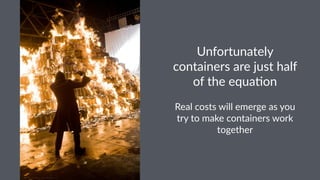
Unfortunately
containers are just half
of the equa3on
Real costs will emerge as you
try to make containers work
together
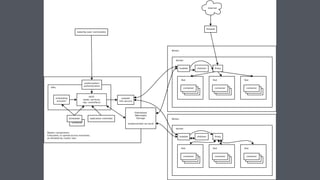
Kubernetes
def.
(Opinionated) Orchestra1on framework to
organise and deploy container-based
applica1ons
Agnos&c sandbox where you
provide the desired state of your
services/apps. Kubernetes aims to
take care of everything else
Disclaimer!
From the outside Kubernetes is a
black box
But inner mechanisms makes it a
complex beast to master
We got the cookies!
a.k.a. features
Self-healing services
Health checks on your containers,
rescheduling failing jobs
Dynamic scaling
Ensure current state and scale your pods (but
it's s4ll on you to scale the nodes)
Networking and rou/ng
Route traffic to your containers
Efficient physical resources usage
Scheduling containers on physical/vms nodes
according to their effec7ve needs
Enough talking
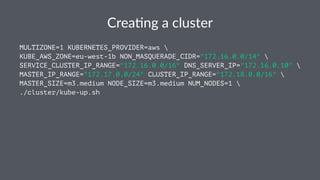
Crea%ng a cluster
MULTIZONE=1 KUBERNETES_PROVIDER=aws 
KUBE_AWS_ZONE=eu-west-1b NON_MASQUERADE_CIDR="172.16.0.0/14" 
SERVICE_CLUSTER_IP_RANGE="172.16.0.0/16" DNS_SERVER_IP="172.16.0.10" 
MASTER_IP_RANGE="172.17.0.0/24" CLUSTER_IP_RANGE="172.18.0.0/16" 
MASTER_SIZE=m3.medium NODE_SIZE=m3.medium NUM_NODES=1 
./cluster/kube-up.sh
h"ps://asciinema.org/a/
4xnz9hc3lvs6zp3eakrf2qcjn
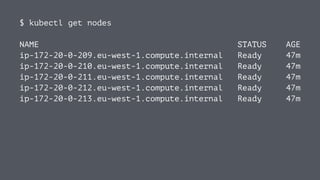
$ kubectl get nodes
NAME STATUS AGE
ip-172-20-0-209.eu-west-1.compute.internal Ready 47m
ip-172-20-0-210.eu-west-1.compute.internal Ready 47m
ip-172-20-0-211.eu-west-1.compute.internal Ready 47m
ip-172-20-0-212.eu-west-1.compute.internal Ready 47m
ip-172-20-0-213.eu-west-1.compute.internal Ready 47m
kubectl is your local CLI command
center.
You can issue commands to the cluster either by kubectl or
directly calling REST APIs exposed by the master
We got the nodes, we are ready
Our first container on kubernetes!
YAML all the things!
Pods
A pod is a group of one or more containers. Pods are the smallest
deployable units that can be created and managed in Kubernetes.
Replica(on Controllers
A replica*on controller ensures that a specified number of pod
“replicas” are running at any one *me
Deployments
Pod + Replica-onController
apiVersion: extensions/v1beta1
kind: Deployment
metadata:
name: dummy-worker
spec:
replicas: 1
template:
metadata:
labels:
app: dummy-worker
spec:
containers:
- name: dummy-worker
image: jnardiello/forever
env:
- name: SOME_ENV_VAR
value: envvarvalue
resources:
limits:
cpu: "256m"
memory: "128Mi"
requests:
cpu: "5m"
memory: "8Mi"
Services
A Kubernetes Service is an abstrac0on which defines a logical set
of Pods and a policy by which to access them.
kind: Service
metadata:
name: dummy-worker-service
spec:
ports:
- port: 80·
targetPort: 8000
protocol: TCP
selector:
app: dummy-worker
externalIPs: [53.8.3.2]
There are different types of services
NodePorts, proxied by the master
LoadBalancer, crea'ng an actual ELB on AWS
Ingress [beta] - WARNING, do not use
Deploy the container
h"ps://asciinema.org/a/7c42c8itmyz3982p6fmo9ecvi
Resilient applica,ons
h"ps://asciinema.org/a/2bxo51ond7ac4haaguneingmv
Kubernetes is truly amazing
(for POCs)
Ba#le-tested cluster
A long way before reaching produc4on ready
There will be blood!
Opinionated Logging
Opinionated Monitoring
Master skynet, then implement your
own solu4on
Custom metrics-based Autoscaling
OpsFactory/Kappa
These topics are for another /me
(We should probably do Kubernetes102)
Ques%ons?
@jnardiello

Kubernetes 101