Measuring SQL Execution Outliers
(to track performance better)

Maxym Kharchenko
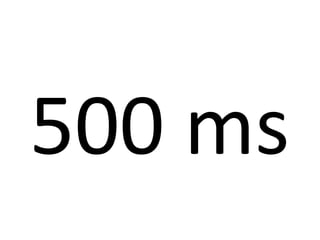
500 ms
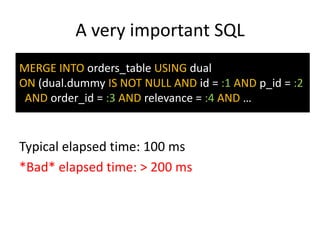
A very important SQL
MERGE INTO orders_table USING dual
ON (dual.dummy IS NOT NULL AND id = :1 AND p_id = :2
AND order_id = :3 AND relevance = :4 AND …

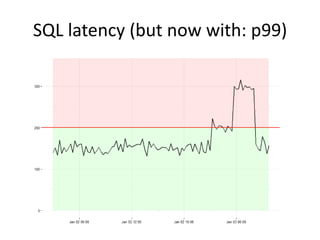
Typical elapsed time: 100 ms
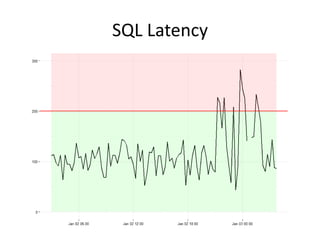
*Bad* elapsed time: > 200 ms
SQL Latency
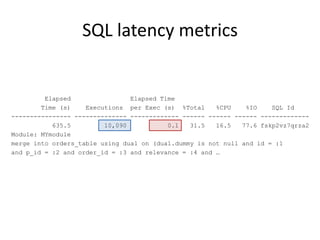
SQL latency metrics

Elapsed
Elapsed Time
Time (s)
Executions per Exec (s) %Total
%CPU
%IO
SQL Id
---------------- -------------- ------------- ------ ------ ------ ------------635.5
10,090
0.1
31.5
16.5
77.6 fskp2vz7qrza2
Module: MYmodule
merge into orders_table using dual on (dual.dummy is not null and id = :1
and p_id = :2 and order_id = :3 and relevance = :4 and …
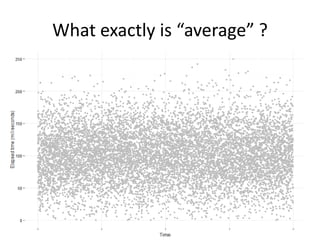
What exactly is “average” ?
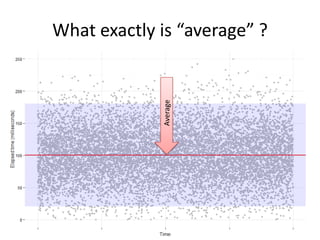
Average

What exactly is “average” ?
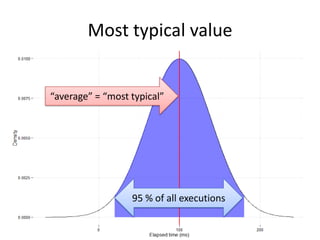
Most typical value

“average” = “most typical”

95 % of all executions
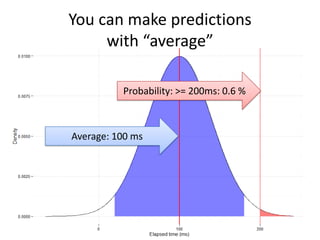
You can make predictions
with “average”
Probability: >= 200ms: 0.6 %

Average: 100 ms
Average is a pretty decent metric
As long as distribution is normal
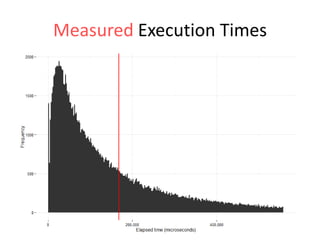
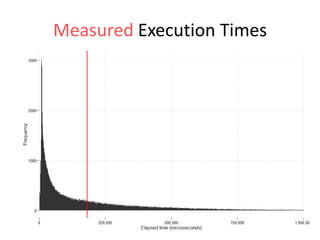
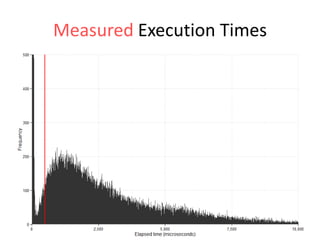
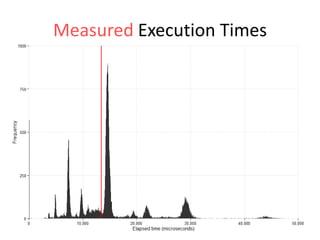
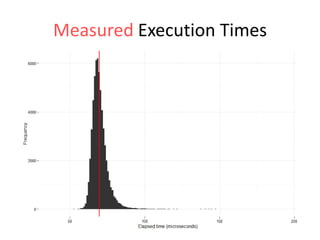
Measured Execution Times
What if the real distribution
is not normal ?
People feel *BAD* variance
not the average
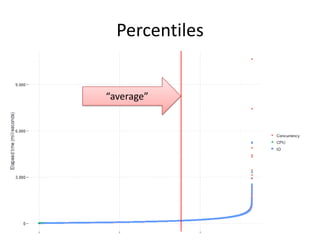
Percentiles

“average”
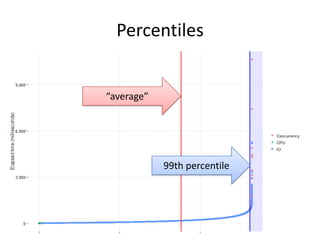
Percentiles

“average”

99th percentile
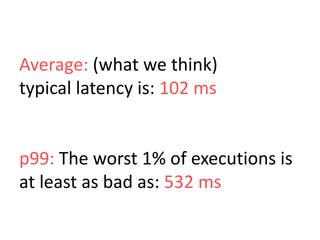
Average: (what we think)
typical latency is: 102 ms

p99: The worst 1% of executions is
at least as bad as: 532 ms
SQL latency (but now with: p99)
Ok, so how do we
measure percentiles ?
You need to capture
individual query times
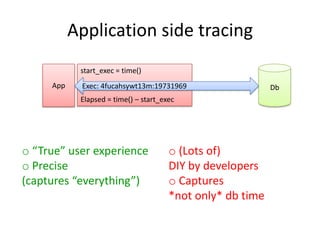
Application side tracing
start_exec = time()
App

Exec: 4fucahsywt13m:19731969
Elapsed = time() – start_exec

o “True” user experience
o Precise
(captures “everything”)

o (Lots of)
DIY by developers
o Captures
*not only* db time

Db
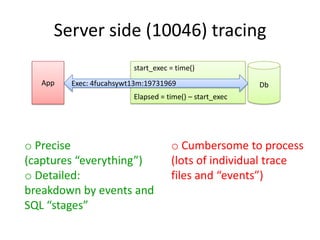
Server side (10046) tracing
start_exec = time()

App

Exec: 4fucahsywt13m:19731969

Db

Elapsed = time() – start_exec

o Precise
(captures “everything”)
o Detailed:
breakdown by events and
SQL “stages”

o Cumbersome to process
(lots of individual trace
files and “events”)
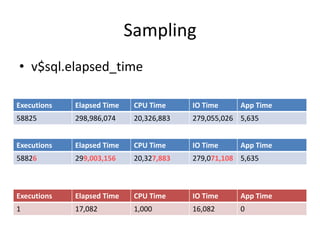
Sampling
• v$sql.elapsed_time
Executions

Elapsed Time

CPU Time

IO Time

App Time

58825

298,986,074

20,326,883

279,055,026 5,635

Executions

Elapsed Time

CPU Time

IO Time

58826

299,003,156

20,327,883

279,071,108 5,635

Executions

Elapsed Time

CPU Time

IO Time

App Time

1

17,082

1,000

16,082

0

App Time
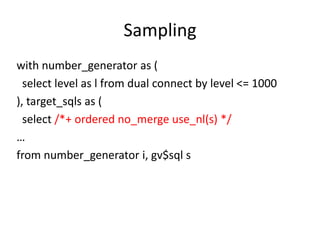
Sampling
with number_generator as (
select level as l from dual connect by level <= 1000
), target_sqls as (
select /*+ ordered no_merge use_nl(s) */
…
from number_generator i, gv$sql s
Sampling
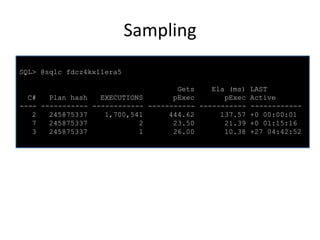
SQL> @sqlc fdcz4kx11era5

C#
Plan hash
EXECUTIONS
---- ----------- -----------2
245875337
1,700,541
7
245875337
2
3
245875337
1

Gets
Ela (ms) LAST
pExec
pExec Active
----------- ----------- -----------444.62
137.57 +0 00:00:01
23.50
21.39 +0 01:15:16
26.00
10.38 +27 04:42:52
Sampling
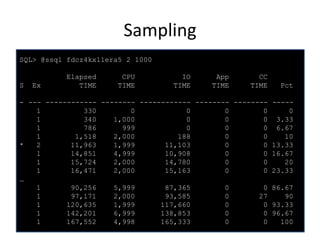
SQL> @ssql fdcz4kx11era5 2 1000

S

Ex

Elapsed
TIME

CPU
TIME

IO
TIME

App
TIME

CC
TIME

Pct

- --- ------------ -------- ------------ -------- -------- ----1
330
0
0
0
0
0
1
340
1,000
0
0
0 3.33
1
786
999
0
0
0 6.67
1
1,518
2,000
188
0
0
10
*
2
11,963
1,999
11,103
0
0 13.33
1
14,851
4,999
10,908
0
0 16.67
1
15,724
2,000
14,780
0
0
20
1
16,471
2,000
15,163
0
0 23.33
…
1
90,256
5,999
87,365
0
0 86.67
1
97,171
2,000
93,585
0
27
90
1
120,635
1,999
117,660
0
0 93.33
1
142,201
6,999
138,853
0
0 96.67
1
167,552
4,998
165,333
0
0
100
Sampling
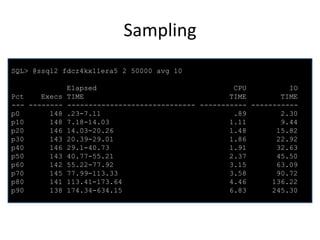
SQL> @ssql2 fdcz4kx11era5 2 50000 avg 10

Pct
Execs
--- -------p0
148
p10
148
p20
146
p30
143
p40
146
p50
143
p60
142
p70
145
p80
141
p90
138

Elapsed
CPU
IO
TIME
TIME
TIME
------------------------------ ----------- ----------.23-7.11
.89
2.30
7.18-14.03
1.11
9.44
14.03-20.26
1.48
15.82
20.39-29.01
1.86
22.92
29.1-40.73
1.91
32.63
40.77-55.21
2.37
45.50
55.22-77.92
3.15
63.09
77.99-113.33
3.58
90.72
113.41-173.64
4.46
136.22
174.34-634.15
6.83
245.30
Sampling
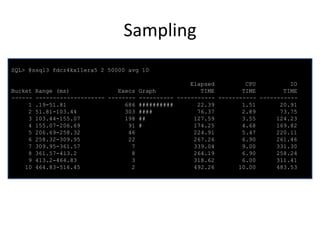
SQL> @ssql3 fdcz4kx11era5 2 50000 avg 10
Elapsed
CPU
IO
Bucket Range (ms)
Execs Graph
TIME
TIME
TIME
------ -------------------- -------- ---------- ----------- ----------- ----------1 .19-51.81
686 ##########
22.39
1.51
20.91
2 51.81-103.44
303 ####
76.37
2.89
73.75
3 103.44-155.07
198 ##
127.59
3.55
124.23
4 155.07-206.69
91 #
174.25
4.68
169.82
5 206.69-258.32
46
224.91
5.47
220.11
6 258.32-309.95
22
267.26
6.90
261.46
7 309.95-361.57
7
339.04
9.00
331.30
8 361.57-413.2
8
264.19
6.90
258.24
9 413.2-464.83
3
318.62
6.00
311.41
10 464.83-516.45
2
492.26
10.00
483.53
The scripts are here

http://intermediatesql.com
Sampling
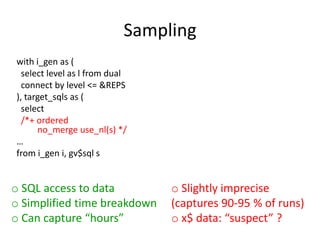
with i_gen as (
select level as l from dual
connect by level <= &REPS
), target_sqls as (
select
/*+ ordered
no_merge use_nl(s) */
…
from i_gen i, gv$sql s

o SQL access to data
o Simplified time breakdown
o Can capture “hours”

o Slightly imprecise
(captures 90-95 % of runs)
o x$ data: “suspect” ?
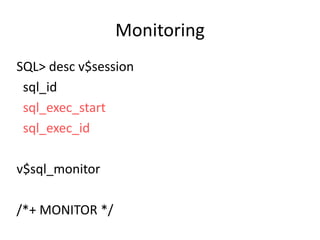
Monitoring
SQL> desc v$session
sql_id
sql_exec_start
sql_exec_id
v$sql_monitor
/*+ MONITOR */
Monitoring
NAME
-----------------------------_sqlmon_binds_xml_format
_sqlmon_max_plan

VALUE
------default
480

_sqlmon_max_planlines
_sqlmon_recycle_time
_sqlmon_threshold

300
60
5

DESCRIPTION
-----------------------------------------------------------format of column binds_xml in [G]V$SQL_MONITOR
Maximum number of plans entry that can be monitored. Defaults
to 20 per CPU
Number of plan lines beyond which a plan cannot be monitored
Minimum time (in s) to wait before a plan entry can be recycled
CPU/IO time threshold before a statement is monitored. 0 is
disabled

o Precise
(captures “everything”)
o SQL access to data

o Capture size is limited
(think: “seconds”)
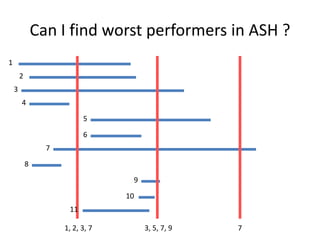
Can I find worst performers in ASH ?
1
2
3
4
5

6
7
8
9
10
11
1, 2, 3, 7

3, 5, 7, 9

7
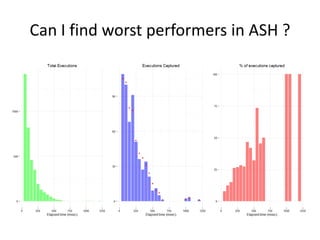
Can I find worst performers in ASH ?
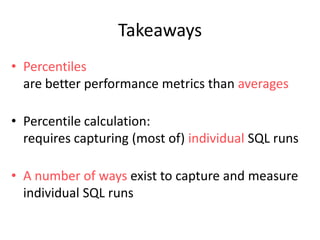
Takeaways
• Percentiles
are better performance metrics than averages
• Percentile calculation:
requires capturing (most of) individual SQL runs
• A number of ways exist to capture and measure
individual SQL runs
Thank you!

Finding SQL execution outliers

Editor's Notes

  • #5 Latency = “elapsed time”How to monitor performance:Define the goal (or SLA)Choose a good metricMeasureFind and report problems
  • #6 AWR reports are looking dba_hist_sqlstat.elapsed_time, which is, in turn, looking at v$sql.elapsed_timeSo, what can we judge from “average” ? How typical is it ? What is the probability that it is *much bigger* ?
  • #7 wikipedia: Normal distributions are … often used in the natural and social sciences for real-valued random variables whose distributions are not known.[1][2]
  • #12 “Time frequency” distribution
  • #18 Based on my samples, I really want to say: “Typically it’s not normal”, but to be conservative, let me just say: “it’s possible it’s not normal”
  • #19 A slight adjustment for “people feel variance, not the mean” maxima.
  • #20 Percentiles:Order all executions by elapsed timeSelect the last N %
  • #21 Percentiles are usually defined by the lower edge
  • #26 Super helpful: send identifier strings along with your data: module, client_id, ECID etc
  • #27 Server side tracing is often complementary to client side tracing: i.e. it allows to confirm whether or not client side latency is *caused* by the database (as opposed to other factors: network, app machine etc)
  • #29 Anything in v$sql/v$session can be captured, i.e. machine, current object etcI found that v$session.prev_sql_addr and v$session.prev_exec_id are pretty accurate
  • #35 Anything in v$sql/v$session can be captured, i.e. machine, current object etcI found that v$session.prev_sql_addr and v$session.prev_exec_id are pretty accurate
  • #38 ASH measures “events”, not overall sql elapsed timeFor short duration “events” (i.e. “db file sequential read”) TIME_WAITED has no correlation to (overall) sql elapsed time (as, presumably, there can be multiple such events)
  • #39 Even though probability of capturing an event gets bigger as wait time gets longer (reaching 100% for &gt;1 second waits), there is, typically, *a lot* more “short running” events than long running.As a result, long running events are completely “swamped” and it is not possible to determine whether sql was long running simply by the fact that its event was recorded in ASH.
  • #40 Percentiles are distribution shape agnostic