Performance tuning 
A Brief Introduction 
By 
Riyaj Shamsudeen 
©OraInternals Riyaj Shamsudeen
©OraInternals Riyaj Shamsudeen 2 
Who am I? 
 18 years using Oracle products/DBA 
 OakTable member 
 Oracle ACE 
 Certified DBA versions 7.0,7.3,8,8i,9i &10g 
 Specializes in RAC, performance tuning, 
Internals and E-business suite 
 Chief DBA with OraInternals 
 Co-author of “Expert Oracle Practices” ‘2009 
 Co-author of “Pro Oracle SQL” ‘2010 
 Email: rshamsud@orainternals.com 
 Blog : orainternals.wordpress.com 
 URL: www.orainternals.com
©OraInternals Riyaj Shamsudeen 3 
Disclaimer 
These slides and materials represent the work and opinions of the author and do not 
constitute official positions of my current or past employer or any other organization. 
This material has been peer reviewed, but author assume no responsibility whatsoever for 
the test cases. 
If you corrupt your databases by running my scripts, you are solely responsible for that. 
This material should not should not be reproduced or used without the authors' written 
permission.
©OraInternals Riyaj Shamsudeen 4 
Agenda 
 Tracing SQL execution 
 Analyzing Trace files 
 Understanding Explain plans 
 Joins 
 Writing optimal SQL 
 Good hints and no-so good hints 
 Effective indexing 
 Partitioning for performance
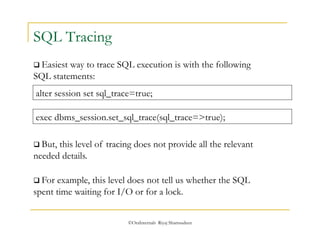
alter session set sql_trace=true; 
exec dbms_session.set_sql_trace(sql_trace=>true); 
©OraInternals Riyaj Shamsudeen 
SQL Tracing 
 Easiest way to trace SQL execution is with the following 
SQL statements: 
 But, this level of tracing does not provide all the relevant 
needed details. 
 For example, this level does not tell us whether the SQL 
spent time waiting for I/O or for a lock.
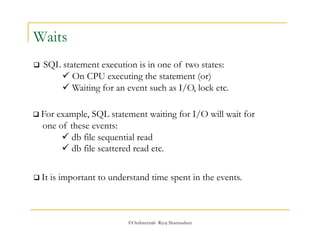
 For example, SQL statement waiting for I/O will wait for 
one of these events: 
 db file sequential read 
 db file scattered read etc. 
©OraInternals Riyaj Shamsudeen 
Waits 
 SQL statement execution is in one of two states: 
 On CPU executing the statement (or) 
 Waiting for an event such as I/O, lock etc. 
 It is important to understand time spent in the events.
Tracing with waits 
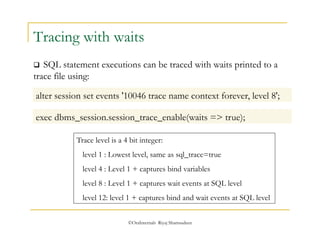
 SQL statement executions can be traced with waits printed to a 
trace file using: 
alter session set events '10046 trace name context forever, level 8'; 
exec dbms_session.session_trace_enable(waits => true); 
Trace level is a 4 bit integer: 
level 1 : Lowest level, same as sql_trace=true 
level 4 : Level 1 + captures bind variables 
level 8 : Level 1 + captures wait events at SQL level 
level 12: level 1 + captures bind and wait events at SQL level 
©OraInternals Riyaj Shamsudeen
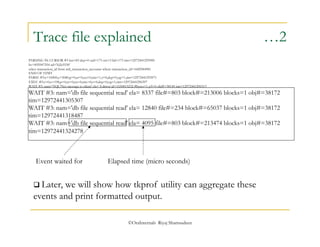
Trace file explained …1 
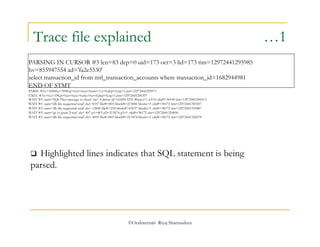
PARSING IN CURSOR #3 len=83 dep=0 uid=173 oct=3 lid=173 tim=12972441295985 
hv=855947554 ad='fa2e5530' 
select transaction_id from mtl_transaction_accounts where transaction_id=1682944981 
END OF STMT 
PARSE #3:c=10000,e=5080,p=0,cr=0,cu=0,mis=1,r=0,dep=0,og=1,tim=12972441295971 
EXEC #3:c=0,e=198,p=0,cr=0,cu=0,mis=0,r=0,dep=0,og=1,tim=12972441296397 
WAIT #3: nam='SQL*Net message to client' ela= 8 driver id=1650815232 #bytes=1 p3=0 obj#=38149 tim=12972441296513 
WAIT #3: nam='db file sequential read' ela= 8337 file#=803 block#=213006 blocks=1 obj#=38172 tim=12972441305307 
WAIT #3: nam='db file sequential read' ela= 12840 file#=234 block#=65037 blocks=1 obj#=38172 tim=12972441318487 
WAIT #3: nam='gc cr grant 2-way' ela= 807 p1=803 p2=213474 p3=1 obj#=38172 tim=12972441320096 
WAIT #3: nam='db file sequential read' ela= 4095 file#=803 block#=213474 blocks=1 obj#=38172 tim=12972441324278 
 Highlighted lines indicates that SQL statement is being 
parsed. 
©OraInternals Riyaj Shamsudeen
Trace file explained …2 
PARSING IN CURSOR #3 len=83 dep=0 uid=173 oct=3 lid=173 tim=12972441295985 
hv=855947554 ad='fa2e5530' 
select transaction_id from mtl_transaction_accounts where transaction_id=1682944981 
END OF STMT 
PARSE #3:c=10000,e=5080,p=0,cr=0,cu=0,mis=1,r=0,dep=0,og=1,tim=12972441295971 
EXEC #3:c=0,e=198,p=0,cr=0,cu=0,mis=0,r=0,dep=0,og=1,tim=12972441296397 
WAIT #3: nam='SQL*Net message to client' ela= 8 driver id=1650815232 #bytes=1 p3=0 obj#=38149 tim=12972441296513 
WAIT #3: nam='db file sequential read' ela= 8337 file#=803 block#=213006 blocks=1 obj#=38172 
tim=12972441305307 
WAIT #3: nam='db file sequential read' ela= 12840 file#=234 block#=65037 blocks=1 obj#=38172 
tim=12972441318487 
WAIT #3: nam='db file sequential read' ela= 4095 file#=803 block#=213474 blocks=1 obj#=38172 
tim=12972441324278 
Event waited for Elapsed time (micro seconds) 
 Later, we will show how tkprof utility can aggregate these 
events and print formatted output. 
©OraInternals Riyaj Shamsudeen
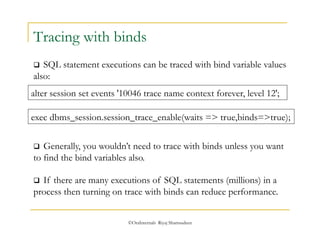
Tracing with binds 
 SQL statement executions can be traced with bind variable values 
also: 
alter session set events '10046 trace name context forever, level 12'; 
exec dbms_session.session_trace_enable(waits => true,binds=>true); 
 Generally, you wouldn’t need to trace with binds unless you want 
to find the bind variables also. 
 If there are many executions of SQL statements (millions) in a 
process then turning on trace with binds can reduce performance. 
©OraInternals Riyaj Shamsudeen
©OraInternals Riyaj Shamsudeen 11 
Agenda 
 Tracing SQL execution 
 Analyzing Trace files 
 Understanding Explain plans 
 Joins 
 Writing optimal SQL 
 Good hints and no-so good hints 
 Effective indexing 
 Partitioning for performance
 tkprof utility provides formatted output from the trace files. 
©OraInternals Riyaj Shamsudeen 
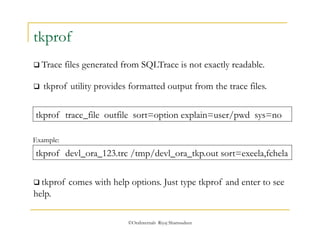
tkprof 
 Trace files generated from SQLTrace is not exactly readable. 
tkprof trace_file outfile sort=option explain=user/pwd sys=no 
Example: 
tkprof devl_ora_123.trc /tmp/devl_ora_tkp.out sort=exeela,fchela 
 tkprof comes with help options. Just type tkprof and enter to see 
help.
©OraInternals Riyaj Shamsudeen 
Sort option 
 Sort option in tkprof is useful. For example, sort=exeela will sort 
the SQL statements by Elapsed time at execution step. 
 Top SQL statements by elapsed time will show up at the top of 
the tkprof output file. 
 Generally, I use sort=exeela, fchela to sort the SQL statements. 
 Other common options are: execpu, fchcpu, prsela etc.
 Explain=userid/password@dev can be supplied to print 
execution plan of that SQL statement. 
 Explain option logs on to the database and executes explain plan 
for every SQL in the trace file. 
©OraInternals Riyaj Shamsudeen 
explain option 
 But, SQL Trace also prints execution plan in the trace file. 
 It is a good practice not to use explain option and use the 
execution plan in the trace file itself. 
 If you are using SQLPlus or TOAD to execute SQL, make sure 
to close the connection or exit so that trace files will be complete.
More on tracing… 
©OraInternals Riyaj Shamsudeen 
 Trace at program level 
 From concurrent program screen, check enable trace box. (level 8) 
 Trace can be enabled at user level: Beware every click is tracing. 
 Using alter session command: 
alter session set events ' 10046 trace name context forever, level 12'; 
 Using dbms_system in another session (mostly used by DBAs): 
Exec dbms_System.set_ev( sid, serial#, 10046, 12, ''); 
Exec dbms_System.set_Sql_Trace_in_session(sid, serial#, true);
©OraInternals Riyaj Shamsudeen 16 
Agenda 
 Tracing SQL execution 
 Analyzing Trace files 
 Understanding Explain plans 
 Joins 
 Writing optimal SQL 
 Good hints and no-so good hints 
 Effective indexing 
 Partitioning for performance
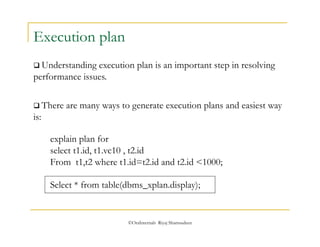
 There are many ways to generate execution plans and easiest way 
is: 
©OraInternals Riyaj Shamsudeen 
Execution plan 
 Understanding execution plan is an important step in resolving 
performance issues. 
explain plan for 
select t1.id, t1.vc10 , t2.id 
From t1,t2 where t1.id=t2.id and t2.id <1000; 
Select * from table(dbms_xplan.display);
Simple SELECT 
Select * from table(dbms_xplan.display); 
-------------------------------------------------------------------------------------- 
| Id | Operation | Name | Rows | Bytes | Cost (%CPU)| Time | 
-------------------------------------------------------------------------------------- 
| 0 | SELECT STATEMENT | | 975 | 22425 | 512 (1)| 00:00:02 | 
|* 1 | HASH JOIN | | 975 | 22425 | 512 (1)| 00:00:02 | 
|* 2 | INDEX RANGE SCAN | T2_N1 | 976 | 5856 | 5 (0)| 00:00:01 | 
| 3 | TABLE ACCESS BY INDEX ROWID| T1 | 1000 | 17000 | 506 (1)| 00:00:02 | 
|* 4 | INDEX RANGE SCAN | T1_N1 | 1000 | | 5 (0)| 00:00:01 | 
-------------------------------------------------------------------------------------- 
Predicate Information (identified by operation id): 
--------------------------------------------------- 
1 - access("T1"."ID"="T2"."ID") 
2 - access("T2"."ID"<1000) 
4 - access("T1"."ID"<1000) 
Execution sequence 
(i) Index T2_N1 was scanned with access predicate t2.id <1000 [ Step 2] 
(ii) Index T1_N1 was scanned with access predicate t1.id <1000 [ Step 4] 
(iii) Table T1 is accessed to retrieve non-indexed column using rowids returned from 
©OraInternals Riyaj Shamsudeen 
step 2. [ Step 3]. 
(iv) Rows from step 2 and 3 are joined to create the final result set.[Step 1]
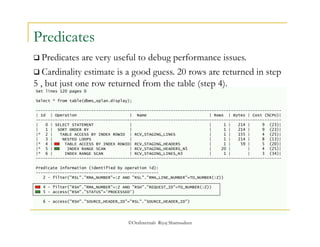
 Predicates are very useful to debug performance issues. 
 Cardinality estimate is a good guess. 20 rows are returned in step 
5 , but just one row returned from the table (step 4). 
©OraInternals Riyaj Shamsudeen 
Predicates 
Set lines 120 pages 0 
Select * from table(dbms_xplan.display); 
------------------------------------------------------------------------------------------------------ 
| Id | Operation | Name | Rows | Bytes | Cost (%CPU)| 
------------------------------------------------------------------------------------------------------ 
| 0 | SELECT STATEMENT | | 1 | 214 | 9 (23)| 
| 1 | SORT ORDER BY | | 1 | 214 | 9 (23)| 
|* 2 | TABLE ACCESS BY INDEX ROWID | RCV_STAGING_LINES | 1 | 155 | 4 (25)| 
| 3 | NESTED LOOPS | | 1 | 214 | 8 (13)| 
|* 4 | TABLE ACCESS BY INDEX ROWID| RCV_STAGING_HEADERS | 1 | 59 | 5 (20)| 
|* 5 | INDEX RANGE SCAN | RCV_STAGING_HEADERS_N5 | 20 | | 4 (25)| 
|* 6 | INDEX RANGE SCAN | RCV_STAGING_LINES_N3 | 1 | | 3 (34)| 
------------------------------------------------------------------------------------------------------ 
Predicate Information (identified by operation id): 
--------------------------------------------------- 
2 - filter("RSL"."RMA_NUMBER"=:Z AND "RSL"."RMA_LINE_NUMBER"=TO_NUMBER(:Z)) 
4 - filter("RSH"."RMA_NUMBER"=:Z AND "RSH"."REQUEST_ID"=TO_NUMBER(:Z)) 
5 - access("RSH"."STATUS"='PROCESSED') 
6 - access("RSH"."SOURCE_HEADER_ID"="RSL"."SOURCE_HEADER_ID")
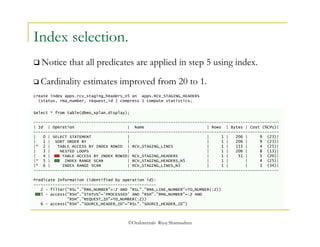
Index selection. 
 Notice that all predicates are applied in step 5 using index. 
 Cardinality estimates improved from 20 to 1. 
create index apps.rcv_staging_headers_n5 on apps.RCV_STAGING_HEADERS 
(status, rma_number, request_id ) compress 1 compute statistics; 
Select * from table(dbms_xplan.display); 
------------------------------------------------------------------------------------------------------ 
| Id | Operation | Name | Rows | Bytes | Cost (%CPU)| 
------------------------------------------------------------------------------------------------------ 
| 0 | SELECT STATEMENT | | 1 | 206 | 9 (23)| 
| 1 | SORT ORDER BY | | 1 | 206 | 9 (23)| 
|* 2 | TABLE ACCESS BY INDEX ROWID | RCV_STAGING_LINES | 1 | 155 | 4 (25)| 
| 3 | NESTED LOOPS | | 1 | 206 | 8 (13)| 
| 4 | TABLE ACCESS BY INDEX ROWID| RCV_STAGING_HEADERS | 1 | 51 | 5 (20)| 
|* 5 | INDEX RANGE SCAN | RCV_STAGING_HEADERS_N5 | 1 | | 4 (25)| 
|* 6 | INDEX RANGE SCAN | RCV_STAGING_LINES_N3 | 1 | | 3 (34)| 
------------------------------------------------------------------------------------------------------ 
Predicate Information (identified by operation id): 
--------------------------------------------------- 
2 - filter("RSL"."RMA_NUMBER"=:Z AND "RSL"."RMA_LINE_NUMBER"=TO_NUMBER(:Z)) 
5 - access("RSH"."STATUS"='PROCESSED' AND "RSH"."RMA_NUMBER"=:Z AND 
"RSH"."REQUEST_ID"=TO_NUMBER(:Z)) 
6 - access("RSH"."SOURCE_HEADER_ID"="RSL"."SOURCE_HEADER_ID") 
©OraInternals Riyaj Shamsudeen
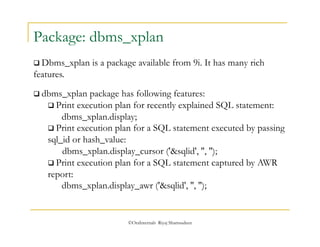
Package: dbms_xplan 
 Dbms_xplan is a package available from 9i. It has many rich 
features. 
 dbms_xplan package has following features: 
 Print execution plan for recently explained SQL statement: 
dbms_xplan.display; 
 Print execution plan for a SQL statement executed by passing 
sql_id or hash_value: 
dbms_xplan.display_cursor ('&sqlid', '', ''); 
 Print execution plan for a SQL statement captured by AWR 
report: 
dbms_xplan.display_awr ('&sqlid', '', ''); 
©OraInternals Riyaj Shamsudeen
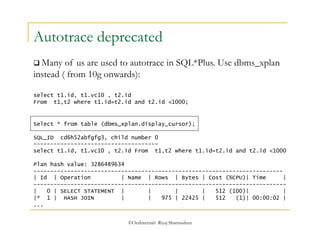
Autotrace deprecated 
 Many of us are used to autotrace in SQL*Plus. Use dbms_xplan 
instead ( from 10g onwards): 
select t1.id, t1.vc10 , t2.id 
From t1,t2 where t1.id=t2.id and t2.id <1000; 
Select * from table (dbms_xplan.display_cursor); 
SQL_ID cd6h52abfgfg3, child number 0 
------------------------------------- 
select t1.id, t1.vc10 , t2.id From t1,t2 where t1.id=t2.id and t2.id <1000 
Plan hash value: 3286489634 
-------------------------------------------------------------------------- 
| Id | Operation | Name | Rows | Bytes | Cost (%CPU)| Time | 
--------------------------------------------------------------------------- 
| 0 | SELECT STATEMENT | | | | 512 (100)| | 
|* 1 | HASH JOIN | | 975 | 22425 | 512 (1)| 00:00:02 | 
... 
©OraInternals Riyaj Shamsudeen
©OraInternals Riyaj Shamsudeen 
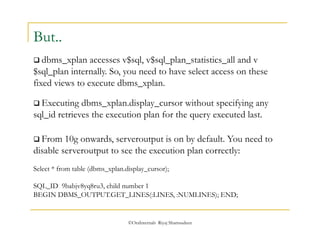
But.. 
 dbms_xplan accesses v$sql, v$sql_plan_statistics_all and v 
$sql_plan internally. So, you need to have select access on these 
fixed views to execute dbms_xplan. 
 Executing dbms_xplan.display_cursor without specifying any 
sql_id retrieves the execution plan for the query executed last. 
 From 10g onwards, serveroutput is on by default. You need to 
disable serveroutput to see the execution plan correctly: 
Select * from table (dbms_xplan.display_cursor); 
SQL_ID 9babjv8yq8ru3, child number 1 
BEGIN DBMS_OUTPUT.GET_LINES(:LINES, :NUMLINES); END;
©OraInternals Riyaj Shamsudeen 
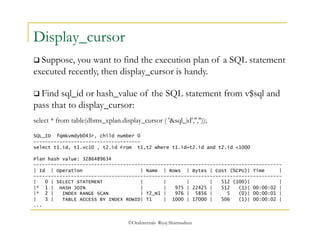
Display_cursor 
 Suppose, you want to find the execution plan of a SQL statement 
executed recently, then display_cursor is handy. 
 Find sql_id or hash_value of the SQL statement from v$sql and 
pass that to display_cursor: 
select * from table(dbms_xplan.display_cursor ( '&sql_id','','')); 
SQL_ID fqmkvmdyb043r, child number 0 
------------------------------------- 
select t1.id, t1.vc10 , t2.id From t1,t2 where t1.id=t2.id and t2.id <1000 
Plan hash value: 3286489634 
-------------------------------------------------------------------------------------- 
| Id | Operation | Name | Rows | Bytes | Cost (%CPU)| Time | 
-------------------------------------------------------------------------------------- 
| 0 | SELECT STATEMENT | | | | 512 (100)| | 
|* 1 | HASH JOIN | | 975 | 22425 | 512 (1)| 00:00:02 | 
|* 2 | INDEX RANGE SCAN | T2_N1 | 976 | 5856 | 5 (0)| 00:00:01 | 
| 3 | TABLE ACCESS BY INDEX ROWID| T1 | 1000 | 17000 | 506 (1)| 00:00:02 | 
...
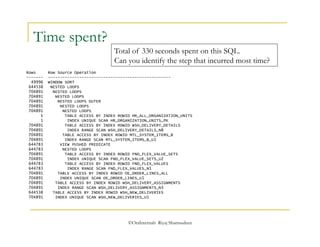
Total of 330 seconds spent on this SQL. 
Can you identify the step that incurred most time? 
©OraInternals Riyaj Shamsudeen 
Time spent? 
Rows Row Source Operation 
------- --------------------------------------------------- 
49996 WINDOW SORT 
644538 NESTED LOOPS 
704891 NESTED LOOPS 
704891 NESTED LOOPS 
704891 NESTED LOOPS OUTER 
704891 NESTED LOOPS 
704891 NESTED LOOPS 
1 TABLE ACCESS BY INDEX ROWID HR_ALL_ORGANIZATION_UNITS 
1 INDEX UNIQUE SCAN HR_ORGANIZATION_UNITS_PK 
704891 TABLE ACCESS BY INDEX ROWID WSH_DELIVERY_DETAILS 
704891 INDEX RANGE SCAN WSH_DELIVERY_DETAILS_N8 
704891 TABLE ACCESS BY INDEX ROWID MTL_SYSTEM_ITEMS_B 
704891 INDEX RANGE SCAN MTL_SYSTEM_ITEMS_B_U1 
644783 VIEW PUSHED PREDICATE 
644783 NESTED LOOPS 
704891 TABLE ACCESS BY INDEX ROWID FND_FLEX_VALUE_SETS 
704891 INDEX UNIQUE SCAN FND_FLEX_VALUE_SETS_U2 
644783 TABLE ACCESS BY INDEX ROWID FND_FLEX_VALUES 
644783 INDEX RANGE SCAN FND_FLEX_VALUES_N1 
704891 TABLE ACCESS BY INDEX ROWID OE_ORDER_LINES_ALL 
704891 INDEX UNIQUE SCAN OE_ORDER_LINES_U1 
704891 TABLE ACCESS BY INDEX ROWID WSH_DELIVERY_ASSIGNMENTS 
704891 INDEX RANGE SCAN WSH_DELIVERY_ASSIGNMENTS_N3 
644538 TABLE ACCESS BY INDEX ROWID WSH_NEW_DELIVERIES 
704891 INDEX UNIQUE SCAN WSH_NEW_DELIVERIES_U1
©OraInternals Riyaj Shamsudeen 
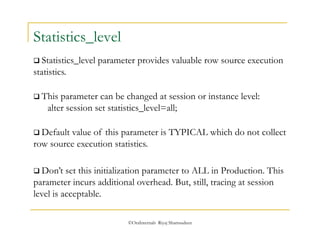
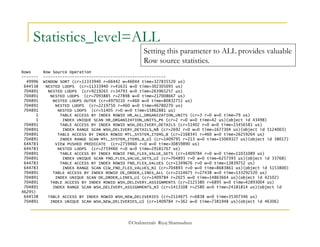
Statistics_level 
 Statistics_level parameter provides valuable row source execution 
statistics. 
 This parameter can be changed at session or instance level: 
alter session set statistics_level=all; 
 Default value of this parameter is TYPICAL which do not collect 
row source execution statistics. 
 Don’t set this initialization parameter to ALL in Production. This 
parameter incurs additional overhead. But, still, tracing at session 
level is acceptable.
Statistics_level=ALL 
Setting this parameter to ALL provides valuable 
Row source statistics. 
Rows Row Source Operation 
------- --------------------------------------------------- 
49996 WINDOW SORT (cr=11333940 r=66442 w=46044 time=327835520 us) 
644538 NESTED LOOPS (cr=11333940 r=41631 w=0 time=302305095 us) 
704891 NESTED LOOPS (cr=9219265 r=34793 w=0 time=263965257 us) 
704891 NESTED LOOPS (cr=7093885 r=27898 w=0 time=217008667 us) 
704891 NESTED LOOPS OUTER (cr=4979210 r=460 w=0 time=80832751 us) 
704891 NESTED LOOPS (cr=2219750 r=460 w=0 time=46780270 us) 
704891 NESTED LOOPS (cr=51405 r=0 w=0 time=15862881 us) 
1 TABLE ACCESS BY INDEX ROWID HR_ALL_ORGANIZATION_UNITS (cr=3 r=0 w=0 time=79 us) 
1 INDEX UNIQUE SCAN HR_ORGANIZATION_UNITS_PK (cr=2 r=0 w=0 time=42 us)(object id 43498) 
704891 TABLE ACCESS BY INDEX ROWID WSH_DELIVERY_DETAILS (cr=51402 r=0 w=0 time=15456581 us) 
704891 INDEX RANGE SCAN WSH_DELIVERY_DETAILS_N8 (cr=2692 r=0 w=0 time=1677304 us)(object id 5124003) 
704891 TABLE ACCESS BY INDEX ROWID MTL_SYSTEM_ITEMS_B (cr=2168345 r=460 w=0 time=26259264 us) 
704891 INDEX RANGE SCAN MTL_SYSTEM_ITEMS_B_U1 (cr=1409795 r=213 w=0 time=15069327 us)(object id 38017) 
644783 VIEW PUSHED PREDICATE (cr=2759460 r=0 w=0 time=30859890 us) 
644783 NESTED LOOPS (cr=2759460 r=0 w=0 time=29181767 us) 
704891 TABLE ACCESS BY INDEX ROWID FND_FLEX_VALUE_SETS (cr=1409784 r=0 w=0 time=11031089 us) 
704891 INDEX UNIQUE SCAN FND_FLEX_VALUE_SETS_U2 (cr=704893 r=0 w=0 time=6257393 us)(object id 33768) 
644783 TABLE ACCESS BY INDEX ROWID FND_FLEX_VALUES (cr=1349676 r=0 w=0 time=13839752 us) 
644783 INDEX RANGE SCAN CCW_FND_FLEX_VALUES_N1 (cr=704893 r=0 w=0 time=8683861 us)(object id 5153800) 
704891 TABLE ACCESS BY INDEX ROWID OE_ORDER_LINES_ALL (cr=2114675 r=27438 w=0 time=133292520 us) 
704891 INDEX UNIQUE SCAN OE_ORDER_LINES_U1 (cr=1409784 r=2025 w=0 time=14863664 us)(object id 42102) 
704891 TABLE ACCESS BY INDEX ROWID WSH_DELIVERY_ASSIGNMENTS (cr=2125380 r=6895 w=0 time=42893004 us) 
704891 INDEX RANGE SCAN WSH_DELIVERY_ASSIGNMENTS_N3 (cr=1413108 r=2580 w=0 time=24181814 us)(object id 
46295) 
644538 TABLE ACCESS BY INDEX ROWID WSH_NEW_DELIVERIES (cr=2114675 r=6838 w=0 time=35307346 us) 
704891 INDEX UNIQUE SCAN WSH_NEW_DELIVERIES_U1 (cr=1409784 r=362 w=0 time=7381948 us)(object id 46306) 
©OraInternals Riyaj Shamsudeen
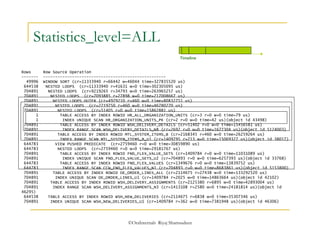
Statistics_level=ALL 
Rows Row Source Operation 
------- --------------------------------------------------- 
Timeline 
49996 WINDOW SORT (cr=11333940 r=66442 w=46044 time=327835520 us) 
644538 NESTED LOOPS (cr=11333940 r=41631 w=0 time=302305095 us) 
704891 NESTED LOOPS (cr=9219265 r=34793 w=0 time=263965257 us) 
704891 NESTED LOOPS (cr=7093885 r=27898 w=0 time=217008667 us) 
704891 NESTED LOOPS OUTER (cr=4979210 r=460 w=0 time=80832751 us) 
704891 NESTED LOOPS (cr=2219750 r=460 w=0 time=46780270 us) 
704891 NESTED LOOPS (cr=51405 r=0 w=0 time=15862881 us) 
1 TABLE ACCESS BY INDEX ROWID HR_ALL_ORGANIZATION_UNITS (cr=3 r=0 w=0 time=79 us) 
1 INDEX UNIQUE SCAN HR_ORGANIZATION_UNITS_PK (cr=2 r=0 w=0 time=42 us)(object id 43498) 
704891 TABLE ACCESS BY INDEX ROWID WSH_DELIVERY_DETAILS (cr=51402 r=0 w=0 time=15456581 us) 
704891 INDEX RANGE SCAN WSH_DELIVERY_DETAILS_N8 (cr=2692 r=0 w=0 time=1677304 us)(object id 5124003) 
704891 TABLE ACCESS BY INDEX ROWID MTL_SYSTEM_ITEMS_B (cr=2168345 r=460 w=0 time=26259264 us) 
704891 INDEX RANGE SCAN MTL_SYSTEM_ITEMS_B_U1 (cr=1409795 r=213 w=0 time=15069327 us)(object id 38017) 
644783 VIEW PUSHED PREDICATE (cr=2759460 r=0 w=0 time=30859890 us) 
644783 NESTED LOOPS (cr=2759460 r=0 w=0 time=29181767 us) 
704891 TABLE ACCESS BY INDEX ROWID FND_FLEX_VALUE_SETS (cr=1409784 r=0 w=0 time=11031089 us) 
704891 INDEX UNIQUE SCAN FND_FLEX_VALUE_SETS_U2 (cr=704893 r=0 w=0 time=6257393 us)(object id 33768) 
644783 TABLE ACCESS BY INDEX ROWID FND_FLEX_VALUES (cr=1349676 r=0 w=0 time=13839752 us) 
644783 INDEX RANGE SCAN CCW_FND_FLEX_VALUES_N1 (cr=704893 r=0 w=0 time=8683861 us)(object id 5153800) 
704891 TABLE ACCESS BY INDEX ROWID OE_ORDER_LINES_ALL (cr=2114675 r=27438 w=0 time=133292520 us) 
704891 INDEX UNIQUE SCAN OE_ORDER_LINES_U1 (cr=1409784 r=2025 w=0 time=14863664 us)(object id 42102) 
704891 TABLE ACCESS BY INDEX ROWID WSH_DELIVERY_ASSIGNMENTS (cr=2125380 r=6895 w=0 time=42893004 us) 
704891 INDEX RANGE SCAN WSH_DELIVERY_ASSIGNMENTS_N3 (cr=1413108 r=2580 w=0 time=24181814 us)(object id 
46295) 
644538 TABLE ACCESS BY INDEX ROWID WSH_NEW_DELIVERIES (cr=2114675 r=6838 w=0 time=35307346 us) 
704891 INDEX UNIQUE SCAN WSH_NEW_DELIVERIES_U1 (cr=1409784 r=362 w=0 time=7381948 us)(object id 46306) 
©OraInternals Riyaj Shamsudeen
©OraInternals Riyaj Shamsudeen 
Statistics_level 
 So, statistics_level parameter can be used to understand the step 
consuming much time. 
 To improve performance we try to reduce the step consuming 
time. 
 But, of course, functional knowledge of the SQL statement will 
come handy.
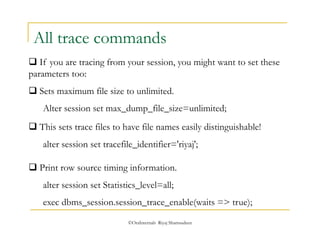
All trace commands 
 If you are tracing from your session, you might want to set these 
parameters too: 
 Sets maximum file size to unlimited. 
Alter session set max_dump_file_size=unlimited; 
 This sets trace files to have file names easily distinguishable! 
alter session set tracefile_identifier='riyaj'; 
 Print row source timing information. 
alter session set Statistics_level=all; 
exec dbms_session.session_trace_enable(waits => true); 
©OraInternals Riyaj Shamsudeen
©OraInternals Riyaj Shamsudeen 31 
Agenda 
 Tracing SQL execution 
 Analyzing Trace files 
 Understanding Explain plans 
 Access, Joins, filters and unnest 
 Writing optimal SQL 
 Good hints and no-so good hints 
 Effective indexing 
 Partitioning for performance
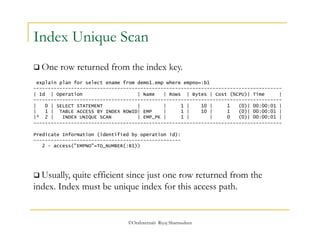
Index Unique Scan 
 One row returned from the index key. 
explain plan for select ename from demo1.emp where empno=:b1 
-------------------------------------------------------------------------------------- 
| Id | Operation | Name | Rows | Bytes | Cost (%CPU)| Time | 
-------------------------------------------------------------------------------------- 
| 0 | SELECT STATEMENT | | 1 | 10 | 1 (0)| 00:00:01 | 
| 1 | TABLE ACCESS BY INDEX ROWID| EMP | 1 | 10 | 1 (0)| 00:00:01 | 
|* 2 | INDEX UNIQUE SCAN | EMP_PK | 1 | | 0 (0)| 00:00:01 | 
-------------------------------------------------------------------------------------- 
Predicate Information (identified by operation id): 
--------------------------------------------------- 
2 - access("EMPNO"=TO_NUMBER(:B1)) 
 Usually, quite efficient since just one row returned from the 
index. Index must be unique index for this access path. 
©OraInternals Riyaj Shamsudeen
©OraInternals Riyaj Shamsudeen 33 
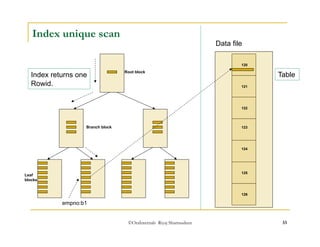
Index unique scan 
Index returns one 
Rowid. 
Root block Table 
Branch block 
Leaf 
blocks 
empno:b1 
Data file 
120 
121 
122 
123 
124 
125 
126
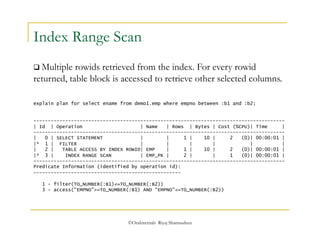
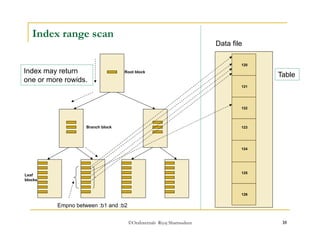
Index Range Scan 
 Multiple rowids retrieved from the index. For every rowid 
returned, table block is accessed to retrieve other selected columns. 
explain plan for select ename from demo1.emp where empno between :b1 and :b2; 
--------------------------------------------------------------------------------------- 
| Id | Operation | Name | Rows | Bytes | Cost (%CPU)| Time | 
--------------------------------------------------------------------------------------- 
| 0 | SELECT STATEMENT | | 1 | 10 | 2 (0)| 00:00:01 | 
|* 1 | FILTER | | | | | | 
| 2 | TABLE ACCESS BY INDEX ROWID| EMP | 1 | 10 | 2 (0)| 00:00:01 | 
|* 3 | INDEX RANGE SCAN | EMP_PK | 2 | | 1 (0)| 00:00:01 | 
--------------------------------------------------------------------------------------- 
Predicate Information (identified by operation id): 
--------------------------------------------------- 
1 - filter(TO_NUMBER(:B1)<=TO_NUMBER(:B2)) 
3 - access("EMPNO">=TO_NUMBER(:B1) AND "EMPNO"<=TO_NUMBER(:B2)) 
©OraInternals Riyaj Shamsudeen
©OraInternals Riyaj Shamsudeen 35 
Index range scan 
Index may return 
one or more rowids. 
Root block Table 
Branch block 
Leaf 
blocks 
Empno between :b1 and :b2 
Data file 
120 
121 
122 
123 
124 
125 
126
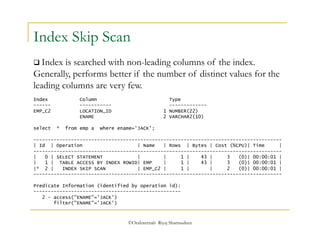
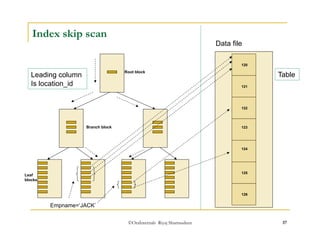
Index Skip Scan 
 Index is searched with non-leading columns of the index. 
Generally, performs better if the number of distinct values for the 
leading columns are very few. 
Index Column Type 
------ ----------- ------------- 
EMP_C2 LOCATION_ID 1 NUMBER(22) 
ENAME 2 VARCHAR2(10) 
select * from emp a where ename='JACK'; 
-------------------------------------------------------------------------------------- 
| Id | Operation | Name | Rows | Bytes | Cost (%CPU)| Time | 
-------------------------------------------------------------------------------------- 
| 0 | SELECT STATEMENT | | 1 | 43 | 3 (0)| 00:00:01 | 
| 1 | TABLE ACCESS BY INDEX ROWID| EMP | 1 | 43 | 3 (0)| 00:00:01 | 
|* 2 | INDEX SKIP SCAN | EMP_C2 | 1 | | 2 (0)| 00:00:01 | 
-------------------------------------------------------------------------------------- 
Predicate Information (identified by operation id): 
--------------------------------------------------- 
©OraInternals Riyaj Shamsudeen 
2 - access("ENAME"='JACK') 
filter("ENAME"='JACK')
©OraInternals Riyaj Shamsudeen 37 
Index skip scan 
Leading column 
Is location_id 
Root block Table 
Branch block 
Leaf 
blocks 
Empname=‘JACK’ 
Data file 
120 
121 
122 
123 
124 
125 
126
©OraInternals Riyaj Shamsudeen 
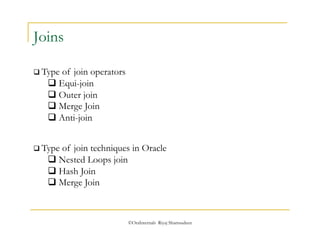
Joins 
 Type of join operators 
 Equi-join 
 Outer join 
 Merge Join 
 Anti-join 
 Type of join techniques in Oracle 
 Nested Loops join 
 Hash Join 
 Merge Join
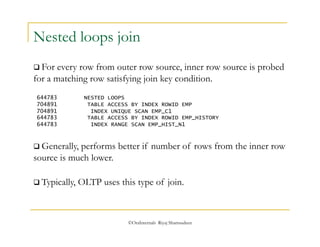
Nested loops join 
 For every row from outer row source, inner row source is probed 
for a matching row satisfying join key condition. 
644783 NESTED LOOPS 
704891 TABLE ACCESS BY INDEX ROWID EMP 
704891 INDEX UNIQUE SCAN EMP_C1 
644783 TABLE ACCESS BY INDEX ROWID EMP_HISTORY 
644783 INDEX RANGE SCAN EMP_HIST_N1 
 Generally, performs better if number of rows from the inner row 
source is much lower. 
 Typically, OLTP uses this type of join. 
©OraInternals Riyaj Shamsudeen
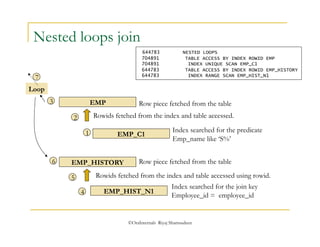
Nested loops join 
EMP 
Row piece fetched from the table 
Rowids fetched from the index and table accessed. 
EMP_C1 
Index searched for the predicate 
Emp_name like ‘S%’ 
Row piece fetched from the table 
Rowids fetched from the index and table accessed using rowid. 
©OraInternals Riyaj Shamsudeen 
Loop 
EMP_HISTORY 
EMP_HIST_N1 
Index searched for the join key 
Employee_id = employee_id 
1 
2 
3 
4 
5 
6 
7 
644783 NESTED LOOPS 
704891 TABLE ACCESS BY INDEX ROWID EMP 
704891 INDEX UNIQUE SCAN EMP_C1 
644783 TABLE ACCESS BY INDEX ROWID EMP_HISTORY 
644783 INDEX RANGE SCAN EMP_HIST_N1
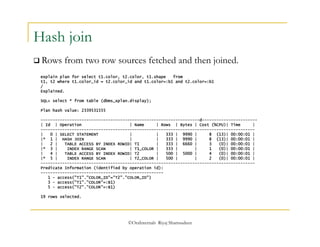
 Rows from two row sources fetched and then joined. 
©OraInternals Riyaj Shamsudeen 
Hash join 
explain plan for select t1.color, t2.color, t1.shape from 
t1, t2 where t1.color_id = t2.color_id and t1.color=:b1 and t2.color=:b1 
/ 
Explained. 
SQL> select * from table (dbms_xplan.display); 
Plan hash value: 2339531555 
------------------------------------------------------------------d----------------------- 
| Id | Operation | Name | Rows | Bytes | Cost (%CPU)| Time | 
----------------------------------------------------------------------------------------- 
| 0 | SELECT STATEMENT | | 333 | 9990 | 8 (13)| 00:00:01 | 
|* 1 | HASH JOIN | | 333 | 9990 | 8 (13)| 00:00:01 | 
| 2 | TABLE ACCESS BY INDEX ROWID| T1 | 333 | 6660 | 3 (0)| 00:00:01 | 
|* 3 | INDEX RANGE SCAN | T1_COLOR | 333 | | 1 (0)| 00:00:01 | 
| 4 | TABLE ACCESS BY INDEX ROWID| T2 | 500 | 5000 | 4 (0)| 00:00:01 | 
|* 5 | INDEX RANGE SCAN | T2_COLOR | 500 | | 2 (0)| 00:00:01 | 
----------------------------------------------------------------------------------------- 
Predicate Information (identified by operation id): 
--------------------------------------------------- 
1 - access("T1"."COLOR_ID"="T2"."COLOR_ID") 
3 - access("T1"."COLOR"=:B1) 
5 - access("T2"."COLOR"=:B1) 
19 rows selected.
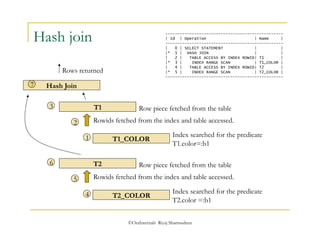
Hash join ------------------------------------------------- 
| Id | Operation | Name | 
------------------------------------------------- 
| 0 | SELECT STATEMENT | | 
|* 1 | HASH JOIN | | 
| 2 | TABLE ACCESS BY INDEX ROWID| T1 | 
|* 3 | INDEX RANGE SCAN | T1_COLOR | 
| 4 | TABLE ACCESS BY INDEX ROWID| T2 | 
|* 5 | INDEX RANGE SCAN | T2_COLOR | 
------------------------------------------------- 
T1 
Row piece fetched from the table 
Rowids fetched from the index and table accessed. 
T1_COLOR 
Index searched for the predicate 
T1.color=:b1 
T2 
Row piece fetched from the table 
Rowids fetched from the index and table accessed. 
©OraInternals Riyaj Shamsudeen 
1 
Hash Join 
2 
3 
T2_COLOR 
Index searched for the predicate 
T2.color =:b1 
4 
5 
6 
Rows returned 
7
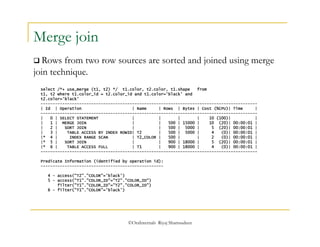
 Rows from two row sources are sorted and joined using merge 
join technique. 
©OraInternals Riyaj Shamsudeen 
Merge join 
select /*+ use_merge (t1, t2) */ t1.color, t2.color, t1.shape from 
t1, t2 where t1.color_id = t2.color_id and t1.color='black' and 
t2.color='black' 
------------------------------------------------------------------------------------------ 
| Id | Operation | Name | Rows | Bytes | Cost (%CPU)| Time | 
------------------------------------------------------------------------------------------ 
| 0 | SELECT STATEMENT | | | | 10 (100)| | 
| 1 | MERGE JOIN | | 500 | 15000 | 10 (20)| 00:00:01 | 
| 2 | SORT JOIN | | 500 | 5000 | 5 (20)| 00:00:01 | 
| 3 | TABLE ACCESS BY INDEX ROWID| T2 | 500 | 5000 | 4 (0)| 00:00:01 | 
|* 4 | INDEX RANGE SCAN | T2_COLOR | 500 | | 2 (0)| 00:00:01 | 
|* 5 | SORT JOIN | | 900 | 18000 | 5 (20)| 00:00:01 | 
|* 6 | TABLE ACCESS FULL | T1 | 900 | 18000 | 4 (0)| 00:00:01 | 
------------------------------------------------------------------------------------------ 
Predicate Information (identified by operation id): 
--------------------------------------------------- 
4 - access("T2"."COLOR"='black') 
5 - access("T1"."COLOR_ID"="T2"."COLOR_ID") 
filter("T1"."COLOR_ID"="T2"."COLOR_ID") 
6 - filter("T1"."COLOR"='black')
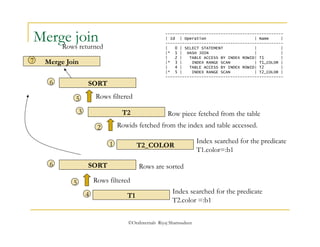
Merge join ------------------------------------------------- 
| Id | Operation | Name | 
------------------------------------------------- 
| 0 | SELECT STATEMENT | | 
|* 1 | HASH JOIN | | 
| 2 | TABLE ACCESS BY INDEX ROWID| T1 | 
|* 3 | INDEX RANGE SCAN | T1_COLOR | 
| 4 | TABLE ACCESS BY INDEX ROWID| T2 | 
|* 5 | INDEX RANGE SCAN | T2_COLOR | 
------------------------------------------------- 
T2 
Rowids fetched from the index and table accessed. 
Row piece fetched from the table 
T2_COLOR 
©OraInternals Riyaj Shamsudeen 
Index searched for the predicate 
T1.color=:b1 
1 
2 
Merge Join 
3 
T1 
Index searched for the predicate 
T2.color =:b1 
SORT 
Rows filtered 
Rows are sorted 
4 
5 
6 
Rows returned 
7 
SORT 
5 Rows filtered 
6
©OraInternals Riyaj Shamsudeen 
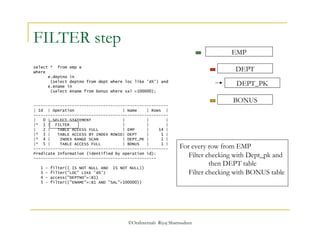
FILTER step 
select * from emp e 
where 
e.deptno in 
(select deptno from dept where loc like 'A%') and 
e.ename in 
(select ename from bonus where sal >100000); 
-------------------------------------------------------- 
| Id | Operation | Name | Rows | 
-------------------------------------------------------- 
| 0 | SELECT STATEMENT | | | 
|* 1 | FILTER | | | 
| 2 | TABLE ACCESS FULL | EMP | 14 | 
|* 3 | TABLE ACCESS BY INDEX ROWID| DEPT | 1 | 
|* 4 | INDEX RANGE SCAN | DEPT_PK | 1 | 
|* 5 | TABLE ACCESS FULL | BONUS | 1 | 
-------------------------------------------------------- 
Predicate Information (identified by operation id): 
--------------------------------------------------- 
1 - filter(( IS NOT NULL AND IS NOT NULL)) 
3 - filter("LOC" LIKE 'A%') 
4 - access("DEPTNO"=:B1) 
5 - filter(("ENAME"=:B1 AND "SAL">100000)) 
EMP 
DEPT 
DEPT_PK 
BONUS 
For every row from EMP 
Filter checking with Dept_pk and 
then DEPT table 
Filter checking with BONUS table
©OraInternals Riyaj Shamsudeen 46 
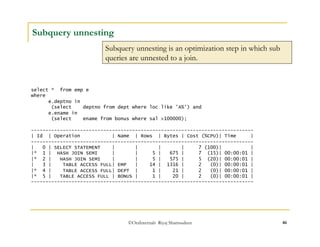
Subquery unnesting 
Subquery unnesting is an optimization step in which sub 
queries are unnested to a join. 
select * from emp e 
where 
e.deptno in 
(select deptno from dept where loc like 'A%') and 
e.ename in 
(select ename from bonus where sal >100000); 
----------------------------------------------------------------------------- 
| Id | Operation | Name | Rows | Bytes | Cost (%CPU)| Time | 
----------------------------------------------------------------------------- 
| 0 | SELECT STATEMENT | | | | 7 (100)| | 
|* 1 | HASH JOIN SEMI | | 5 | 675 | 7 (15)| 00:00:01 | 
|* 2 | HASH JOIN SEMI | | 5 | 575 | 5 (20)| 00:00:01 | 
| 3 | TABLE ACCESS FULL| EMP | 14 | 1316 | 2 (0)| 00:00:01 | 
|* 4 | TABLE ACCESS FULL| DEPT | 1 | 21 | 2 (0)| 00:00:01 | 
|* 5 | TABLE ACCESS FULL | BONUS | 1 | 20 | 2 (0)| 00:00:01 | 
-----------------------------------------------------------------------------
©OraInternals Riyaj Shamsudeen 
Summary 
 There are different types of join techniques. 
 There are no one join techniques superior to other join technique. 
If that is the case, Oracle product would not choose inferior 
techniques. 
 Choosing a join method suitable for the SQL statement is also a 
necessary step of tuning that statement.
Common problem areas in an execution plan. 
©OraInternals Riyaj Shamsudeen 48
Identify plan issues 
 There are couple of clues in the execution plan that can give you 
a hint about the root cause. 
 Following few slides details these clues. But, this is not a complete 
list. 
 It is probably a better idea to test your theory 
 by rewriting the query 
 by adjusting the execution plan with hints 
 by testing with a different database or different set of data. 
©OraInternals Riyaj Shamsudeen
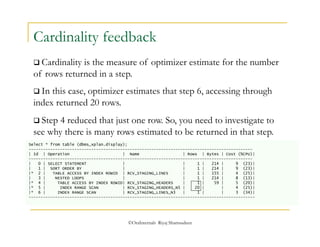
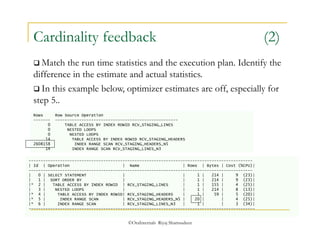
Cardinality feedback 
 Cardinality is the measure of optimizer estimate for the number 
of rows returned in a step. 
 In this case, optimizer estimates that step 6, accessing through 
index returned 20 rows. 
 Step 4 reduced that just one row. So, you need to investigate to 
see why there is many rows estimated to be returned in that step. 
Select * from table (dbms_xplan.display); 
--------------------------------------------------------------------------------------------- 
| Id | Operation | Name | Rows | Bytes | Cost (%CPU)| 
--------------------------------------------------------------------------------------------- 
| 0 | SELECT STATEMENT | | 1 | 214 | 9 (23)| 
| 1 | SORT ORDER BY | | 1 | 214 | 9 (23)| 
|* 2 | TABLE ACCESS BY INDEX ROWID | RCV_STAGING_LINES | 1 | 155 | 4 (25)| 
| 3 | NESTED LOOPS | | 1 | 214 | 8 (13)| 
|* 4 | TABLE ACCESS BY INDEX ROWID| RCV_STAGING_HEADERS | 1 | 59 | 5 (20)| 
|* 5 | INDEX RANGE SCAN | RCV_STAGING_HEADERS_N5 | 20 | | 4 (25)| 
|* 6 | INDEX RANGE SCAN | RCV_STAGING_LINES_N3 | 1 | | 3 (34)| 
---------------------------------------------------------------------------------------------- 
©OraInternals Riyaj Shamsudeen
Cardinality feedback (2) 
 Match the run time statistics and the execution plan. Identify the 
difference in the estimate and actual statistics. 
 In this example below, optimizer estimates are off, especially for 
step 5.. 
Rows Row Source Operation 
------- --------------------------------------------------- 
0 TABLE ACCESS BY INDEX ROWID RCV_STAGING_LINES 
0 NESTED LOOPS 
0 NESTED LOOPS 
14 TABLE ACCESS BY INDEX ROWID RCV_STAGING_HEADERS 
2608158 INDEX RANGE SCAN RCV_STAGING_HEADERS_N5 
14 INDEX RANGE SCAN RCV_STAGING_LINES_N3 
--------------------------------------------------------------------------------------------- 
| Id | Operation | Name | Rows | Bytes | Cost (%CPU)| 
--------------------------------------------------------------------------------------------- 
| 0 | SELECT STATEMENT | | 1 | 214 | 9 (23)| 
| 1 | SORT ORDER BY | | 1 | 214 | 9 (23)| 
|* 2 | TABLE ACCESS BY INDEX ROWID | RCV_STAGING_LINES | 1 | 155 | 4 (25)| 
| 3 | NESTED LOOPS | | 1 | 214 | 8 (13)| 
|* 4 | TABLE ACCESS BY INDEX ROWID| RCV_STAGING_HEADERS | 1 | 59 | 5 (20)| 
|* 5 | INDEX RANGE SCAN | RCV_STAGING_HEADERS_N5 | 20 | | 4 (25)| 
|* 6 | INDEX RANGE SCAN | RCV_STAGING_LINES_N3 | 1 | | 3 (34)| 
---------------------------------------------------------------------------------------------- 
©OraInternals Riyaj Shamsudeen
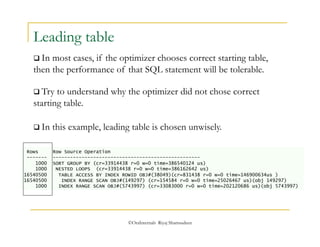
 Try to understand why the optimizer did not chose correct 
starting table. 
 In this example, leading table is chosen unwisely. 
©OraInternals Riyaj Shamsudeen 
Leading table 
 In most cases, if the optimizer chooses correct starting table, 
then the performance of that SQL statement will be tolerable. 
Rows Row Source Operation 
------- --------------------------------------------------- 
1000 SORT GROUP BY (cr=33914438 r=0 w=0 time=386540124 us) 
1000 NESTED LOOPS (cr=33914438 r=0 w=0 time=386162642 us) 
16540500 TABLE ACCESS BY INDEX ROWID OBJ#(38049)(cr=831438 r=0 w=0 time=146900634us ) 
16540500 INDEX RANGE SCAN OBJ#(149297) (cr=154584 r=0 w=0 time=25026467 us)(obj 149297) 
1000 INDEX RANGE SCAN OBJ#(5743997) (cr=33083000 r=0 w=0 time=202120686 us)(obj 5743997)
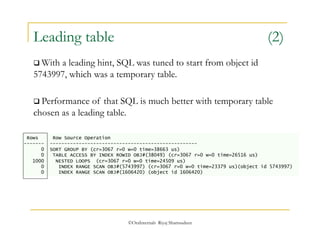
Leading table (2) 
 With a leading hint, SQL was tuned to start from object id 
5743997, which was a temporary table. 
 Performance of that SQL is much better with temporary table 
chosen as a leading table. 
Rows Row Source Operation 
------- --------------------------------------------------- 
0 SORT GROUP BY (cr=3067 r=0 w=0 time=38663 us) 
0 TABLE ACCESS BY INDEX ROWID OBJ#(38049) (cr=3067 r=0 w=0 time=26516 us) 
1000 NESTED LOOPS (cr=3067 r=0 w=0 time=24509 us) 
0 INDEX RANGE SCAN OBJ#(5743997) (cr=3067 r=0 w=0 time=23379 us)(object id 5743997) 
0 INDEX RANGE SCAN OBJ#(1606420) (object id 1606420) 
©OraInternals Riyaj Shamsudeen
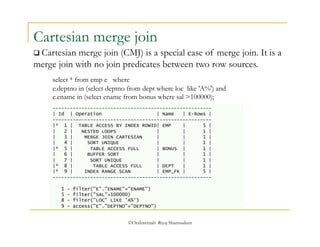
Cartesian merge join 
 Cartesian merge join (CMJ) is a special case of merge join. It is a 
merge join with no join predicates between two row sources. 
select * from emp e where 
e.deptno in (select deptno from dept where loc like 'A%') and 
e.ename in (select ename from bonus where sal >100000); 
------------------------------------------------------- 
| Id | Operation | Name | E-Rows | 
------------------------------------------------------- 
|* 1 | TABLE ACCESS BY INDEX ROWID| EMP | 5 | 
| 2 | NESTED LOOPS | | 1 | 
| 3 | MERGE JOIN CARTESIAN | | 1 | 
| 4 | SORT UNIQUE | | 1 | 
|* 5 | TABLE ACCESS FULL | BONUS | 1 | 
| 6 | BUFFER SORT | | 1 | 
| 7 | SORT UNIQUE | | 1 | 
|* 8 | TABLE ACCESS FULL | DEPT | 1 | 
|* 9 | INDEX RANGE SCAN | EMP_FK | 5 | 
------------------------------------------------------- 
1 - filter("E"."ENAME"="ENAME") 
5 - filter("SAL">100000) 
8 - filter("LOC" LIKE 'A%') 
9 - access("E"."DEPTNO"="DEPTNO") 
©OraInternals Riyaj Shamsudeen
Nested Loops join 
©OraInternals Riyaj Shamsudeen 
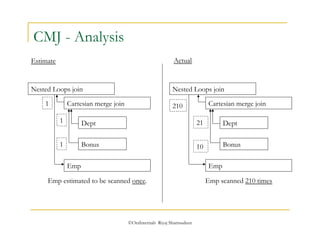
CMJ - Analysis 
Nested Loops join 
Cartesian merge join 
Dept 
Bonus 
Emp 
Cartesian merge join 
Dept 
Bonus 
Emp 
Estimate Actual 
1 
1 
1 
10 
Emp estimated to be scanned once. 
21 
210 
Emp scanned 210 times
CMJ & cardinality 
 If the row source cardinality is incorrectly estimated as 1, then 
SQL statements with cartesian merge join can be a performance 
bottleneck. 
 In some cases, it may be necessary to avoid this unnesting with an 
hint. select * from emp e where 
e.deptno in (select /*+ no_unnest */ deptno from dept where loc like 'A%') and 
e.ename in (select ename from bonus where sal >100000); 
--------------------------------------------------------- 
| Id | Operation | Name | E-Rows | 
--------------------------------------------------------- 
|* 1 | FILTER | | | 
|* 2 | HASH JOIN SEMI | | 1 | 
| 3 | TABLE ACCESS FULL | EMP | 14 | 
|* 4 | TABLE ACCESS FULL | BONUS | 1 | 
|* 5 | TABLE ACCESS BY INDEX ROWID| DEPT | 1 | 
|* 6 | INDEX RANGE SCAN | DEPT_PK | 1 | 
--------------------------------------------------------- 
©OraInternals Riyaj Shamsudeen
 Normal views do not store data, just the definition of the view. 
©OraInternals Riyaj Shamsudeen 
View merging 
 View definitions are merged with calling query or DML statement 
and merged to create final execution plan. 
create or replace view bonus_simple_vw as select job, sal from bonus; 
select e.ename, e.job, e.sal, b.sal from emp e, bonus_simple_vw b where 
e.job=b.job; 
--------------------------------------------- 
| Id | Operation | Name | E-Rows | 
--------------------------------------------- 
| 1 | NESTED LOOPS | | 1 | 
| 2 | TABLE ACCESS FULL| EMP | 14 | 
|* 3 | TABLE ACCESS FULL| BONUS | 1 | 
--------------------------------------------- 
Predicate Information (identified by operation id): 
--------------------------------------------------- 
3 - filter("E"."JOB"="JOB")
 But, some views are not merge-able. 
©OraInternals Riyaj Shamsudeen 
View merging 
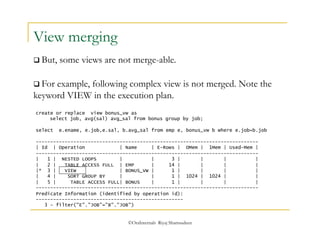
 For example, following complex view is not merged. Note the 
keyword VIEW in the execution plan. 
create or replace view bonus_vw as 
select job, avg(sal) avg_sal from bonus group by job; 
select e.ename, e.job,e.sal, b.avg_sal from emp e, bonus_vw b where e.job=b.job 
----------------------------------------------------------------------------- 
| Id | Operation | Name | E-Rows | OMem | 1Mem | Used-Mem | 
----------------------------------------------------------------------------- 
| 1 | NESTED LOOPS | | 3 | | | | 
| 2 | TABLE ACCESS FULL | EMP | 14 | | | | 
|* 3 | VIEW | BONUS_VW | 1 | | | | 
| 4 | SORT GROUP BY | | 1 | 1024 | 1024 | | 
| 5 | TABLE ACCESS FULL| BONUS | 1 | | | | 
----------------------------------------------------------------------------- 
Predicate Information (identified by operation id): 
--------------------------------------------------- 
3 - filter("E"."JOB"="B"."JOB")
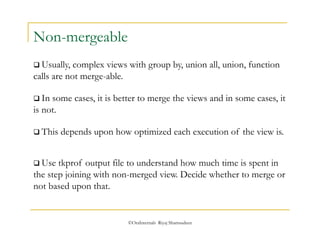
 Usually, complex views with group by, union all, union, function 
calls are not merge-able. 
 This depends upon how optimized each execution of the view is. 
©OraInternals Riyaj Shamsudeen 
Non-mergeable 
 In some cases, it is better to merge the views and in some cases, it 
is not. 
 Use tkprof output file to understand how much time is spent in 
the step joining with non-merged view. Decide whether to merge or 
not based upon that.
Writing optimal SQL 
©OraInternals Riyaj Shamsudeen 60
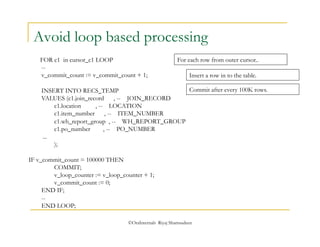
Avoid loop based processing 
FOR c1 in cursor_c1 LOOP 
-- 
v_commit_count := v_commit_count + 1; 
INSERT INTO RECS_TEMP 
VALUES (c1.join_record , -- JOIN_RECORD 
c1.location , -- LOCATION 
c1.item_number , -- ITEM_NUMBER 
c1.wh_report_group , -- WH_REPORT_GROUP 
c1.po_number , -- PO_NUMBER 
©OraInternals Riyaj Shamsudeen 
... 
); 
IF v_commit_count = 100000 THEN 
COMMIT; 
v_loop_counter := v_loop_counter + 1; 
v_commit_count := 0; 
END IF; 
-- 
END LOOP; 
For each row from outer cursor.. 
Insert a row in to the table. 
Commit after every 100K rows.
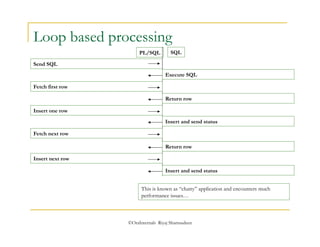
Loop based processing 
©OraInternals Riyaj Shamsudeen 
Send SQL 
Execute SQL 
Fetch first row 
Return row 
Insert one row 
Insert and send status 
Fetch next row 
Return row 
Insert next row 
PL/SQL SQL 
Insert and send status 
This is known as “chatty” application and encounters much 
performance issues…
Think in terms of set 
 SQL is a set language. SQL is optimized to work as a set 
language. 
 Avoid row-by-row processing if possible. 
 In some cases, Loops are unavoidable. 
©OraInternals Riyaj Shamsudeen
©OraInternals Riyaj Shamsudeen 
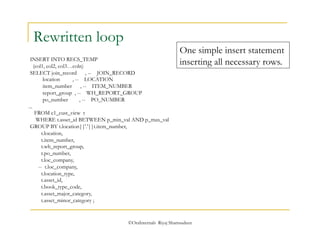
Rewritten loop 
INSERT INTO RECS_TEMP 
(col1, col2, col3…coln) 
SELECT join_record , -- JOIN_RECORD 
location , -- LOCATION 
item_number , -- ITEM_NUMBER 
report_group , -- WH_REPORT_GROUP 
po_number , -- PO_NUMBER 
... 
FROM c1_cust_view t 
WHERE t.asset_id BETWEEN p_min_val AND p_max_val 
GROUP BY t.location||'.'||t.item_number, 
t.location, 
t.item_number, 
t.wh_report_group, 
t.po_number, 
t.loc_company, 
-- t.loc_company, 
t.location_type, 
t.asset_id, 
t.book_type_code, 
t.asset_major_category, 
t.asset_minor_category ; 
One simple insert statement 
inserting all necessary rows.
Few guidelines… 
 Use direct SQL statements. 
 If PL/SQL loop can’t be avoided use array based processing. 
 bulk bind, bulk fetch, bulk insert etc. 
 If another host language such as ‘C’ or java, use arrays and host language 
facilities to reduce round trip network calls between client and the database. 
©OraInternals Riyaj Shamsudeen
©OraInternals Riyaj Shamsudeen 
Use joins (1) 
 Optimizer will tries to convert almost all sub-queries to a join format. 
 Join conditions provides more permutations for the optimizer to tune your 
SQL statement. 
 Due to complex SQL statement, providing more options to optimizer to tune 
your SQL will improve the performance of that statement.
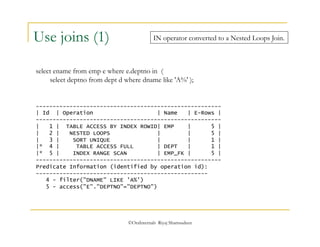
IN operator converted to a Nested Loops Join. 
select ename from emp e where e.deptno in ( 
select deptno from dept d where dname like 'A%' ); 
©OraInternals Riyaj Shamsudeen 
Use joins (1) 
------------------------------------------------------- 
| Id | Operation | Name | E-Rows | 
------------------------------------------------------- 
| 1 | TABLE ACCESS BY INDEX ROWID| EMP | 5 | 
| 2 | NESTED LOOPS | | 5 | 
| 3 | SORT UNIQUE | | 1 | 
|* 4 | TABLE ACCESS FULL | DEPT | 1 | 
|* 5 | INDEX RANGE SCAN | EMP_FK | 5 | 
------------------------------------------------------- 
Predicate Information (identified by operation id): 
--------------------------------------------------- 
4 - filter("DNAME" LIKE 'A%') 
5 - access("E"."DEPTNO"="DEPTNO")
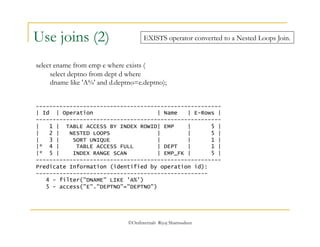
EXISTS operator converted to a Nested Loops Join. 
©OraInternals Riyaj Shamsudeen 
Use joins (2) 
select ename from emp e where exists ( 
select deptno from dept d where 
dname like 'A%' and d.deptno=e.deptno); 
------------------------------------------------------- 
| Id | Operation | Name | E-Rows | 
------------------------------------------------------- 
| 1 | TABLE ACCESS BY INDEX ROWID| EMP | 5 | 
| 2 | NESTED LOOPS | | 5 | 
| 3 | SORT UNIQUE | | 1 | 
|* 4 | TABLE ACCESS FULL | DEPT | 1 | 
|* 5 | INDEX RANGE SCAN | EMP_FK | 5 | 
------------------------------------------------------- 
Predicate Information (identified by operation id): 
--------------------------------------------------- 
4 - filter("DNAME" LIKE 'A%') 
5 - access("E"."DEPTNO"="DEPTNO")
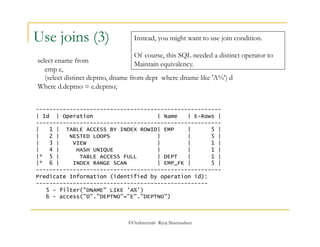
Instead, you might want to use join condition. 
Of course, this SQL needed a distinct operator to 
Maintain equivalency. 
©OraInternals Riyaj Shamsudeen 
Use joins (3) 
select ename from 
emp e, 
(select distinct deptno, dname from dept where dname like 'A%') d 
Where d.deptno = e.deptno; 
------------------------------------------------------- 
| Id | Operation | Name | E-Rows | 
------------------------------------------------------- 
| 1 | TABLE ACCESS BY INDEX ROWID| EMP | 5 | 
| 2 | NESTED LOOPS | | 5 | 
| 3 | VIEW | | 1 | 
| 4 | HASH UNIQUE | | 1 | 
|* 5 | TABLE ACCESS FULL | DEPT | 1 | 
|* 6 | INDEX RANGE SCAN | EMP_FK | 5 | 
------------------------------------------------------- 
Predicate Information (identified by operation id): 
--------------------------------------------------- 
5 - filter("DNAME" LIKE 'A%') 
6 - access("D"."DEPTNO"="E"."DEPTNO")
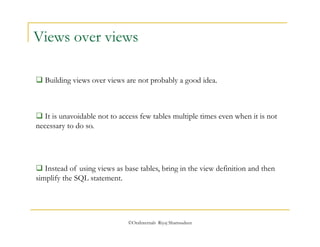
Views over views 
 Building views over views are not probably a good idea. 
 It is unavoidable not to access few tables multiple times even when it is not 
necessary to do so. 
 Instead of using views as base tables, bring in the view definition and then 
simplify the SQL statement. 
©OraInternals Riyaj Shamsudeen
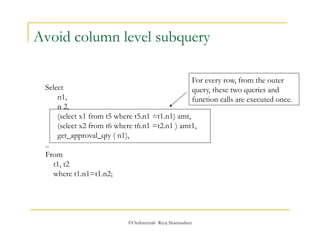
Avoid column level subquery 
©OraInternals Riyaj Shamsudeen 
Select 
n1, 
n 2, 
(select x1 from t5 where t5.n1 =t1.n1) amt, 
(select x2 from t6 where t6.n1 =t2.n1 ) amt1, 
get_approval_qty ( n1), 
.. 
From 
t1, t2 
where t1.n1=t1.n2; 
For every row, from the outer 
query, these two queries and 
function calls are executed once.
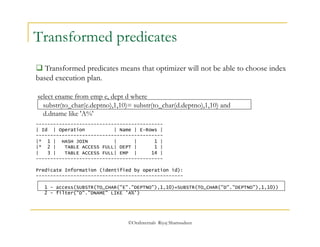
Transformed predicates 
 Transformed predicates means that optimizer will not be able to choose index 
based execution plan. 
select ename from emp e, dept d where 
substr(to_char(e.deptno),1,10)= substr(to_char(d.deptno),1,10) and 
d.dname like 'A%' 
-------------------------------------------- 
| Id | Operation | Name | E-Rows | 
-------------------------------------------- 
|* 1 | HASH JOIN | | 1 | 
|* 2 | TABLE ACCESS FULL| DEPT | 1 | 
| 3 | TABLE ACCESS FULL| EMP | 14 | 
-------------------------------------------- 
Predicate Information (identified by operation id): 
--------------------------------------------------- 
1 - access(SUBSTR(TO_CHAR("E"."DEPTNO"),1,10)=SUBSTR(TO_CHAR("D"."DEPTNO"),1,10)) 
2 - filter("D"."DNAME" LIKE 'A%') 
©OraInternals Riyaj Shamsudeen
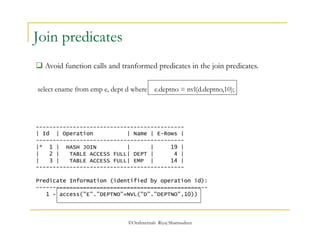
select ename from emp e, dept d where e.deptno = nvl(d.deptno,10); 
©OraInternals Riyaj Shamsudeen 
Join predicates 
 Avoid function calls and tranformed predicates in the join predicates. 
-------------------------------------------- 
| Id | Operation | Name | E-Rows | 
-------------------------------------------- 
|* 1 | HASH JOIN | | 19 | 
| 2 | TABLE ACCESS FULL| DEPT | 4 | 
| 3 | TABLE ACCESS FULL| EMP | 14 | 
-------------------------------------------- 
Predicate Information (identified by operation id): 
--------------------------------------------------- 
1 - access("E"."DEPTNO"=NVL("D"."DEPTNO",10))
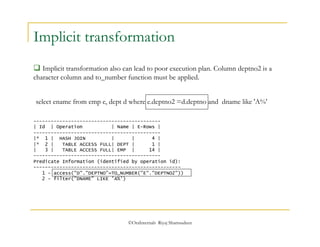
Implicit transformation 
 Implicit transformation also can lead to poor execution plan. Column deptno2 is a 
character column and to_number function must be applied. 
select ename from emp e, dept d where e.deptno2 =d.deptno and dname like 'A%' 
-------------------------------------------- 
| Id | Operation | Name | E-Rows | 
-------------------------------------------- 
|* 1 | HASH JOIN | | 4 | 
|* 2 | TABLE ACCESS FULL| DEPT | 1 | 
| 3 | TABLE ACCESS FULL| EMP | 14 | 
-------------------------------------------- 
Predicate Information (identified by operation id): 
--------------------------------------------------- 
1 - access("D"."DEPTNO"=TO_NUMBER("E"."DEPTNO2")) 
2 - filter("DNAME" LIKE 'A%') 
©OraInternals Riyaj Shamsudeen
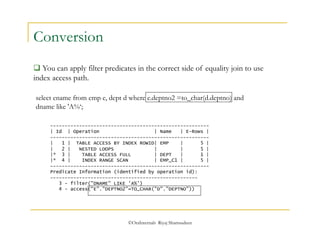
select ename from emp e, dept d where e.deptno2 =to_char(d.deptno) and 
dname like 'A%‘; 
©OraInternals Riyaj Shamsudeen 
Conversion 
 You can apply filter predicates in the correct side of equality join to use 
index access path. 
------------------------------------------------------- 
| Id | Operation | Name | E-Rows | 
------------------------------------------------------- 
| 1 | TABLE ACCESS BY INDEX ROWID| EMP | 5 | 
| 2 | NESTED LOOPS | | 5 | 
|* 3 | TABLE ACCESS FULL | DEPT | 1 | 
|* 4 | INDEX RANGE SCAN | EMP_C1 | 5 | 
------------------------------------------------------- 
Predicate Information (identified by operation id): 
--------------------------------------------------- 
3 - filter("DNAME" LIKE 'A%') 
4 - access("E"."DEPTNO2"=TO_CHAR("D"."DEPTNO"))
©OraInternals Riyaj Shamsudeen 
EXISTS vs IN 
Select * from emp 
where deptno in (select deptno from dept where name=‘ACCOUNTING’ ) ; 
 If the inner subquery will return very few rows, then use IN operator. 
 In this case, there is just one row from the dept table and so, IN operator 
is more appropriate. 
 Simply put, driving table has very few rows and DEPT is the driving table 
for this SQL statement.
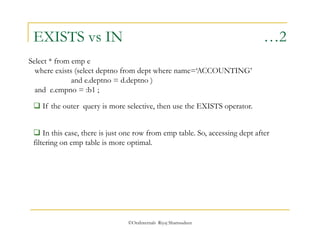
EXISTS vs IN …2 
Select * from emp e 
where exists (select deptno from dept where name=‘ACCOUNTING’ 
and e.deptno = d.deptno ) 
and e.empno = :b1 ; 
 If the outer query is more selective, then use the EXISTS operator. 
 In this case, there is just one row from emp table. So, accessing dept after 
filtering on emp table is more optimal. 
©OraInternals Riyaj Shamsudeen
Excessive revisits 
©OraInternals Riyaj Shamsudeen 
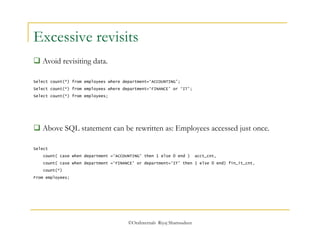
 Avoid revisiting data. 
Select count(*) from employees where department=‘ACCOUNTING’; 
Select count(*) from employees where department=‘FINANCE’ or ‘IT’; 
Select count(*) from employees; 
 Above SQL statement can be rewritten as: Employees accessed just once. 
Select 
count( case when department =‘ACCOUNTING’ then 1 else 0 end ) acct_cnt, 
count( case when department =‘FINANCE’ or department=‘IT’ then 1 else 0 end) fin_it_cnt, 
count(*) 
From employees;
©OraInternals Riyaj Shamsudeen 
Full table scan 
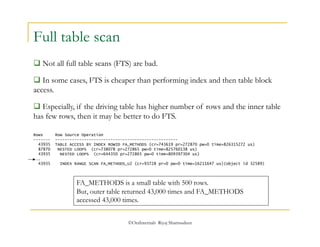
 Not all full table scans (FTS) are bad. 
 In some cases, FTS is cheaper than performing index and then table block 
access. 
 Especially, if the driving table has higher number of rows and the inner table 
has few rows, then it may be better to do FTS. 
Rows Row Source Operation 
------- --------------------------------------------------- 
43935 TABLE ACCESS BY INDEX ROWID FA_METHODS (cr=743619 pr=272870 pw=0 time=826315272 us) 
87870 NESTED LOOPS (cr=738078 pr=272865 pw=0 time=825760138 us) 
43935 NESTED LOOPS (cr=644350 pr=272865 pw=0 time=809397304 us) 
... 
43935 INDEX RANGE SCAN FA_METHODS_U2 (cr=93728 pr=0 pw=0 time=16211647 us)(object id 32589) 
FA_METHODS is a small table with 500 rows. 
But, outer table returned 43,000 times and FA_METHODS 
accessed 43,000 times.
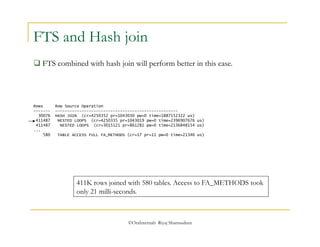
FTS and Hash join 
 FTS combined with hash join will perform better in this case. 
Rows Row Source Operation 
------- --------------------------------------------------- 
30076 HASH JOIN (cr=4250352 pr=1043030 pw=0 time=1887152322 us) 
411487 NESTED LOOPS (cr=4250335 pr=1043019 pw=0 time=2396907676 us) 
411487 NESTED LOOPS (cr=3015121 pr=861281 pw=0 time=2136848154 us) 
... 
580 TABLE ACCESS FULL FA_METHODS (cr=17 pr=11 pw=0 time=21346 us) 
411K rows joined with 580 tables. Access to FA_METHODS took 
only 21 milli-seconds. 
©OraInternals Riyaj Shamsudeen
©OraInternals Riyaj Shamsudeen 
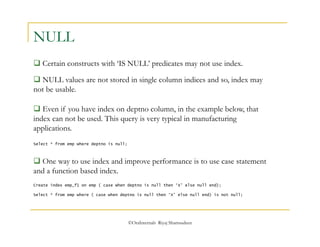
NULL 
 Certain constructs with ‘IS NULL’ predicates may not use index. 
 NULL values are not stored in single column indices and so, index may 
not be usable. 
 Even if you have index on deptno column, in the example below, that 
index can not be used. This query is very typical in manufacturing 
applications. 
Select * from emp where deptno is null; 
 One way to use index and improve performance is to use case statement 
and a function based index. 
Create index emp_f1 on emp ( case when deptno is null then ‘X’ else null end); 
Select * from emp where ( case when deptno is null then ‘X’ else null end) is not null;
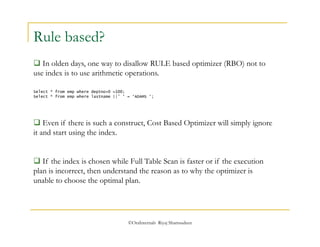
Select * from emp where deptno+0 =100; 
Select * from emp where lastname ||’ ‘ = ‘ADAMS ‘; 
©OraInternals Riyaj Shamsudeen 
Rule based? 
 In olden days, one way to disallow RULE based optimizer (RBO) not to 
use index is to use arithmetic operations. 
 Even if there is such a construct, Cost Based Optimizer will simply ignore 
it and start using the index. 
 If the index is chosen while Full Table Scan is faster or if the execution 
plan is incorrect, then understand the reason as to why the optimizer is 
unable to choose the optimal plan.
©OraInternals Riyaj Shamsudeen 
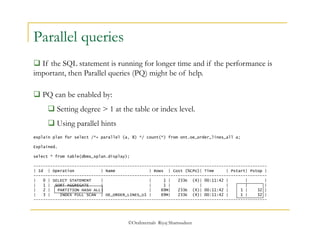
Parallel queries 
 If the SQL statement is running for longer time and if the performance is 
important, then Parallel queries (PQ) might be of help. 
 PQ can be enabled by: 
 Setting degree > 1 at the table or index level. 
 Using parallel hints 
explain plan for select /*+ parallel (a, 8) */ count(*) from ont.oe_order_lines_all a; 
Explained. 
select * from table(dbms_xplan.display); 
------------------------------------------------------------------------------------------------- 
| Id | Operation | Name | Rows | Cost (%CPU)| Time | Pstart| Pstop | 
------------------------------------------------------------------------------------------------- 
| 0 | SELECT STATEMENT | | 1 | 233K (4)| 00:11:42 | | | 
| 1 | SORT AGGREGATE | | 1 | | | | | 
| 2 | PARTITION HASH ALL| | 69M| 233K (4)| 00:11:42 | 1 | 32 | 
| 3 | INDEX FULL SCAN | OE_ORDER_LINES_U1 | 69M| 233K (4)| 00:11:42 | 1 | 32 | 
-------------------------------------------------------------------------------------------------
©OraInternals Riyaj Shamsudeen 
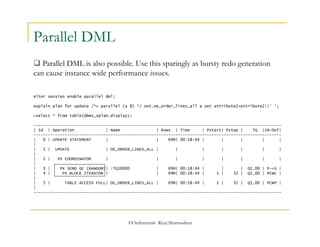
Parallel DML 
 Parallel DML is also possible. Use this sparingly as bursty redo generation 
can cause instance wide performance issues. 
Alter session enable parallel dml; 
explain plan for update /*+ parallel (a 8) */ ont.oe_order_lines_all a set attribute2=attribute2||' '; 
>select * from table(dbms_xplan.display); 
------------------------------------------------------------------------------------------------------- 
| Id | Operation | Name | Rows | Time | Pstart| Pstop | TQ |IN-OUT| 
------------------------------------------------------------------------------------------------------- 
| 0 | UPDATE STATEMENT | | 69M| 00:18:44 | | | | | 
| 
| 1 | UPDATE | OE_ORDER_LINES_ALL | | | | | | | 
| 
| 2 | PX COORDINATOR | | | | | | | | 
| 
| 3 | PX SEND QC (RANDOM)| :TQ10000 | 69M| 00:18:44 | | | Q1,00 | P->S | 
| 4 | PX BLOCK ITERATOR | | 69M| 00:18:44 | 1 | 32 | Q1,00 | PCWC | 
| 
| 5 | TABLE ACCESS FULL| OE_ORDER_LINES_ALL | 69M| 00:18:44 | 1 | 32 | Q1,00 | PCWP | 
| 
-------------------------------------------------------------------------------------------------------
 Following statement need to be hard parsed for execution. As the first 
name can change for every execution, it is not sharable. 
©OraInternals Riyaj Shamsudeen 
Parsing 
 For every unique SQL statement, Oracle Database must parse the 
statement, authenticate statement and generate an execution plan. 
 Use of literal variable makes SQL statements unsharable. 
Select ename from emp where first_name=‘SCOTT’; 
Select ename from emp where first_name=‘ADAM’; 
Select ename from emp where first_name=‘JUNE’; 
Select ename from emp where first_name=‘JAMES’;
Use Bind variables 
 Use of bind variables leads to sharable SQL statement. 
Select ename from emp where first_name=:B1; 
 Hard parsing a SQL statement is an expensive operation and lead to poor 
application scalability. 
©OraInternals Riyaj Shamsudeen 
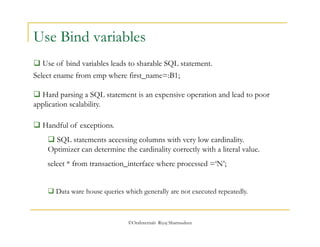
 Handful of exceptions. 
 SQL statements accessing columns with very low cardinality. 
Optimizer can determine the cardinality correctly with a literal value. 
select * from transaction_interface where processed =‘N’; 
 Data ware house queries which generally are not executed repeatedly.
Hints 
©OraInternals Riyaj Shamsudeen 87
©OraInternals Riyaj Shamsudeen 88 
HINTS 
 Hints are directive to the optimizer and almost always 
honored by the optimizer. 
 Hints are not honored only if the hints are inconsistent with 
itself or another hint. 
 Avoid hints, if possible. Many software upgrade performance 
issues that I have seen is due to hints(bad). 
 In some cases, hints are necessary evils 
©OraInternals Riyaj Shamsudeen 89 
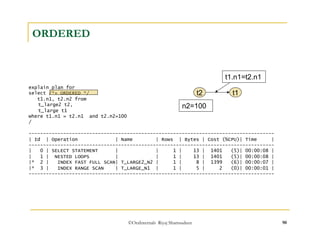
ORDERED 
 ORDERED hint Dictates optimizer an exact sequence of 
tables to join [ top to bottom or L->R canonically speaking]. 
Select … 
From t1, 
t2, 
t3, 
t4 
t1 t2 t3 t4
t1.n1=t2.n1 
t2 t1 
n2=100 
©OraInternals Riyaj Shamsudeen 90 
ORDERED 
explain plan for 
select /*+ ORDERED */ 
t1.n1, t2.n2 from 
t_large2 t2, 
t_large t1 
where t1.n1 = t2.n1 and t2.n2=100 
/ 
------------------------------------------------------------------------------------- 
| Id | Operation | Name | Rows | Bytes | Cost (%CPU)| Time | 
------------------------------------------------------------------------------------- 
| 0 | SELECT STATEMENT | | 1 | 13 | 1401 (5)| 00:00:08 | 
| 1 | NESTED LOOPS | | 1 | 13 | 1401 (5)| 00:00:08 | 
|* 2 | INDEX FAST FULL SCAN| T_LARGE2_N2 | 1 | 8 | 1399 (6)| 00:00:07 | 
|* 3 | INDEX RANGE SCAN | T_LARGE_N1 | 1 | 5 | 2 (0)| 00:00:01 | 
-------------------------------------------------------------------------------------
Optimizer did exactly what it is told to! 
t1.n1=t2.n1 
©OraInternals Riyaj Shamsudeen 91 
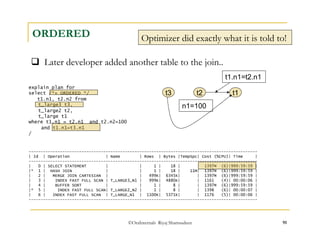
ORDERED 
 Later developer added another table to the join.. 
explain plan for 
select /*+ ORDERED */ 
t1.n1, t2.n2 from 
t_large3 t3, 
t_large2 t2, 
t_large t1 
where t1.n1 = t2.n1 and t2.n2=100 
and t1.n1=t3.n1 
/ 
t2 t1 
n1=100 
t3 
----------------------------------------------------------------------------------------------- 
| Id | Operation | Name | Rows | Bytes |TempSpc| Cost (%CPU)| Time | 
----------------------------------------------------------------------------------------------- 
| 0 | SELECT STATEMENT | | 1 | 18 | | 1397M (6)|999:59:59 | 
|* 1 | HASH JOIN | | 1 | 18 | 11M| 1397M (6)|999:59:59 | 
| 2 | MERGE JOIN CARTESIAN | | 499K| 6345K| | 1397M (6)|999:59:59 | 
| 3 | INDEX FAST FULL SCAN | T_LARGE3_N1 | 999K| 4880K| | 1161 (4)| 00:00:06 | 
| 4 | BUFFER SORT | | 1 | 8 | | 1397M (6)|999:59:59 | 
|* 5 | INDEX FAST FULL SCAN| T_LARGE2_N2 | 1 | 8 | | 1398 (6)| 00:00:07 | 
| 6 | INDEX FAST FULL SCAN | T_LARGE_N1 | 1100K| 5371K| | 1176 (5)| 00:00:06 | 
-----------------------------------------------------------------------------------------------
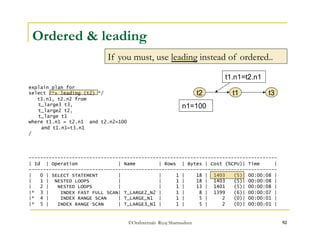
Ordered & leading 
If you must, use leading instead of ordered.. 
t1.n1=t2.n1 
©OraInternals Riyaj Shamsudeen 92 
explain plan for 
select /*+ leading (t2) */ 
t1.n1, t2.n2 from 
t_large3 t3, 
t_large2 t2, 
t_large t1 
where t1.n1 = t2.n1 and t2.n2=100 
and t1.n1=t3.n1 
/ 
t2 t1 
n1=100 
t3 
-------------------------------------------------------------------------------------- 
| Id | Operation | Name | Rows | Bytes | Cost (%CPU)| Time | 
-------------------------------------------------------------------------------------- 
| 0 | SELECT STATEMENT | | 1 | 18 | 1403 (5)| 00:00:08 | 
| 1 | NESTED LOOPS | | 1 | 18 | 1403 (5)| 00:00:08 | 
| 2 | NESTED LOOPS | | 1 | 13 | 1401 (5)| 00:00:08 | 
|* 3 | INDEX FAST FULL SCAN| T_LARGE2_N2 | 1 | 8 | 1399 (6)| 00:00:07 | 
|* 4 | INDEX RANGE SCAN | T_LARGE_N1 | 1 | 5 | 2 (0)| 00:00:01 | 
|* 5 | INDEX RANGE SCAN | T_LARGE3_N1 | 1 | 5 | 2 (0)| 00:00:01 |
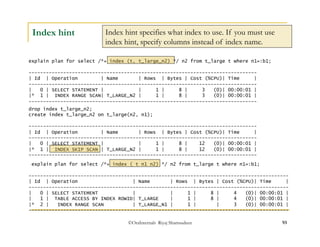
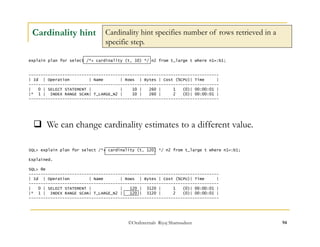
Index hint specifies what index to use. If you must use 
index hint, specify columns instead of index name. 
©OraInternals Riyaj Shamsudeen 93 
Index hint 
explain plan for select /*+ index (t, t_large_n2) */ n2 from t_large t where n1=:b1; 
------------------------------------------------------------------------------- 
| Id | Operation | Name | Rows | Bytes | Cost (%CPU)| Time | 
------------------------------------------------------------------------------- 
| 0 | SELECT STATEMENT | | 1 | 8 | 3 (0)| 00:00:01 | 
|* 1 | INDEX RANGE SCAN| T_LARGE_N2 | 1 | 8 | 3 (0)| 00:00:01 | 
------------------------------------------------------------------------------- 
drop index t_large_n2; 
create index t_large_n2 on t_large(n2, n1); 
------------------------------------------------------------------------------- 
| Id | Operation | Name | Rows | Bytes | Cost (%CPU)| Time | 
------------------------------------------------------------------------------- 
| 0 | SELECT STATEMENT | | 1 | 8 | 12 (0)| 00:00:01 | 
|* 1 | INDEX SKIP SCAN | T_LARGE_N2 | 1 | 8 | 12 (0)| 00:00:01 | 
------------------------------------------------------------------------------- 
explain plan for select /*+ index ( t n1 n2) */ n2 from t_large t where n1=:b1; 
------------------------------------------------------------------------------------------ 
| Id | Operation | Name | Rows | Bytes | Cost (%CPU)| Time | 
------------------------------------------------------------------------------------------ 
| 0 | SELECT STATEMENT | | 1 | 8 | 4 (0)| 00:00:01 | 
| 1 | TABLE ACCESS BY INDEX ROWID| T_LARGE | 1 | 8 | 4 (0)| 00:00:01 | 
|* 2 | INDEX RANGE SCAN | T_LARGE_N1 | 1 | | 3 (0)| 00:00:01 | 
------------------------------------------------------------------------------------------
Cardinality hint specifies number of rows retrieved in a 
specific step. 
 We can change cardinality estimates to a different value. 
©OraInternals Riyaj Shamsudeen 94 
Cardinality hint 
explain plan for select /*+ cardinality (t, 10) */ n2 from t_large t where n1=:b1; 
------------------------------------------------------------------------------- 
| Id | Operation | Name | Rows | Bytes | Cost (%CPU)| Time | 
------------------------------------------------------------------------------- 
| 0 | SELECT STATEMENT | | 10 | 260 | 1 (0)| 00:00:01 | 
|* 1 | INDEX RANGE SCAN| T_LARGE_N2 | 10 | 260 | 2 (0)| 00:00:01 | 
------------------------------------------------------------------------------- 
SQL> explain plan for select /*+ cardinality (t, 120) */ n2 from t_large t where n1=:b1; 
Explained. 
SQL> @e 
------------------------------------------------------------------------------- 
| Id | Operation | Name | Rows | Bytes | Cost (%CPU)| Time | 
------------------------------------------------------------------------------- 
| 0 | SELECT STATEMENT | | 120 | 3120 | 1 (0)| 00:00:01 | 
|* 1 | INDEX RANGE SCAN| T_LARGE_N2 | 120 | 3120 | 2 (0)| 00:00:01 | 
-------------------------------------------------------------------------------
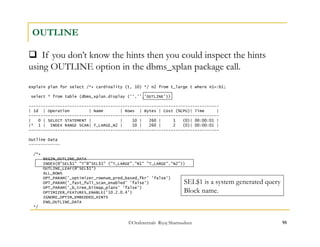
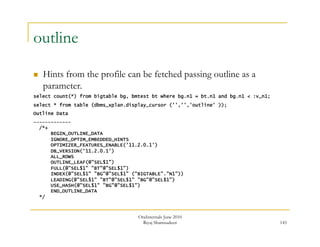
 If you don’t know the hints then you could inspect the hints 
using OUTLINE option in the dbms_xplan package call. 
©OraInternals Riyaj Shamsudeen 95 
OUTLINE 
explain plan for select /*+ cardinality (t, 10) */ n2 from t_large t where n1=:b1; 
select * from table (dbms_xplan.display ('','','OUTLINE')) 
------------------------------------------------------------------------------- 
| Id | Operation | Name | Rows | Bytes | Cost (%CPU)| Time | 
------------------------------------------------------------------------------- 
| 0 | SELECT STATEMENT | | 10 | 260 | 1 (0)| 00:00:01 | 
|* 1 | INDEX RANGE SCAN| T_LARGE_N2 | 10 | 260 | 2 (0)| 00:00:01 | 
------------------------------------------------------------------------------- 
Outline Data 
------------- 
/*+ 
BEGIN_OUTLINE_DATA 
INDEX(@"SEL$1" "T"@"SEL$1" ("T_LARGE"."N1" "T_LARGE"."N2")) 
OUTLINE_LEAF(@"SEL$1") 
ALL_ROWS 
OPT_PARAM('_optimizer_rownum_pred_based_fkr' 'false') 
OPT_PARAM('_fast_full_scan_enabled' 'false') 
OPT_PARAM('_b_tree_bitmap_plans' 'false') 
OPTIMIZER_FEATURES_ENABLE('10.2.0.4') 
IGNORE_OPTIM_EMBEDDED_HINTS 
END_OUTLINE_DATA 
*/ 
SEL$1 is a system generated query 
Block name.
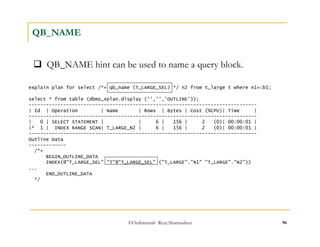
 QB_NAME hint can be used to name a query block. 
©OraInternals Riyaj Shamsudeen 96 
QB_NAME 
explain plan for select /*+ qb_name (T_LARGE_SEL) */ n2 from t_large t where n1=:b1; 
select * from table (dbms_xplan.display ('','','OUTLINE')); 
------------------------------------------------------------------------------- 
| Id | Operation | Name | Rows | Bytes | Cost (%CPU)| Time | 
------------------------------------------------------------------------------- 
| 0 | SELECT STATEMENT | | 6 | 156 | 2 (0)| 00:00:01 | 
|* 1 | INDEX RANGE SCAN| T_LARGE_N2 | 6 | 156 | 2 (0)| 00:00:01 | 
------------------------------------------------------------------------------- 
Outline Data 
------------- 
/*+ 
BEGIN_OUTLINE_DATA 
INDEX(@"T_LARGE_SEL" "T"@"T_LARGE_SEL" ("T_LARGE"."N1" "T_LARGE"."N2")) 
... 
END_OUTLINE_DATA 
*/
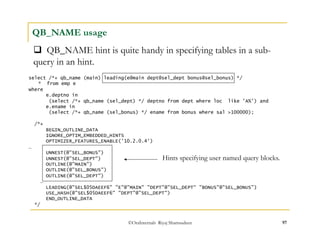
 QB_NAME hint is quite handy in specifying tables in a sub-query 
©OraInternals Riyaj Shamsudeen 97 
QB_NAME usage 
select /*+ qb_name (main) leading(e@main dept@sel_dept bonus@sel_bonus) */ 
* from emp e 
where 
e.deptno in 
(select /*+ qb_name (sel_dept) */ deptno from dept where loc like 'A%') and 
e.ename in 
(select /*+ qb_name (sel_bonus) */ ename from bonus where sal >100000); 
/*+ 
BEGIN_OUTLINE_DATA 
IGNORE_OPTIM_EMBEDDED_HINTS 
OPTIMIZER_FEATURES_ENABLE('10.2.0.4') 
… 
UNNEST(@"SEL_BONUS") 
UNNEST(@"SEL_DEPT") 
OUTLINE(@"MAIN") 
OUTLINE(@"SEL_BONUS") 
OUTLINE(@"SEL_DEPT") 
… 
LEADING(@"SEL$05DAEEF6" "E"@"MAIN" "DEPT"@"SEL_DEPT“ "BONUS"@"SEL_BONUS") 
USE_HASH(@"SEL$05DAEEF6" "DEPT"@"SEL_DEPT") 
END_OUTLINE_DATA 
*/ 
in an hint. 
Hints specifying user named query blocks.
Indexing, partitioning and more 
©OraInternals Riyaj Shamsudeen 98
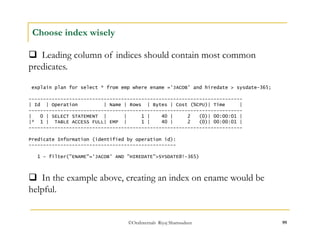
 Leading column of indices should contain most common 
predicates. 
©OraInternals Riyaj Shamsudeen 99 
Choose index wisely 
explain plan for select * from emp where ename ='JACOB' and hiredate > sysdate-365; 
-------------------------------------------------------------------------- 
| Id | Operation | Name | Rows | Bytes | Cost (%CPU)| Time | 
-------------------------------------------------------------------------- 
| 0 | SELECT STATEMENT | | 1 | 40 | 2 (0)| 00:00:01 | 
|* 1 | TABLE ACCESS FULL| EMP | 1 | 40 | 2 (0)| 00:00:01 | 
-------------------------------------------------------------------------- 
Predicate Information (identified by operation id): 
--------------------------------------------------- 
1 - filter("ENAME"='JACOB' AND "HIREDATE">SYSDATE@!-365) 
 In the example above, creating an index on ename would be 
helpful.
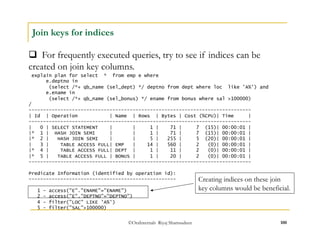
 For frequently executed queries, try to see if indices can be 
created on join key columns. 
©OraInternals Riyaj Shamsudeen 100 
Join keys for indices 
explain plan for select * from emp e where 
e.deptno in 
(select /*+ qb_name (sel_dept) */ deptno from dept where loc like 'A%') and 
e.ename in 
(select /*+ qb_name (sel_bonus) */ ename from bonus where sal >100000) 
/ 
----------------------------------------------------------------------------- 
| Id | Operation | Name | Rows | Bytes | Cost (%CPU)| Time | 
----------------------------------------------------------------------------- 
| 0 | SELECT STATEMENT | | 1 | 71 | 7 (15)| 00:00:01 | 
|* 1 | HASH JOIN SEMI | | 1 | 71 | 7 (15)| 00:00:01 | 
|* 2 | HASH JOIN SEMI | | 5 | 255 | 5 (20)| 00:00:01 | 
| 3 | TABLE ACCESS FULL| EMP | 14 | 560 | 2 (0)| 00:00:01 | 
|* 4 | TABLE ACCESS FULL| DEPT | 1 | 11 | 2 (0)| 00:00:01 | 
|* 5 | TABLE ACCESS FULL | BONUS | 1 | 20 | 2 (0)| 00:00:01 | 
----------------------------------------------------------------------------- 
Predicate Information (identified by operation id): 
--------------------------------------------------- 
1 - access("E"."ENAME"="ENAME") 
2 - access("E"."DEPTNO"="DEPTNO") 
4 - filter("LOC" LIKE 'A%') 
5 - filter("SAL">100000) 
Creating indices on these join 
key columns would be beneficial.
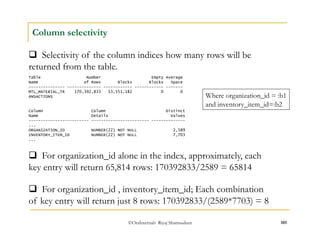
 Selectivity of the column indices how many rows will be 
returned from the table. 
Where organization_id = :b1 
and inventory_item_id=:b2 
©OraInternals Riyaj Shamsudeen 101 
Column selectivity 
Table Number Empty Average 
Name of Rows Blocks Blocks Space 
--------------- -------------- ------------ ------------ ------- 
MTL_MATERIAL_TR 170,392,833 13,551,182 0 0 
ANSACTIONS 
Column Column Distinct 
Name Details Values 
------------------------- ------------------------ -------------- 
... 
ORGANIZATION_ID NUMBER(22) NOT NULL 2,589 
INVENTORY_ITEM_ID NUMBER(22) NOT NULL 7,703 
... 
 For organization_id alone in the index, approximately, each 
key entry will return 65,814 rows: 170392833/2589 = 65814 
 For organization_id , inventory_item_id; Each combination 
of key entry will return just 8 rows: 170392833/(2589*7703) = 8
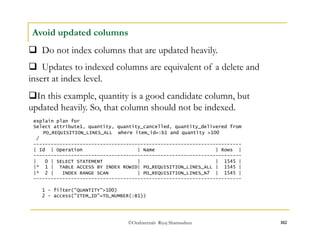
Avoid updated columns 
 Do not index columns that are updated heavily. 
 Updates to indexed columns are equivalent of a delete and 
insert at index level. 
 In this example, quantity is a good candidate column, but 
updated heavily. So, that column should not be indexed. 
explain plan for 
Select attribute1, quantity, quantity_cancelled, quantity_delivered from 
PO_REQUISITION_LINES_ALL where item_id=:b1 and quantity >100 
/ 
------------------------------------------------------------------------ 
| Id | Operation | Name | Rows | 
------------------------------------------------------------------------ 
| 0 | SELECT STATEMENT | | 1545 | 
|* 1 | TABLE ACCESS BY INDEX ROWID| PO_REQUISITION_LINES_ALL | 1545 | 
|* 2 | INDEX RANGE SCAN | PO_REQUISITION_LINES_N7 | 1545 | 
------------------------------------------------------------------------ 
1 - filter("QUANTITY">100) 
2 - access("ITEM_ID"=TO_NUMBER(:B1)) 
©OraInternals Riyaj Shamsudeen 102
©OraInternals Riyaj Shamsudeen 103 
Other index types 
 There are more index types then just b-tree indices 
 bitmap indices 
 Index organized tables 
 Partitioned indices etc. 
 Consider activity while choosing index. For example, bitmap 
indices are useful only for read only tables (like data warehouse 
tables). 
 Index Organized tables are suitable for tables which are 
accessed just using just leading columns of the table.
Why would the optimizer not choose 
t1_n2 index? 
explain plan for 
select n1 from t1 where n2=:b1; 
------------------------------------------------------- 
| Id | Operation | Name | Rows | Cost (%CPU)| 
------------------------------------------------------- 
| 0 | SELECT STATEMENT | | 62 | 19 (0)| 
|* 1 | TABLE ACCESS FULL| T1 | 62 | 19 (0)| 
------------------------------------------------------- 
Predicate Information (identified by operation id): 
--------------------------------------------------- 
1 - filter("N2"=TO_NUMBER(:B1)) 
©OraInternals Riyaj Shamsudeen 104 
Index efficiency? 
DESC T1 
... 
N2 NUMBER 
N3 NUMBER 
... 
select count(distinct(n2)) n2_count, 
count(distinct(n3)) n3_count 
from t1; 
N2_COUNT N3_COUNT 
---------- ---------- 
62 63 
1 row selected. 
create index t1_n2 on t1(n2); 
create index t1_n3 on t1(n3); 
Begin 
dbms_Stats.gather_table_stats 
( user, 't1' , 
estimate_percent =>100, 
cascade =>true); 
End; 
/ 
explain plan for 
select n1 from t1 where n3=:b1; 
------------------------------------------------------------------ 
| Id | Operation | Name | Rows | Cost (%CPU)| 
------------------------------------------------------------------ 
| 0 | SELECT STATEMENT | | 61 | 3 (0)| 
| 1 | TABLE ACCESS BY INDEX ROWID| T1 | 61 | 3 (0)| 
|* 2 | INDEX RANGE SCAN | T1_N3 | 61 | 1 (0)| 
------------------------------------------------------------------ 
Predicate Information (identified by operation id): 
--------------------------------------------------- 
2 - access("N3"=TO_NUMBER(:B1))
©OraInternals Riyaj Shamsudeen 105 
Index properties.. 
drop table t1; 
create table t1 
(n1 number, 
n2 number, 
n3 number, 
v1 varchar2(100) ); 
insert into t1 
select l1, 
mod(l1, 62) n2, 
round (l1/62) n3, 
lpad(l1, 100,'x') v1 
from 
(select level l1 from dual 
connect by level 
<=3844); 
commit; 
Property T1_N2 T1_N3 
Unique No No 
Level 1 1 
Leaf blocks 8 8 
Distinct keys 62 63 
# of rows 3844 3844 
Avg. leaf block/key 1 1 
Avg. datablock/key 61 1 
Clustering factor 3843 78
©OraInternals Riyaj Shamsudeen 106 
Index efficiency 
Index with 
Low clustering 
factor 
Root block Table 
Branch block 
Leaf 
blocks 
n3=:b1 
Data file 
120 
121 
122 
123 
124 
125 
126
©OraInternals Riyaj Shamsudeen 107 
Index efficiency 
Index with high 
Clustering factor 
Root block Table 
Branch block 
Leaf 
blocks 
n2=:b1 
Data file 
120 
121 
122 
123 
124 
125 
126
©OraInternals Riyaj Shamsudeen 108 
Index efficiency 
 Optimizer did not choose index on n2 since clustering factor of 
that index is very high. 
 Accessing table through the index will be costlier due to visits to 
table blocks can increase I/O. 
 Avoiding table blocks by adding more columns to that index 
might be of help.
©OraInternals Riyaj Shamsudeen 109 
Partitioning 
 Consider table partitioning for many reasons: 
 Easy archiving of data. Example: gl_balances on 
period_name 
 Performance of table scan. For example, report SQLs 
accessing just last period on gl_balances table. 
 Partition to improve scalability of the table. Hash partition 
the table inserted aggressively with primary key/unique keys.
©OraInternals Riyaj Shamsudeen 110 
Unscalable index 
Root block 
Primary key index on line_id 
Branch block 
Leaf 
blocks 
Ses 1: inserting value of 10000 
Ses 2: inserting value of 10001 
Ses 3: inserting value of 10002 
Ses 4: inserting value of 10003 
All sessions inserting into a 
leaf block.
©OraInternals Riyaj Shamsudeen 111 
Hash partitioning 
Primary key index on line_id 
Root block 
Branch block 
Leaf 
blocks 
All sessions inserting into a 
leaf block. 
Root block 
Branch block 
Ses 1: inserting value of 10000 Ses 2: inserting value of 10001 
Ses 3: inserting value of 10002 Ses 4: inserting value of 10003
Identifying performance issues 
in Production 
©OraInternals Riyaj Shamsudeen 112
Thinking about performance 
Is the session waiting for a resource? 
Is there any statistics issue? Review stats at 
table, index and column level. 
Is there increase in data processed by this SQL 
statement? 
Page 113 
Decompose the problem. 
Try to understand the 
problem 
Where was the time spent? Which SQL 
consumed time? (Breakdown analysis) 
If one SQL causing issues, is there any 
execution plan change? Review execution 
plan and SQL performance history. 
Any instance or cluster wide database issues?
Identify session wait 
ATT June 2010 
Riyaj Shamsudeen 114 
For example: 
USER_CONCURRENT_PROGRAM_N EXECUTION_FILE_NAME SUBROUTINE_NAME PH 
------------------------- ------------------------- --------------- -- 
Custom Inv extract Invoice_Extract_To 
... 
INST_ID SID SERIAL# SPID EVENT STATE 
---------- ---------- ---------- ------------ ------------------------- ---------- 
4 10417 45212 29971 db file scattered read WAITING 
State is very important. If the state is not 
WAITING, then the event is irrelevant.
115 
Session details 
 Review session details with ash_session_detail.sql 
 This script retrieves information about the session using Active 
Session History view. 
 For example: 
SQL> @ash_session_details.sql 
SID SERIAL# 
-------- ---------- 
10604 20697 
OraInternals June 2010 
Riyaj Shamsudeen
Session details… (2) 
Waits in the past five minutes. 
.. This is a sample of waits, not currently waiting. 
.. Gives you an idea about where could be the problem 
.. Again, these are samples and actuals. So, care must be taken to understand this 
SAMPLE_TIME SESSION_ID ST WAIT_TIME TIME_WAITED SEQ# P1_P2_P3_TEXT 
------------------------- ---------- ---------------------------------------- --------- ----------- ---------- ------------------ 
116 
11-JUN-10 05.09.39.712 PM 10604 db file sequential read WAITING 0 3457 11047 file# 328-block# 
293543-blocks 1 
11-JUN-10 05.09.40.742 PM 10604 db file sequential read WAITING 0 14885 11160 file# 32-block# 
443309-blocks 1 
11-JUN-10 05.09.41.774 PM 10604 ON CPU 1054 0 11292 file# 410-block# 
487451-blocks 1 
11-JUN-10 05.09.42.801 PM 10604 ON CPU 2437 0 11416 129- 667948- 
33619969 
11-JUN-10 05.09.43.821 PM 10604 db file sequential read WAITING 0 0 11525 file# 992-block# 
251572-blocks 1 
Seq# is changing indicating that session is not waiting for One occurrence of 
event, but many occurrences of the events. 
Session is working on the database and performing some work. Not stuck for 
anything recently. 
OraInternals June 2010 
Riyaj Shamsudeen
Session details… (3) 
117 
Waits with available history of the session 
.. This is a summary of waits 
START_TIME END_TIME EVENT CNT_ON_CPU CNT_WAITING 
------------------------- ------------------------- ------------------------- ---------- ----------- 
11-JUN-10 05.00.06.744 PM 11-JUN-10 05.09.43.821 PM ON CPU 232 0 
db file scattered read 0 3 
db file sequential read 0 210 
gc buffer busy 0 1 
gc cr grant 2-way 0 30 
gc cr grant congested 0 1 
gc cr multi block request 0 1 
gc current block 2-way 0 2 
gc current grant 2-way 0 49 
gc current grant 0 2 
congested 
row cache lock 0 19 
11 rows selected. 
Session started at 05PM. It is observed that session using CPU in 232 samples 
and waiting for single block reads in 210 samples. 
This output tells us that session is using CPU and waiting for single block reads 
in a nearly 50-50 split. 
OraInternals June 2010 
Riyaj Shamsudeen
Session details… (4) 
118 
Waits with avaialble history of the session 
.. This is a summary of waits for sql_ids 
START_TIME END_TIME SQL_ID CNT_ON_CPU CNT_WAITING TOT_CNT RNK 
------------------------- ------------------------- ------------- ---------- ----------- ---------- ---------- 
06-JUL-10 04.00.01.933 PM 06-JUL-10 04.37.05.647 PM 2w9n14h63ygy6 256 1836 2092 1 
1sfcx2m4n4u67 25 4 29 2 
This session was observed executing the SQL with sql_id 2w9n14h63ygy6 in 
2092 samples. 
So, if we need to reduce the run time of this program, we need to tune the top 
SQL statement 2w9n14h63ygy6. 
OraInternals June 2010 
Riyaj Shamsudeen
Session details… (5) 
119 
Waits with avaialble history of the session 
.. This is a summary of waits for sql_ids 
START_TIME END_TIME SQL_ID EVENT TOT_CNT RNK 
------------------------- ------------------------- ------------- ------------------------------ ---------- ---------- 
06-JUL-10 04.48.39.073 PM 06-JUL-10 05.14.59.218 PM 77shh7fxb5fau db file scattered read 202 1 
acj84tu2kx7zz db file scattered read 188 2 
acj84tu2kx7zz gc cr multi block request 153 3 
77shh7fxb5fau gc cr multi block request 151 4 
77shh7fxb5fau 124 5 
acj84tu2kx7zz 113 6 
77shh7fxb5fau db file parallel read 82 7 
acj84tu2kx7zz db file parallel read 53 8 
gg7c75z1w0zz6 19 9 
gg7c75z1w0zz6 gc cr multi block request 18 10 
10 rows selected. 
This session was observed executing many SQL statements. Most statements are 
waiting for full table scan since the event is ‘db file scattered read’. 
OraInternals June 2010 
Riyaj Shamsudeen
120 
SQL Details… 
SQL> @sql_details 
bspofin01a:PROD1>@"sql_details.sql" 
Enter value for sql_id: bt8wv3whmnpvg 
SQL_ID CPU_TIME ELA_TIME EXECUTIONS CPU_TIME_PER_EXEC ELA_TIME_PER_EXEC BGETS_PER_EXEC DRDS_PER_EXEC ROWS_PER_EXEC 
------------- ---------- ---------- ---------- ----------------- ----------------- -------------- ------------- ------------- 
bt8wv3whmnpvg 138.26 189.18 43600 .003171305 .004339 37.6788761 .079610092 .939220183 
bspofin01a:PROD1> 
bspofin01a:PROD1>/ 
SQL_ID CPU_TIME ELA_TIME EXECUTIONS CPU_TIME_PER_EXEC ELA_TIME_PER_EXEC BGETS_PER_EXEC DRDS_PER_EXEC ROWS_PER_EXEC 
------------- ---------- ---------- ---------- ----------------- ----------------- -------------- ------------- ------------- 
bt8wv3whmnpvg 138.37 189.3 43639 .003170984 .004337927 37.6730448 .079584775 .939228672 
Executing this SQL multiple times shows that if the SQL is executed just once or 
frequently. 
Also, shows the elapsed time, cpu time, buffer gets , rows processed per 
execution in a readable format. 
OraInternals June 2010 
Riyaj Shamsudeen
121 
SQL Plan… 
@xpcur.sql 
SQL_ID bt8wv3whmnpvg, child number 0 
------------------------------------- 
SELECT WIAS.ACTIVITY_STATUS, WIAS.ACTIVITY_RESULT_CODE, WIAS.PROCESS_ACTIVITY 
FROM WF_ITEM_ACTIVITY_STATUSES WIAS, WF_PROCESS_ACTIVITIES WPA WHERE 
WIAS.ITEM_KEY = :B3 AND WIAS.ITEM_TYPE = :B2 AND WPA.ACTIVITY_NAME = :B1 AND 
WIAS.PROCESS_ACTIVITY = WPA.INSTANCE_ID 
Plan hash value: 3698887934 
---------------------------------------------------------------------------------------- 
| Id | Operation | Name | E-Rows | 
---------------------------------------------------------------------------------------- 
| 1 | NESTED LOOPS | | 3 | 
| 2 | PARTITION RANGE SINGLE | | 4 | 
| 3 | PARTITION HASH SINGLE | | 4 | 
| 4 | TABLE ACCESS BY LOCAL INDEX ROWID| WF_ITEM_ACTIVITY_STATUSES | 4 | 
|* 5 | INDEX RANGE SCAN | CCW_WF_ITEM_ACTIVITY_STATUS_N5 | 4 | 
|* 6 | TABLE ACCESS BY INDEX ROWID | WF_PROCESS_ACTIVITIES | 1 | 
|* 7 | INDEX UNIQUE SCAN | WF_PROCESS_ACTIVITIES_PK | 1 | 
---------------------------------------------------------------------------------------- 
Predicate Information (identified by operation id): 
--------------------------------------------------- 
5 - access("WIAS"."ITEM_KEY"=:B3 AND "WIAS"."ITEM_TYPE"=:B2) 
6 - filter("WPA"."ACTIVITY_NAME"=:B1) 
7 - access("WIAS"."PROCESS_ACTIVITY"="WPA"."INSTANCE_ID") 
This script is to fetch the current execution plan for the SQL statement. 
There can be many children and plan can be different across instances. 
OraInternals June 2010 
Riyaj Shamsudeen
122 
SQL History… 
SQL> @awr_sql_history 
Enter the SQL_ID: 53ph4hjg7dmtb 
Enter number of days (backwards from this hour) to report (default: ALL): 5 
+--------------------------------------------------------------------------------------------------+ 
|Plan HV Min Snap Max Snap Execs LIO PIO CPU Elapsed | 
+--------------------------------------------------------------------------------------------------+ 
|3239720338 11464 11614 341 432,102,720 1,455,517 13,922.17 28,535.22 | 
+--------------------------------------------------------------------------------------------------+ 
. 
========== PHV = 3239720338========== 
First seen from "06/07/10 17:00:13" (snap #11464) 
Last seen from "06/10/10 20:00:00" (snap #11614) 
. 
Execs LIO PIO CPU Elapsed 
===== === === === ======= 
341 1,455,517 432,102,720 13,922.17 28,535.22 
. 
Plan hash value: 3239720338 
-------------------------------------------------------------------------------------------------------------------------- 
| Id | Operation | Name | Rows | Bytes | Cost (%CPU)| Time | Pstart| Pstop | 
-------------------------------------------------------------------------------------------------------------------------- 
| 0 | DELETE STATEMENT | | | | 3 (100)| | | | 
| 1 | DELETE | WF_ITEM_ACTIVITY_STATUSES | | | | | | | 
| 2 | PARTITION RANGE SINGLE| | 3 | 108 | 3 (0)| 00:00:01 | KEY | KEY | 
| 3 | PARTITION HASH SINGLE| | 3 | 108 | 3 (0)| 00:00:01 | KEY | KEY | 
| 4 | INDEX RANGE SCAN | CCW_WF_ITEM_ACTIVITY_STATUS_N5 | 3 | 108 | 3 (0)| 00:00:01 | KEY | KEY | 
-------------------------------------------------------------------------------------------------------------------------- 
Summary Execution Statistics Over Time 
Avg Avg 
Snapshot Avg LIO Avg PIO CPU (secs) Elapsed (secs) 
Time Execs Per Exec Per Exec Per Exec Per Exec 
------------ -------- ------------------- ------------------- ------------------- ------------------- 
07-JUN 17:00 19 589,986.84 3,043.89 21.50 55.15 
07-JUN 17:30 12 1,368,471.83 7,357.75 48.21 126.40 
07-JUN 18:00 4 4,063,364.00 6,779.25 118.69 180.04 
07-JUN 20:00 27 932,021.63 1,941.33 29.21 50.70 
07-JUN 22:00 1 10,350,626.00 35,867.00 334.29 683.23 
08-JUN 00:00 1 9,345,543.00 31,275.00 287.37 582.39 
OraInternals June 2010 
Riyaj Shamsudeen
123 
SQL History… (2) 
SQL> @awr_sql_history 
+--------------------------------------------------------------------------------------------------+ 
|Plan HV Min Snap Max Snap Execs LIO PIO CPU Elapsed | 
+--------------------------------------------------------------------------------------------------+ 
|4152136498 11844 12007 1,737 30,521,209,942 514,449 682,669.22 769,689.90 | 
|3744705170 12010 12147 1,588 17,624,970,347 658,412 411,930.84 468,395.55 | 
|4280475418 12148 12178 547 3,040,635,549 55,481 81,962.93 95,473.93 | 
+--------------------------------------------------------------------------------------------------+ 
. 
========== PHV = 4152136498========== 
First seen from "06/15/10 15:00:07" (snap #11844) 
Last seen from "06/19/10 00:30:11" (snap #12007) 
… 
========== PHV = 3744705170========== 
First seen from "06/19/10 02:00:19" (snap #12010) 
Last seen from "06/21/10 22:30:05" (snap #12147) 
... 
Execs LIO PIO CPU Elapsed 
===== === === === ======= 
1,588 658,412 17,624,970,347 411,930.84 468,395.55 
... 
========== PHV = 4280475418========== 
First seen from "06/21/10 23:00:02" (snap #12148) 
Last seen from "06/22/10 14:00:19" (snap #12178) 
This SQL had three execution plans. 
Execs LIO PIO CPU Elapsed 
===== === === === ======= 
547 55,481 3,040,635,549 81,962.93 95,473.93 
... 
Above section shows when these plans were in use. 
OraInternals June 2010 
Riyaj Shamsudeen
124 
SQL History… (3) 
Snapshot Avg LIO Avg PIO CPU (secs) Elapsed (secs) 
Time Execs Per Exec Per Exec Per Exec Per Exec 
------------ -------- ------------------- ------------------- ------------------- ------------------- 
20-JUN 05:30 20 10,802,003.30 3.55 244.27 244.49 
20-JUN 06:00 20 10,469,251.05 6.40 240.89 241.10 
20-JUN 08:30 10 10,731,641.80 12,233.40 285.55 601.76 
20-JUN 09:00 10 10,333,361.60 16.10 229.33 230.20 
20-JUN 09:30 20 11,215,536.45 10.25 248.07 248.11 
20-JUN 10:00 20 11,049,868.80 10.50 239.99 240.09 
... 
22-JUN 10:30 21 5,227,556.10 144.19 142.67 165.10 
22-JUN 11:00 20 5,355,930.35 156.20 146.93 176.22 
22-JUN 11:30 15 6,730,461.87 192.20 186.53 221.81 
22-JUN 12:00 20 5,342,742.10 88.25 145.67 173.39 
22-JUN 12:30 20 5,344,663.40 90.65 146.75 173.12 
22-JUN 13:00 20 5,335,895.55 92.80 145.05 167.10 
22-JUN 13:30 20 5,336,389.95 63.45 144.69 166.85 
22-JUN 14:00 20 5,336,126.60 63.80 144.24 165.58 
-------- ------------------- ------------------- ------------------- ------------------- 
avg 14,636,548.90 1,048.47 338.41 428.53 
This section shows how the execution statistics of the plan changed. It was 
using almost 10 million LIO per execution around 20th Jun. After 22-Jun, it 
was performing 6 million LIOs 
OraInternals June 2010 
Riyaj Shamsudeen
125 
SQL History… (3) 
Avg Avg 
Plan Snapshot Avg LIO Avg PIO CPU (secs) Elapsed (secs) 
Hash Value Time Execs Per Exec Per Exec Per Exec Per Exec 
---------- ------------ -------- ------------------- ------------------- ------------------- ------------------- 
3744705170 21-JUN 12:30 15 8,524,628.27 271.80 213.67 267.43 
21-JUN 13:00 15 5,717,546.87 254.80 146.71 238.70 
... 
4152136498 15-JUN 15:00 20 8,865,314.60 133.55 199.20 214.41 
15-JUN 15:30 20 7,642,152.90 169.70 171.14 190.17 
15-JUN 16:00 15 12,298,334.13 241.87 276.54 309.40 
... 
4280475418 21-JUN 23:00 5 6,901,149.80 78.60 171.43 184.42 
` 
21-JUN 23:30 15 6,592,838.73 92.80 173.07 192.28 
22-JUN 00:00 15 6,540,028.13 104.47 176.42 198.56 
This section shows how various execution plans were in play. Plan with 
plan_hash_value 4280475418 is the winner. 
OraInternals June 2010 
Riyaj Shamsudeen
126 
CBO stats (1) 
@get_cbostats 
Please enter Name of Table Owner (Null = APPS): inv 
Please enter Table Name to show Statistics for: mtl_material_transactions 
********** 
Table Level 
*********** 
Table Number Empty Average Chain Average Global User Sample Date 
Name of Rows Blocks Blocks Space Count Row Len Stats Stats Size MM-DD-YYYY 
--------------- -------------- ------------ ------------ ------- ----------- ------- ------ ------ -------------- ---------- 
MTL_MATERIAL_TR 147,336,280 14,602,892 0 0 0 310 YES NO 44,200,884 06-16-2010 
ANSACTIONS 
Column Column Distinct Number Number Global User Sample Date 
Name Details Values Density Buckets Nulls Stats Stats Size MM-DD-YYYY 
------------------------- ------------ --------- ------- ------- ----------- ------ ------ -------------- ---------- 
OVERCOMPLETION_TRANSACTIO NUMBER(22) 0 0 0 ########### YES NO 06-16-2010 
N_QTY 
REASON_ID NUMBER(22) 73 0 1 ########### YES NO 4,536,756 06-16-2010 
DISTRIBUTION_ACCOUNT_ID NUMBER(22) 26,945 0 1 61,312,033 YES NO 25,807,274 06-16-2010 
... 
get_cbostats.sql is handy in showing the statistics of table in one step. 
OraInternals June 2010 
Riyaj Shamsudeen
127 
CBO stats (2) 
.. 
Index Column Col Column 
Name Name Pos Details 
--------------- ------------------------- ---- ------------------------ 
CCW_MTL_MATERIA SOURCE_LINE_ID 1 NUMBER(22) 
L_TRANS_N1 
TRX_SOURCE_LINE_ID 2 NUMBER(22) 
INVENTORY_ITEM_ID 3 NUMBER(22) NOT NULL 
CCW_MTL_MATERIA TRX_SOURCE_LINE_ID 1 NUMBER(22) 
L_TRANS_N2 
INVENTORY_ITEM_ID 2 NUMBER(22) NOT NULL 
CCW_MTL_MATERIA CREATION_DATE 1 DATE NOT NULL 
L_TRANS_N3 
CCW_MTL_MATERIA INVENTORY_ITEM_ID 1 NUMBER(22) NOT NULL 
L_TRANS_N5 
ORGANIZATION_ID 2 NUMBER(22) NOT NULL 
TRANSACTION_TYPE_ID 3 NUMBER(22) NOT NULL 
TRANSACTION_SOURCE_TYPE_I 4 NUMBER(22) NOT NULL 
D 
Also prints index details, statistics of those indices etc. 
OraInternals June 2010 
Riyaj Shamsudeen
SQL tracing … (1) 
128 
To trace a running session in another window, use dbms_monitor package from 
10g onwards: 
Scripts: enable_sqltrace.sql and disable_sqltrace.sql 
exec dbms_monitor.SESSION_TRACE_ENABLE ( &sid, &serial, true, false); 
OraInternals June 2010 
Riyaj Shamsudeen
AWR reports (1) 
129 
Use my scripts to generate AWR report in a single script. 
-- This generates AWR from all available instances for the last snap interval. 
@awrrpt_all_gen.sql 
OraInternals June 2010 
Riyaj Shamsudeen
AWR reports range (2) 
130 
Use my scripts to generate AWR report for a given range 
-- This generates AWR from all available instances for an interval. 
-- prompts for snaps to choose 
@awrrpt_all_range_gen.sql 
OraInternals June 2010 
Riyaj Shamsudeen
131 
Wait details (1) 
These scripts give nice overview of session wait details. 
wait_details.sql for current instance. Uses v$ views 
wait_details_rac.sql for global view, uses gv$views 
@wait_details.sql 
SID PID EVENT USERNAME OSUSER STATE WAIT_TIME WIS P1_P2_P3_TEXT 
------ ---------- ------------------------------ ---------- ---------- ------------------- --------- ----- 
---------------------------------------- 
10037 3417 gc cr request APPS applprod WAITING 0 0 file# 780-block# 
707453-class# 1 
10046 24221 db file sequential read APPS applprod WAITING 0 0 file# 949-block# 
381820-blocks 1 
9567 19391 gc cr request APPS applprod WAITING 0 0 file# 506-block# 1977- 
class# 4377 
9878 24926 db file sequential read APPS applprod WAITED SHORT TIME -1 0 file# 229-block# 
949561-blocks 1 
9675 20716 gc cr request APPS applprod WAITED SHORT TIME -1 0 file# 984-block# 
464587-class# 1 
OraInternals June 2010 
Riyaj Shamsudeen
Resolutions: SQL Profiles 
©OraInternals Riyaj Shamsudeen 132
133 
Introduction 
 SQL Profiles can be used to stabilize the execution plan. 
 SQL Profiles are similar to outlines, but much versatile and 
powerful. 
 SQL Execution plan can be modified without even touching the 
code or statistics. 
 Very useful to stabilize critical SQL statements. 
OraInternals June 2010 
Riyaj Shamsudeen
134 
Use case 
 Always try to identify why the optimizer is not choosing an 
optimal plan. 
 In a practical world, it is a necessary evil. 
 You can even create profiles in development, and copy them to 
production. 
OraInternals June 2010 
Riyaj Shamsudeen
135 
An example.. 
select count(*) from bigtable bg, bmtest bt 
where bg.n1 = bt.n1 and bg.n1 <100 ; 
OraInternals June 2010 
Riyaj Shamsudeen 
COUNT(*) 
---------- 
891 
1 row selected. 
select * from table (dbms_xplan.display_cursor ('','','ALLSTATS LAST')); 
PLAN_TABLE_OUTPUT 
--------------------------------- 
SQL_ID 5jqxmjq15x5d8, child number 0 
------------------------------------- 
select count(*) from bigtable bg, bmtest bt where bg.n1 = bt.n1 and 
bg.n1 <100 
Plan hash value: 3781779160 
Contd.. 
We will use this SQL to show how 
execution plans can be tuned without any 
code change..
136 
Current plan.. 
Current execution plan uses Hash join. 
Contd... 
------------------------------------------------------------------------------- 
| Id | Operation | Name | E-Rows | OMem | 1Mem | Used-Mem | 
------------------------------------------------------------------------------- 
| 0 | SELECT STATEMENT | | | | | | 
| 1 | SORT AGGREGATE | | 1 | | | | 
|* 2 | HASH JOIN | | 5 | 1517K| 1517K| 1505K (0)| 
|* 3 | TABLE ACCESS FULL| BMTEST | 5 | | | | 
|* 4 | INDEX RANGE SCAN | BIGTABLE_N1 | 891 | | | | 
------------------------------------------------------------------------------- 
Predicate Information (identified by operation id): 
--------------------------------------------------- 
OraInternals June 2010 
Riyaj Shamsudeen 
2 - access("BG"."N1"="BT"."N1") 
3 - filter("BT"."N1"<100) 
4 - access("BG"."N1"<100) 
Note 
----- 
- dynamic sampling used for this statement (level=2) 
- Warning: basic plan statistics not available. These are only collected when:
137 
Tuning with a hint.. 
To create a profile, it is easier to swap the profiles, if the execution plan is in 
memory. 
select /*+ leading (bt) use_nl (bg) */ count(*) from 
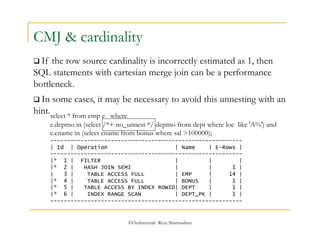
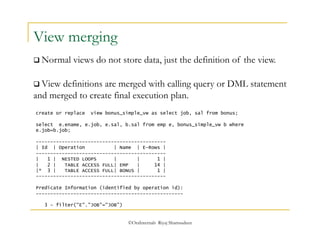
bigtable bg, bmtest bt where bg.n1 = bt.n1 and bg.n1 <100 
/ 
We will use hints to modify the execution plan for this statement. 
OraInternals June 2010 
Riyaj Shamsudeen 
COUNT(*) 
---------- 
891 
select * from table (dbms_xplan.display_cursor ('','','ALLSTATS LAST')); 
SQL_ID guxnam2t4px2k, child number 0 
------------------------------------- 
select /*+ leading (bt) use_nl (bg) */ count(*) from bigtable bg, 
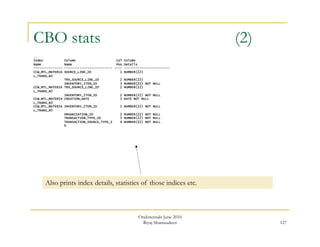
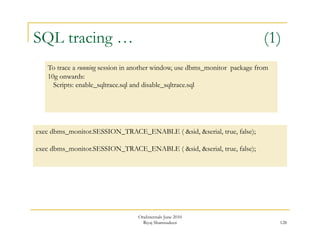
bmtest bt where bg.n1 = bt.n1 and bg.n1 <100 
Plan hash value: 497639897 
Tuned SQL_ID
138 
Join : NL 
Modified execution plan uses Nested loops join, as we tuned.. 
---------------------------------------------------- 
| Id | Operation | Name | E-Rows | 
---------------------------------------------------- 
| 0 | SELECT STATEMENT | | | 
| 1 | SORT AGGREGATE | | 1 | 
| 2 | NESTED LOOPS | | 5 | 
|* 3 | TABLE ACCESS FULL| BMTEST | 5 | 
|* 4 | INDEX RANGE SCAN | BIGTABLE_N1 | 1 | 
---------------------------------------------------- 
Predicate Information (identified by operation id): 
--------------------------------------------------- 
OraInternals June 2010 
Riyaj Shamsudeen 
3 - filter("BT"."N1"<100) 
4 - access("BG"."N1"="BT"."N1") 
filter("BG"."N1"<100) 
Note 
----- 
- dynamic sampling used for this statement (level=2)
139 
Script 
We will use a script to swap the hints to create a new profile PROF_TEST_01 
OraInternals June 2010 
Riyaj Shamsudeen 
@profile_from_cache 
Enter value for tuned_sql_id: guxnam2t4px2k 
Enter value for tuned_child: 0 
Enter value for orig_sql_id: 5jqxmjq15x5d8 
Enter value for orig_child: 0 
Enter value for profile_name: PROF_TEST_01 
PL/SQL procedure successfully completed.
After swapping the profile, execution plan is different. Notice the profile name printed. 
140 
Plan tuned 
select count(*) from bigtable bg, bmtest bt where bg.n1 = bt.n1 and bg.n1 <100; 
select * from table (dbms_xplan.display_cursor ('','','ALLSTATS LAST')); 
SQL_ID 4fcma6crxj305, child number 0 
------------------------------------- 
select count(*) from bigtable bg, bmtest bt where bg.n1 = bt.n1 and bg.n1 <100 
---------------------------------------------------- 
| Id | Operation | Name | E-Rows | 
---------------------------------------------------- 
| 0 | SELECT STATEMENT | | | 
| 1 | SORT AGGREGATE | | 1 | 
| 2 | NESTED LOOPS | | 6818 | 
|* 3 | TABLE ACCESS FULL| BMTEST | 2026 | 
|* 4 | INDEX RANGE SCAN | BIGTABLE_N1 | 3 | 
---------------------------------------------------- 
OraInternals June 2010 
Riyaj Shamsudeen 
Note 
----- 
- SQL profile PROF_TEST_01 used for this statement
141 
Few key points 
 Script profile_from_cache uses dbms_sqltune.import_sql_profile 
procedure to swap execution plans. 
 This method works even with bind variables, since the script uses 
force_match=>true while calling import_sql_profile procedure. 
 Only next hard parse of the statement will use the profile, in 
some cases, you might have to purge the cursor. 
Use: purge_cursor.sql script to purge a cursor. 
OraInternals June 2010 
Riyaj Shamsudeen
142 
Dba_sql_profiles 
 Sql profiles can be seen in dba_sql_profiles view: 
select name, status, force_matching from dba_sql_profiles; 
NAME STATUS FOR 
------------------------------ -------- --- 
PROF_TEST_01 ENABLED YES 
 V$sql and v$sqlarea has a column sql_profile that shows whether 
the cursor using profile or not. 
 If that column value is null, then that cursor is not using a 
profile. 
OraInternals June 2010 
Riyaj Shamsudeen
143 
outline 
 Hints from the profile can be fetched passing outline as a 
parameter. 
select count(*) from bigtable bg, bmtest bt where bg.n1 = bt.n1 and bg.n1 < :v_n1; 
select * from table (dbms_xplan.display_cursor ('','','outline' )); 
Outline Data 
------------- 
/*+ 
BEGIN_OUTLINE_DATA 
IGNORE_OPTIM_EMBEDDED_HINTS 
OPTIMIZER_FEATURES_ENABLE('11.2.0.1') 
DB_VERSION('11.2.0.1') 
ALL_ROWS 
OUTLINE_LEAF(@"SEL$1") 
FULL(@"SEL$1" "BT"@"SEL$1") 
INDEX(@"SEL$1" "BG"@"SEL$1" ("BIGTABLE"."N1")) 
LEADING(@"SEL$1" "BT"@"SEL$1" "BG"@"SEL$1") 
USE_HASH(@"SEL$1" "BG"@"SEL$1") 
END_OUTLINE_DATA 
*/ 
OraInternals June 2010 
Riyaj Shamsudeen
144 
Bind capture 
 It is also important to use exact SQL statement if possible to 
avoid surprises. 
 For example, use bind variables as in this statement. 
Variable v_n1 number 
select count(*) from bigtable bg, bmtest bt where bg.n1 = bt.n1 and bg.n1 < :v_n1; 
 Bind values can be fetched from v$sql_bind_capture. 
select child_number, position, datatype, value_string, last_captured from 
v$sql_bind_capture where sql_id='9gkpy76q1gp89’ 
CHILD_NUMBER POSITION DATATYPE VALUE_STRING LAST_CAPT 
------------ ---------- ---------- ---------------------------------------- --------- 
1 1 2 100 18-NOV-10 
0 1 2 100 18-NOV-10 
OraInternals June 2010 
Riyaj Shamsudeen
When conventional tools fail.. 
©OraInternals Riyaj Shamsudeen 145
146 
Database centric.. 
 When database centric tools fails, Operating system need to be 
reviewed in-depth. 
 Following few slides introduces few tools. 
 Every platform has its own tools and so, it is not possible to 
cover all Operating systems in this presentation. 
OraInternals June 2010 
Riyaj Shamsudeen
vmstat 
 vmstat provides a concise view of server health. 
vmstat 1 5 
kthr memory page disk faults cpu 
r b w swap free re mf pi po fr de sr m0 m1 m4 m5 in sy cs us sy id 
3 3 0 265724888 296150632 279 2870 279 8 6 0 0 23 4 21 12 9004 66456 38958 9 8 83 
2 4 0 260794488 291328496 18 925 0 0 0 0 0 0 0 6 0 9739 74972 49516 11 29 59 
0 3 0 260793680 291328248 94 520 0 0 0 0 0 0 0 0 0 9328 83034 47627 10 34 56 
323 6 0 260793264 291328176 0 10 0 0 0 0 0 0 0 0 0 10829 61895 50706 11 32 57 
251 7 0 260794440 291330168 71 1175 0 0 0 0 0 0 0 0 0 11345 71646 55438 10 23 67 
Runnable processes 
Excceeds 300 
Not much swapping 
Or paging 
30% cpu usage in kernel or 
Sys mode. That’s 9 CPUs in 
Kernel mode usage.
Mpstat 1 5 
Many CPUs are in 
Kernel mode. 
 mpstat provides per processor level statistics 
This is not an I/O 
Issue, as wt for I/O 
is not high. 
CPU minf mjf xcal intr ithr csw icsw migr smtx srw syscl usr sys wt idl 
33 9 0 11 80 2 933 38 135 501 0 1614 12 35 17 37 
34 12 0 6 66 2 1246 24 123 549 0 1212 7 33 16 44 
35 153 0 16 77 2 927 31 117 421 0 1529 11 29 12 48 
36 62 0 7 70 2 544 26 110 280 0 1143 13 27 9 51 
37 419 0 127 83 2 664 35 103 339 0 1348 24 29 12 36 
38 13 0 645 2170 2107 588 39 93 2456 0 440 6 47 4 43 
39 267 0 389 58 2 735 21 98 388 0 1038 17 33 18 32 
64 133 0 6 66 2 421 32 74 207 0 10888 45 31 0 24 
65 185 0 342 65 2 726 29 103 346 0 9341 11 31 6 53 
66 5 0 6 46 2 673 12 88 313 0 494 5 31 5 60 
67 23 0 344 1087 1016 437 39 90 425 0 1131 9 38 2 51 
68 2 0 9190 53 2 421 15 116 282 0 517 7 32 2 60 
69 431 0 6 55 2 569 20 107 275 0 1227 29 31 1 39 
.. 
134 0 0 5 81 1 534 38 96 312 0 3165 14 25 0 61 
135 0 0 280 1087 1030 428 25 85 424 0 918 14 39 2 44 
160 385 0 291 97 1 1244 34 193 571 0 9384 12 30 0 58 
161 0 0 862 55 1 1131 7 138 590 0 683 4 31 1 64 
162 6 0 8 61 1 1125 12 117 557 0 1977 6 28 0 66 
163 2 0 4 66 1 719 20 112 495 0 1709 6 32 1 62 
164 119 0 12 78 1 647 32 106 348 0 732 9 27 2 62 
165 5 0 969 74 1 869 29 136 400 0 684 4 32 1 63
sar queue size 
sar -q 1 5 
Sar confirms observations from 
Vmstat output. 
15:23:54 runq-sz %runocc swpq-sz %swpocc 
15:23:55 267.0 81 0.0 0 
15:23:56 154.0 93 0.0 0 
15:23:57 0.0 0 0.0 0 
15:23:58 1.0 78 0.0 0 
15:23:59 0.0 0 0.0 0 
Average 140.7 52 0.0 0
Observations 
 CPU run queue jumps to 100s intermittently. 
 CPUs are used in kernel mode- over 30% kernel mode 
cpu usage. 
 No observable abnormal swapping or paging activity 
 No observable I/O issues. 
Is that bad? Not necessarily, but 
needs further review.
prstat -mL 
prstat provides process level statistics. 
Flag m is for microstate accounting 
PID USERNAME USR SYS TRP TFL DFL LCK SLP LAT VCX ICX SCL SIG PROCESS/LWPID 
13893 oracle 84 0.5 0.1 0.0 0.0 0.0 2.1 14 39 180 3K 0 oracle/1 
15309 oracle 54 18 0.0 0.0 0.0 0.0 29 0.0 416 271 23K 0 oracle/1 
19096 oracle 69 3.5 0.1 0.0 0.0 0.0 14 13 742 178 2K 0 oracle/1 
28759 oracle 69 0.4 0.0 0.0 0.0 0.0 18 12 104 119 831 0 oracle/1 
15328 oracle 39 27 0.0 0.0 0.0 0.0 34 0.0 615 233 20K 0 oracle/1 
15296 oracle 47 19 0.0 0.0 0.0 0.0 34 0.0 617 129 38K 0 oracle/1 
15331 oracle 31 34 0.0 0.0 0.0 0.0 38 0.0 344 172 21K 0 oracle/1 
27950 oracle 59 3.4 0.0 0.0 0.0 0.0 25 13 636 148 2K 0 oracle/1 
15332 oracle 17 42 0.0 0.0 0.0 0.0 42 0.0 13K 376 75K 0 ps/1 
20285 oracle 53 4.1 0.1 0.0 0.0 0.0 30 13 957 178 8K 0 oracle/1 
11155 oracle 42 11 0.0 0.0 0.0 0.0 34 13 1K 106 16K 0 oracle/1 
15299 oracle 28 15 0.0 0.0 0.0 0.0 58 0.0 259 42 13K 0 oracle/1 
28250 oracle 21 21 0.0 0.0 0.0 0.0 43 15 5K 178 43K 0 oracle/1 
24136 oracle 33 5.1 0.2 0.0 0.0 0.0 48 13 1K 133 4K 0 oracle/1 
15292 oracle 26 11 0.0 0.0 0.0 0.0 64 0.0 402 67 14K 0 oracle/1 
13306 oracle 30 6.5 0.0 0.0 0.0 0.0 53 11 1K 126 16K 0 oracle/1 
27150 oracle 22 7.9 0.0 0.0 0.0 0.0 57 13 2K 172 11K 0 oracle/1 
... 
27614 oracle 6.1 4.5 0.0 0.0 0.0 0.0 79 11 891 60 2K 0 oracle/1 
28432 oracle 4.2 5.6 0.0 0.0 0.0 0.0 87 3.3 26 12 108 0 oracle/1 
28310 oracle 4.5 4.9 0.0 0.0 0.0 0.0 80 11 1K 57 5K 0 oracle/1 
28328 oracle 4.3 4.9 0.0 0.0 0.0 0.0 82 9.0 867 74 4K 0 oracle/1 
28264 oracle 4.1 4.2 0.0 0.0 0.0 0.0 83 8.9 851 93 4K 0 oracle/1 
28248 oracle 4.1 4.1 0.1 0.0 0.0 0.0 86 5.4 63 45 6K 0 oracle/1 
28343 oracle 4.0 4.0 0.0 0.0 0.0 0.0 87 4.6 27 46 120 0 oracle/1 
28277 oracle 3.9 4.1 0.0 0.0 0.0 0.0 86 6.4 971 40 4K 0 oracle/1 
28324 oracle 3.9 3.9 0.0 0.0 0.0 0.0 82 10 860 24 4K 0 oracle/1 
28436 oracle 3.4 4.4 0.0 0.0 0.0 0.0 91 1.0 26 25 92 0 oracle/1 
LAT column 
suggests that 
pid 13893 
was waiting 
for CPU 
14% of its 
time, during 
that 
observation 
Interval.
More prstat -mL 
PID USERNAME USR SYS TRP TFL DFL LCK SLP LAT VCX ICX SCL SIG PROCESS/LWPID 
23131 oraprod 56 4.8 0.7 0.0 0.0 0.0 0.3 39 5 7K .1M 0 oracle/1 
25566 oraprod 57 0.0 0.8 0.0 0.0 0.0 4.3 38 16 7K 13 0 oracle/1 
24588 root 19 11 - - - - 0.0 - 1K 5K 9K 0 sendmail/1 
18093 oraprod 17 9.8 0.3 0.0 0.0 0.0 43 30 2K 3K 7K 0 oracle/1 
23495 oraprod 19 7.8 0.4 0.0 0.0 0.0 40 33 2K 4K 6K 0 oracle/1 
23499 oraprod 18 7.8 0.3 0.0 0.0 0.0 45 29 2K 2K 7K 0 oracle/1 
23483 oraprod 18 7.0 0.3 0.0 0.0 0.0 39 36 2K 2K 7K 0 oracle/1 
23559 oraprod 18 7.5 0.3 0.0 0.0 0.0 39 35 2K 3K 7K 0 oracle/1 
23557 oraprod 18 7.2 0.3 0.0 0.0 0.0 35 40 1K 3K 5K 0 oracle/1 
23485 oraprod 18 6.9 0.4 0.0 0.0 0.0 40 35 1K 4K 6K 0 oracle/1 
23561 oraprod 16 7.3 0.2 0.0 0.0 0.0 50 26 2K 2K 7K 0 oracle/1 
23493 oraprod 16 6.9 0.3 0.0 0.0 0.0 38 39 2K 2K 5K 0 oracle/1 
21665 oraprod 15 8.3 0.3 0.0 0.0 0.0 39 38 2K 3K 6K 0 oracle/1 
796 oraprod 14 8.5 0.2 0.0 0.0 0.0 49 28 2K 2K 7K 0 oracle/1 
1345 oraprod 14 8.3 0.2 0.0 0.0 0.0 46 31 2K 2K 7K 0 oracle/1 
21667 oraprod 14 8.3 0.2 0.0 0.0 0.0 44 33 2K 2K 7K 0 oracle/1 
23491 oraprod 16 6.9 0.4 0.0 0.0 0.0 39 38 1K 3K 5K 0 oracle/1 
23481 oraprod 16 6.0 0.4 0.0 0.0 0.0 36 41 1K 4K 5K 0 oracle/1 
23553 oraprod 15 6.7 0.3 0.0 0.0 0.0 41 37 2K 2K 6K 0 oracle/1 
23563 oraprod 15 5.9 0.3 0.0 0.0 0.0 34 44 1K 2K 5K 0 oracle/1 
23489 oraprod 15 5.7 0.4 0.0 0.0 0.0 33 46 1K 3K 5K 0 oracle/1 
24824 oraprod 15 5.4 0.2 0.0 0.0 0.0 71 8.0 950 3K 5K 0 oracle/1 
807 oraprod 13 7.3 0.3 0.0 0.0 0.0 33 46 1K 3K 5K 0 oracle/1 
18097 oraprod 13 7.6 0.3 0.0 0.0 0.0 38 42 2K 3K 5K 0 oracle/1
Truss 
Description: 
The truss utility traces the system calls and the signal process receives. 
Options: 
truss [-fcaeildD] [ - [tTvx] [!] syscall ,...] [ - [sS] [!] signal ,...] [ - 
[mM] [!] fault ,...] [ - [rw] [!] fd ,...] [ - [uU] [!] lib ,... : [:] [!] func ,...] [- 
o outfile] com- mand | -p pid... 
Solaris – truss 
Hpux- tusc (download) 
Linux – strace
Truss – Word of caution 
At every system call, truss inspects the process. 
This *potentially* could slow down the process. 
So, Truss critical processes, only when it is 
necessary to do so.
Truss - Example 
truss –p 28393 
llseek(18, 0, SEEK_CUR) = 0x012EF9A4 
fstat(18, 0xFFBFA058) = 0 
write(18, " 9 8 7 1 0 o b jn <".., 21) = 21 
fstat(18, 0xFFBFA058) = 0 
write(18, " 9 8 7 2 0 R > >n s".., 18) = 18 
fstat(18, 0xFFBFA0C0) = 0 
write(18, " qn 0 . 0 0 1 4 3 . 7".., 5700) = 5700 
fstat(18, 0xFFBFA100) = 0 
write(18, " e n d s t r e a mn e n".., 17) = 17 
fstat(18, 0xFFBFA100) = 0 
write(18, " 9 8 7 2 0 o b jn 5".., 23) = 23 
fstat(18, 0xFFBFA100) = 0 
lseek(17, 0x0216B000, SEEK_SET) = 0x0216B000 
write(17, "C8021686 )00 )D0000".., 4096) = 4096 
lseek(17, 0x0219D000, SEEK_SET) = 0x0219D000 
read(17, "00000101001FF 00".., 4096) = 4096 
lseek(17, 0x0219E000, SEEK_SET) = 0x0219E000 
read(17, "D30070015CC000 qB0".., 4096) = 4096 
lseek(17, 0x0216D000, SEEK_SET) = 0x0216D000 
write(17, "0 b000 qAA18 L O S".., 4096) = 4096 
lseek(17, 0x0219F000, SEEK_SET) = 0x0219F000 
read(17, "000000000101001".., 4096) = 4096 
write(18, " 9 8 7 0 0 o b jn <".., 189) = 189 
fstat(18, 0xFFBFA058) = 0 
llseek(18, 0, SEEK_CUR) = 0x012F10F4 
fstat(18, 0xFFBFA058) = 0 
write(18, " 9 8 7 4 0 o b jn <".., 21) = 21 
fstat(18, 0xFFBFA058) = 0 
write(18, " 9 8 7 5 0 R > >n s".., 18) = 18 
fstat(18, 0xFFBFA0C0) = 0 
write(18, " qn 0 . 0 0 1 4 3 . 7".., 5736) = 5736 
fstat(18, 0xFFBFA100) = 0 
write(18, " e n d s t r e a mn e n".., 17) = 17 
fstat(18, 0xFFBFA100) = 0 
Process seemingly calling 
Many seek, write and fstat calls 
For, seek, fstat, write, read calls etc, 
first argument is the file descriptor. 
For read, write call second argument 
is the buffer itself.
Truss 
To trace a process and print minimal information 
truss –p <pid> Example: truss –p 23898 
To trace a process, follow its children and print minimal information 
truss –f –p <pid> Example: truss –f –p 23898 
To trace a process, print timestamp and print minimal information 
truss –d –p <pid> Example: truss –d –p 23898 
To trace a process, send output to a file and print minimal information. 
truss –o /tmp/truss.out –p <pid> 
Example: truss –o /tmp/truss.out –d –p 23898
Truss – Few outputs 
truss -d -o /tmp/truss.out -p 484 
cat /tmp/truss.out: 
Baase time stamp: 1188872874.8745 [ Mon Sep 3 22:27:54 EDT 2007 ] 
0.5942 semtimedop(3735584, 0xFFFFFFFF7FFFDFCC, 1, 0xFFFFFFFF7FFFDFB8) Err#11 EAGAIN 
0.5949 ioctl(8, (('7'<<8)|72), 0xFFFFFFFF7FFF87F8) = 192 
0.5950 ioctl(8, (('7'<<8)|63), 0x1038AA738) = 0 
0.5958 semtimedop(3735584, 0xFFFFFFFF7FFFC26C, 1, 0xFFFFFFFF7FFFC258) = 0 
0.5998 ioctl(10, (('V'<<24)|('X'<<16)|('O'<<8)|28), 0xFFFFFFFF7FFFD838) = 0 
0.6025 ioctl(10, (('V'<<24)|('X'<<16)|('O'<<8)|28), 0xFFFFFFFF7FFFD838) = 0 
0.6047 ioctl(10, (('V'<<24)|('X'<<16)|('O'<<8)|28), 0xFFFFFFFF7FFFD838) = 0 
0.6054 ioctl(10, (('V'<<24)|('X'<<16)|('O'<<8)|28), 0xFFFFFFFF7FFFDA48) = 0 
0.6059 ioctl(10, (('V'<<24)|('X'<<16)|('O'<<8)|28), 0xFFFFFFFF7FFFD9C8) = 0 
0.6064 ioctl(10, (('V'<<24)|('X'<<16)|('O'<<8)|28), 0xFFFFFFFF7FFFD858) = 0 
0.6076 ioctl(10, (('V'<<24)|('X'<<16)|('O'<<8)|28), 0xFFFFFFFF7FFFD808) = 0 
0.6089 ioctl(10, (('V'<<24)|('X'<<16)|('O'<<8)|28), 0xFFFFFFFF7FFFD8B8) = 0 
1.2775 semtimedop(3735584, 0xFFFFFFFF7FFFDFCC, 1, 0xFFFFFFFF7FFFDFB8) = 0 
1.2780 ioctl(10, (('V'<<24)|('X'<<16)|('O'<<8)|28), 0xFFFFFFFF7FFF7BF8) = 0 
1.2782 ioctl(8, (('7'<<8)|72), 0xFFFFFFFF7FFFA4B8) = 160 
1.2783 ioctl(8, (('7'<<8)|63), 0x1038AA738) = 0 
1.2785 semtimedop(3735584, 0xFFFFFFFF7FFFD3FC, 1, 0xFFFFFFFF7FFFD3E8) = 0 
1.2794 semtimedop(3735584, 0xFFFFFFFF7FFFD3FC, 1, 0xFFFFFFFF7FFFD3E8) = 0 
1.2795 ioctl(10, (('V'<<24)|('X'<<16)|('O'<<8)|28), 0xFFFFFFFF7FFFBE08) = 0 
1.2797 ioctl(10, (('V'<<24)|('X'<<16)|('O'<<8)|28), 0xFFFFFFFF7FFFBE08) = 0 
Time stamp displacement 
From base timestamp. 
Seconds.fraction of sec
Truss again 
For this process, during this observation period, 
11.182 second spent in user mode, 0.344 seconds in 
kernel mode. What happened to other 4.146 seconds ? 
 Truss of that process, with –c flag 
truss -c -p 13893 
syscall seconds calls errors 
write .001 20 
times .326 9360 
semctl .000 2 
ioctl .015 48 
-------- ------ ---- 
sys totals: .344 9430 0 
usr time: 11.182 
elapsed: 15.670
PROC tools 
Most Operating systems provide PROC tools to 
review process’ run time attributes.
pstack 
Thread #1 is sleeping. 
 pstack shows current stack of the process. Let’s look at pstack for this java process: 
pstack 16858 |more 
16858: java TestCase 
----------------- lwp# 1 / thread# 1 -------------------- 
ff31dfdc poll (ffbfeb38, 0, fa0) 
ff37e6a8 select (0, 0, 0, 0, ffbfec08, ffbfec08) + 6c 
fecf0a20 __1cIos_sleep6Fxi_i_ (0, fa0, 1, 0, 4, 0) + 1f8 
fecf07ec __1cCosFsleep6FpnGThread_xi_i_ (36b70, 0, fa0, 1, 10, 0) + 21c 
fed6da4c JVM_Sleep (36c04, ffbfed60, 0, fa0, 10, 0) + 27c 
f9c0be48 ???????? (0, b8, 5, 8, 0, ffbfed78) 
f9c05c64 ???????? (ffbfee78, 0, 0, f9c155e0, 3349f0, ffbfee18) 
f9c00118 ???????? (ffbfef00, ffbff0e0, a, f58fa768, f9c0aae0, ffbfefec) 
fecc84a8 
__1cJJavaCallsLcall_helper6FpnJJavaValue_pnMmethodHandle_pnRJavaCallArguments_pnGTh 
read__v_ (ffbff0d8, ffbfefb4, ffbfefe4, 36b70, 36b 70, 0) + 274 
fecdc674 
_1cRjni_invoke_static6FpnHJNIEnv__pnJJavaValue_pnI_jobject_nLJNICallType_pnK_jmetho 
dID_pnSJNI_ArgumentPusher_pnGThread__v_ (36c04, f 
fbff0d8, 0, 0, fbd90, ffbff0bc) + 218 
fed660ec jni_CallStaticVoidMethod (36c04, 36dc8, fbd90, 36dd8, 36c04, ff0000) + 13c 
00012ea4 main (36dac, 260, 0, fbd90, 488, 268) + 158c 
000118f0 _start (0, 0, 0, 0, 0, 0) + 108
pmap <pid> 
Address Kbytes RSS Anon Locked Mode Mapped File 
00010000 72 72 - - r-x-- java 
00030000 16 16 16 - rwx-- java 
00034000 8744 8680 8680 - rwx-- [ heap ] 
77980000 1224 1048 - - r--s- dev:273,2000 ino:104403 
77CFA000 24 24 24 - rw--R [ anon ] 
77F7A000 24 24 24 - rw--R [ anon ] 
78000000 72 72 72 - rwx-- [ anon ] 
7814C000 144 144 144 - rwx-- [ anon ] 
783E8000 32 32 32 - rwx-- [ anon ] 
78408000 8 8 8 - rwx-- [ anon ] 
78480000 752 464 - - r--s- dev:85,0 ino:13789 
7877E000 8 8 8 - rw--R [ anon ] 
78800000 36864 8192 8192 - rwx-- [ anon ] 
…… 
FF25C000 16 8 8 - rwx-- libCrun.so.1 
FF276000 8 8 - - rwxs- [ anon ] 
FF280000 688 688 - - r-x-- libc.so.1 
FF33C000 32 32 32 - rwx-- libc.so.1 
FF350000 16 16 16 - rw--- [ anon ] 
FF360000 8 8 8 - rwx-- [ anon ] 
FF370000 96 96 - - r-x-- libthread.so.1 
FF398000 8 8 8 - rwx-- libthread.so.1 
FF39A000 8 8 8 - rwx-- libthread.so.1 
FF3A0000 8 8 - - r-x-- libc_psr.so.1 
FF3B0000 184 184 - - r-x-- ld.so.1 
FF3EE000 8 8 8 - rwx-- ld.so.1 
FF3F0000 8 8 8 - rwx-- ld.so.1 
FF3FA000 8 8 8 - rwx-- libdl.so.1 
FFB80000 24 - - - ----- [ anon ] 
FFBF0000 64 64 64 - rw--- [ stack ] 
-------- ------- ------- ------- ------- 
total Kb 182352 65568 26360 - 
Pmap prints a 
Nice memory map 
of the Process. 
Verious heaps and 
Stacks are printed here 
Total memory foot print 
Also printed.
pfiles 
Using these device numbers and 
Inode numbers, file names can be mapped. 
pfiles 28393 
28393: ar60runb P_CONC_REQUEST_ID=2452107 STARTDATE='012006' 
ENDDATE='122006' 
Current rlimit: 4096 file descriptors 
0: S_IFIFO mode:0000 dev:272,0 ino:7325504 uid:11175 gid:100 size:0 
O_RDWR 
1: S_IFREG mode:0644 dev:233,63004 ino:895220 uid:11175 gid:100 size:0 
O_WRONLY|O_APPEND|O_CREAT 
2: S_IFREG mode:0644 dev:233,63004 ino:895220 uid:11175 gid:100 size:0 
O_WRONLY|O_APPEND|O_CREAT 
... 
17: S_IFREG mode:0644 dev:233,63004 ino:895242 uid:11175 gid:100 size: 
102522880 
O_RDWR|O_CREAT|O_TRUNC 
18: S_IFREG mode:0644 dev:233,63004 ino:895305 uid:11175 gid:100 size: 
25491841 
O_RDWR|O_CREAT|O_TRUNC 
This is the file_id 
In the truss output 
This is the device id 
Of the form minor,major 
Inode number

Performance tuning a quick intoduction

  • 1.
    Performance tuning ABrief Introduction By Riyaj Shamsudeen ©OraInternals Riyaj Shamsudeen
  • 2.
    ©OraInternals Riyaj Shamsudeen2 Who am I?  18 years using Oracle products/DBA  OakTable member  Oracle ACE  Certified DBA versions 7.0,7.3,8,8i,9i &10g  Specializes in RAC, performance tuning, Internals and E-business suite  Chief DBA with OraInternals  Co-author of “Expert Oracle Practices” ‘2009  Co-author of “Pro Oracle SQL” ‘2010  Email: rshamsud@orainternals.com  Blog : orainternals.wordpress.com  URL: www.orainternals.com
  • 3.
    ©OraInternals Riyaj Shamsudeen3 Disclaimer These slides and materials represent the work and opinions of the author and do not constitute official positions of my current or past employer or any other organization. This material has been peer reviewed, but author assume no responsibility whatsoever for the test cases. If you corrupt your databases by running my scripts, you are solely responsible for that. This material should not should not be reproduced or used without the authors' written permission.
  • 4.
    ©OraInternals Riyaj Shamsudeen4 Agenda  Tracing SQL execution  Analyzing Trace files  Understanding Explain plans  Joins  Writing optimal SQL  Good hints and no-so good hints  Effective indexing  Partitioning for performance
  • 5.
    alter session setsql_trace=true; exec dbms_session.set_sql_trace(sql_trace=>true); ©OraInternals Riyaj Shamsudeen SQL Tracing  Easiest way to trace SQL execution is with the following SQL statements:  But, this level of tracing does not provide all the relevant needed details.  For example, this level does not tell us whether the SQL spent time waiting for I/O or for a lock.
  • 6.
     For example,SQL statement waiting for I/O will wait for one of these events:  db file sequential read  db file scattered read etc. ©OraInternals Riyaj Shamsudeen Waits  SQL statement execution is in one of two states:  On CPU executing the statement (or)  Waiting for an event such as I/O, lock etc.  It is important to understand time spent in the events.
  • 7.
    Tracing with waits  SQL statement executions can be traced with waits printed to a trace file using: alter session set events '10046 trace name context forever, level 8'; exec dbms_session.session_trace_enable(waits => true); Trace level is a 4 bit integer: level 1 : Lowest level, same as sql_trace=true level 4 : Level 1 + captures bind variables level 8 : Level 1 + captures wait events at SQL level level 12: level 1 + captures bind and wait events at SQL level ©OraInternals Riyaj Shamsudeen
  • 8.
    Trace file explained…1 PARSING IN CURSOR #3 len=83 dep=0 uid=173 oct=3 lid=173 tim=12972441295985 hv=855947554 ad='fa2e5530' select transaction_id from mtl_transaction_accounts where transaction_id=1682944981 END OF STMT PARSE #3:c=10000,e=5080,p=0,cr=0,cu=0,mis=1,r=0,dep=0,og=1,tim=12972441295971 EXEC #3:c=0,e=198,p=0,cr=0,cu=0,mis=0,r=0,dep=0,og=1,tim=12972441296397 WAIT #3: nam='SQL*Net message to client' ela= 8 driver id=1650815232 #bytes=1 p3=0 obj#=38149 tim=12972441296513 WAIT #3: nam='db file sequential read' ela= 8337 file#=803 block#=213006 blocks=1 obj#=38172 tim=12972441305307 WAIT #3: nam='db file sequential read' ela= 12840 file#=234 block#=65037 blocks=1 obj#=38172 tim=12972441318487 WAIT #3: nam='gc cr grant 2-way' ela= 807 p1=803 p2=213474 p3=1 obj#=38172 tim=12972441320096 WAIT #3: nam='db file sequential read' ela= 4095 file#=803 block#=213474 blocks=1 obj#=38172 tim=12972441324278  Highlighted lines indicates that SQL statement is being parsed. ©OraInternals Riyaj Shamsudeen
  • 9.
    Trace file explained…2 PARSING IN CURSOR #3 len=83 dep=0 uid=173 oct=3 lid=173 tim=12972441295985 hv=855947554 ad='fa2e5530' select transaction_id from mtl_transaction_accounts where transaction_id=1682944981 END OF STMT PARSE #3:c=10000,e=5080,p=0,cr=0,cu=0,mis=1,r=0,dep=0,og=1,tim=12972441295971 EXEC #3:c=0,e=198,p=0,cr=0,cu=0,mis=0,r=0,dep=0,og=1,tim=12972441296397 WAIT #3: nam='SQL*Net message to client' ela= 8 driver id=1650815232 #bytes=1 p3=0 obj#=38149 tim=12972441296513 WAIT #3: nam='db file sequential read' ela= 8337 file#=803 block#=213006 blocks=1 obj#=38172 tim=12972441305307 WAIT #3: nam='db file sequential read' ela= 12840 file#=234 block#=65037 blocks=1 obj#=38172 tim=12972441318487 WAIT #3: nam='db file sequential read' ela= 4095 file#=803 block#=213474 blocks=1 obj#=38172 tim=12972441324278 Event waited for Elapsed time (micro seconds)  Later, we will show how tkprof utility can aggregate these events and print formatted output. ©OraInternals Riyaj Shamsudeen
  • 10.
    Tracing with binds  SQL statement executions can be traced with bind variable values also: alter session set events '10046 trace name context forever, level 12'; exec dbms_session.session_trace_enable(waits => true,binds=>true);  Generally, you wouldn’t need to trace with binds unless you want to find the bind variables also.  If there are many executions of SQL statements (millions) in a process then turning on trace with binds can reduce performance. ©OraInternals Riyaj Shamsudeen
  • 11.
    ©OraInternals Riyaj Shamsudeen11 Agenda  Tracing SQL execution  Analyzing Trace files  Understanding Explain plans  Joins  Writing optimal SQL  Good hints and no-so good hints  Effective indexing  Partitioning for performance
  • 12.
     tkprof utilityprovides formatted output from the trace files. ©OraInternals Riyaj Shamsudeen tkprof  Trace files generated from SQLTrace is not exactly readable. tkprof trace_file outfile sort=option explain=user/pwd sys=no Example: tkprof devl_ora_123.trc /tmp/devl_ora_tkp.out sort=exeela,fchela  tkprof comes with help options. Just type tkprof and enter to see help.
  • 13.
    ©OraInternals Riyaj Shamsudeen Sort option  Sort option in tkprof is useful. For example, sort=exeela will sort the SQL statements by Elapsed time at execution step.  Top SQL statements by elapsed time will show up at the top of the tkprof output file.  Generally, I use sort=exeela, fchela to sort the SQL statements.  Other common options are: execpu, fchcpu, prsela etc.
  • 14.
     Explain=userid/password@dev canbe supplied to print execution plan of that SQL statement.  Explain option logs on to the database and executes explain plan for every SQL in the trace file. ©OraInternals Riyaj Shamsudeen explain option  But, SQL Trace also prints execution plan in the trace file.  It is a good practice not to use explain option and use the execution plan in the trace file itself.  If you are using SQLPlus or TOAD to execute SQL, make sure to close the connection or exit so that trace files will be complete.
  • 15.
    More on tracing… ©OraInternals Riyaj Shamsudeen  Trace at program level  From concurrent program screen, check enable trace box. (level 8)  Trace can be enabled at user level: Beware every click is tracing.  Using alter session command: alter session set events ' 10046 trace name context forever, level 12';  Using dbms_system in another session (mostly used by DBAs): Exec dbms_System.set_ev( sid, serial#, 10046, 12, ''); Exec dbms_System.set_Sql_Trace_in_session(sid, serial#, true);
  • 16.
    ©OraInternals Riyaj Shamsudeen16 Agenda  Tracing SQL execution  Analyzing Trace files  Understanding Explain plans  Joins  Writing optimal SQL  Good hints and no-so good hints  Effective indexing  Partitioning for performance
  • 17.
     There aremany ways to generate execution plans and easiest way is: ©OraInternals Riyaj Shamsudeen Execution plan  Understanding execution plan is an important step in resolving performance issues. explain plan for select t1.id, t1.vc10 , t2.id From t1,t2 where t1.id=t2.id and t2.id <1000; Select * from table(dbms_xplan.display);
  • 18.
    Simple SELECT Select* from table(dbms_xplan.display); -------------------------------------------------------------------------------------- | Id | Operation | Name | Rows | Bytes | Cost (%CPU)| Time | -------------------------------------------------------------------------------------- | 0 | SELECT STATEMENT | | 975 | 22425 | 512 (1)| 00:00:02 | |* 1 | HASH JOIN | | 975 | 22425 | 512 (1)| 00:00:02 | |* 2 | INDEX RANGE SCAN | T2_N1 | 976 | 5856 | 5 (0)| 00:00:01 | | 3 | TABLE ACCESS BY INDEX ROWID| T1 | 1000 | 17000 | 506 (1)| 00:00:02 | |* 4 | INDEX RANGE SCAN | T1_N1 | 1000 | | 5 (0)| 00:00:01 | -------------------------------------------------------------------------------------- Predicate Information (identified by operation id): --------------------------------------------------- 1 - access("T1"."ID"="T2"."ID") 2 - access("T2"."ID"<1000) 4 - access("T1"."ID"<1000) Execution sequence (i) Index T2_N1 was scanned with access predicate t2.id <1000 [ Step 2] (ii) Index T1_N1 was scanned with access predicate t1.id <1000 [ Step 4] (iii) Table T1 is accessed to retrieve non-indexed column using rowids returned from ©OraInternals Riyaj Shamsudeen step 2. [ Step 3]. (iv) Rows from step 2 and 3 are joined to create the final result set.[Step 1]
  • 19.
     Predicates arevery useful to debug performance issues.  Cardinality estimate is a good guess. 20 rows are returned in step 5 , but just one row returned from the table (step 4). ©OraInternals Riyaj Shamsudeen Predicates Set lines 120 pages 0 Select * from table(dbms_xplan.display); ------------------------------------------------------------------------------------------------------ | Id | Operation | Name | Rows | Bytes | Cost (%CPU)| ------------------------------------------------------------------------------------------------------ | 0 | SELECT STATEMENT | | 1 | 214 | 9 (23)| | 1 | SORT ORDER BY | | 1 | 214 | 9 (23)| |* 2 | TABLE ACCESS BY INDEX ROWID | RCV_STAGING_LINES | 1 | 155 | 4 (25)| | 3 | NESTED LOOPS | | 1 | 214 | 8 (13)| |* 4 | TABLE ACCESS BY INDEX ROWID| RCV_STAGING_HEADERS | 1 | 59 | 5 (20)| |* 5 | INDEX RANGE SCAN | RCV_STAGING_HEADERS_N5 | 20 | | 4 (25)| |* 6 | INDEX RANGE SCAN | RCV_STAGING_LINES_N3 | 1 | | 3 (34)| ------------------------------------------------------------------------------------------------------ Predicate Information (identified by operation id): --------------------------------------------------- 2 - filter("RSL"."RMA_NUMBER"=:Z AND "RSL"."RMA_LINE_NUMBER"=TO_NUMBER(:Z)) 4 - filter("RSH"."RMA_NUMBER"=:Z AND "RSH"."REQUEST_ID"=TO_NUMBER(:Z)) 5 - access("RSH"."STATUS"='PROCESSED') 6 - access("RSH"."SOURCE_HEADER_ID"="RSL"."SOURCE_HEADER_ID")
  • 20.
    Index selection. Notice that all predicates are applied in step 5 using index.  Cardinality estimates improved from 20 to 1. create index apps.rcv_staging_headers_n5 on apps.RCV_STAGING_HEADERS (status, rma_number, request_id ) compress 1 compute statistics; Select * from table(dbms_xplan.display); ------------------------------------------------------------------------------------------------------ | Id | Operation | Name | Rows | Bytes | Cost (%CPU)| ------------------------------------------------------------------------------------------------------ | 0 | SELECT STATEMENT | | 1 | 206 | 9 (23)| | 1 | SORT ORDER BY | | 1 | 206 | 9 (23)| |* 2 | TABLE ACCESS BY INDEX ROWID | RCV_STAGING_LINES | 1 | 155 | 4 (25)| | 3 | NESTED LOOPS | | 1 | 206 | 8 (13)| | 4 | TABLE ACCESS BY INDEX ROWID| RCV_STAGING_HEADERS | 1 | 51 | 5 (20)| |* 5 | INDEX RANGE SCAN | RCV_STAGING_HEADERS_N5 | 1 | | 4 (25)| |* 6 | INDEX RANGE SCAN | RCV_STAGING_LINES_N3 | 1 | | 3 (34)| ------------------------------------------------------------------------------------------------------ Predicate Information (identified by operation id): --------------------------------------------------- 2 - filter("RSL"."RMA_NUMBER"=:Z AND "RSL"."RMA_LINE_NUMBER"=TO_NUMBER(:Z)) 5 - access("RSH"."STATUS"='PROCESSED' AND "RSH"."RMA_NUMBER"=:Z AND "RSH"."REQUEST_ID"=TO_NUMBER(:Z)) 6 - access("RSH"."SOURCE_HEADER_ID"="RSL"."SOURCE_HEADER_ID") ©OraInternals Riyaj Shamsudeen
  • 21.
    Package: dbms_xplan Dbms_xplan is a package available from 9i. It has many rich features.  dbms_xplan package has following features:  Print execution plan for recently explained SQL statement: dbms_xplan.display;  Print execution plan for a SQL statement executed by passing sql_id or hash_value: dbms_xplan.display_cursor ('&sqlid', '', '');  Print execution plan for a SQL statement captured by AWR report: dbms_xplan.display_awr ('&sqlid', '', ''); ©OraInternals Riyaj Shamsudeen
  • 22.
    Autotrace deprecated Many of us are used to autotrace in SQL*Plus. Use dbms_xplan instead ( from 10g onwards): select t1.id, t1.vc10 , t2.id From t1,t2 where t1.id=t2.id and t2.id <1000; Select * from table (dbms_xplan.display_cursor); SQL_ID cd6h52abfgfg3, child number 0 ------------------------------------- select t1.id, t1.vc10 , t2.id From t1,t2 where t1.id=t2.id and t2.id <1000 Plan hash value: 3286489634 -------------------------------------------------------------------------- | Id | Operation | Name | Rows | Bytes | Cost (%CPU)| Time | --------------------------------------------------------------------------- | 0 | SELECT STATEMENT | | | | 512 (100)| | |* 1 | HASH JOIN | | 975 | 22425 | 512 (1)| 00:00:02 | ... ©OraInternals Riyaj Shamsudeen
  • 23.
    ©OraInternals Riyaj Shamsudeen But..  dbms_xplan accesses v$sql, v$sql_plan_statistics_all and v $sql_plan internally. So, you need to have select access on these fixed views to execute dbms_xplan.  Executing dbms_xplan.display_cursor without specifying any sql_id retrieves the execution plan for the query executed last.  From 10g onwards, serveroutput is on by default. You need to disable serveroutput to see the execution plan correctly: Select * from table (dbms_xplan.display_cursor); SQL_ID 9babjv8yq8ru3, child number 1 BEGIN DBMS_OUTPUT.GET_LINES(:LINES, :NUMLINES); END;
  • 24.
    ©OraInternals Riyaj Shamsudeen Display_cursor  Suppose, you want to find the execution plan of a SQL statement executed recently, then display_cursor is handy.  Find sql_id or hash_value of the SQL statement from v$sql and pass that to display_cursor: select * from table(dbms_xplan.display_cursor ( '&sql_id','','')); SQL_ID fqmkvmdyb043r, child number 0 ------------------------------------- select t1.id, t1.vc10 , t2.id From t1,t2 where t1.id=t2.id and t2.id <1000 Plan hash value: 3286489634 -------------------------------------------------------------------------------------- | Id | Operation | Name | Rows | Bytes | Cost (%CPU)| Time | -------------------------------------------------------------------------------------- | 0 | SELECT STATEMENT | | | | 512 (100)| | |* 1 | HASH JOIN | | 975 | 22425 | 512 (1)| 00:00:02 | |* 2 | INDEX RANGE SCAN | T2_N1 | 976 | 5856 | 5 (0)| 00:00:01 | | 3 | TABLE ACCESS BY INDEX ROWID| T1 | 1000 | 17000 | 506 (1)| 00:00:02 | ...
  • 25.
    Total of 330seconds spent on this SQL. Can you identify the step that incurred most time? ©OraInternals Riyaj Shamsudeen Time spent? Rows Row Source Operation ------- --------------------------------------------------- 49996 WINDOW SORT 644538 NESTED LOOPS 704891 NESTED LOOPS 704891 NESTED LOOPS 704891 NESTED LOOPS OUTER 704891 NESTED LOOPS 704891 NESTED LOOPS 1 TABLE ACCESS BY INDEX ROWID HR_ALL_ORGANIZATION_UNITS 1 INDEX UNIQUE SCAN HR_ORGANIZATION_UNITS_PK 704891 TABLE ACCESS BY INDEX ROWID WSH_DELIVERY_DETAILS 704891 INDEX RANGE SCAN WSH_DELIVERY_DETAILS_N8 704891 TABLE ACCESS BY INDEX ROWID MTL_SYSTEM_ITEMS_B 704891 INDEX RANGE SCAN MTL_SYSTEM_ITEMS_B_U1 644783 VIEW PUSHED PREDICATE 644783 NESTED LOOPS 704891 TABLE ACCESS BY INDEX ROWID FND_FLEX_VALUE_SETS 704891 INDEX UNIQUE SCAN FND_FLEX_VALUE_SETS_U2 644783 TABLE ACCESS BY INDEX ROWID FND_FLEX_VALUES 644783 INDEX RANGE SCAN FND_FLEX_VALUES_N1 704891 TABLE ACCESS BY INDEX ROWID OE_ORDER_LINES_ALL 704891 INDEX UNIQUE SCAN OE_ORDER_LINES_U1 704891 TABLE ACCESS BY INDEX ROWID WSH_DELIVERY_ASSIGNMENTS 704891 INDEX RANGE SCAN WSH_DELIVERY_ASSIGNMENTS_N3 644538 TABLE ACCESS BY INDEX ROWID WSH_NEW_DELIVERIES 704891 INDEX UNIQUE SCAN WSH_NEW_DELIVERIES_U1
  • 26.
    ©OraInternals Riyaj Shamsudeen Statistics_level  Statistics_level parameter provides valuable row source execution statistics.  This parameter can be changed at session or instance level: alter session set statistics_level=all;  Default value of this parameter is TYPICAL which do not collect row source execution statistics.  Don’t set this initialization parameter to ALL in Production. This parameter incurs additional overhead. But, still, tracing at session level is acceptable.
  • 27.
    Statistics_level=ALL Setting thisparameter to ALL provides valuable Row source statistics. Rows Row Source Operation ------- --------------------------------------------------- 49996 WINDOW SORT (cr=11333940 r=66442 w=46044 time=327835520 us) 644538 NESTED LOOPS (cr=11333940 r=41631 w=0 time=302305095 us) 704891 NESTED LOOPS (cr=9219265 r=34793 w=0 time=263965257 us) 704891 NESTED LOOPS (cr=7093885 r=27898 w=0 time=217008667 us) 704891 NESTED LOOPS OUTER (cr=4979210 r=460 w=0 time=80832751 us) 704891 NESTED LOOPS (cr=2219750 r=460 w=0 time=46780270 us) 704891 NESTED LOOPS (cr=51405 r=0 w=0 time=15862881 us) 1 TABLE ACCESS BY INDEX ROWID HR_ALL_ORGANIZATION_UNITS (cr=3 r=0 w=0 time=79 us) 1 INDEX UNIQUE SCAN HR_ORGANIZATION_UNITS_PK (cr=2 r=0 w=0 time=42 us)(object id 43498) 704891 TABLE ACCESS BY INDEX ROWID WSH_DELIVERY_DETAILS (cr=51402 r=0 w=0 time=15456581 us) 704891 INDEX RANGE SCAN WSH_DELIVERY_DETAILS_N8 (cr=2692 r=0 w=0 time=1677304 us)(object id 5124003) 704891 TABLE ACCESS BY INDEX ROWID MTL_SYSTEM_ITEMS_B (cr=2168345 r=460 w=0 time=26259264 us) 704891 INDEX RANGE SCAN MTL_SYSTEM_ITEMS_B_U1 (cr=1409795 r=213 w=0 time=15069327 us)(object id 38017) 644783 VIEW PUSHED PREDICATE (cr=2759460 r=0 w=0 time=30859890 us) 644783 NESTED LOOPS (cr=2759460 r=0 w=0 time=29181767 us) 704891 TABLE ACCESS BY INDEX ROWID FND_FLEX_VALUE_SETS (cr=1409784 r=0 w=0 time=11031089 us) 704891 INDEX UNIQUE SCAN FND_FLEX_VALUE_SETS_U2 (cr=704893 r=0 w=0 time=6257393 us)(object id 33768) 644783 TABLE ACCESS BY INDEX ROWID FND_FLEX_VALUES (cr=1349676 r=0 w=0 time=13839752 us) 644783 INDEX RANGE SCAN CCW_FND_FLEX_VALUES_N1 (cr=704893 r=0 w=0 time=8683861 us)(object id 5153800) 704891 TABLE ACCESS BY INDEX ROWID OE_ORDER_LINES_ALL (cr=2114675 r=27438 w=0 time=133292520 us) 704891 INDEX UNIQUE SCAN OE_ORDER_LINES_U1 (cr=1409784 r=2025 w=0 time=14863664 us)(object id 42102) 704891 TABLE ACCESS BY INDEX ROWID WSH_DELIVERY_ASSIGNMENTS (cr=2125380 r=6895 w=0 time=42893004 us) 704891 INDEX RANGE SCAN WSH_DELIVERY_ASSIGNMENTS_N3 (cr=1413108 r=2580 w=0 time=24181814 us)(object id 46295) 644538 TABLE ACCESS BY INDEX ROWID WSH_NEW_DELIVERIES (cr=2114675 r=6838 w=0 time=35307346 us) 704891 INDEX UNIQUE SCAN WSH_NEW_DELIVERIES_U1 (cr=1409784 r=362 w=0 time=7381948 us)(object id 46306) ©OraInternals Riyaj Shamsudeen
  • 28.
    Statistics_level=ALL Rows RowSource Operation ------- --------------------------------------------------- Timeline 49996 WINDOW SORT (cr=11333940 r=66442 w=46044 time=327835520 us) 644538 NESTED LOOPS (cr=11333940 r=41631 w=0 time=302305095 us) 704891 NESTED LOOPS (cr=9219265 r=34793 w=0 time=263965257 us) 704891 NESTED LOOPS (cr=7093885 r=27898 w=0 time=217008667 us) 704891 NESTED LOOPS OUTER (cr=4979210 r=460 w=0 time=80832751 us) 704891 NESTED LOOPS (cr=2219750 r=460 w=0 time=46780270 us) 704891 NESTED LOOPS (cr=51405 r=0 w=0 time=15862881 us) 1 TABLE ACCESS BY INDEX ROWID HR_ALL_ORGANIZATION_UNITS (cr=3 r=0 w=0 time=79 us) 1 INDEX UNIQUE SCAN HR_ORGANIZATION_UNITS_PK (cr=2 r=0 w=0 time=42 us)(object id 43498) 704891 TABLE ACCESS BY INDEX ROWID WSH_DELIVERY_DETAILS (cr=51402 r=0 w=0 time=15456581 us) 704891 INDEX RANGE SCAN WSH_DELIVERY_DETAILS_N8 (cr=2692 r=0 w=0 time=1677304 us)(object id 5124003) 704891 TABLE ACCESS BY INDEX ROWID MTL_SYSTEM_ITEMS_B (cr=2168345 r=460 w=0 time=26259264 us) 704891 INDEX RANGE SCAN MTL_SYSTEM_ITEMS_B_U1 (cr=1409795 r=213 w=0 time=15069327 us)(object id 38017) 644783 VIEW PUSHED PREDICATE (cr=2759460 r=0 w=0 time=30859890 us) 644783 NESTED LOOPS (cr=2759460 r=0 w=0 time=29181767 us) 704891 TABLE ACCESS BY INDEX ROWID FND_FLEX_VALUE_SETS (cr=1409784 r=0 w=0 time=11031089 us) 704891 INDEX UNIQUE SCAN FND_FLEX_VALUE_SETS_U2 (cr=704893 r=0 w=0 time=6257393 us)(object id 33768) 644783 TABLE ACCESS BY INDEX ROWID FND_FLEX_VALUES (cr=1349676 r=0 w=0 time=13839752 us) 644783 INDEX RANGE SCAN CCW_FND_FLEX_VALUES_N1 (cr=704893 r=0 w=0 time=8683861 us)(object id 5153800) 704891 TABLE ACCESS BY INDEX ROWID OE_ORDER_LINES_ALL (cr=2114675 r=27438 w=0 time=133292520 us) 704891 INDEX UNIQUE SCAN OE_ORDER_LINES_U1 (cr=1409784 r=2025 w=0 time=14863664 us)(object id 42102) 704891 TABLE ACCESS BY INDEX ROWID WSH_DELIVERY_ASSIGNMENTS (cr=2125380 r=6895 w=0 time=42893004 us) 704891 INDEX RANGE SCAN WSH_DELIVERY_ASSIGNMENTS_N3 (cr=1413108 r=2580 w=0 time=24181814 us)(object id 46295) 644538 TABLE ACCESS BY INDEX ROWID WSH_NEW_DELIVERIES (cr=2114675 r=6838 w=0 time=35307346 us) 704891 INDEX UNIQUE SCAN WSH_NEW_DELIVERIES_U1 (cr=1409784 r=362 w=0 time=7381948 us)(object id 46306) ©OraInternals Riyaj Shamsudeen
  • 29.
    ©OraInternals Riyaj Shamsudeen Statistics_level  So, statistics_level parameter can be used to understand the step consuming much time.  To improve performance we try to reduce the step consuming time.  But, of course, functional knowledge of the SQL statement will come handy.
  • 30.
    All trace commands  If you are tracing from your session, you might want to set these parameters too:  Sets maximum file size to unlimited. Alter session set max_dump_file_size=unlimited;  This sets trace files to have file names easily distinguishable! alter session set tracefile_identifier='riyaj';  Print row source timing information. alter session set Statistics_level=all; exec dbms_session.session_trace_enable(waits => true); ©OraInternals Riyaj Shamsudeen
  • 31.
    ©OraInternals Riyaj Shamsudeen31 Agenda  Tracing SQL execution  Analyzing Trace files  Understanding Explain plans  Access, Joins, filters and unnest  Writing optimal SQL  Good hints and no-so good hints  Effective indexing  Partitioning for performance
  • 32.
    Index Unique Scan  One row returned from the index key. explain plan for select ename from demo1.emp where empno=:b1 -------------------------------------------------------------------------------------- | Id | Operation | Name | Rows | Bytes | Cost (%CPU)| Time | -------------------------------------------------------------------------------------- | 0 | SELECT STATEMENT | | 1 | 10 | 1 (0)| 00:00:01 | | 1 | TABLE ACCESS BY INDEX ROWID| EMP | 1 | 10 | 1 (0)| 00:00:01 | |* 2 | INDEX UNIQUE SCAN | EMP_PK | 1 | | 0 (0)| 00:00:01 | -------------------------------------------------------------------------------------- Predicate Information (identified by operation id): --------------------------------------------------- 2 - access("EMPNO"=TO_NUMBER(:B1))  Usually, quite efficient since just one row returned from the index. Index must be unique index for this access path. ©OraInternals Riyaj Shamsudeen
  • 33.
    ©OraInternals Riyaj Shamsudeen33 Index unique scan Index returns one Rowid. Root block Table Branch block Leaf blocks empno:b1 Data file 120 121 122 123 124 125 126
  • 34.
    Index Range Scan  Multiple rowids retrieved from the index. For every rowid returned, table block is accessed to retrieve other selected columns. explain plan for select ename from demo1.emp where empno between :b1 and :b2; --------------------------------------------------------------------------------------- | Id | Operation | Name | Rows | Bytes | Cost (%CPU)| Time | --------------------------------------------------------------------------------------- | 0 | SELECT STATEMENT | | 1 | 10 | 2 (0)| 00:00:01 | |* 1 | FILTER | | | | | | | 2 | TABLE ACCESS BY INDEX ROWID| EMP | 1 | 10 | 2 (0)| 00:00:01 | |* 3 | INDEX RANGE SCAN | EMP_PK | 2 | | 1 (0)| 00:00:01 | --------------------------------------------------------------------------------------- Predicate Information (identified by operation id): --------------------------------------------------- 1 - filter(TO_NUMBER(:B1)<=TO_NUMBER(:B2)) 3 - access("EMPNO">=TO_NUMBER(:B1) AND "EMPNO"<=TO_NUMBER(:B2)) ©OraInternals Riyaj Shamsudeen
  • 35.
    ©OraInternals Riyaj Shamsudeen35 Index range scan Index may return one or more rowids. Root block Table Branch block Leaf blocks Empno between :b1 and :b2 Data file 120 121 122 123 124 125 126
  • 36.
    Index Skip Scan  Index is searched with non-leading columns of the index. Generally, performs better if the number of distinct values for the leading columns are very few. Index Column Type ------ ----------- ------------- EMP_C2 LOCATION_ID 1 NUMBER(22) ENAME 2 VARCHAR2(10) select * from emp a where ename='JACK'; -------------------------------------------------------------------------------------- | Id | Operation | Name | Rows | Bytes | Cost (%CPU)| Time | -------------------------------------------------------------------------------------- | 0 | SELECT STATEMENT | | 1 | 43 | 3 (0)| 00:00:01 | | 1 | TABLE ACCESS BY INDEX ROWID| EMP | 1 | 43 | 3 (0)| 00:00:01 | |* 2 | INDEX SKIP SCAN | EMP_C2 | 1 | | 2 (0)| 00:00:01 | -------------------------------------------------------------------------------------- Predicate Information (identified by operation id): --------------------------------------------------- ©OraInternals Riyaj Shamsudeen 2 - access("ENAME"='JACK') filter("ENAME"='JACK')
  • 37.
    ©OraInternals Riyaj Shamsudeen37 Index skip scan Leading column Is location_id Root block Table Branch block Leaf blocks Empname=‘JACK’ Data file 120 121 122 123 124 125 126
  • 38.
    ©OraInternals Riyaj Shamsudeen Joins  Type of join operators  Equi-join  Outer join  Merge Join  Anti-join  Type of join techniques in Oracle  Nested Loops join  Hash Join  Merge Join
  • 39.
    Nested loops join  For every row from outer row source, inner row source is probed for a matching row satisfying join key condition. 644783 NESTED LOOPS 704891 TABLE ACCESS BY INDEX ROWID EMP 704891 INDEX UNIQUE SCAN EMP_C1 644783 TABLE ACCESS BY INDEX ROWID EMP_HISTORY 644783 INDEX RANGE SCAN EMP_HIST_N1  Generally, performs better if number of rows from the inner row source is much lower.  Typically, OLTP uses this type of join. ©OraInternals Riyaj Shamsudeen
  • 40.
    Nested loops join EMP Row piece fetched from the table Rowids fetched from the index and table accessed. EMP_C1 Index searched for the predicate Emp_name like ‘S%’ Row piece fetched from the table Rowids fetched from the index and table accessed using rowid. ©OraInternals Riyaj Shamsudeen Loop EMP_HISTORY EMP_HIST_N1 Index searched for the join key Employee_id = employee_id 1 2 3 4 5 6 7 644783 NESTED LOOPS 704891 TABLE ACCESS BY INDEX ROWID EMP 704891 INDEX UNIQUE SCAN EMP_C1 644783 TABLE ACCESS BY INDEX ROWID EMP_HISTORY 644783 INDEX RANGE SCAN EMP_HIST_N1
  • 41.
     Rows fromtwo row sources fetched and then joined. ©OraInternals Riyaj Shamsudeen Hash join explain plan for select t1.color, t2.color, t1.shape from t1, t2 where t1.color_id = t2.color_id and t1.color=:b1 and t2.color=:b1 / Explained. SQL> select * from table (dbms_xplan.display); Plan hash value: 2339531555 ------------------------------------------------------------------d----------------------- | Id | Operation | Name | Rows | Bytes | Cost (%CPU)| Time | ----------------------------------------------------------------------------------------- | 0 | SELECT STATEMENT | | 333 | 9990 | 8 (13)| 00:00:01 | |* 1 | HASH JOIN | | 333 | 9990 | 8 (13)| 00:00:01 | | 2 | TABLE ACCESS BY INDEX ROWID| T1 | 333 | 6660 | 3 (0)| 00:00:01 | |* 3 | INDEX RANGE SCAN | T1_COLOR | 333 | | 1 (0)| 00:00:01 | | 4 | TABLE ACCESS BY INDEX ROWID| T2 | 500 | 5000 | 4 (0)| 00:00:01 | |* 5 | INDEX RANGE SCAN | T2_COLOR | 500 | | 2 (0)| 00:00:01 | ----------------------------------------------------------------------------------------- Predicate Information (identified by operation id): --------------------------------------------------- 1 - access("T1"."COLOR_ID"="T2"."COLOR_ID") 3 - access("T1"."COLOR"=:B1) 5 - access("T2"."COLOR"=:B1) 19 rows selected.
  • 42.
    Hash join ------------------------------------------------- | Id | Operation | Name | ------------------------------------------------- | 0 | SELECT STATEMENT | | |* 1 | HASH JOIN | | | 2 | TABLE ACCESS BY INDEX ROWID| T1 | |* 3 | INDEX RANGE SCAN | T1_COLOR | | 4 | TABLE ACCESS BY INDEX ROWID| T2 | |* 5 | INDEX RANGE SCAN | T2_COLOR | ------------------------------------------------- T1 Row piece fetched from the table Rowids fetched from the index and table accessed. T1_COLOR Index searched for the predicate T1.color=:b1 T2 Row piece fetched from the table Rowids fetched from the index and table accessed. ©OraInternals Riyaj Shamsudeen 1 Hash Join 2 3 T2_COLOR Index searched for the predicate T2.color =:b1 4 5 6 Rows returned 7
  • 43.
     Rows fromtwo row sources are sorted and joined using merge join technique. ©OraInternals Riyaj Shamsudeen Merge join select /*+ use_merge (t1, t2) */ t1.color, t2.color, t1.shape from t1, t2 where t1.color_id = t2.color_id and t1.color='black' and t2.color='black' ------------------------------------------------------------------------------------------ | Id | Operation | Name | Rows | Bytes | Cost (%CPU)| Time | ------------------------------------------------------------------------------------------ | 0 | SELECT STATEMENT | | | | 10 (100)| | | 1 | MERGE JOIN | | 500 | 15000 | 10 (20)| 00:00:01 | | 2 | SORT JOIN | | 500 | 5000 | 5 (20)| 00:00:01 | | 3 | TABLE ACCESS BY INDEX ROWID| T2 | 500 | 5000 | 4 (0)| 00:00:01 | |* 4 | INDEX RANGE SCAN | T2_COLOR | 500 | | 2 (0)| 00:00:01 | |* 5 | SORT JOIN | | 900 | 18000 | 5 (20)| 00:00:01 | |* 6 | TABLE ACCESS FULL | T1 | 900 | 18000 | 4 (0)| 00:00:01 | ------------------------------------------------------------------------------------------ Predicate Information (identified by operation id): --------------------------------------------------- 4 - access("T2"."COLOR"='black') 5 - access("T1"."COLOR_ID"="T2"."COLOR_ID") filter("T1"."COLOR_ID"="T2"."COLOR_ID") 6 - filter("T1"."COLOR"='black')
  • 44.
    Merge join ------------------------------------------------- | Id | Operation | Name | ------------------------------------------------- | 0 | SELECT STATEMENT | | |* 1 | HASH JOIN | | | 2 | TABLE ACCESS BY INDEX ROWID| T1 | |* 3 | INDEX RANGE SCAN | T1_COLOR | | 4 | TABLE ACCESS BY INDEX ROWID| T2 | |* 5 | INDEX RANGE SCAN | T2_COLOR | ------------------------------------------------- T2 Rowids fetched from the index and table accessed. Row piece fetched from the table T2_COLOR ©OraInternals Riyaj Shamsudeen Index searched for the predicate T1.color=:b1 1 2 Merge Join 3 T1 Index searched for the predicate T2.color =:b1 SORT Rows filtered Rows are sorted 4 5 6 Rows returned 7 SORT 5 Rows filtered 6
  • 45.
    ©OraInternals Riyaj Shamsudeen FILTER step select * from emp e where e.deptno in (select deptno from dept where loc like 'A%') and e.ename in (select ename from bonus where sal >100000); -------------------------------------------------------- | Id | Operation | Name | Rows | -------------------------------------------------------- | 0 | SELECT STATEMENT | | | |* 1 | FILTER | | | | 2 | TABLE ACCESS FULL | EMP | 14 | |* 3 | TABLE ACCESS BY INDEX ROWID| DEPT | 1 | |* 4 | INDEX RANGE SCAN | DEPT_PK | 1 | |* 5 | TABLE ACCESS FULL | BONUS | 1 | -------------------------------------------------------- Predicate Information (identified by operation id): --------------------------------------------------- 1 - filter(( IS NOT NULL AND IS NOT NULL)) 3 - filter("LOC" LIKE 'A%') 4 - access("DEPTNO"=:B1) 5 - filter(("ENAME"=:B1 AND "SAL">100000)) EMP DEPT DEPT_PK BONUS For every row from EMP Filter checking with Dept_pk and then DEPT table Filter checking with BONUS table
  • 46.
    ©OraInternals Riyaj Shamsudeen46 Subquery unnesting Subquery unnesting is an optimization step in which sub queries are unnested to a join. select * from emp e where e.deptno in (select deptno from dept where loc like 'A%') and e.ename in (select ename from bonus where sal >100000); ----------------------------------------------------------------------------- | Id | Operation | Name | Rows | Bytes | Cost (%CPU)| Time | ----------------------------------------------------------------------------- | 0 | SELECT STATEMENT | | | | 7 (100)| | |* 1 | HASH JOIN SEMI | | 5 | 675 | 7 (15)| 00:00:01 | |* 2 | HASH JOIN SEMI | | 5 | 575 | 5 (20)| 00:00:01 | | 3 | TABLE ACCESS FULL| EMP | 14 | 1316 | 2 (0)| 00:00:01 | |* 4 | TABLE ACCESS FULL| DEPT | 1 | 21 | 2 (0)| 00:00:01 | |* 5 | TABLE ACCESS FULL | BONUS | 1 | 20 | 2 (0)| 00:00:01 | -----------------------------------------------------------------------------
  • 47.
    ©OraInternals Riyaj Shamsudeen Summary  There are different types of join techniques.  There are no one join techniques superior to other join technique. If that is the case, Oracle product would not choose inferior techniques.  Choosing a join method suitable for the SQL statement is also a necessary step of tuning that statement.
  • 48.
    Common problem areasin an execution plan. ©OraInternals Riyaj Shamsudeen 48
  • 49.
    Identify plan issues  There are couple of clues in the execution plan that can give you a hint about the root cause.  Following few slides details these clues. But, this is not a complete list.  It is probably a better idea to test your theory  by rewriting the query  by adjusting the execution plan with hints  by testing with a different database or different set of data. ©OraInternals Riyaj Shamsudeen
  • 50.
    Cardinality feedback Cardinality is the measure of optimizer estimate for the number of rows returned in a step.  In this case, optimizer estimates that step 6, accessing through index returned 20 rows.  Step 4 reduced that just one row. So, you need to investigate to see why there is many rows estimated to be returned in that step. Select * from table (dbms_xplan.display); --------------------------------------------------------------------------------------------- | Id | Operation | Name | Rows | Bytes | Cost (%CPU)| --------------------------------------------------------------------------------------------- | 0 | SELECT STATEMENT | | 1 | 214 | 9 (23)| | 1 | SORT ORDER BY | | 1 | 214 | 9 (23)| |* 2 | TABLE ACCESS BY INDEX ROWID | RCV_STAGING_LINES | 1 | 155 | 4 (25)| | 3 | NESTED LOOPS | | 1 | 214 | 8 (13)| |* 4 | TABLE ACCESS BY INDEX ROWID| RCV_STAGING_HEADERS | 1 | 59 | 5 (20)| |* 5 | INDEX RANGE SCAN | RCV_STAGING_HEADERS_N5 | 20 | | 4 (25)| |* 6 | INDEX RANGE SCAN | RCV_STAGING_LINES_N3 | 1 | | 3 (34)| ---------------------------------------------------------------------------------------------- ©OraInternals Riyaj Shamsudeen
  • 51.
    Cardinality feedback (2)  Match the run time statistics and the execution plan. Identify the difference in the estimate and actual statistics.  In this example below, optimizer estimates are off, especially for step 5.. Rows Row Source Operation ------- --------------------------------------------------- 0 TABLE ACCESS BY INDEX ROWID RCV_STAGING_LINES 0 NESTED LOOPS 0 NESTED LOOPS 14 TABLE ACCESS BY INDEX ROWID RCV_STAGING_HEADERS 2608158 INDEX RANGE SCAN RCV_STAGING_HEADERS_N5 14 INDEX RANGE SCAN RCV_STAGING_LINES_N3 --------------------------------------------------------------------------------------------- | Id | Operation | Name | Rows | Bytes | Cost (%CPU)| --------------------------------------------------------------------------------------------- | 0 | SELECT STATEMENT | | 1 | 214 | 9 (23)| | 1 | SORT ORDER BY | | 1 | 214 | 9 (23)| |* 2 | TABLE ACCESS BY INDEX ROWID | RCV_STAGING_LINES | 1 | 155 | 4 (25)| | 3 | NESTED LOOPS | | 1 | 214 | 8 (13)| |* 4 | TABLE ACCESS BY INDEX ROWID| RCV_STAGING_HEADERS | 1 | 59 | 5 (20)| |* 5 | INDEX RANGE SCAN | RCV_STAGING_HEADERS_N5 | 20 | | 4 (25)| |* 6 | INDEX RANGE SCAN | RCV_STAGING_LINES_N3 | 1 | | 3 (34)| ---------------------------------------------------------------------------------------------- ©OraInternals Riyaj Shamsudeen
  • 52.
     Try tounderstand why the optimizer did not chose correct starting table.  In this example, leading table is chosen unwisely. ©OraInternals Riyaj Shamsudeen Leading table  In most cases, if the optimizer chooses correct starting table, then the performance of that SQL statement will be tolerable. Rows Row Source Operation ------- --------------------------------------------------- 1000 SORT GROUP BY (cr=33914438 r=0 w=0 time=386540124 us) 1000 NESTED LOOPS (cr=33914438 r=0 w=0 time=386162642 us) 16540500 TABLE ACCESS BY INDEX ROWID OBJ#(38049)(cr=831438 r=0 w=0 time=146900634us ) 16540500 INDEX RANGE SCAN OBJ#(149297) (cr=154584 r=0 w=0 time=25026467 us)(obj 149297) 1000 INDEX RANGE SCAN OBJ#(5743997) (cr=33083000 r=0 w=0 time=202120686 us)(obj 5743997)
  • 53.
    Leading table (2)  With a leading hint, SQL was tuned to start from object id 5743997, which was a temporary table.  Performance of that SQL is much better with temporary table chosen as a leading table. Rows Row Source Operation ------- --------------------------------------------------- 0 SORT GROUP BY (cr=3067 r=0 w=0 time=38663 us) 0 TABLE ACCESS BY INDEX ROWID OBJ#(38049) (cr=3067 r=0 w=0 time=26516 us) 1000 NESTED LOOPS (cr=3067 r=0 w=0 time=24509 us) 0 INDEX RANGE SCAN OBJ#(5743997) (cr=3067 r=0 w=0 time=23379 us)(object id 5743997) 0 INDEX RANGE SCAN OBJ#(1606420) (object id 1606420) ©OraInternals Riyaj Shamsudeen
  • 54.
    Cartesian merge join  Cartesian merge join (CMJ) is a special case of merge join. It is a merge join with no join predicates between two row sources. select * from emp e where e.deptno in (select deptno from dept where loc like 'A%') and e.ename in (select ename from bonus where sal >100000); ------------------------------------------------------- | Id | Operation | Name | E-Rows | ------------------------------------------------------- |* 1 | TABLE ACCESS BY INDEX ROWID| EMP | 5 | | 2 | NESTED LOOPS | | 1 | | 3 | MERGE JOIN CARTESIAN | | 1 | | 4 | SORT UNIQUE | | 1 | |* 5 | TABLE ACCESS FULL | BONUS | 1 | | 6 | BUFFER SORT | | 1 | | 7 | SORT UNIQUE | | 1 | |* 8 | TABLE ACCESS FULL | DEPT | 1 | |* 9 | INDEX RANGE SCAN | EMP_FK | 5 | ------------------------------------------------------- 1 - filter("E"."ENAME"="ENAME") 5 - filter("SAL">100000) 8 - filter("LOC" LIKE 'A%') 9 - access("E"."DEPTNO"="DEPTNO") ©OraInternals Riyaj Shamsudeen
  • 55.
    Nested Loops join ©OraInternals Riyaj Shamsudeen CMJ - Analysis Nested Loops join Cartesian merge join Dept Bonus Emp Cartesian merge join Dept Bonus Emp Estimate Actual 1 1 1 10 Emp estimated to be scanned once. 21 210 Emp scanned 210 times
  • 56.
    CMJ & cardinality  If the row source cardinality is incorrectly estimated as 1, then SQL statements with cartesian merge join can be a performance bottleneck.  In some cases, it may be necessary to avoid this unnesting with an hint. select * from emp e where e.deptno in (select /*+ no_unnest */ deptno from dept where loc like 'A%') and e.ename in (select ename from bonus where sal >100000); --------------------------------------------------------- | Id | Operation | Name | E-Rows | --------------------------------------------------------- |* 1 | FILTER | | | |* 2 | HASH JOIN SEMI | | 1 | | 3 | TABLE ACCESS FULL | EMP | 14 | |* 4 | TABLE ACCESS FULL | BONUS | 1 | |* 5 | TABLE ACCESS BY INDEX ROWID| DEPT | 1 | |* 6 | INDEX RANGE SCAN | DEPT_PK | 1 | --------------------------------------------------------- ©OraInternals Riyaj Shamsudeen
  • 57.
     Normal viewsdo not store data, just the definition of the view. ©OraInternals Riyaj Shamsudeen View merging  View definitions are merged with calling query or DML statement and merged to create final execution plan. create or replace view bonus_simple_vw as select job, sal from bonus; select e.ename, e.job, e.sal, b.sal from emp e, bonus_simple_vw b where e.job=b.job; --------------------------------------------- | Id | Operation | Name | E-Rows | --------------------------------------------- | 1 | NESTED LOOPS | | 1 | | 2 | TABLE ACCESS FULL| EMP | 14 | |* 3 | TABLE ACCESS FULL| BONUS | 1 | --------------------------------------------- Predicate Information (identified by operation id): --------------------------------------------------- 3 - filter("E"."JOB"="JOB")
  • 58.
     But, someviews are not merge-able. ©OraInternals Riyaj Shamsudeen View merging  For example, following complex view is not merged. Note the keyword VIEW in the execution plan. create or replace view bonus_vw as select job, avg(sal) avg_sal from bonus group by job; select e.ename, e.job,e.sal, b.avg_sal from emp e, bonus_vw b where e.job=b.job ----------------------------------------------------------------------------- | Id | Operation | Name | E-Rows | OMem | 1Mem | Used-Mem | ----------------------------------------------------------------------------- | 1 | NESTED LOOPS | | 3 | | | | | 2 | TABLE ACCESS FULL | EMP | 14 | | | | |* 3 | VIEW | BONUS_VW | 1 | | | | | 4 | SORT GROUP BY | | 1 | 1024 | 1024 | | | 5 | TABLE ACCESS FULL| BONUS | 1 | | | | ----------------------------------------------------------------------------- Predicate Information (identified by operation id): --------------------------------------------------- 3 - filter("E"."JOB"="B"."JOB")
  • 59.
     Usually, complexviews with group by, union all, union, function calls are not merge-able.  This depends upon how optimized each execution of the view is. ©OraInternals Riyaj Shamsudeen Non-mergeable  In some cases, it is better to merge the views and in some cases, it is not.  Use tkprof output file to understand how much time is spent in the step joining with non-merged view. Decide whether to merge or not based upon that.
  • 60.
    Writing optimal SQL ©OraInternals Riyaj Shamsudeen 60
  • 61.
    Avoid loop basedprocessing FOR c1 in cursor_c1 LOOP -- v_commit_count := v_commit_count + 1; INSERT INTO RECS_TEMP VALUES (c1.join_record , -- JOIN_RECORD c1.location , -- LOCATION c1.item_number , -- ITEM_NUMBER c1.wh_report_group , -- WH_REPORT_GROUP c1.po_number , -- PO_NUMBER ©OraInternals Riyaj Shamsudeen ... ); IF v_commit_count = 100000 THEN COMMIT; v_loop_counter := v_loop_counter + 1; v_commit_count := 0; END IF; -- END LOOP; For each row from outer cursor.. Insert a row in to the table. Commit after every 100K rows.
  • 62.
    Loop based processing ©OraInternals Riyaj Shamsudeen Send SQL Execute SQL Fetch first row Return row Insert one row Insert and send status Fetch next row Return row Insert next row PL/SQL SQL Insert and send status This is known as “chatty” application and encounters much performance issues…
  • 63.
    Think in termsof set  SQL is a set language. SQL is optimized to work as a set language.  Avoid row-by-row processing if possible.  In some cases, Loops are unavoidable. ©OraInternals Riyaj Shamsudeen
  • 64.
    ©OraInternals Riyaj Shamsudeen Rewritten loop INSERT INTO RECS_TEMP (col1, col2, col3…coln) SELECT join_record , -- JOIN_RECORD location , -- LOCATION item_number , -- ITEM_NUMBER report_group , -- WH_REPORT_GROUP po_number , -- PO_NUMBER ... FROM c1_cust_view t WHERE t.asset_id BETWEEN p_min_val AND p_max_val GROUP BY t.location||'.'||t.item_number, t.location, t.item_number, t.wh_report_group, t.po_number, t.loc_company, -- t.loc_company, t.location_type, t.asset_id, t.book_type_code, t.asset_major_category, t.asset_minor_category ; One simple insert statement inserting all necessary rows.
  • 65.
    Few guidelines… Use direct SQL statements.  If PL/SQL loop can’t be avoided use array based processing.  bulk bind, bulk fetch, bulk insert etc.  If another host language such as ‘C’ or java, use arrays and host language facilities to reduce round trip network calls between client and the database. ©OraInternals Riyaj Shamsudeen
  • 66.
    ©OraInternals Riyaj Shamsudeen Use joins (1)  Optimizer will tries to convert almost all sub-queries to a join format.  Join conditions provides more permutations for the optimizer to tune your SQL statement.  Due to complex SQL statement, providing more options to optimizer to tune your SQL will improve the performance of that statement.
  • 67.
    IN operator convertedto a Nested Loops Join. select ename from emp e where e.deptno in ( select deptno from dept d where dname like 'A%' ); ©OraInternals Riyaj Shamsudeen Use joins (1) ------------------------------------------------------- | Id | Operation | Name | E-Rows | ------------------------------------------------------- | 1 | TABLE ACCESS BY INDEX ROWID| EMP | 5 | | 2 | NESTED LOOPS | | 5 | | 3 | SORT UNIQUE | | 1 | |* 4 | TABLE ACCESS FULL | DEPT | 1 | |* 5 | INDEX RANGE SCAN | EMP_FK | 5 | ------------------------------------------------------- Predicate Information (identified by operation id): --------------------------------------------------- 4 - filter("DNAME" LIKE 'A%') 5 - access("E"."DEPTNO"="DEPTNO")
  • 68.
    EXISTS operator convertedto a Nested Loops Join. ©OraInternals Riyaj Shamsudeen Use joins (2) select ename from emp e where exists ( select deptno from dept d where dname like 'A%' and d.deptno=e.deptno); ------------------------------------------------------- | Id | Operation | Name | E-Rows | ------------------------------------------------------- | 1 | TABLE ACCESS BY INDEX ROWID| EMP | 5 | | 2 | NESTED LOOPS | | 5 | | 3 | SORT UNIQUE | | 1 | |* 4 | TABLE ACCESS FULL | DEPT | 1 | |* 5 | INDEX RANGE SCAN | EMP_FK | 5 | ------------------------------------------------------- Predicate Information (identified by operation id): --------------------------------------------------- 4 - filter("DNAME" LIKE 'A%') 5 - access("E"."DEPTNO"="DEPTNO")
  • 69.
    Instead, you mightwant to use join condition. Of course, this SQL needed a distinct operator to Maintain equivalency. ©OraInternals Riyaj Shamsudeen Use joins (3) select ename from emp e, (select distinct deptno, dname from dept where dname like 'A%') d Where d.deptno = e.deptno; ------------------------------------------------------- | Id | Operation | Name | E-Rows | ------------------------------------------------------- | 1 | TABLE ACCESS BY INDEX ROWID| EMP | 5 | | 2 | NESTED LOOPS | | 5 | | 3 | VIEW | | 1 | | 4 | HASH UNIQUE | | 1 | |* 5 | TABLE ACCESS FULL | DEPT | 1 | |* 6 | INDEX RANGE SCAN | EMP_FK | 5 | ------------------------------------------------------- Predicate Information (identified by operation id): --------------------------------------------------- 5 - filter("DNAME" LIKE 'A%') 6 - access("D"."DEPTNO"="E"."DEPTNO")
  • 70.
    Views over views  Building views over views are not probably a good idea.  It is unavoidable not to access few tables multiple times even when it is not necessary to do so.  Instead of using views as base tables, bring in the view definition and then simplify the SQL statement. ©OraInternals Riyaj Shamsudeen
  • 71.
    Avoid column levelsubquery ©OraInternals Riyaj Shamsudeen Select n1, n 2, (select x1 from t5 where t5.n1 =t1.n1) amt, (select x2 from t6 where t6.n1 =t2.n1 ) amt1, get_approval_qty ( n1), .. From t1, t2 where t1.n1=t1.n2; For every row, from the outer query, these two queries and function calls are executed once.
  • 72.
    Transformed predicates Transformed predicates means that optimizer will not be able to choose index based execution plan. select ename from emp e, dept d where substr(to_char(e.deptno),1,10)= substr(to_char(d.deptno),1,10) and d.dname like 'A%' -------------------------------------------- | Id | Operation | Name | E-Rows | -------------------------------------------- |* 1 | HASH JOIN | | 1 | |* 2 | TABLE ACCESS FULL| DEPT | 1 | | 3 | TABLE ACCESS FULL| EMP | 14 | -------------------------------------------- Predicate Information (identified by operation id): --------------------------------------------------- 1 - access(SUBSTR(TO_CHAR("E"."DEPTNO"),1,10)=SUBSTR(TO_CHAR("D"."DEPTNO"),1,10)) 2 - filter("D"."DNAME" LIKE 'A%') ©OraInternals Riyaj Shamsudeen
  • 73.
    select ename fromemp e, dept d where e.deptno = nvl(d.deptno,10); ©OraInternals Riyaj Shamsudeen Join predicates  Avoid function calls and tranformed predicates in the join predicates. -------------------------------------------- | Id | Operation | Name | E-Rows | -------------------------------------------- |* 1 | HASH JOIN | | 19 | | 2 | TABLE ACCESS FULL| DEPT | 4 | | 3 | TABLE ACCESS FULL| EMP | 14 | -------------------------------------------- Predicate Information (identified by operation id): --------------------------------------------------- 1 - access("E"."DEPTNO"=NVL("D"."DEPTNO",10))
  • 74.
    Implicit transformation Implicit transformation also can lead to poor execution plan. Column deptno2 is a character column and to_number function must be applied. select ename from emp e, dept d where e.deptno2 =d.deptno and dname like 'A%' -------------------------------------------- | Id | Operation | Name | E-Rows | -------------------------------------------- |* 1 | HASH JOIN | | 4 | |* 2 | TABLE ACCESS FULL| DEPT | 1 | | 3 | TABLE ACCESS FULL| EMP | 14 | -------------------------------------------- Predicate Information (identified by operation id): --------------------------------------------------- 1 - access("D"."DEPTNO"=TO_NUMBER("E"."DEPTNO2")) 2 - filter("DNAME" LIKE 'A%') ©OraInternals Riyaj Shamsudeen
  • 75.
    select ename fromemp e, dept d where e.deptno2 =to_char(d.deptno) and dname like 'A%‘; ©OraInternals Riyaj Shamsudeen Conversion  You can apply filter predicates in the correct side of equality join to use index access path. ------------------------------------------------------- | Id | Operation | Name | E-Rows | ------------------------------------------------------- | 1 | TABLE ACCESS BY INDEX ROWID| EMP | 5 | | 2 | NESTED LOOPS | | 5 | |* 3 | TABLE ACCESS FULL | DEPT | 1 | |* 4 | INDEX RANGE SCAN | EMP_C1 | 5 | ------------------------------------------------------- Predicate Information (identified by operation id): --------------------------------------------------- 3 - filter("DNAME" LIKE 'A%') 4 - access("E"."DEPTNO2"=TO_CHAR("D"."DEPTNO"))
  • 76.
    ©OraInternals Riyaj Shamsudeen EXISTS vs IN Select * from emp where deptno in (select deptno from dept where name=‘ACCOUNTING’ ) ;  If the inner subquery will return very few rows, then use IN operator.  In this case, there is just one row from the dept table and so, IN operator is more appropriate.  Simply put, driving table has very few rows and DEPT is the driving table for this SQL statement.
  • 77.
    EXISTS vs IN…2 Select * from emp e where exists (select deptno from dept where name=‘ACCOUNTING’ and e.deptno = d.deptno ) and e.empno = :b1 ;  If the outer query is more selective, then use the EXISTS operator.  In this case, there is just one row from emp table. So, accessing dept after filtering on emp table is more optimal. ©OraInternals Riyaj Shamsudeen
  • 78.
    Excessive revisits ©OraInternalsRiyaj Shamsudeen  Avoid revisiting data. Select count(*) from employees where department=‘ACCOUNTING’; Select count(*) from employees where department=‘FINANCE’ or ‘IT’; Select count(*) from employees;  Above SQL statement can be rewritten as: Employees accessed just once. Select count( case when department =‘ACCOUNTING’ then 1 else 0 end ) acct_cnt, count( case when department =‘FINANCE’ or department=‘IT’ then 1 else 0 end) fin_it_cnt, count(*) From employees;
  • 79.
    ©OraInternals Riyaj Shamsudeen Full table scan  Not all full table scans (FTS) are bad.  In some cases, FTS is cheaper than performing index and then table block access.  Especially, if the driving table has higher number of rows and the inner table has few rows, then it may be better to do FTS. Rows Row Source Operation ------- --------------------------------------------------- 43935 TABLE ACCESS BY INDEX ROWID FA_METHODS (cr=743619 pr=272870 pw=0 time=826315272 us) 87870 NESTED LOOPS (cr=738078 pr=272865 pw=0 time=825760138 us) 43935 NESTED LOOPS (cr=644350 pr=272865 pw=0 time=809397304 us) ... 43935 INDEX RANGE SCAN FA_METHODS_U2 (cr=93728 pr=0 pw=0 time=16211647 us)(object id 32589) FA_METHODS is a small table with 500 rows. But, outer table returned 43,000 times and FA_METHODS accessed 43,000 times.
  • 80.
    FTS and Hashjoin  FTS combined with hash join will perform better in this case. Rows Row Source Operation ------- --------------------------------------------------- 30076 HASH JOIN (cr=4250352 pr=1043030 pw=0 time=1887152322 us) 411487 NESTED LOOPS (cr=4250335 pr=1043019 pw=0 time=2396907676 us) 411487 NESTED LOOPS (cr=3015121 pr=861281 pw=0 time=2136848154 us) ... 580 TABLE ACCESS FULL FA_METHODS (cr=17 pr=11 pw=0 time=21346 us) 411K rows joined with 580 tables. Access to FA_METHODS took only 21 milli-seconds. ©OraInternals Riyaj Shamsudeen
  • 81.
    ©OraInternals Riyaj Shamsudeen NULL  Certain constructs with ‘IS NULL’ predicates may not use index.  NULL values are not stored in single column indices and so, index may not be usable.  Even if you have index on deptno column, in the example below, that index can not be used. This query is very typical in manufacturing applications. Select * from emp where deptno is null;  One way to use index and improve performance is to use case statement and a function based index. Create index emp_f1 on emp ( case when deptno is null then ‘X’ else null end); Select * from emp where ( case when deptno is null then ‘X’ else null end) is not null;
  • 82.
    Select * fromemp where deptno+0 =100; Select * from emp where lastname ||’ ‘ = ‘ADAMS ‘; ©OraInternals Riyaj Shamsudeen Rule based?  In olden days, one way to disallow RULE based optimizer (RBO) not to use index is to use arithmetic operations.  Even if there is such a construct, Cost Based Optimizer will simply ignore it and start using the index.  If the index is chosen while Full Table Scan is faster or if the execution plan is incorrect, then understand the reason as to why the optimizer is unable to choose the optimal plan.
  • 83.
    ©OraInternals Riyaj Shamsudeen Parallel queries  If the SQL statement is running for longer time and if the performance is important, then Parallel queries (PQ) might be of help.  PQ can be enabled by:  Setting degree > 1 at the table or index level.  Using parallel hints explain plan for select /*+ parallel (a, 8) */ count(*) from ont.oe_order_lines_all a; Explained. select * from table(dbms_xplan.display); ------------------------------------------------------------------------------------------------- | Id | Operation | Name | Rows | Cost (%CPU)| Time | Pstart| Pstop | ------------------------------------------------------------------------------------------------- | 0 | SELECT STATEMENT | | 1 | 233K (4)| 00:11:42 | | | | 1 | SORT AGGREGATE | | 1 | | | | | | 2 | PARTITION HASH ALL| | 69M| 233K (4)| 00:11:42 | 1 | 32 | | 3 | INDEX FULL SCAN | OE_ORDER_LINES_U1 | 69M| 233K (4)| 00:11:42 | 1 | 32 | -------------------------------------------------------------------------------------------------
  • 84.
    ©OraInternals Riyaj Shamsudeen Parallel DML  Parallel DML is also possible. Use this sparingly as bursty redo generation can cause instance wide performance issues. Alter session enable parallel dml; explain plan for update /*+ parallel (a 8) */ ont.oe_order_lines_all a set attribute2=attribute2||' '; >select * from table(dbms_xplan.display); ------------------------------------------------------------------------------------------------------- | Id | Operation | Name | Rows | Time | Pstart| Pstop | TQ |IN-OUT| ------------------------------------------------------------------------------------------------------- | 0 | UPDATE STATEMENT | | 69M| 00:18:44 | | | | | | | 1 | UPDATE | OE_ORDER_LINES_ALL | | | | | | | | | 2 | PX COORDINATOR | | | | | | | | | | 3 | PX SEND QC (RANDOM)| :TQ10000 | 69M| 00:18:44 | | | Q1,00 | P->S | | 4 | PX BLOCK ITERATOR | | 69M| 00:18:44 | 1 | 32 | Q1,00 | PCWC | | | 5 | TABLE ACCESS FULL| OE_ORDER_LINES_ALL | 69M| 00:18:44 | 1 | 32 | Q1,00 | PCWP | | -------------------------------------------------------------------------------------------------------
  • 85.
     Following statementneed to be hard parsed for execution. As the first name can change for every execution, it is not sharable. ©OraInternals Riyaj Shamsudeen Parsing  For every unique SQL statement, Oracle Database must parse the statement, authenticate statement and generate an execution plan.  Use of literal variable makes SQL statements unsharable. Select ename from emp where first_name=‘SCOTT’; Select ename from emp where first_name=‘ADAM’; Select ename from emp where first_name=‘JUNE’; Select ename from emp where first_name=‘JAMES’;
  • 86.
    Use Bind variables  Use of bind variables leads to sharable SQL statement. Select ename from emp where first_name=:B1;  Hard parsing a SQL statement is an expensive operation and lead to poor application scalability. ©OraInternals Riyaj Shamsudeen  Handful of exceptions.  SQL statements accessing columns with very low cardinality. Optimizer can determine the cardinality correctly with a literal value. select * from transaction_interface where processed =‘N’;  Data ware house queries which generally are not executed repeatedly.
  • 87.
  • 88.
    ©OraInternals Riyaj Shamsudeen88 HINTS  Hints are directive to the optimizer and almost always honored by the optimizer.  Hints are not honored only if the hints are inconsistent with itself or another hint.  Avoid hints, if possible. Many software upgrade performance issues that I have seen is due to hints(bad).  In some cases, hints are necessary evils 
  • 89.
    ©OraInternals Riyaj Shamsudeen89 ORDERED  ORDERED hint Dictates optimizer an exact sequence of tables to join [ top to bottom or L->R canonically speaking]. Select … From t1, t2, t3, t4 t1 t2 t3 t4
  • 90.
    t1.n1=t2.n1 t2 t1 n2=100 ©OraInternals Riyaj Shamsudeen 90 ORDERED explain plan for select /*+ ORDERED */ t1.n1, t2.n2 from t_large2 t2, t_large t1 where t1.n1 = t2.n1 and t2.n2=100 / ------------------------------------------------------------------------------------- | Id | Operation | Name | Rows | Bytes | Cost (%CPU)| Time | ------------------------------------------------------------------------------------- | 0 | SELECT STATEMENT | | 1 | 13 | 1401 (5)| 00:00:08 | | 1 | NESTED LOOPS | | 1 | 13 | 1401 (5)| 00:00:08 | |* 2 | INDEX FAST FULL SCAN| T_LARGE2_N2 | 1 | 8 | 1399 (6)| 00:00:07 | |* 3 | INDEX RANGE SCAN | T_LARGE_N1 | 1 | 5 | 2 (0)| 00:00:01 | -------------------------------------------------------------------------------------
  • 91.
    Optimizer did exactlywhat it is told to! t1.n1=t2.n1 ©OraInternals Riyaj Shamsudeen 91 ORDERED  Later developer added another table to the join.. explain plan for select /*+ ORDERED */ t1.n1, t2.n2 from t_large3 t3, t_large2 t2, t_large t1 where t1.n1 = t2.n1 and t2.n2=100 and t1.n1=t3.n1 / t2 t1 n1=100 t3 ----------------------------------------------------------------------------------------------- | Id | Operation | Name | Rows | Bytes |TempSpc| Cost (%CPU)| Time | ----------------------------------------------------------------------------------------------- | 0 | SELECT STATEMENT | | 1 | 18 | | 1397M (6)|999:59:59 | |* 1 | HASH JOIN | | 1 | 18 | 11M| 1397M (6)|999:59:59 | | 2 | MERGE JOIN CARTESIAN | | 499K| 6345K| | 1397M (6)|999:59:59 | | 3 | INDEX FAST FULL SCAN | T_LARGE3_N1 | 999K| 4880K| | 1161 (4)| 00:00:06 | | 4 | BUFFER SORT | | 1 | 8 | | 1397M (6)|999:59:59 | |* 5 | INDEX FAST FULL SCAN| T_LARGE2_N2 | 1 | 8 | | 1398 (6)| 00:00:07 | | 6 | INDEX FAST FULL SCAN | T_LARGE_N1 | 1100K| 5371K| | 1176 (5)| 00:00:06 | -----------------------------------------------------------------------------------------------
  • 92.
    Ordered & leading If you must, use leading instead of ordered.. t1.n1=t2.n1 ©OraInternals Riyaj Shamsudeen 92 explain plan for select /*+ leading (t2) */ t1.n1, t2.n2 from t_large3 t3, t_large2 t2, t_large t1 where t1.n1 = t2.n1 and t2.n2=100 and t1.n1=t3.n1 / t2 t1 n1=100 t3 -------------------------------------------------------------------------------------- | Id | Operation | Name | Rows | Bytes | Cost (%CPU)| Time | -------------------------------------------------------------------------------------- | 0 | SELECT STATEMENT | | 1 | 18 | 1403 (5)| 00:00:08 | | 1 | NESTED LOOPS | | 1 | 18 | 1403 (5)| 00:00:08 | | 2 | NESTED LOOPS | | 1 | 13 | 1401 (5)| 00:00:08 | |* 3 | INDEX FAST FULL SCAN| T_LARGE2_N2 | 1 | 8 | 1399 (6)| 00:00:07 | |* 4 | INDEX RANGE SCAN | T_LARGE_N1 | 1 | 5 | 2 (0)| 00:00:01 | |* 5 | INDEX RANGE SCAN | T_LARGE3_N1 | 1 | 5 | 2 (0)| 00:00:01 |
  • 93.
    Index hint specifieswhat index to use. If you must use index hint, specify columns instead of index name. ©OraInternals Riyaj Shamsudeen 93 Index hint explain plan for select /*+ index (t, t_large_n2) */ n2 from t_large t where n1=:b1; ------------------------------------------------------------------------------- | Id | Operation | Name | Rows | Bytes | Cost (%CPU)| Time | ------------------------------------------------------------------------------- | 0 | SELECT STATEMENT | | 1 | 8 | 3 (0)| 00:00:01 | |* 1 | INDEX RANGE SCAN| T_LARGE_N2 | 1 | 8 | 3 (0)| 00:00:01 | ------------------------------------------------------------------------------- drop index t_large_n2; create index t_large_n2 on t_large(n2, n1); ------------------------------------------------------------------------------- | Id | Operation | Name | Rows | Bytes | Cost (%CPU)| Time | ------------------------------------------------------------------------------- | 0 | SELECT STATEMENT | | 1 | 8 | 12 (0)| 00:00:01 | |* 1 | INDEX SKIP SCAN | T_LARGE_N2 | 1 | 8 | 12 (0)| 00:00:01 | ------------------------------------------------------------------------------- explain plan for select /*+ index ( t n1 n2) */ n2 from t_large t where n1=:b1; ------------------------------------------------------------------------------------------ | Id | Operation | Name | Rows | Bytes | Cost (%CPU)| Time | ------------------------------------------------------------------------------------------ | 0 | SELECT STATEMENT | | 1 | 8 | 4 (0)| 00:00:01 | | 1 | TABLE ACCESS BY INDEX ROWID| T_LARGE | 1 | 8 | 4 (0)| 00:00:01 | |* 2 | INDEX RANGE SCAN | T_LARGE_N1 | 1 | | 3 (0)| 00:00:01 | ------------------------------------------------------------------------------------------
  • 94.
    Cardinality hint specifiesnumber of rows retrieved in a specific step.  We can change cardinality estimates to a different value. ©OraInternals Riyaj Shamsudeen 94 Cardinality hint explain plan for select /*+ cardinality (t, 10) */ n2 from t_large t where n1=:b1; ------------------------------------------------------------------------------- | Id | Operation | Name | Rows | Bytes | Cost (%CPU)| Time | ------------------------------------------------------------------------------- | 0 | SELECT STATEMENT | | 10 | 260 | 1 (0)| 00:00:01 | |* 1 | INDEX RANGE SCAN| T_LARGE_N2 | 10 | 260 | 2 (0)| 00:00:01 | ------------------------------------------------------------------------------- SQL> explain plan for select /*+ cardinality (t, 120) */ n2 from t_large t where n1=:b1; Explained. SQL> @e ------------------------------------------------------------------------------- | Id | Operation | Name | Rows | Bytes | Cost (%CPU)| Time | ------------------------------------------------------------------------------- | 0 | SELECT STATEMENT | | 120 | 3120 | 1 (0)| 00:00:01 | |* 1 | INDEX RANGE SCAN| T_LARGE_N2 | 120 | 3120 | 2 (0)| 00:00:01 | -------------------------------------------------------------------------------
  • 95.
     If youdon’t know the hints then you could inspect the hints using OUTLINE option in the dbms_xplan package call. ©OraInternals Riyaj Shamsudeen 95 OUTLINE explain plan for select /*+ cardinality (t, 10) */ n2 from t_large t where n1=:b1; select * from table (dbms_xplan.display ('','','OUTLINE')) ------------------------------------------------------------------------------- | Id | Operation | Name | Rows | Bytes | Cost (%CPU)| Time | ------------------------------------------------------------------------------- | 0 | SELECT STATEMENT | | 10 | 260 | 1 (0)| 00:00:01 | |* 1 | INDEX RANGE SCAN| T_LARGE_N2 | 10 | 260 | 2 (0)| 00:00:01 | ------------------------------------------------------------------------------- Outline Data ------------- /*+ BEGIN_OUTLINE_DATA INDEX(@"SEL$1" "T"@"SEL$1" ("T_LARGE"."N1" "T_LARGE"."N2")) OUTLINE_LEAF(@"SEL$1") ALL_ROWS OPT_PARAM('_optimizer_rownum_pred_based_fkr' 'false') OPT_PARAM('_fast_full_scan_enabled' 'false') OPT_PARAM('_b_tree_bitmap_plans' 'false') OPTIMIZER_FEATURES_ENABLE('10.2.0.4') IGNORE_OPTIM_EMBEDDED_HINTS END_OUTLINE_DATA */ SEL$1 is a system generated query Block name.
  • 96.
     QB_NAME hintcan be used to name a query block. ©OraInternals Riyaj Shamsudeen 96 QB_NAME explain plan for select /*+ qb_name (T_LARGE_SEL) */ n2 from t_large t where n1=:b1; select * from table (dbms_xplan.display ('','','OUTLINE')); ------------------------------------------------------------------------------- | Id | Operation | Name | Rows | Bytes | Cost (%CPU)| Time | ------------------------------------------------------------------------------- | 0 | SELECT STATEMENT | | 6 | 156 | 2 (0)| 00:00:01 | |* 1 | INDEX RANGE SCAN| T_LARGE_N2 | 6 | 156 | 2 (0)| 00:00:01 | ------------------------------------------------------------------------------- Outline Data ------------- /*+ BEGIN_OUTLINE_DATA INDEX(@"T_LARGE_SEL" "T"@"T_LARGE_SEL" ("T_LARGE"."N1" "T_LARGE"."N2")) ... END_OUTLINE_DATA */
  • 97.
     QB_NAME hintis quite handy in specifying tables in a sub-query ©OraInternals Riyaj Shamsudeen 97 QB_NAME usage select /*+ qb_name (main) leading(e@main dept@sel_dept bonus@sel_bonus) */ * from emp e where e.deptno in (select /*+ qb_name (sel_dept) */ deptno from dept where loc like 'A%') and e.ename in (select /*+ qb_name (sel_bonus) */ ename from bonus where sal >100000); /*+ BEGIN_OUTLINE_DATA IGNORE_OPTIM_EMBEDDED_HINTS OPTIMIZER_FEATURES_ENABLE('10.2.0.4') … UNNEST(@"SEL_BONUS") UNNEST(@"SEL_DEPT") OUTLINE(@"MAIN") OUTLINE(@"SEL_BONUS") OUTLINE(@"SEL_DEPT") … LEADING(@"SEL$05DAEEF6" "E"@"MAIN" "DEPT"@"SEL_DEPT“ "BONUS"@"SEL_BONUS") USE_HASH(@"SEL$05DAEEF6" "DEPT"@"SEL_DEPT") END_OUTLINE_DATA */ in an hint. Hints specifying user named query blocks.
  • 98.
    Indexing, partitioning andmore ©OraInternals Riyaj Shamsudeen 98
  • 99.
     Leading columnof indices should contain most common predicates. ©OraInternals Riyaj Shamsudeen 99 Choose index wisely explain plan for select * from emp where ename ='JACOB' and hiredate > sysdate-365; -------------------------------------------------------------------------- | Id | Operation | Name | Rows | Bytes | Cost (%CPU)| Time | -------------------------------------------------------------------------- | 0 | SELECT STATEMENT | | 1 | 40 | 2 (0)| 00:00:01 | |* 1 | TABLE ACCESS FULL| EMP | 1 | 40 | 2 (0)| 00:00:01 | -------------------------------------------------------------------------- Predicate Information (identified by operation id): --------------------------------------------------- 1 - filter("ENAME"='JACOB' AND "HIREDATE">SYSDATE@!-365)  In the example above, creating an index on ename would be helpful.
  • 100.
     For frequentlyexecuted queries, try to see if indices can be created on join key columns. ©OraInternals Riyaj Shamsudeen 100 Join keys for indices explain plan for select * from emp e where e.deptno in (select /*+ qb_name (sel_dept) */ deptno from dept where loc like 'A%') and e.ename in (select /*+ qb_name (sel_bonus) */ ename from bonus where sal >100000) / ----------------------------------------------------------------------------- | Id | Operation | Name | Rows | Bytes | Cost (%CPU)| Time | ----------------------------------------------------------------------------- | 0 | SELECT STATEMENT | | 1 | 71 | 7 (15)| 00:00:01 | |* 1 | HASH JOIN SEMI | | 1 | 71 | 7 (15)| 00:00:01 | |* 2 | HASH JOIN SEMI | | 5 | 255 | 5 (20)| 00:00:01 | | 3 | TABLE ACCESS FULL| EMP | 14 | 560 | 2 (0)| 00:00:01 | |* 4 | TABLE ACCESS FULL| DEPT | 1 | 11 | 2 (0)| 00:00:01 | |* 5 | TABLE ACCESS FULL | BONUS | 1 | 20 | 2 (0)| 00:00:01 | ----------------------------------------------------------------------------- Predicate Information (identified by operation id): --------------------------------------------------- 1 - access("E"."ENAME"="ENAME") 2 - access("E"."DEPTNO"="DEPTNO") 4 - filter("LOC" LIKE 'A%') 5 - filter("SAL">100000) Creating indices on these join key columns would be beneficial.
  • 101.
     Selectivity ofthe column indices how many rows will be returned from the table. Where organization_id = :b1 and inventory_item_id=:b2 ©OraInternals Riyaj Shamsudeen 101 Column selectivity Table Number Empty Average Name of Rows Blocks Blocks Space --------------- -------------- ------------ ------------ ------- MTL_MATERIAL_TR 170,392,833 13,551,182 0 0 ANSACTIONS Column Column Distinct Name Details Values ------------------------- ------------------------ -------------- ... ORGANIZATION_ID NUMBER(22) NOT NULL 2,589 INVENTORY_ITEM_ID NUMBER(22) NOT NULL 7,703 ...  For organization_id alone in the index, approximately, each key entry will return 65,814 rows: 170392833/2589 = 65814  For organization_id , inventory_item_id; Each combination of key entry will return just 8 rows: 170392833/(2589*7703) = 8
  • 102.
    Avoid updated columns  Do not index columns that are updated heavily.  Updates to indexed columns are equivalent of a delete and insert at index level.  In this example, quantity is a good candidate column, but updated heavily. So, that column should not be indexed. explain plan for Select attribute1, quantity, quantity_cancelled, quantity_delivered from PO_REQUISITION_LINES_ALL where item_id=:b1 and quantity >100 / ------------------------------------------------------------------------ | Id | Operation | Name | Rows | ------------------------------------------------------------------------ | 0 | SELECT STATEMENT | | 1545 | |* 1 | TABLE ACCESS BY INDEX ROWID| PO_REQUISITION_LINES_ALL | 1545 | |* 2 | INDEX RANGE SCAN | PO_REQUISITION_LINES_N7 | 1545 | ------------------------------------------------------------------------ 1 - filter("QUANTITY">100) 2 - access("ITEM_ID"=TO_NUMBER(:B1)) ©OraInternals Riyaj Shamsudeen 102
  • 103.
    ©OraInternals Riyaj Shamsudeen103 Other index types  There are more index types then just b-tree indices  bitmap indices  Index organized tables  Partitioned indices etc.  Consider activity while choosing index. For example, bitmap indices are useful only for read only tables (like data warehouse tables).  Index Organized tables are suitable for tables which are accessed just using just leading columns of the table.
  • 104.
    Why would theoptimizer not choose t1_n2 index? explain plan for select n1 from t1 where n2=:b1; ------------------------------------------------------- | Id | Operation | Name | Rows | Cost (%CPU)| ------------------------------------------------------- | 0 | SELECT STATEMENT | | 62 | 19 (0)| |* 1 | TABLE ACCESS FULL| T1 | 62 | 19 (0)| ------------------------------------------------------- Predicate Information (identified by operation id): --------------------------------------------------- 1 - filter("N2"=TO_NUMBER(:B1)) ©OraInternals Riyaj Shamsudeen 104 Index efficiency? DESC T1 ... N2 NUMBER N3 NUMBER ... select count(distinct(n2)) n2_count, count(distinct(n3)) n3_count from t1; N2_COUNT N3_COUNT ---------- ---------- 62 63 1 row selected. create index t1_n2 on t1(n2); create index t1_n3 on t1(n3); Begin dbms_Stats.gather_table_stats ( user, 't1' , estimate_percent =>100, cascade =>true); End; / explain plan for select n1 from t1 where n3=:b1; ------------------------------------------------------------------ | Id | Operation | Name | Rows | Cost (%CPU)| ------------------------------------------------------------------ | 0 | SELECT STATEMENT | | 61 | 3 (0)| | 1 | TABLE ACCESS BY INDEX ROWID| T1 | 61 | 3 (0)| |* 2 | INDEX RANGE SCAN | T1_N3 | 61 | 1 (0)| ------------------------------------------------------------------ Predicate Information (identified by operation id): --------------------------------------------------- 2 - access("N3"=TO_NUMBER(:B1))
  • 105.
    ©OraInternals Riyaj Shamsudeen105 Index properties.. drop table t1; create table t1 (n1 number, n2 number, n3 number, v1 varchar2(100) ); insert into t1 select l1, mod(l1, 62) n2, round (l1/62) n3, lpad(l1, 100,'x') v1 from (select level l1 from dual connect by level <=3844); commit; Property T1_N2 T1_N3 Unique No No Level 1 1 Leaf blocks 8 8 Distinct keys 62 63 # of rows 3844 3844 Avg. leaf block/key 1 1 Avg. datablock/key 61 1 Clustering factor 3843 78
  • 106.
    ©OraInternals Riyaj Shamsudeen106 Index efficiency Index with Low clustering factor Root block Table Branch block Leaf blocks n3=:b1 Data file 120 121 122 123 124 125 126
  • 107.
    ©OraInternals Riyaj Shamsudeen107 Index efficiency Index with high Clustering factor Root block Table Branch block Leaf blocks n2=:b1 Data file 120 121 122 123 124 125 126
  • 108.
    ©OraInternals Riyaj Shamsudeen108 Index efficiency  Optimizer did not choose index on n2 since clustering factor of that index is very high.  Accessing table through the index will be costlier due to visits to table blocks can increase I/O.  Avoiding table blocks by adding more columns to that index might be of help.
  • 109.
    ©OraInternals Riyaj Shamsudeen109 Partitioning  Consider table partitioning for many reasons:  Easy archiving of data. Example: gl_balances on period_name  Performance of table scan. For example, report SQLs accessing just last period on gl_balances table.  Partition to improve scalability of the table. Hash partition the table inserted aggressively with primary key/unique keys.
  • 110.
    ©OraInternals Riyaj Shamsudeen110 Unscalable index Root block Primary key index on line_id Branch block Leaf blocks Ses 1: inserting value of 10000 Ses 2: inserting value of 10001 Ses 3: inserting value of 10002 Ses 4: inserting value of 10003 All sessions inserting into a leaf block.
  • 111.
    ©OraInternals Riyaj Shamsudeen111 Hash partitioning Primary key index on line_id Root block Branch block Leaf blocks All sessions inserting into a leaf block. Root block Branch block Ses 1: inserting value of 10000 Ses 2: inserting value of 10001 Ses 3: inserting value of 10002 Ses 4: inserting value of 10003
  • 112.
    Identifying performance issues in Production ©OraInternals Riyaj Shamsudeen 112
  • 113.
    Thinking about performance Is the session waiting for a resource? Is there any statistics issue? Review stats at table, index and column level. Is there increase in data processed by this SQL statement? Page 113 Decompose the problem. Try to understand the problem Where was the time spent? Which SQL consumed time? (Breakdown analysis) If one SQL causing issues, is there any execution plan change? Review execution plan and SQL performance history. Any instance or cluster wide database issues?
  • 114.
    Identify session wait ATT June 2010 Riyaj Shamsudeen 114 For example: USER_CONCURRENT_PROGRAM_N EXECUTION_FILE_NAME SUBROUTINE_NAME PH ------------------------- ------------------------- --------------- -- Custom Inv extract Invoice_Extract_To ... INST_ID SID SERIAL# SPID EVENT STATE ---------- ---------- ---------- ------------ ------------------------- ---------- 4 10417 45212 29971 db file scattered read WAITING State is very important. If the state is not WAITING, then the event is irrelevant.
  • 115.
    115 Session details  Review session details with ash_session_detail.sql  This script retrieves information about the session using Active Session History view.  For example: SQL> @ash_session_details.sql SID SERIAL# -------- ---------- 10604 20697 OraInternals June 2010 Riyaj Shamsudeen
  • 116.
    Session details… (2) Waits in the past five minutes. .. This is a sample of waits, not currently waiting. .. Gives you an idea about where could be the problem .. Again, these are samples and actuals. So, care must be taken to understand this SAMPLE_TIME SESSION_ID ST WAIT_TIME TIME_WAITED SEQ# P1_P2_P3_TEXT ------------------------- ---------- ---------------------------------------- --------- ----------- ---------- ------------------ 116 11-JUN-10 05.09.39.712 PM 10604 db file sequential read WAITING 0 3457 11047 file# 328-block# 293543-blocks 1 11-JUN-10 05.09.40.742 PM 10604 db file sequential read WAITING 0 14885 11160 file# 32-block# 443309-blocks 1 11-JUN-10 05.09.41.774 PM 10604 ON CPU 1054 0 11292 file# 410-block# 487451-blocks 1 11-JUN-10 05.09.42.801 PM 10604 ON CPU 2437 0 11416 129- 667948- 33619969 11-JUN-10 05.09.43.821 PM 10604 db file sequential read WAITING 0 0 11525 file# 992-block# 251572-blocks 1 Seq# is changing indicating that session is not waiting for One occurrence of event, but many occurrences of the events. Session is working on the database and performing some work. Not stuck for anything recently. OraInternals June 2010 Riyaj Shamsudeen
  • 117.
    Session details… (3) 117 Waits with available history of the session .. This is a summary of waits START_TIME END_TIME EVENT CNT_ON_CPU CNT_WAITING ------------------------- ------------------------- ------------------------- ---------- ----------- 11-JUN-10 05.00.06.744 PM 11-JUN-10 05.09.43.821 PM ON CPU 232 0 db file scattered read 0 3 db file sequential read 0 210 gc buffer busy 0 1 gc cr grant 2-way 0 30 gc cr grant congested 0 1 gc cr multi block request 0 1 gc current block 2-way 0 2 gc current grant 2-way 0 49 gc current grant 0 2 congested row cache lock 0 19 11 rows selected. Session started at 05PM. It is observed that session using CPU in 232 samples and waiting for single block reads in 210 samples. This output tells us that session is using CPU and waiting for single block reads in a nearly 50-50 split. OraInternals June 2010 Riyaj Shamsudeen
  • 118.
    Session details… (4) 118 Waits with avaialble history of the session .. This is a summary of waits for sql_ids START_TIME END_TIME SQL_ID CNT_ON_CPU CNT_WAITING TOT_CNT RNK ------------------------- ------------------------- ------------- ---------- ----------- ---------- ---------- 06-JUL-10 04.00.01.933 PM 06-JUL-10 04.37.05.647 PM 2w9n14h63ygy6 256 1836 2092 1 1sfcx2m4n4u67 25 4 29 2 This session was observed executing the SQL with sql_id 2w9n14h63ygy6 in 2092 samples. So, if we need to reduce the run time of this program, we need to tune the top SQL statement 2w9n14h63ygy6. OraInternals June 2010 Riyaj Shamsudeen
  • 119.
    Session details… (5) 119 Waits with avaialble history of the session .. This is a summary of waits for sql_ids START_TIME END_TIME SQL_ID EVENT TOT_CNT RNK ------------------------- ------------------------- ------------- ------------------------------ ---------- ---------- 06-JUL-10 04.48.39.073 PM 06-JUL-10 05.14.59.218 PM 77shh7fxb5fau db file scattered read 202 1 acj84tu2kx7zz db file scattered read 188 2 acj84tu2kx7zz gc cr multi block request 153 3 77shh7fxb5fau gc cr multi block request 151 4 77shh7fxb5fau 124 5 acj84tu2kx7zz 113 6 77shh7fxb5fau db file parallel read 82 7 acj84tu2kx7zz db file parallel read 53 8 gg7c75z1w0zz6 19 9 gg7c75z1w0zz6 gc cr multi block request 18 10 10 rows selected. This session was observed executing many SQL statements. Most statements are waiting for full table scan since the event is ‘db file scattered read’. OraInternals June 2010 Riyaj Shamsudeen
  • 120.
    120 SQL Details… SQL> @sql_details bspofin01a:PROD1>@"sql_details.sql" Enter value for sql_id: bt8wv3whmnpvg SQL_ID CPU_TIME ELA_TIME EXECUTIONS CPU_TIME_PER_EXEC ELA_TIME_PER_EXEC BGETS_PER_EXEC DRDS_PER_EXEC ROWS_PER_EXEC ------------- ---------- ---------- ---------- ----------------- ----------------- -------------- ------------- ------------- bt8wv3whmnpvg 138.26 189.18 43600 .003171305 .004339 37.6788761 .079610092 .939220183 bspofin01a:PROD1> bspofin01a:PROD1>/ SQL_ID CPU_TIME ELA_TIME EXECUTIONS CPU_TIME_PER_EXEC ELA_TIME_PER_EXEC BGETS_PER_EXEC DRDS_PER_EXEC ROWS_PER_EXEC ------------- ---------- ---------- ---------- ----------------- ----------------- -------------- ------------- ------------- bt8wv3whmnpvg 138.37 189.3 43639 .003170984 .004337927 37.6730448 .079584775 .939228672 Executing this SQL multiple times shows that if the SQL is executed just once or frequently. Also, shows the elapsed time, cpu time, buffer gets , rows processed per execution in a readable format. OraInternals June 2010 Riyaj Shamsudeen
  • 121.
    121 SQL Plan… @xpcur.sql SQL_ID bt8wv3whmnpvg, child number 0 ------------------------------------- SELECT WIAS.ACTIVITY_STATUS, WIAS.ACTIVITY_RESULT_CODE, WIAS.PROCESS_ACTIVITY FROM WF_ITEM_ACTIVITY_STATUSES WIAS, WF_PROCESS_ACTIVITIES WPA WHERE WIAS.ITEM_KEY = :B3 AND WIAS.ITEM_TYPE = :B2 AND WPA.ACTIVITY_NAME = :B1 AND WIAS.PROCESS_ACTIVITY = WPA.INSTANCE_ID Plan hash value: 3698887934 ---------------------------------------------------------------------------------------- | Id | Operation | Name | E-Rows | ---------------------------------------------------------------------------------------- | 1 | NESTED LOOPS | | 3 | | 2 | PARTITION RANGE SINGLE | | 4 | | 3 | PARTITION HASH SINGLE | | 4 | | 4 | TABLE ACCESS BY LOCAL INDEX ROWID| WF_ITEM_ACTIVITY_STATUSES | 4 | |* 5 | INDEX RANGE SCAN | CCW_WF_ITEM_ACTIVITY_STATUS_N5 | 4 | |* 6 | TABLE ACCESS BY INDEX ROWID | WF_PROCESS_ACTIVITIES | 1 | |* 7 | INDEX UNIQUE SCAN | WF_PROCESS_ACTIVITIES_PK | 1 | ---------------------------------------------------------------------------------------- Predicate Information (identified by operation id): --------------------------------------------------- 5 - access("WIAS"."ITEM_KEY"=:B3 AND "WIAS"."ITEM_TYPE"=:B2) 6 - filter("WPA"."ACTIVITY_NAME"=:B1) 7 - access("WIAS"."PROCESS_ACTIVITY"="WPA"."INSTANCE_ID") This script is to fetch the current execution plan for the SQL statement. There can be many children and plan can be different across instances. OraInternals June 2010 Riyaj Shamsudeen
  • 122.
    122 SQL History… SQL> @awr_sql_history Enter the SQL_ID: 53ph4hjg7dmtb Enter number of days (backwards from this hour) to report (default: ALL): 5 +--------------------------------------------------------------------------------------------------+ |Plan HV Min Snap Max Snap Execs LIO PIO CPU Elapsed | +--------------------------------------------------------------------------------------------------+ |3239720338 11464 11614 341 432,102,720 1,455,517 13,922.17 28,535.22 | +--------------------------------------------------------------------------------------------------+ . ========== PHV = 3239720338========== First seen from "06/07/10 17:00:13" (snap #11464) Last seen from "06/10/10 20:00:00" (snap #11614) . Execs LIO PIO CPU Elapsed ===== === === === ======= 341 1,455,517 432,102,720 13,922.17 28,535.22 . Plan hash value: 3239720338 -------------------------------------------------------------------------------------------------------------------------- | Id | Operation | Name | Rows | Bytes | Cost (%CPU)| Time | Pstart| Pstop | -------------------------------------------------------------------------------------------------------------------------- | 0 | DELETE STATEMENT | | | | 3 (100)| | | | | 1 | DELETE | WF_ITEM_ACTIVITY_STATUSES | | | | | | | | 2 | PARTITION RANGE SINGLE| | 3 | 108 | 3 (0)| 00:00:01 | KEY | KEY | | 3 | PARTITION HASH SINGLE| | 3 | 108 | 3 (0)| 00:00:01 | KEY | KEY | | 4 | INDEX RANGE SCAN | CCW_WF_ITEM_ACTIVITY_STATUS_N5 | 3 | 108 | 3 (0)| 00:00:01 | KEY | KEY | -------------------------------------------------------------------------------------------------------------------------- Summary Execution Statistics Over Time Avg Avg Snapshot Avg LIO Avg PIO CPU (secs) Elapsed (secs) Time Execs Per Exec Per Exec Per Exec Per Exec ------------ -------- ------------------- ------------------- ------------------- ------------------- 07-JUN 17:00 19 589,986.84 3,043.89 21.50 55.15 07-JUN 17:30 12 1,368,471.83 7,357.75 48.21 126.40 07-JUN 18:00 4 4,063,364.00 6,779.25 118.69 180.04 07-JUN 20:00 27 932,021.63 1,941.33 29.21 50.70 07-JUN 22:00 1 10,350,626.00 35,867.00 334.29 683.23 08-JUN 00:00 1 9,345,543.00 31,275.00 287.37 582.39 OraInternals June 2010 Riyaj Shamsudeen
  • 123.
    123 SQL History…(2) SQL> @awr_sql_history +--------------------------------------------------------------------------------------------------+ |Plan HV Min Snap Max Snap Execs LIO PIO CPU Elapsed | +--------------------------------------------------------------------------------------------------+ |4152136498 11844 12007 1,737 30,521,209,942 514,449 682,669.22 769,689.90 | |3744705170 12010 12147 1,588 17,624,970,347 658,412 411,930.84 468,395.55 | |4280475418 12148 12178 547 3,040,635,549 55,481 81,962.93 95,473.93 | +--------------------------------------------------------------------------------------------------+ . ========== PHV = 4152136498========== First seen from "06/15/10 15:00:07" (snap #11844) Last seen from "06/19/10 00:30:11" (snap #12007) … ========== PHV = 3744705170========== First seen from "06/19/10 02:00:19" (snap #12010) Last seen from "06/21/10 22:30:05" (snap #12147) ... Execs LIO PIO CPU Elapsed ===== === === === ======= 1,588 658,412 17,624,970,347 411,930.84 468,395.55 ... ========== PHV = 4280475418========== First seen from "06/21/10 23:00:02" (snap #12148) Last seen from "06/22/10 14:00:19" (snap #12178) This SQL had three execution plans. Execs LIO PIO CPU Elapsed ===== === === === ======= 547 55,481 3,040,635,549 81,962.93 95,473.93 ... Above section shows when these plans were in use. OraInternals June 2010 Riyaj Shamsudeen
  • 124.
    124 SQL History…(3) Snapshot Avg LIO Avg PIO CPU (secs) Elapsed (secs) Time Execs Per Exec Per Exec Per Exec Per Exec ------------ -------- ------------------- ------------------- ------------------- ------------------- 20-JUN 05:30 20 10,802,003.30 3.55 244.27 244.49 20-JUN 06:00 20 10,469,251.05 6.40 240.89 241.10 20-JUN 08:30 10 10,731,641.80 12,233.40 285.55 601.76 20-JUN 09:00 10 10,333,361.60 16.10 229.33 230.20 20-JUN 09:30 20 11,215,536.45 10.25 248.07 248.11 20-JUN 10:00 20 11,049,868.80 10.50 239.99 240.09 ... 22-JUN 10:30 21 5,227,556.10 144.19 142.67 165.10 22-JUN 11:00 20 5,355,930.35 156.20 146.93 176.22 22-JUN 11:30 15 6,730,461.87 192.20 186.53 221.81 22-JUN 12:00 20 5,342,742.10 88.25 145.67 173.39 22-JUN 12:30 20 5,344,663.40 90.65 146.75 173.12 22-JUN 13:00 20 5,335,895.55 92.80 145.05 167.10 22-JUN 13:30 20 5,336,389.95 63.45 144.69 166.85 22-JUN 14:00 20 5,336,126.60 63.80 144.24 165.58 -------- ------------------- ------------------- ------------------- ------------------- avg 14,636,548.90 1,048.47 338.41 428.53 This section shows how the execution statistics of the plan changed. It was using almost 10 million LIO per execution around 20th Jun. After 22-Jun, it was performing 6 million LIOs OraInternals June 2010 Riyaj Shamsudeen
  • 125.
    125 SQL History…(3) Avg Avg Plan Snapshot Avg LIO Avg PIO CPU (secs) Elapsed (secs) Hash Value Time Execs Per Exec Per Exec Per Exec Per Exec ---------- ------------ -------- ------------------- ------------------- ------------------- ------------------- 3744705170 21-JUN 12:30 15 8,524,628.27 271.80 213.67 267.43 21-JUN 13:00 15 5,717,546.87 254.80 146.71 238.70 ... 4152136498 15-JUN 15:00 20 8,865,314.60 133.55 199.20 214.41 15-JUN 15:30 20 7,642,152.90 169.70 171.14 190.17 15-JUN 16:00 15 12,298,334.13 241.87 276.54 309.40 ... 4280475418 21-JUN 23:00 5 6,901,149.80 78.60 171.43 184.42 ` 21-JUN 23:30 15 6,592,838.73 92.80 173.07 192.28 22-JUN 00:00 15 6,540,028.13 104.47 176.42 198.56 This section shows how various execution plans were in play. Plan with plan_hash_value 4280475418 is the winner. OraInternals June 2010 Riyaj Shamsudeen
  • 126.
    126 CBO stats(1) @get_cbostats Please enter Name of Table Owner (Null = APPS): inv Please enter Table Name to show Statistics for: mtl_material_transactions ********** Table Level *********** Table Number Empty Average Chain Average Global User Sample Date Name of Rows Blocks Blocks Space Count Row Len Stats Stats Size MM-DD-YYYY --------------- -------------- ------------ ------------ ------- ----------- ------- ------ ------ -------------- ---------- MTL_MATERIAL_TR 147,336,280 14,602,892 0 0 0 310 YES NO 44,200,884 06-16-2010 ANSACTIONS Column Column Distinct Number Number Global User Sample Date Name Details Values Density Buckets Nulls Stats Stats Size MM-DD-YYYY ------------------------- ------------ --------- ------- ------- ----------- ------ ------ -------------- ---------- OVERCOMPLETION_TRANSACTIO NUMBER(22) 0 0 0 ########### YES NO 06-16-2010 N_QTY REASON_ID NUMBER(22) 73 0 1 ########### YES NO 4,536,756 06-16-2010 DISTRIBUTION_ACCOUNT_ID NUMBER(22) 26,945 0 1 61,312,033 YES NO 25,807,274 06-16-2010 ... get_cbostats.sql is handy in showing the statistics of table in one step. OraInternals June 2010 Riyaj Shamsudeen
  • 127.
    127 CBO stats(2) .. Index Column Col Column Name Name Pos Details --------------- ------------------------- ---- ------------------------ CCW_MTL_MATERIA SOURCE_LINE_ID 1 NUMBER(22) L_TRANS_N1 TRX_SOURCE_LINE_ID 2 NUMBER(22) INVENTORY_ITEM_ID 3 NUMBER(22) NOT NULL CCW_MTL_MATERIA TRX_SOURCE_LINE_ID 1 NUMBER(22) L_TRANS_N2 INVENTORY_ITEM_ID 2 NUMBER(22) NOT NULL CCW_MTL_MATERIA CREATION_DATE 1 DATE NOT NULL L_TRANS_N3 CCW_MTL_MATERIA INVENTORY_ITEM_ID 1 NUMBER(22) NOT NULL L_TRANS_N5 ORGANIZATION_ID 2 NUMBER(22) NOT NULL TRANSACTION_TYPE_ID 3 NUMBER(22) NOT NULL TRANSACTION_SOURCE_TYPE_I 4 NUMBER(22) NOT NULL D Also prints index details, statistics of those indices etc. OraInternals June 2010 Riyaj Shamsudeen
  • 128.
    SQL tracing …(1) 128 To trace a running session in another window, use dbms_monitor package from 10g onwards: Scripts: enable_sqltrace.sql and disable_sqltrace.sql exec dbms_monitor.SESSION_TRACE_ENABLE ( &sid, &serial, true, false); exec dbms_monitor.SESSION_TRACE_ENABLE ( &sid, &serial, true, false); OraInternals June 2010 Riyaj Shamsudeen
  • 129.
    AWR reports (1) 129 Use my scripts to generate AWR report in a single script. -- This generates AWR from all available instances for the last snap interval. @awrrpt_all_gen.sql OraInternals June 2010 Riyaj Shamsudeen
  • 130.
    AWR reports range(2) 130 Use my scripts to generate AWR report for a given range -- This generates AWR from all available instances for an interval. -- prompts for snaps to choose @awrrpt_all_range_gen.sql OraInternals June 2010 Riyaj Shamsudeen
  • 131.
    131 Wait details(1) These scripts give nice overview of session wait details. wait_details.sql for current instance. Uses v$ views wait_details_rac.sql for global view, uses gv$views @wait_details.sql SID PID EVENT USERNAME OSUSER STATE WAIT_TIME WIS P1_P2_P3_TEXT ------ ---------- ------------------------------ ---------- ---------- ------------------- --------- ----- ---------------------------------------- 10037 3417 gc cr request APPS applprod WAITING 0 0 file# 780-block# 707453-class# 1 10046 24221 db file sequential read APPS applprod WAITING 0 0 file# 949-block# 381820-blocks 1 9567 19391 gc cr request APPS applprod WAITING 0 0 file# 506-block# 1977- class# 4377 9878 24926 db file sequential read APPS applprod WAITED SHORT TIME -1 0 file# 229-block# 949561-blocks 1 9675 20716 gc cr request APPS applprod WAITED SHORT TIME -1 0 file# 984-block# 464587-class# 1 OraInternals June 2010 Riyaj Shamsudeen
  • 132.
    Resolutions: SQL Profiles ©OraInternals Riyaj Shamsudeen 132
  • 133.
    133 Introduction SQL Profiles can be used to stabilize the execution plan.  SQL Profiles are similar to outlines, but much versatile and powerful.  SQL Execution plan can be modified without even touching the code or statistics.  Very useful to stabilize critical SQL statements. OraInternals June 2010 Riyaj Shamsudeen
  • 134.
    134 Use case  Always try to identify why the optimizer is not choosing an optimal plan.  In a practical world, it is a necessary evil.  You can even create profiles in development, and copy them to production. OraInternals June 2010 Riyaj Shamsudeen
  • 135.
    135 An example.. select count(*) from bigtable bg, bmtest bt where bg.n1 = bt.n1 and bg.n1 <100 ; OraInternals June 2010 Riyaj Shamsudeen COUNT(*) ---------- 891 1 row selected. select * from table (dbms_xplan.display_cursor ('','','ALLSTATS LAST')); PLAN_TABLE_OUTPUT --------------------------------- SQL_ID 5jqxmjq15x5d8, child number 0 ------------------------------------- select count(*) from bigtable bg, bmtest bt where bg.n1 = bt.n1 and bg.n1 <100 Plan hash value: 3781779160 Contd.. We will use this SQL to show how execution plans can be tuned without any code change..
  • 136.
    136 Current plan.. Current execution plan uses Hash join. Contd... ------------------------------------------------------------------------------- | Id | Operation | Name | E-Rows | OMem | 1Mem | Used-Mem | ------------------------------------------------------------------------------- | 0 | SELECT STATEMENT | | | | | | | 1 | SORT AGGREGATE | | 1 | | | | |* 2 | HASH JOIN | | 5 | 1517K| 1517K| 1505K (0)| |* 3 | TABLE ACCESS FULL| BMTEST | 5 | | | | |* 4 | INDEX RANGE SCAN | BIGTABLE_N1 | 891 | | | | ------------------------------------------------------------------------------- Predicate Information (identified by operation id): --------------------------------------------------- OraInternals June 2010 Riyaj Shamsudeen 2 - access("BG"."N1"="BT"."N1") 3 - filter("BT"."N1"<100) 4 - access("BG"."N1"<100) Note ----- - dynamic sampling used for this statement (level=2) - Warning: basic plan statistics not available. These are only collected when:
  • 137.
    137 Tuning witha hint.. To create a profile, it is easier to swap the profiles, if the execution plan is in memory. select /*+ leading (bt) use_nl (bg) */ count(*) from bigtable bg, bmtest bt where bg.n1 = bt.n1 and bg.n1 <100 / We will use hints to modify the execution plan for this statement. OraInternals June 2010 Riyaj Shamsudeen COUNT(*) ---------- 891 select * from table (dbms_xplan.display_cursor ('','','ALLSTATS LAST')); SQL_ID guxnam2t4px2k, child number 0 ------------------------------------- select /*+ leading (bt) use_nl (bg) */ count(*) from bigtable bg, bmtest bt where bg.n1 = bt.n1 and bg.n1 <100 Plan hash value: 497639897 Tuned SQL_ID
  • 138.
    138 Join :NL Modified execution plan uses Nested loops join, as we tuned.. ---------------------------------------------------- | Id | Operation | Name | E-Rows | ---------------------------------------------------- | 0 | SELECT STATEMENT | | | | 1 | SORT AGGREGATE | | 1 | | 2 | NESTED LOOPS | | 5 | |* 3 | TABLE ACCESS FULL| BMTEST | 5 | |* 4 | INDEX RANGE SCAN | BIGTABLE_N1 | 1 | ---------------------------------------------------- Predicate Information (identified by operation id): --------------------------------------------------- OraInternals June 2010 Riyaj Shamsudeen 3 - filter("BT"."N1"<100) 4 - access("BG"."N1"="BT"."N1") filter("BG"."N1"<100) Note ----- - dynamic sampling used for this statement (level=2)
  • 139.
    139 Script Wewill use a script to swap the hints to create a new profile PROF_TEST_01 OraInternals June 2010 Riyaj Shamsudeen @profile_from_cache Enter value for tuned_sql_id: guxnam2t4px2k Enter value for tuned_child: 0 Enter value for orig_sql_id: 5jqxmjq15x5d8 Enter value for orig_child: 0 Enter value for profile_name: PROF_TEST_01 PL/SQL procedure successfully completed.
  • 140.
    After swapping theprofile, execution plan is different. Notice the profile name printed. 140 Plan tuned select count(*) from bigtable bg, bmtest bt where bg.n1 = bt.n1 and bg.n1 <100; select * from table (dbms_xplan.display_cursor ('','','ALLSTATS LAST')); SQL_ID 4fcma6crxj305, child number 0 ------------------------------------- select count(*) from bigtable bg, bmtest bt where bg.n1 = bt.n1 and bg.n1 <100 ---------------------------------------------------- | Id | Operation | Name | E-Rows | ---------------------------------------------------- | 0 | SELECT STATEMENT | | | | 1 | SORT AGGREGATE | | 1 | | 2 | NESTED LOOPS | | 6818 | |* 3 | TABLE ACCESS FULL| BMTEST | 2026 | |* 4 | INDEX RANGE SCAN | BIGTABLE_N1 | 3 | ---------------------------------------------------- OraInternals June 2010 Riyaj Shamsudeen Note ----- - SQL profile PROF_TEST_01 used for this statement
  • 141.
    141 Few keypoints  Script profile_from_cache uses dbms_sqltune.import_sql_profile procedure to swap execution plans.  This method works even with bind variables, since the script uses force_match=>true while calling import_sql_profile procedure.  Only next hard parse of the statement will use the profile, in some cases, you might have to purge the cursor. Use: purge_cursor.sql script to purge a cursor. OraInternals June 2010 Riyaj Shamsudeen
  • 142.
    142 Dba_sql_profiles Sql profiles can be seen in dba_sql_profiles view: select name, status, force_matching from dba_sql_profiles; NAME STATUS FOR ------------------------------ -------- --- PROF_TEST_01 ENABLED YES  V$sql and v$sqlarea has a column sql_profile that shows whether the cursor using profile or not.  If that column value is null, then that cursor is not using a profile. OraInternals June 2010 Riyaj Shamsudeen
  • 143.
    143 outline Hints from the profile can be fetched passing outline as a parameter. select count(*) from bigtable bg, bmtest bt where bg.n1 = bt.n1 and bg.n1 < :v_n1; select * from table (dbms_xplan.display_cursor ('','','outline' )); Outline Data ------------- /*+ BEGIN_OUTLINE_DATA IGNORE_OPTIM_EMBEDDED_HINTS OPTIMIZER_FEATURES_ENABLE('11.2.0.1') DB_VERSION('11.2.0.1') ALL_ROWS OUTLINE_LEAF(@"SEL$1") FULL(@"SEL$1" "BT"@"SEL$1") INDEX(@"SEL$1" "BG"@"SEL$1" ("BIGTABLE"."N1")) LEADING(@"SEL$1" "BT"@"SEL$1" "BG"@"SEL$1") USE_HASH(@"SEL$1" "BG"@"SEL$1") END_OUTLINE_DATA */ OraInternals June 2010 Riyaj Shamsudeen
  • 144.
    144 Bind capture  It is also important to use exact SQL statement if possible to avoid surprises.  For example, use bind variables as in this statement. Variable v_n1 number select count(*) from bigtable bg, bmtest bt where bg.n1 = bt.n1 and bg.n1 < :v_n1;  Bind values can be fetched from v$sql_bind_capture. select child_number, position, datatype, value_string, last_captured from v$sql_bind_capture where sql_id='9gkpy76q1gp89’ CHILD_NUMBER POSITION DATATYPE VALUE_STRING LAST_CAPT ------------ ---------- ---------- ---------------------------------------- --------- 1 1 2 100 18-NOV-10 0 1 2 100 18-NOV-10 OraInternals June 2010 Riyaj Shamsudeen
  • 145.
    When conventional toolsfail.. ©OraInternals Riyaj Shamsudeen 145
  • 146.
    146 Database centric..  When database centric tools fails, Operating system need to be reviewed in-depth.  Following few slides introduces few tools.  Every platform has its own tools and so, it is not possible to cover all Operating systems in this presentation. OraInternals June 2010 Riyaj Shamsudeen
  • 147.
    vmstat  vmstatprovides a concise view of server health. vmstat 1 5 kthr memory page disk faults cpu r b w swap free re mf pi po fr de sr m0 m1 m4 m5 in sy cs us sy id 3 3 0 265724888 296150632 279 2870 279 8 6 0 0 23 4 21 12 9004 66456 38958 9 8 83 2 4 0 260794488 291328496 18 925 0 0 0 0 0 0 0 6 0 9739 74972 49516 11 29 59 0 3 0 260793680 291328248 94 520 0 0 0 0 0 0 0 0 0 9328 83034 47627 10 34 56 323 6 0 260793264 291328176 0 10 0 0 0 0 0 0 0 0 0 10829 61895 50706 11 32 57 251 7 0 260794440 291330168 71 1175 0 0 0 0 0 0 0 0 0 11345 71646 55438 10 23 67 Runnable processes Excceeds 300 Not much swapping Or paging 30% cpu usage in kernel or Sys mode. That’s 9 CPUs in Kernel mode usage.
  • 148.
    Mpstat 1 5 Many CPUs are in Kernel mode.  mpstat provides per processor level statistics This is not an I/O Issue, as wt for I/O is not high. CPU minf mjf xcal intr ithr csw icsw migr smtx srw syscl usr sys wt idl 33 9 0 11 80 2 933 38 135 501 0 1614 12 35 17 37 34 12 0 6 66 2 1246 24 123 549 0 1212 7 33 16 44 35 153 0 16 77 2 927 31 117 421 0 1529 11 29 12 48 36 62 0 7 70 2 544 26 110 280 0 1143 13 27 9 51 37 419 0 127 83 2 664 35 103 339 0 1348 24 29 12 36 38 13 0 645 2170 2107 588 39 93 2456 0 440 6 47 4 43 39 267 0 389 58 2 735 21 98 388 0 1038 17 33 18 32 64 133 0 6 66 2 421 32 74 207 0 10888 45 31 0 24 65 185 0 342 65 2 726 29 103 346 0 9341 11 31 6 53 66 5 0 6 46 2 673 12 88 313 0 494 5 31 5 60 67 23 0 344 1087 1016 437 39 90 425 0 1131 9 38 2 51 68 2 0 9190 53 2 421 15 116 282 0 517 7 32 2 60 69 431 0 6 55 2 569 20 107 275 0 1227 29 31 1 39 .. 134 0 0 5 81 1 534 38 96 312 0 3165 14 25 0 61 135 0 0 280 1087 1030 428 25 85 424 0 918 14 39 2 44 160 385 0 291 97 1 1244 34 193 571 0 9384 12 30 0 58 161 0 0 862 55 1 1131 7 138 590 0 683 4 31 1 64 162 6 0 8 61 1 1125 12 117 557 0 1977 6 28 0 66 163 2 0 4 66 1 719 20 112 495 0 1709 6 32 1 62 164 119 0 12 78 1 647 32 106 348 0 732 9 27 2 62 165 5 0 969 74 1 869 29 136 400 0 684 4 32 1 63
  • 149.
    sar queue size sar -q 1 5 Sar confirms observations from Vmstat output. 15:23:54 runq-sz %runocc swpq-sz %swpocc 15:23:55 267.0 81 0.0 0 15:23:56 154.0 93 0.0 0 15:23:57 0.0 0 0.0 0 15:23:58 1.0 78 0.0 0 15:23:59 0.0 0 0.0 0 Average 140.7 52 0.0 0
  • 150.
    Observations  CPUrun queue jumps to 100s intermittently.  CPUs are used in kernel mode- over 30% kernel mode cpu usage.  No observable abnormal swapping or paging activity  No observable I/O issues. Is that bad? Not necessarily, but needs further review.
  • 151.
    prstat -mL prstatprovides process level statistics. Flag m is for microstate accounting PID USERNAME USR SYS TRP TFL DFL LCK SLP LAT VCX ICX SCL SIG PROCESS/LWPID 13893 oracle 84 0.5 0.1 0.0 0.0 0.0 2.1 14 39 180 3K 0 oracle/1 15309 oracle 54 18 0.0 0.0 0.0 0.0 29 0.0 416 271 23K 0 oracle/1 19096 oracle 69 3.5 0.1 0.0 0.0 0.0 14 13 742 178 2K 0 oracle/1 28759 oracle 69 0.4 0.0 0.0 0.0 0.0 18 12 104 119 831 0 oracle/1 15328 oracle 39 27 0.0 0.0 0.0 0.0 34 0.0 615 233 20K 0 oracle/1 15296 oracle 47 19 0.0 0.0 0.0 0.0 34 0.0 617 129 38K 0 oracle/1 15331 oracle 31 34 0.0 0.0 0.0 0.0 38 0.0 344 172 21K 0 oracle/1 27950 oracle 59 3.4 0.0 0.0 0.0 0.0 25 13 636 148 2K 0 oracle/1 15332 oracle 17 42 0.0 0.0 0.0 0.0 42 0.0 13K 376 75K 0 ps/1 20285 oracle 53 4.1 0.1 0.0 0.0 0.0 30 13 957 178 8K 0 oracle/1 11155 oracle 42 11 0.0 0.0 0.0 0.0 34 13 1K 106 16K 0 oracle/1 15299 oracle 28 15 0.0 0.0 0.0 0.0 58 0.0 259 42 13K 0 oracle/1 28250 oracle 21 21 0.0 0.0 0.0 0.0 43 15 5K 178 43K 0 oracle/1 24136 oracle 33 5.1 0.2 0.0 0.0 0.0 48 13 1K 133 4K 0 oracle/1 15292 oracle 26 11 0.0 0.0 0.0 0.0 64 0.0 402 67 14K 0 oracle/1 13306 oracle 30 6.5 0.0 0.0 0.0 0.0 53 11 1K 126 16K 0 oracle/1 27150 oracle 22 7.9 0.0 0.0 0.0 0.0 57 13 2K 172 11K 0 oracle/1 ... 27614 oracle 6.1 4.5 0.0 0.0 0.0 0.0 79 11 891 60 2K 0 oracle/1 28432 oracle 4.2 5.6 0.0 0.0 0.0 0.0 87 3.3 26 12 108 0 oracle/1 28310 oracle 4.5 4.9 0.0 0.0 0.0 0.0 80 11 1K 57 5K 0 oracle/1 28328 oracle 4.3 4.9 0.0 0.0 0.0 0.0 82 9.0 867 74 4K 0 oracle/1 28264 oracle 4.1 4.2 0.0 0.0 0.0 0.0 83 8.9 851 93 4K 0 oracle/1 28248 oracle 4.1 4.1 0.1 0.0 0.0 0.0 86 5.4 63 45 6K 0 oracle/1 28343 oracle 4.0 4.0 0.0 0.0 0.0 0.0 87 4.6 27 46 120 0 oracle/1 28277 oracle 3.9 4.1 0.0 0.0 0.0 0.0 86 6.4 971 40 4K 0 oracle/1 28324 oracle 3.9 3.9 0.0 0.0 0.0 0.0 82 10 860 24 4K 0 oracle/1 28436 oracle 3.4 4.4 0.0 0.0 0.0 0.0 91 1.0 26 25 92 0 oracle/1 LAT column suggests that pid 13893 was waiting for CPU 14% of its time, during that observation Interval.
  • 152.
    More prstat -mL PID USERNAME USR SYS TRP TFL DFL LCK SLP LAT VCX ICX SCL SIG PROCESS/LWPID 23131 oraprod 56 4.8 0.7 0.0 0.0 0.0 0.3 39 5 7K .1M 0 oracle/1 25566 oraprod 57 0.0 0.8 0.0 0.0 0.0 4.3 38 16 7K 13 0 oracle/1 24588 root 19 11 - - - - 0.0 - 1K 5K 9K 0 sendmail/1 18093 oraprod 17 9.8 0.3 0.0 0.0 0.0 43 30 2K 3K 7K 0 oracle/1 23495 oraprod 19 7.8 0.4 0.0 0.0 0.0 40 33 2K 4K 6K 0 oracle/1 23499 oraprod 18 7.8 0.3 0.0 0.0 0.0 45 29 2K 2K 7K 0 oracle/1 23483 oraprod 18 7.0 0.3 0.0 0.0 0.0 39 36 2K 2K 7K 0 oracle/1 23559 oraprod 18 7.5 0.3 0.0 0.0 0.0 39 35 2K 3K 7K 0 oracle/1 23557 oraprod 18 7.2 0.3 0.0 0.0 0.0 35 40 1K 3K 5K 0 oracle/1 23485 oraprod 18 6.9 0.4 0.0 0.0 0.0 40 35 1K 4K 6K 0 oracle/1 23561 oraprod 16 7.3 0.2 0.0 0.0 0.0 50 26 2K 2K 7K 0 oracle/1 23493 oraprod 16 6.9 0.3 0.0 0.0 0.0 38 39 2K 2K 5K 0 oracle/1 21665 oraprod 15 8.3 0.3 0.0 0.0 0.0 39 38 2K 3K 6K 0 oracle/1 796 oraprod 14 8.5 0.2 0.0 0.0 0.0 49 28 2K 2K 7K 0 oracle/1 1345 oraprod 14 8.3 0.2 0.0 0.0 0.0 46 31 2K 2K 7K 0 oracle/1 21667 oraprod 14 8.3 0.2 0.0 0.0 0.0 44 33 2K 2K 7K 0 oracle/1 23491 oraprod 16 6.9 0.4 0.0 0.0 0.0 39 38 1K 3K 5K 0 oracle/1 23481 oraprod 16 6.0 0.4 0.0 0.0 0.0 36 41 1K 4K 5K 0 oracle/1 23553 oraprod 15 6.7 0.3 0.0 0.0 0.0 41 37 2K 2K 6K 0 oracle/1 23563 oraprod 15 5.9 0.3 0.0 0.0 0.0 34 44 1K 2K 5K 0 oracle/1 23489 oraprod 15 5.7 0.4 0.0 0.0 0.0 33 46 1K 3K 5K 0 oracle/1 24824 oraprod 15 5.4 0.2 0.0 0.0 0.0 71 8.0 950 3K 5K 0 oracle/1 807 oraprod 13 7.3 0.3 0.0 0.0 0.0 33 46 1K 3K 5K 0 oracle/1 18097 oraprod 13 7.6 0.3 0.0 0.0 0.0 38 42 2K 3K 5K 0 oracle/1
  • 153.
    Truss Description: Thetruss utility traces the system calls and the signal process receives. Options: truss [-fcaeildD] [ - [tTvx] [!] syscall ,...] [ - [sS] [!] signal ,...] [ - [mM] [!] fault ,...] [ - [rw] [!] fd ,...] [ - [uU] [!] lib ,... : [:] [!] func ,...] [- o outfile] com- mand | -p pid... Solaris – truss Hpux- tusc (download) Linux – strace
  • 154.
    Truss – Wordof caution At every system call, truss inspects the process. This *potentially* could slow down the process. So, Truss critical processes, only when it is necessary to do so.
  • 155.
    Truss - Example truss –p 28393 llseek(18, 0, SEEK_CUR) = 0x012EF9A4 fstat(18, 0xFFBFA058) = 0 write(18, " 9 8 7 1 0 o b jn <".., 21) = 21 fstat(18, 0xFFBFA058) = 0 write(18, " 9 8 7 2 0 R > >n s".., 18) = 18 fstat(18, 0xFFBFA0C0) = 0 write(18, " qn 0 . 0 0 1 4 3 . 7".., 5700) = 5700 fstat(18, 0xFFBFA100) = 0 write(18, " e n d s t r e a mn e n".., 17) = 17 fstat(18, 0xFFBFA100) = 0 write(18, " 9 8 7 2 0 o b jn 5".., 23) = 23 fstat(18, 0xFFBFA100) = 0 lseek(17, 0x0216B000, SEEK_SET) = 0x0216B000 write(17, "C8021686 )00 )D0000".., 4096) = 4096 lseek(17, 0x0219D000, SEEK_SET) = 0x0219D000 read(17, "00000101001FF 00".., 4096) = 4096 lseek(17, 0x0219E000, SEEK_SET) = 0x0219E000 read(17, "D30070015CC000 qB0".., 4096) = 4096 lseek(17, 0x0216D000, SEEK_SET) = 0x0216D000 write(17, "0 b000 qAA18 L O S".., 4096) = 4096 lseek(17, 0x0219F000, SEEK_SET) = 0x0219F000 read(17, "000000000101001".., 4096) = 4096 write(18, " 9 8 7 0 0 o b jn <".., 189) = 189 fstat(18, 0xFFBFA058) = 0 llseek(18, 0, SEEK_CUR) = 0x012F10F4 fstat(18, 0xFFBFA058) = 0 write(18, " 9 8 7 4 0 o b jn <".., 21) = 21 fstat(18, 0xFFBFA058) = 0 write(18, " 9 8 7 5 0 R > >n s".., 18) = 18 fstat(18, 0xFFBFA0C0) = 0 write(18, " qn 0 . 0 0 1 4 3 . 7".., 5736) = 5736 fstat(18, 0xFFBFA100) = 0 write(18, " e n d s t r e a mn e n".., 17) = 17 fstat(18, 0xFFBFA100) = 0 Process seemingly calling Many seek, write and fstat calls For, seek, fstat, write, read calls etc, first argument is the file descriptor. For read, write call second argument is the buffer itself.
  • 156.
    Truss To tracea process and print minimal information truss –p <pid> Example: truss –p 23898 To trace a process, follow its children and print minimal information truss –f –p <pid> Example: truss –f –p 23898 To trace a process, print timestamp and print minimal information truss –d –p <pid> Example: truss –d –p 23898 To trace a process, send output to a file and print minimal information. truss –o /tmp/truss.out –p <pid> Example: truss –o /tmp/truss.out –d –p 23898
  • 157.
    Truss – Fewoutputs truss -d -o /tmp/truss.out -p 484 cat /tmp/truss.out: Baase time stamp: 1188872874.8745 [ Mon Sep 3 22:27:54 EDT 2007 ] 0.5942 semtimedop(3735584, 0xFFFFFFFF7FFFDFCC, 1, 0xFFFFFFFF7FFFDFB8) Err#11 EAGAIN 0.5949 ioctl(8, (('7'<<8)|72), 0xFFFFFFFF7FFF87F8) = 192 0.5950 ioctl(8, (('7'<<8)|63), 0x1038AA738) = 0 0.5958 semtimedop(3735584, 0xFFFFFFFF7FFFC26C, 1, 0xFFFFFFFF7FFFC258) = 0 0.5998 ioctl(10, (('V'<<24)|('X'<<16)|('O'<<8)|28), 0xFFFFFFFF7FFFD838) = 0 0.6025 ioctl(10, (('V'<<24)|('X'<<16)|('O'<<8)|28), 0xFFFFFFFF7FFFD838) = 0 0.6047 ioctl(10, (('V'<<24)|('X'<<16)|('O'<<8)|28), 0xFFFFFFFF7FFFD838) = 0 0.6054 ioctl(10, (('V'<<24)|('X'<<16)|('O'<<8)|28), 0xFFFFFFFF7FFFDA48) = 0 0.6059 ioctl(10, (('V'<<24)|('X'<<16)|('O'<<8)|28), 0xFFFFFFFF7FFFD9C8) = 0 0.6064 ioctl(10, (('V'<<24)|('X'<<16)|('O'<<8)|28), 0xFFFFFFFF7FFFD858) = 0 0.6076 ioctl(10, (('V'<<24)|('X'<<16)|('O'<<8)|28), 0xFFFFFFFF7FFFD808) = 0 0.6089 ioctl(10, (('V'<<24)|('X'<<16)|('O'<<8)|28), 0xFFFFFFFF7FFFD8B8) = 0 1.2775 semtimedop(3735584, 0xFFFFFFFF7FFFDFCC, 1, 0xFFFFFFFF7FFFDFB8) = 0 1.2780 ioctl(10, (('V'<<24)|('X'<<16)|('O'<<8)|28), 0xFFFFFFFF7FFF7BF8) = 0 1.2782 ioctl(8, (('7'<<8)|72), 0xFFFFFFFF7FFFA4B8) = 160 1.2783 ioctl(8, (('7'<<8)|63), 0x1038AA738) = 0 1.2785 semtimedop(3735584, 0xFFFFFFFF7FFFD3FC, 1, 0xFFFFFFFF7FFFD3E8) = 0 1.2794 semtimedop(3735584, 0xFFFFFFFF7FFFD3FC, 1, 0xFFFFFFFF7FFFD3E8) = 0 1.2795 ioctl(10, (('V'<<24)|('X'<<16)|('O'<<8)|28), 0xFFFFFFFF7FFFBE08) = 0 1.2797 ioctl(10, (('V'<<24)|('X'<<16)|('O'<<8)|28), 0xFFFFFFFF7FFFBE08) = 0 Time stamp displacement From base timestamp. Seconds.fraction of sec
  • 158.
    Truss again Forthis process, during this observation period, 11.182 second spent in user mode, 0.344 seconds in kernel mode. What happened to other 4.146 seconds ?  Truss of that process, with –c flag truss -c -p 13893 syscall seconds calls errors write .001 20 times .326 9360 semctl .000 2 ioctl .015 48 -------- ------ ---- sys totals: .344 9430 0 usr time: 11.182 elapsed: 15.670
  • 159.
    PROC tools MostOperating systems provide PROC tools to review process’ run time attributes.
  • 160.
    pstack Thread #1is sleeping.  pstack shows current stack of the process. Let’s look at pstack for this java process: pstack 16858 |more 16858: java TestCase ----------------- lwp# 1 / thread# 1 -------------------- ff31dfdc poll (ffbfeb38, 0, fa0) ff37e6a8 select (0, 0, 0, 0, ffbfec08, ffbfec08) + 6c fecf0a20 __1cIos_sleep6Fxi_i_ (0, fa0, 1, 0, 4, 0) + 1f8 fecf07ec __1cCosFsleep6FpnGThread_xi_i_ (36b70, 0, fa0, 1, 10, 0) + 21c fed6da4c JVM_Sleep (36c04, ffbfed60, 0, fa0, 10, 0) + 27c f9c0be48 ???????? (0, b8, 5, 8, 0, ffbfed78) f9c05c64 ???????? (ffbfee78, 0, 0, f9c155e0, 3349f0, ffbfee18) f9c00118 ???????? (ffbfef00, ffbff0e0, a, f58fa768, f9c0aae0, ffbfefec) fecc84a8 __1cJJavaCallsLcall_helper6FpnJJavaValue_pnMmethodHandle_pnRJavaCallArguments_pnGTh read__v_ (ffbff0d8, ffbfefb4, ffbfefe4, 36b70, 36b 70, 0) + 274 fecdc674 _1cRjni_invoke_static6FpnHJNIEnv__pnJJavaValue_pnI_jobject_nLJNICallType_pnK_jmetho dID_pnSJNI_ArgumentPusher_pnGThread__v_ (36c04, f fbff0d8, 0, 0, fbd90, ffbff0bc) + 218 fed660ec jni_CallStaticVoidMethod (36c04, 36dc8, fbd90, 36dd8, 36c04, ff0000) + 13c 00012ea4 main (36dac, 260, 0, fbd90, 488, 268) + 158c 000118f0 _start (0, 0, 0, 0, 0, 0) + 108
  • 161.
    pmap <pid> AddressKbytes RSS Anon Locked Mode Mapped File 00010000 72 72 - - r-x-- java 00030000 16 16 16 - rwx-- java 00034000 8744 8680 8680 - rwx-- [ heap ] 77980000 1224 1048 - - r--s- dev:273,2000 ino:104403 77CFA000 24 24 24 - rw--R [ anon ] 77F7A000 24 24 24 - rw--R [ anon ] 78000000 72 72 72 - rwx-- [ anon ] 7814C000 144 144 144 - rwx-- [ anon ] 783E8000 32 32 32 - rwx-- [ anon ] 78408000 8 8 8 - rwx-- [ anon ] 78480000 752 464 - - r--s- dev:85,0 ino:13789 7877E000 8 8 8 - rw--R [ anon ] 78800000 36864 8192 8192 - rwx-- [ anon ] …… FF25C000 16 8 8 - rwx-- libCrun.so.1 FF276000 8 8 - - rwxs- [ anon ] FF280000 688 688 - - r-x-- libc.so.1 FF33C000 32 32 32 - rwx-- libc.so.1 FF350000 16 16 16 - rw--- [ anon ] FF360000 8 8 8 - rwx-- [ anon ] FF370000 96 96 - - r-x-- libthread.so.1 FF398000 8 8 8 - rwx-- libthread.so.1 FF39A000 8 8 8 - rwx-- libthread.so.1 FF3A0000 8 8 - - r-x-- libc_psr.so.1 FF3B0000 184 184 - - r-x-- ld.so.1 FF3EE000 8 8 8 - rwx-- ld.so.1 FF3F0000 8 8 8 - rwx-- ld.so.1 FF3FA000 8 8 8 - rwx-- libdl.so.1 FFB80000 24 - - - ----- [ anon ] FFBF0000 64 64 64 - rw--- [ stack ] -------- ------- ------- ------- ------- total Kb 182352 65568 26360 - Pmap prints a Nice memory map of the Process. Verious heaps and Stacks are printed here Total memory foot print Also printed.
  • 162.
    pfiles Using thesedevice numbers and Inode numbers, file names can be mapped. pfiles 28393 28393: ar60runb P_CONC_REQUEST_ID=2452107 STARTDATE='012006' ENDDATE='122006' Current rlimit: 4096 file descriptors 0: S_IFIFO mode:0000 dev:272,0 ino:7325504 uid:11175 gid:100 size:0 O_RDWR 1: S_IFREG mode:0644 dev:233,63004 ino:895220 uid:11175 gid:100 size:0 O_WRONLY|O_APPEND|O_CREAT 2: S_IFREG mode:0644 dev:233,63004 ino:895220 uid:11175 gid:100 size:0 O_WRONLY|O_APPEND|O_CREAT ... 17: S_IFREG mode:0644 dev:233,63004 ino:895242 uid:11175 gid:100 size: 102522880 O_RDWR|O_CREAT|O_TRUNC 18: S_IFREG mode:0644 dev:233,63004 ino:895305 uid:11175 gid:100 size: 25491841 O_RDWR|O_CREAT|O_TRUNC This is the file_id In the truss output This is the device id Of the form minor,major Inode number