How
Browser Works?
by Volodymyr Voyevidka, FrontEnd Developer
eleks.com
Performance
Quality
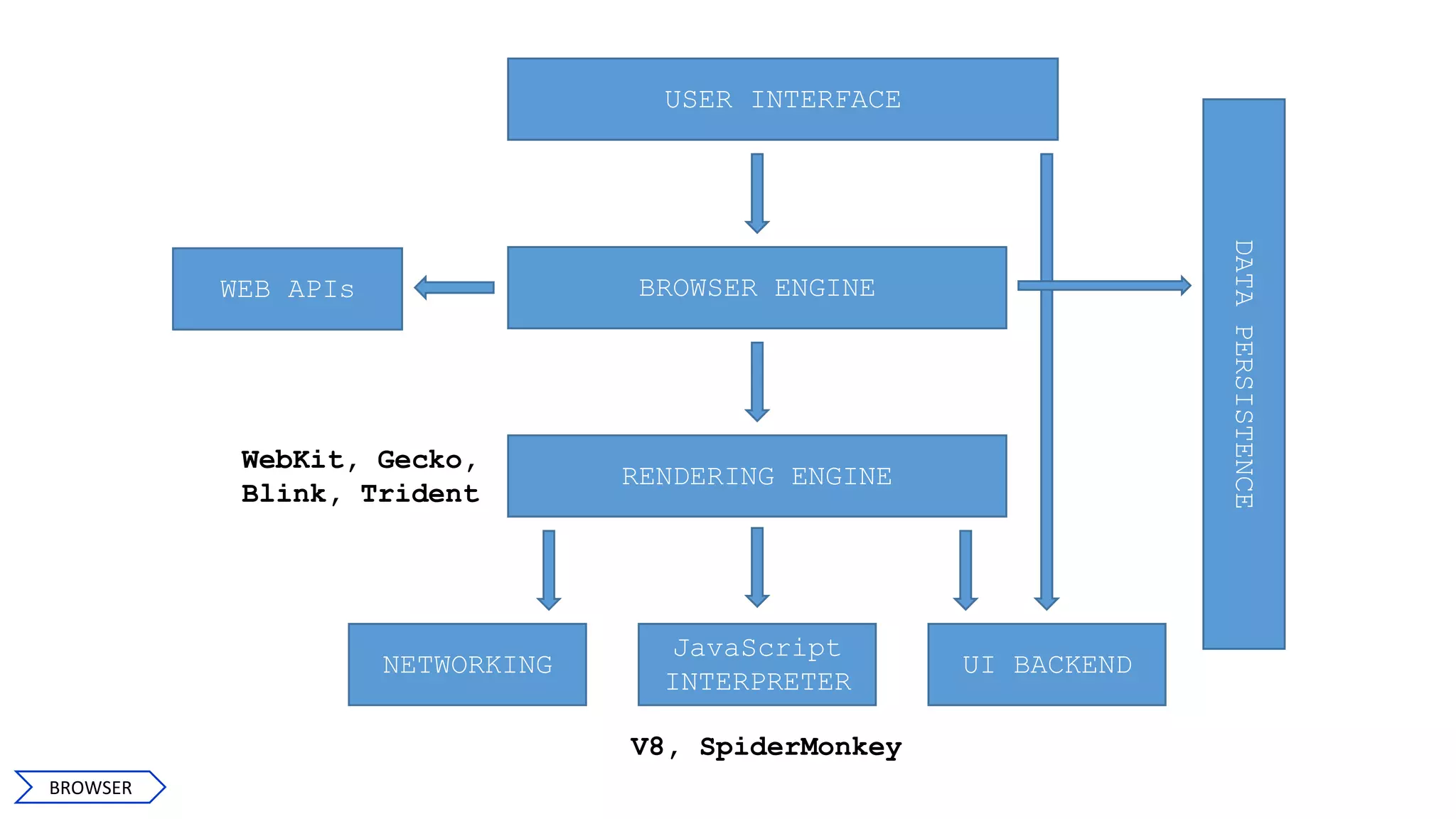
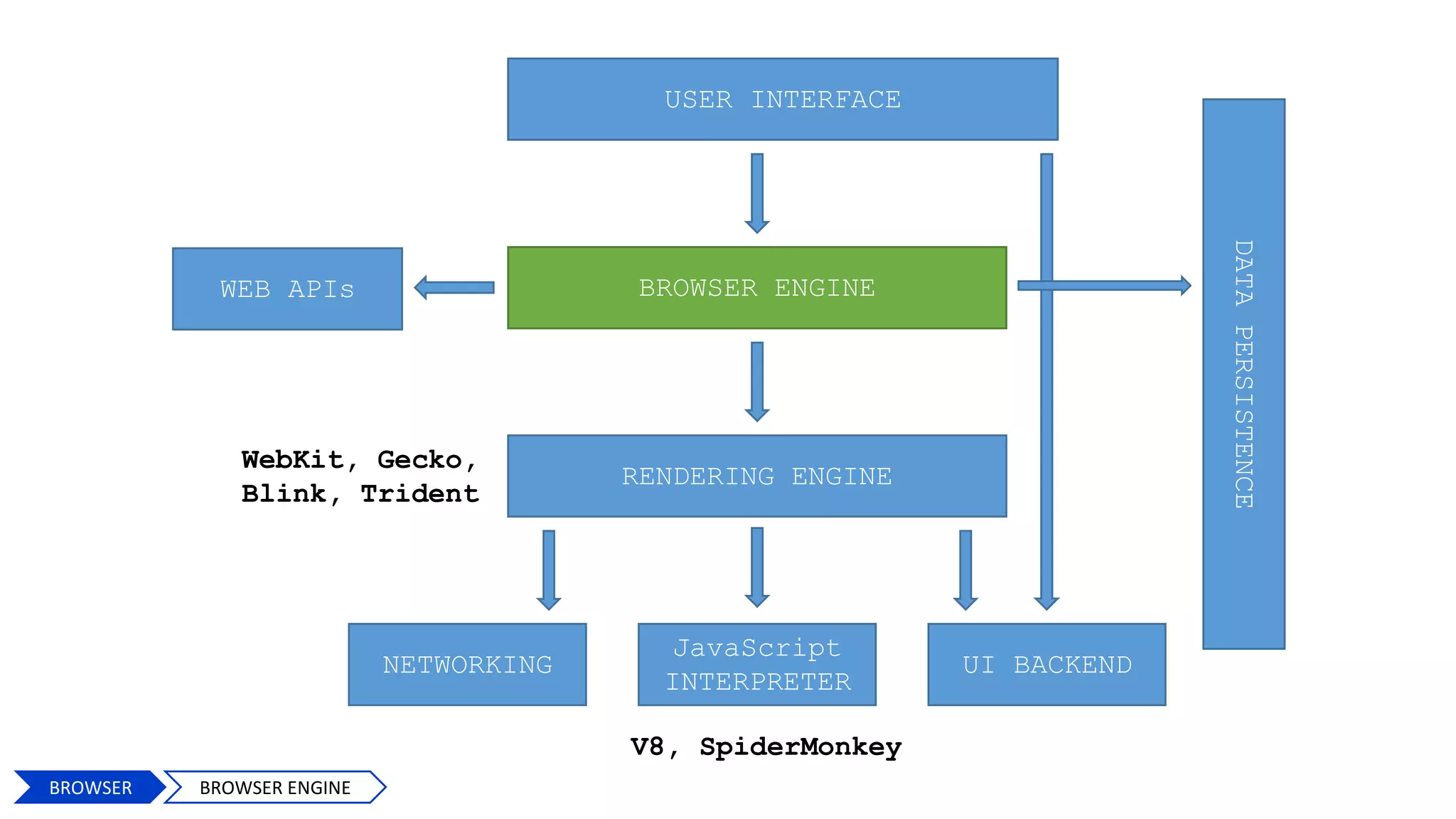
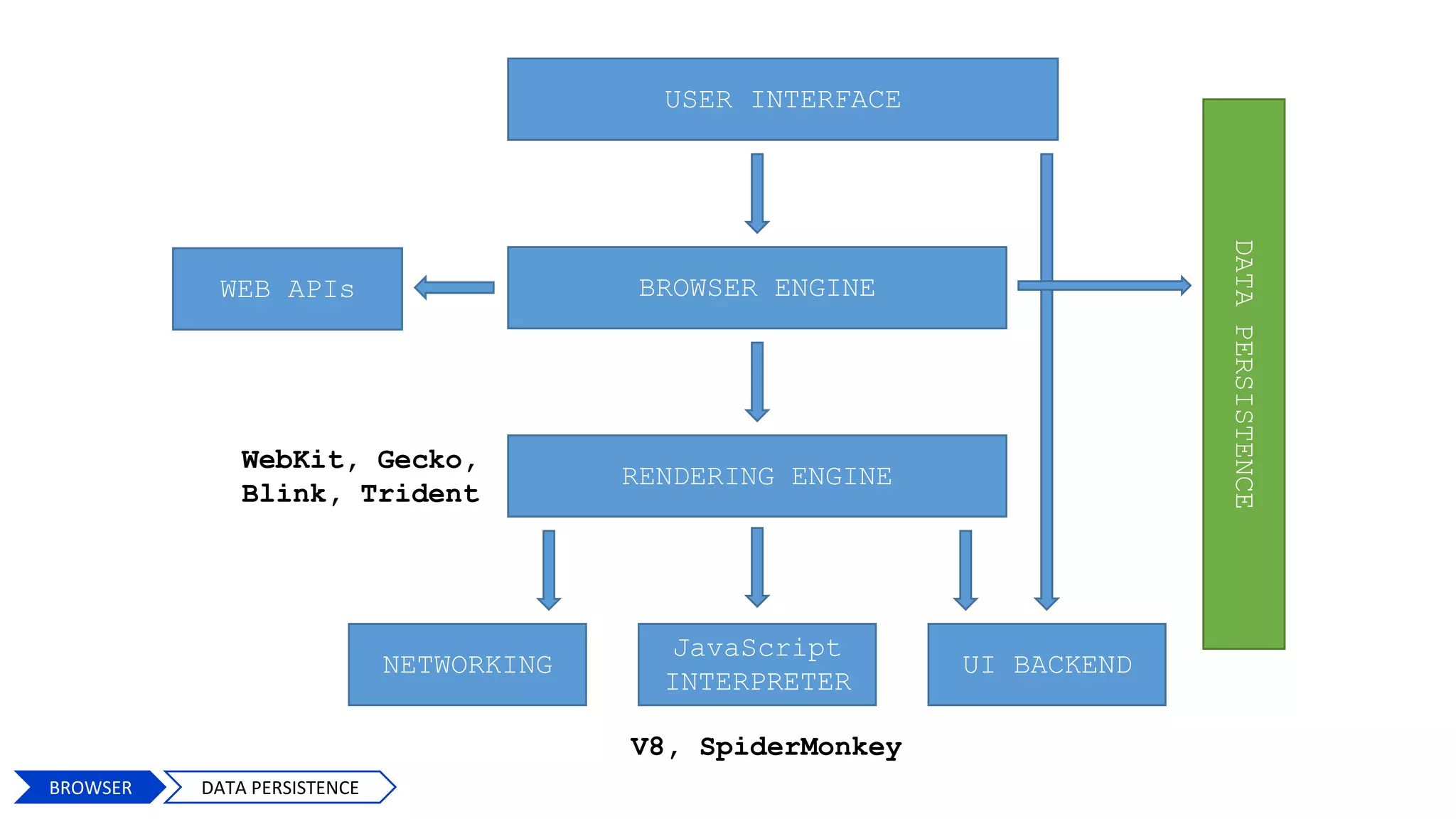
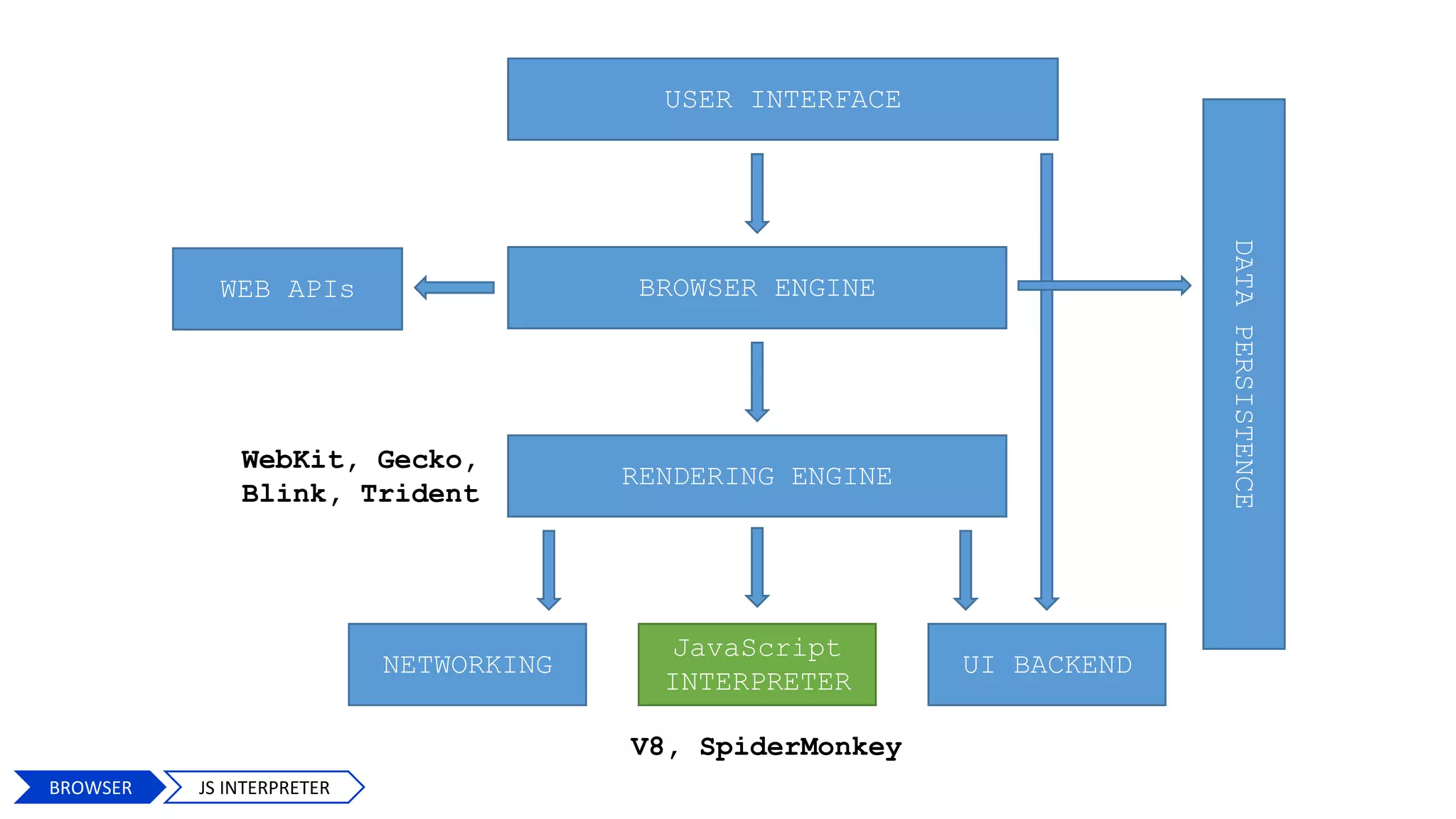
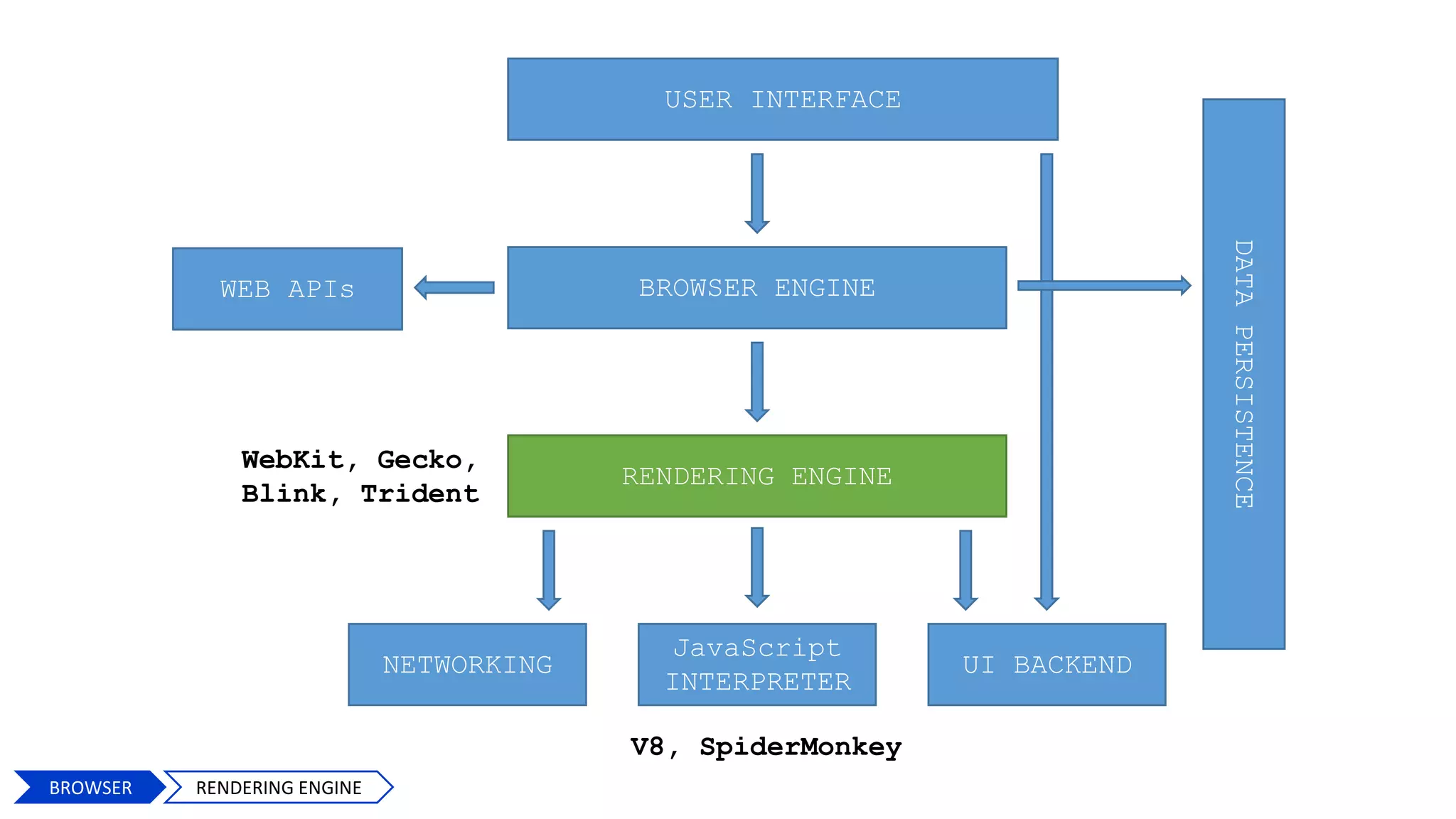
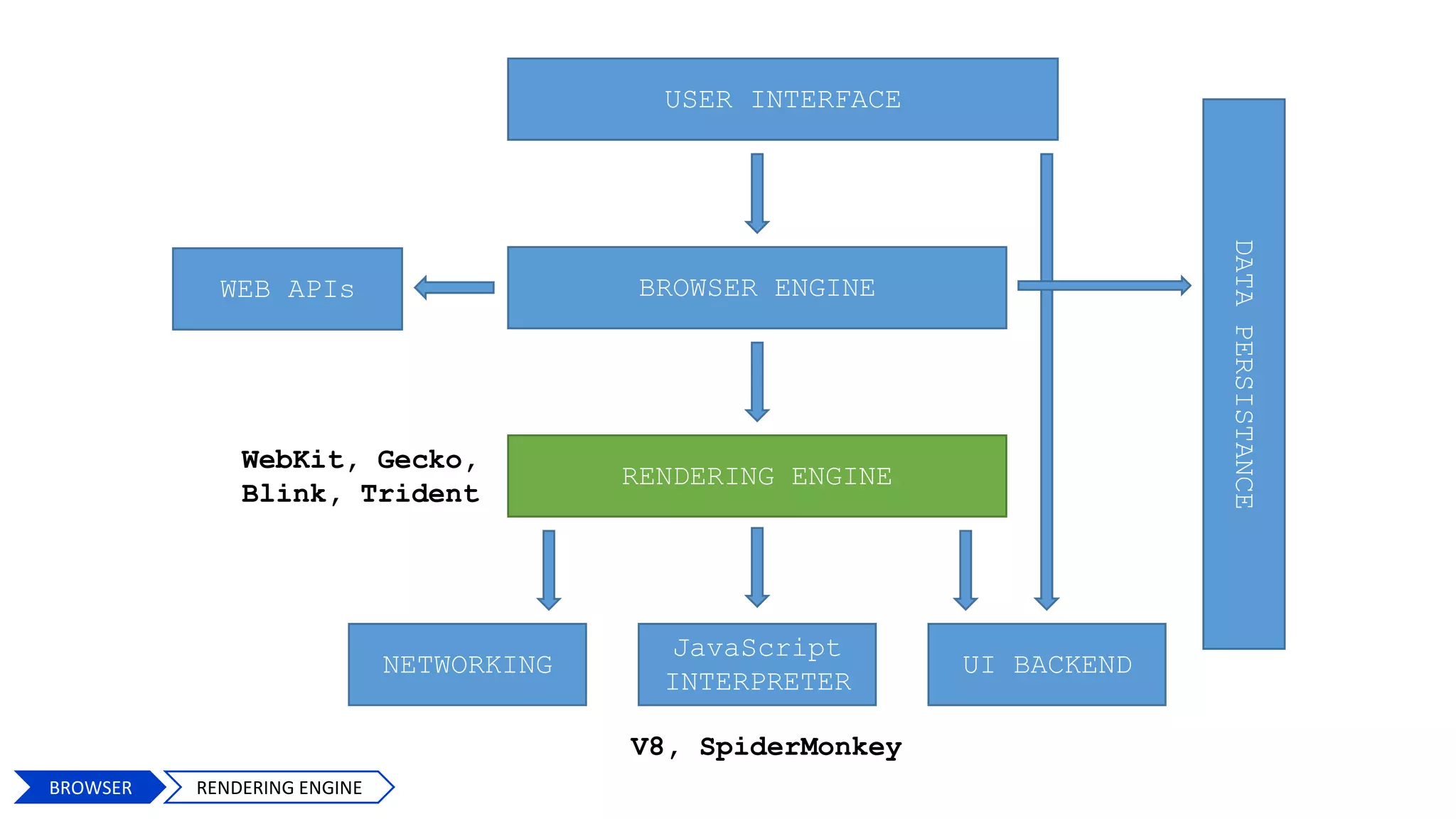
USER INTERFACE
BROWSER ENGINE
RENDERING ENGINE
NETWORKING
JavaScript
INTERPRETER
UI BACKEND
DATAPERSISTENCE
V8, SpiderMonkey
WebKit, Gecko,
Blink, Trident
WEB APIs
4
BROWSER
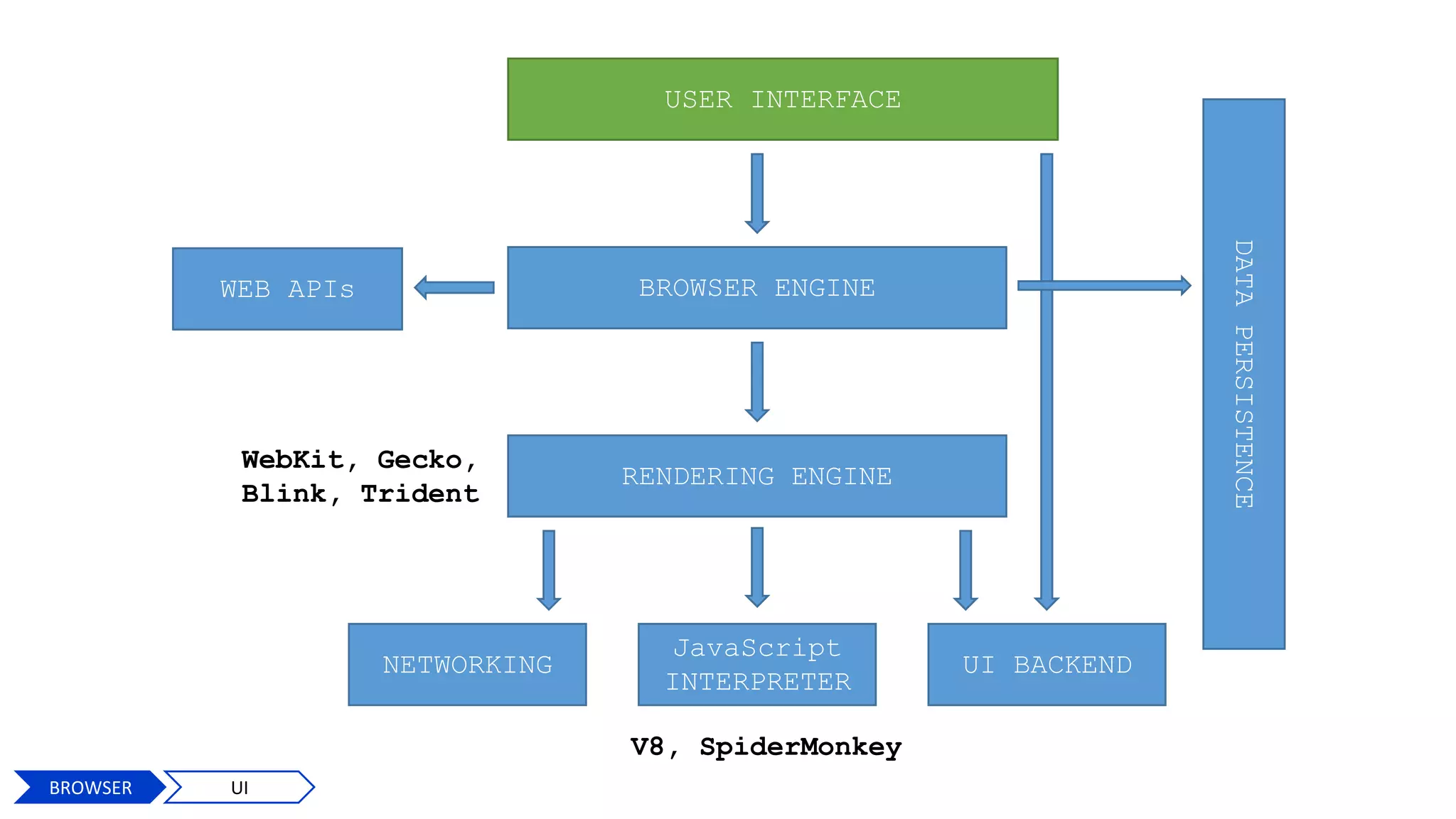
USER INTERFACE
BROWSER ENGINE
RENDERING ENGINE
NETWORKING
JavaScript
INTERPRETER
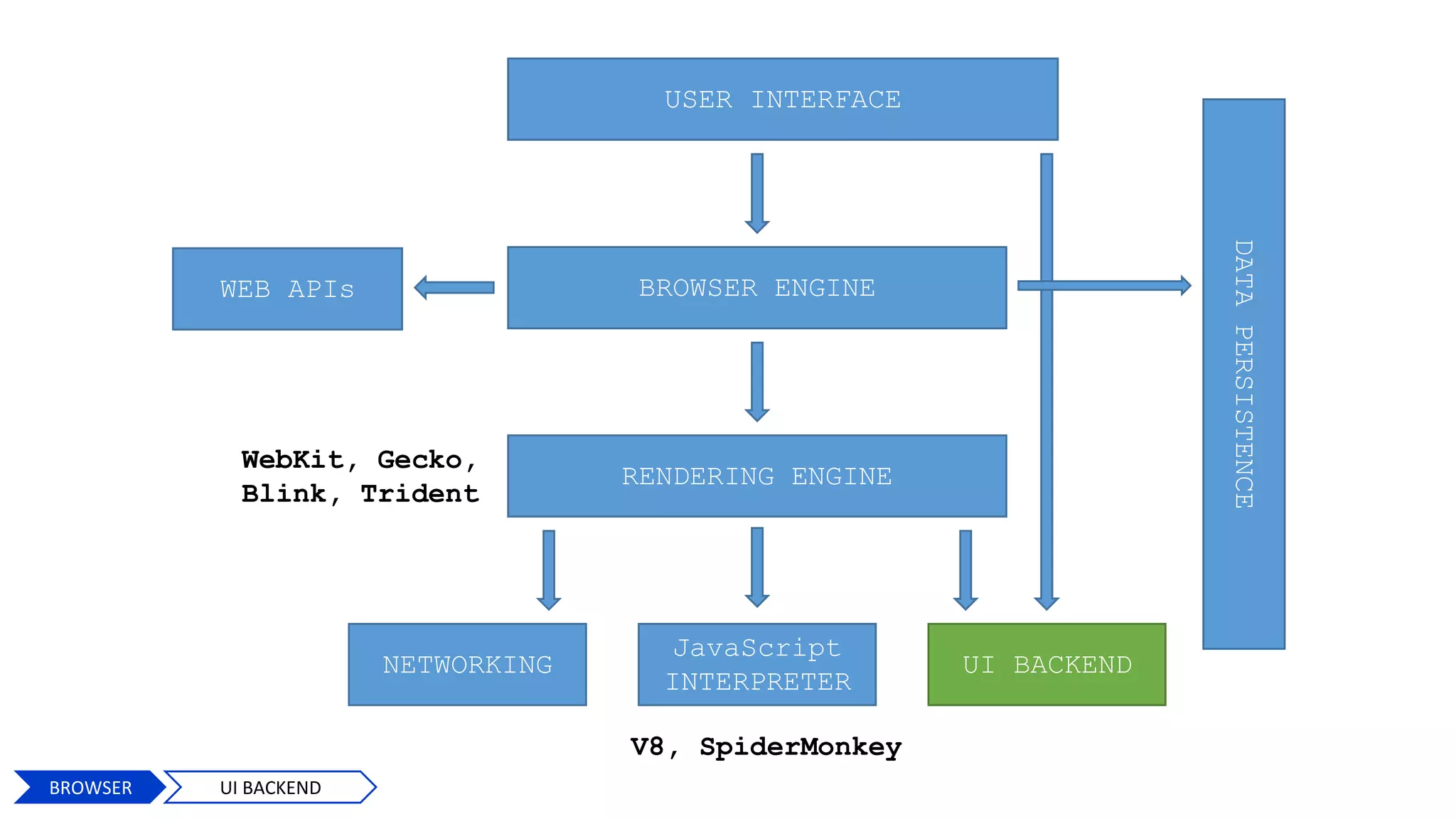
UI BACKEND
DATAPERSISTENCE
V8, SpiderMonkey
WebKit, Gecko,
Blink, Trident
WEB APIs
BROWSER UI
BROWSER UI
User Interface
USER INTERFACE
BROWSER ENGINE
RENDERING ENGINE
NETWORKING
JavaScript
INTERPRETER
UI BACKEND
DATAPERSISTENCE
V8, SpiderMonkey
WebKit, Gecko,
Blink, Trident
WEB APIs
7
BROWSER BROWSER ENGINE
Browser Engine
Browser
Engine
BROWSER BROWSER ENGINE
USER INTERFACE
BROWSER ENGINE
RENDERING ENGINE
NETWORKING
JavaScript
INTERPRETER
UI BACKEND
DATAPERSISTENCE
V8, SpiderMonkey
WebKit, Gecko,
Blink, Trident
WEB APIs
9
BROWSER UI BACKEND
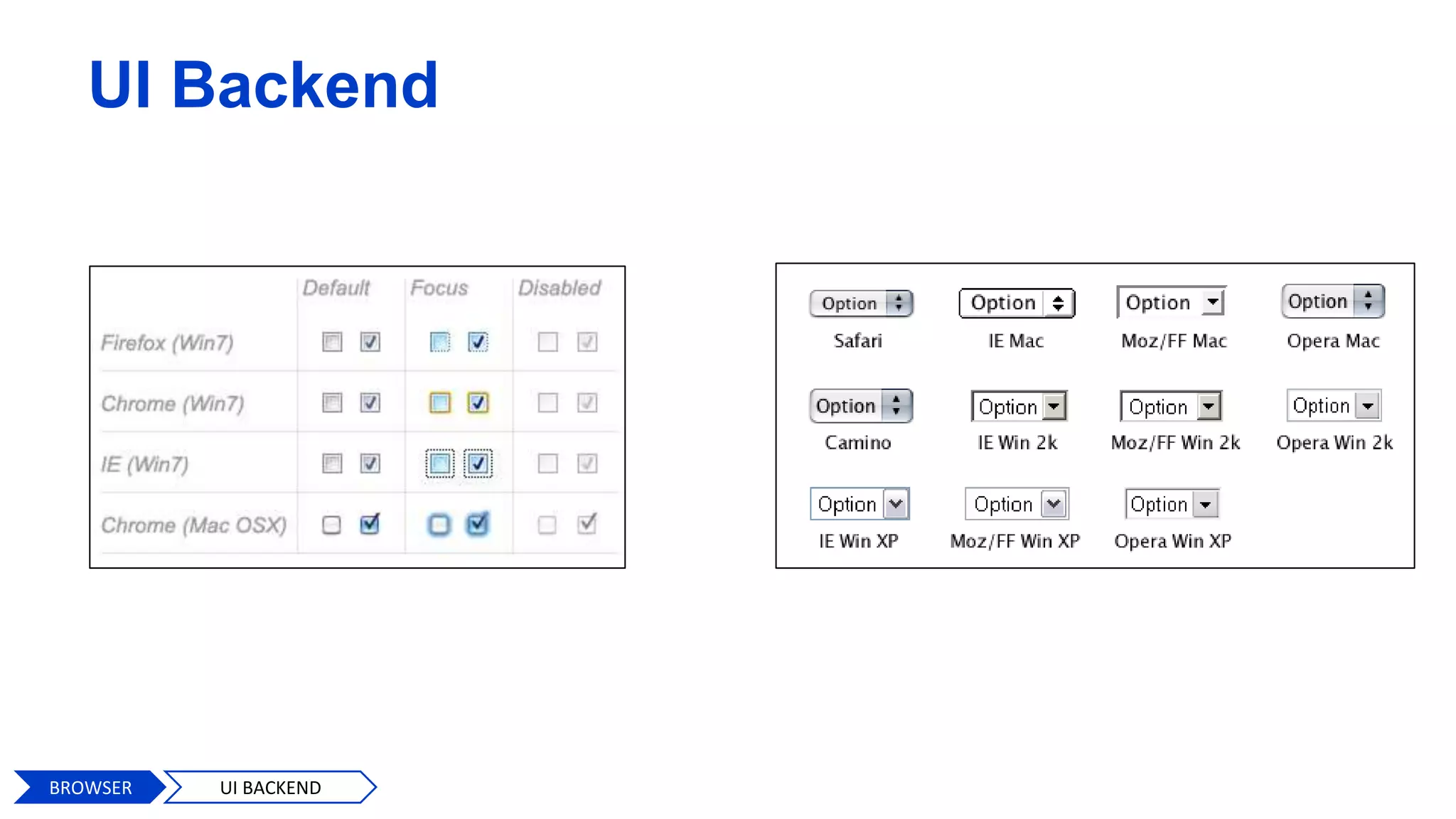
UI Backend
BROWSER UI BACKEND
USER INTERFACE
BROWSER ENGINE
RENDERING ENGINE
NETWORKING
JavaScript
INTERPRETER
UI BACKEND
DATAPERSISTENCE
V8, SpiderMonkey
WebKit, Gecko,
Blink, Trident
WEB APIs
11
BROWSER DATA PERSISTENCE
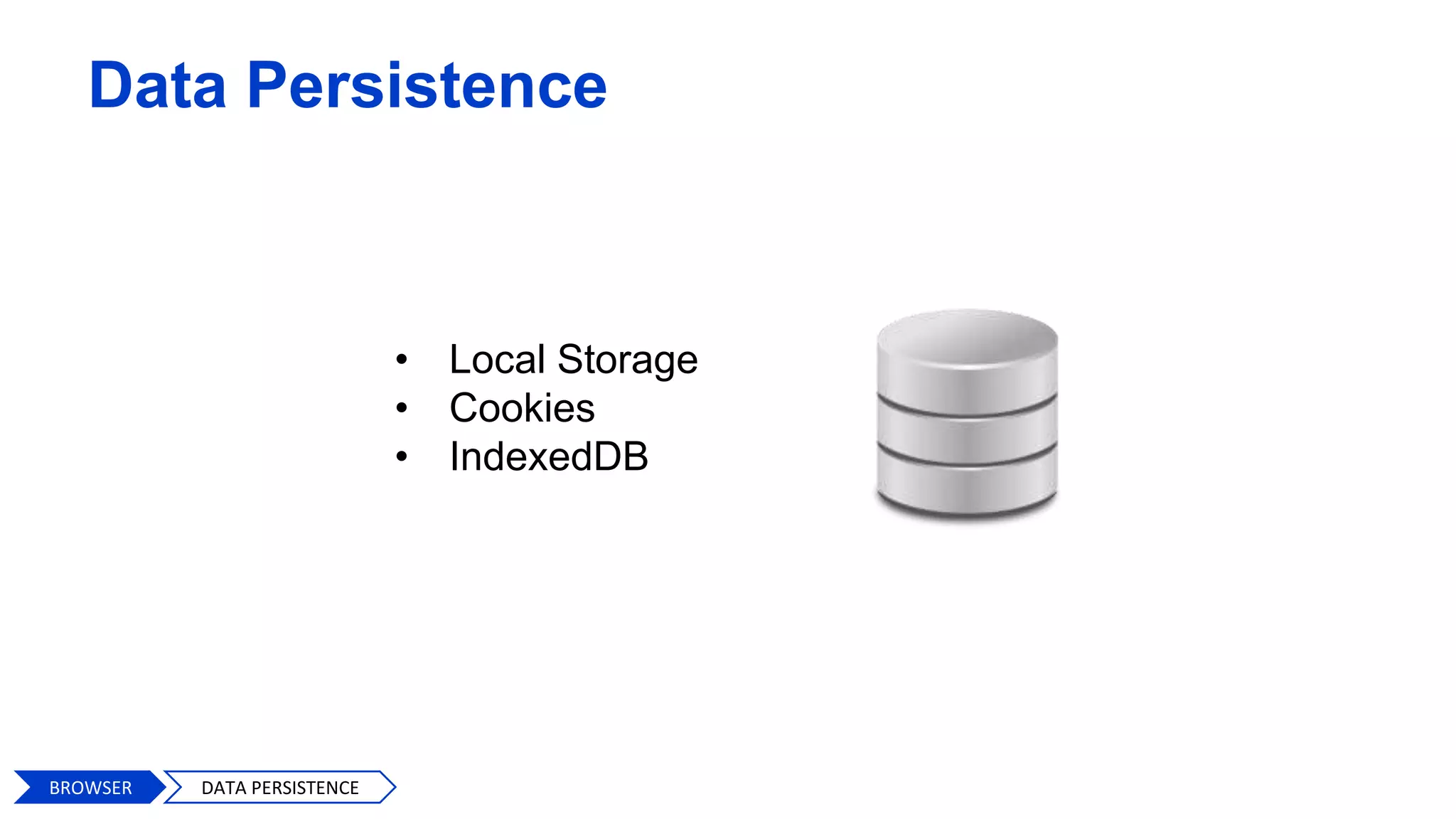
Data Persistence
• Local Storage
• Cookies
• IndexedDB
BROWSER DATA PERSISTENCE
USER INTERFACE
BROWSER ENGINE
RENDERING ENGINE
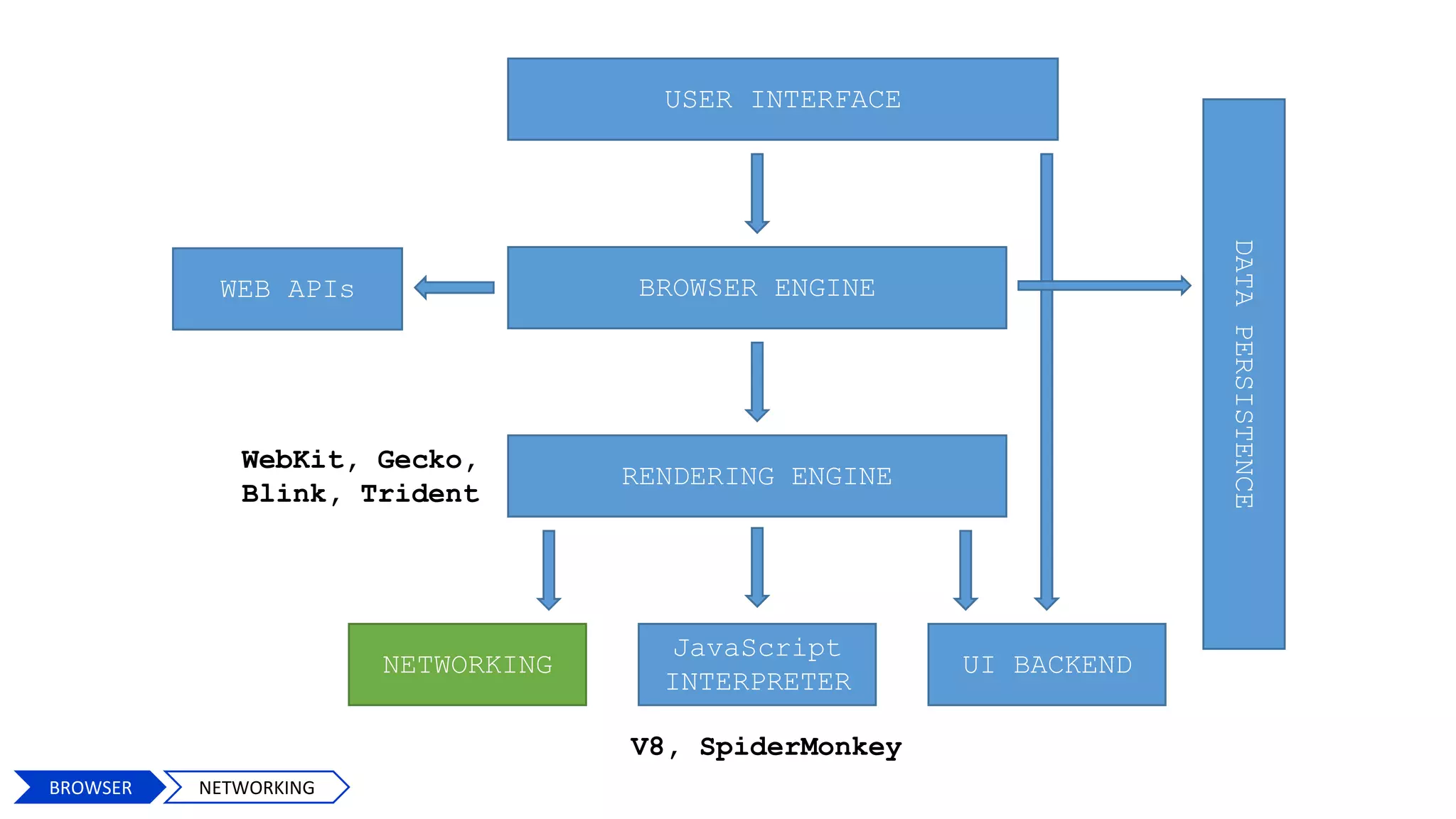
NETWORKING
JavaScript
INTERPRETER
UI BACKEND
DATAPERSISTENCE
V8, SpiderMonkey
WebKit, Gecko,
Blink, Trident
WEB APIs
13
BROWSER NETWORKING
Networking
14BROWSER NETWORKING
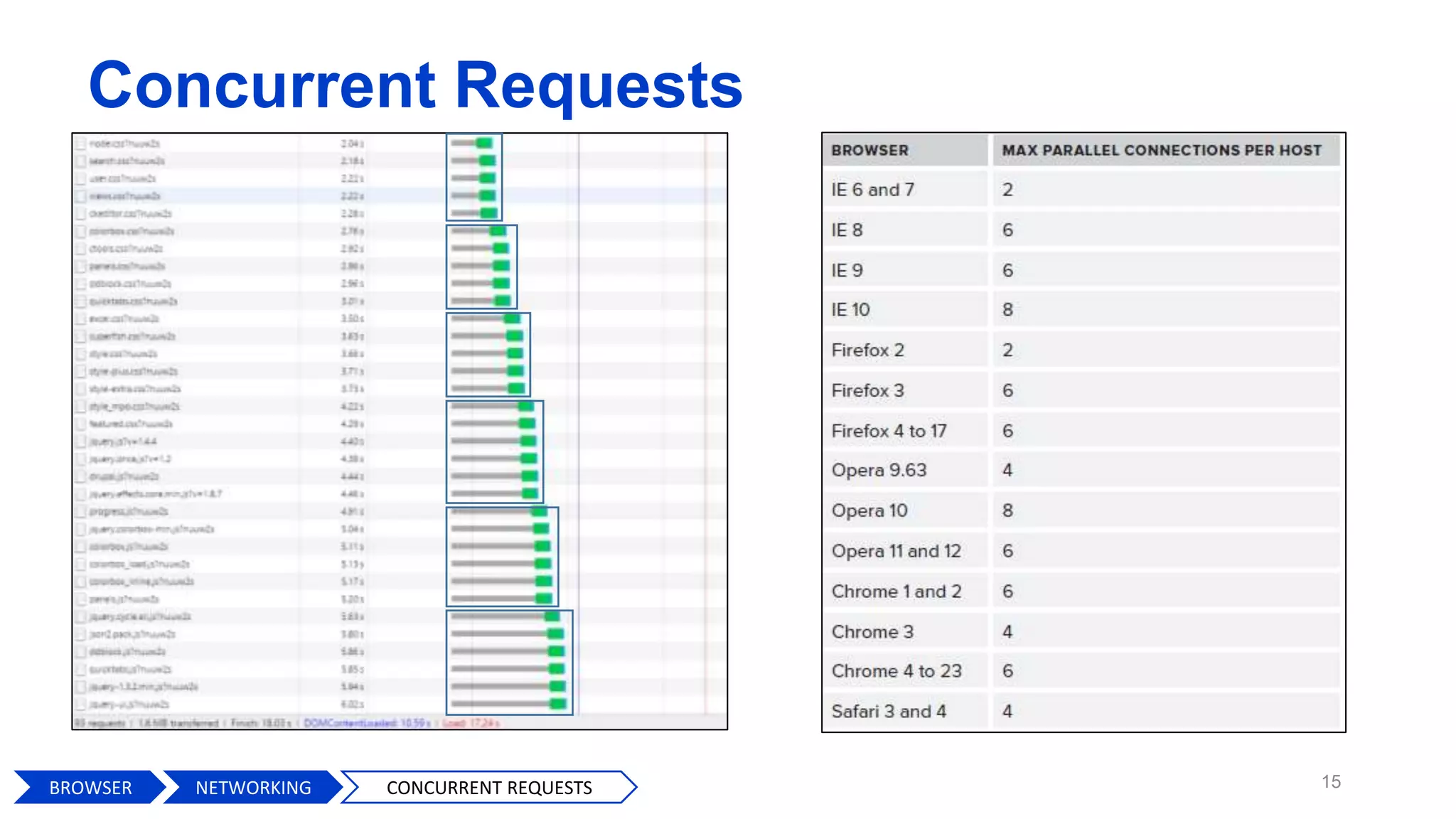
Concurrent Requests
15BROWSER CONCURRENT REQUESTSNETWORKING
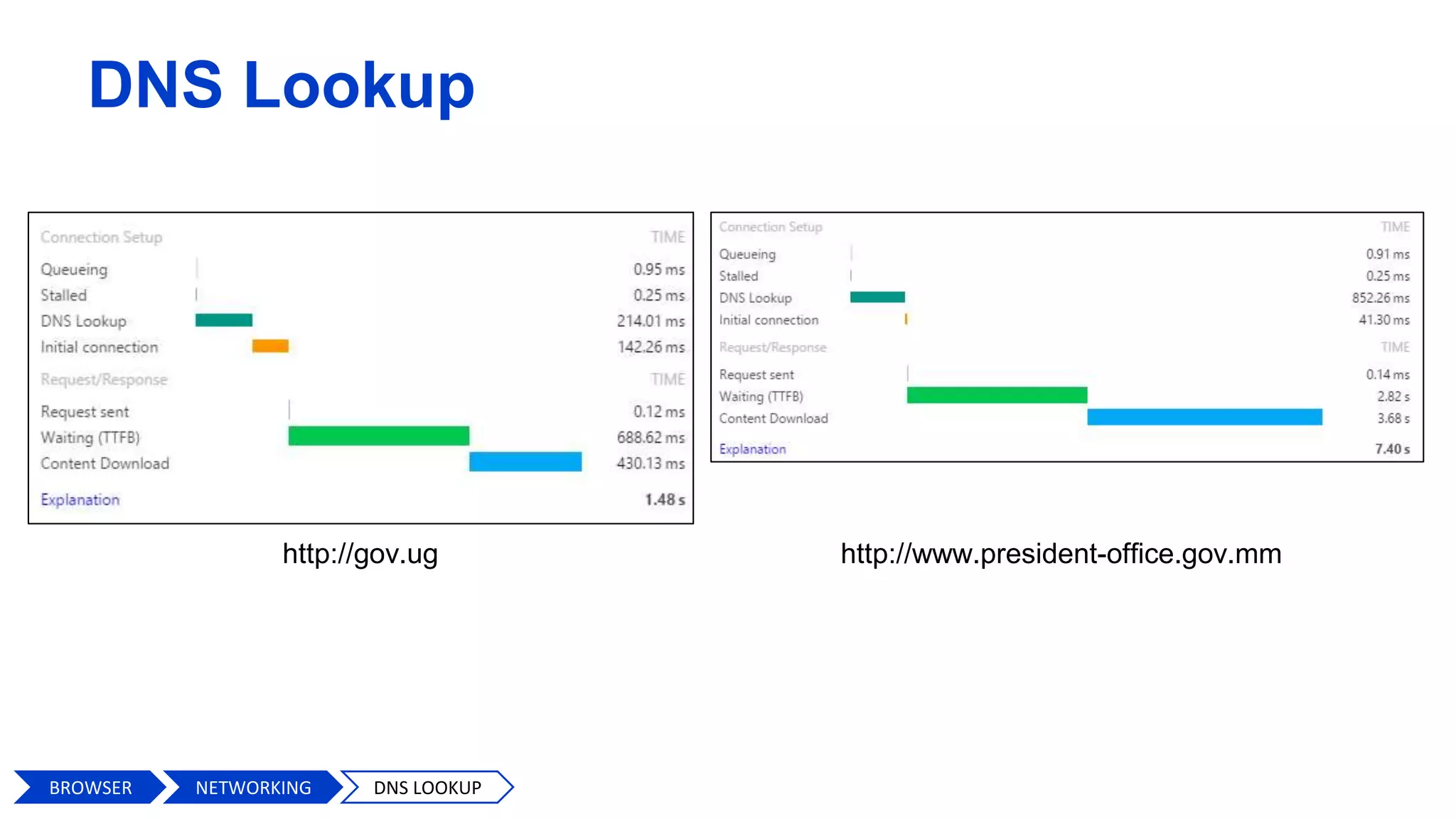
DNS Lookup
http://gov.ug http://www.president-office.gov.mm
BROWSER DNS LOOKUPNETWORKING
17
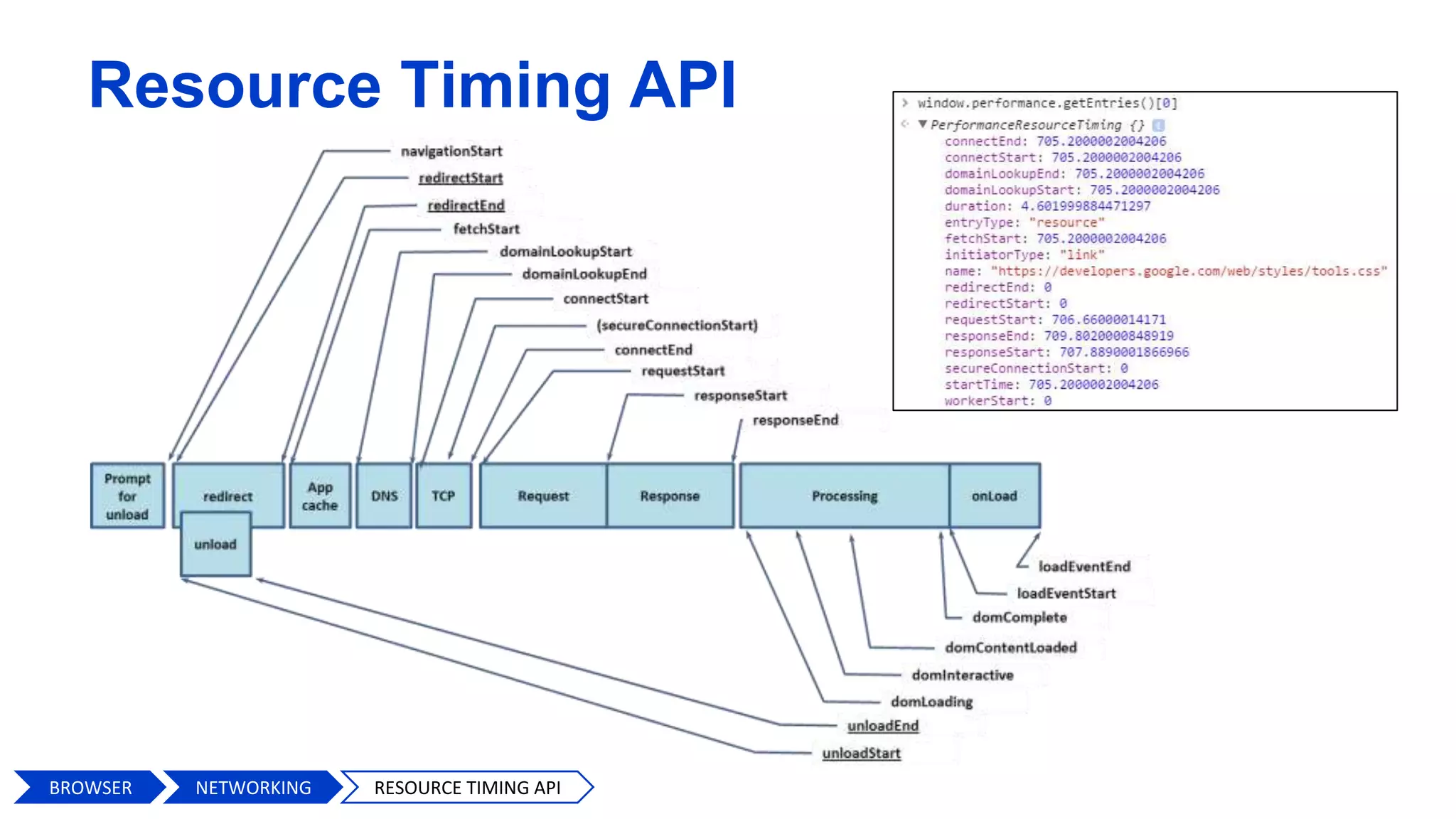
Resource Timing API
BROWSER RESOURCE TIMING APINETWORKING
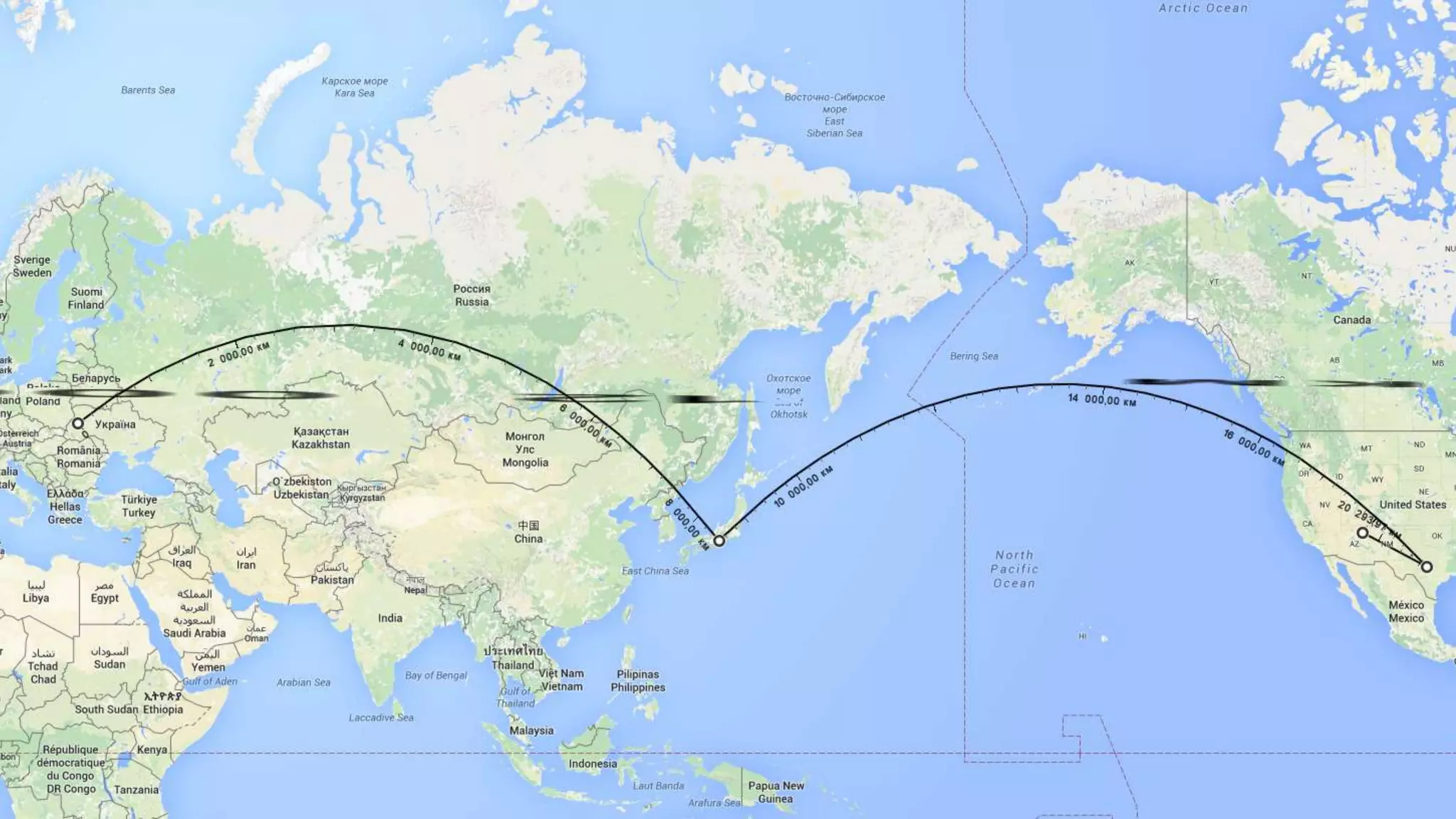
Latency matters
20
amazon100ms = 1% of sales
1% = $889 900 000
21
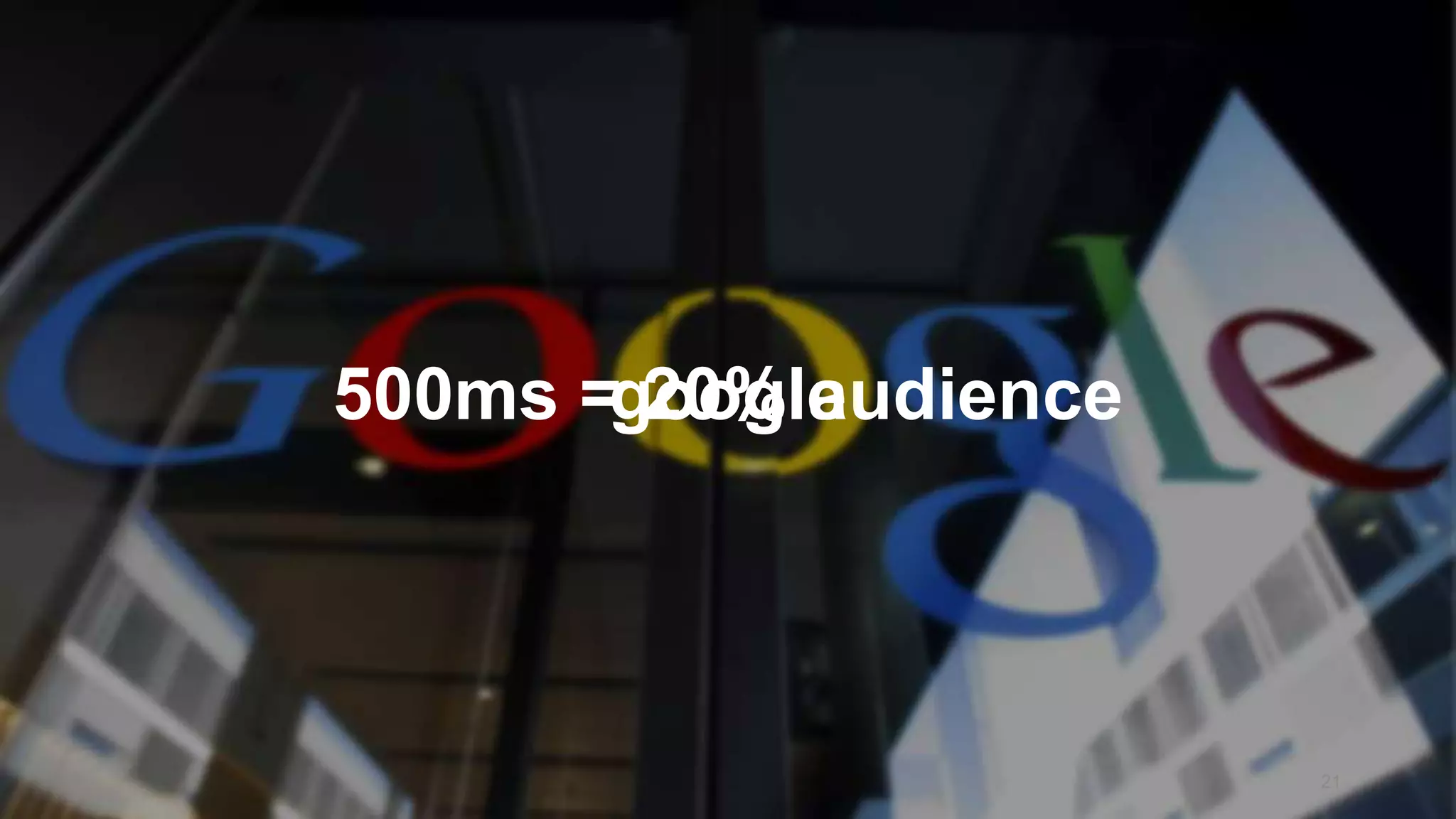
google500ms = 20% audience
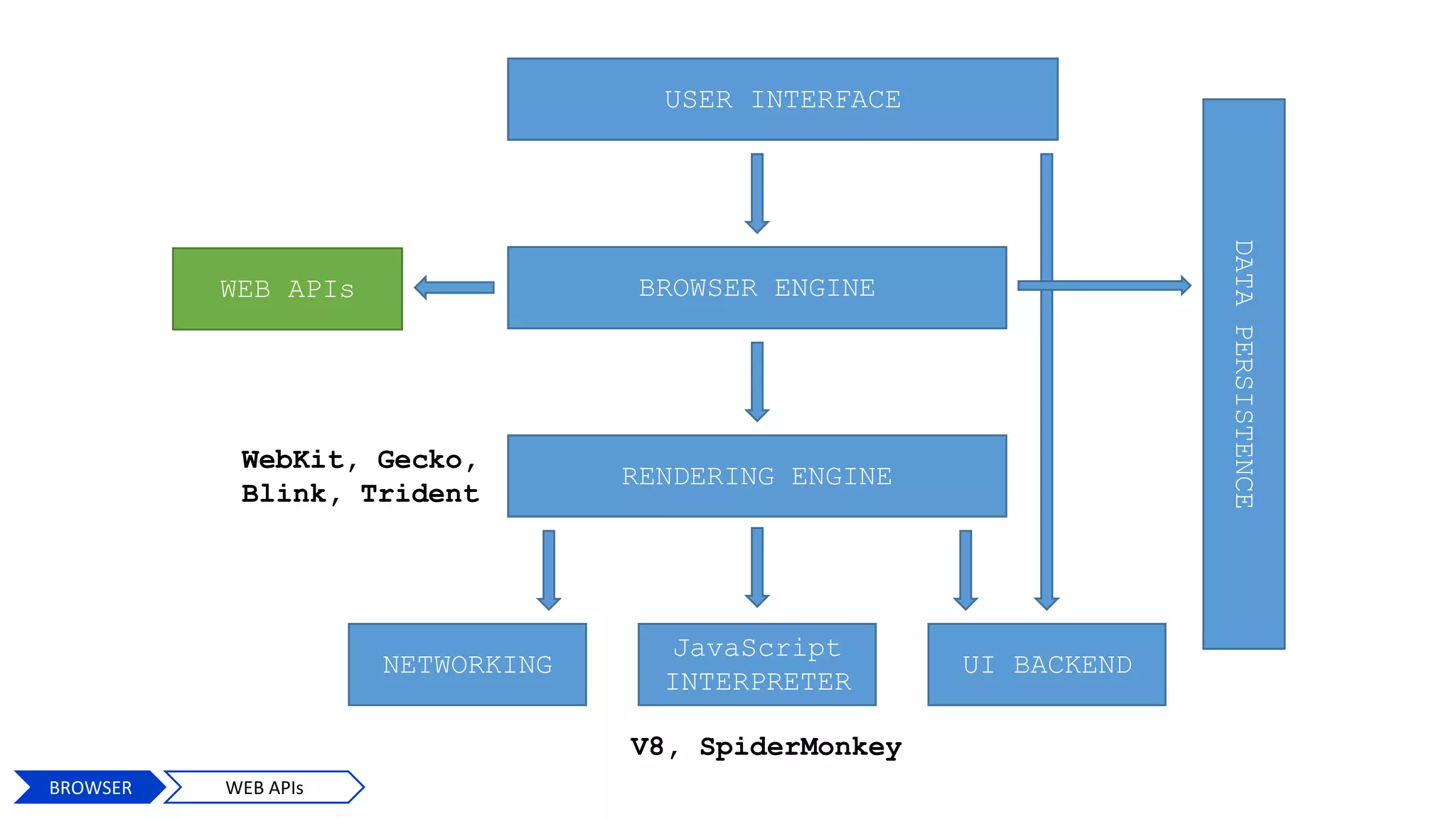
USER INTERFACE
BROWSER ENGINE
RENDERING ENGINE
NETWORKING
JavaScript
INTERPRETER
UI BACKEND
DATAPERSISTENCE
V8, SpiderMonkey
WebKit, Gecko,
Blink, Trident
WEB APIs
22
BROWSER JS INTERPRETER
USER INTERFACE
BROWSER ENGINE
RENDERING ENGINE
NETWORKING
JavaScript
INTERPRETER
UI BACKEND
DATAPERSISTENCE
V8, SpiderMonkey
WebKit, Gecko,
Blink, Trident
WEB APIs
23
BROWSER WEB APIs
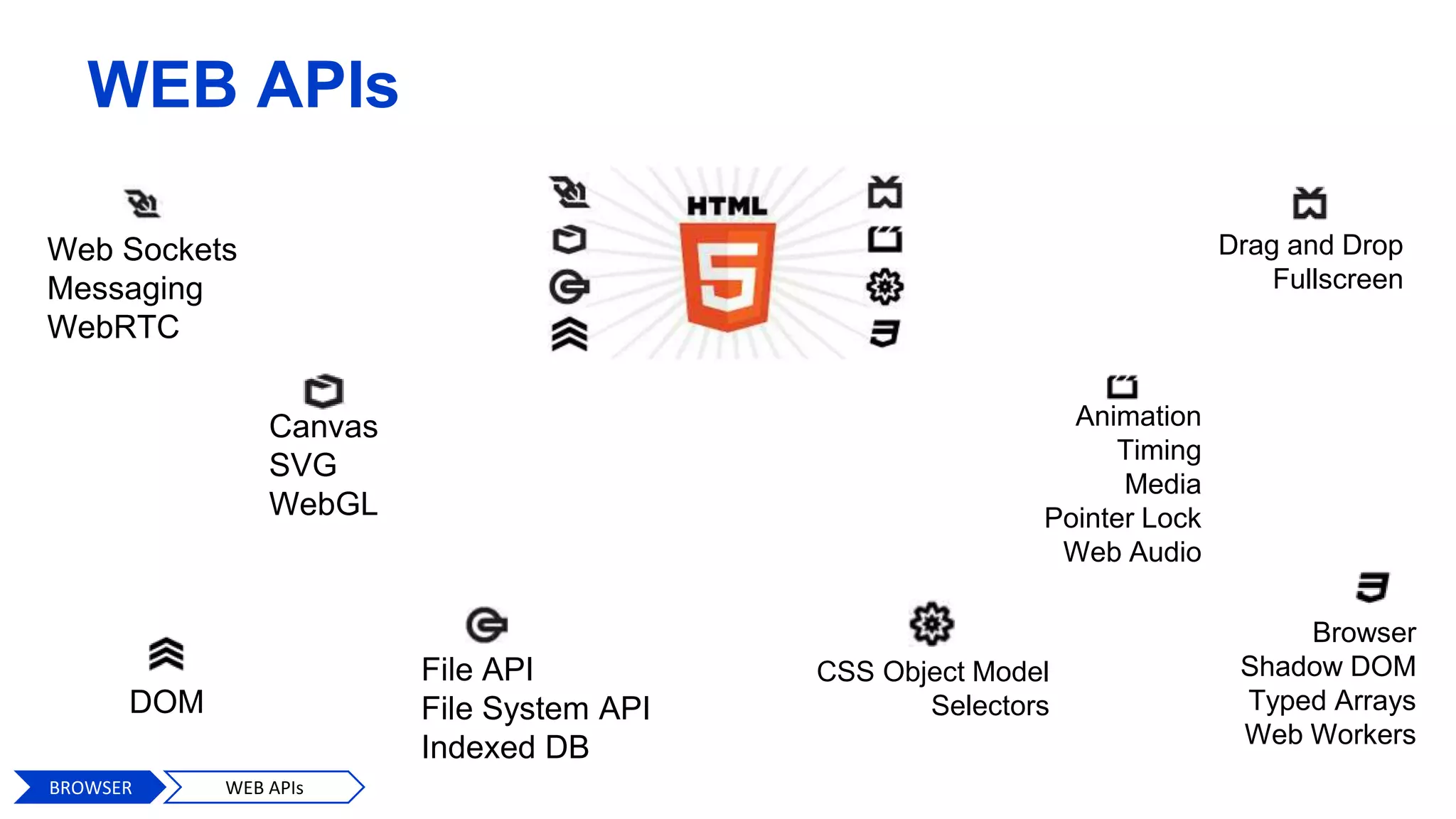
WEB APIs
Web Sockets
Messaging
WebRTC
Canvas
SVG
WebGL
File API
File System API
Indexed DB
DOM
Drag and Drop
Fullscreen
Animation
Timing
Media
Pointer Lock
Web Audio
Browser
Shadow DOM
Typed Arrays
Web Workers
CSS Object Model
Selectors
BROWSER WEB APIs
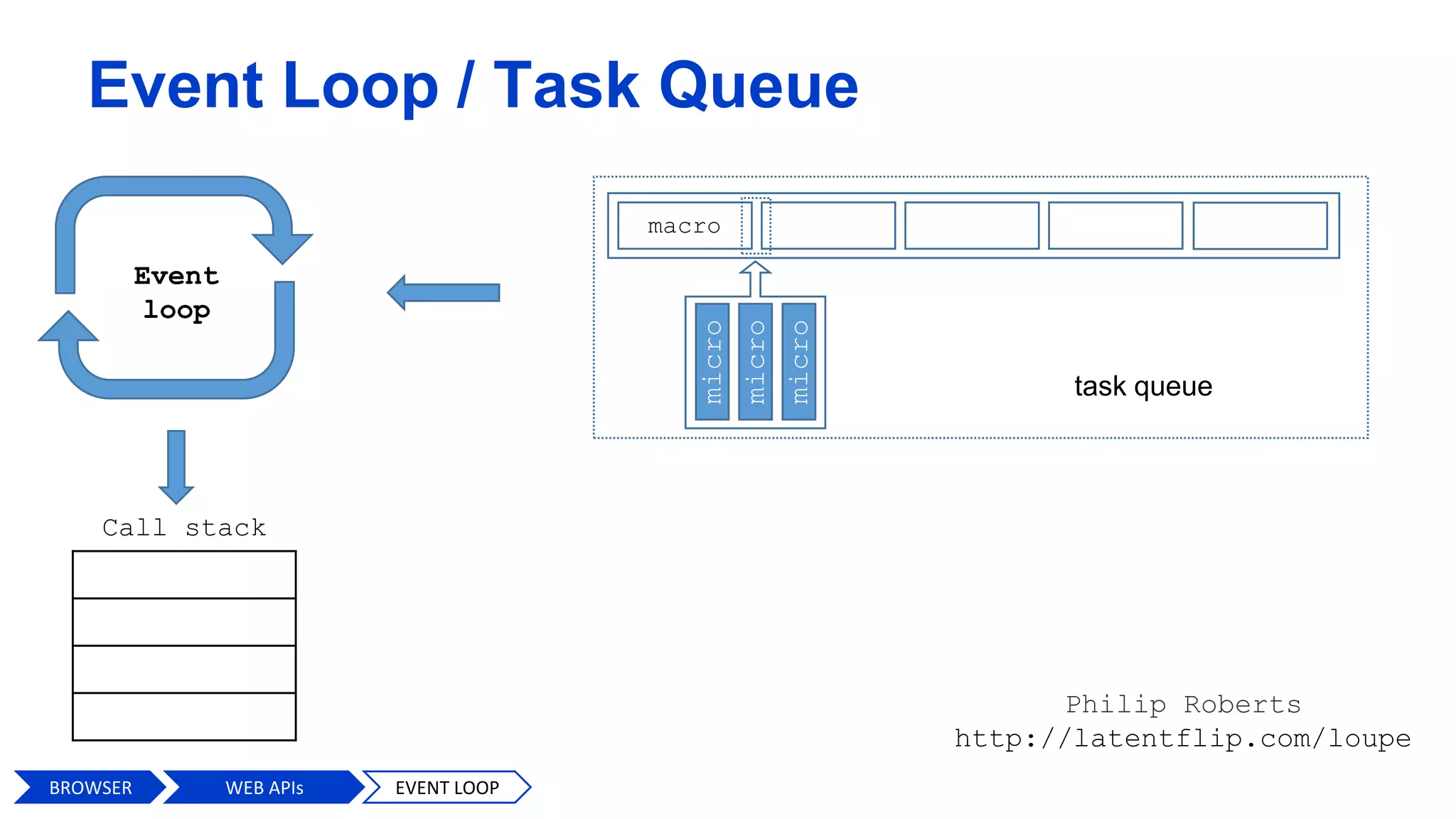
Event Loop / Task Queue
Philip Roberts
http://latentflip.com/loupe
Event
loop
Call stack
BROWSER WEB APIs EVENT LOOP
macro
micro
micro
micro
task queue
26
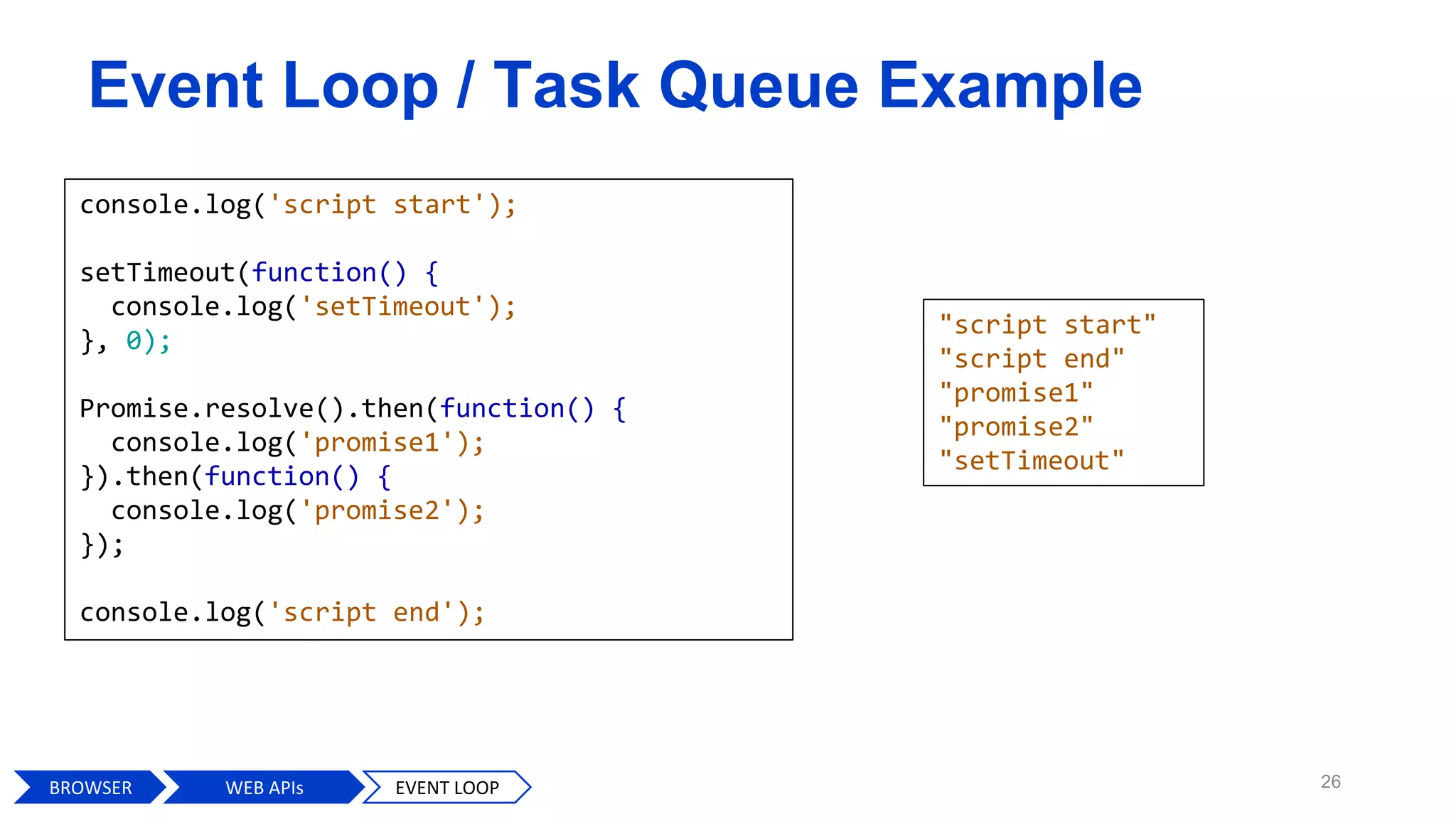
console.log('script start');
setTimeout(function() {
console.log('setTimeout');
}, 0);
Promise.resolve().then(function() {
console.log('promise1');
}).then(function() {
console.log('promise2');
});
console.log('script end');
Event Loop / Task Queue Example
BROWSER WEB APIs EVENT LOOP
"script start"
"script end"
"promise1"
"promise2"
"setTimeout"
Event Loop / Task Queue Example
BROWSER WEB APIs EVENT LOOP
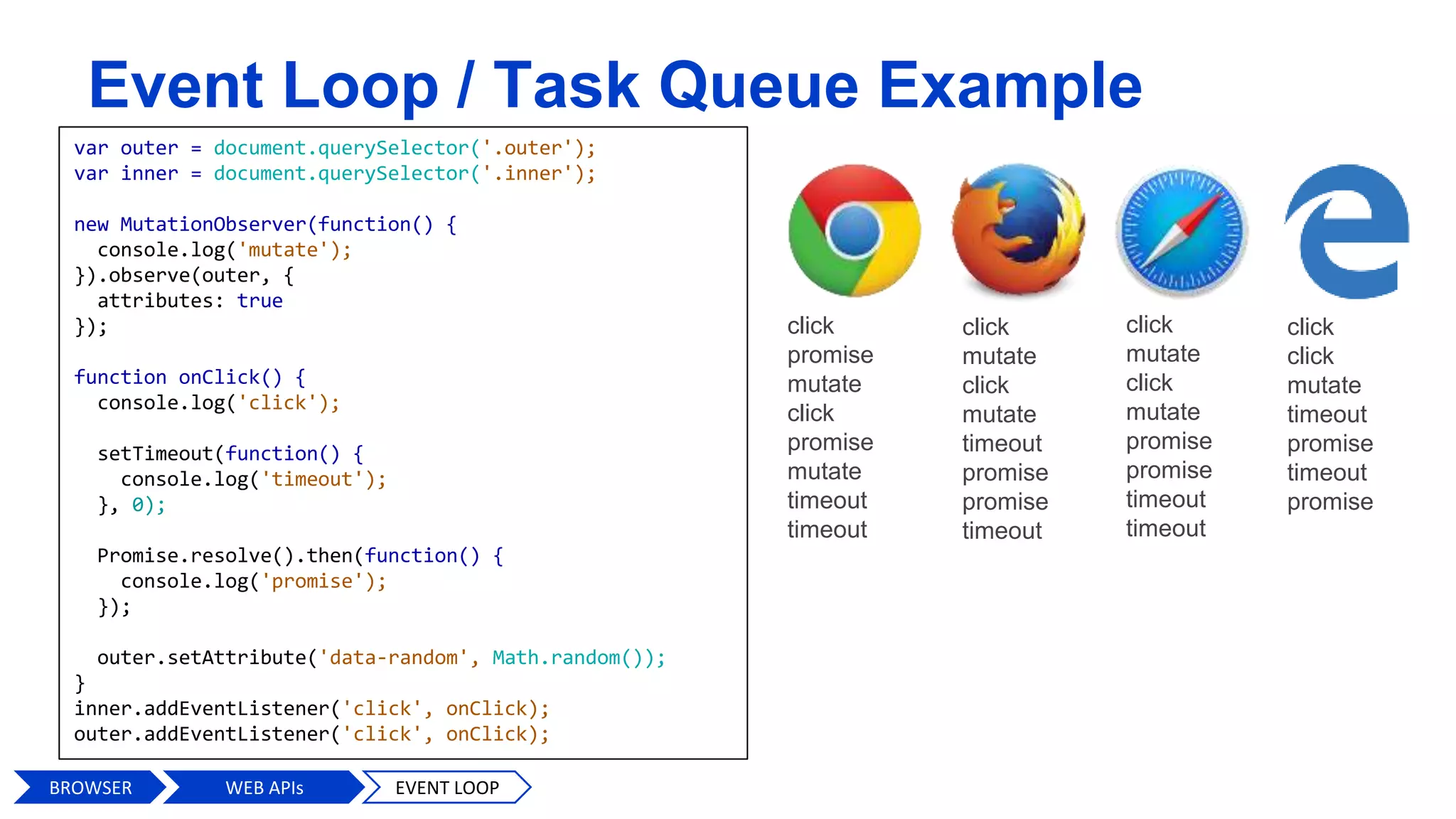
var outer = document.querySelector('.outer');
var inner = document.querySelector('.inner');
new MutationObserver(function() {
console.log('mutate');
}).observe(outer, {
attributes: true
});
function onClick() {
console.log('click');
setTimeout(function() {
console.log('timeout');
}, 0);
Promise.resolve().then(function() {
console.log('promise');
});
outer.setAttribute('data-random', Math.random());
}
inner.addEventListener('click', onClick);
outer.addEventListener('click', onClick);
click
promise
mutate
click
promise
mutate
timeout
timeout
click
mutate
click
mutate
timeout
promise
promise
timeout
click
mutate
click
mutate
promise
promise
timeout
timeout
click
click
mutate
timeout
promise
timeout
promise
USER INTERFACE
BROWSER ENGINE
RENDERING ENGINE
NETWORKING
JavaScript
INTERPRETER
UI BACKEND
DATAPERSISTENCE
V8, SpiderMonkey
WebKit, Gecko,
Blink, Trident
WEB APIs
28
BROWSER RENDERING ENGINE
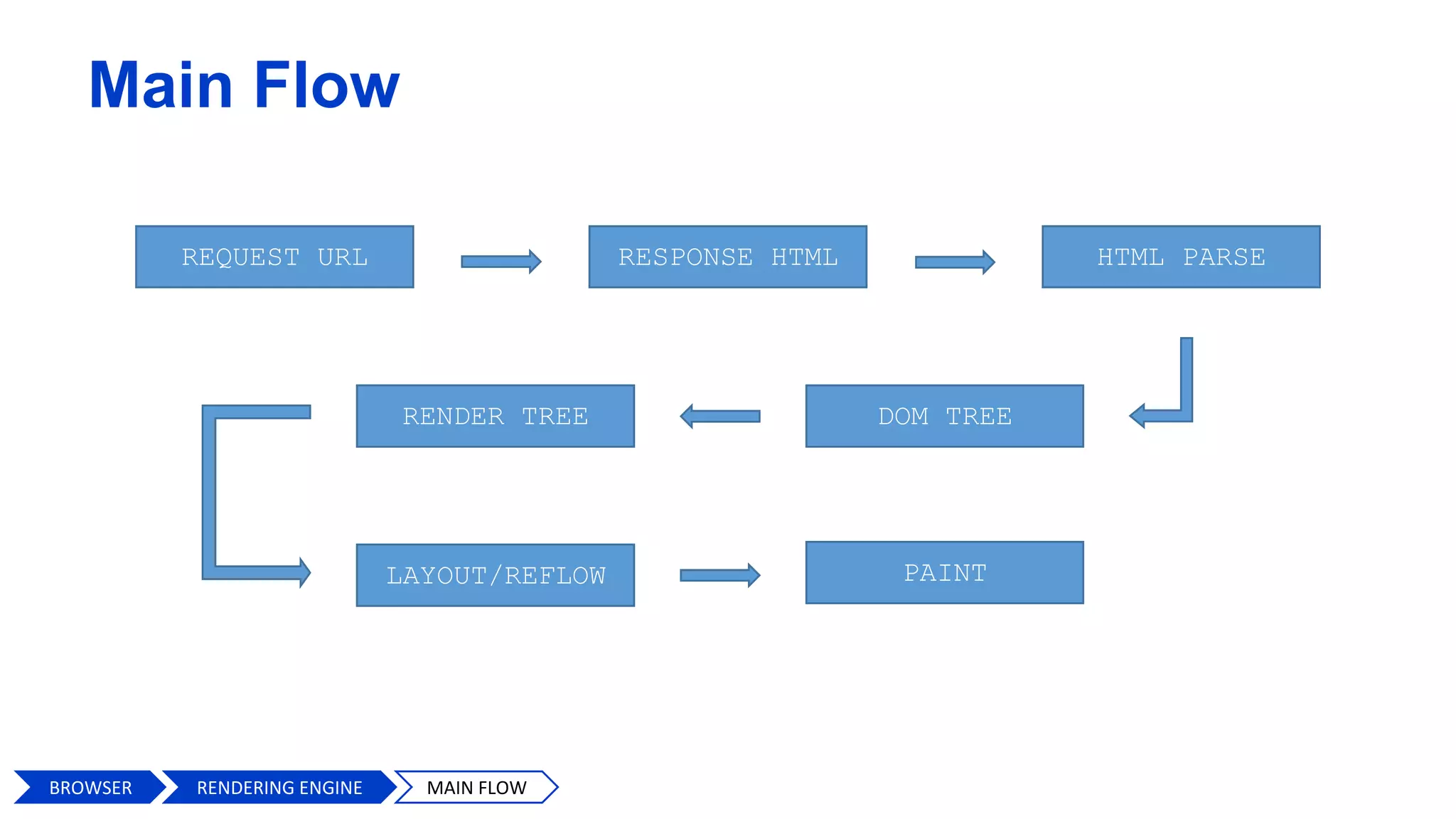
Main Flow
RESPONSE HTML HTML PARSEREQUEST URL
LAYOUT/REFLOW PAINT
RENDER TREE DOM TREE
BROWSER MAIN FLOWRENDERING ENGINE
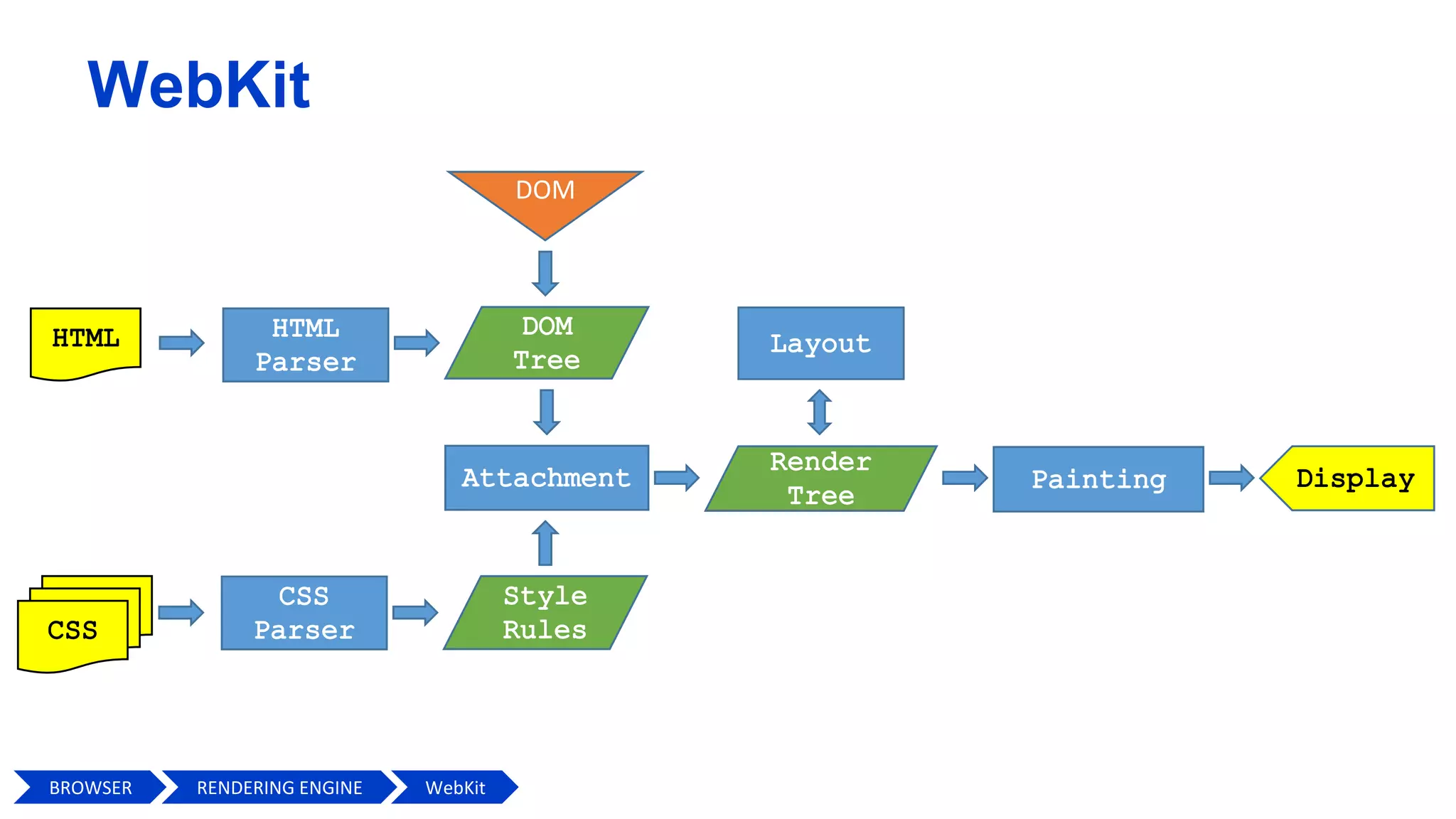
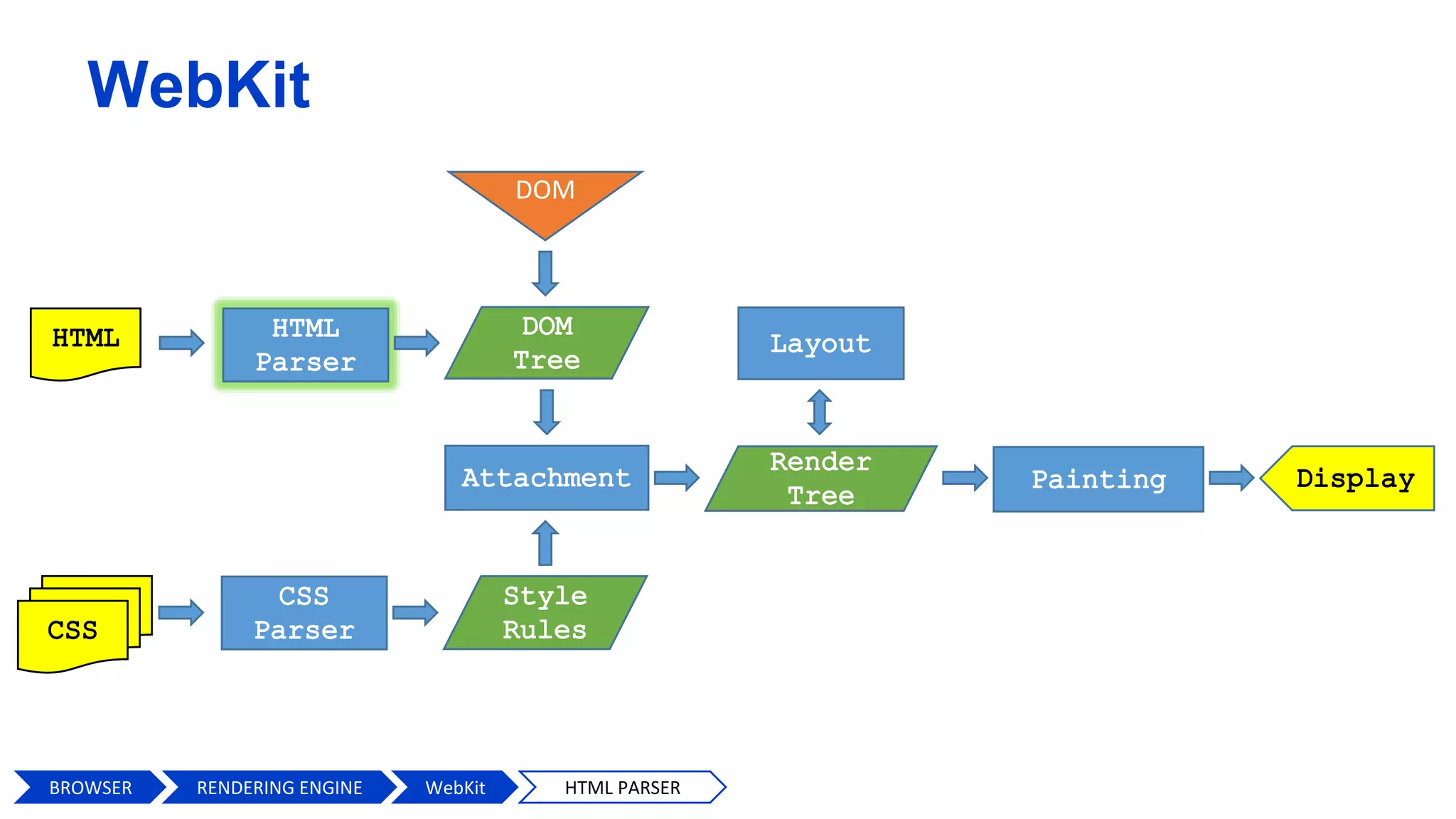
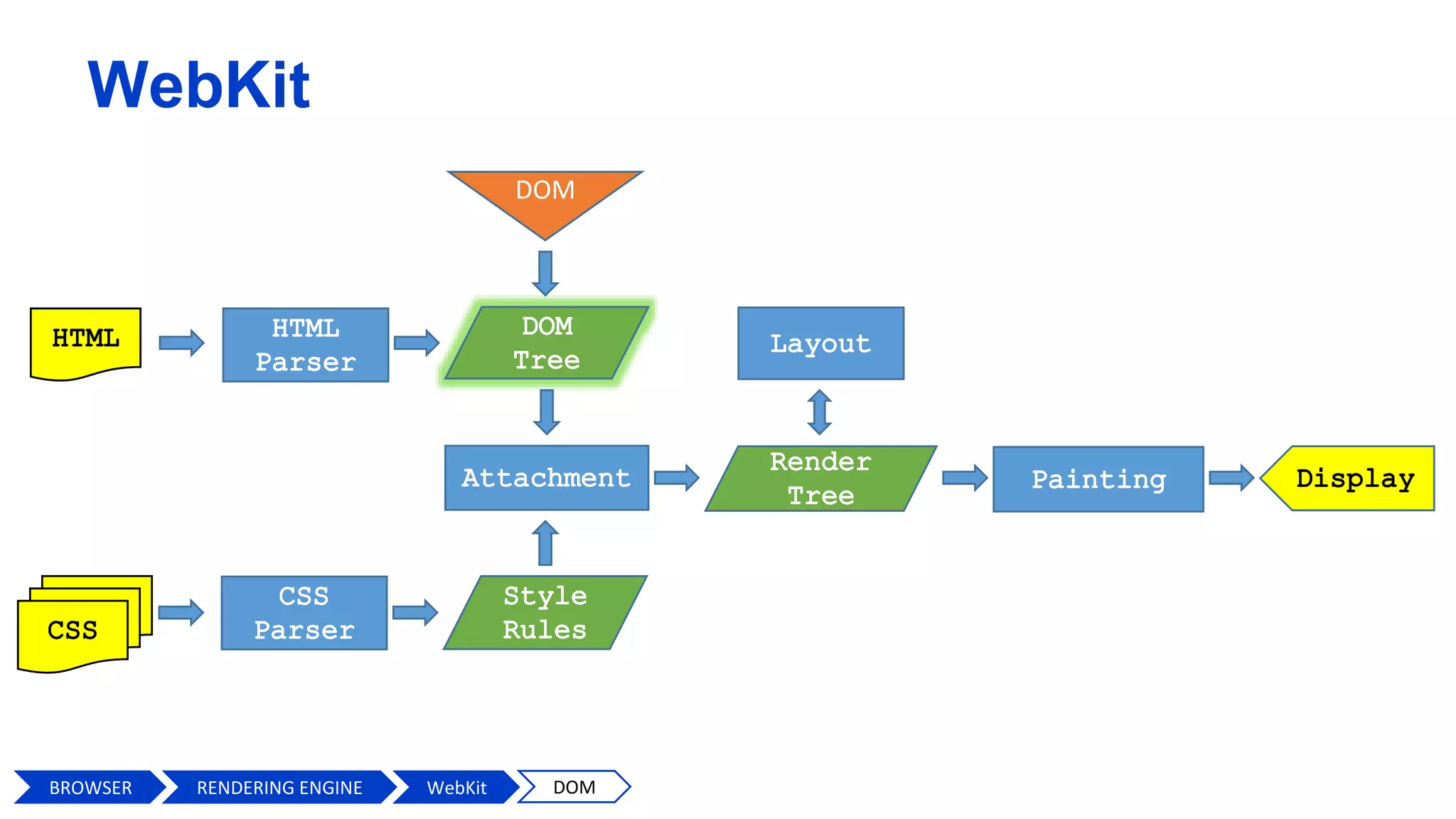
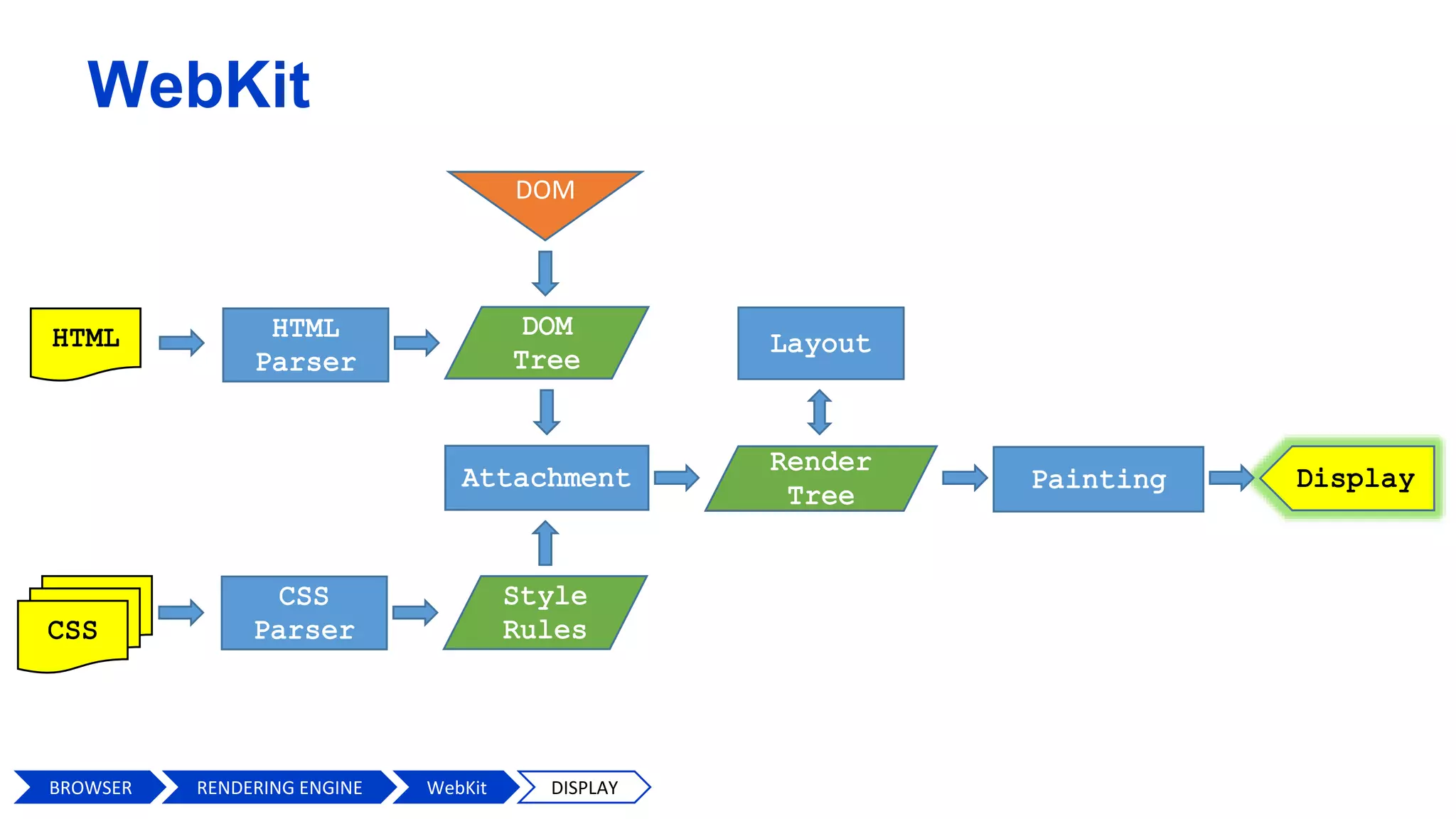
WebKit
DOM
BROWSER WebKitRENDERING ENGINE
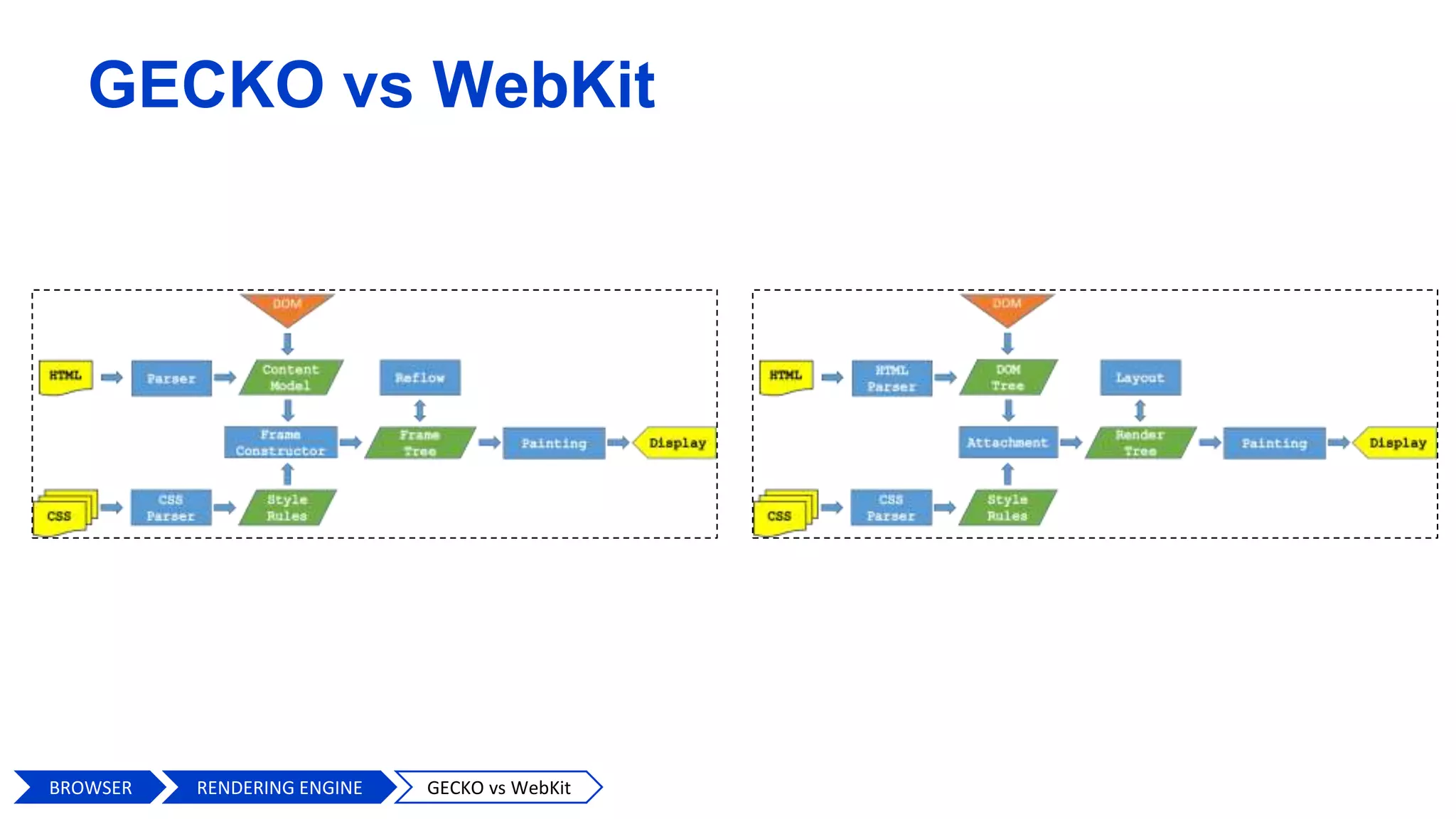
GECKO vs WebKit
BROWSER GECKO vs WebKitRENDERING ENGINE
WebKit
DOM
BROWSER HTML PARSERWebKitRENDERING ENGINE
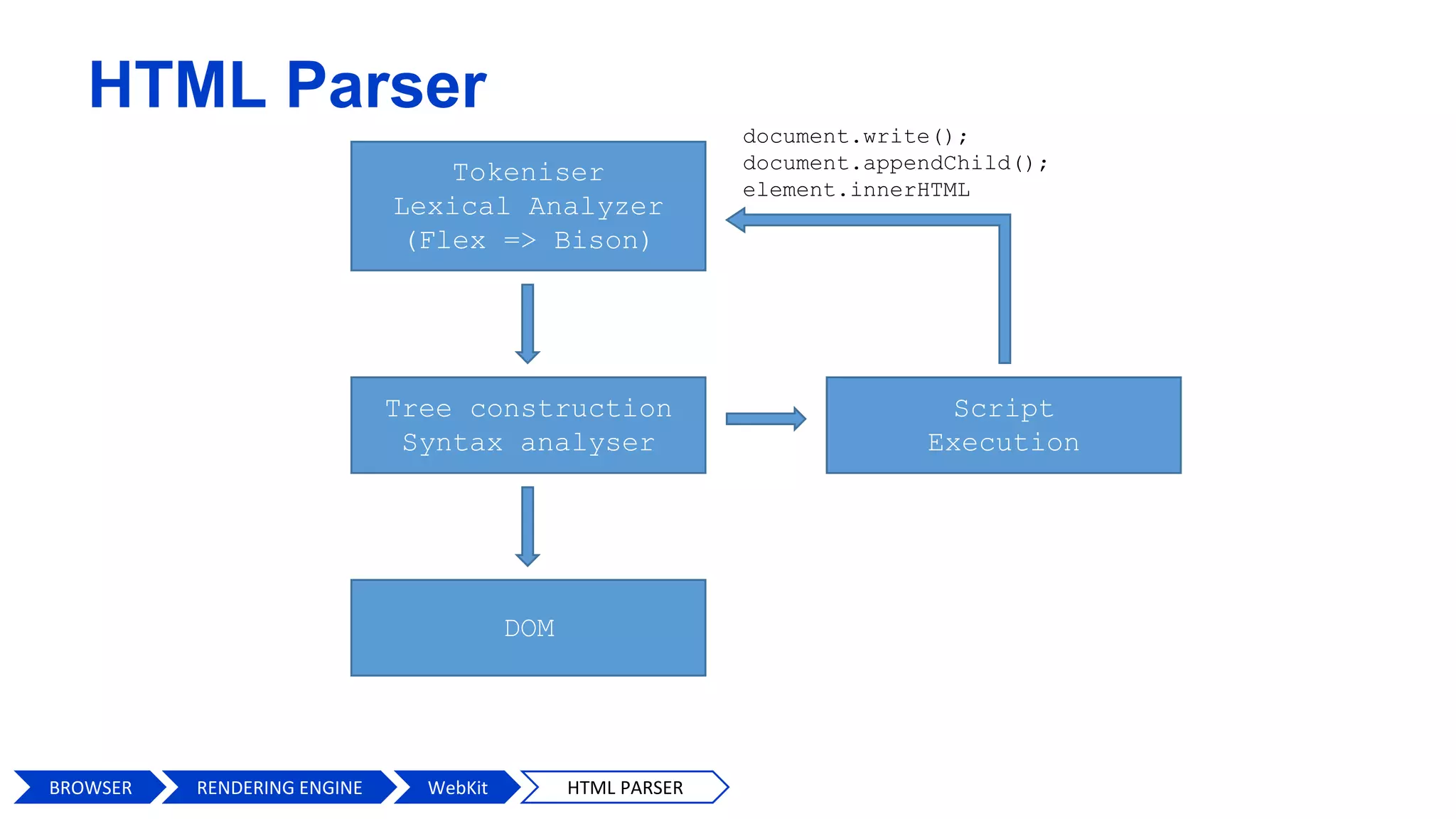
HTML Parser
Tokeniser
Lexical Analyzer
(Flex => Bison)
Tree construction
Syntax analyser
DOM
Script
Execution
document.write();
document.appendChild();
element.innerHTML
BROWSER HTML PARSERWebKitRENDERING ENGINE
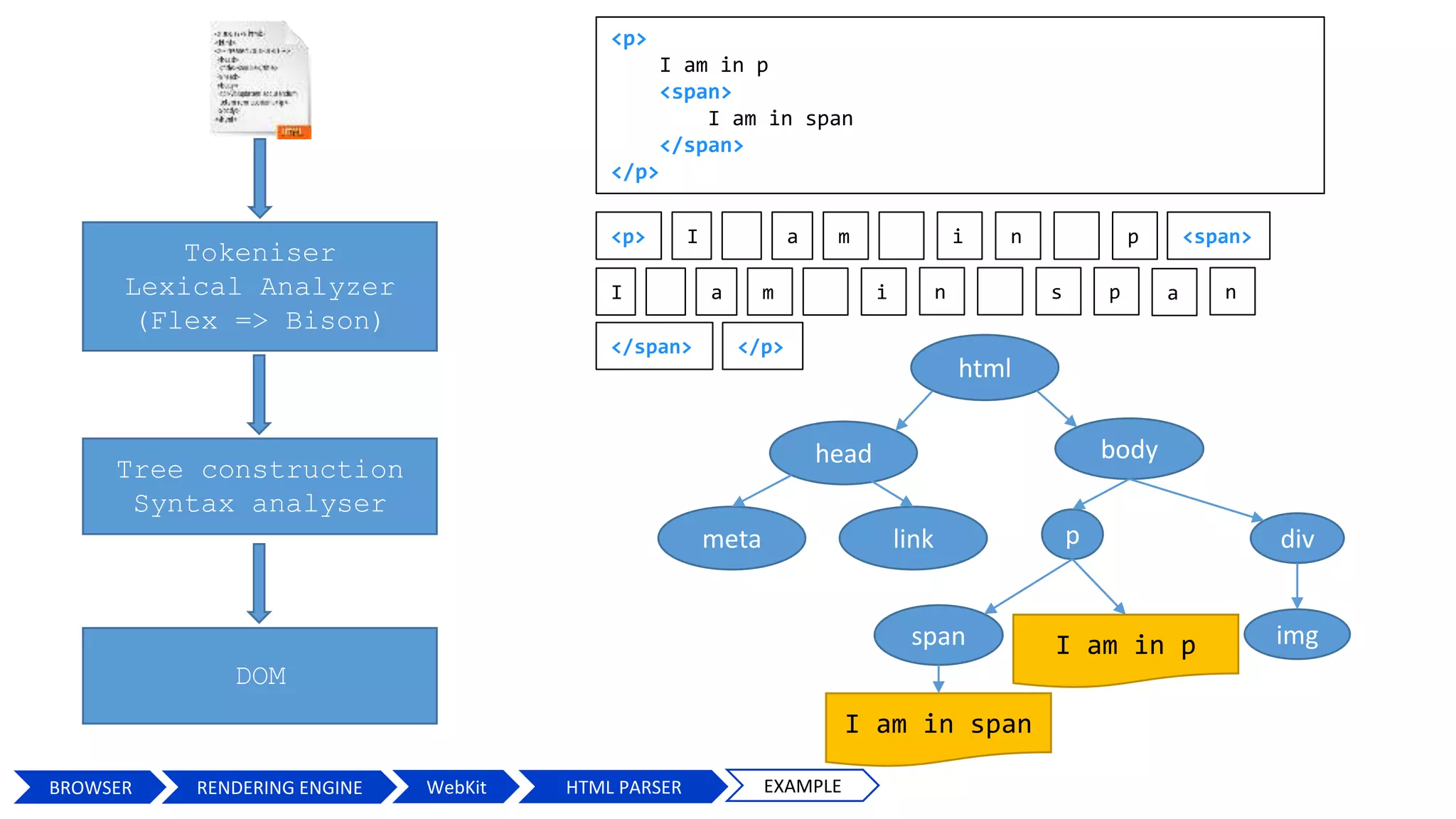
Tokeniser
Lexical Analyzer
(Flex => Bison)
Tree construction
Syntax analyser
<p> I <span>ma i n p
I ma i n s p a
</span> </p>
DOM
html
head body
p
span
I am in span
n
linkmeta
I am in p
div
img
<p>
I am in p
<span>
I am in span
</span>
</p>
BROWSER HTML PARSERWebKit EXAMPLERENDERING ENGINE
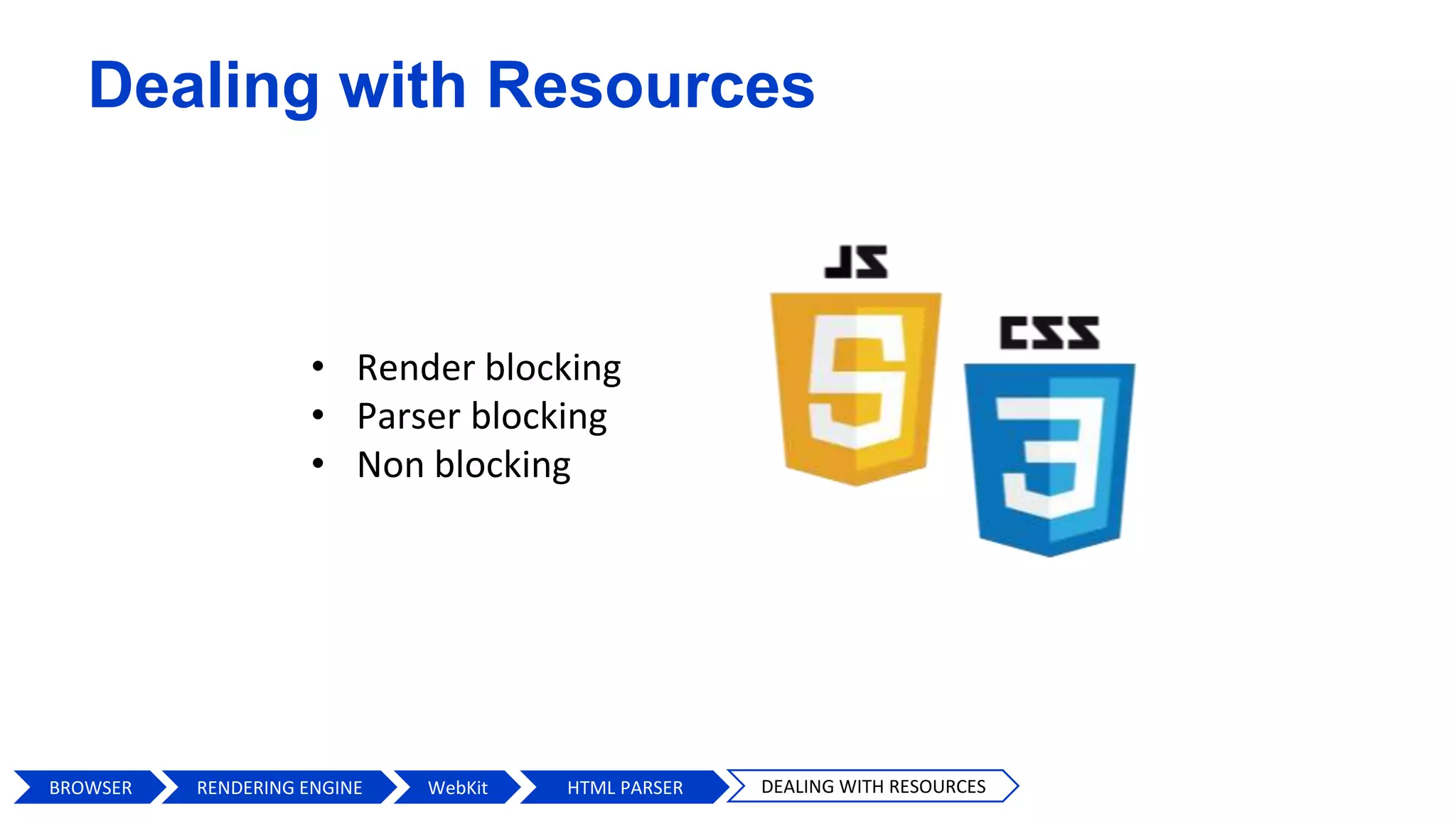
Dealing with Resources
• Render blocking
• Parser blocking
• Non blocking
BROWSER HTML PARSERWebKit DEALING WITH RESOURCESRENDERING ENGINE
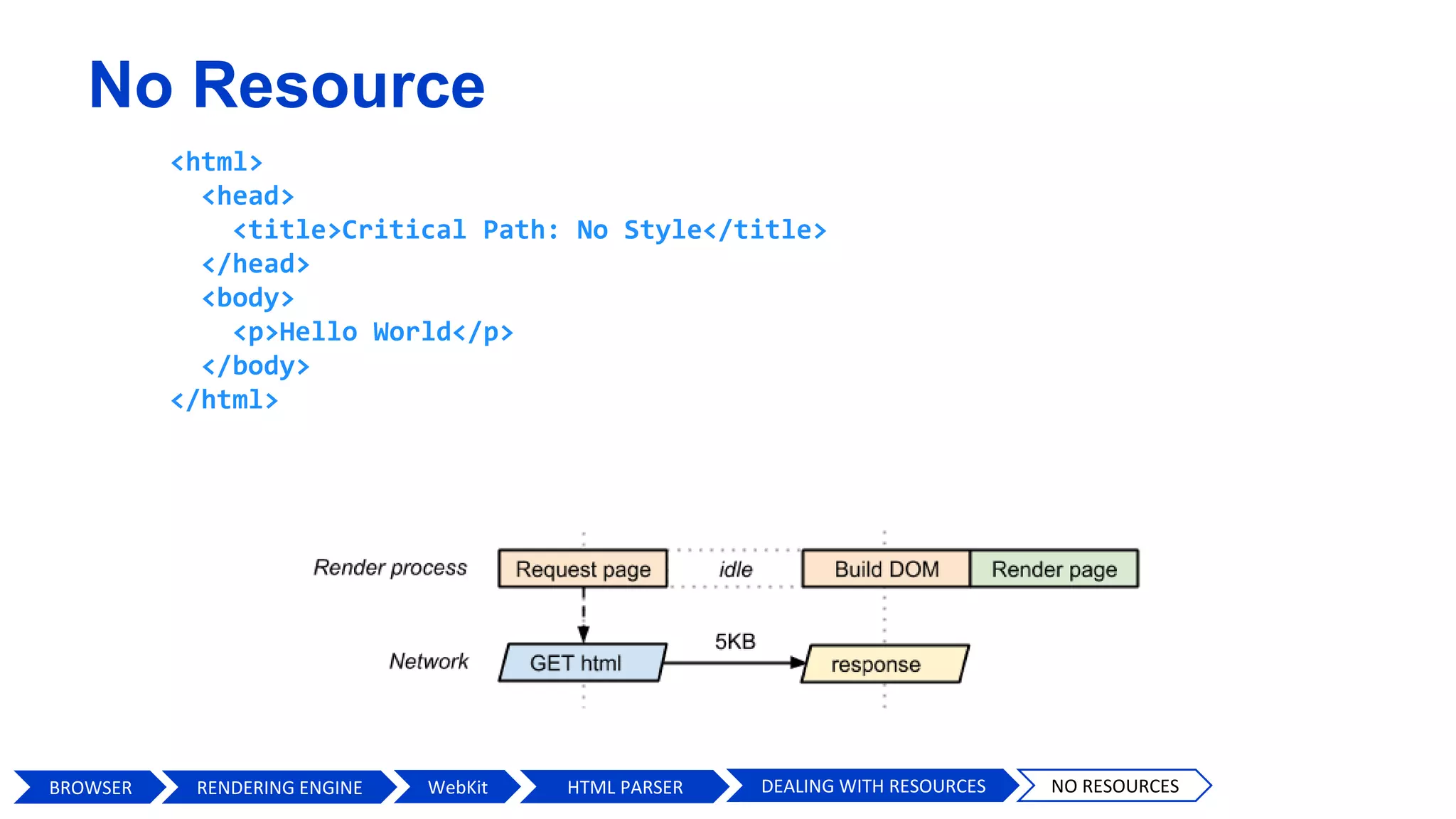
No Resource
<html>
<head>
<title>Critical Path: No Style</title>
</head>
<body>
<p>Hello World</p>
</body>
</html>
BROWSER HTML PARSERWebKit DEALING WITH RESOURCES NO RESOURCESRENDERING ENGINE
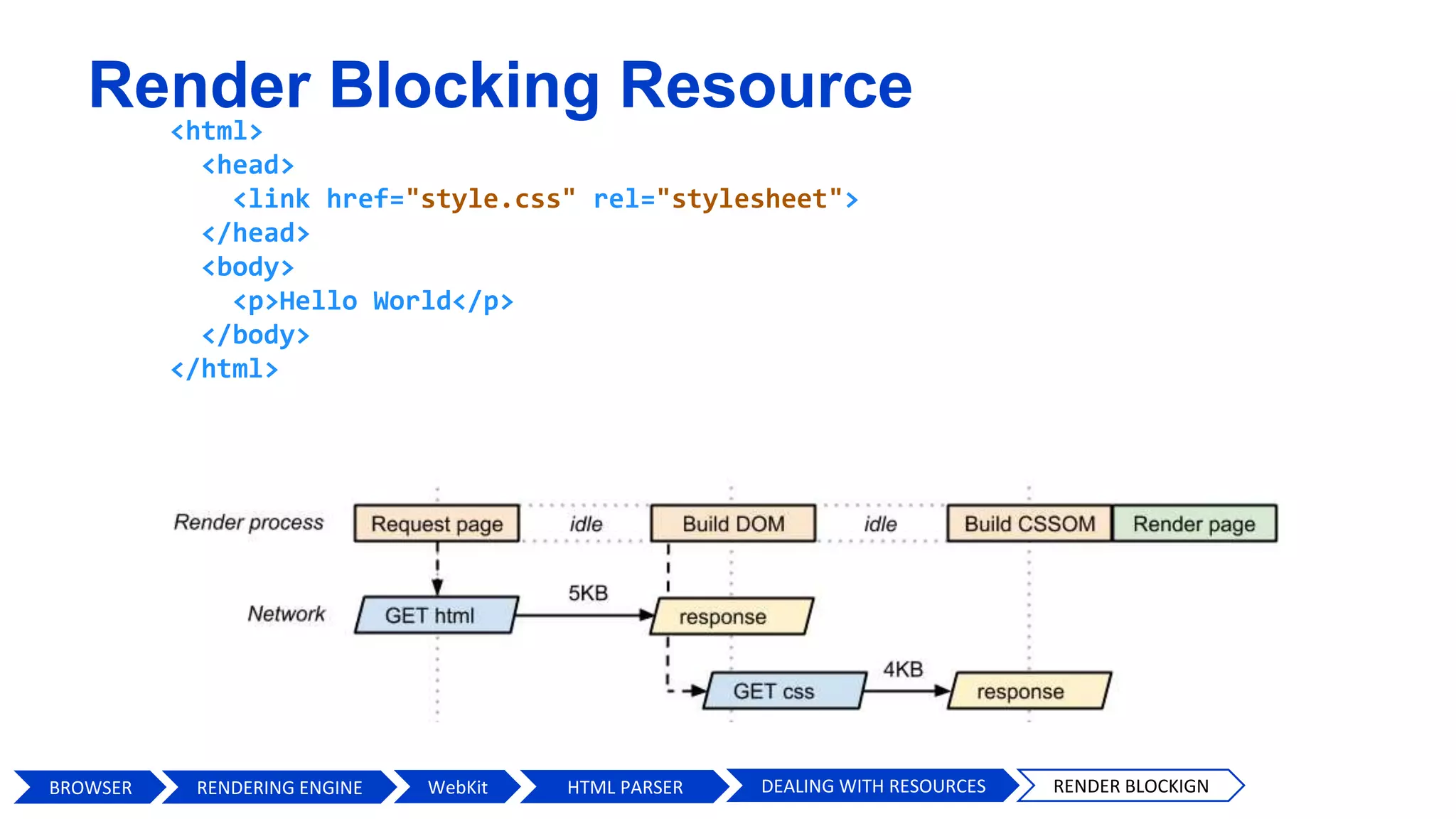
Render Blocking Resource
<html>
<head>
<link href="style.css" rel="stylesheet">
</head>
<body>
<p>Hello World</p>
</body>
</html>
BROWSER HTML PARSERWebKit DEALING WITH RESOURCES RENDER BLOCKIGNRENDERING ENGINE
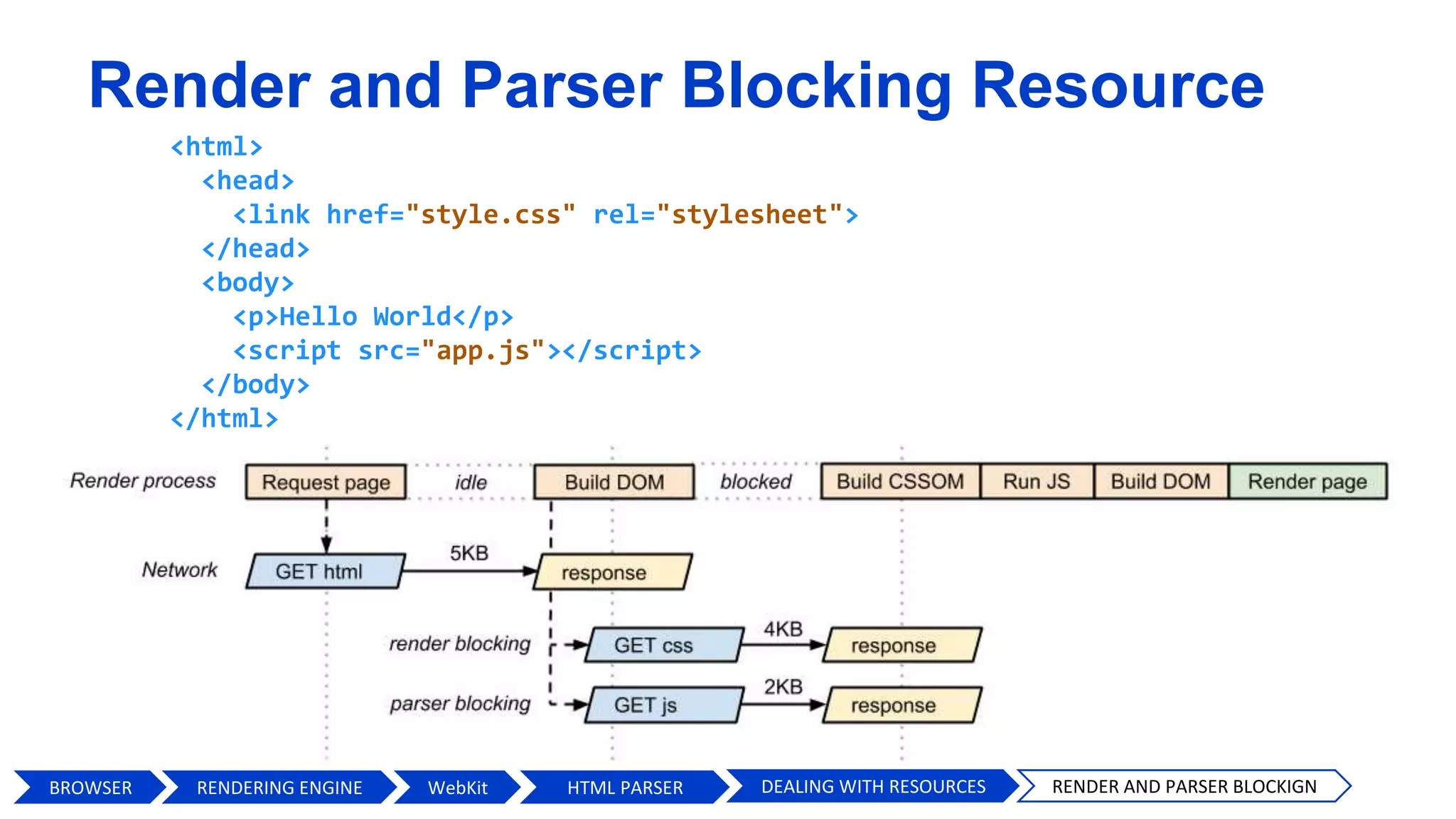
Render and Parser Blocking Resource
<html>
<head>
<link href="style.css" rel="stylesheet">
</head>
<body>
<p>Hello World</p>
<script src="app.js"></script>
</body>
</html>
BROWSER HTML PARSERWebKit DEALING WITH RESOURCES RENDER AND PARSER BLOCKIGNRENDERING ENGINE
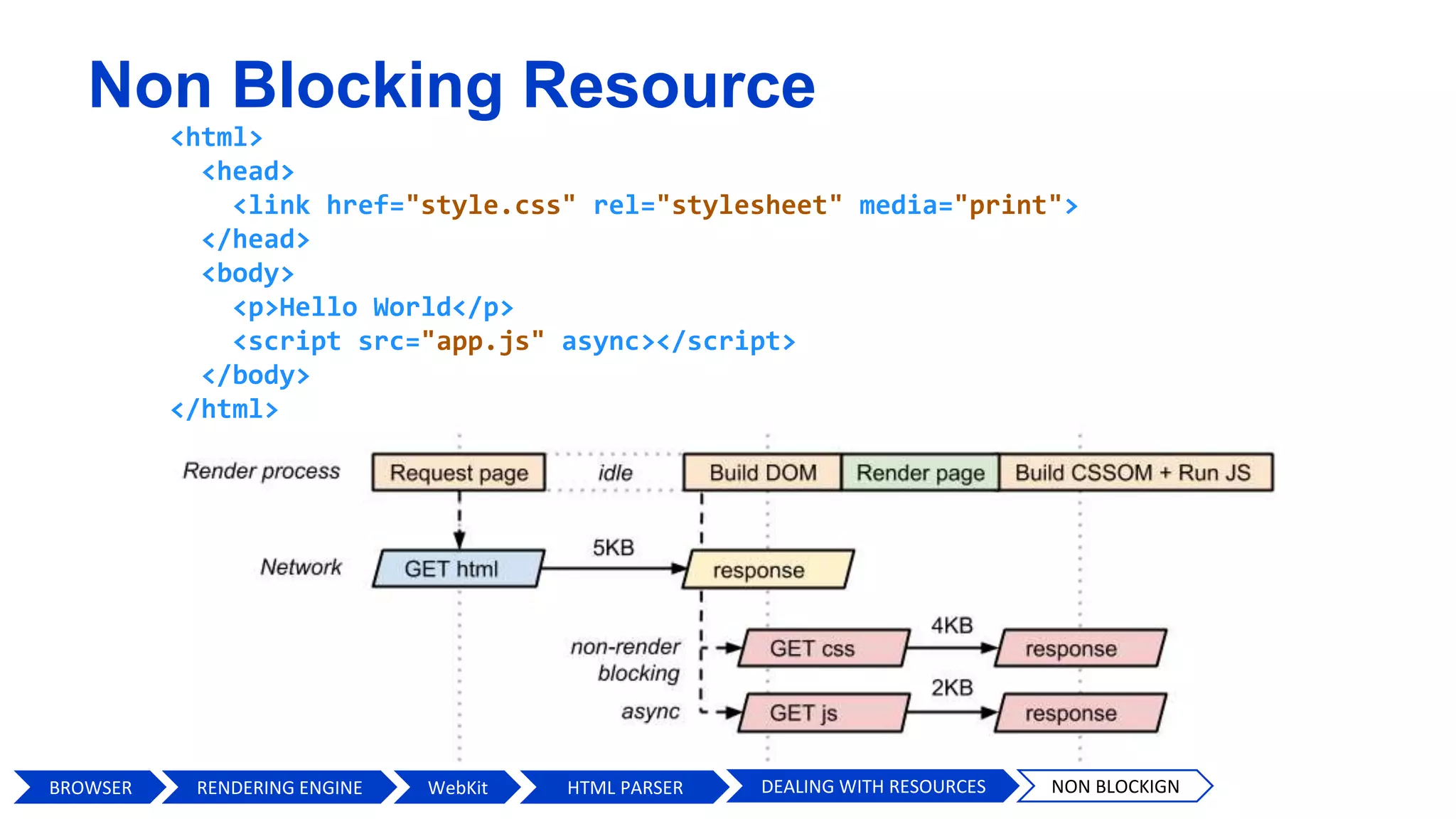
Non Blocking Resource
<html>
<head>
<link href="style.css" rel="stylesheet" media="print">
</head>
<body>
<p>Hello World</p>
<script src="app.js" async></script>
</body>
</html>
BROWSER HTML PARSERWebKit DEALING WITH RESOURCES NON BLOCKIGNRENDERING ENGINE
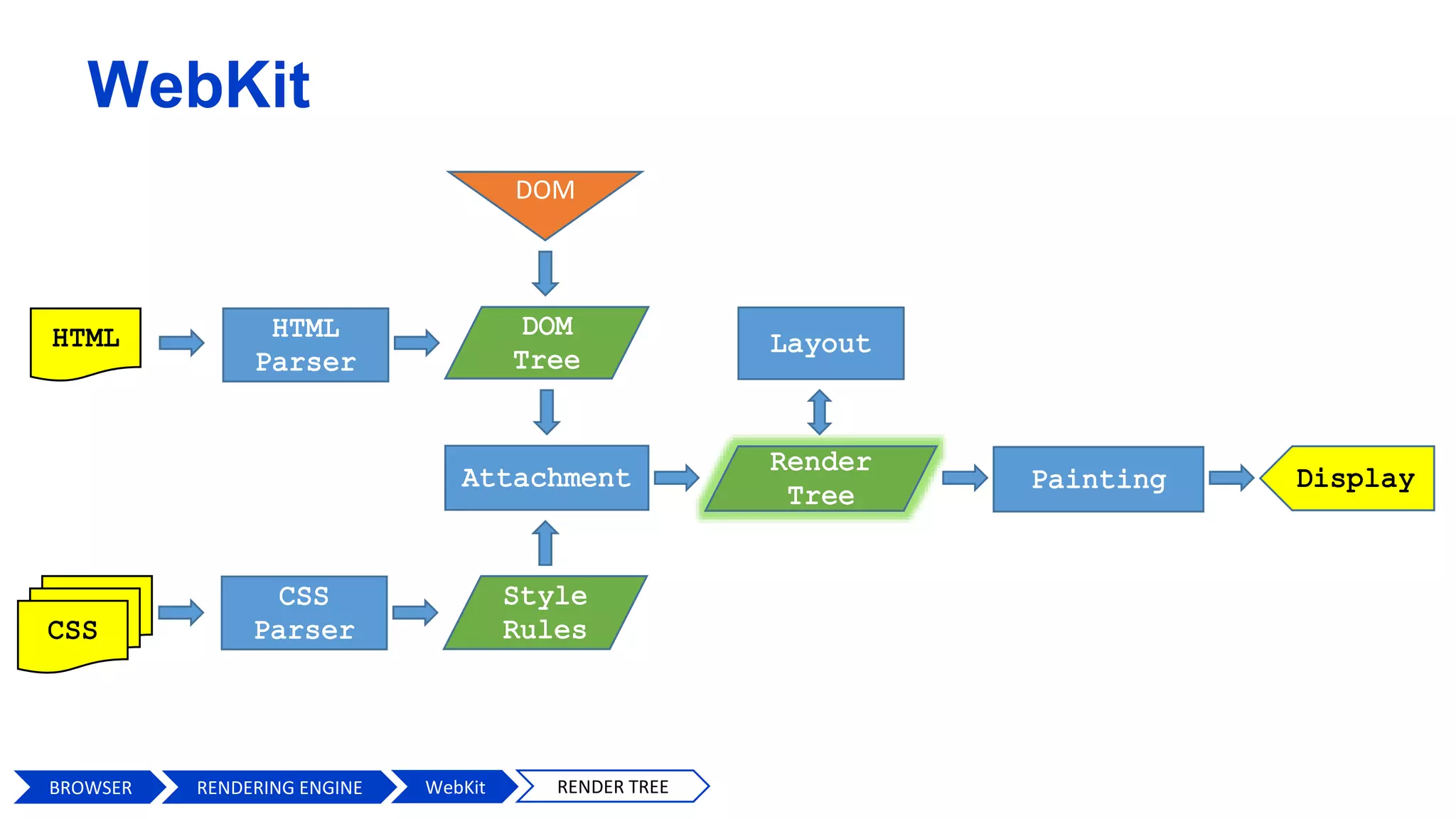
WebKit
DOM
BROWSER WebKit DOMRENDERING ENGINE
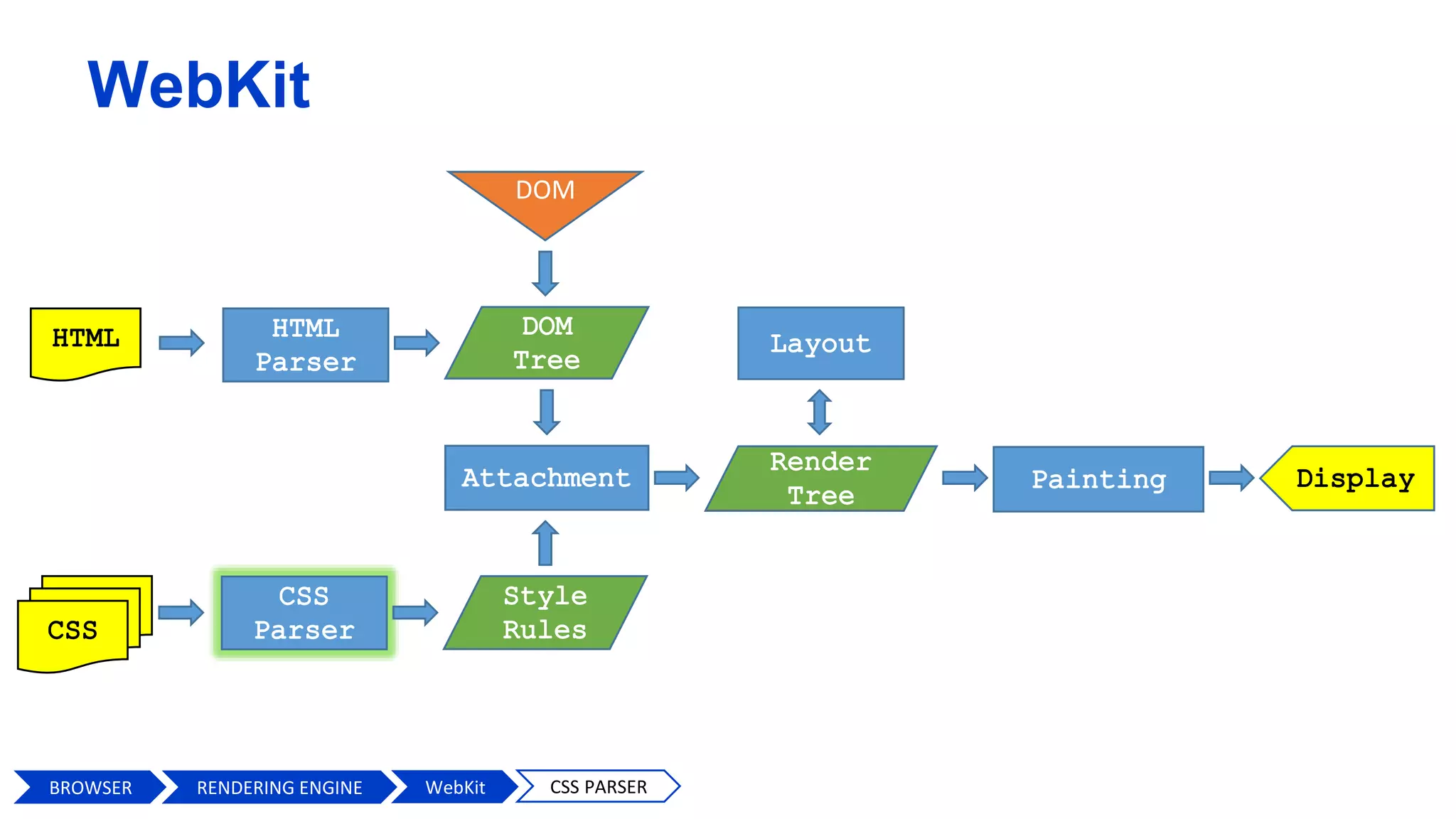
WebKit
DOM
BROWSER WebKit CSS PARSERRENDERING ENGINE
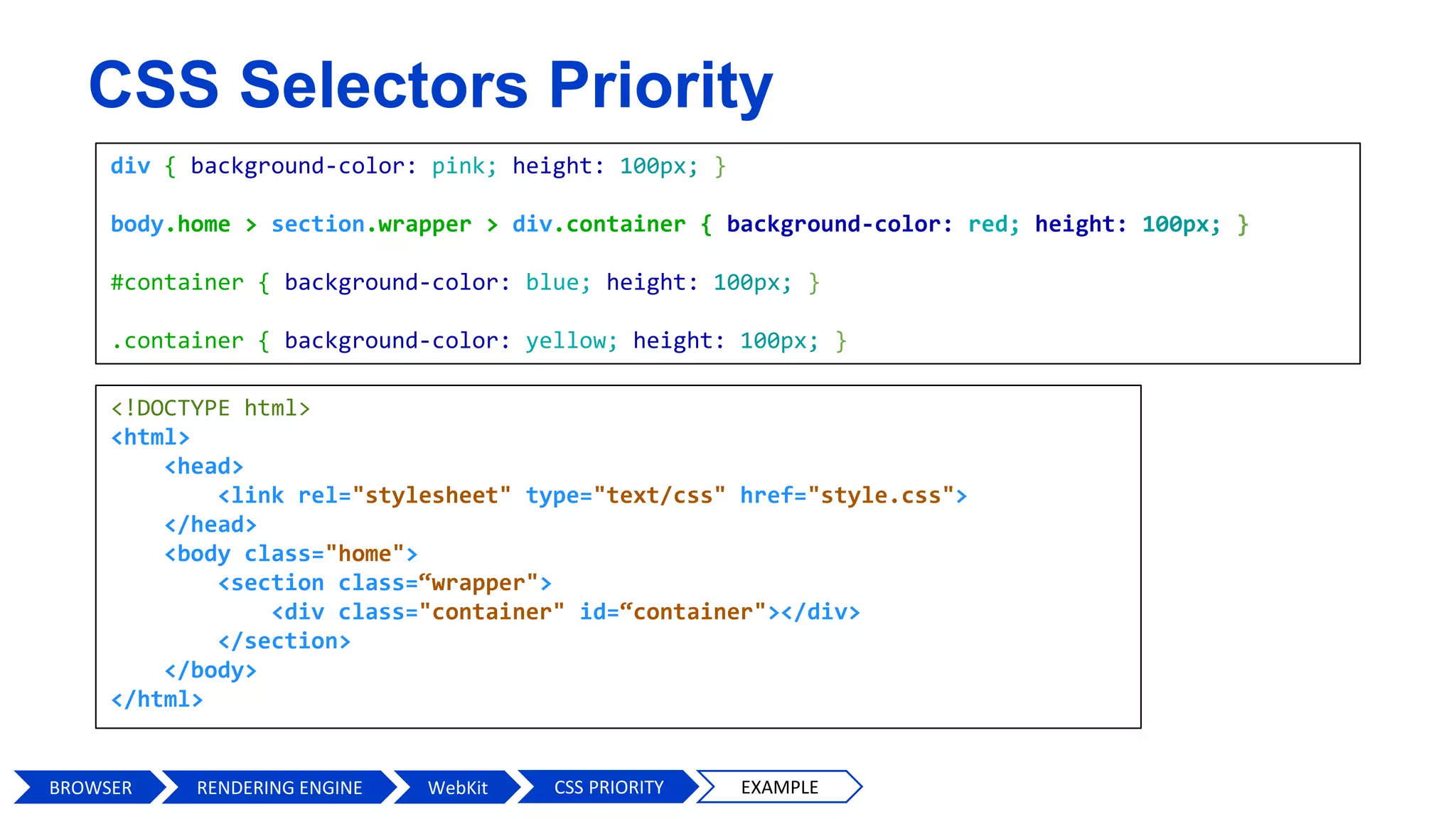
CSS Selectors Priority
div { background-color: pink; height: 100px; }
body.home > section.wrapper > div.container { background-color: red; height: 100px; }
#container { background-color: blue; height: 100px; }
.container { background-color: yellow; height: 100px; }
<!DOCTYPE html>
<html>
<head>
<link rel="stylesheet" type="text/css" href="style.css">
</head>
<body class="home">
<section class=“wrapper">
<div class="container" id=“container"></div>
</section>
</body>
</html>
BROWSER WebKit CSS PRIORITY EXAMPLERENDERING ENGINE
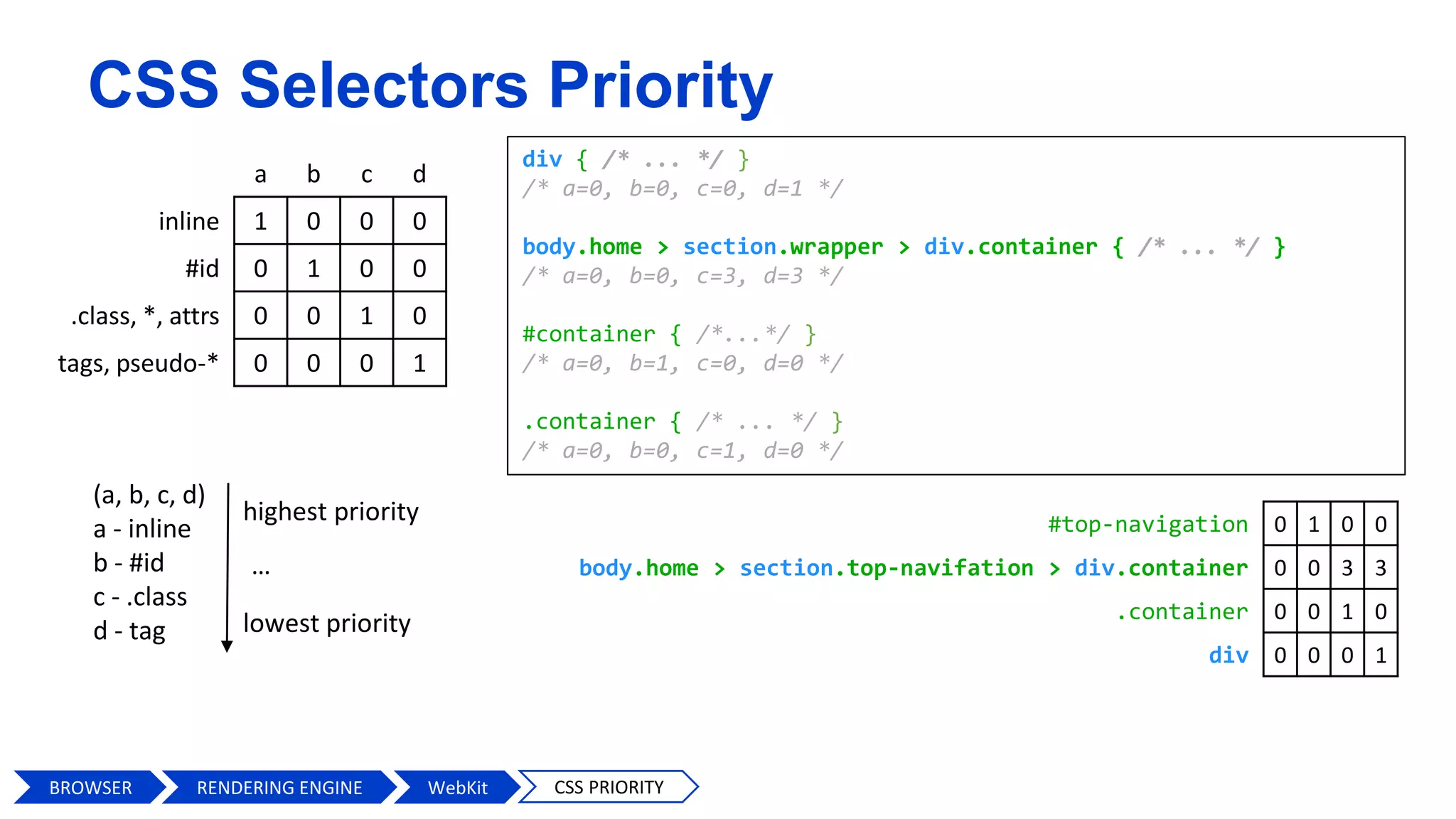
CSS Selectors Priority
a b c d
inline 1 0 0 0
#id 0 1 0 0
.class, *, attrs 0 0 1 0
tags, pseudo-* 0 0 0 1
(a, b, c, d)
a - inline
b - #id
c - .class
d - tag
highest priority
lowest priority
…
div { /* ... */ }
/* a=0, b=0, c=0, d=1 */
body.home > section.wrapper > div.container { /* ... */ }
/* a=0, b=0, c=3, d=3 */
#container { /*...*/ }
/* a=0, b=1, c=0, d=0 */
.container { /* ... */ }
/* a=0, b=0, c=1, d=0 */
#top-navigation 0 1 0 0
body.home > section.top-navifation > div.container 0 0 3 3
.container 0 0 1 0
div 0 0 0 1
BROWSER WebKit CSS PRIORITYRENDERING ENGINE
#main-navigation { } /* ID (Fastest) */
body.home #wrapper { } /* ID */
.main-navigation { } /* Class */
ul li a.current { } /* Class */
ul { } /* Tag */
ul li a { } /* Tag */
* { } /* Universal (Slowest) */
#content [title='home'] /* Universal */
ID selectors
main-navigation { }
wrapper { }
Class selectors
main-navigation { }
current { }
Tag selectors
ul { }
a { }
Universal selectors
* { }
[title='home'] { }
BROWSER WebKit CSS PERFORMANCE
CSS Selectors Performance
RENDERING ENGINE
Chrome Firefox 29 Opera 19 IE9 Android 4
Data attribute 56.8 125.4 63.6 152.6 1455.2
Data attribute (qualified) 55.4 128.4 61.4 141 1404.6
Data attribute (unqualified but with value) 55 125.6 61.8 152.4 1363.4
Data attribute (qualified with value) 54.8 129 63.2 147.4 1421.2
Multiple data attributes (qualified with values) 55.4 124.4 63.2 147.4 1411.2
Solo pseudo selector (e.g. :after) 60.6 138 58.4 162 1500.4
Combined classes (e.g. class1.class2) 51.2 126.6 56.8 147.8 1453.8
Multiple classes 48.8 127.4 56.2 150.2 1398.8
Multiple classes with child selector 48.8 127.4 55.8 154.6 1348.4
Partial attribute matching (e.g. [class^=“wrap”]) 52.2 129.4 58 172 1420.2
nth-child selector 49 127.4 56.6 148.4 1352
nth-child selector followed by another nth-child selector 50.6 127.2 58.4 146.2 1377.6
Insanity selection (all selections qualified, every class used) 64.6 129.2 72.4 152.8 1461.2
Slight insanity selection (e.g. .tagLi .tagB a.TagA.link) 50.2 129.8 54.8 154.6 1381.2
Universal selector 50 126.2 56.8 154.8 1351.6
Element single 49.2 127.6 56 149.2 1379.2
Element double 50.4 132.4 55 157.6 1386
Element treble 49.2 128.8 58.6 154.2 1380.6
Element treble with pseudo 48.6 132.4 54.8 148.4 1349.6
Single class 50.4 128 55 149.8 1393.8
Biggest Diff 16 13.6 17.6 31 152
Biggest Diff 13 6 13 10 6
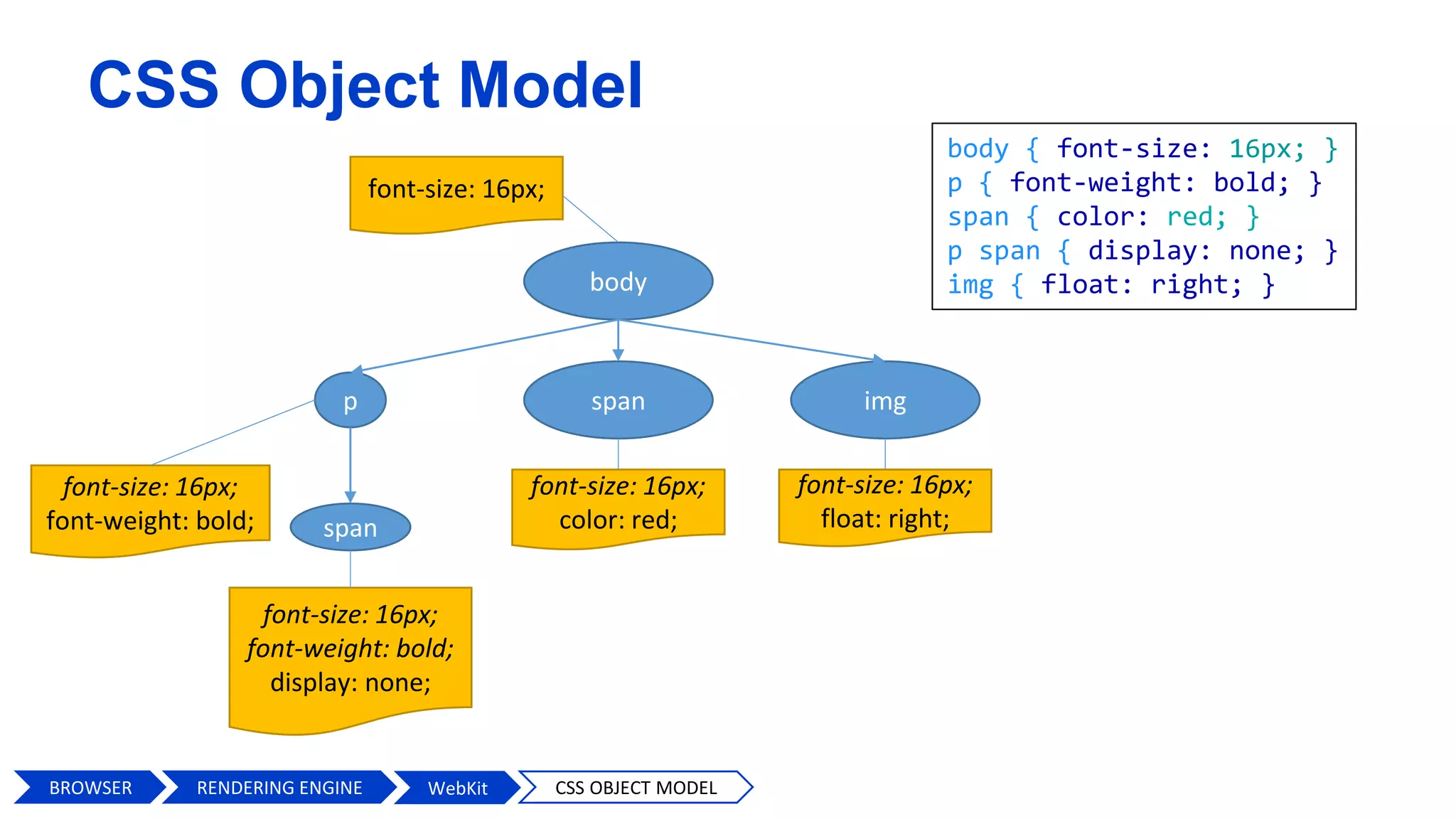
body
p imgspan
span
body { font-size: 16px; }
p { font-weight: bold; }
span { color: red; }
p span { display: none; }
img { float: right; }
font-size: 16px;
font-size: 16px;
float: right;
font-size: 16px;
font-weight: bold;
font-size: 16px;
font-weight: bold;
display: none;
font-size: 16px;
color: red;
BROWSER WebKit CSS OBJECT MODEL
CSS Object Model
RENDERING ENGINE
DOM
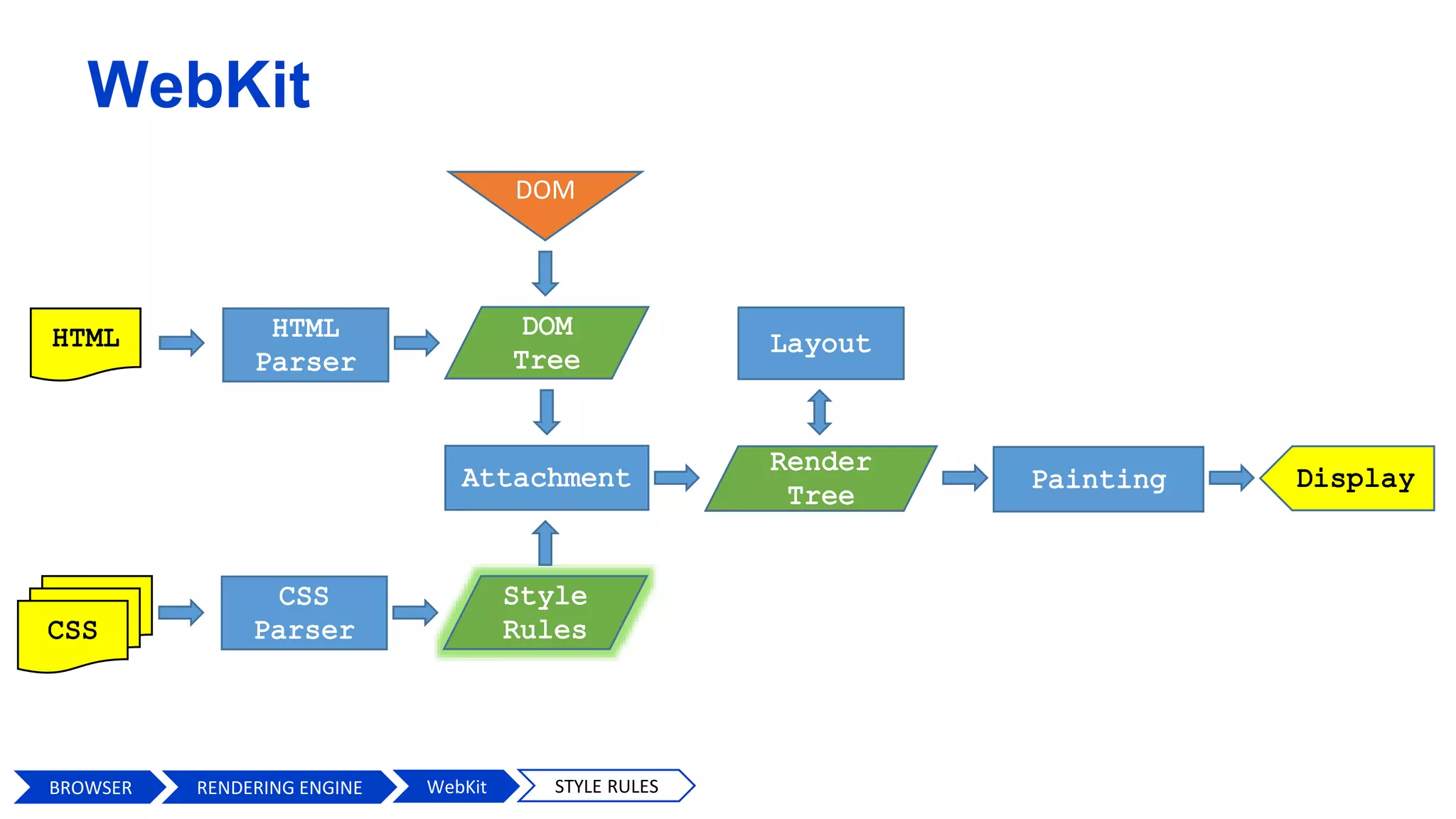
BROWSER WebKit STYLE RULES
WebKit
RENDERING ENGINE
DOM
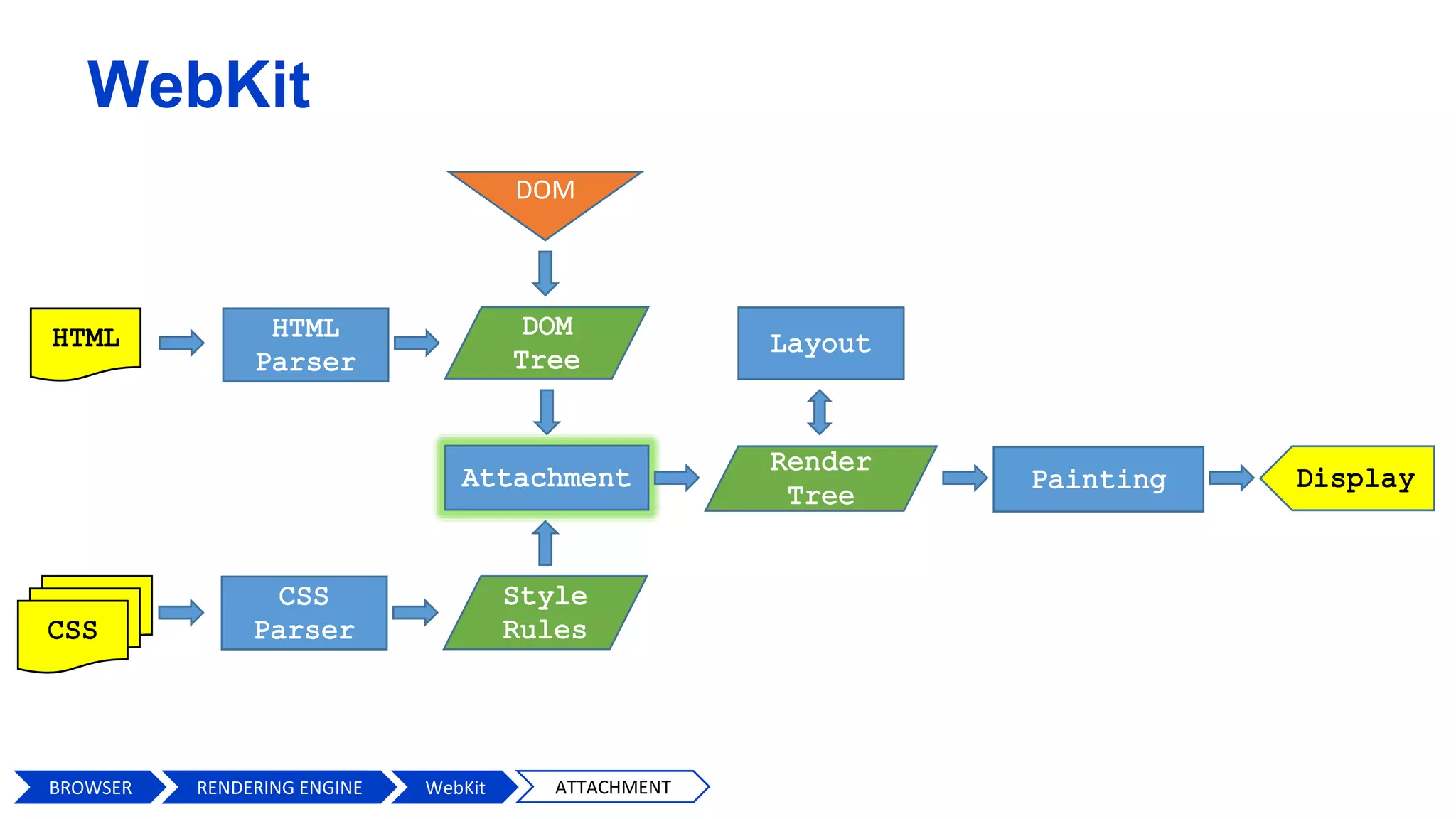
BROWSER RENDERING ENGIN WebKit ATTACHMENT
WebKit
RENDERING ENGINE
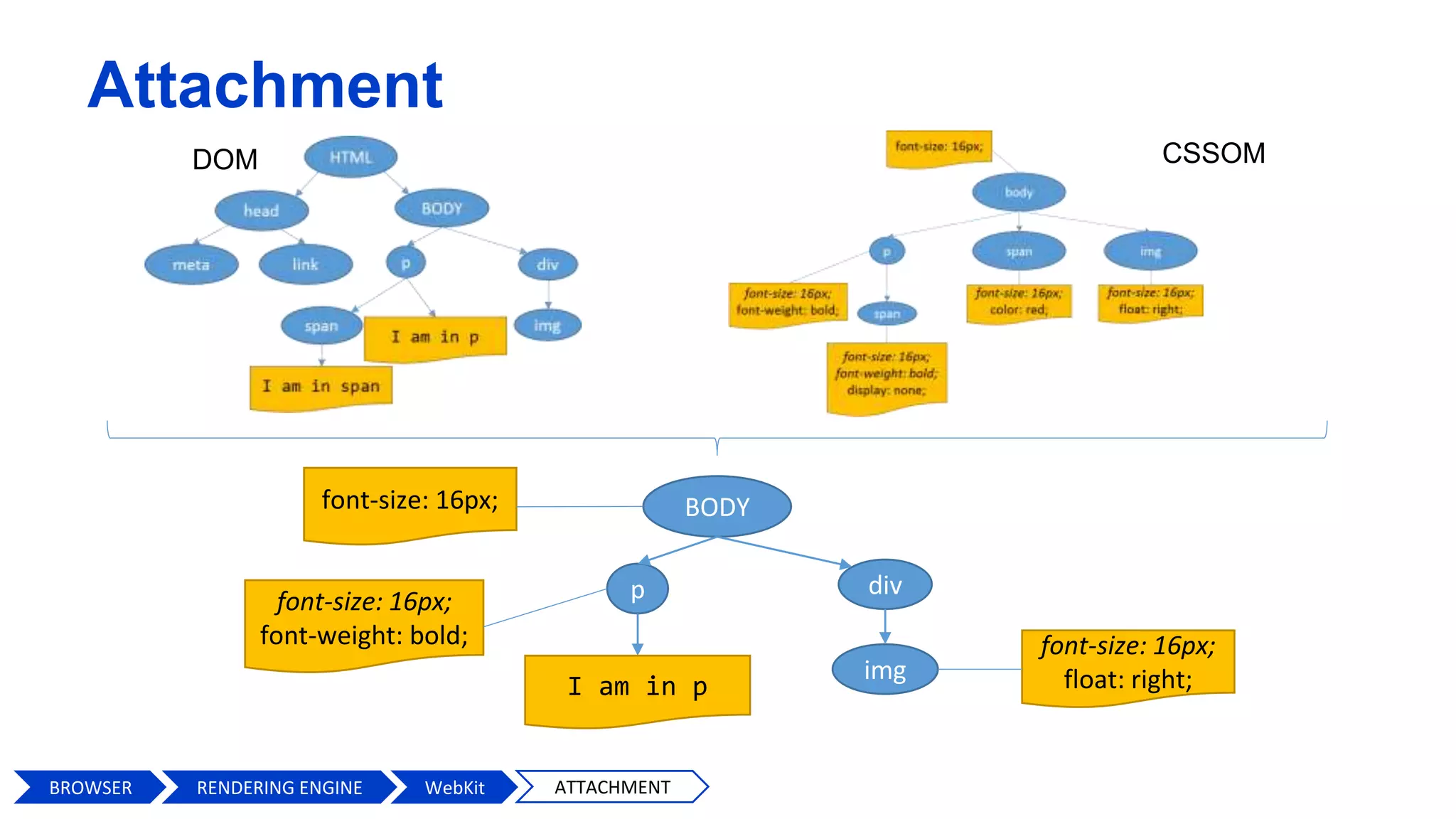
Attachment
CSSOMDOM
BODY
p
I am in p
div
img
font-size: 16px;
font-size: 16px;
float: right;
font-size: 16px;
font-weight: bold;
BROWSER WebKit ATTACHMENTRENDERING ENGINE
DOM
BROWSER WebKit RENDER TREE
WebKit
RENDERING ENGINE
DOM
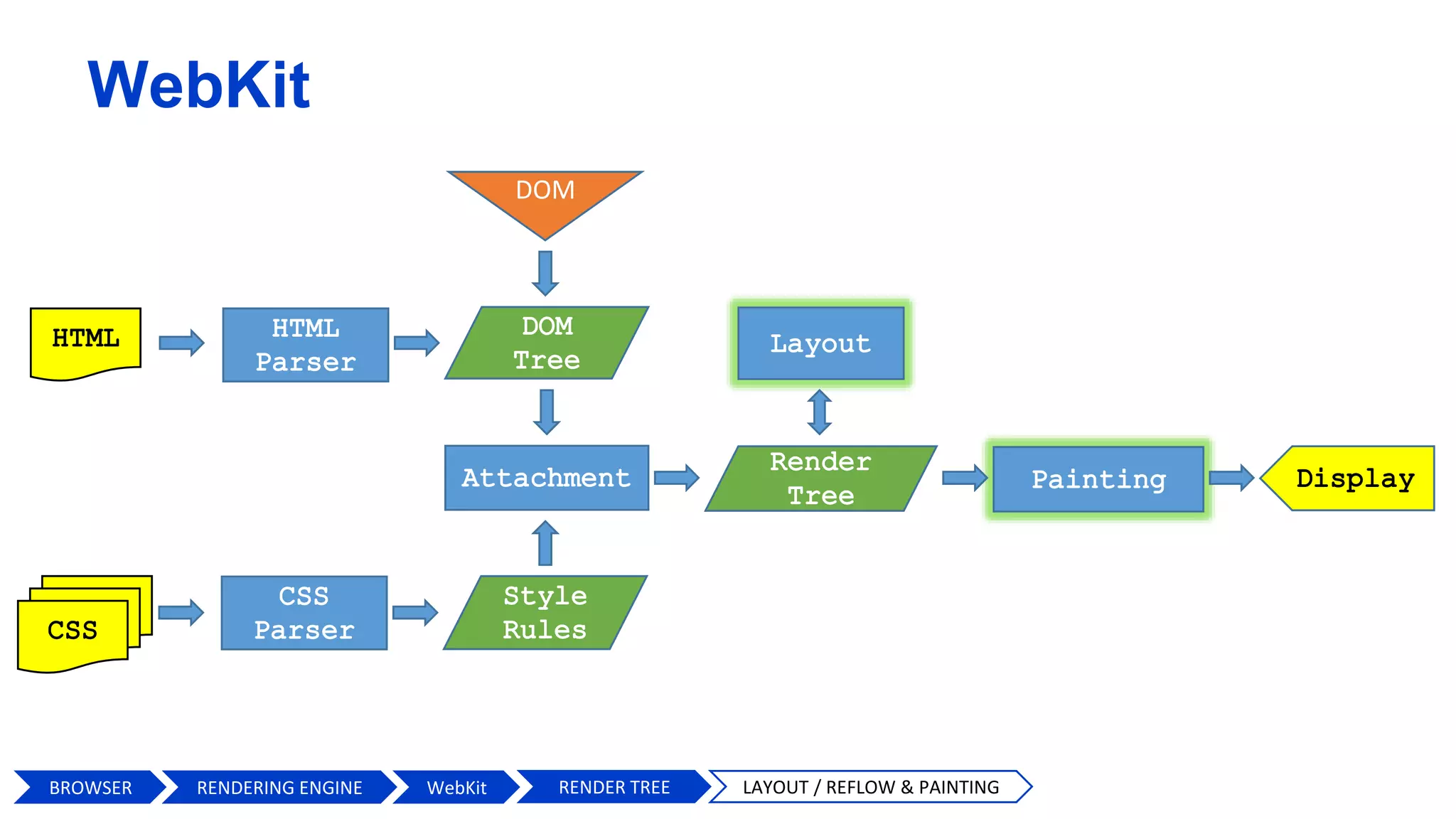
BROWSER WebKit RENDER TREE LAYOUT / REFLOW & PAINTING
WebKit
RENDERING ENGINE
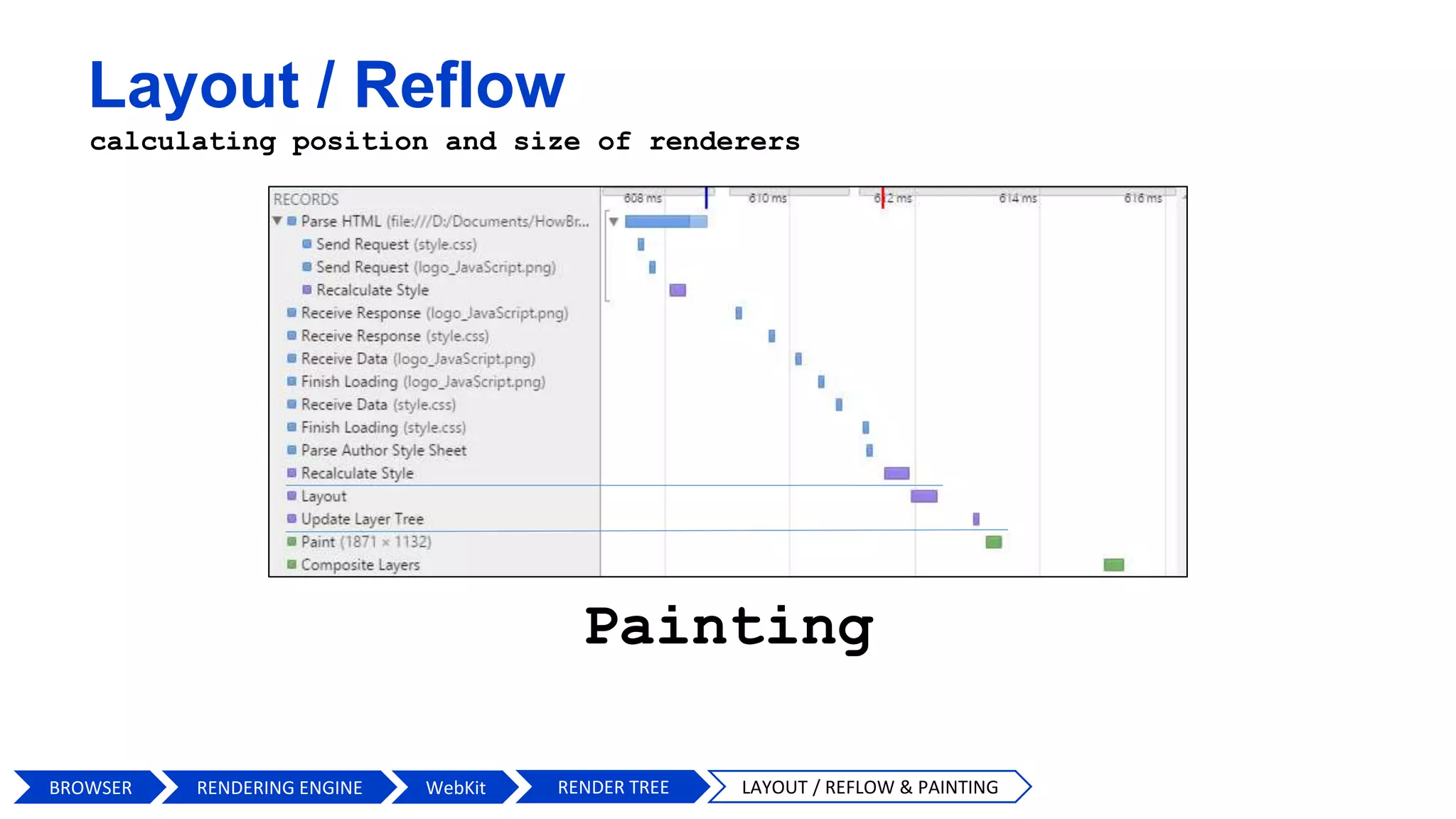
Layout / Reflow
calculating position and size of renderers
Painting
BROWSER WebKit RENDER TREE LAYOUT / REFLOW & PAINTINGRENDERING ENGINE
var textlist = [1,2,3,4,5,6,7,8,9],
elem;
for(var i = 0; i < textlist.length; i++) {
elem = document.getElementById('item-'+ textlist[i]);
elem.style.background = '#333';
elem.style.color = '#fff';
elem.style.border = '1px solid #00f';
elem.style.width = '300px';
}
Layout / Reflow & Repaint optimization
var toChange = document.getElementById('mainelement');
toChange.style.background = '#333';
toChange.style.color = '#fff';
toChange.style.border = '1px solid #00f';
toChange.style.width = '300px';
BROWSER WebKit RENDER TREE LAYOUT / REFLOW & PAINTING OPTIMIZATION
<style>
div { /* … */ }
div.highlight { /* … */ }
</style>
<script>
document.getElementById('mainelement').classList.add('highlight');
</script>
var textlist = [1,2,3,4,5,6,7,8,9],
docFragm, elem, contents;
docFragm = document.createDocumentFragment();
for(var i = 0; i < textlist.length; i++) {
elem = document.createElement('p');
contents = document.createTextNode(textlist[i]);
elem.appendChild(contents);
docFragm.appendChild(elem);
}
document.body.appendChild(docFragm);
RENDERING ENGINE
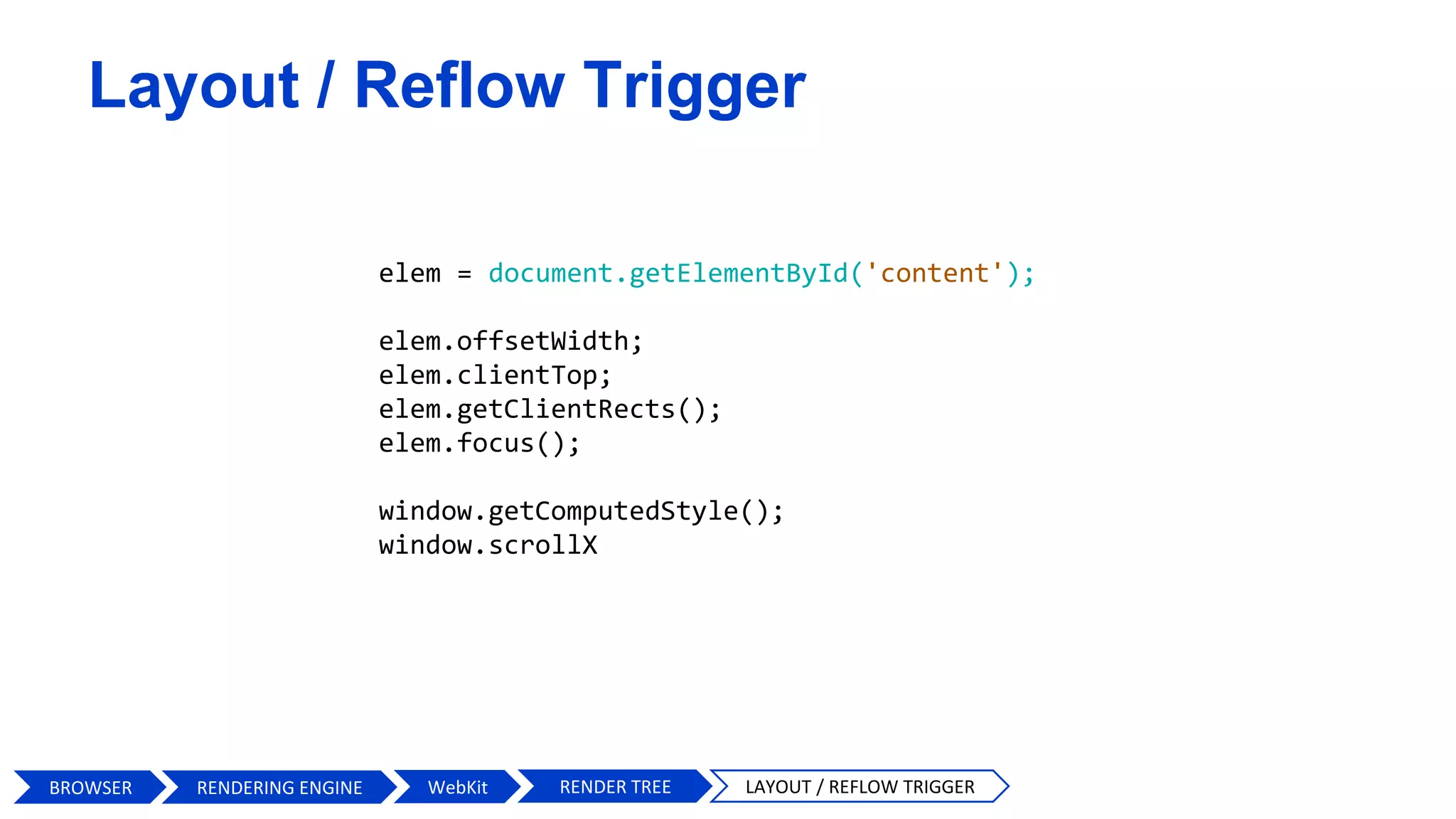
elem = document.getElementById('content');
elem.offsetWidth;
elem.clientTop;
elem.getClientRects();
elem.focus();
window.getComputedStyle();
window.scrollX
BROWSER WebKit RENDER TREE LAYOUT / REFLOW TRIGGER
Layout / Reflow Trigger
RENDERING ENGINE
DOM
BROWSER WebKit DISPLAY
WebKit
RENDERING ENGINE
USER INTERFACE
BROWSER ENGINE
RENDERING ENGINE
NETWORKING
JavaScript
INTERPRETER
UI BACKEND
DATAPERSISTANCE
V8, SpiderMonkey
WebKit, Gecko,
Blink, Trident
WEB APIs
56
BROWSER RENDERING ENGINE
57
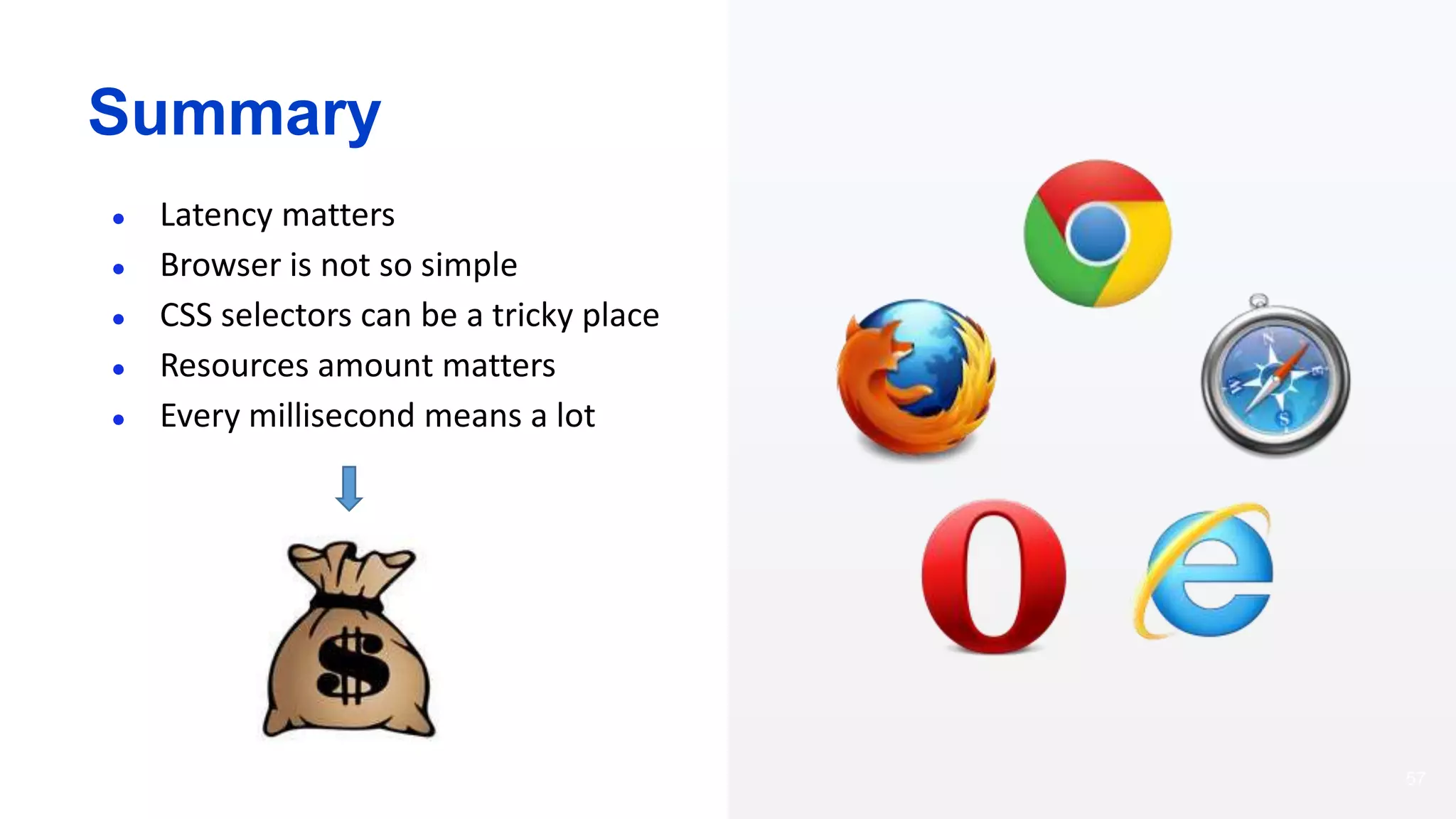
Summary
● Latency matters
● Browser is not so simple
● CSS selectors can be a tricky place
● Resources amount matters
● Every millisecond means a lot
58
Questions & Answers
Inspired by Technology.
Driven by Value.
Find us at eleks.com Have a question? Write to eleksinfo@eleks.com

JS Lab`16. Владимир Воевидка: "Как работает браузер"

  • 1.
    How Browser Works? by VolodymyrVoyevidka, FrontEnd Developer eleks.com
  • 2.
  • 3.
  • 4.
    USER INTERFACE BROWSER ENGINE RENDERINGENGINE NETWORKING JavaScript INTERPRETER UI BACKEND DATAPERSISTENCE V8, SpiderMonkey WebKit, Gecko, Blink, Trident WEB APIs 4 BROWSER
  • 5.
    USER INTERFACE BROWSER ENGINE RENDERINGENGINE NETWORKING JavaScript INTERPRETER UI BACKEND DATAPERSISTENCE V8, SpiderMonkey WebKit, Gecko, Blink, Trident WEB APIs BROWSER UI
  • 6.
  • 7.
    USER INTERFACE BROWSER ENGINE RENDERINGENGINE NETWORKING JavaScript INTERPRETER UI BACKEND DATAPERSISTENCE V8, SpiderMonkey WebKit, Gecko, Blink, Trident WEB APIs 7 BROWSER BROWSER ENGINE
  • 8.
  • 9.
    USER INTERFACE BROWSER ENGINE RENDERINGENGINE NETWORKING JavaScript INTERPRETER UI BACKEND DATAPERSISTENCE V8, SpiderMonkey WebKit, Gecko, Blink, Trident WEB APIs 9 BROWSER UI BACKEND
  • 10.
  • 11.
    USER INTERFACE BROWSER ENGINE RENDERINGENGINE NETWORKING JavaScript INTERPRETER UI BACKEND DATAPERSISTENCE V8, SpiderMonkey WebKit, Gecko, Blink, Trident WEB APIs 11 BROWSER DATA PERSISTENCE
  • 12.
    Data Persistence • LocalStorage • Cookies • IndexedDB BROWSER DATA PERSISTENCE
  • 13.
    USER INTERFACE BROWSER ENGINE RENDERINGENGINE NETWORKING JavaScript INTERPRETER UI BACKEND DATAPERSISTENCE V8, SpiderMonkey WebKit, Gecko, Blink, Trident WEB APIs 13 BROWSER NETWORKING
  • 14.
  • 15.
  • 16.
  • 17.
  • 18.
    Resource Timing API BROWSERRESOURCE TIMING APINETWORKING
  • 19.
  • 20.
    20 amazon100ms = 1%of sales 1% = $889 900 000
  • 21.
  • 22.
    USER INTERFACE BROWSER ENGINE RENDERINGENGINE NETWORKING JavaScript INTERPRETER UI BACKEND DATAPERSISTENCE V8, SpiderMonkey WebKit, Gecko, Blink, Trident WEB APIs 22 BROWSER JS INTERPRETER
  • 23.
    USER INTERFACE BROWSER ENGINE RENDERINGENGINE NETWORKING JavaScript INTERPRETER UI BACKEND DATAPERSISTENCE V8, SpiderMonkey WebKit, Gecko, Blink, Trident WEB APIs 23 BROWSER WEB APIs
  • 24.
    WEB APIs Web Sockets Messaging WebRTC Canvas SVG WebGL FileAPI File System API Indexed DB DOM Drag and Drop Fullscreen Animation Timing Media Pointer Lock Web Audio Browser Shadow DOM Typed Arrays Web Workers CSS Object Model Selectors BROWSER WEB APIs
  • 25.
    Event Loop /Task Queue Philip Roberts http://latentflip.com/loupe Event loop Call stack BROWSER WEB APIs EVENT LOOP macro micro micro micro task queue
  • 26.
    26 console.log('script start'); setTimeout(function() { console.log('setTimeout'); },0); Promise.resolve().then(function() { console.log('promise1'); }).then(function() { console.log('promise2'); }); console.log('script end'); Event Loop / Task Queue Example BROWSER WEB APIs EVENT LOOP "script start" "script end" "promise1" "promise2" "setTimeout"
  • 27.
    Event Loop /Task Queue Example BROWSER WEB APIs EVENT LOOP var outer = document.querySelector('.outer'); var inner = document.querySelector('.inner'); new MutationObserver(function() { console.log('mutate'); }).observe(outer, { attributes: true }); function onClick() { console.log('click'); setTimeout(function() { console.log('timeout'); }, 0); Promise.resolve().then(function() { console.log('promise'); }); outer.setAttribute('data-random', Math.random()); } inner.addEventListener('click', onClick); outer.addEventListener('click', onClick); click promise mutate click promise mutate timeout timeout click mutate click mutate timeout promise promise timeout click mutate click mutate promise promise timeout timeout click click mutate timeout promise timeout promise
  • 28.
    USER INTERFACE BROWSER ENGINE RENDERINGENGINE NETWORKING JavaScript INTERPRETER UI BACKEND DATAPERSISTENCE V8, SpiderMonkey WebKit, Gecko, Blink, Trident WEB APIs 28 BROWSER RENDERING ENGINE
  • 29.
    Main Flow RESPONSE HTMLHTML PARSEREQUEST URL LAYOUT/REFLOW PAINT RENDER TREE DOM TREE BROWSER MAIN FLOWRENDERING ENGINE
  • 30.
  • 31.
    GECKO vs WebKit BROWSERGECKO vs WebKitRENDERING ENGINE
  • 32.
  • 33.
    HTML Parser Tokeniser Lexical Analyzer (Flex=> Bison) Tree construction Syntax analyser DOM Script Execution document.write(); document.appendChild(); element.innerHTML BROWSER HTML PARSERWebKitRENDERING ENGINE
  • 34.
    Tokeniser Lexical Analyzer (Flex =>Bison) Tree construction Syntax analyser <p> I <span>ma i n p I ma i n s p a </span> </p> DOM html head body p span I am in span n linkmeta I am in p div img <p> I am in p <span> I am in span </span> </p> BROWSER HTML PARSERWebKit EXAMPLERENDERING ENGINE
  • 35.
    Dealing with Resources •Render blocking • Parser blocking • Non blocking BROWSER HTML PARSERWebKit DEALING WITH RESOURCESRENDERING ENGINE
  • 36.
    No Resource <html> <head> <title>Critical Path:No Style</title> </head> <body> <p>Hello World</p> </body> </html> BROWSER HTML PARSERWebKit DEALING WITH RESOURCES NO RESOURCESRENDERING ENGINE
  • 37.
    Render Blocking Resource <html> <head> <linkhref="style.css" rel="stylesheet"> </head> <body> <p>Hello World</p> </body> </html> BROWSER HTML PARSERWebKit DEALING WITH RESOURCES RENDER BLOCKIGNRENDERING ENGINE
  • 38.
    Render and ParserBlocking Resource <html> <head> <link href="style.css" rel="stylesheet"> </head> <body> <p>Hello World</p> <script src="app.js"></script> </body> </html> BROWSER HTML PARSERWebKit DEALING WITH RESOURCES RENDER AND PARSER BLOCKIGNRENDERING ENGINE
  • 39.
    Non Blocking Resource <html> <head> <linkhref="style.css" rel="stylesheet" media="print"> </head> <body> <p>Hello World</p> <script src="app.js" async></script> </body> </html> BROWSER HTML PARSERWebKit DEALING WITH RESOURCES NON BLOCKIGNRENDERING ENGINE
  • 40.
  • 41.
    WebKit DOM BROWSER WebKit CSSPARSERRENDERING ENGINE
  • 42.
    CSS Selectors Priority div{ background-color: pink; height: 100px; } body.home > section.wrapper > div.container { background-color: red; height: 100px; } #container { background-color: blue; height: 100px; } .container { background-color: yellow; height: 100px; } <!DOCTYPE html> <html> <head> <link rel="stylesheet" type="text/css" href="style.css"> </head> <body class="home"> <section class=“wrapper"> <div class="container" id=“container"></div> </section> </body> </html> BROWSER WebKit CSS PRIORITY EXAMPLERENDERING ENGINE
  • 43.
    CSS Selectors Priority ab c d inline 1 0 0 0 #id 0 1 0 0 .class, *, attrs 0 0 1 0 tags, pseudo-* 0 0 0 1 (a, b, c, d) a - inline b - #id c - .class d - tag highest priority lowest priority … div { /* ... */ } /* a=0, b=0, c=0, d=1 */ body.home > section.wrapper > div.container { /* ... */ } /* a=0, b=0, c=3, d=3 */ #container { /*...*/ } /* a=0, b=1, c=0, d=0 */ .container { /* ... */ } /* a=0, b=0, c=1, d=0 */ #top-navigation 0 1 0 0 body.home > section.top-navifation > div.container 0 0 3 3 .container 0 0 1 0 div 0 0 0 1 BROWSER WebKit CSS PRIORITYRENDERING ENGINE
  • 44.
    #main-navigation { }/* ID (Fastest) */ body.home #wrapper { } /* ID */ .main-navigation { } /* Class */ ul li a.current { } /* Class */ ul { } /* Tag */ ul li a { } /* Tag */ * { } /* Universal (Slowest) */ #content [title='home'] /* Universal */ ID selectors main-navigation { } wrapper { } Class selectors main-navigation { } current { } Tag selectors ul { } a { } Universal selectors * { } [title='home'] { } BROWSER WebKit CSS PERFORMANCE CSS Selectors Performance RENDERING ENGINE
  • 45.
    Chrome Firefox 29Opera 19 IE9 Android 4 Data attribute 56.8 125.4 63.6 152.6 1455.2 Data attribute (qualified) 55.4 128.4 61.4 141 1404.6 Data attribute (unqualified but with value) 55 125.6 61.8 152.4 1363.4 Data attribute (qualified with value) 54.8 129 63.2 147.4 1421.2 Multiple data attributes (qualified with values) 55.4 124.4 63.2 147.4 1411.2 Solo pseudo selector (e.g. :after) 60.6 138 58.4 162 1500.4 Combined classes (e.g. class1.class2) 51.2 126.6 56.8 147.8 1453.8 Multiple classes 48.8 127.4 56.2 150.2 1398.8 Multiple classes with child selector 48.8 127.4 55.8 154.6 1348.4 Partial attribute matching (e.g. [class^=“wrap”]) 52.2 129.4 58 172 1420.2 nth-child selector 49 127.4 56.6 148.4 1352 nth-child selector followed by another nth-child selector 50.6 127.2 58.4 146.2 1377.6 Insanity selection (all selections qualified, every class used) 64.6 129.2 72.4 152.8 1461.2 Slight insanity selection (e.g. .tagLi .tagB a.TagA.link) 50.2 129.8 54.8 154.6 1381.2 Universal selector 50 126.2 56.8 154.8 1351.6 Element single 49.2 127.6 56 149.2 1379.2 Element double 50.4 132.4 55 157.6 1386 Element treble 49.2 128.8 58.6 154.2 1380.6 Element treble with pseudo 48.6 132.4 54.8 148.4 1349.6 Single class 50.4 128 55 149.8 1393.8 Biggest Diff 16 13.6 17.6 31 152 Biggest Diff 13 6 13 10 6
  • 46.
    body p imgspan span body {font-size: 16px; } p { font-weight: bold; } span { color: red; } p span { display: none; } img { float: right; } font-size: 16px; font-size: 16px; float: right; font-size: 16px; font-weight: bold; font-size: 16px; font-weight: bold; display: none; font-size: 16px; color: red; BROWSER WebKit CSS OBJECT MODEL CSS Object Model RENDERING ENGINE
  • 47.
    DOM BROWSER WebKit STYLERULES WebKit RENDERING ENGINE
  • 48.
    DOM BROWSER RENDERING ENGINWebKit ATTACHMENT WebKit RENDERING ENGINE
  • 49.
    Attachment CSSOMDOM BODY p I am inp div img font-size: 16px; font-size: 16px; float: right; font-size: 16px; font-weight: bold; BROWSER WebKit ATTACHMENTRENDERING ENGINE
  • 50.
    DOM BROWSER WebKit RENDERTREE WebKit RENDERING ENGINE
  • 51.
    DOM BROWSER WebKit RENDERTREE LAYOUT / REFLOW & PAINTING WebKit RENDERING ENGINE
  • 52.
    Layout / Reflow calculatingposition and size of renderers Painting BROWSER WebKit RENDER TREE LAYOUT / REFLOW & PAINTINGRENDERING ENGINE
  • 53.
    var textlist =[1,2,3,4,5,6,7,8,9], elem; for(var i = 0; i < textlist.length; i++) { elem = document.getElementById('item-'+ textlist[i]); elem.style.background = '#333'; elem.style.color = '#fff'; elem.style.border = '1px solid #00f'; elem.style.width = '300px'; } Layout / Reflow & Repaint optimization var toChange = document.getElementById('mainelement'); toChange.style.background = '#333'; toChange.style.color = '#fff'; toChange.style.border = '1px solid #00f'; toChange.style.width = '300px'; BROWSER WebKit RENDER TREE LAYOUT / REFLOW & PAINTING OPTIMIZATION <style> div { /* … */ } div.highlight { /* … */ } </style> <script> document.getElementById('mainelement').classList.add('highlight'); </script> var textlist = [1,2,3,4,5,6,7,8,9], docFragm, elem, contents; docFragm = document.createDocumentFragment(); for(var i = 0; i < textlist.length; i++) { elem = document.createElement('p'); contents = document.createTextNode(textlist[i]); elem.appendChild(contents); docFragm.appendChild(elem); } document.body.appendChild(docFragm); RENDERING ENGINE
  • 54.
  • 55.
  • 56.
    USER INTERFACE BROWSER ENGINE RENDERINGENGINE NETWORKING JavaScript INTERPRETER UI BACKEND DATAPERSISTANCE V8, SpiderMonkey WebKit, Gecko, Blink, Trident WEB APIs 56 BROWSER RENDERING ENGINE
  • 57.
    57 Summary ● Latency matters ●Browser is not so simple ● CSS selectors can be a tricky place ● Resources amount matters ● Every millisecond means a lot
  • 58.
  • 59.
    Inspired by Technology. Drivenby Value. Find us at eleks.com Have a question? Write to eleksinfo@eleks.com

Editor's Notes