Deploying a Web Application

         Thierry Sans
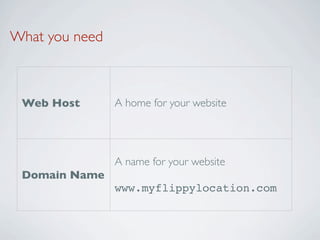
What you need


 Web Host       A home for your website


                A name for your website
 Domain Name
                www.myflippylocation.com
Web Hosting
Development Server vs Production Server


➡   Django provides a development server

๏   Does not scale with multiple requests (high threading)

✓   We need to setup a production server
Web Hosting


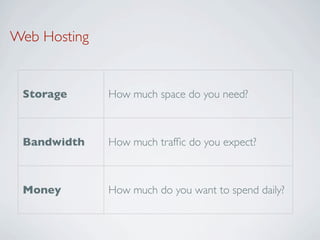
 Storage      How much space do you need?


 Bandwidth    How much traffic do you expect?


 Money        How much do you want to spend daily?
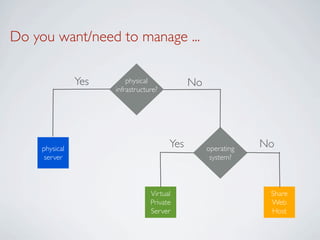
Do you want/need to manage ...

                Yes       physical            No
                      infrastructure?


     physical                           Yes        operating   No
      server                                        system?


                                  Virtual                       Share
                                  Private                       Web
                                  Server                        Host
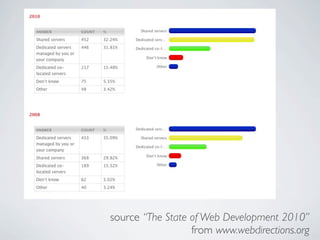
source “The State of Web Development 2010”
                  from www.webdirections.org
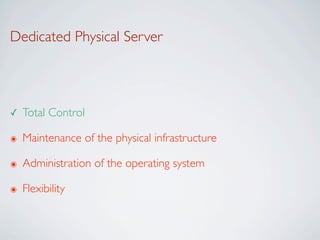
Dedicated Physical Server


✓   Total Control

๏   Maintenance of the physical infrastructure

๏   Administration of the operating system

๏   Flexibility
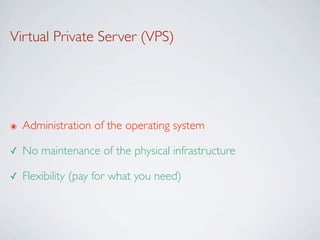
Virtual Private Server (VPS)


๏   Administration of the operating system

✓   No maintenance of the physical infrastructure

✓   Flexibility (pay for what you need)
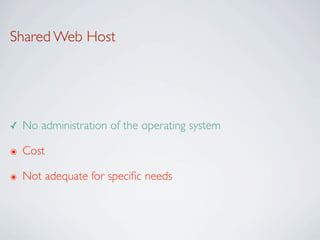
Shared Web Host


✓   No administration of the operating system

๏   Cost

๏   Not adequate for specific needs
Choosing the Technology
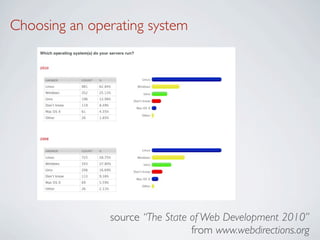
Choosing an operating system


               source “The State of Web Development 2010”
                                 from www.webdirections.org
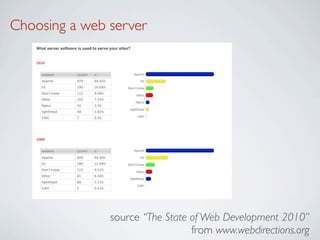
Choosing a web server


               source “The State of Web Development 2010”
                                 from www.webdirections.org
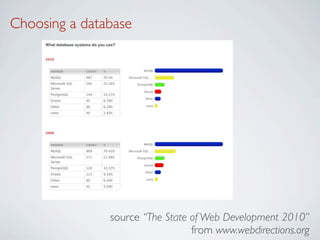
Choosing a database


               source “The State of Web Development 2010”
                                 from www.webdirections.org
The popularity of LAMP


•   Linux

•   Apache

•   MySQL

•   Perl / PHP / Pyhton
Choosing a technology


•   Choosing a technology depends on

                        Specific applications that your web
      Specific needs
                        applications uses
                        What you are comfortable to
      Security
                        administer
Domain Name
Internet Top Level Names


•   See List of Internet top-level domains (Wikipedia)
How to get a domain name?


•   You need to buy one from a Domain Name Registrar
What about Qatar?


✓   A domain name in .qa

➡   See Qatar Domain Registry
Step 1 - Buy your domain name


•   Can be more or less expensive
Step 2 - Configure


➡   Attach an IP address (or another URL) to your domaine name
Django with Apache
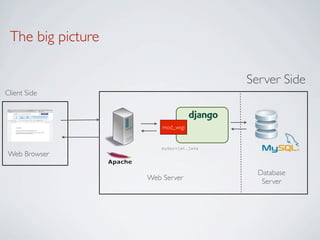
The big picture

                                        Server Side
Client Side


                       mod_wsgi


                       myServlet.java
Web Browser

                                          Database
                   Web Server              Server
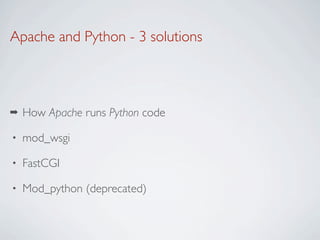
Apache and Python - 3 solutions


➡   How Apache runs Python code

•   mod_wsgi

•   FastCGI

•   Mod_python (deprecated)
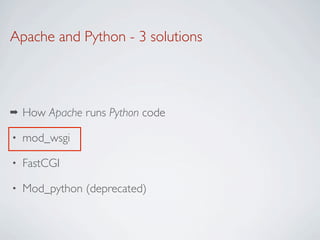
Apache and Python - 3 solutions


➡   How Apache runs Python code

•   mod_wsgi

•   FastCGI

•   Mod_python (deprecated)
Apache and mod_wsgi


•   Apache

    http://www.apache.org/


•   Python WSGI adapter for Apache (mod_wsgi)

    http://code.google.com/p/modwsgi/
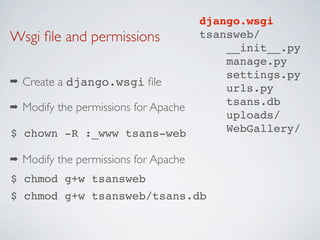
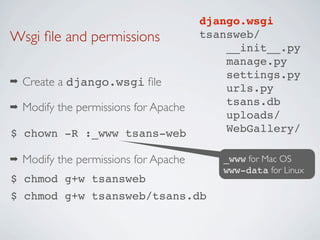
django.wsgi
Wsgi file and permissions                tsansweb/
                                            __init__.py
                                            manage.py
                                            settings.py
➡   Create a django.wsgi file                urls.py
                                            tsans.db
➡   Modify the permissions for Apache
                                            uploads/
$ chown -R :_www tsans-web                  WebGallery/

➡   Modify the permissions for Apache
$ chmod g+w tsansweb
$ chmod g+w tsansweb/tsans.db
django.wsgi
Wsgi file and permissions                tsansweb/
                                            __init__.py
                                            manage.py
                                            settings.py
➡   Create a django.wsgi file                urls.py
                                            tsans.db
➡   Modify the permissions for Apache
                                            uploads/
$ chown -R :_www tsans-web                  WebGallery/

➡   Modify the permissions for Apache      _www for Mac OS
                                           www-data for Linux
$ chmod g+w tsansweb
$ chmod g+w tsansweb/tsans.db
Django WSGI file (Django version 1.3)                    django.wsgi
import os
import sys


path = os.path.abspath(os.path.dirname(__file__))
if path not in sys.path:
    sys.path.append(path)


path+="/tsansweb"
if path not in sys.path:
    sys.path.append(path)


os.environ['DJANGO_SETTINGS_MODULE'] = 'tsansweb.settings'


import django.core.handlers.wsgi
application = django.core.handlers.wsgi.WSGIHandler()
Django WSGI file (Django version 1.3)                    django.wsgi
import os
import sys


path = os.path.abspath(os.path.dirname(__file__))
if path not in sys.path:
    sys.path.append(path)
                            Django project path
path+="/tsansweb"
if path not in sys.path:
    sys.path.append(path)


os.environ['DJANGO_SETTINGS_MODULE'] = 'tsansweb.settings'


import django.core.handlers.wsgi
application = django.core.handlers.wsgi.WSGIHandler()
Django WSGI file (Django version 1.3)                      django.wsgi
import os
import sys


path = os.path.abspath(os.path.dirname(__file__))
if path not in sys.path:
    sys.path.append(path)
                            Django project path
path+="/tsansweb"
if path not in sys.path:
    sys.path.append(path)
                                                    Settings module


os.environ['DJANGO_SETTINGS_MODULE'] = 'tsansweb.settings'


import django.core.handlers.wsgi
application = django.core.handlers.wsgi.WSGIHandler()
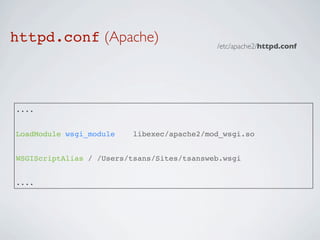
httpd.conf (Apache)                         /etc/apache2/httpd.conf


....


LoadModule wsgi_module    libexec/apache2/mod_wsgi.so


WSGIScriptAlias / /Users/tsans/Sites/tsansweb.wsgi


....
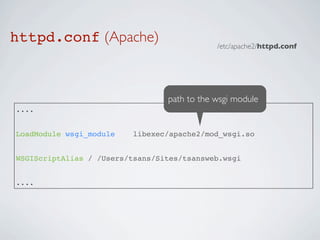
httpd.conf (Apache)                          /etc/apache2/httpd.conf


                                 path to the wsgi module
....


LoadModule wsgi_module    libexec/apache2/mod_wsgi.so


WSGIScriptAlias / /Users/tsans/Sites/tsansweb.wsgi


....
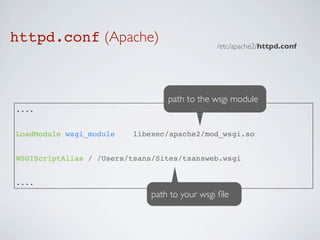
httpd.conf (Apache)                            /etc/apache2/httpd.conf


                                  path to the wsgi module
....


LoadModule wsgi_module    libexec/apache2/mod_wsgi.so


WSGIScriptAlias / /Users/tsans/Sites/tsansweb.wsgi


....
                              path to your wsgi file
Django and MySQL
MySQL


•   MySQL

    http://www.mysql.com/
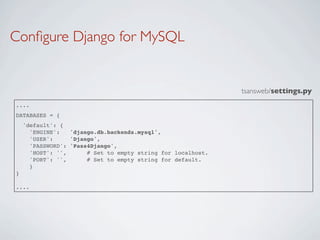
Configure Django for MySQL


                                                              tsansweb/settings.py
....
DATABASES = {
    'default': {
      'ENGINE':   'django.db.backends.mysql',
      'USER':     'Django',
      'PASSWORD': 'Pass4Django',
      'HOST': '',      # Set to empty string for localhost.
      'PORT': '',      # Set to empty string for default.
      }
}

....
Configure Django for MySQL


                                                               tsansweb/settings.py
....
DATABASES = {
    'default': {
      'ENGINE':
      'USER':
                  'django.db.backends.mysql',
                  'Django',
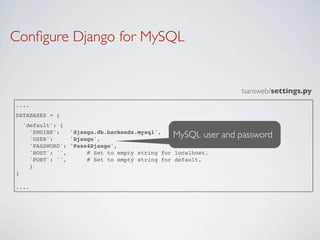
                                                MySQL user and password
      'PASSWORD': 'Pass4Django',
      'HOST': '',      # Set to empty string for localhost.
      'PORT': '',      # Set to empty string for default.
      }
}

....

Deploying

  • 1.
    Deploying a WebApplication Thierry Sans
  • 2.
    What you need Web Host A home for your website A name for your website Domain Name www.myflippylocation.com
  • 3.
  • 4.
    Development Server vsProduction Server ➡ Django provides a development server ๏ Does not scale with multiple requests (high threading) ✓ We need to setup a production server
  • 5.
    Web Hosting Storage How much space do you need? Bandwidth How much traffic do you expect? Money How much do you want to spend daily?
  • 6.
    Do you want/needto manage ... Yes physical No infrastructure? physical Yes operating No server system? Virtual Share Private Web Server Host
  • 7.
    source “The Stateof Web Development 2010” from www.webdirections.org
  • 8.
    Dedicated Physical Server ✓ Total Control ๏ Maintenance of the physical infrastructure ๏ Administration of the operating system ๏ Flexibility
  • 9.
    Virtual Private Server(VPS) ๏ Administration of the operating system ✓ No maintenance of the physical infrastructure ✓ Flexibility (pay for what you need)
  • 10.
    Shared Web Host ✓ No administration of the operating system ๏ Cost ๏ Not adequate for specific needs
  • 11.
  • 12.
    Choosing an operatingsystem source “The State of Web Development 2010” from www.webdirections.org
  • 13.
    Choosing a webserver source “The State of Web Development 2010” from www.webdirections.org
  • 14.
    Choosing a database source “The State of Web Development 2010” from www.webdirections.org
  • 15.
    The popularity ofLAMP • Linux • Apache • MySQL • Perl / PHP / Pyhton
  • 16.
    Choosing a technology • Choosing a technology depends on Specific applications that your web Specific needs applications uses What you are comfortable to Security administer
  • 17.
  • 18.
    Internet Top LevelNames • See List of Internet top-level domains (Wikipedia)
  • 19.
    How to geta domain name? • You need to buy one from a Domain Name Registrar
  • 20.
    What about Qatar? ✓ A domain name in .qa ➡ See Qatar Domain Registry
  • 21.
    Step 1 -Buy your domain name • Can be more or less expensive
  • 22.
    Step 2 -Configure ➡ Attach an IP address (or another URL) to your domaine name
  • 23.
  • 24.
    The big picture Server Side Client Side mod_wsgi myServlet.java Web Browser Database Web Server Server
  • 25.
    Apache and Python- 3 solutions ➡ How Apache runs Python code • mod_wsgi • FastCGI • Mod_python (deprecated)
  • 26.
    Apache and Python- 3 solutions ➡ How Apache runs Python code • mod_wsgi • FastCGI • Mod_python (deprecated)
  • 27.
    Apache and mod_wsgi • Apache http://www.apache.org/ • Python WSGI adapter for Apache (mod_wsgi) http://code.google.com/p/modwsgi/
  • 28.
    django.wsgi Wsgi file andpermissions tsansweb/ __init__.py manage.py settings.py ➡ Create a django.wsgi file urls.py tsans.db ➡ Modify the permissions for Apache uploads/ $ chown -R :_www tsans-web WebGallery/ ➡ Modify the permissions for Apache $ chmod g+w tsansweb $ chmod g+w tsansweb/tsans.db
  • 29.
    django.wsgi Wsgi file andpermissions tsansweb/ __init__.py manage.py settings.py ➡ Create a django.wsgi file urls.py tsans.db ➡ Modify the permissions for Apache uploads/ $ chown -R :_www tsans-web WebGallery/ ➡ Modify the permissions for Apache _www for Mac OS www-data for Linux $ chmod g+w tsansweb $ chmod g+w tsansweb/tsans.db
  • 30.
    Django WSGI file(Django version 1.3) django.wsgi import os import sys path = os.path.abspath(os.path.dirname(__file__)) if path not in sys.path: sys.path.append(path) path+="/tsansweb" if path not in sys.path: sys.path.append(path) os.environ['DJANGO_SETTINGS_MODULE'] = 'tsansweb.settings' import django.core.handlers.wsgi application = django.core.handlers.wsgi.WSGIHandler()
  • 31.
    Django WSGI file(Django version 1.3) django.wsgi import os import sys path = os.path.abspath(os.path.dirname(__file__)) if path not in sys.path: sys.path.append(path) Django project path path+="/tsansweb" if path not in sys.path: sys.path.append(path) os.environ['DJANGO_SETTINGS_MODULE'] = 'tsansweb.settings' import django.core.handlers.wsgi application = django.core.handlers.wsgi.WSGIHandler()
  • 32.
    Django WSGI file(Django version 1.3) django.wsgi import os import sys path = os.path.abspath(os.path.dirname(__file__)) if path not in sys.path: sys.path.append(path) Django project path path+="/tsansweb" if path not in sys.path: sys.path.append(path) Settings module os.environ['DJANGO_SETTINGS_MODULE'] = 'tsansweb.settings' import django.core.handlers.wsgi application = django.core.handlers.wsgi.WSGIHandler()
  • 33.
    httpd.conf (Apache) /etc/apache2/httpd.conf .... LoadModule wsgi_module libexec/apache2/mod_wsgi.so WSGIScriptAlias / /Users/tsans/Sites/tsansweb.wsgi ....
  • 34.
    httpd.conf (Apache) /etc/apache2/httpd.conf path to the wsgi module .... LoadModule wsgi_module libexec/apache2/mod_wsgi.so WSGIScriptAlias / /Users/tsans/Sites/tsansweb.wsgi ....
  • 35.
    httpd.conf (Apache) /etc/apache2/httpd.conf path to the wsgi module .... LoadModule wsgi_module libexec/apache2/mod_wsgi.so WSGIScriptAlias / /Users/tsans/Sites/tsansweb.wsgi .... path to your wsgi file
  • 36.
  • 37.
    MySQL • MySQL http://www.mysql.com/
  • 38.
    Configure Django forMySQL tsansweb/settings.py .... DATABASES = { 'default': { 'ENGINE': 'django.db.backends.mysql', 'USER': 'Django', 'PASSWORD': 'Pass4Django', 'HOST': '', # Set to empty string for localhost. 'PORT': '', # Set to empty string for default. } } ....
  • 39.
    Configure Django forMySQL tsansweb/settings.py .... DATABASES = { 'default': { 'ENGINE': 'USER': 'django.db.backends.mysql', 'Django', MySQL user and password 'PASSWORD': 'Pass4Django', 'HOST': '', # Set to empty string for localhost. 'PORT': '', # Set to empty string for default. } } ....