Doris Chen Ph.D.
Developer Evangelist
Microsoft
doris.chen@microsoft.com
@doristchen
Building Web Sites that
Work Everywhere
Who am I?
 Developer Evangelist at Microsoft based in Silicon
Valley, CA
 Blog: http://blogs.msdn.com/b/dorischen/
 Twitter @doristchen
 Email: doris.chen@microsoft.com
 Has over 18 years of experience in the software industry
focusing on web technologies
 Spoke and published widely at OSCON, Fluent, HTML5
DevConf, JavaOne, O'Reilly, Silicon Valley Code Camp,
and worldwide User Groups meetings
 Doris received her Ph.D. from the University of California
at Los Angeles (UCLA)
Agenda
PAGE 3
Cross Browser Testing
Browser Detection and User Agent
Polyfills and Fallbacks
Summary
Feature Detection
CSS3 and Vendor Prefixes
Cross Browser Testing
4
MICROSOFT CONFIDENTIAL
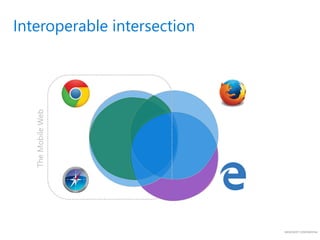
Interoperable intersection
TheMobileWeb
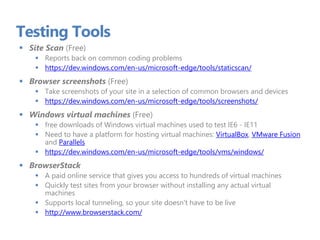
Testing Tools
 Site Scan (Free)
 Reports back on common coding problems
 https://dev.windows.com/en-us/microsoft-edge/tools/staticscan/
 Browser screenshots (Free)
 Take screenshots of your site in a selection of common browsers and devices
 https://dev.windows.com/en-us/microsoft-edge/tools/screenshots/
 Windows virtual machines (Free)
 free downloads of Windows virtual machines used to test IE6 - IE11
 Need to have a platform for hosting virtual machines: VirtualBox, VMware Fusion
and Parallels
 https://dev.windows.com/en-us/microsoft-edge/tools/vms/windows/
 BrowserStack
 A paid online service that gives you access to hundreds of virtual machines
 Quickly test sites from your browser without installing any actual virtual
machines
 Supports local tunneling, so your site doesn't have to be live
 http://www.browserstack.com/
Testing Tools
Demo
CSS3 and Vendor Prefixes
12
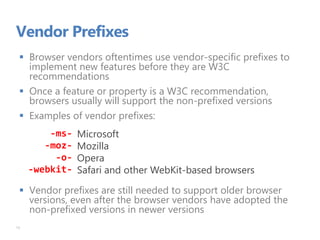
Vendor Prefixes
 Browser vendors oftentimes use vendor-specific prefixes to
implement new features before they are W3C
recommendations
 Once a feature or property is a W3C recommendation,
browsers usually will support the non-prefixed versions
 Examples of vendor prefixes:
 Vendor prefixes are still needed to support older browser
versions, even after the browser vendors have adopted the
non-prefixed versions in newer versions
13
-ms-
-moz-
-o-
-webkit-
Microsoft
Mozilla
Opera
Safari and other WebKit-based browsers
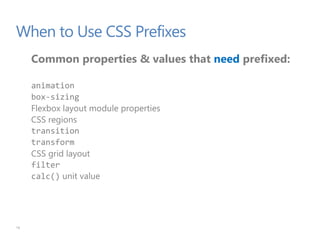
When to Use CSS Prefixes
Common properties & values that need prefixed:
animation
box-sizing
Flexbox layout module properties
CSS regions
transition
transform
CSS grid layout
filter
calc() unit value
16
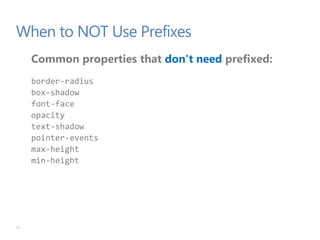
When to NOT Use Prefixes
Common properties that don't need prefixed:
border-radius
box-shadow
font-face
opacity
text-shadow
pointer-events
max-height
min-height
17
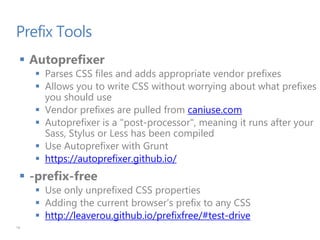
Prefix Tools
 Autoprefixer
 Parses CSS files and adds appropriate vendor prefixes
 Allows you to write CSS without worrying about what prefixes
you should use
 Vendor prefixes are pulled from caniuse.com
 Autoprefixer is a "post-processor", meaning it runs after your
Sass, Stylus or Less has been compiled
 Use Autoprefixer with Grunt
 https://autoprefixer.github.io/
 -prefix-free
 Use only unprefixed CSS properties
 Adding the current browser’s prefix to any CSS
 http://leaverou.github.io/prefixfree/#test-drive
18
Prefix tools
Demo
Browser Detection and User Agent
22
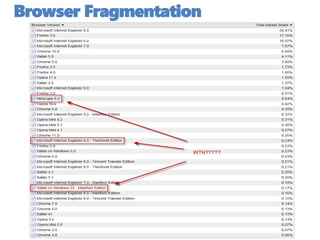
Browser Fragmentation
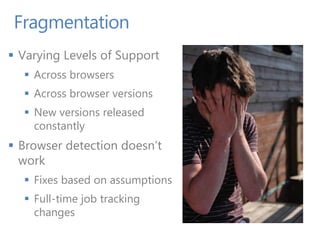
Fragmentation
 Varying Levels of Support
 Across browsers
 Across browser versions
 New versions released
constantly
 Browser detection doesn’t
work
 Fixes based on assumptions
 Full-time job tracking
changes
Browser Detection: User Agent
 Each browser User Agent through the years tried to
mimic others
 Lead to very complicated logic when UA sniffing
 Many browsers try to act like other browsers to claim
they support each other
 In the past, the user agent string was used to change
code per browser (sometimes via a JavaScript plugin)
 No longer a recommended technique
 Much better technique is to use feature detection
26
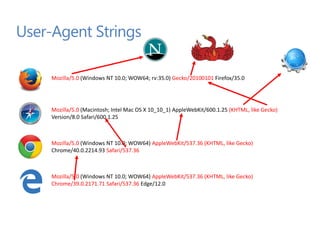
User-Agent Strings
Mozilla/5.0 (Windows NT 10.0; WOW64) AppleWebKit/537.36 (KHTML, like Gecko)
Chrome/39.0.2171.71 Safari/537.36 Edge/12.0
Mozilla/5.0 (Macintosh; Intel Mac OS X 10_10_1) AppleWebKit/600.1.25 (KHTML, like Gecko)
Version/8.0 Safari/600.1.25
Mozilla/5.0 (Windows NT 10.0; WOW64) AppleWebKit/537.36 (KHTML, like Gecko)
Chrome/40.0.2214.93 Safari/537.36
Mozilla/5.0 (Windows NT 10.0; WOW64; rv:35.0) Gecko/20100101 Firefox/35.0
User Agent Sniffing
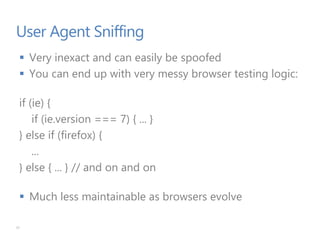
 Very inexact and can easily be spoofed
 You can end up with very messy browser testing logic:
if (ie) {
if (ie.version === 7) { ... }
} else if (firefox) {
...
} else { ... } // and on and on
 Much less maintainable as browsers evolve
31
Feature Detection
Feature Detection
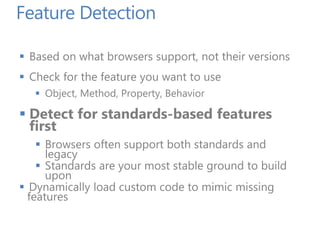
 Based on what browsers support, not their versions
 Check for the feature you want to use
 Object, Method, Property, Behavior
 Detect for standards-based features
first
 Browsers often support both standards and
legacy
 Standards are your most stable ground to build
upon
 Dynamically load custom code to mimic missing
features
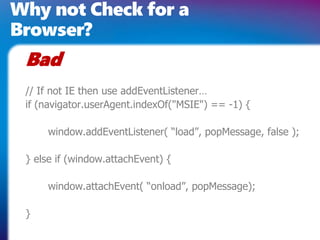
Why not Check for a
Browser?
// If not IE then use addEventListener…
if (navigator.userAgent.indexOf("MSIE") == -1) {
window.addEventListener( “load”, popMessage, false );
} else if (window.attachEvent) {
window.attachEvent( “onload”, popMessage);
}
Bad
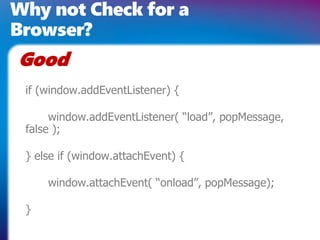
Why not Check for a
Browser?
if (window.addEventListener) {
window.addEventListener( “load”, popMessage,
false );
} else if (window.attachEvent) {
window.attachEvent( “onload”, popMessage);
}
Good
Feature Detection
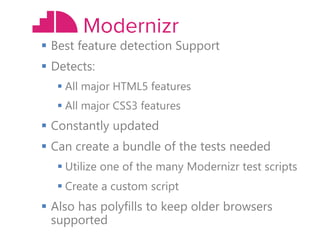
 Best option in my opinion for this…
 http://www.modernizr.com/
 Best feature detection Support
 Detects:
 All major HTML5 features
 All major CSS3 features
 Constantly updated
 Can create a bundle of the tests needed
 Utilize one of the many Modernizr test scripts
 Create a custom script
 Also has polyfills to keep older browsers
supported
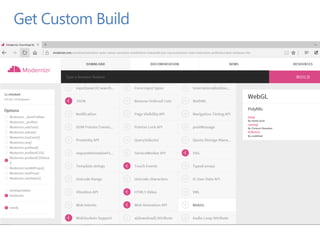
Get Custom Build
function(){
var
sheet, bool,
head = docHead || docElement,
style = document.createElement("style"),
impl = document.implementation || { hasFeature: function() { return false; } };
style.type = 'text/css';
head.insertBefore(style, head.firstChild);
sheet = style.sheet || style.styleSheet;
var supportAtRule = impl.hasFeature('CSS2', '') ?
function(rule) {
if (!(sheet && rule)) return false;
var result = false;
try {
sheet.insertRule(rule, 0);
result = (/src/i).test(sheet.cssRules[0].cssText);
sheet.deleteRule(sheet.cssRules.length - 1);
} catch(e) { }
return result;
} :
function(rule) {
if (!(sheet && rule)) return false;
sheet.cssText = rule;
return sheet.cssText.length !== 0 && (/src/i).test(sheet.cssText) &&
sheet.cssText
.replace(/r+|n+/g, '')
.indexOf(rule.split(' ')[0]) === 0;
};
bool = supportAtRule('@font-face { font-family: "font"; src: url(data:,); }');
head.removeChild(style);
return bool;
};
Test for @font-face
You can do this
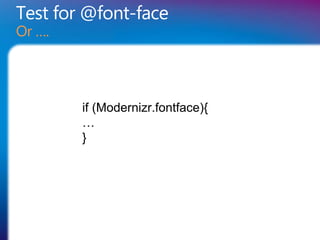
Test for @font-face
Or ….
if (Modernizr.fontface){
…
}
Demo
Polyfills and Fallbacks
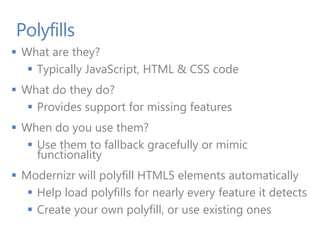
Polyfills
 What are they?
 Typically JavaScript, HTML & CSS code
 What do they do?
 Provides support for missing features
 When do you use them?
 Use them to fallback gracefully or mimic
functionality
 Modernizr will polyfill HTML5 elements automatically
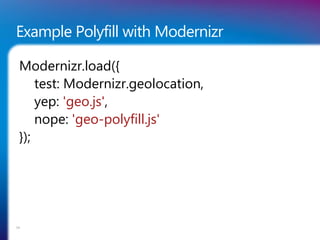
 Help load polyfills for nearly every feature it detects
 Create your own polyfill, or use existing ones
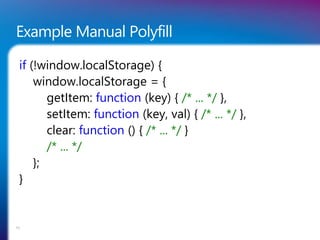
Example Manual Polyfill
if (!window.localStorage) {
window.localStorage = {
getItem: function (key) { /* ... */ },
setItem: function (key, val) { /* ... */ },
clear: function () { /* ... */ }
/* ... */
};
}
53
Example Polyfill with Modernizr
Modernizr.load({
test: Modernizr.geolocation,
yep: 'geo.js',
nope: 'geo-polyfill.js'
});
54
Polyfills: Examples
Video Tags
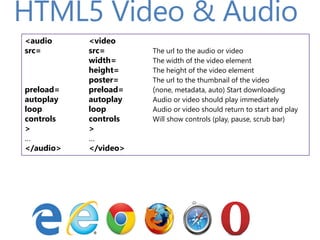
HTML5 Video & Audio
<audio <video
src= src= The url to the audio or video
width= The width of the video element
height= The height of the video element
poster= The url to the thumbnail of the video
preload= preload= (none, metadata, auto) Start downloading
autoplay autoplay Audio or video should play immediately
loop loop Audio or video should return to start and play
controls controls Will show controls (play, pause, scrub bar)
> >
… …
</audio> </video>
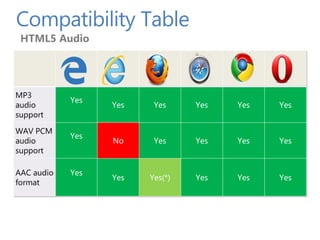
Compatibility Table
HTML5 Audio
MP3
audio
support
Yes
Yes Yes Yes Yes Yes
WAV PCM
audio
support
Yes
No Yes Yes Yes Yes
AAC audio
format
Yes
Yes Yes(*) Yes Yes Yes
Compatibility Table
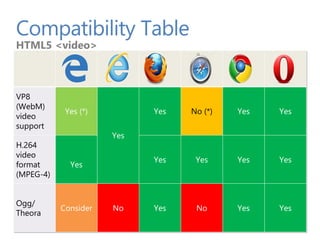
HTML5 <video>
VP8
(WebM)
video
support
Yes (*)
Yes
Yes No (*) Yes Yes
H.264
video
format
(MPEG-4)
Yes
Yes Yes Yes Yes
Ogg/
Theora
Consider No Yes No Yes Yes
Elements With Fall Backs
PAGE 60
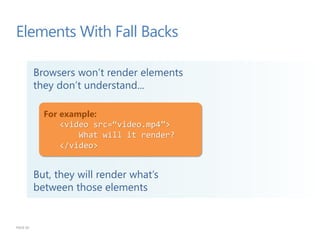
Browsers won’t render elements
they don’t understand...
But, they will render what’s
between those elements
For example:
<video src=“video.mp4”>
What will it render?
</video>
HTML5 <video> : Degrading Gracefully
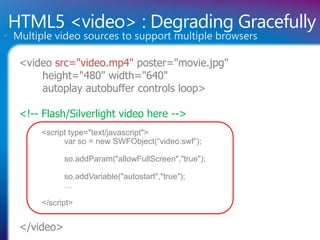
<video src="video.mp4" poster="movie.jpg"
height="480" width="640"
autoplay autobuffer controls loop>
<!-- Flash/Silverlight video here -->
<script type="text/javascript">
var so = new SWFObject(“video.swf”);
so.addParam("allowFullScreen","true");
so.addVariable("autostart","true");
…
</script>
</video>
 Multiple video sources to support multiple browsers
Plugin Free Experience:
http://www.worldstarhiphop.com/vi
deos/video.php?v=wshhNPy952Q9
wUk3n353
Demo
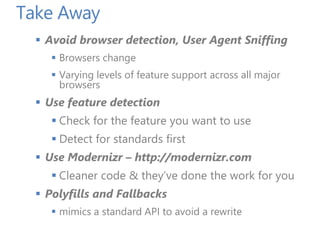
Take Away
 Avoid browser detection, User Agent Sniffing
 Browsers change
 Varying levels of feature support across all major
browsers
 Use feature detection
 Check for the feature you want to use
 Detect for standards first
 Use Modernizr – http://modernizr.com
 Cleaner code & they’ve done the work for you
 Polyfills and Fallbacks
 mimics a standard API to avoid a rewrite

Building Web Sites that Work Everywhere

  • 1.
    Doris Chen Ph.D. DeveloperEvangelist Microsoft doris.chen@microsoft.com @doristchen Building Web Sites that Work Everywhere
  • 2.
    Who am I? Developer Evangelist at Microsoft based in Silicon Valley, CA  Blog: http://blogs.msdn.com/b/dorischen/  Twitter @doristchen  Email: doris.chen@microsoft.com  Has over 18 years of experience in the software industry focusing on web technologies  Spoke and published widely at OSCON, Fluent, HTML5 DevConf, JavaOne, O'Reilly, Silicon Valley Code Camp, and worldwide User Groups meetings  Doris received her Ph.D. from the University of California at Los Angeles (UCLA)
  • 3.
    Agenda PAGE 3 Cross BrowserTesting Browser Detection and User Agent Polyfills and Fallbacks Summary Feature Detection CSS3 and Vendor Prefixes
  • 4.
  • 6.
  • 7.
    Testing Tools  SiteScan (Free)  Reports back on common coding problems  https://dev.windows.com/en-us/microsoft-edge/tools/staticscan/  Browser screenshots (Free)  Take screenshots of your site in a selection of common browsers and devices  https://dev.windows.com/en-us/microsoft-edge/tools/screenshots/  Windows virtual machines (Free)  free downloads of Windows virtual machines used to test IE6 - IE11  Need to have a platform for hosting virtual machines: VirtualBox, VMware Fusion and Parallels  https://dev.windows.com/en-us/microsoft-edge/tools/vms/windows/  BrowserStack  A paid online service that gives you access to hundreds of virtual machines  Quickly test sites from your browser without installing any actual virtual machines  Supports local tunneling, so your site doesn't have to be live  http://www.browserstack.com/
  • 8.
  • 9.
    CSS3 and VendorPrefixes 12
  • 10.
    Vendor Prefixes  Browservendors oftentimes use vendor-specific prefixes to implement new features before they are W3C recommendations  Once a feature or property is a W3C recommendation, browsers usually will support the non-prefixed versions  Examples of vendor prefixes:  Vendor prefixes are still needed to support older browser versions, even after the browser vendors have adopted the non-prefixed versions in newer versions 13 -ms- -moz- -o- -webkit- Microsoft Mozilla Opera Safari and other WebKit-based browsers
  • 11.
    When to UseCSS Prefixes Common properties & values that need prefixed: animation box-sizing Flexbox layout module properties CSS regions transition transform CSS grid layout filter calc() unit value 16
  • 12.
    When to NOTUse Prefixes Common properties that don't need prefixed: border-radius box-shadow font-face opacity text-shadow pointer-events max-height min-height 17
  • 13.
    Prefix Tools  Autoprefixer Parses CSS files and adds appropriate vendor prefixes  Allows you to write CSS without worrying about what prefixes you should use  Vendor prefixes are pulled from caniuse.com  Autoprefixer is a "post-processor", meaning it runs after your Sass, Stylus or Less has been compiled  Use Autoprefixer with Grunt  https://autoprefixer.github.io/  -prefix-free  Use only unprefixed CSS properties  Adding the current browser’s prefix to any CSS  http://leaverou.github.io/prefixfree/#test-drive 18
  • 14.
  • 15.
    Browser Detection andUser Agent 22
  • 16.
  • 17.
    Fragmentation  Varying Levelsof Support  Across browsers  Across browser versions  New versions released constantly  Browser detection doesn’t work  Fixes based on assumptions  Full-time job tracking changes
  • 18.
    Browser Detection: UserAgent  Each browser User Agent through the years tried to mimic others  Lead to very complicated logic when UA sniffing  Many browsers try to act like other browsers to claim they support each other  In the past, the user agent string was used to change code per browser (sometimes via a JavaScript plugin)  No longer a recommended technique  Much better technique is to use feature detection 26
  • 19.
    User-Agent Strings Mozilla/5.0 (WindowsNT 10.0; WOW64) AppleWebKit/537.36 (KHTML, like Gecko) Chrome/39.0.2171.71 Safari/537.36 Edge/12.0 Mozilla/5.0 (Macintosh; Intel Mac OS X 10_10_1) AppleWebKit/600.1.25 (KHTML, like Gecko) Version/8.0 Safari/600.1.25 Mozilla/5.0 (Windows NT 10.0; WOW64) AppleWebKit/537.36 (KHTML, like Gecko) Chrome/40.0.2214.93 Safari/537.36 Mozilla/5.0 (Windows NT 10.0; WOW64; rv:35.0) Gecko/20100101 Firefox/35.0
  • 20.
    User Agent Sniffing Very inexact and can easily be spoofed  You can end up with very messy browser testing logic: if (ie) { if (ie.version === 7) { ... } } else if (firefox) { ... } else { ... } // and on and on  Much less maintainable as browsers evolve 31
  • 21.
  • 22.
    Feature Detection  Basedon what browsers support, not their versions  Check for the feature you want to use  Object, Method, Property, Behavior  Detect for standards-based features first  Browsers often support both standards and legacy  Standards are your most stable ground to build upon  Dynamically load custom code to mimic missing features
  • 23.
    Why not Checkfor a Browser? // If not IE then use addEventListener… if (navigator.userAgent.indexOf("MSIE") == -1) { window.addEventListener( “load”, popMessage, false ); } else if (window.attachEvent) { window.attachEvent( “onload”, popMessage); } Bad
  • 24.
    Why not Checkfor a Browser? if (window.addEventListener) { window.addEventListener( “load”, popMessage, false ); } else if (window.attachEvent) { window.attachEvent( “onload”, popMessage); } Good
  • 25.
    Feature Detection  Bestoption in my opinion for this…  http://www.modernizr.com/
  • 26.
     Best featuredetection Support  Detects:  All major HTML5 features  All major CSS3 features  Constantly updated  Can create a bundle of the tests needed  Utilize one of the many Modernizr test scripts  Create a custom script  Also has polyfills to keep older browsers supported
  • 27.
  • 28.
    function(){ var sheet, bool, head =docHead || docElement, style = document.createElement("style"), impl = document.implementation || { hasFeature: function() { return false; } }; style.type = 'text/css'; head.insertBefore(style, head.firstChild); sheet = style.sheet || style.styleSheet; var supportAtRule = impl.hasFeature('CSS2', '') ? function(rule) { if (!(sheet && rule)) return false; var result = false; try { sheet.insertRule(rule, 0); result = (/src/i).test(sheet.cssRules[0].cssText); sheet.deleteRule(sheet.cssRules.length - 1); } catch(e) { } return result; } : function(rule) { if (!(sheet && rule)) return false; sheet.cssText = rule; return sheet.cssText.length !== 0 && (/src/i).test(sheet.cssText) && sheet.cssText .replace(/r+|n+/g, '') .indexOf(rule.split(' ')[0]) === 0; }; bool = supportAtRule('@font-face { font-family: "font"; src: url(data:,); }'); head.removeChild(style); return bool; }; Test for @font-face You can do this
  • 29.
    Test for @font-face Or…. if (Modernizr.fontface){ … }
  • 30.
  • 31.
  • 32.
    Polyfills  What arethey?  Typically JavaScript, HTML & CSS code  What do they do?  Provides support for missing features  When do you use them?  Use them to fallback gracefully or mimic functionality  Modernizr will polyfill HTML5 elements automatically  Help load polyfills for nearly every feature it detects  Create your own polyfill, or use existing ones
  • 33.
    Example Manual Polyfill if(!window.localStorage) { window.localStorage = { getItem: function (key) { /* ... */ }, setItem: function (key, val) { /* ... */ }, clear: function () { /* ... */ } /* ... */ }; } 53
  • 34.
    Example Polyfill withModernizr Modernizr.load({ test: Modernizr.geolocation, yep: 'geo.js', nope: 'geo-polyfill.js' }); 54
  • 35.
  • 36.
    HTML5 Video &Audio <audio <video src= src= The url to the audio or video width= The width of the video element height= The height of the video element poster= The url to the thumbnail of the video preload= preload= (none, metadata, auto) Start downloading autoplay autoplay Audio or video should play immediately loop loop Audio or video should return to start and play controls controls Will show controls (play, pause, scrub bar) > > … … </audio> </video>
  • 37.
    Compatibility Table HTML5 Audio MP3 audio support Yes YesYes Yes Yes Yes WAV PCM audio support Yes No Yes Yes Yes Yes AAC audio format Yes Yes Yes(*) Yes Yes Yes
  • 38.
    Compatibility Table HTML5 <video> VP8 (WebM) video support Yes(*) Yes Yes No (*) Yes Yes H.264 video format (MPEG-4) Yes Yes Yes Yes Yes Ogg/ Theora Consider No Yes No Yes Yes
  • 39.
    Elements With FallBacks PAGE 60 Browsers won’t render elements they don’t understand... But, they will render what’s between those elements For example: <video src=“video.mp4”> What will it render? </video>
  • 40.
    HTML5 <video> :Degrading Gracefully <video src="video.mp4" poster="movie.jpg" height="480" width="640" autoplay autobuffer controls loop> <!-- Flash/Silverlight video here --> <script type="text/javascript"> var so = new SWFObject(“video.swf”); so.addParam("allowFullScreen","true"); so.addVariable("autostart","true"); … </script> </video>  Multiple video sources to support multiple browsers
  • 41.
  • 42.
    Take Away  Avoidbrowser detection, User Agent Sniffing  Browsers change  Varying levels of feature support across all major browsers  Use feature detection  Check for the feature you want to use  Detect for standards first  Use Modernizr – http://modernizr.com  Cleaner code & they’ve done the work for you  Polyfills and Fallbacks  mimics a standard API to avoid a rewrite