From Back-end to Front-end
Kiev 2018
React-Native: Introduction
Ilya Ivanov
Mobile Team Lead at Payoneer Team
Ciklum
About me
React-Native: Introduction
• 1.5 years in react-native
• 3 years in web
• 3 years in C#/.NET
Back-end
Web
front-end
Mobile
front-end
What to expect
• Show React-Native in context
• Explain how React-Native works
• Help you avoid silly mistakes I did
when started
React-Native: Introduction
What not to expect
• Complete course on building mobile apps with React-Native
• I won’t tell you what state management library to use
React-Native: Introduction
Agenda
• Ways to create mobile UI
• React.js in 5 minutes
• React-Native key concepts
• How React-Native works
• Advanced concepts
• React-Native pitfalls
React-Native: Introduction
Ways to create mobile UI
1. Native application (Objective-C or Swift/Java)
2. Website running within mobile browser
3. Hybrid application (HTML/JS/CSS in WebView)
MountainRoad
Hybrid
Cyclo-cross Cross-country
Types of bikes
Web
Web
Code
Browser
Hybrid
Native
Container
Web
Code
Native
Native
App
Ways to create mobile apps summary
• React-Native is a new way to create native apps
• Each approach is a balance between UX and development speed
Agenda
• Ways to create mobile UI
• React.js in 5 minutes
• React-Native key concepts
• How React-Native works
• Advanced concepts
• React-Native pitfalls
React.js in 5 minutes
• Declarative components
• Virtual DOM
• One-way data binding
Declarative components
import React, {Component} from 'react';
class App extends Component {
render() {
return (
<div>
<Title/>
<form>
<div>
<label>Email address</label>
<input type="text"/>
</div>
<br/>
<input type="button" value="Submit"/>
</form>
</div>
);
}
}
Title component
const Title = () =>
<h1>Sign me up!</h1>;
Virtual DOM
div
h1 form
div
label
input
br input
div
Browser DOM
div
h1 form
div
label
input
br input
div
DiffPatch
react-dom
react
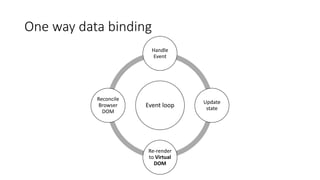
One way data binding
Event loop
Handle
Event
Update
state
Re-render
to Virtual
DOM
Reconcile
Browser
DOM
One way data binding
class App extends Component {
state = {};
render() {
return (
<div>
{
this.state.submitted &&
<span>Thanks for submitting your email!</span>
}
<br/>
<input type="button"
value="Submit"
onClick={() => this.setState({submitted: true})}/>
</div>
);
}
}
React.js summary
• Declarative components
• Return virtual DOM elements
• Virtual DOM
• Abstracts away browser’s DOM
• Change DOM via patches
• One-way data binding
• Unidirectional data flow
• Triggered on explicit state changes (via setState call)
Agenda
• Ways to create mobile UI
• React.js in 5 minutes
• React-Native key concepts
• How React-Native works
• Advanced concepts
• React-Native pitfalls
React-Native key concepts
• Ways to bootstrap
• Primitives
• Styling
• Platform-specific code
Bootstrapping your application
react-native init MyApplication
Pros:
• Can use custom native code
• Stable in terms of dev experience
create-react-native-app MyApplication
Pros:
• No need to install Android Studio and Xcode
• Can publish your apps
• You can always eject
Cons:
• Need to install Xcode and Android studio
• Longer feedback cycle
Cons:
• Can’t use custom native code
• Less stable
Initial app
class App extends Component {
render() {
return (
<View style={styles.container}>
<Text>
Welcome to React Native!
</Text>
</View>
);
}
}
Primitives
• View – fundamental component for building a UI. Supports layout
with flexbox.
• Similar to div
• Text – all text should be wrapped into Text component.
• Similar to span
• TouchableOpacity – component to handle user press.
• Somewhat similar to button
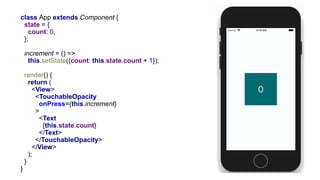
class App extends Component {
state = {
count: 0,
};
increment = () =>
this.setState({count: this.state.count + 1});
render() {
return (
<View>
<TouchableOpacity
onPress={this.increment}
>
<Text
{this.state.count}
</Text>
</TouchableOpacity>
</View>
);
}
}
Styling and flexbox
<View style={styles.container}>
<View style={styles.box}/>
<View style={[styles.box, styles.red]}/>
<View style={styles.box}/>
</View>
const styles = StyleSheet.create({
container: {
flex: 1,
justifyContent: 'space-around',
alignItems: 'center',
},
box: {
height: 50,
width: 50,
backgroundColor: ’green',
},
red: {
backgroundColor: 'red',
},
});
Flexbox native/web
• flexDirection defaults
• web: row
• native: column
• flex:
• web: flex-grow, flex-shrink, flex-basis
• flex: 2 2 10%;
• native: flex
• flex: 1;
Platform specific code
//from Home.js
import MyComponent from './MyComponent';
Platform specific code
import {Platform} from 'react-native';
const MyComponent = () =>
<Text>{Platform.OS === 'android' ?
'This is Android' :
'This is iOS'}
</Text>;
Key concepts summary
• Bootstrapping
• Start with Expo, eject if needed
• Primitives
• View => div
• Text => span
• TouchableOpacity => button
• Styling
• Flexbox almost identical to web
• Syntax similar to react-style library styling
• Platform-specific code
• Platform-aware vs platform-agnostic components
Agenda
• Ways to create mobile UI
• React.js in 5 minutes
• React-Native key concepts
• How React-Native works
• Advanced concepts
• React-Native pitfalls
React-Native Virtual DOM
View
Text
Android
react-native
react android.view
android.text
iOS
UIView
UILabel
Reconciliation
class App extends Component {
render() {
return (
<View style={styles.container}>
<Text>
Welcome to React Native!
</Text>
</View>
);
}
}
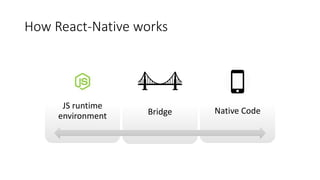
JS runtime
environment Bridge Native Code
How React-Native works
class App extends Component {
state = {
count: 0,
};
increment = () =>
this.setState({count: this.state.count + 1});
render() {
return (
<View>
<TouchableOpacity
onPress={this.increment}
>
<Text
{this.state.count}
</Text>
</TouchableOpacity>
</View>
);
}
}
Event flow
Source: https://www.slideshare.net/rahatkhanna/introduction-to-react-native-rendering-charts-graphs
Agenda
• Ways to create mobile UI
• React.js in 5 minutes
• React-Native key concepts
• How React-Native works
• Advanced concepts
• React-Native pitfalls
Advanced React-Native
• Navigation
• Animation
Navigation
• react-navigation
• JavaScript-based navigation
• react-native-navigation
• Native implementation navigation
Navigation
const ModalStack = StackNavigator({
Home: {
screen: Home,
},
ThreeBoxes: {
screen: ThreeBoxes,
},
});
Home screen
class Home extends Component {
static navigationOptions = {
title: 'Home',
};
render() {
const {navigation} = this.props;
return <View>
<TouchableOpacity
onPress={() => navigation.navigate('ThreeBoxes')}
/>
</View>;
}
}
Argues about smooth 60 FPS animation.
But is using gif in presentation?
Animation
class AnimatedBox extends Component {
scale = new Animated.Value(1);
animate = () => {
const animation = Animated.timing(
this.scale,
{
toValue: 6,
duration: 2000,
useNativeDriver: true,
},
);
animation.start();
};
render() {
const transform = [{scaleX: this.scale}, {scaleY: this.scale}];
return (
<View style={styles.container}>
<TouchableOpacity onPress={this.animate}>
<Animated.View style={[styles.box, {transform}]}/>
</TouchableOpacity>
</View>
);
}
}
Animation: summary
• Runs on the native thread
• Can achieve 60 FPS even on old Android devices
• Doesn’t use setState (out of react.js component lifecycle)
Agenda
• Ways to create mobile UI
• React.js in 5 minutes
• React-Native key concepts
• How React-Native works
• Advanced concepts
• React-Native pitfalls
React-Native pitfalls
• You still might need a native developer
• React-Native favors performance over code readability
• Be very careful with your state management
• Big state updates might lead to performance degradation
• Android and iOS are very different platforms
Summary
• React-Native: no HTML/CSS, native views defined via JavaScript
• Bridge - key part of js  native communication
• Why React-Native?
• You can write great native mobile apps having only web experience
• Reuse your mental models and codebase from web
Thanks
Resources
• Repository for the sample application
• Getting started with React-Native
• Why not Expo?
• How Airnb is using React-Native
• Animate React Native UI Elements

JS Fest 2018. Илья Иванов. Введение в React-Native

  • 1.
    From Back-end toFront-end Kiev 2018 React-Native: Introduction Ilya Ivanov Mobile Team Lead at Payoneer Team Ciklum
  • 2.
    About me React-Native: Introduction •1.5 years in react-native • 3 years in web • 3 years in C#/.NET Back-end Web front-end Mobile front-end
  • 3.
    What to expect •Show React-Native in context • Explain how React-Native works • Help you avoid silly mistakes I did when started React-Native: Introduction
  • 4.
    What not toexpect • Complete course on building mobile apps with React-Native • I won’t tell you what state management library to use React-Native: Introduction
  • 5.
    Agenda • Ways tocreate mobile UI • React.js in 5 minutes • React-Native key concepts • How React-Native works • Advanced concepts • React-Native pitfalls React-Native: Introduction
  • 6.
    Ways to createmobile UI 1. Native application (Objective-C or Swift/Java) 2. Website running within mobile browser 3. Hybrid application (HTML/JS/CSS in WebView)
  • 7.
  • 8.
  • 9.
    Ways to createmobile apps summary • React-Native is a new way to create native apps • Each approach is a balance between UX and development speed
  • 10.
    Agenda • Ways tocreate mobile UI • React.js in 5 minutes • React-Native key concepts • How React-Native works • Advanced concepts • React-Native pitfalls
  • 11.
    React.js in 5minutes • Declarative components • Virtual DOM • One-way data binding
  • 12.
    Declarative components import React,{Component} from 'react'; class App extends Component { render() { return ( <div> <Title/> <form> <div> <label>Email address</label> <input type="text"/> </div> <br/> <input type="button" value="Submit"/> </form> </div> ); } }
  • 13.
    Title component const Title= () => <h1>Sign me up!</h1>;
  • 14.
    Virtual DOM div h1 form div label input brinput div Browser DOM div h1 form div label input br input div DiffPatch react-dom react
  • 15.
    One way databinding Event loop Handle Event Update state Re-render to Virtual DOM Reconcile Browser DOM
  • 16.
    One way databinding class App extends Component { state = {}; render() { return ( <div> { this.state.submitted && <span>Thanks for submitting your email!</span> } <br/> <input type="button" value="Submit" onClick={() => this.setState({submitted: true})}/> </div> ); } }
  • 17.
    React.js summary • Declarativecomponents • Return virtual DOM elements • Virtual DOM • Abstracts away browser’s DOM • Change DOM via patches • One-way data binding • Unidirectional data flow • Triggered on explicit state changes (via setState call)
  • 18.
    Agenda • Ways tocreate mobile UI • React.js in 5 minutes • React-Native key concepts • How React-Native works • Advanced concepts • React-Native pitfalls
  • 19.
    React-Native key concepts •Ways to bootstrap • Primitives • Styling • Platform-specific code
  • 20.
    Bootstrapping your application react-nativeinit MyApplication Pros: • Can use custom native code • Stable in terms of dev experience create-react-native-app MyApplication Pros: • No need to install Android Studio and Xcode • Can publish your apps • You can always eject Cons: • Need to install Xcode and Android studio • Longer feedback cycle Cons: • Can’t use custom native code • Less stable
  • 21.
    Initial app class Appextends Component { render() { return ( <View style={styles.container}> <Text> Welcome to React Native! </Text> </View> ); } }
  • 22.
    Primitives • View –fundamental component for building a UI. Supports layout with flexbox. • Similar to div • Text – all text should be wrapped into Text component. • Similar to span • TouchableOpacity – component to handle user press. • Somewhat similar to button
  • 23.
    class App extendsComponent { state = { count: 0, }; increment = () => this.setState({count: this.state.count + 1}); render() { return ( <View> <TouchableOpacity onPress={this.increment} > <Text {this.state.count} </Text> </TouchableOpacity> </View> ); } }
  • 24.
    Styling and flexbox <Viewstyle={styles.container}> <View style={styles.box}/> <View style={[styles.box, styles.red]}/> <View style={styles.box}/> </View> const styles = StyleSheet.create({ container: { flex: 1, justifyContent: 'space-around', alignItems: 'center', }, box: { height: 50, width: 50, backgroundColor: ’green', }, red: { backgroundColor: 'red', }, });
  • 25.
    Flexbox native/web • flexDirectiondefaults • web: row • native: column • flex: • web: flex-grow, flex-shrink, flex-basis • flex: 2 2 10%; • native: flex • flex: 1;
  • 26.
    Platform specific code //fromHome.js import MyComponent from './MyComponent';
  • 27.
    Platform specific code import{Platform} from 'react-native'; const MyComponent = () => <Text>{Platform.OS === 'android' ? 'This is Android' : 'This is iOS'} </Text>;
  • 28.
    Key concepts summary •Bootstrapping • Start with Expo, eject if needed • Primitives • View => div • Text => span • TouchableOpacity => button • Styling • Flexbox almost identical to web • Syntax similar to react-style library styling • Platform-specific code • Platform-aware vs platform-agnostic components
  • 29.
    Agenda • Ways tocreate mobile UI • React.js in 5 minutes • React-Native key concepts • How React-Native works • Advanced concepts • React-Native pitfalls
  • 30.
    React-Native Virtual DOM View Text Android react-native reactandroid.view android.text iOS UIView UILabel Reconciliation class App extends Component { render() { return ( <View style={styles.container}> <Text> Welcome to React Native! </Text> </View> ); } }
  • 31.
    JS runtime environment BridgeNative Code How React-Native works
  • 32.
    class App extendsComponent { state = { count: 0, }; increment = () => this.setState({count: this.state.count + 1}); render() { return ( <View> <TouchableOpacity onPress={this.increment} > <Text {this.state.count} </Text> </TouchableOpacity> </View> ); } }
  • 33.
  • 34.
    Agenda • Ways tocreate mobile UI • React.js in 5 minutes • React-Native key concepts • How React-Native works • Advanced concepts • React-Native pitfalls
  • 35.
  • 36.
    Navigation • react-navigation • JavaScript-basednavigation • react-native-navigation • Native implementation navigation
  • 37.
    Navigation const ModalStack =StackNavigator({ Home: { screen: Home, }, ThreeBoxes: { screen: ThreeBoxes, }, });
  • 38.
    Home screen class Homeextends Component { static navigationOptions = { title: 'Home', }; render() { const {navigation} = this.props; return <View> <TouchableOpacity onPress={() => navigation.navigate('ThreeBoxes')} /> </View>; } }
  • 39.
    Argues about smooth60 FPS animation. But is using gif in presentation?
  • 40.
    Animation class AnimatedBox extendsComponent { scale = new Animated.Value(1); animate = () => { const animation = Animated.timing( this.scale, { toValue: 6, duration: 2000, useNativeDriver: true, }, ); animation.start(); }; render() { const transform = [{scaleX: this.scale}, {scaleY: this.scale}]; return ( <View style={styles.container}> <TouchableOpacity onPress={this.animate}> <Animated.View style={[styles.box, {transform}]}/> </TouchableOpacity> </View> ); } }
  • 41.
    Animation: summary • Runson the native thread • Can achieve 60 FPS even on old Android devices • Doesn’t use setState (out of react.js component lifecycle)
  • 42.
    Agenda • Ways tocreate mobile UI • React.js in 5 minutes • React-Native key concepts • How React-Native works • Advanced concepts • React-Native pitfalls
  • 43.
    React-Native pitfalls • Youstill might need a native developer • React-Native favors performance over code readability • Be very careful with your state management • Big state updates might lead to performance degradation • Android and iOS are very different platforms
  • 44.
    Summary • React-Native: noHTML/CSS, native views defined via JavaScript • Bridge - key part of js  native communication • Why React-Native? • You can write great native mobile apps having only web experience • Reuse your mental models and codebase from web
  • 45.
  • 46.
    Resources • Repository forthe sample application • Getting started with React-Native • Why not Expo? • How Airnb is using React-Native • Animate React Native UI Elements