AngularJS 
Jason
Agenda 
• What is AngularJS 
• AngularJS Features 
• Directives、Filters and Data Binding 
• Views、Controllers and Scope 
• Modules and Factories
SPA 
• Single Page Application 
• In which we have a shell page and we can load multiple views into that. 
• The Challenge with SPAs 
• DOM Manipulation、Caching、Data Binding…etc.
AngularJS 
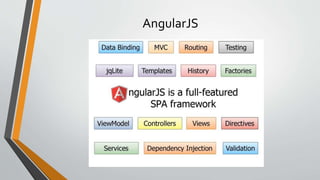
• AngularJS is one core library. 
• AngularJS is a structural framework for dynamic web apps 
• AngularJS is a full-featured SPA framework
AngularJS
AngularJs 
• Angular takes another approach. 
• Data binding, as in {{}}. 
• DOM control structures for repeating/hiding DOM fragments. 
• Support for forms and form validation. 
• Attaching code-behind to DOM elements. 
• Grouping of HTML into reusable components.
Directives 
• A directive is really a way to teach HTML new tricks. 
• At a high level, directives are markers on a DOM element (such as an attribute, 
element name, comment or CSS class) that tell AngularJS's HTML compiler ($compile) 
to attach a specified behavior to that DOM element or even transform the DOM 
element and its children.
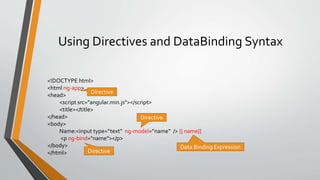
Using Directives and DataBinding Syntax 
<!DOCTYPE html> 
<html ng-app> 
<head> 
<script src="angular.min.js"></script> 
<title></title> 
</head> 
<body> 
Name:<input type=“text” ng-model=“name” /> {{ name}} 
<p ng-bind="name"></p> 
</body> 
</html> 
Directive 
Directive 
Data Binding Expression 
Directive
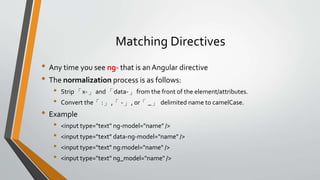
Matching Directives 
• Any time you see ng- that is an Angular directive 
• The normalization process is as follows: 
• Strip 「x-」and 「data-」from the front of the element/attributes. 
• Convert the「:」,「-」, or「_」delimited name to camelCase. 
• Example 
• <input type="text" ng-model="name" /> 
• <input type="text" data-ng-model="name" /> 
• <input type="text" ng:model="name" /> 
• <input type="text" ng_model="name" />
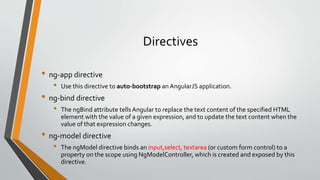
Directives 
• ng-app directive 
• Use this directive to auto-bootstrap an AngularJS application. 
• ng-bind directive 
• The ngBind attribute tells Angular to replace the text content of the specified HTML 
element with the value of a given expression, and to update the text content when the 
value of that expression changes. 
• ng-model directive 
• The ngModel directive binds an input,select, textarea (or custom form control) to a 
property on the scope using NgModelController, which is created and exposed by this 
directive.
Angular Expressions 
• Angular expressions are JavaScript-like code snippets that are usually 
placed in bindings such as {{ expression }}. 
• For example, these are valid expressions in Angular: 
• 1+2 
• a+b 
• user.name 
• Items[index]
Lterating with the ng-repeat Directive 
<div data-ng-init="names=['John Smith', 'John Doe', 'Jane Doe']"> 
<ul> 
<li data-ng-repeat="name in names"> 
{{name}} 
</li> 
</ul> 
</div>
Using Filters 
<input type="text" data-ng-model="nameText" /> 
<div data-ng-init="names=['John Smith', '1John Doe', 'Jane Doe']"> 
<ul> 
<li data-ng-repeat="name in names | filter:nameText"> 
{{name | uppercase}} 
</li> 
</ul> 
</div>
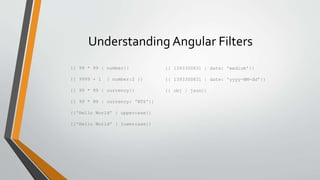
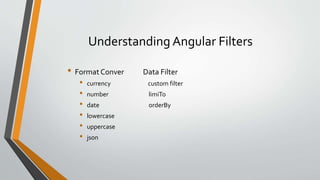
Understanding Angular Filters 
{{ 99 * 99 | number}} 
{{ 9999 + 1 | number:2 }} 
{{ 99 * 99 | currency}} 
{{ 99 * 99 | currency: 'NT$'}} 
{{'Hello World' | uppercase}} 
{{'Hello World' | lowercase}} 
{{ 1393300831 | date: 'medium'}} 
{{ 1393300831 | date: 'yyyy-MM-dd'}} 
{{ obj | json}}
Understanding Angular Filters 
• Format Conver Data Filter 
• currency custom filter 
• number limiTo 
• date orderBy 
• lowercase 
• uppercase 
• json
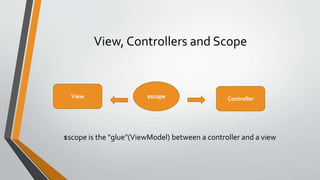
View, Controllers and Scope 
View $scope Controller 
$scope is the "glue"(ViewModel) between a controller and a view
Understanding Controllers 
• In Angular, a Controller is a JavaScript constructor function that is used to 
augment the Angular Scope 
• When a Controller is attached to the DOM via the ng-controller directive, Angular 
will instantiate a new Controller object, using the specified Controller's constructor 
function. 
• A new child scope will be available as an injectable parameter to the Controller's 
constructor function as $scope.
Creating a View and Controller 
<div class="container" data-ng-controller="SimpleController"> 
<h3>Adding a Simple Controller</h3> 
<input type="text" data-ng-model="name" /> 
<ul> 
<li data-ng-repeat="cust in customers"> 
{{ cust.name }} - {{ cust.city}} 
</li> 
</ul> 
</div> 
Access $scope 
<script> 
Basic controller 
function SimpleController($scope) 
{ 
$scope.customers = [ 
{name : 'Dave Jones', city:'Phoenix'}, 
{name : 'Jamie Riley', city:'Atlanta'}, 
{name : 'Heedy Wahlin', city:'Chandler'}, 
{name : 'Thomas Winter', city:'Seattle'}, 
]; 
} 
</script> 
So now we have two properties in the scope. The ng-model is going to add a property in the scope 
called name, and we can actually get to that now in the controller by saying $scope.name
Create a Controller in a Module 
Module that demoApp 
depends on 
var demoApp = angular.module('demoApp', []); 
demoApp.controller('SimpleController', function($scope) { 
$scope.customers = [ 
{name : 'Dave Jones', city:'Phoenix'}, 
{name : 'Jamie Riley', city:'Atlanta'}, 
{name : 'Heedy Wahlin', city:'Chandler'}, 
{name : 'Thomas Winter', city:'Seattle'} 
]; 
});
Create a Controller in a Module 
var demoApp = angular.module('demoApp', []); 
demoApp.controller('SimpleController', ['$scope', function(scope){ 
scope.customers = [ 
{name : 'Dave Jones', city:'Phoenix'}, 
{name : 'Jamie Riley', city:'Atlanta'}, 
{name : 'Heedy Wahlin', city:'Chandler'}, 
{name : 'Thomas Winter', city:'Seattle'} 
]; 
}]);
Create Multi Controller in a Module 
var demoApp = angular.module('demoApp', []); 
var controllers = {}; 
controllers.SimpleController = function($scope) { 
…… 
}; 
controllers.SimpleController2 = function($scope) { 
…… 
}; 
demoApp.controller(controllers);
The Role of Factories 
var demoApp = angular.module('demoApp', []) 
.factory('simpleFactory', function(){ 
var factory = {}; 
var customers = [………]; 
factory.getCustomers = function(){ 
return customers; 
}; 
return factory; 
}).controller('SimpleController', function($scope, simpleFactory) 
{ 
$scope.customers = simpleFactory.getCustomers(); 
}); 
Factory injected into 
controller at runtime
Create Custom Directive 
angular.module('docsSimpleDirective', []).controller('Controller', function($scope) { 
$scope.customer = { 
name: 'Naomi', 
address: '1600 Amphitheatre' 
}; 
}).directive('myCustomer', function() { 
return { 
restrict: 'A', 
template: 'Name: {{customer.name}} Address: {{customer.address}}' 
}; 
}); 
<div ng-controller="Controller"> 
<div my-customer></div> 
</div>
$inject 
• If a function has an $inject property and its value is an array of strings, then 
the strings represent names of services to be injected into the function. 
var MyController = function(renamed$scope, renamedGreeter) { 
... 
} 
MyController['$inject'] = ['$scope', 'greeter'];
Value VS. Service VS. Factory VS. Provider 
• Value 
• module.value('valueName', valueObj); 
• Get value from valueObj 
• Service 
• module.service( 'serviceName', ServiceFunction ); 
• Get service from 'new ServiceFunction()'. 
• Factory 
• module.factory( 'factoryName', FactoryFunction ); 
• Get factory from the value that is returned by invoking the FactoryFunction. 
• Provider 
• module.provider( 'providerName', ProviderFunction); 
• Get provider fromnew ProviderFunction().$get()
$watch 
• $watch(watchExpression, listener, [objectEquality]) 
• Registers a listener callback to be executed whenever the watchExpression changes 
• $watchCollection(watchExpression, listener) 
• Shallow watches the properties of an object and fires whenever any of the properties 
change
Reference 
• AngularJS In 60 Minutes 
• http://fastandfluid.com/publicdownloads/AngularJSIn60MinutesIsh_DanWahlin_May2 
013.pdf 
• AngularJS 
• https://angularjs.org/

AngularJS

  • 1.
  • 2.
    Agenda • Whatis AngularJS • AngularJS Features • Directives、Filters and Data Binding • Views、Controllers and Scope • Modules and Factories
  • 3.
    SPA • SinglePage Application • In which we have a shell page and we can load multiple views into that. • The Challenge with SPAs • DOM Manipulation、Caching、Data Binding…etc.
  • 4.
    AngularJS • AngularJSis one core library. • AngularJS is a structural framework for dynamic web apps • AngularJS is a full-featured SPA framework
  • 5.
  • 6.
    AngularJs • Angulartakes another approach. • Data binding, as in {{}}. • DOM control structures for repeating/hiding DOM fragments. • Support for forms and form validation. • Attaching code-behind to DOM elements. • Grouping of HTML into reusable components.
  • 7.
    Directives • Adirective is really a way to teach HTML new tricks. • At a high level, directives are markers on a DOM element (such as an attribute, element name, comment or CSS class) that tell AngularJS's HTML compiler ($compile) to attach a specified behavior to that DOM element or even transform the DOM element and its children.
  • 8.
    Using Directives andDataBinding Syntax <!DOCTYPE html> <html ng-app> <head> <script src="angular.min.js"></script> <title></title> </head> <body> Name:<input type=“text” ng-model=“name” /> {{ name}} <p ng-bind="name"></p> </body> </html> Directive Directive Data Binding Expression Directive
  • 9.
    Matching Directives •Any time you see ng- that is an Angular directive • The normalization process is as follows: • Strip 「x-」and 「data-」from the front of the element/attributes. • Convert the「:」,「-」, or「_」delimited name to camelCase. • Example • <input type="text" ng-model="name" /> • <input type="text" data-ng-model="name" /> • <input type="text" ng:model="name" /> • <input type="text" ng_model="name" />
  • 10.
    Directives • ng-appdirective • Use this directive to auto-bootstrap an AngularJS application. • ng-bind directive • The ngBind attribute tells Angular to replace the text content of the specified HTML element with the value of a given expression, and to update the text content when the value of that expression changes. • ng-model directive • The ngModel directive binds an input,select, textarea (or custom form control) to a property on the scope using NgModelController, which is created and exposed by this directive.
  • 11.
    Angular Expressions •Angular expressions are JavaScript-like code snippets that are usually placed in bindings such as {{ expression }}. • For example, these are valid expressions in Angular: • 1+2 • a+b • user.name • Items[index]
  • 12.
    Lterating with theng-repeat Directive <div data-ng-init="names=['John Smith', 'John Doe', 'Jane Doe']"> <ul> <li data-ng-repeat="name in names"> {{name}} </li> </ul> </div>
  • 13.
    Using Filters <inputtype="text" data-ng-model="nameText" /> <div data-ng-init="names=['John Smith', '1John Doe', 'Jane Doe']"> <ul> <li data-ng-repeat="name in names | filter:nameText"> {{name | uppercase}} </li> </ul> </div>
  • 14.
    Understanding Angular Filters {{ 99 * 99 | number}} {{ 9999 + 1 | number:2 }} {{ 99 * 99 | currency}} {{ 99 * 99 | currency: 'NT$'}} {{'Hello World' | uppercase}} {{'Hello World' | lowercase}} {{ 1393300831 | date: 'medium'}} {{ 1393300831 | date: 'yyyy-MM-dd'}} {{ obj | json}}
  • 15.
    Understanding Angular Filters • Format Conver Data Filter • currency custom filter • number limiTo • date orderBy • lowercase • uppercase • json
  • 16.
    View, Controllers andScope View $scope Controller $scope is the "glue"(ViewModel) between a controller and a view
  • 17.
    Understanding Controllers •In Angular, a Controller is a JavaScript constructor function that is used to augment the Angular Scope • When a Controller is attached to the DOM via the ng-controller directive, Angular will instantiate a new Controller object, using the specified Controller's constructor function. • A new child scope will be available as an injectable parameter to the Controller's constructor function as $scope.
  • 18.
    Creating a Viewand Controller <div class="container" data-ng-controller="SimpleController"> <h3>Adding a Simple Controller</h3> <input type="text" data-ng-model="name" /> <ul> <li data-ng-repeat="cust in customers"> {{ cust.name }} - {{ cust.city}} </li> </ul> </div> Access $scope <script> Basic controller function SimpleController($scope) { $scope.customers = [ {name : 'Dave Jones', city:'Phoenix'}, {name : 'Jamie Riley', city:'Atlanta'}, {name : 'Heedy Wahlin', city:'Chandler'}, {name : 'Thomas Winter', city:'Seattle'}, ]; } </script> So now we have two properties in the scope. The ng-model is going to add a property in the scope called name, and we can actually get to that now in the controller by saying $scope.name
  • 19.
    Create a Controllerin a Module Module that demoApp depends on var demoApp = angular.module('demoApp', []); demoApp.controller('SimpleController', function($scope) { $scope.customers = [ {name : 'Dave Jones', city:'Phoenix'}, {name : 'Jamie Riley', city:'Atlanta'}, {name : 'Heedy Wahlin', city:'Chandler'}, {name : 'Thomas Winter', city:'Seattle'} ]; });
  • 20.
    Create a Controllerin a Module var demoApp = angular.module('demoApp', []); demoApp.controller('SimpleController', ['$scope', function(scope){ scope.customers = [ {name : 'Dave Jones', city:'Phoenix'}, {name : 'Jamie Riley', city:'Atlanta'}, {name : 'Heedy Wahlin', city:'Chandler'}, {name : 'Thomas Winter', city:'Seattle'} ]; }]);
  • 21.
    Create Multi Controllerin a Module var demoApp = angular.module('demoApp', []); var controllers = {}; controllers.SimpleController = function($scope) { …… }; controllers.SimpleController2 = function($scope) { …… }; demoApp.controller(controllers);
  • 22.
    The Role ofFactories var demoApp = angular.module('demoApp', []) .factory('simpleFactory', function(){ var factory = {}; var customers = [………]; factory.getCustomers = function(){ return customers; }; return factory; }).controller('SimpleController', function($scope, simpleFactory) { $scope.customers = simpleFactory.getCustomers(); }); Factory injected into controller at runtime
  • 23.
    Create Custom Directive angular.module('docsSimpleDirective', []).controller('Controller', function($scope) { $scope.customer = { name: 'Naomi', address: '1600 Amphitheatre' }; }).directive('myCustomer', function() { return { restrict: 'A', template: 'Name: {{customer.name}} Address: {{customer.address}}' }; }); <div ng-controller="Controller"> <div my-customer></div> </div>
  • 24.
    $inject • Ifa function has an $inject property and its value is an array of strings, then the strings represent names of services to be injected into the function. var MyController = function(renamed$scope, renamedGreeter) { ... } MyController['$inject'] = ['$scope', 'greeter'];
  • 25.
    Value VS. ServiceVS. Factory VS. Provider • Value • module.value('valueName', valueObj); • Get value from valueObj • Service • module.service( 'serviceName', ServiceFunction ); • Get service from 'new ServiceFunction()'. • Factory • module.factory( 'factoryName', FactoryFunction ); • Get factory from the value that is returned by invoking the FactoryFunction. • Provider • module.provider( 'providerName', ProviderFunction); • Get provider fromnew ProviderFunction().$get()
  • 26.
    $watch • $watch(watchExpression,listener, [objectEquality]) • Registers a listener callback to be executed whenever the watchExpression changes • $watchCollection(watchExpression, listener) • Shallow watches the properties of an object and fires whenever any of the properties change
  • 27.
    Reference • AngularJSIn 60 Minutes • http://fastandfluid.com/publicdownloads/AngularJSIn60MinutesIsh_DanWahlin_May2 013.pdf • AngularJS • https://angularjs.org/

Editor's Notes

  • #25 minify http://jsbin.com/musiqo/edit?html,js,output
  • #26 http://jsbin.com/lazila/edit
  • #27 http://jsbin.com/fusefepama/edit http://bennadel.github.io/JavaScript-Demos/demos/watch-vs-watch-collection/