React Native
introduction
1
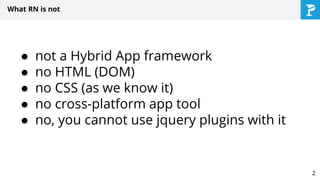
● not a Hybrid App framework
● no HTML (DOM)
● no CSS (as we know it)
● no cross-platform app tool
● no, you cannot use jquery plugins with it
What RN is not
2
A JAVASCRIPT LIBRARY
FOR BUILDING USER INTERFACES
What RN is
Atwood's Law: any application that can be written in JavaScript, will eventually be written in JavaScript.
3
● independent from:
○ data models
○ internal application logic
○ application state machine
○ design patterns for application architecture
● no two-way data-binding
● great for modern architectures (ex. DDD)
and frameworks (ex. Flux)
No application architecture binding
4
Components - fundamental building blocks
● components are state machines
● properties
● state
● internal logic
● render method
● JSX-based views
● style
● can be nested
5
Component Example
6
Rethink established best practicesTM
7
Everything* is javascript
● code is javascript
● styles are … javascript
● JSX is … javascript
● layout is … javascript
8
Not your grand-father’s javascript
● use ‘strict’
● Javascript runtime: JavascriptCore/V8
● io.js platform (node rewritten)
● ES6 + some ES7 (draft):
http://facebook.github.io/react-native/docs/javascript-
environment.html#content
● Babel transpiler
● @flow - static code compilation
9
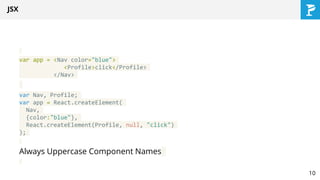
JSX
var app = <Nav color="blue">
<Profile>click</Profile>
</Nav>
var Nav, Profile;
var app = React.createElement(
Nav,
{color:"blue"},
React.createElement(Profile, null, "click")
);
Always Uppercase Component Names
10
Styles
● similar to CSS
● no class
● dash-separated => camelBack (mixedCase)
● subset of CSS only
● flexbox layout
● is done in Javascript
● can be easily and predictably combined
11
Layout
● Flexbox + some css
● Implemented by facebook in … Javascript
https://github.com/facebook/css-layout
● Subset of web layout
● No baggage
● Side note - it transpiles to C and Java (!)
12
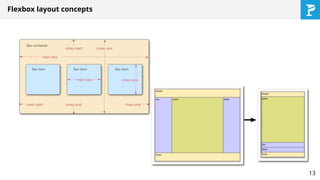
Flexbox layout concepts
13
Advantages of using JS everywhere*
● Simple management and coordination
● Get rid of CSS/HTML baggage
● Can be optimized better
● Your styles and views more dynamic
● easier reuse of styles
● everything for component in one place
14
Application demo
15
Why react?
16
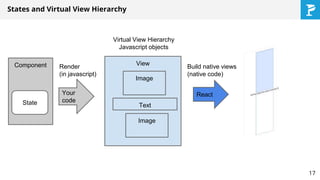
States and Virtual View Hierarchy
Component
State
Your
code
Render
(in javascript)
View
Virtual View Hierarchy
Javascript objects
Image
Image
Text
React
Build native views
(native code)
17
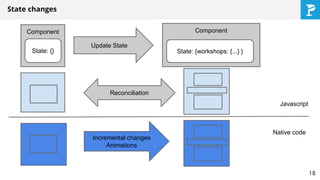
State changes
Component
State: {}
Component
State: {workshops: {...} }
Update State
Reconciliation
Incremental changes
Animations
Javascript
Native code
18
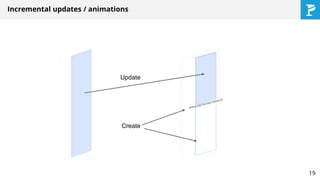
Incremental updates / animations
Update
Create
19
Some internals
20
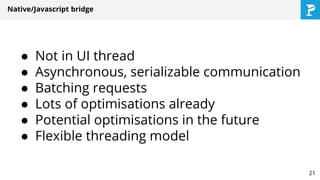
Native/Javascript bridge
● Not in UI thread
● Asynchronous, serializable communication
● Batching requests
● Lots of optimisations already
● Potential optimisations in the future
● Flexible threading model
21
Animations
● LayoutAnimations - simple
● Animated - fine grained control
○ Value animations still in javascript
○ But potential to optimise it and make native
○ Often declarative
22
Animation example
23
Extras
24
Integration with ObjC/Swift
● Custom Access to APIs
http://facebook.github.io/react-native/docs/native-modules-ios.html#content
● Custom native UI components
http://facebook.github.io/react-native/docs/native-components-ios.html#content
● Direct Properties manipulation
http://facebook.github.io/react-native/docs/direct-manipulation.html#content
● RCTView can be embedded in native app
http://facebook.github.io/react-native/docs/embedded-app-ios.html#content
● Can work with cocoapods 25
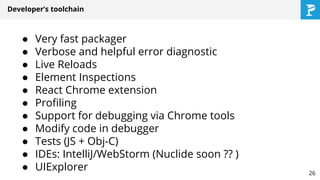
Developer’s toolchain
● Very fast packager
● Verbose and helpful error diagnostic
● Live Reloads
● Element Inspections
● React Chrome extension
● Profiling
● Support for debugging via Chrome tools
● Modify code in debugger
● Tests (JS + Obj-C)
● IDEs: IntelliJ/WebStorm (Nuclide soon ?? )
● UIExplorer 26
Deployment options
27
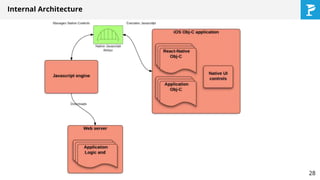
Internal Architecture
28
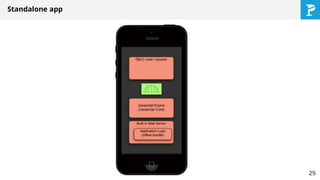
Standalone app
29
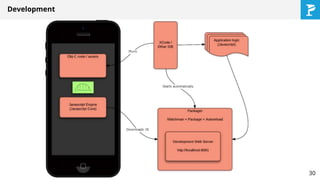
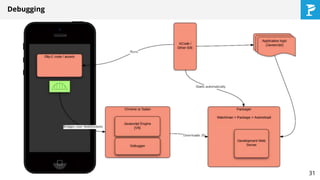
Development
30
Debugging
31
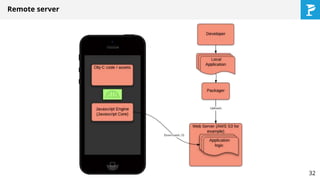
Remote server
32
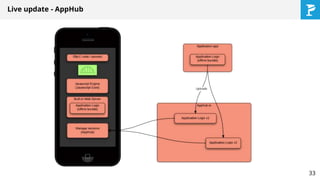
Live update - AppHub
33
What Facebook wants to achieve?
What they tell
● Learn once - write anywhere
● No “cross-platform app framework”
● Less complex apps
What they don’t tell
● Common code shared as libs
● Dynamic app updates (A/B testing)
34
Is it ready yet?
● Still beta and changing fast
● Still some (small) issues with performance
● Have not tested with really big application
● Some components are of beta quality
● Some components done by community
● Community is small but growing (Stack
Overflow)
● Documentation is heavily “distributed”
35
Q&A
36

React native introduction (Mobile Warsaw)

  • 1.
  • 2.
    ● not aHybrid App framework ● no HTML (DOM) ● no CSS (as we know it) ● no cross-platform app tool ● no, you cannot use jquery plugins with it What RN is not 2
  • 3.
    A JAVASCRIPT LIBRARY FORBUILDING USER INTERFACES What RN is Atwood's Law: any application that can be written in JavaScript, will eventually be written in JavaScript. 3
  • 4.
    ● independent from: ○data models ○ internal application logic ○ application state machine ○ design patterns for application architecture ● no two-way data-binding ● great for modern architectures (ex. DDD) and frameworks (ex. Flux) No application architecture binding 4
  • 5.
    Components - fundamentalbuilding blocks ● components are state machines ● properties ● state ● internal logic ● render method ● JSX-based views ● style ● can be nested 5
  • 6.
  • 7.
  • 8.
    Everything* is javascript ●code is javascript ● styles are … javascript ● JSX is … javascript ● layout is … javascript 8
  • 9.
    Not your grand-father’sjavascript ● use ‘strict’ ● Javascript runtime: JavascriptCore/V8 ● io.js platform (node rewritten) ● ES6 + some ES7 (draft): http://facebook.github.io/react-native/docs/javascript- environment.html#content ● Babel transpiler ● @flow - static code compilation 9
  • 10.
    JSX var app =<Nav color="blue"> <Profile>click</Profile> </Nav> var Nav, Profile; var app = React.createElement( Nav, {color:"blue"}, React.createElement(Profile, null, "click") ); Always Uppercase Component Names 10
  • 11.
    Styles ● similar toCSS ● no class ● dash-separated => camelBack (mixedCase) ● subset of CSS only ● flexbox layout ● is done in Javascript ● can be easily and predictably combined 11
  • 12.
    Layout ● Flexbox +some css ● Implemented by facebook in … Javascript https://github.com/facebook/css-layout ● Subset of web layout ● No baggage ● Side note - it transpiles to C and Java (!) 12
  • 13.
  • 14.
    Advantages of usingJS everywhere* ● Simple management and coordination ● Get rid of CSS/HTML baggage ● Can be optimized better ● Your styles and views more dynamic ● easier reuse of styles ● everything for component in one place 14
  • 15.
  • 16.
  • 17.
    States and VirtualView Hierarchy Component State Your code Render (in javascript) View Virtual View Hierarchy Javascript objects Image Image Text React Build native views (native code) 17
  • 18.
    State changes Component State: {} Component State:{workshops: {...} } Update State Reconciliation Incremental changes Animations Javascript Native code 18
  • 19.
    Incremental updates /animations Update Create 19
  • 20.
  • 21.
    Native/Javascript bridge ● Notin UI thread ● Asynchronous, serializable communication ● Batching requests ● Lots of optimisations already ● Potential optimisations in the future ● Flexible threading model 21
  • 22.
    Animations ● LayoutAnimations -simple ● Animated - fine grained control ○ Value animations still in javascript ○ But potential to optimise it and make native ○ Often declarative 22
  • 23.
  • 24.
  • 25.
    Integration with ObjC/Swift ●Custom Access to APIs http://facebook.github.io/react-native/docs/native-modules-ios.html#content ● Custom native UI components http://facebook.github.io/react-native/docs/native-components-ios.html#content ● Direct Properties manipulation http://facebook.github.io/react-native/docs/direct-manipulation.html#content ● RCTView can be embedded in native app http://facebook.github.io/react-native/docs/embedded-app-ios.html#content ● Can work with cocoapods 25
  • 26.
    Developer’s toolchain ● Veryfast packager ● Verbose and helpful error diagnostic ● Live Reloads ● Element Inspections ● React Chrome extension ● Profiling ● Support for debugging via Chrome tools ● Modify code in debugger ● Tests (JS + Obj-C) ● IDEs: IntelliJ/WebStorm (Nuclide soon ?? ) ● UIExplorer 26
  • 27.
  • 28.
  • 29.
  • 30.
  • 31.
  • 32.
  • 33.
    Live update -AppHub 33
  • 34.
    What Facebook wantsto achieve? What they tell ● Learn once - write anywhere ● No “cross-platform app framework” ● Less complex apps What they don’t tell ● Common code shared as libs ● Dynamic app updates (A/B testing) 34
  • 35.
    Is it readyyet? ● Still beta and changing fast ● Still some (small) issues with performance ● Have not tested with really big application ● Some components are of beta quality ● Some components done by community ● Community is small but growing (Stack Overflow) ● Documentation is heavily “distributed” 35
  • 36.