jQuery & Rails
          Best Friends Forever*

            Best Friends Forever*


       *Forever as used by a 6th-grader

  *Forever in the sense of a sixth grader.
I'll Cover:
●   Brief Rails explanation

●   Brief jQuery explanation

●   Nice methods between each technology to encourage a rich web app

    ●   AJAX

    ●   JSON

    ●   data
●   The Future
jQuery...
●   is a JavaScript framework (YUI, prototype, scriptaculous)

●   includes basic JavaScript functionality for AJAX, DOM manipulation,
    events

●   likes to hang out with jQuery UI, user interface library, interactions,
    widgets, effects, themes

●   is known for being concise and readable


                               http://jqueryui.com/
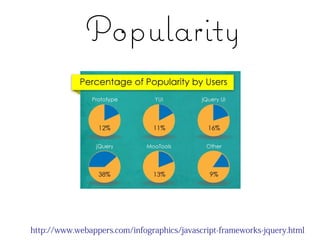
Popularity


http://www.webappers.com/infographics/javascript-frameworks-jquery.html
Ruby on Rails...
●   is a MVC framework built on
    Ruby

●   is a tool for efficient development
    that follows universal conventions

●   is designed to work well with
    JavaScript + AJAX
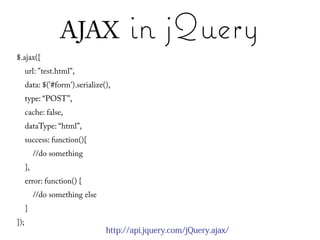
AJAX                in jQuery
$.ajax({
      url: "test.html",
      data: $('#form').serialize(),
      type: “POST”,
      cache: false,
      dataType: “html”,
      success: function(){
           //do something
      },
      error: function() {
           //do something else
      }
});
                                 http://api.jquery.com/jQuery.ajax/
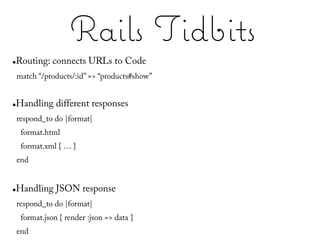
Rails Tidbits
●   Routing: connects URLs to Code
    match “/products/:id” => “products#show”


●   Handling different responses
    respond_to do |format|
     format.html
     format.xml { … }
    end


●   Handling JSON response
    respond_to do |format|
     format.json { render :json => data }
    end
Rails Tidbits
●   Request object
    request.xhr?


●   Handling CGI parameters
    params[:name], params[:description]
    params.has_key?(:name)


    p = Product.new(params[:product])
    p.save # check for p.errors


    product.update_attributes(params[:product])
Pong


http://www.bafta.org/awards/video-games/play-pong-online,678,BA.html
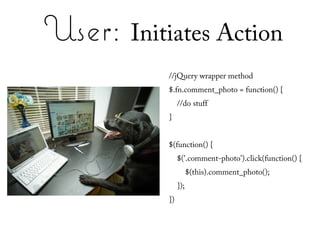
User: Initiates Action
           //jQuery wrapper method
           $.fn.comment_photo = function() {
                //do stuff
           }


           $(function() {
                $('.comment-photo').click(function() {
                      $(this).comment_photo();
                });
           })
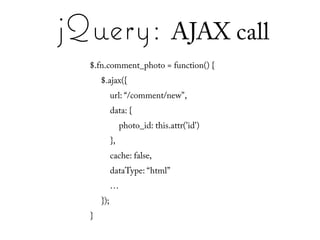
jQuery: AJAX call
  $.fn.comment_photo = function() {
      $.ajax({
            url: “/comment/new",
            data: {
                 photo_id: this.attr('id')
            },
            cache: false,
            dataType: “html”
            …
      });
  }
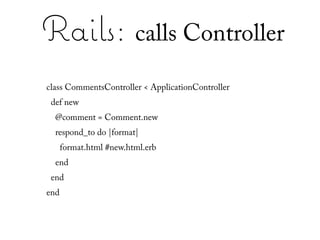
Rails: calls Controller
class CommentsController < ApplicationController
 def new
  @comment = Comment.new
  respond_to do |format|
      format.html #new.html.erb
  end
 end
end
Rails: renders HTML
            erb                                       HTML
<% form_for @comment do |f| %>     <form action= “/comments” method=”post”>
 <%= f.label :title %>             <label for=“comment_title”>Title</label>
 <%= f.text_field :title %>        <input type=“text” id=“comment_title” name=“comment[title]” />


 <%= f.label :data %>              <label for=“comment_data”>Data</label>
 <%= f.text_area :data %>          <textarea id=“comment_data” name=“comment[data]” /></textarea>


 <%= f.submit %>                   <input type=“submit” id=“comment_submit” value=”Create ” />
<% end %>                          </form>


                         http://www.ruby-doc.org/stdlib/libdoc/erb/rdoc/
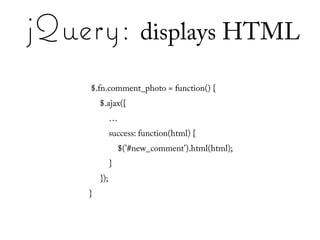
jQuery: displays HTML
    $.fn.comment_photo = function() {
        $.ajax({
              …
              success: function(html) {
                  $('#new_comment').html(html);
              }
        });
    }
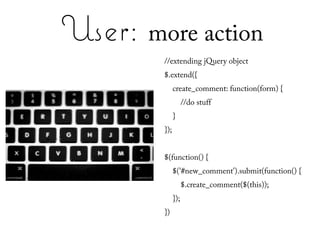
User: more action
        //extending jQuery object
        $.extend({
              create_comment: function(form) {
                    //do stuff
              }
        });


        $(function() {
              $('#new_comment').submit(function() {
                    $.create_comment($(this));
              });
        })
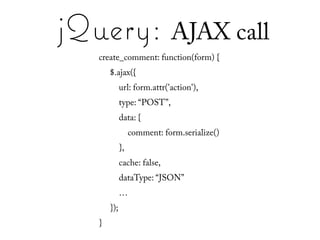
jQuery: AJAX call
   create_comment: function(form) {
       $.ajax({
             url: form.attr('action'),
             type: “POST”,
             data: {
                  comment: form.serialize()
             },
             cache: false,
             dataType: “JSON”
             …
       });
   }
Rails: calls Controller
 class CommentsController < ApplicationController
  def create
   begin
       comment = Comment.new(params[:comment])
       comment.user = current_user
       comment.save
       respond_to do |format|
        format.json :json => comment
       end
   rescue Exception => e
       render :status => 500, :json => {}
   end
  end
 end
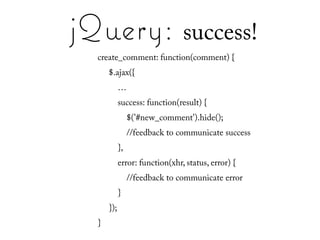
jQuery: success!
  create_comment: function(comment) {
      $.ajax({
            …
            success: function(result) {
                 $('#new_comment').hide();
                 //feedback to communicate success
            },
            error: function(xhr, status, error) {
                 //feedback to communicate error
            }
      });
  }
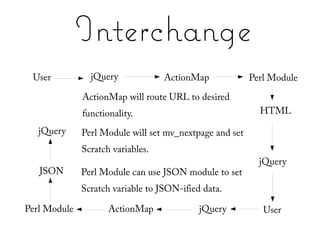
Interchange
 User           jQuery             ActionMap             Perl Module
              ActionMap will route URL to desired
              functionality.                               HTML

   jQuery     Perl Module will set mv_nextpage and set
              Scratch variables.
                                                           jQuery
   JSON       Perl Module can use JSON module to set
              Scratch variable to JSON-ified data.

Perl Module          ActionMap              jQuery          User
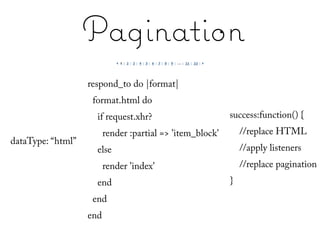
Pagination
                   respond_to do |format|
                    format.html do
                     if request.xhr?                       success:function() {
                         render :partial => 'item_block'       //replace HTML
dataType: “html”
                     else                                      //apply listeners
                         render 'index'                        //replace pagination
                     end                                   }
                    end
                   end
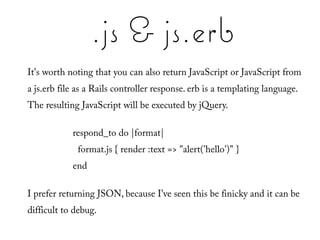
.js & js.erb
It's worth noting that you can also return JavaScript or JavaScript from
a js.erb file as a Rails controller response. erb is a templating language.
The resulting JavaScript will be executed by jQuery.

            respond_to do |format|
             format.js { render :text => "alert('hello')" }
            end

I prefer returning JSON, because I've seen this be finicky and it can be
difficult to debug.
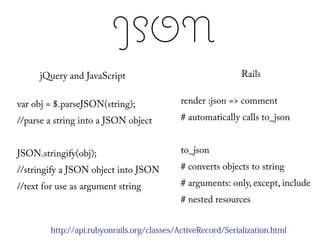
JSON
      jQuery and JavaScript                                  Rails


var obj = $.parseJSON(string);              render :json => comment

//parse a string into a JSON object         # automatically calls to_json


JSON.stringify(obj);                        to_json

//stringify a JSON object into JSON         # converts objects to string

//text for use as argument string           # arguments: only, except, include
                                            # nested resources


        http://api.rubyonrails.org/classes/ActiveRecord/Serialization.html
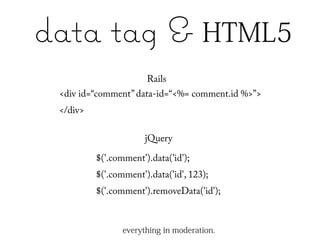
data tag & HTML5
                       Rails
 <div id=“comment” data-id=“<%= comment.id %>”>
 </div>

                       jQuery

          $('.comment').data('id');
          $('.comment').data('id', 123);
          $('.comment').removeData('id');


                 everything in moderation.
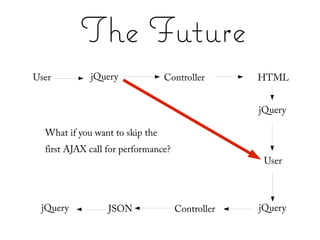
The Future
User         jQuery              Controller       HTML


                                                  jQuery

  What if you want to skip the
  first AJAX call for performance?
                                                   User


 jQuery           JSON               Controller   jQuery
The Future
                   Options for eliminating first AJAX call

●   Render HTML form inline (once)

●   Render HTML form in JavaScript with jQuery HTML builder nodes

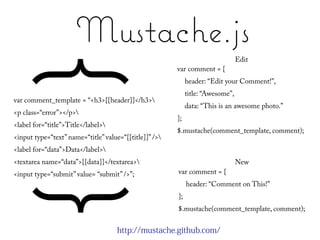
●   Use a template system like Mustache.js or Handlebars.js

●   Use a JavaScript [client-side] Model-View framework like
    Backbone.js
Mustache.js
                                                                                 Edit
     { }
var comment_template = “<h3>{{header}}</h3>
                                                        var comment = {
                                                             header: “Edit your Comment!”,
                                                             title: “Awesome”,
                                                             data: “This is an awesome photo.”
<p class=“error”></p>
                                                        };
<label for=“title”>Title</label>
                                                        $.mustache(comment_template, comment);
<input type=“text” name=“title” value=“{{title}}” />
<label for=“data”>Data</label>
<textarea name=“data”>{{data}}</textarea>                                       New
<input type=“submit” value= “submit” />”;               var comment = {
                                                             header: “Comment on This!”
                                                        };
                                                        $.mustache(comment_template, comment);


                                     http://mustache.github.com/
Disclaimer

●   Other modern javascript frameworks
    have much of the same functionality
    here, specifically YUI. You have a choice.


        http://developer.yahoo.com/yui/
jQuery & Rails
●   jQuery and Rails work together to
    write rich web applications.

●   jQuery is most popular and known for
    it's conciseness and readability, and
    unique “chaining” method

●   DIG into the documentation. jQuery
    and Ruby documentation is good.
    Rails is “up and coming”.

          http://visualjquery.com/
Photo Credits


●   http://www.etsy.com/listing/62497842/eloise-and-ramona-play-telephone-best
●   me: http://www.flickr.com/photos/just_steph/
Questions?

jQuery and Rails: Best Friends Forever

  • 1.
    jQuery & Rails Best Friends Forever* Best Friends Forever* *Forever as used by a 6th-grader *Forever in the sense of a sixth grader.
  • 2.
    I'll Cover: ● Brief Rails explanation ● Brief jQuery explanation ● Nice methods between each technology to encourage a rich web app ● AJAX ● JSON ● data ● The Future
  • 3.
    jQuery... ● is a JavaScript framework (YUI, prototype, scriptaculous) ● includes basic JavaScript functionality for AJAX, DOM manipulation, events ● likes to hang out with jQuery UI, user interface library, interactions, widgets, effects, themes ● is known for being concise and readable http://jqueryui.com/
  • 4.
  • 5.
    Ruby on Rails... ● is a MVC framework built on Ruby ● is a tool for efficient development that follows universal conventions ● is designed to work well with JavaScript + AJAX
  • 6.
    AJAX in jQuery $.ajax({ url: "test.html", data: $('#form').serialize(), type: “POST”, cache: false, dataType: “html”, success: function(){ //do something }, error: function() { //do something else } }); http://api.jquery.com/jQuery.ajax/
  • 7.
    Rails Tidbits ● Routing: connects URLs to Code match “/products/:id” => “products#show” ● Handling different responses respond_to do |format| format.html format.xml { … } end ● Handling JSON response respond_to do |format| format.json { render :json => data } end
  • 8.
    Rails Tidbits ● Request object request.xhr? ● Handling CGI parameters params[:name], params[:description] params.has_key?(:name) p = Product.new(params[:product]) p.save # check for p.errors product.update_attributes(params[:product])
  • 9.
  • 10.
    User: Initiates Action //jQuery wrapper method $.fn.comment_photo = function() { //do stuff } $(function() { $('.comment-photo').click(function() { $(this).comment_photo(); }); })
  • 11.
    jQuery: AJAX call $.fn.comment_photo = function() { $.ajax({ url: “/comment/new", data: { photo_id: this.attr('id') }, cache: false, dataType: “html” … }); }
  • 12.
    Rails: calls Controller classCommentsController < ApplicationController def new @comment = Comment.new respond_to do |format| format.html #new.html.erb end end end
  • 13.
    Rails: renders HTML erb HTML <% form_for @comment do |f| %> <form action= “/comments” method=”post”> <%= f.label :title %> <label for=“comment_title”>Title</label> <%= f.text_field :title %> <input type=“text” id=“comment_title” name=“comment[title]” /> <%= f.label :data %> <label for=“comment_data”>Data</label> <%= f.text_area :data %> <textarea id=“comment_data” name=“comment[data]” /></textarea> <%= f.submit %> <input type=“submit” id=“comment_submit” value=”Create ” /> <% end %> </form> http://www.ruby-doc.org/stdlib/libdoc/erb/rdoc/
  • 14.
    jQuery: displays HTML $.fn.comment_photo = function() { $.ajax({ … success: function(html) { $('#new_comment').html(html); } }); }
  • 15.
    User: more action //extending jQuery object $.extend({ create_comment: function(form) { //do stuff } }); $(function() { $('#new_comment').submit(function() { $.create_comment($(this)); }); })
  • 16.
    jQuery: AJAX call create_comment: function(form) { $.ajax({ url: form.attr('action'), type: “POST”, data: { comment: form.serialize() }, cache: false, dataType: “JSON” … }); }
  • 17.
    Rails: calls Controller class CommentsController < ApplicationController def create begin comment = Comment.new(params[:comment]) comment.user = current_user comment.save respond_to do |format| format.json :json => comment end rescue Exception => e render :status => 500, :json => {} end end end
  • 18.
    jQuery: success! create_comment: function(comment) { $.ajax({ … success: function(result) { $('#new_comment').hide(); //feedback to communicate success }, error: function(xhr, status, error) { //feedback to communicate error } }); }
  • 19.
    Interchange User jQuery ActionMap Perl Module ActionMap will route URL to desired functionality. HTML jQuery Perl Module will set mv_nextpage and set Scratch variables. jQuery JSON Perl Module can use JSON module to set Scratch variable to JSON-ified data. Perl Module ActionMap jQuery User
  • 20.
    Pagination respond_to do |format| format.html do if request.xhr? success:function() { render :partial => 'item_block' //replace HTML dataType: “html” else //apply listeners render 'index' //replace pagination end } end end
  • 21.
    .js & js.erb It'sworth noting that you can also return JavaScript or JavaScript from a js.erb file as a Rails controller response. erb is a templating language. The resulting JavaScript will be executed by jQuery. respond_to do |format| format.js { render :text => "alert('hello')" } end I prefer returning JSON, because I've seen this be finicky and it can be difficult to debug.
  • 22.
    JSON jQuery and JavaScript Rails var obj = $.parseJSON(string); render :json => comment //parse a string into a JSON object # automatically calls to_json JSON.stringify(obj); to_json //stringify a JSON object into JSON # converts objects to string //text for use as argument string # arguments: only, except, include # nested resources http://api.rubyonrails.org/classes/ActiveRecord/Serialization.html
  • 23.
    data tag &HTML5 Rails <div id=“comment” data-id=“<%= comment.id %>”> </div> jQuery $('.comment').data('id'); $('.comment').data('id', 123); $('.comment').removeData('id'); everything in moderation.
  • 24.
    The Future User jQuery Controller HTML jQuery What if you want to skip the first AJAX call for performance? User jQuery JSON Controller jQuery
  • 25.
    The Future Options for eliminating first AJAX call ● Render HTML form inline (once) ● Render HTML form in JavaScript with jQuery HTML builder nodes ● Use a template system like Mustache.js or Handlebars.js ● Use a JavaScript [client-side] Model-View framework like Backbone.js
  • 26.
    Mustache.js Edit { } var comment_template = “<h3>{{header}}</h3> var comment = { header: “Edit your Comment!”, title: “Awesome”, data: “This is an awesome photo.” <p class=“error”></p> }; <label for=“title”>Title</label> $.mustache(comment_template, comment); <input type=“text” name=“title” value=“{{title}}” /> <label for=“data”>Data</label> <textarea name=“data”>{{data}}</textarea> New <input type=“submit” value= “submit” />”; var comment = { header: “Comment on This!” }; $.mustache(comment_template, comment); http://mustache.github.com/
  • 27.
    Disclaimer ● Other modern javascript frameworks have much of the same functionality here, specifically YUI. You have a choice. http://developer.yahoo.com/yui/
  • 28.
    jQuery & Rails ● jQuery and Rails work together to write rich web applications. ● jQuery is most popular and known for it's conciseness and readability, and unique “chaining” method ● DIG into the documentation. jQuery and Ruby documentation is good. Rails is “up and coming”. http://visualjquery.com/
  • 29.
    Photo Credits ● http://www.etsy.com/listing/62497842/eloise-and-ramona-play-telephone-best ● me: http://www.flickr.com/photos/just_steph/
  • 30.

Editor's Notes

  • #4 Also known for it&apos;s chaining model
  • #5 - 360k sites use jQuery, as compared to 55k MooTools, 39k Prototype, 30k YUI, 9k script.aculo.us - 66% of web page visits use jQuery
  • #7 - what are the bare minimum, step by step - context, onstart, tons of arguments
  • #8 - routing is akin to Interchange actionmaps (although evolved, more complex) - rendering :json automaticallly calls a to_json method on the data
  • #9 - the request object contains a lot of useful information about the request: host, domain, format, method, type of request, headers, port, protocol, etc.
  • #22 ParseJSON is a jQuery specific function, while JSON.stringify is not a part of the jQuery library (JSON also has it&apos;s own parse method). to_json nested elements might include images belonging to product
  • #23 - only works in HTML5 - in addition to id, you may also want to track nested ids, or other information about that comment that has little to do with CSS styles - jQuery has getter and setter methods here, for data - e.g. of use: multiple comments on one page, but HTML for one form. When click on edit comment, data is set to identify which comment is being edited.
  • #25 - writing your own HTML can be messy, but give you full control - using a template system encourages DRY - using a client side model-view paradigm may result in reproducing business logic for an individual model (that business logic also lives on the server side) - disadvantage to all: you aren&apos;t leveraging server side functionality or helpers for building Rails forms - advantage to all: speed, less dependency on server for AJAX hits