iPhone project
  Wireless Network

   Silvio Daminato
  February 28, 2011
Project: Simon says the color

• Kids   game: “Strega comanda colore” ported to iPhone
  • iPhone    asks for a color
  • player   takes a picture with that color in the center
• Simple    augmented reality
• File   handling
• Bluetooth

• Upload     of top scores
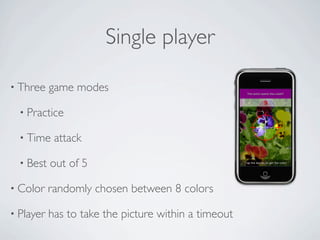
Single player

• Three    game modes

  • Practice

  • Time    attack

  • Best   out of 5

• Color    randomly chosen between 8 colors

• Player   has to take the picture within a timeout
Multiplayer

•A   player is the Witch

  • He/she   choose the color

  • He/she   sets the difficulty (timeout)

• Up   to six players

• Communication     over bluetooth

• Client-Server   architecture
Developing for iPhone


• http://developer.apple.com/
  • Sign  up as developer
  • Download of development and debugging tools
  • Manage profiles, certificates, devices
• http://developer.apple.com/programs/ios/university/
  • It allows to install and test apps on a iOS device
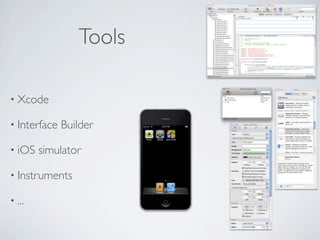
Tools

• Xcode

• Interface   Builder

• iOS   simulator

• Instruments

• ...
Objective C

• Object   oriented

• C-based

• Smalltalk   style: based on messages exchange

                C++                             Obj-C
A* a = new A;                     A* a = [[A alloc] init];
a -> doSomething(argument);       [a doSomething: argument];
delete a;                         [a release];
Delegation

• Widely   used in Cocoa Touch

• An object is delegated by the application to handle some kind
 of events

• Examples: UITableViewDelegate, UIAlertViewDelegate

•A delegate object has to implement specific methods with
 specific signatures
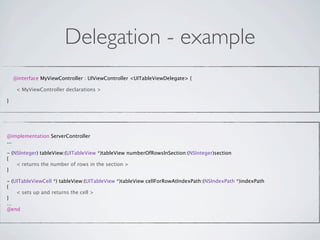
Delegation - example
    @interface MyViewController : UIViewController <UITableViewDelegate> {


    < MyViewController declarations >

}


@implementation ServerController
...

- (NSInteger) tableView:(UITableView *)tableView numberOfRowsInSection:(NSInteger)section
{

   < returns the number of rows in the section >
}

- (UITableViewCell *) tableView:(UITableView *)tableView cellForRowAtIndexPath:(NSIndexPath *)indexPath
{

   < sets up and returns the cell >
}
...
@end
Using the camera

• Class   UIImagePickerController


  • Source    type UIImagePickerControllerSourceTypeCamera

• Delegate    protocol UIImagePickerControllerDelegate

  • Method     imagePickerController:didFinishPickingMediaWithInfo:   returns
   the image

  • Method     imagePickerControllerDidCancel:   is called when user
   cancels
Augmented reality


• Create   an UIView object or a UIView subclass object

• Assign   that object to cameraOverlayView property of the
 UIImagePickerController
Augmented reality


• Create   an UIView object or a UIView subclass object

• Assign   that object to cameraOverlayView property of the
 UIImagePickerController


                              That’s all.
Camera and augmented reality -
          example
UIImagePickerController *ipc = [[UIImagePickerController alloc] init];
ipc.delegate = self;
ipc.sourceType = UIImagePickerControllerSourceTypeCamera;
ipc.showsCameraControls = NO;
ipc.navigationBarHidden = YES;
ipc.wantsFullScreenLayout = YES;

OverlayView *overlay = [[OverlayView alloc] initWithFrame:CGRectMake(0, 0, 320, 480)];
ipc.cameraOverlayView = overlay;

[self presentModalViewController:ipc animated:YES];
Camera and augmented reality -
          example
UIImagePickerController *ipc = [[UIImagePickerController alloc] init];
ipc.delegate = self;
ipc.sourceType = UIImagePickerControllerSourceTypeCamera;
ipc.showsCameraControls = NO;
ipc.navigationBarHidden = YES;
ipc.wantsFullScreenLayout = YES;

OverlayView *overlay = [[OverlayView alloc] initWithFrame:CGRectMake(0, 0, 320, 480)];
ipc.cameraOverlayView = overlay;

[self presentModalViewController:ipc animated:YES];
Text file handling

• .plist   format

  • XML      with a specific format

  • Handling      is simple

• Set   up data, generate path of file, write to file

• Generate       path, read file

• Data     as NSDictionary, NSArray, NSString, ...
Text file handling - example
NSString *firstString = @"Voglio salvare questa stringa";
NSString *secondString = @"Voglio salvare anche questa!";
NSMutableArray *plistFileContent = [[NSMutableArray alloc]
                     initWithObjects:firstString, secondString, nil];

NSArray *paths = NSSearchPathForDirectoriesInDomains(NSDocumentDirectory,
                    NSUserDomainMask, YES);
NSString *documentsDirectory = [paths objectAtIndex:0];
NSString *myfile = [documentsDirectory
                    stringByAppendingPathComponent:@"myfile.plist"];

[plistFileContent writeToFile:myfile atomically:YES];


NSArray *paths = NSSearchPathForDirectoriesInDomains(NSDocumentDirectory,
                       NSUserDomainMask, YES);
NSString *documentsDirectory = [paths objectAtIndex:0];
NSString *myfile = [documentsDirectory
                       stringByAppendingPathComponent:@"myfile.plist"];

NSArray *plistFileContent = [[NSArray alloc] initWithContentsOfFile:myfile];
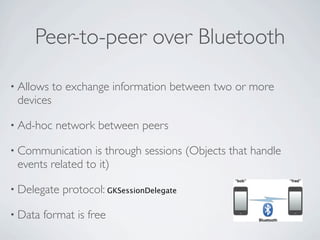
Peer-to-peer over Bluetooth

• Allows   to exchange information between two or more
 devices

• Ad-hoc   network between peers

• Communication   is through sessions (Objects that handle
 events related to it)

• Delegate   protocol: GKSessionDelegate

• Data   format is free
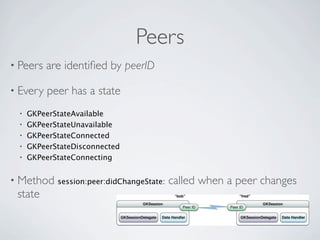
Peers
• Peers   are identified by peerID

• Every   peer has a state
 •   GKPeerStateAvailable
 •   GKPeerStateUnavailable
 •   GKPeerStateConnected
 •   GKPeerStateDisconnected
 •   GKPeerStateConnecting


• Method    session:peer:didChangeState:   called when a peer changes
 state
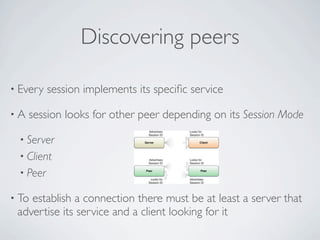
Discovering peers

• Every   session implements its specific service

•A   session looks for other peer depending on its Session Mode

 • Server
 • Client
 • Peer

• Toestablish a connection there must be at least a server that
 advertise its service and a client looking for it
Implementing a Server
• Initialize   the session: initWithSessionID:displayName:sessionMode:
• Session      mode GKSessionModeServer or GKSessionModePeer
• Set   property available = YES to advertise the service
• The   service has its own Id
• Method       session:didReceiveConnectionRequestFromPeer:   notifies a
  connection request
• Server   decides whether to accept the request or not
• When     the session is created session:peer:didChangeState: method is
  called
Implementing a Server - example
- (void) initSession {
  
   GKSession *session = [[GKSession alloc] initWithSessionID:@"Servizio"
                                displayName:@"Server"
                                sessionMode:GKSessionModeServer];
  
   session.delegate = self;
  
   [session setDataReceiveHandler: self withContext:nil];
  
   session.available = YES;
}

- (void)session:(GKSession *)session didReceiveConnectionRequestFromPeer:(NSString *)peerID {
  
   if (![session isAvailable]) {
  
   
     [session denyConnectionFromPeer:peerID];
  
   } else {
  
   
     session.available = NO;
  
   
     if (connections_count == max_connections) {


    [session denyConnectionFromPeer: peerID];
  
   
     } else {


    [session acceptConnectionFromPeer: peerID];


    connections_count ++;
  
   
     }
  
   
     session.available = YES;
  
   }
}
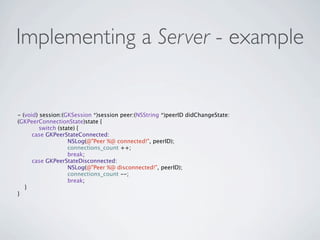
Implementing a Server - example


- (void) session:(GKSession *)session peer:(NSString *)peerID didChangeState:
(GKPeerConnectionState)state {

        switch (state) {
      case GKPeerStateConnected:


     NSLog(@"Peer %@ connected!", peerID);


     connections_count ++;


     break;
      case GKPeerStateDisconnected:


     NSLog(@"Peer %@ disconnected!", peerID);


     connections_count --;


     break;
   }
}
Connecting to a service
• Initialize   the session: initWithSessionID:displayName:sessionMode:
• Session      mode GKSessionModeClient or GKSessionModePeer
• Set   property available = YES to look for the service
• Only   service with the same sessionID are found
• Method       session:peer:didChangeState:   called when a server has been
  found
• Method       connectToPeer:withTimeout:   to request connection
• Method       session:peer:didChangeState:   called when the session has
  been created
Connecting to a service -
                  example
- (GKSession *) initSession {
  
  GKSession *session = [[GKSession alloc] initWithSessionID:@"Servizio"
                               displayName:@"Client"
                               sessionMode:GKSessionModeClient];
  
  session.delegate = self;
  
  [session setDataReceiveHandler: self withContext:nil];
  
  session.available = YES;
  
  return session;
}

- (void) session:(GKSession *)session peer:(NSString *)peerID didChangeState:
(GKPeerConnectionState)state {

        switch (state) {
           case GKPeerStateAvailable:


     NSLog(@"Trovato servizio!");


     [session connectToPeer:peerID withTimeout:5.0];


     break;
           case GKPeerStateConnected:


     NSLog(@"Connessione avvenuta!");


     session.available = NO;


     break;
           case GKPeerStateDisconnected:


     NSLog(@"Disconnesso");


     break;
}
Exchanging data

• Connected   peers can exchange data

• Method   sendDataToAllPeers:WithDataMode:error:   sends to all peers

• Method   sendData:toPeers:WithDataMode:error:   sends to some peers

• Dataformat is not fixed, but they have to be encapsulated in
 an NSData object
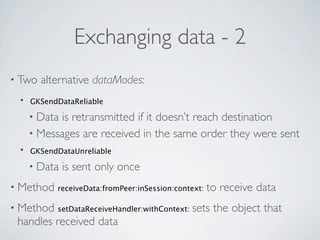
Exchanging data - 2
• Two   alternative dataModes:
 •   GKSendDataReliable

     • Datais retransmitted if it doesn’t reach destination
     • Messages are received in the same order they were sent
 •   GKSendDataUnreliable

     • Data   is sent only once
• Method   receiveData:fromPeer:inSession:context:   to receive data
• Method   setDataReceiveHandler:withContext:   sets the object that
 handles received data
Exchanging data - example
NSString *chosenColor = @"yellow";
NSString *level = @"Easy";

NSMutableDictionary *dict = [[NSMutableDictionary alloc] initWithObjectsAndKeys:
                    chosenColor, @"Color", level, @"Level", nil];


NSMutableData *data = [[NSMutableData alloc] init];
NSKeyedArchiver *archiver = [[NSKeyedArchiver alloc] initForWritingWithMutableData:data];
[archiver encodeObject:dict forKey:@"Dictionary"];
[archiver finishEncoding];

[session sendDataToAllPeers:data withDataMode:GKSendDataReliable error:nil];


- (void) receiveData:(NSData *)data fromPeer:(NSString *)peer inSession:(GKSession *)session context:(void
*)context {

        NSDictionary *gameInfo;

        NSKeyedUnarchiver *unarchiver = [[NSKeyedUnarchiver alloc] initForReadingWithData:data];

        gameInfo = [unarchiver decodeObjectForKey:@"Dictionary"];

        [unarchiver finishDecoding];


        NSString * response = [gameInfo objectForKey:@"Response"];

        [self checkResponse:response peerID:peer];
}
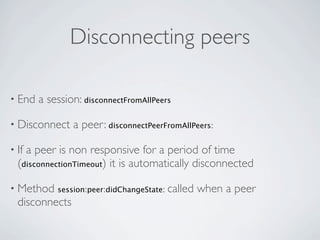
Disconnecting peers

• End   a session: disconnectFromAllPeers

• Disconnect    a peer: disconnectPeerFromAllPeers:

• Ifa peer is non responsive for a period of time
  (disconnectionTimeout) it is automatically disconnected

• Method    session:peer:didChangeState:   called when a peer
  disconnects
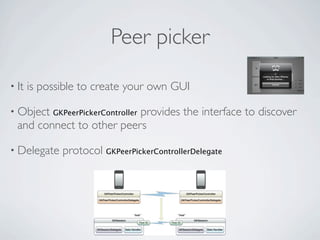
Peer picker

• It   is possible to create your own GUI

• Object                   provides the interface to discover
            GKPeerPickerController
  and connect to other peers

• Delegate    protocol GKPeerPickerControllerDelegate
Help and documentation

• Xcode   menu bar ➙ Help ➙ Developer documentation

• http://developer.apple.com/library/ios/navigation/

• http://www.google.com/

  • http://stackoverflow.com/

  • http://www.iphonedevsdk.com/forum/
References


• “Simon says the color”, S. Daminato, A. Giavatto, Progetto di
 Reti Wireless 2009/2010

• http://developer.apple.com/library/ios/navigation/

• “Game    Kit Programming Guide”, Apple Inc.

iPhone project - Wireless networks seminar

  • 1.
    iPhone project Wireless Network Silvio Daminato February 28, 2011
  • 2.
    Project: Simon saysthe color • Kids game: “Strega comanda colore” ported to iPhone • iPhone asks for a color • player takes a picture with that color in the center • Simple augmented reality • File handling • Bluetooth • Upload of top scores
  • 3.
    Single player • Three game modes • Practice • Time attack • Best out of 5 • Color randomly chosen between 8 colors • Player has to take the picture within a timeout
  • 4.
    Multiplayer •A player is the Witch • He/she choose the color • He/she sets the difficulty (timeout) • Up to six players • Communication over bluetooth • Client-Server architecture
  • 5.
    Developing for iPhone •http://developer.apple.com/ • Sign up as developer • Download of development and debugging tools • Manage profiles, certificates, devices • http://developer.apple.com/programs/ios/university/ • It allows to install and test apps on a iOS device
  • 6.
    Tools • Xcode • Interface Builder • iOS simulator • Instruments • ...
  • 7.
    Objective C • Object oriented • C-based • Smalltalk style: based on messages exchange C++ Obj-C A* a = new A; A* a = [[A alloc] init]; a -> doSomething(argument); [a doSomething: argument]; delete a; [a release];
  • 8.
    Delegation • Widely used in Cocoa Touch • An object is delegated by the application to handle some kind of events • Examples: UITableViewDelegate, UIAlertViewDelegate •A delegate object has to implement specific methods with specific signatures
  • 9.
    Delegation - example @interface MyViewController : UIViewController <UITableViewDelegate> { < MyViewController declarations > } @implementation ServerController ... - (NSInteger) tableView:(UITableView *)tableView numberOfRowsInSection:(NSInteger)section { < returns the number of rows in the section > } - (UITableViewCell *) tableView:(UITableView *)tableView cellForRowAtIndexPath:(NSIndexPath *)indexPath { < sets up and returns the cell > } ... @end
  • 10.
    Using the camera •Class UIImagePickerController • Source type UIImagePickerControllerSourceTypeCamera • Delegate protocol UIImagePickerControllerDelegate • Method imagePickerController:didFinishPickingMediaWithInfo: returns the image • Method imagePickerControllerDidCancel: is called when user cancels
  • 11.
    Augmented reality • Create an UIView object or a UIView subclass object • Assign that object to cameraOverlayView property of the UIImagePickerController
  • 12.
    Augmented reality • Create an UIView object or a UIView subclass object • Assign that object to cameraOverlayView property of the UIImagePickerController That’s all.
  • 13.
    Camera and augmentedreality - example UIImagePickerController *ipc = [[UIImagePickerController alloc] init]; ipc.delegate = self; ipc.sourceType = UIImagePickerControllerSourceTypeCamera; ipc.showsCameraControls = NO; ipc.navigationBarHidden = YES; ipc.wantsFullScreenLayout = YES; OverlayView *overlay = [[OverlayView alloc] initWithFrame:CGRectMake(0, 0, 320, 480)]; ipc.cameraOverlayView = overlay; [self presentModalViewController:ipc animated:YES];
  • 14.
    Camera and augmentedreality - example UIImagePickerController *ipc = [[UIImagePickerController alloc] init]; ipc.delegate = self; ipc.sourceType = UIImagePickerControllerSourceTypeCamera; ipc.showsCameraControls = NO; ipc.navigationBarHidden = YES; ipc.wantsFullScreenLayout = YES; OverlayView *overlay = [[OverlayView alloc] initWithFrame:CGRectMake(0, 0, 320, 480)]; ipc.cameraOverlayView = overlay; [self presentModalViewController:ipc animated:YES];
  • 15.
    Text file handling •.plist format • XML with a specific format • Handling is simple • Set up data, generate path of file, write to file • Generate path, read file • Data as NSDictionary, NSArray, NSString, ...
  • 16.
    Text file handling- example NSString *firstString = @"Voglio salvare questa stringa"; NSString *secondString = @"Voglio salvare anche questa!"; NSMutableArray *plistFileContent = [[NSMutableArray alloc] initWithObjects:firstString, secondString, nil]; NSArray *paths = NSSearchPathForDirectoriesInDomains(NSDocumentDirectory, NSUserDomainMask, YES); NSString *documentsDirectory = [paths objectAtIndex:0]; NSString *myfile = [documentsDirectory stringByAppendingPathComponent:@"myfile.plist"]; [plistFileContent writeToFile:myfile atomically:YES]; NSArray *paths = NSSearchPathForDirectoriesInDomains(NSDocumentDirectory, NSUserDomainMask, YES); NSString *documentsDirectory = [paths objectAtIndex:0]; NSString *myfile = [documentsDirectory stringByAppendingPathComponent:@"myfile.plist"]; NSArray *plistFileContent = [[NSArray alloc] initWithContentsOfFile:myfile];
  • 17.
    Peer-to-peer over Bluetooth •Allows to exchange information between two or more devices • Ad-hoc network between peers • Communication is through sessions (Objects that handle events related to it) • Delegate protocol: GKSessionDelegate • Data format is free
  • 18.
    Peers • Peers are identified by peerID • Every peer has a state • GKPeerStateAvailable • GKPeerStateUnavailable • GKPeerStateConnected • GKPeerStateDisconnected • GKPeerStateConnecting • Method session:peer:didChangeState: called when a peer changes state
  • 19.
    Discovering peers • Every session implements its specific service •A session looks for other peer depending on its Session Mode • Server • Client • Peer • Toestablish a connection there must be at least a server that advertise its service and a client looking for it
  • 20.
    Implementing a Server •Initialize the session: initWithSessionID:displayName:sessionMode: • Session mode GKSessionModeServer or GKSessionModePeer • Set property available = YES to advertise the service • The service has its own Id • Method session:didReceiveConnectionRequestFromPeer: notifies a connection request • Server decides whether to accept the request or not • When the session is created session:peer:didChangeState: method is called
  • 21.
    Implementing a Server- example - (void) initSession { GKSession *session = [[GKSession alloc] initWithSessionID:@"Servizio" displayName:@"Server" sessionMode:GKSessionModeServer]; session.delegate = self; [session setDataReceiveHandler: self withContext:nil]; session.available = YES; } - (void)session:(GKSession *)session didReceiveConnectionRequestFromPeer:(NSString *)peerID { if (![session isAvailable]) { [session denyConnectionFromPeer:peerID]; } else { session.available = NO; if (connections_count == max_connections) { [session denyConnectionFromPeer: peerID]; } else { [session acceptConnectionFromPeer: peerID]; connections_count ++; } session.available = YES; } }
  • 22.
    Implementing a Server- example - (void) session:(GKSession *)session peer:(NSString *)peerID didChangeState: (GKPeerConnectionState)state { switch (state) { case GKPeerStateConnected: NSLog(@"Peer %@ connected!", peerID); connections_count ++; break; case GKPeerStateDisconnected: NSLog(@"Peer %@ disconnected!", peerID); connections_count --; break; } }
  • 23.
    Connecting to aservice • Initialize the session: initWithSessionID:displayName:sessionMode: • Session mode GKSessionModeClient or GKSessionModePeer • Set property available = YES to look for the service • Only service with the same sessionID are found • Method session:peer:didChangeState: called when a server has been found • Method connectToPeer:withTimeout: to request connection • Method session:peer:didChangeState: called when the session has been created
  • 24.
    Connecting to aservice - example - (GKSession *) initSession { GKSession *session = [[GKSession alloc] initWithSessionID:@"Servizio" displayName:@"Client" sessionMode:GKSessionModeClient]; session.delegate = self; [session setDataReceiveHandler: self withContext:nil]; session.available = YES; return session; } - (void) session:(GKSession *)session peer:(NSString *)peerID didChangeState: (GKPeerConnectionState)state { switch (state) { case GKPeerStateAvailable: NSLog(@"Trovato servizio!"); [session connectToPeer:peerID withTimeout:5.0]; break; case GKPeerStateConnected: NSLog(@"Connessione avvenuta!"); session.available = NO; break; case GKPeerStateDisconnected: NSLog(@"Disconnesso"); break; }
  • 25.
    Exchanging data • Connected peers can exchange data • Method sendDataToAllPeers:WithDataMode:error: sends to all peers • Method sendData:toPeers:WithDataMode:error: sends to some peers • Dataformat is not fixed, but they have to be encapsulated in an NSData object
  • 26.
    Exchanging data -2 • Two alternative dataModes: • GKSendDataReliable • Datais retransmitted if it doesn’t reach destination • Messages are received in the same order they were sent • GKSendDataUnreliable • Data is sent only once • Method receiveData:fromPeer:inSession:context: to receive data • Method setDataReceiveHandler:withContext: sets the object that handles received data
  • 27.
    Exchanging data -example NSString *chosenColor = @"yellow"; NSString *level = @"Easy"; NSMutableDictionary *dict = [[NSMutableDictionary alloc] initWithObjectsAndKeys: chosenColor, @"Color", level, @"Level", nil]; NSMutableData *data = [[NSMutableData alloc] init]; NSKeyedArchiver *archiver = [[NSKeyedArchiver alloc] initForWritingWithMutableData:data]; [archiver encodeObject:dict forKey:@"Dictionary"]; [archiver finishEncoding]; [session sendDataToAllPeers:data withDataMode:GKSendDataReliable error:nil]; - (void) receiveData:(NSData *)data fromPeer:(NSString *)peer inSession:(GKSession *)session context:(void *)context { NSDictionary *gameInfo; NSKeyedUnarchiver *unarchiver = [[NSKeyedUnarchiver alloc] initForReadingWithData:data]; gameInfo = [unarchiver decodeObjectForKey:@"Dictionary"]; [unarchiver finishDecoding]; NSString * response = [gameInfo objectForKey:@"Response"]; [self checkResponse:response peerID:peer]; }
  • 28.
    Disconnecting peers • End a session: disconnectFromAllPeers • Disconnect a peer: disconnectPeerFromAllPeers: • Ifa peer is non responsive for a period of time (disconnectionTimeout) it is automatically disconnected • Method session:peer:didChangeState: called when a peer disconnects
  • 29.
    Peer picker • It is possible to create your own GUI • Object provides the interface to discover GKPeerPickerController and connect to other peers • Delegate protocol GKPeerPickerControllerDelegate
  • 30.
    Help and documentation •Xcode menu bar ➙ Help ➙ Developer documentation • http://developer.apple.com/library/ios/navigation/ • http://www.google.com/ • http://stackoverflow.com/ • http://www.iphonedevsdk.com/forum/
  • 31.
    References • “Simon saysthe color”, S. Daminato, A. Giavatto, Progetto di Reti Wireless 2009/2010 • http://developer.apple.com/library/ios/navigation/ • “Game Kit Programming Guide”, Apple Inc.