
JavaScript	
  Browser	
  Object	
  Model	
  
(BOM)	
  
Jussi	
  Pohjolainen	
  
Tampere	
  University	
  of	
  Applied	
  Sciences	
  
Objects?	
  
•  NaDve	
  (Core	
  Javascript)	
  
– ECMAScript	
  standard:	
  Array,	
  Date..	
  
•  Host 	
  	
  
– The	
  host	
  environment,	
  for	
  example	
  browser:	
  
BOM,	
  DOM	
  objects	
  
•  JavaScript	
  =	
  ECMAScript	
  +	
  BOM	
  +	
  DOM	


BOM	
  vs	
  DOM?	
  
•  BOM	
  
–  Browser	
  Object	
  Model	
  
–  Access	
  and	
  manipulaDon	
  of	
  the	
  browser	
  window	
  
–  No	
  standard,	
  in	
  theory	
  every	
  browser	
  can	
  have	
  it's	
  own	
  
implementaDon	
  of	
  BOM	
  
–  In	
  pracDce	
  almost	
  all	
  modern	
  browsers	
  share	
  the	
  same	
  objects	
  
•  DOM	
  
–  Document	
  Object	
  Model	
  
–  Different	
  levels	
  (1,2,3)	
  
–  Manipulate	
  the	
  html	
  document	
  
–  W3C	
  RecommendaDon	
  (not	
  JS	
  specific!)	
  
•  hYp://www.w3.org/DOM/	
  
Some	
  BOM	
  Objects	
  
•  window	
  –	
  browser	
  window	
  
– navigator	
  –	
  informaDon	
  about	
  the	
  browser	
  
– history	
  –	
  going	
  back	
  and	
  forward	
  in	
  browser	
  
history	
  
– screen	
  –	
  informaDon	
  about	
  the	
  user	
  screen	
  
– location	
  –	
  informaDon	
  about	
  the	
  url	
  
– document	
  (this	
  is	
  DOM!,	
  we	
  will	
  look	
  at	
  this	
  later)	


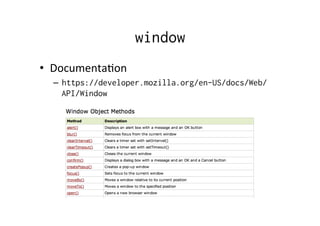
window
•  DocumentaDon	
  
–  https://developer.mozilla.org/en-US/docs/Web/
API/Window
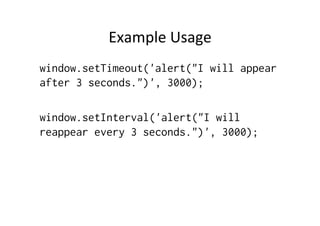
Example	
  Usage	
  
window.setTimeout('alert("I will appear
after 3 seconds.")', 3000);
window.setInterval('alert("I will
reappear every 3 seconds.")', 3000);
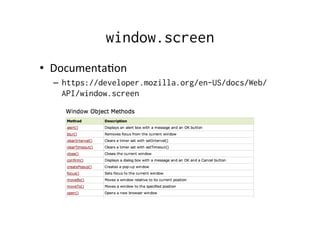
window.screen
•  DocumentaDon	
  
–  https://developer.mozilla.org/en-US/docs/Web/
API/window.screen	
  
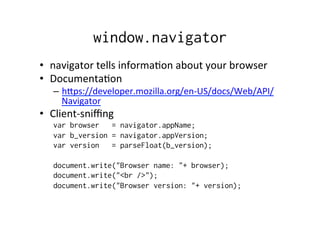
window.navigator
•  navigator	
  tells	
  informaDon	
  about	
  your	
  browser	
  
•  DocumentaDon	
  
–  hYps://developer.mozilla.org/en-­‐US/docs/Web/API/
Navigator	
  
•  Client-­‐sniffing	
  
var browser = navigator.appName;
var b_version = navigator.appVersion;
var version = parseFloat(b_version);
document.write("Browser name: "+ browser);
document.write("<br />");
document.write("Browser version: "+ version);
history	
  and	
  locaDon	
  
•  history	
  
– hYps://developer.mozilla.org/en-­‐US/docs/Web/
API/window.history	
  
•  locaDon	
  
– hYps://developer.mozilla.org/en-­‐US/docs/Web/
API/window.locaDon	


Accessing	
  Forms	
  in	
  DOM	
  0	
  
document.forms[’myform'].elements['address']
document.forms['myform'].elements[0]
document.forms[0].elements['address’]
document.forms[0].elements[0]
ABOUT	
  JAVASCRIPT	
  EVENTS	
  
Intro	
  to	
  Events	
  
•  When	
  adding	
  interacDvity	
  to	
  your	
  apps,	
  you	
  use	
  
events	
  
–  how	
  to	
  act	
  when	
  user	
  reacts	
  to	
  something	
  
•  Different	
  models	
  
–  Tradi:onal	
  model:	
  aYach	
  an	
  event	
  handler	
  to	
  certain	
  
html	
  elements,	
  mostly	
  links	
  and	
  form	
  fields.	
  IE	
  and	
  
others	
  conforms	
  to	
  Netscape	
  2	
  model	
  
–  Modern	
  event	
  model:	
  totally	
  different	
  models	
  in	
  
netscape	
  and	
  microsoc	
  ie	
  
–  W3C	
  DOM	
  Event	
  specifica:on:	
  effort	
  to	
  bring	
  
constant	
  event	
  handling	
  to	
  all	
  browsers	
  
TradiDonal	
  Model	
  
•  Works	
  fine!	
  
•  Most	
  HTML	
  elements	
  have	
  properDes	
  like	
  
onclick,	
  onmouseover,	
  onkeypress, onload,
onsubmit
–  Which	
  elements	
  hold	
  which	
  properDes?	
  Depends	
  on	
  
the	
  browser…	
  
•  How?	
  
–  <a href="site.html" onclick="doSomething()">
•  See	
  events	
  and	
  compability	
  list	
  
–  http://www.quirksmode.org/dom/events/
index.html
Canceling	
  	
  
•  You	
  may	
  cancel	
  some	
  events:	
  
– <a href=http://www.tamk.fi/
onclick="alert('message'); return
false;">
•  Example	
  
– <form name="myform" action=""
onsubmit="return validate();">
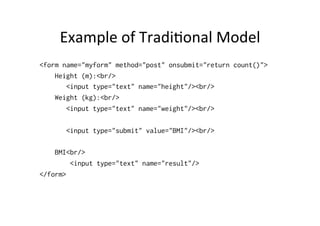
Example	
  of	
  TradiDonal	
  Model	
  	
  
<form name="myform" method="post" onsubmit="return count()">
Height (m):<br/>
<input type="text" name="height"/><br/>
Weight (kg):<br/>
<input type="text" name="weight"/><br/>
<input type="submit" value="BMI"/><br/>
BMI<br/>
<input type="text" name="result"/>
</form>
<script type="text/javascript">
//<![CDATA[
function count()
{
// Uses DOM LEVEL 0
var height = document.myform.height.value;
var weight = document.myform.weight.value;
document.myform.result.value = (weight / (height*height));
return false;
}
//]]>
</script>
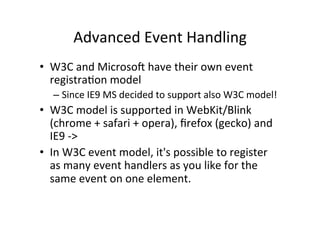
Advanced	
  Event	
  Handling	
  
•  W3C	
  and	
  Microsoc	
  have	
  their	
  own	
  event	
  
registraDon	
  model	
  
– Since	
  IE9	
  MS	
  decided	
  to	
  support	
  also	
  W3C	
  model!	
  
•  W3C	
  model	
  is	
  supported	
  in	
  WebKit/Blink	
  
(chrome	
  +	
  safari	
  +	
  opera),	
  firefox	
  (gecko)	
  and	
  
IE9	
  -­‐>	
  
•  In	
  W3C	
  event	
  model,	
  it's	
  possible	
  to	
  register	
  
as	
  many	
  event	
  handlers	
  as	
  you	
  like	
  for	
  the	
  
same	
  event	
  on	
  one	
  element.	
  
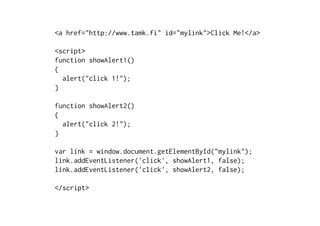
<a href="http://www.tamk.fi" id="mylink">Click Me!</a>
<script>
function showAlert1()
{
alert("click 1!");
}
function showAlert2()
{
alert("click 2!");
}
var link = window.document.getElementById("mylink");
link.addEventListener('click', showAlert1, false);
link.addEventListener('click', showAlert2, false);
</script>
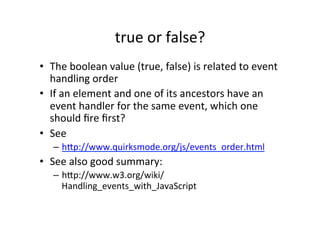
true	
  or	
  false?	
  
•  The	
  boolean	
  value	
  (true,	
  false)	
  is	
  related	
  to	
  event	
  
handling	
  order	
  
•  If	
  an	
  element	
  and	
  one	
  of	
  its	
  ancestors	
  have	
  an	
  
event	
  handler	
  for	
  the	
  same	
  event,	
  which	
  one	
  
should	
  fire	
  first?	
  
•  See	
  
–  hYp://www.quirksmode.org/js/events_order.html	
  
•  See	
  also	
  good	
  summary:	
  
–  hYp://www.w3.org/wiki/
Handling_events_with_JavaScript	
  

JavaScript and BOM events

  • 1.
    JavaScript  Browser  Object  Model   (BOM)   Jussi  Pohjolainen   Tampere  University  of  Applied  Sciences  
  • 2.
    Objects?   •  NaDve  (Core  Javascript)   – ECMAScript  standard:  Array,  Date..   •  Host     – The  host  environment,  for  example  browser:   BOM,  DOM  objects   •  JavaScript  =  ECMAScript  +  BOM  +  DOM      
  • 3.
    BOM  vs  DOM?   •  BOM   –  Browser  Object  Model   –  Access  and  manipulaDon  of  the  browser  window   –  No  standard,  in  theory  every  browser  can  have  it's  own   implementaDon  of  BOM   –  In  pracDce  almost  all  modern  browsers  share  the  same  objects   •  DOM   –  Document  Object  Model   –  Different  levels  (1,2,3)   –  Manipulate  the  html  document   –  W3C  RecommendaDon  (not  JS  specific!)   •  hYp://www.w3.org/DOM/  
  • 4.
    Some  BOM  Objects   •  window  –  browser  window   – navigator  –  informaDon  about  the  browser   – history  –  going  back  and  forward  in  browser   history   – screen  –  informaDon  about  the  user  screen   – location  –  informaDon  about  the  url   – document  (this  is  DOM!,  we  will  look  at  this  later)    
  • 5.
    window •  DocumentaDon   – https://developer.mozilla.org/en-US/docs/Web/ API/Window
  • 6.
    Example  Usage   window.setTimeout('alert("Iwill appear after 3 seconds.")', 3000); window.setInterval('alert("I will reappear every 3 seconds.")', 3000);
  • 7.
    window.screen •  DocumentaDon   – https://developer.mozilla.org/en-US/docs/Web/ API/window.screen  
  • 8.
    window.navigator •  navigator  tells  informaDon  about  your  browser   •  DocumentaDon   –  hYps://developer.mozilla.org/en-­‐US/docs/Web/API/ Navigator   •  Client-­‐sniffing   var browser = navigator.appName; var b_version = navigator.appVersion; var version = parseFloat(b_version); document.write("Browser name: "+ browser); document.write("<br />"); document.write("Browser version: "+ version);
  • 9.
    history  and  locaDon   •  history   – hYps://developer.mozilla.org/en-­‐US/docs/Web/ API/window.history   •  locaDon   – hYps://developer.mozilla.org/en-­‐US/docs/Web/ API/window.locaDon    
  • 10.
    Accessing  Forms  in  DOM  0   document.forms[’myform'].elements['address'] document.forms['myform'].elements[0] document.forms[0].elements['address’] document.forms[0].elements[0]
  • 11.
  • 12.
    Intro  to  Events   •  When  adding  interacDvity  to  your  apps,  you  use   events   –  how  to  act  when  user  reacts  to  something   •  Different  models   –  Tradi:onal  model:  aYach  an  event  handler  to  certain   html  elements,  mostly  links  and  form  fields.  IE  and   others  conforms  to  Netscape  2  model   –  Modern  event  model:  totally  different  models  in   netscape  and  microsoc  ie   –  W3C  DOM  Event  specifica:on:  effort  to  bring   constant  event  handling  to  all  browsers  
  • 13.
    TradiDonal  Model   • Works  fine!   •  Most  HTML  elements  have  properDes  like   onclick,  onmouseover,  onkeypress, onload, onsubmit –  Which  elements  hold  which  properDes?  Depends  on   the  browser…   •  How?   –  <a href="site.html" onclick="doSomething()"> •  See  events  and  compability  list   –  http://www.quirksmode.org/dom/events/ index.html
  • 14.
    Canceling     • You  may  cancel  some  events:   – <a href=http://www.tamk.fi/ onclick="alert('message'); return false;"> •  Example   – <form name="myform" action="" onsubmit="return validate();">
  • 15.
    Example  of  TradiDonal  Model     <form name="myform" method="post" onsubmit="return count()"> Height (m):<br/> <input type="text" name="height"/><br/> Weight (kg):<br/> <input type="text" name="weight"/><br/> <input type="submit" value="BMI"/><br/> BMI<br/> <input type="text" name="result"/> </form>
  • 16.
    <script type="text/javascript"> //<![CDATA[ function count() { //Uses DOM LEVEL 0 var height = document.myform.height.value; var weight = document.myform.weight.value; document.myform.result.value = (weight / (height*height)); return false; } //]]> </script>
  • 17.
    Advanced  Event  Handling   •  W3C  and  Microsoc  have  their  own  event   registraDon  model   – Since  IE9  MS  decided  to  support  also  W3C  model!   •  W3C  model  is  supported  in  WebKit/Blink   (chrome  +  safari  +  opera),  firefox  (gecko)  and   IE9  -­‐>   •  In  W3C  event  model,  it's  possible  to  register   as  many  event  handlers  as  you  like  for  the   same  event  on  one  element.  
  • 18.
    <a href="http://www.tamk.fi" id="mylink">ClickMe!</a> <script> function showAlert1() { alert("click 1!"); } function showAlert2() { alert("click 2!"); } var link = window.document.getElementById("mylink"); link.addEventListener('click', showAlert1, false); link.addEventListener('click', showAlert2, false); </script>
  • 19.
    true  or  false?   •  The  boolean  value  (true,  false)  is  related  to  event   handling  order   •  If  an  element  and  one  of  its  ancestors  have  an   event  handler  for  the  same  event,  which  one   should  fire  first?   •  See   –  hYp://www.quirksmode.org/js/events_order.html   •  See  also  good  summary:   –  hYp://www.w3.org/wiki/ Handling_events_with_JavaScript