Gran Sasso Science Institute
+ Università degli Studi dell’Aquila
Ivano Malavolta
Fast mobile web apps
Intro
You will leave this presentation with...

an understanding of what makes a mobile web app slow
techniques to improve the performance of your mobile web apps


In any case, step zero to success is to be technologically ready, 
for example many people tend to underestimate JavaScript, don't!
http://eloquentjavascript.net
Roadmap
•  Use the DOM efficiently
•  Master events
•  Be smart with the network 
•  Take care of memory issues
•  Take advantage of CSS3 features

The best practices and advices in this presentation are
implemented in a generic app template available here:

https://github.com/iivanoo/cordovaboilerplate
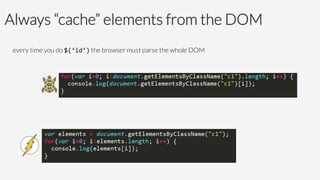
Always “cache” elements from the DOM
every time you do $(‘id’) the browser must parse the whole DOM
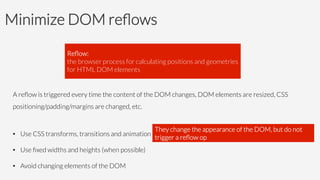
Minimize DOM reflows
A reflow is triggered every time the content of the DOM changes, DOM elements are resized, CSS
positioning/padding/margins are changed, etc.

•  Use CSS transforms, transitions and animation
•  Use fixed widths and heights (when possible)
•  Avoid changing elements of the DOM
They change the appearance of the DOM, but do not
trigger a reflow op
Reflow:
the browser process for calculating positions and geometries
for HTML DOM elements
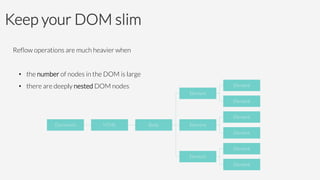
Keep your DOM slim
Reflow operations are much heavier when

•  the number of nodes in the DOM is large
•  there are deeply nested DOM nodes

Document
 HTML
 Body
Element
Element
Element
Element
Element
Element
Element
Element
Element
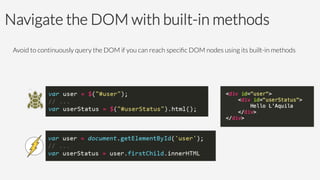
Navigate the DOM with built-in methods
Avoid to continuously query the DOM if you can reach specific DOM nodes using its built-in methods
Examples of built-in JS properties for navigation
element.parentNode — returns the node containing the element in the DOM
element.childNodes; — returns all the nested nodes of the element in the DOM
element.firstChild — retrieves the first nested node of the element in the DOM
element.lastChild — retrieves the last nested node of the element in the DOM
element.nextSibling — returns the node immediately following the element in the DOM
element.previousSibling — returns the node immediately preceding the element in the DOM
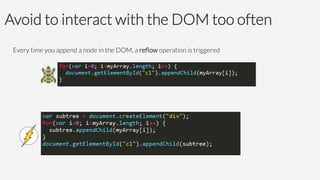
Avoid to interact with the DOM too often 
Every time you append a node in the DOM, a reflow operation is triggered
Prefer built-in JavaScript methods
Under the lines, all JS frameworks end up in calling standard JavaScript methods 
à 
when it’s possible, prefer JavaScript built-in methods to pass through a framework


Many frameworks contain a lot of workarounds and fallbacks for older
browsers that we are not targeting (e.g., Internet Explorer 7)
Examples of built-in JS methods
element.innerHTML; — returns the contents of the DOM node
element.innerHTML = " contents "; — appends contents to the DOM node
element.parentNode.removeChild(element); — remove the node from the DOM

element.hasAttribute(" attribute") — tests whether the DOM node has a specific attribute
element.getAttribute(" attribute") — returns the value of a specific attribute 
element.setAttribute(" name", " value ") — adds a specific attribute to the DOM node
element.removeAttribute(" attribute") —removes a specific attribute to the DOM node
Examples of built-in JS methods
element.classList.add() — adds a specific class to the DOM
element.classList.remove() — adds a specific class to the DOM
element.classList.toggle() — adds a specific class to the DOM

... and many more
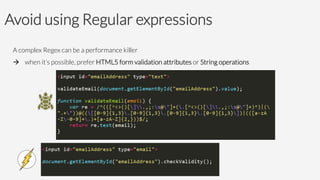
Avoid using Regular expressions 
A complex Regex can be a performance killer
à 
when it’s possible, prefer HTML5 form validation attributes or String operations
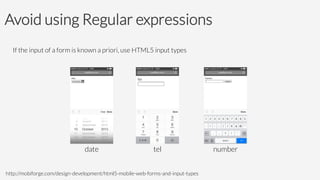
Avoid using Regular expressions 
If the input of a form is known a priori, use HTML5 input types
http://mobiforge.com/design-development/html5-mobile-web-forms-and-input-types
date	

 tel	

 number
Roadmap
•  Use the DOM efficiently
•  Master events
•  Be smart with the network 
•  Take care of memory issues
•  Take advantage of CSS3 features
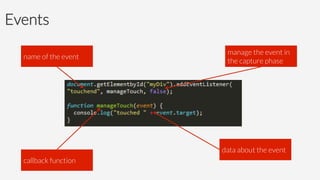
Events
name of the event
callback function
manage the event in
the capture phase
data about the event
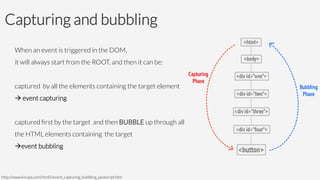
Capturing and bubbling
When an event is triggered in the DOM, 
it will always start from the ROOT, and then it can be:

captured by all the elements containing the target element 
à event capturing

captured first by the target and then BUBBLE up through all 
the HTML elements containing the target
àevent bubbling
http://www.kirupa.com/html5/event_capturing_bubbling_javascript.htm
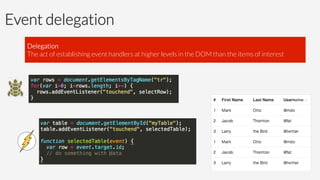
Event delegation


Delegation 
The act of establishing event handlers at higher levels in the DOM than the items of interest
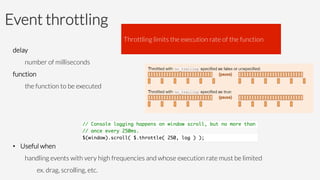
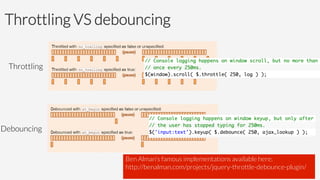
Event throttling
delay

number of milliseconds
function

the function to be executed


•  Useful when 


handling events with very high frequencies and whose execution rate must be limited


ex. drag, scrolling, etc.
Throttling limits the execution rate of the function
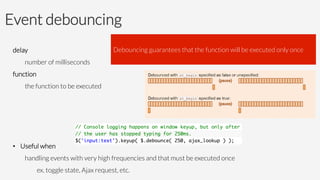
Event debouncing
delay

number of milliseconds
function

the function to be executed


•  Useful when 


handling events with very high frequencies and that must be executed once


ex. toggle state, Ajax request, etc.
Debouncing guarantees that the function will be executed only once
Throttling VS debouncing
Throttling	

Debouncing	

Ben Alman’s famous implementations available here:
http://benalman.com/projects/jquery-throttle-debounce-plugin/
Roadmap
•  Use the DOM efficiently
•  Master events
•  Be smart with the network 
•  Take care of memory issues
•  Take advantage of CSS3 features
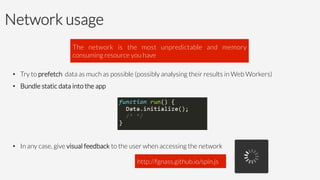
Network usage
•  Try to prefetch data as much as possible (possibly analysing their results in Web Workers)
•  Bundle static data into the app
•  In any case, give visual feedback to the user when accessing the network
The network is the most unpredictable and memory
consuming resource you have
http://fgnass.github.io/spin.js
Roadmap
•  Use the DOM efficiently
•  Master events
•  Be smart with the network 
•  Take care of memory issues
•  Take advantage of CSS3 features
Take care of memory issues


True, it automatically cleans up and deallocates memory, but it must be sure about what it is deleting forever


à you have to make it clear what code you are no longer using
Definition of memory leak
A memory leak is the situation in which the available memory of your app gets gradually lost

In JavaScript a memory leak can happen when an object is stored in memory but cannot be accessed by the
running code 

Wait, why should I worry if JavaScript has a garbage
collector that automatically cleans my memory?
Meet your best friend!
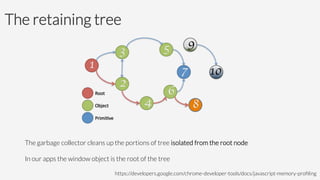
The retaining tree


The garbage collector cleans up the portions of tree isolated from the root node

In our apps the window object is the root of the tree


 https://developers.google.com/chrome-developer-tools/docs/javascript-memory-profiling
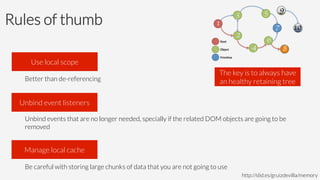
Rules of thumb


Better than de-referencing


Unbind events that are no longer needed, specially if the related DOM objects are going to be
removed


Be careful with storing large chunks of data that you are not going to use

Use local scope
Unbind event listeners
Manage local cache
http://slid.es/gruizdevilla/memory
The key is to always have
an healthy retaining tree
How to detect a memory leak
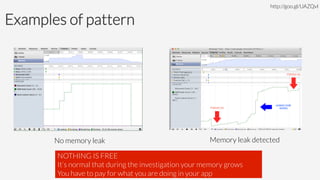
1.  Open the Memory View in the Timeline tab
2.  start recording
3.  execute the suspicious actions
4.  during the execution force a GC different times
5.  If you see a sawtooth-shaped wave

à no relevant memory leaks J
You have a memory leak if one of the following do not drop down:

used memory – number of DOM nodes – number of event handlers
http://goo.gl/UAZQvl
Examples of pattern
http://goo.gl/UAZQvl
No memory leak	

 Memory leak detected	

NOTHING IS FREE 
It’s normal that during the investigation your memory grows
You have to pay for what you are doing in your app
How to detect the source of your memory leak
1.  Open the Heap Profile 
2.  Take a heap snapshot
3.  Perform suspicious actions
4.  Take a heap snapshot
5.  Perform suspicious actions again
6.  Take a final heap snapshot
7.  Select the most recent snapshot taken
8.  find the drop-down that says "All objects" and switch it to "Objects allocated between snapshots 1 and
2". (You can also do the same for 2 and 3 if needed)
http://goo.gl/UAZQvl
There, you will find the objects which have not been collected during the snapshots
How to detect the source of your memory leak
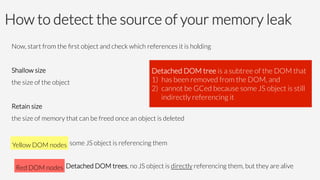
Now, start from the first object and check which references it is holding

Shallow size
the size of the object 

Retain size 
the size of memory that can be freed once an object is deleted

Yellow DOM nodes
Red DOM nodes
 Detached DOM trees, no JS object is directly referencing them, but they are alive
some JS object is referencing them
Detached DOM tree is a subtree of the DOM that 
1)  has been removed from the DOM, and
2)  cannot be GCed because some JS object is still
indirectly referencing it
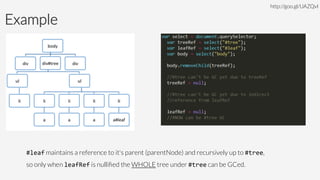
Example
http://goo.gl/UAZQvl
#leaf maintains a reference to it's parent (parentNode) and recursively up to #tree, 
so only when leafRef is nullified the WHOLE tree under #tree can be GCed.
Roadmap
•  Use the DOM efficiently
•  Master events
•  Be smart with the network 
•  Take care of memory issues
•  Take advantage of CSS3 features
Rule of thumb

Corollaries:
•  Don’t use JavaScript for UI-related operations
•  Don’t use images for something you can do with CSS
CSS3 has many interesting features, like:
•  text manipulations & effects
•  visual effects
•  media queries
•  ...
If you can do something with CSS, do it!
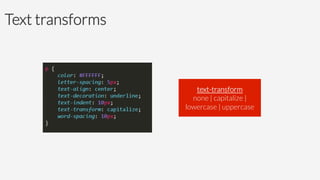
Text transforms
text-transform
none | capitalize | 
lowercase | uppercase
Text effects


2px à horizontal shadow 
10px à vertical shadow 
5px à blur distance 
#FF0000 à color
Visual effects

Three main mechanisms:

1.  Transforms (both 2D and 3D)
2.  Transitions
3.  Animations
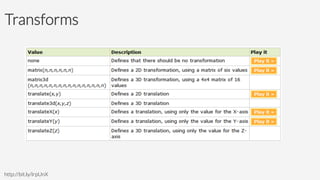
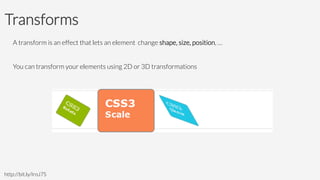
Transforms
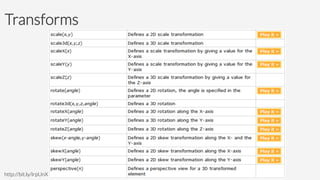
A transform is an effect that lets an element change shape, size, position, … 

You can transform your elements using 2D or 3D transformations

http://bit.ly/IroJ7S
Transforms
http://bit.ly/IrpUnX
Transforms
http://bit.ly/IrpUnX
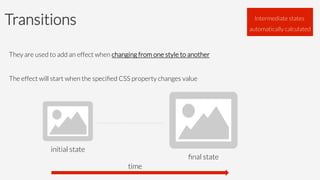
Transitions

They are used to add an effect when changing from one style to another

The effect will start when the specified CSS property changes value


initial state
final state
Intermediate states
automatically calculated
time
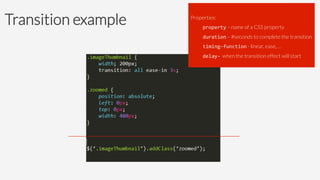
Transition example
 Properties:
property – name of a CSS property
duration – #seconds to complete the transition
timing-­‐function - linear, ease, …
delay-­‐ when the transition effect will start
Animations
An animation is an effect that lets an element gradually change from one style to another

You can change style in loop, repeating, etc. 

initial state
 finalstate
Intermediate states
automatically calculated
time
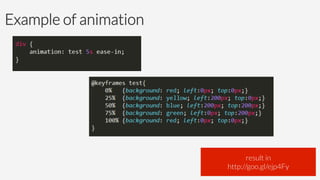
Example of animation
result in
http://goo.gl/ejp4Fy
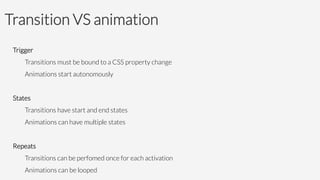
Transition VS animation
Trigger
Transitions must be bound to a CSS property change
Animations start autonomously

States
Transitions have start and end states
Animations can have multiple states

Repeats
Transitions can be perfomed once for each activation
Animations can be looped
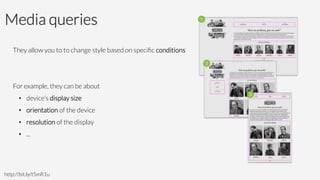
Media queries
They allow you to to change style based on specific conditions


For example, they can be about
•  device’s display size
•  orientation of the device
•  resolution of the display
•  ...
http://bit.ly/I5mR1u
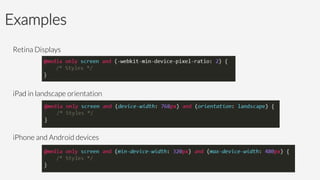
Examples
Retina Displays


iPad in landscape orientation


iPhone and Android devices
References
https://developer.mozilla.org/en-US/docs/JavaScript/Guide
https://github.com/iivanoo/cordovaboilerplate
+ 39 380 70 21 600
Contact
Ivano Malavolta | 
Gran Sasso Science Institute
iivanoo
ivano.malavolta@univaq.it
www.ivanomalavolta.com

Fast mobile web apps

  • 1.
    Gran Sasso ScienceInstitute + Università degli Studi dell’Aquila Ivano Malavolta Fast mobile web apps
  • 2.
    Intro You will leavethis presentation with... an understanding of what makes a mobile web app slow techniques to improve the performance of your mobile web apps In any case, step zero to success is to be technologically ready, for example many people tend to underestimate JavaScript, don't! http://eloquentjavascript.net
  • 3.
    Roadmap •  Use theDOM efficiently •  Master events •  Be smart with the network •  Take care of memory issues •  Take advantage of CSS3 features The best practices and advices in this presentation are implemented in a generic app template available here: https://github.com/iivanoo/cordovaboilerplate
  • 4.
    Always “cache” elementsfrom the DOM every time you do $(‘id’) the browser must parse the whole DOM
  • 5.
    Minimize DOM reflows Areflow is triggered every time the content of the DOM changes, DOM elements are resized, CSS positioning/padding/margins are changed, etc. •  Use CSS transforms, transitions and animation •  Use fixed widths and heights (when possible) •  Avoid changing elements of the DOM They change the appearance of the DOM, but do not trigger a reflow op Reflow: the browser process for calculating positions and geometries for HTML DOM elements
  • 6.
    Keep your DOMslim Reflow operations are much heavier when •  the number of nodes in the DOM is large •  there are deeply nested DOM nodes Document HTML Body Element Element Element Element Element Element Element Element Element
  • 7.
    Navigate the DOMwith built-in methods Avoid to continuously query the DOM if you can reach specific DOM nodes using its built-in methods
  • 8.
    Examples of built-inJS properties for navigation element.parentNode — returns the node containing the element in the DOM element.childNodes; — returns all the nested nodes of the element in the DOM element.firstChild — retrieves the first nested node of the element in the DOM element.lastChild — retrieves the last nested node of the element in the DOM element.nextSibling — returns the node immediately following the element in the DOM element.previousSibling — returns the node immediately preceding the element in the DOM
  • 9.
    Avoid to interactwith the DOM too often Every time you append a node in the DOM, a reflow operation is triggered
  • 10.
    Prefer built-in JavaScriptmethods Under the lines, all JS frameworks end up in calling standard JavaScript methods à when it’s possible, prefer JavaScript built-in methods to pass through a framework Many frameworks contain a lot of workarounds and fallbacks for older browsers that we are not targeting (e.g., Internet Explorer 7)
  • 11.
    Examples of built-inJS methods element.innerHTML; — returns the contents of the DOM node element.innerHTML = " contents "; — appends contents to the DOM node element.parentNode.removeChild(element); — remove the node from the DOM element.hasAttribute(" attribute") — tests whether the DOM node has a specific attribute element.getAttribute(" attribute") — returns the value of a specific attribute element.setAttribute(" name", " value ") — adds a specific attribute to the DOM node element.removeAttribute(" attribute") —removes a specific attribute to the DOM node
  • 12.
    Examples of built-inJS methods element.classList.add() — adds a specific class to the DOM element.classList.remove() — adds a specific class to the DOM element.classList.toggle() — adds a specific class to the DOM ... and many more
  • 13.
    Avoid using Regularexpressions A complex Regex can be a performance killer à when it’s possible, prefer HTML5 form validation attributes or String operations
  • 14.
    Avoid using Regularexpressions If the input of a form is known a priori, use HTML5 input types http://mobiforge.com/design-development/html5-mobile-web-forms-and-input-types date tel number
  • 15.
    Roadmap •  Use theDOM efficiently •  Master events •  Be smart with the network •  Take care of memory issues •  Take advantage of CSS3 features
  • 16.
    Events name of theevent callback function manage the event in the capture phase data about the event
  • 17.
    Capturing and bubbling Whenan event is triggered in the DOM, it will always start from the ROOT, and then it can be: captured by all the elements containing the target element à event capturing captured first by the target and then BUBBLE up through all the HTML elements containing the target àevent bubbling http://www.kirupa.com/html5/event_capturing_bubbling_javascript.htm
  • 18.
    Event delegation Delegation Theact of establishing event handlers at higher levels in the DOM than the items of interest
  • 19.
    Event throttling delay number ofmilliseconds function the function to be executed •  Useful when handling events with very high frequencies and whose execution rate must be limited ex. drag, scrolling, etc. Throttling limits the execution rate of the function
  • 20.
    Event debouncing delay number ofmilliseconds function the function to be executed •  Useful when handling events with very high frequencies and that must be executed once ex. toggle state, Ajax request, etc. Debouncing guarantees that the function will be executed only once
  • 21.
    Throttling VS debouncing Throttling Debouncing BenAlman’s famous implementations available here: http://benalman.com/projects/jquery-throttle-debounce-plugin/
  • 22.
    Roadmap •  Use theDOM efficiently •  Master events •  Be smart with the network •  Take care of memory issues •  Take advantage of CSS3 features
  • 23.
    Network usage •  Tryto prefetch data as much as possible (possibly analysing their results in Web Workers) •  Bundle static data into the app •  In any case, give visual feedback to the user when accessing the network The network is the most unpredictable and memory consuming resource you have http://fgnass.github.io/spin.js
  • 24.
    Roadmap •  Use theDOM efficiently •  Master events •  Be smart with the network •  Take care of memory issues •  Take advantage of CSS3 features
  • 25.
    Take care ofmemory issues True, it automatically cleans up and deallocates memory, but it must be sure about what it is deleting forever à you have to make it clear what code you are no longer using Definition of memory leak A memory leak is the situation in which the available memory of your app gets gradually lost In JavaScript a memory leak can happen when an object is stored in memory but cannot be accessed by the running code Wait, why should I worry if JavaScript has a garbage collector that automatically cleans my memory?
  • 26.
  • 27.
    The retaining tree Thegarbage collector cleans up the portions of tree isolated from the root node In our apps the window object is the root of the tree https://developers.google.com/chrome-developer-tools/docs/javascript-memory-profiling
  • 28.
    Rules of thumb Betterthan de-referencing Unbind events that are no longer needed, specially if the related DOM objects are going to be removed Be careful with storing large chunks of data that you are not going to use Use local scope Unbind event listeners Manage local cache http://slid.es/gruizdevilla/memory The key is to always have an healthy retaining tree
  • 29.
    How to detecta memory leak 1.  Open the Memory View in the Timeline tab 2.  start recording 3.  execute the suspicious actions 4.  during the execution force a GC different times 5.  If you see a sawtooth-shaped wave à no relevant memory leaks J You have a memory leak if one of the following do not drop down: used memory – number of DOM nodes – number of event handlers http://goo.gl/UAZQvl
  • 30.
    Examples of pattern http://goo.gl/UAZQvl Nomemory leak Memory leak detected NOTHING IS FREE It’s normal that during the investigation your memory grows You have to pay for what you are doing in your app
  • 31.
    How to detectthe source of your memory leak 1.  Open the Heap Profile 2.  Take a heap snapshot 3.  Perform suspicious actions 4.  Take a heap snapshot 5.  Perform suspicious actions again 6.  Take a final heap snapshot 7.  Select the most recent snapshot taken 8.  find the drop-down that says "All objects" and switch it to "Objects allocated between snapshots 1 and 2". (You can also do the same for 2 and 3 if needed) http://goo.gl/UAZQvl There, you will find the objects which have not been collected during the snapshots
  • 32.
    How to detectthe source of your memory leak Now, start from the first object and check which references it is holding Shallow size the size of the object Retain size the size of memory that can be freed once an object is deleted Yellow DOM nodes Red DOM nodes Detached DOM trees, no JS object is directly referencing them, but they are alive some JS object is referencing them Detached DOM tree is a subtree of the DOM that 1)  has been removed from the DOM, and 2)  cannot be GCed because some JS object is still indirectly referencing it
  • 33.
    Example http://goo.gl/UAZQvl #leaf maintains a referenceto it's parent (parentNode) and recursively up to #tree, so only when leafRef is nullified the WHOLE tree under #tree can be GCed.
  • 34.
    Roadmap •  Use theDOM efficiently •  Master events •  Be smart with the network •  Take care of memory issues •  Take advantage of CSS3 features
  • 35.
    Rule of thumb Corollaries: • Don’t use JavaScript for UI-related operations •  Don’t use images for something you can do with CSS CSS3 has many interesting features, like: •  text manipulations & effects •  visual effects •  media queries •  ... If you can do something with CSS, do it!
  • 36.
    Text transforms text-transform none |capitalize | lowercase | uppercase
  • 37.
    Text effects 2px àhorizontal shadow 10px à vertical shadow 5px à blur distance #FF0000 à color
  • 38.
    Visual effects Three mainmechanisms: 1.  Transforms (both 2D and 3D) 2.  Transitions 3.  Animations
  • 39.
    Transforms A transform isan effect that lets an element change shape, size, position, … You can transform your elements using 2D or 3D transformations http://bit.ly/IroJ7S
  • 40.
  • 41.
  • 42.
    Transitions They are usedto add an effect when changing from one style to another The effect will start when the specified CSS property changes value initial state final state Intermediate states automatically calculated time
  • 43.
    Transition example Properties: property– name of a CSS property duration – #seconds to complete the transition timing-­‐function - linear, ease, … delay-­‐ when the transition effect will start
  • 44.
    Animations An animation isan effect that lets an element gradually change from one style to another You can change style in loop, repeating, etc. initial state finalstate Intermediate states automatically calculated time
  • 45.
    Example of animation resultin http://goo.gl/ejp4Fy
  • 46.
    Transition VS animation Trigger Transitionsmust be bound to a CSS property change Animations start autonomously States Transitions have start and end states Animations can have multiple states Repeats Transitions can be perfomed once for each activation Animations can be looped
  • 47.
    Media queries They allowyou to to change style based on specific conditions For example, they can be about •  device’s display size •  orientation of the device •  resolution of the display •  ... http://bit.ly/I5mR1u
  • 48.
    Examples Retina Displays iPad inlandscape orientation iPhone and Android devices
  • 49.
  • 50.
    + 39 38070 21 600 Contact Ivano Malavolta | Gran Sasso Science Institute iivanoo ivano.malavolta@univaq.it www.ivanomalavolta.com