WELCOME TOWELCOME TO
OUROUR
PRESENTATIONPRESENTATION
Packages
‱ Package is a container for classes
‱ A package is a grouping of related types
(classes and interfaces) providing access
protection and name space management.
‱ In simple words, packages is the way we
organize files into different directories
according to their functionality, usability as
well as category they should belong to.
Why do we need Packages?
‱ One can easily determine that these types are related.
‱ One knows where to find types that can provide task-
related functions.
‱ The names of your types won't conflict with the type
names in other packages because the package creates a
new namespace.
‱ One can allow types within the package to have
unrestricted access to one another yet still restrict access
for types outside the package.
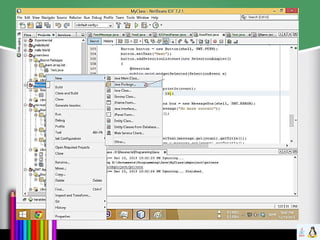
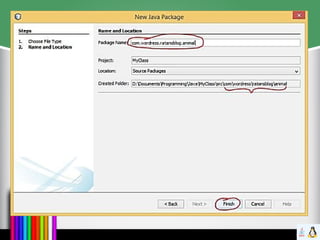
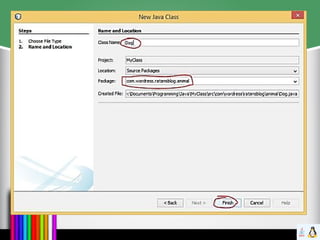
How To Create a Package
‱ Packages are mirrored through directory
structure.
‱ To create a package, First we have to create
a directory /directory structure that matches
the package hierarchy.
‱ Package structure should match the
directory structure also.
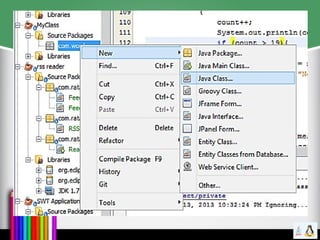
‱ To make a class belongs to a particular
package include the package statement as
the first statement of source file.
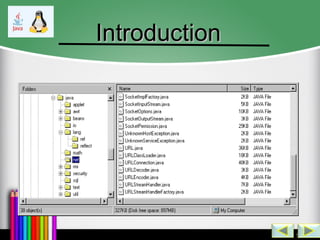
IntroductionIntroduction
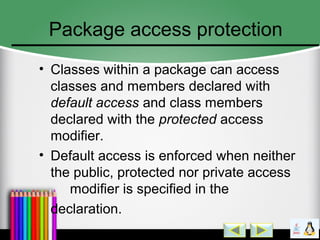
Package access protection
‱ Classes within a package can access
classes and members declared with
default access and class members
declared with the protected access
modifier.
‱ Default access is enforced when neither
the public, protected nor private access
modifier is specified in the
declaration.
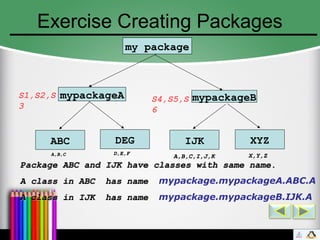
Exercise Creating Packages
my package
mypackageBmypackageA
ABC DEG IJK XYZ
S1,S2,S
3
S4,S5,S
6
A,B,CA,B,C D,E,FD,E,F
A,B,C,I,J,KA,B,C,I,J,K X,Y,ZX,Y,Z
Package ABC and IJK have classes with same name.Package ABC and IJK have classes with same name.
A class in ABC has nameA class in ABC has name mypackage.mypackageA.ABC.A
A class in IJK has nameA class in IJK has name mypackage.mypackageB.IJK.A
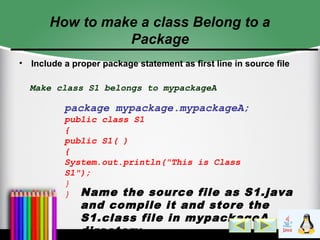
How to make a class Belong to a
Package
‱ Include a proper package statement as first line in source file
Make class S1 belongs to mypackageA
package mypackage.mypackageA;
public class S1
{
public S1( )
{
System.out.println("This is Class
S1");
}
} Name the source file as S1.java
and compile it and store the
S1.class file in mypackageA
directory
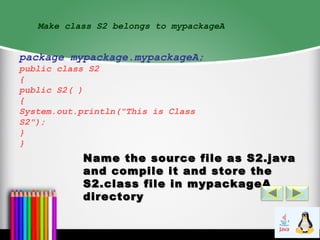
Make class S2 belongs to mypackageA
package mypackage.mypackageA;
public class S2
{
public S2( )
{
System.out.println("This is Class
S2");
}
}
Name the source file as S2.javaName the source file as S2.java
and compile it and store theand compile it and store the
S2.class file in mypackageAS2.class file in mypackageA
directorydirectory
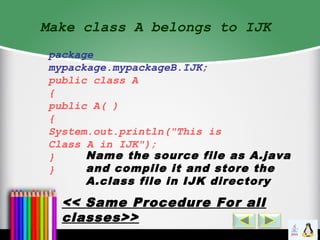
Make class A belongs to IJK
package
mypackage.mypackageB.IJK;
public class A
{
public A( )
{
System.out.println("This is
Class A in IJK");
}
}
Name the source file as A.java
and compile it and store the
A.class file in IJK directory
<< Same Procedure For all
classes>>
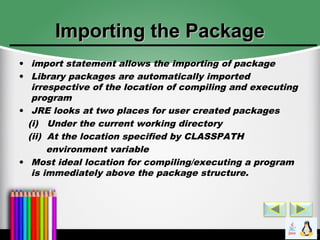
Importing the PackageImporting the Package
‱ import statement allows the importing of package
‱ Library packages are automatically imported
irrespective of the location of compiling and executing
program
‱ JRE looks at two places for user created packages
(i) Under the current working directory
(ii) At the location specified by CLASSPATH
environment variable
‱ Most ideal location for compiling/executing a program
is immediately above the package structure.
Example importingExample importing
import mypackage.mypackageA.ABC;import mypackage.mypackageA.ABC;
import mypackage.mypackageA.ABC.*;import mypackage.mypackageA.ABC.*;
class packagetestclass packagetest
{{
public static void main(String args[])public static void main(String args[])
{{
B b1 = new B();B b1 = new B();
C c1 = new C();C c1 = new C();
}}
}}
<<packagetest.java>>
<< Store it in location above the<< Store it in location above the
package structure. Compile andpackage structure. Compile and
Execute it from there>>Execute it from there>>
<< Store it in location above the<< Store it in location above the
package structure. Compile andpackage structure. Compile and
Execute it from there>>Execute it from there>>
import mypackage.mypackageA.ABC.*;
Import mypackage.mypackageB.IJK.*;
class packagetest
{
public static void main(String args[])
{
A a1 = new A();
}
}
<< What’s Wrong
Here>>
<< class A is present in both the
imported packages ABC and IJK.
So A has to be fully qualified in
this case>>
mypackage.mypackageA.ABC.A a1 = new
mypackage.mypackageA.ABC.A();
OR
mypackage.mypackageB.IJK.A a1 = new
mypackage.mypackageB.IJK.A();
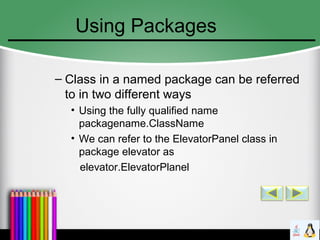
Using Packages
– Class in a named package can be referred
to in two different ways
‱ Using the fully qualified name
packagename.ClassName
‱ We can refer to the ElevatorPanel class in
package elevator as
elevator.ElevatorPlanel
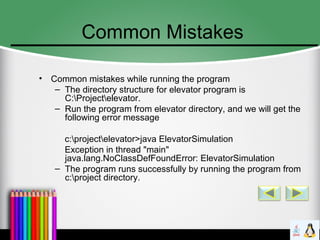
Common Mistakes
‱ Common mistakes while running the program
– The directory structure for elevator program is
C:Projectelevator.
– Run the program from elevator directory, and we will get the
following error message
c:projectelevator>java ElevatorSimulation
Exception in thread "main"
java.lang.NoClassDefFoundError: ElevatorSimulation
– The program runs successfully by running the program from
c:project directory.
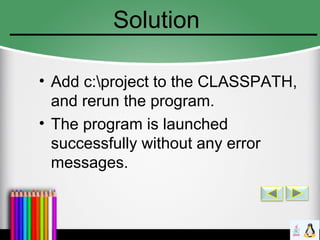
Solution
‱ Add c:project to the CLASSPATH,
and rerun the program.
‱ The program is launched
successfully without any error
messages.
Nested Classes
Nested classes are defined WITHIN another class
They are defined using the static keyword
The nested class is defined as part of the outer class. It can
only be referenced through the outer class.
public class LinkedList
{
private static class LinkedListNode
{
[...]
}
public static class LinkedListStats
{[...]
}// Create an instance of the nested class LinkedListStats
LinkedList.LinkedListStats x = new LinkedList.LinkedListStats();
// Illegal access to private nested class -- compiler error
dLinkeList.LinkedListNode y = new LinkedList.LinkedListNode();
Local Classes
Local classes are defined within a method
The scope is limited to the method
Used for small helper classes whose applicability is within the method only
public class LinkedList
{
public void traverse()
{
class MyIterator extends Iterator
{
public void doTraversal()
{
[...]
}
}
MyIterator anIterator = new MyIterator();
[...]
}
}
Member Classes
Member classes are similar to nested classes, except they
are not static.
They are used in the same manner as instance variables.
public class LinkedListpublic class LinkedList
{{
public class LinkedListStatspublic class LinkedListStats
{{
[...][...]
}} LinkedList aList = new Linked List();LinkedList aList = new Linked List();
LinkedList.LinkedListStats aStat = newLinkedList.LinkedListStats aStat = new
aList.LinkedListStats();aList.LinkedListStats();
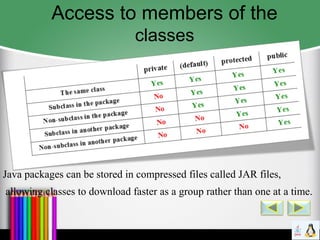
Access to members of the
classes
Java packages can be stored in compressed files called JAR files,
allowing classes to download faster as a group rather than one at a time.
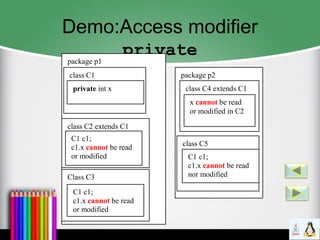
Demo:Access modifier
privatepackage p1
class C1
private int x
class C2 extends C1
C1 c1;
c1.x cannot be read
or modified
package p2
class C4 extends C1
x cannot be read
or modified in C2
class C5
C1 c1;
c1.x cannot be read
nor modifiedClass C3
C1 c1;
c1.x cannot be read
or modified
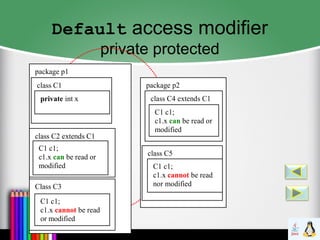
Default access modifier
private protected
package p1
class C1
private int x
class C2 extends C1
C1 c1;
c1.x can be read or
modified
package p2
class C4 extends C1
C1 c1;
c1.x can be read or
modified
class C5
C1 c1;
c1.x cannot be read
nor modifiedClass C3
C1 c1;
c1.x cannot be read
or modified
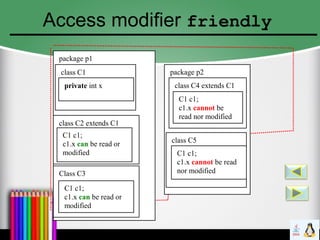
Access modifier friendly
package p1
class C1
private int x
class C2 extends C1
C1 c1;
c1.x can be read or
modified
package p2
class C4 extends C1
C1 c1;
c1.x cannot be
read nor modified
class C5
C1 c1;
c1.x cannot be read
nor modifiedClass C3
C1 c1;
c1.x can be read or
modified
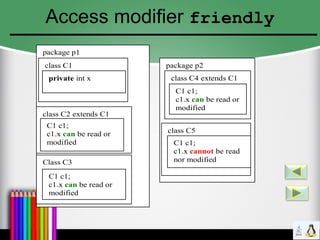
Access modifier friendly
package p1
class C1
private int x
class C2 extends C1
C1 c1;
c1.x can be read or
modified
package p2
class C4 extends C1
C1 c1;
c1.x can be read or
modified
class C5
C1 c1;
c1.x cannot be read
nor modifiedClass C3
C1 c1;
c1.x can be read or
modified
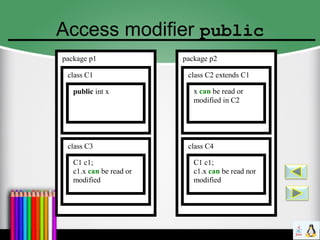
Access modifier public
package p1
class C1
public int x
class C3
C1 c1;
c1.x can be read or
modified
package p2
class C2 extends C1
x can be read or
modified in C2
class C4
C1 c1;
c1.x can be read nor
modified
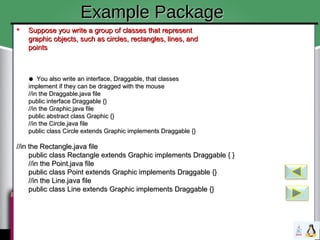
 Suppose you write a group of classes that representSuppose you write a group of classes that represent
graphic objects, such as circles, rectangles, lines, andgraphic objects, such as circles, rectangles, lines, and
pointspoints
●● You also write an interface, Draggable, that classesYou also write an interface, Draggable, that classes
implement if they can be dragged with the mouseimplement if they can be dragged with the mouse
//in the Draggable.java file//in the Draggable.java file
public interface Draggable {}public interface Draggable {}
//in the Graphic.java file//in the Graphic.java file
public abstract class Graphic {}public abstract class Graphic {}
//in the Circle.java file//in the Circle.java file
public class Circle extends Graphic implements Draggable {}public class Circle extends Graphic implements Draggable {}
//in the Rectangle.java file//in the Rectangle.java file
public class Rectangle extends Graphic implements Draggable { }public class Rectangle extends Graphic implements Draggable { }
//in the Point.java file//in the Point.java file
public class Point extends Graphic implements Draggable {}public class Point extends Graphic implements Draggable {}
//in the Line.java file//in the Line.java file
public class Line extends Graphic implements Draggable {}public class Line extends Graphic implements Draggable {}
 Suppose you write a group of classes that representSuppose you write a group of classes that represent
graphic objects, such as circles, rectangles, lines, andgraphic objects, such as circles, rectangles, lines, and
pointspoints
●● You also write an interface, Draggable, that classesYou also write an interface, Draggable, that classes
implement if they can be dragged with the mouseimplement if they can be dragged with the mouse
//in the Draggable.java file//in the Draggable.java file
public interface Draggable {}public interface Draggable {}
//in the Graphic.java file//in the Graphic.java file
public abstract class Graphic {}public abstract class Graphic {}
//in the Circle.java file//in the Circle.java file
public class Circle extends Graphic implements Draggable {}public class Circle extends Graphic implements Draggable {}
//in the Rectangle.java file//in the Rectangle.java file
public class Rectangle extends Graphic implements Draggable { }public class Rectangle extends Graphic implements Draggable { }
//in the Point.java file//in the Point.java file
public class Point extends Graphic implements Draggable {}public class Point extends Graphic implements Draggable {}
//in the Line.java file//in the Line.java file
public class Line extends Graphic implements Draggable {}public class Line extends Graphic implements Draggable {}
Example PackageExample Package
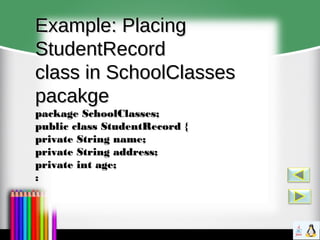
Example: PlacingExample: Placing
StudentRecordStudentRecord
class in SchoolClassesclass in SchoolClasses
pacakgepacakge
package SchoolClasses;package SchoolClasses;
public class StudentRecord {public class StudentRecord {
private String name;private String name;
private String address;private String address;
private int age;private int age;
::
Packages – Directory Paths
‱ The CLASSPATH
– List of directories and/or jar files. The compiler will
look in these directories for any precompiled files it
needs.
– The CLASSPATH can be set as an environmental
variable or specified on the command line using –
classpath option.
– The CLASSPATH is also used by the Java Virtual
Machine to load classes.
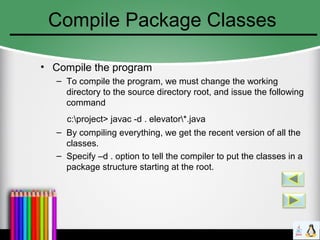
Compile Package Classes
‱ Compile the program
– To compile the program, we must change the working
directory to the source directory root, and issue the following
command
c:project> javac -d . elevator*.java
– By compiling everything, we get the recent version of all the
classes.
– Specify –d . option to tell the compiler to put the classes in a
package structure starting at the root.
Benefits of Packaging
●
You and other programmers can easily determine thatYou and other programmers can easily determine that
these classes and interfaces are related.these classes and interfaces are related.
●
You and other programmers know where to find classesYou and other programmers know where to find classes
and interfaces that can provide graphicsrelated functions.and interfaces that can provide graphicsrelated functions.
●
The names of your classes and interfaces won't conflictThe names of your classes and interfaces won't conflict
with the names in other packages because the packagewith the names in other packages because the package
creates a new namespace.creates a new namespace.
●
You can allow classes within the package to haveYou can allow classes within the package to have
unrestricted access to one another yet still restrict accessunrestricted access to one another yet still restrict access
for types outside the package.for types outside the package.
THANKS TO ALLTHANKS TO ALL
ID:141311056ID:141311056
ID:141311057ID:141311057
ID:141311058ID:141311058
ID:141311059ID:141311059
ID:141311060ID:141311060
ID:141311062ID:141311062
ID:141311063ID:141311063
special thanks to-special thanks to-
NOYONNOYON

Javapackages 4th semester

  • 1.
  • 2.
    Packages ‱ Package isa container for classes ‱ A package is a grouping of related types (classes and interfaces) providing access protection and name space management. ‱ In simple words, packages is the way we organize files into different directories according to their functionality, usability as well as category they should belong to.
  • 3.
    Why do weneed Packages? ‱ One can easily determine that these types are related. ‱ One knows where to find types that can provide task- related functions. ‱ The names of your types won't conflict with the type names in other packages because the package creates a new namespace. ‱ One can allow types within the package to have unrestricted access to one another yet still restrict access for types outside the package.
  • 4.
    How To Createa Package ‱ Packages are mirrored through directory structure. ‱ To create a package, First we have to create a directory /directory structure that matches the package hierarchy. ‱ Package structure should match the directory structure also. ‱ To make a class belongs to a particular package include the package statement as the first statement of source file.
  • 5.
  • 10.
    Package access protection ‱Classes within a package can access classes and members declared with default access and class members declared with the protected access modifier. ‱ Default access is enforced when neither the public, protected nor private access modifier is specified in the declaration.
  • 11.
    Exercise Creating Packages mypackage mypackageBmypackageA ABC DEG IJK XYZ S1,S2,S 3 S4,S5,S 6 A,B,CA,B,C D,E,FD,E,F A,B,C,I,J,KA,B,C,I,J,K X,Y,ZX,Y,Z Package ABC and IJK have classes with same name.Package ABC and IJK have classes with same name. A class in ABC has nameA class in ABC has name mypackage.mypackageA.ABC.A A class in IJK has nameA class in IJK has name mypackage.mypackageB.IJK.A
  • 12.
    How to makea class Belong to a Package ‱ Include a proper package statement as first line in source file Make class S1 belongs to mypackageA package mypackage.mypackageA; public class S1 { public S1( ) { System.out.println("This is Class S1"); } } Name the source file as S1.java and compile it and store the S1.class file in mypackageA directory
  • 13.
    Make class S2belongs to mypackageA package mypackage.mypackageA; public class S2 { public S2( ) { System.out.println("This is Class S2"); } } Name the source file as S2.javaName the source file as S2.java and compile it and store theand compile it and store the S2.class file in mypackageAS2.class file in mypackageA directorydirectory
  • 14.
    Make class Abelongs to IJK package mypackage.mypackageB.IJK; public class A { public A( ) { System.out.println("This is Class A in IJK"); } } Name the source file as A.java and compile it and store the A.class file in IJK directory << Same Procedure For all classes>>
  • 15.
    Importing the PackageImportingthe Package ‱ import statement allows the importing of package ‱ Library packages are automatically imported irrespective of the location of compiling and executing program ‱ JRE looks at two places for user created packages (i) Under the current working directory (ii) At the location specified by CLASSPATH environment variable ‱ Most ideal location for compiling/executing a program is immediately above the package structure.
  • 16.
    Example importingExample importing importmypackage.mypackageA.ABC;import mypackage.mypackageA.ABC; import mypackage.mypackageA.ABC.*;import mypackage.mypackageA.ABC.*; class packagetestclass packagetest {{ public static void main(String args[])public static void main(String args[]) {{ B b1 = new B();B b1 = new B(); C c1 = new C();C c1 = new C(); }} }} <<packagetest.java>> << Store it in location above the<< Store it in location above the package structure. Compile andpackage structure. Compile and Execute it from there>>Execute it from there>> << Store it in location above the<< Store it in location above the package structure. Compile andpackage structure. Compile and Execute it from there>>Execute it from there>>
  • 17.
    import mypackage.mypackageA.ABC.*; Import mypackage.mypackageB.IJK.*; classpackagetest { public static void main(String args[]) { A a1 = new A(); } } << What’s Wrong Here>> << class A is present in both the imported packages ABC and IJK. So A has to be fully qualified in this case>> mypackage.mypackageA.ABC.A a1 = new mypackage.mypackageA.ABC.A(); OR mypackage.mypackageB.IJK.A a1 = new mypackage.mypackageB.IJK.A();
  • 18.
    Using Packages – Classin a named package can be referred to in two different ways ‱ Using the fully qualified name packagename.ClassName ‱ We can refer to the ElevatorPanel class in package elevator as elevator.ElevatorPlanel
  • 19.
    Common Mistakes ‱ Commonmistakes while running the program – The directory structure for elevator program is C:Projectelevator. – Run the program from elevator directory, and we will get the following error message c:projectelevator>java ElevatorSimulation Exception in thread "main" java.lang.NoClassDefFoundError: ElevatorSimulation – The program runs successfully by running the program from c:project directory.
  • 20.
    Solution ‱ Add c:projectto the CLASSPATH, and rerun the program. ‱ The program is launched successfully without any error messages.
  • 21.
    Nested Classes Nested classesare defined WITHIN another class They are defined using the static keyword The nested class is defined as part of the outer class. It can only be referenced through the outer class. public class LinkedList { private static class LinkedListNode { [...] } public static class LinkedListStats {[...] }// Create an instance of the nested class LinkedListStats LinkedList.LinkedListStats x = new LinkedList.LinkedListStats(); // Illegal access to private nested class -- compiler error dLinkeList.LinkedListNode y = new LinkedList.LinkedListNode();
  • 22.
    Local Classes Local classesare defined within a method The scope is limited to the method Used for small helper classes whose applicability is within the method only public class LinkedList { public void traverse() { class MyIterator extends Iterator { public void doTraversal() { [...] } } MyIterator anIterator = new MyIterator(); [...] } }
  • 23.
    Member Classes Member classesare similar to nested classes, except they are not static. They are used in the same manner as instance variables. public class LinkedListpublic class LinkedList {{ public class LinkedListStatspublic class LinkedListStats {{ [...][...] }} LinkedList aList = new Linked List();LinkedList aList = new Linked List(); LinkedList.LinkedListStats aStat = newLinkedList.LinkedListStats aStat = new aList.LinkedListStats();aList.LinkedListStats();
  • 24.
    Access to membersof the classes Java packages can be stored in compressed files called JAR files, allowing classes to download faster as a group rather than one at a time.
  • 25.
    Demo:Access modifier privatepackage p1 classC1 private int x class C2 extends C1 C1 c1; c1.x cannot be read or modified package p2 class C4 extends C1 x cannot be read or modified in C2 class C5 C1 c1; c1.x cannot be read nor modifiedClass C3 C1 c1; c1.x cannot be read or modified
  • 26.
    Default access modifier privateprotected package p1 class C1 private int x class C2 extends C1 C1 c1; c1.x can be read or modified package p2 class C4 extends C1 C1 c1; c1.x can be read or modified class C5 C1 c1; c1.x cannot be read nor modifiedClass C3 C1 c1; c1.x cannot be read or modified
  • 27.
    Access modifier friendly packagep1 class C1 private int x class C2 extends C1 C1 c1; c1.x can be read or modified package p2 class C4 extends C1 C1 c1; c1.x cannot be read nor modified class C5 C1 c1; c1.x cannot be read nor modifiedClass C3 C1 c1; c1.x can be read or modified
  • 28.
    Access modifier friendly packagep1 class C1 private int x class C2 extends C1 C1 c1; c1.x can be read or modified package p2 class C4 extends C1 C1 c1; c1.x can be read or modified class C5 C1 c1; c1.x cannot be read nor modifiedClass C3 C1 c1; c1.x can be read or modified
  • 29.
    Access modifier public packagep1 class C1 public int x class C3 C1 c1; c1.x can be read or modified package p2 class C2 extends C1 x can be read or modified in C2 class C4 C1 c1; c1.x can be read nor modified
  • 30.
     Suppose youwrite a group of classes that representSuppose you write a group of classes that represent graphic objects, such as circles, rectangles, lines, andgraphic objects, such as circles, rectangles, lines, and pointspoints ●● You also write an interface, Draggable, that classesYou also write an interface, Draggable, that classes implement if they can be dragged with the mouseimplement if they can be dragged with the mouse //in the Draggable.java file//in the Draggable.java file public interface Draggable {}public interface Draggable {} //in the Graphic.java file//in the Graphic.java file public abstract class Graphic {}public abstract class Graphic {} //in the Circle.java file//in the Circle.java file public class Circle extends Graphic implements Draggable {}public class Circle extends Graphic implements Draggable {} //in the Rectangle.java file//in the Rectangle.java file public class Rectangle extends Graphic implements Draggable { }public class Rectangle extends Graphic implements Draggable { } //in the Point.java file//in the Point.java file public class Point extends Graphic implements Draggable {}public class Point extends Graphic implements Draggable {} //in the Line.java file//in the Line.java file public class Line extends Graphic implements Draggable {}public class Line extends Graphic implements Draggable {}  Suppose you write a group of classes that representSuppose you write a group of classes that represent graphic objects, such as circles, rectangles, lines, andgraphic objects, such as circles, rectangles, lines, and pointspoints ●● You also write an interface, Draggable, that classesYou also write an interface, Draggable, that classes implement if they can be dragged with the mouseimplement if they can be dragged with the mouse //in the Draggable.java file//in the Draggable.java file public interface Draggable {}public interface Draggable {} //in the Graphic.java file//in the Graphic.java file public abstract class Graphic {}public abstract class Graphic {} //in the Circle.java file//in the Circle.java file public class Circle extends Graphic implements Draggable {}public class Circle extends Graphic implements Draggable {} //in the Rectangle.java file//in the Rectangle.java file public class Rectangle extends Graphic implements Draggable { }public class Rectangle extends Graphic implements Draggable { } //in the Point.java file//in the Point.java file public class Point extends Graphic implements Draggable {}public class Point extends Graphic implements Draggable {} //in the Line.java file//in the Line.java file public class Line extends Graphic implements Draggable {}public class Line extends Graphic implements Draggable {} Example PackageExample Package
  • 31.
    Example: PlacingExample: Placing StudentRecordStudentRecord classin SchoolClassesclass in SchoolClasses pacakgepacakge package SchoolClasses;package SchoolClasses; public class StudentRecord {public class StudentRecord { private String name;private String name; private String address;private String address; private int age;private int age; ::
  • 32.
    Packages – DirectoryPaths ‱ The CLASSPATH – List of directories and/or jar files. The compiler will look in these directories for any precompiled files it needs. – The CLASSPATH can be set as an environmental variable or specified on the command line using – classpath option. – The CLASSPATH is also used by the Java Virtual Machine to load classes.
  • 33.
    Compile Package Classes ‱Compile the program – To compile the program, we must change the working directory to the source directory root, and issue the following command c:project> javac -d . elevator*.java – By compiling everything, we get the recent version of all the classes. – Specify –d . option to tell the compiler to put the classes in a package structure starting at the root.
  • 34.
    Benefits of Packaging ● Youand other programmers can easily determine thatYou and other programmers can easily determine that these classes and interfaces are related.these classes and interfaces are related. ● You and other programmers know where to find classesYou and other programmers know where to find classes and interfaces that can provide graphicsrelated functions.and interfaces that can provide graphicsrelated functions. ● The names of your classes and interfaces won't conflictThe names of your classes and interfaces won't conflict with the names in other packages because the packagewith the names in other packages because the package creates a new namespace.creates a new namespace. ● You can allow classes within the package to haveYou can allow classes within the package to have unrestricted access to one another yet still restrict accessunrestricted access to one another yet still restrict access for types outside the package.for types outside the package.
  • 35.
    THANKS TO ALLTHANKSTO ALL ID:141311056ID:141311056 ID:141311057ID:141311057 ID:141311058ID:141311058 ID:141311059ID:141311059 ID:141311060ID:141311060 ID:141311062ID:141311062 ID:141311063ID:141311063 special thanks to-special thanks to- NOYONNOYON