Programming in Java
5-day workshop
The Java SDLC
Matt Collison
JP Morgan Chase 2021
PiJ4.1: Java Packages
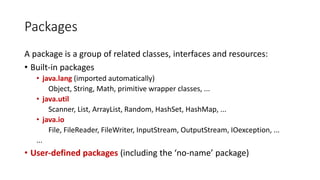
Packages
A package is a group of related classes, interfaces and resources:
• Built-in packages
• java.lang (imported automatically)
Object, String, Math, primitive wrapper classes, ...
• java.util
Scanner, List, ArrayList, Random, HashSet, HashMap, ...
• java.io
File, FileReader, FileWriter, InputStream, OutputStream, IOexception, ...
...
• User-defined packages (including the ‘no-name’ package)
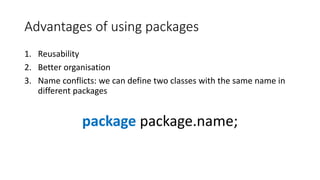
Advantages of using packages
1. Reusability
2. Better organisation
3. Name conflicts: we can define two classes with the same name in
different packages
package package.name;
User defined packages
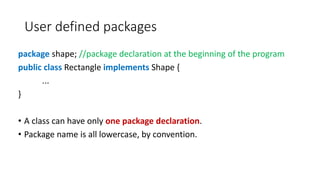
package shape; //package declaration at the beginning of the program
public class Rectangle implements Shape {
...
}
• A class can have only one package declaration.
• Package name is all lowercase, by convention.
Compiling user-defined packages
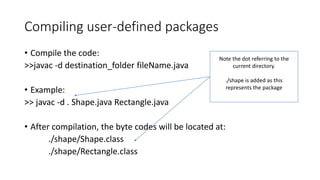
• Compile the code:
>>javac -d destination_folder fileName.java
• Example:
>> javac -d . Shape.java Rectangle.java
• After compilation, the byte codes will be located at:
./shape/Shape.class
./shape/Rectangle.class
Note the dot referring to the
current directory.
./shape is added as this
represents the package
Using user-defined packages
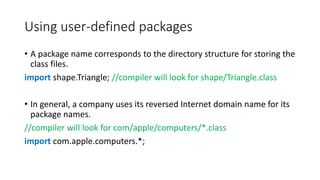
• A package name corresponds to the directory structure for storing the
class files.
import shape.Triangle; //compiler will look for shape/Triangle.class
• In general, a company uses its reversed Internet domain name for its
package names.
//compiler will look for com/apple/computers/*.class
import com.apple.computers.*;
Using user-defined packages
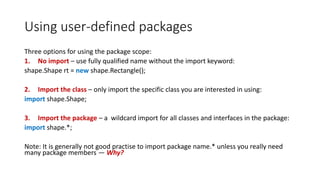
Three options for using the package scope:
1. No import – use fully qualified name without the import keyword:
shape.Shape rt = new shape.Rectangle();
2. Import the class – only import the specific class you are interested in using:
import shape.Shape;
3. Import the package – a wildcard import for all classes and interfaces in the package:
import shape.*;
Note: It is generally not good practise to import package name.* unless you really need
many package members — Why?
Filesystem and packages
• Packages in Java are often groups in subdirectories but are not
hierarchical (although they may seem to be by looking at them).
For example:
• javax.crypto
• javax.crypto.interfaces
• javax.crypto.spec
• import javax.crypto.*;
• will import all the members of javax.crypto
• but not javax.crypto.interfaces or javax.crypto.spec package members
Filesystem and packages
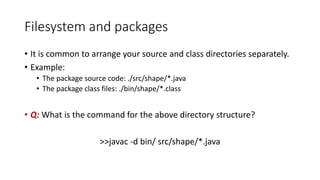
• It is common to arrange your source and class directories separately.
• Example:
• The package source code: ./src/shape/*.java
• The package class files: ./bin/shape/*.class
• Q: What is the command for the above directory structure?
>>javac -d bin/ src/shape/*.java
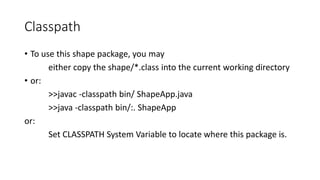
Classpath
• To use this shape package, you may
either copy the shape/*.class into the current working directory
• or:
>>javac -classpath bin/ ShapeApp.java
>>java -classpath bin/:. ShapeApp
or:
Set CLASSPATH System Variable to locate where this package is.
The ant build tool
• Ant enable the
configuration of your
project classpath,
manifest file, target
directory, etc in a
structured xml
>> ant compile
>> ant jar
>> ant run
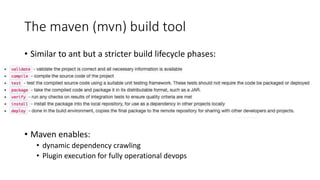
The maven (mvn) build tool
• Similar to ant but a stricter build lifecycle phases:
• Maven enables:
• dynamic dependency crawling
• Plugin execution for fully operational devops
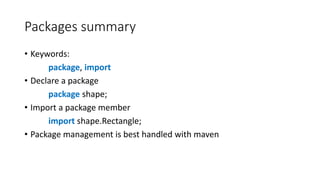
Packages summary
• Keywords:
package, import
• Declare a package
package shape;
• Import a package member
import shape.Rectangle;
• Package management is best handled with maven
Documentation
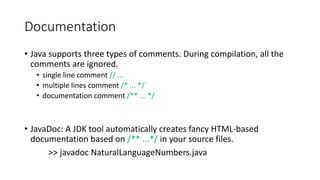
• Java supports three types of comments. During compilation, all the
comments are ignored.
• single line comment // ...
• multiple lines comment /* ... */
• documentation comment /** ... */
• JavaDoc: A JDK tool automatically creates fancy HTML-based
documentation based on /** ...*/ in your source files.
>> javadoc NaturalLanguageNumbers.java
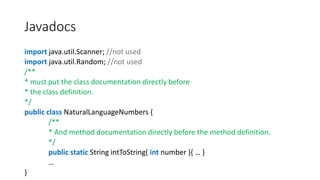
Javadocs
import java.util.Scanner; //not used
import java.util.Random; //not used
/**
* must put the class documentation directly before
* the class definition.
*/
public class NaturalLanguageNumbers {
/**
* And method documentation directly before the method definition.
*/
public static String intToString( int number ){ … }
…
}
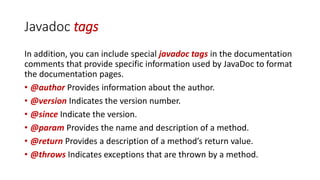
Javadoc tags
In addition, you can include special javadoc tags in the documentation
comments that provide specific information used by JavaDoc to format
the documentation pages.
• @author Provides information about the author.
• @version Indicates the version number.
• @since Indicate the version.
• @param Provides the name and description of a method.
• @return Provides a description of a method’s return value.
• @throws Indicates exceptions that are thrown by a method.
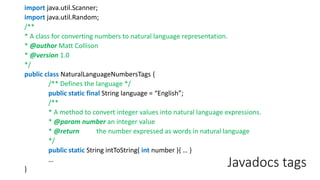
Javadocs tags
import java.util.Scanner;
import java.util.Random;
/**
* A class for converting numbers to natural language representation.
* @author Matt Collison
* @version 1.0
*/
public class NaturalLanguageNumbersTags {
/** Defines the language */
public static final String language = “English”;
/**
* A method to convert integer values into natural language expressions.
* @param number an integer value
* @return the number expressed as words in natural language
*/
public static String intToString( int number ){ … }
…
}
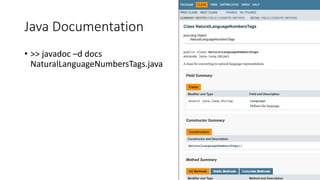
Java Documentation
• >> javadoc –d docs
NaturalLanguageNumbersTags.java
Annotations
• An annotation always starts with the symbol @ followed by the
annotation name.
• Different from the doc tag, annotations are checked by Java compiler.
• Q: Where have you seen annotations before?
Pre-defined annotations
Commonly used pre-defined annotations:
• @Deprecated
• @Override
• @SuppressWarnings
Custom annotations could be defined by using @interface.
• More details see:
https://docs.oracle.com/javase/tutorial/java/annotations/index.html
Javadoc tags vs annotations example
• @Deprecated - indicates a marked element should no longer be used.
It is usually also documented using the Javadoc @deprecated tag
/**
* @deprecated ← a doc tag, not checked by compiler
* explanation of why it was deprecated
*/
@Deprecated ← an annotation, checked by compiler
void anyMethod() { ... }
Learning resources
The workshop homepage
https://mcollison.github.io/JPMC-java-intro-2021/
The course materials
https://mcollison.github.io/java-programming-foundations/
• Session worksheets – updated each week
Additional resources
• Think Java: How to think like a computer scientist
• Allen B Downey (O’Reilly Press)
• Available under Creative Commons license
• https://greenteapress.com/wp/think-java-2e/
• Oracle central Java Documentation –
https://docs.oracle.com/javase/8/docs/api/
• Other sources:
• W3Schools Java - https://www.w3schools.com/java/
• stack overflow - https://stackoverflow.com/
• Coding bat - https://codingbat.com/java

Pi j4.1 packages

  • 1.
    Programming in Java 5-dayworkshop The Java SDLC Matt Collison JP Morgan Chase 2021 PiJ4.1: Java Packages
  • 2.
    Packages A package isa group of related classes, interfaces and resources: • Built-in packages • java.lang (imported automatically) Object, String, Math, primitive wrapper classes, ... • java.util Scanner, List, ArrayList, Random, HashSet, HashMap, ... • java.io File, FileReader, FileWriter, InputStream, OutputStream, IOexception, ... ... • User-defined packages (including the ‘no-name’ package)
  • 3.
    Advantages of usingpackages 1. Reusability 2. Better organisation 3. Name conflicts: we can define two classes with the same name in different packages package package.name;
  • 4.
    User defined packages packageshape; //package declaration at the beginning of the program public class Rectangle implements Shape { ... } • A class can have only one package declaration. • Package name is all lowercase, by convention.
  • 5.
    Compiling user-defined packages •Compile the code: >>javac -d destination_folder fileName.java • Example: >> javac -d . Shape.java Rectangle.java • After compilation, the byte codes will be located at: ./shape/Shape.class ./shape/Rectangle.class Note the dot referring to the current directory. ./shape is added as this represents the package
  • 6.
    Using user-defined packages •A package name corresponds to the directory structure for storing the class files. import shape.Triangle; //compiler will look for shape/Triangle.class • In general, a company uses its reversed Internet domain name for its package names. //compiler will look for com/apple/computers/*.class import com.apple.computers.*;
  • 7.
    Using user-defined packages Threeoptions for using the package scope: 1. No import – use fully qualified name without the import keyword: shape.Shape rt = new shape.Rectangle(); 2. Import the class – only import the specific class you are interested in using: import shape.Shape; 3. Import the package – a wildcard import for all classes and interfaces in the package: import shape.*; Note: It is generally not good practise to import package name.* unless you really need many package members — Why?
  • 8.
    Filesystem and packages •Packages in Java are often groups in subdirectories but are not hierarchical (although they may seem to be by looking at them). For example: • javax.crypto • javax.crypto.interfaces • javax.crypto.spec • import javax.crypto.*; • will import all the members of javax.crypto • but not javax.crypto.interfaces or javax.crypto.spec package members
  • 9.
    Filesystem and packages •It is common to arrange your source and class directories separately. • Example: • The package source code: ./src/shape/*.java • The package class files: ./bin/shape/*.class • Q: What is the command for the above directory structure? >>javac -d bin/ src/shape/*.java
  • 10.
    Classpath • To usethis shape package, you may either copy the shape/*.class into the current working directory • or: >>javac -classpath bin/ ShapeApp.java >>java -classpath bin/:. ShapeApp or: Set CLASSPATH System Variable to locate where this package is.
  • 11.
    The ant buildtool • Ant enable the configuration of your project classpath, manifest file, target directory, etc in a structured xml >> ant compile >> ant jar >> ant run
  • 12.
    The maven (mvn)build tool • Similar to ant but a stricter build lifecycle phases: • Maven enables: • dynamic dependency crawling • Plugin execution for fully operational devops
  • 13.
    Packages summary • Keywords: package,import • Declare a package package shape; • Import a package member import shape.Rectangle; • Package management is best handled with maven
  • 14.
    Documentation • Java supportsthree types of comments. During compilation, all the comments are ignored. • single line comment // ... • multiple lines comment /* ... */ • documentation comment /** ... */ • JavaDoc: A JDK tool automatically creates fancy HTML-based documentation based on /** ...*/ in your source files. >> javadoc NaturalLanguageNumbers.java
  • 15.
    Javadocs import java.util.Scanner; //notused import java.util.Random; //not used /** * must put the class documentation directly before * the class definition. */ public class NaturalLanguageNumbers { /** * And method documentation directly before the method definition. */ public static String intToString( int number ){ … } … }
  • 16.
    Javadoc tags In addition,you can include special javadoc tags in the documentation comments that provide specific information used by JavaDoc to format the documentation pages. • @author Provides information about the author. • @version Indicates the version number. • @since Indicate the version. • @param Provides the name and description of a method. • @return Provides a description of a method’s return value. • @throws Indicates exceptions that are thrown by a method.
  • 17.
    Javadocs tags import java.util.Scanner; importjava.util.Random; /** * A class for converting numbers to natural language representation. * @author Matt Collison * @version 1.0 */ public class NaturalLanguageNumbersTags { /** Defines the language */ public static final String language = “English”; /** * A method to convert integer values into natural language expressions. * @param number an integer value * @return the number expressed as words in natural language */ public static String intToString( int number ){ … } … }
  • 18.
    Java Documentation • >>javadoc –d docs NaturalLanguageNumbersTags.java
  • 19.
    Annotations • An annotationalways starts with the symbol @ followed by the annotation name. • Different from the doc tag, annotations are checked by Java compiler. • Q: Where have you seen annotations before?
  • 20.
    Pre-defined annotations Commonly usedpre-defined annotations: • @Deprecated • @Override • @SuppressWarnings Custom annotations could be defined by using @interface. • More details see: https://docs.oracle.com/javase/tutorial/java/annotations/index.html
  • 21.
    Javadoc tags vsannotations example • @Deprecated - indicates a marked element should no longer be used. It is usually also documented using the Javadoc @deprecated tag /** * @deprecated ← a doc tag, not checked by compiler * explanation of why it was deprecated */ @Deprecated ← an annotation, checked by compiler void anyMethod() { ... }
  • 22.
    Learning resources The workshophomepage https://mcollison.github.io/JPMC-java-intro-2021/ The course materials https://mcollison.github.io/java-programming-foundations/ • Session worksheets – updated each week
  • 23.
    Additional resources • ThinkJava: How to think like a computer scientist • Allen B Downey (O’Reilly Press) • Available under Creative Commons license • https://greenteapress.com/wp/think-java-2e/ • Oracle central Java Documentation – https://docs.oracle.com/javase/8/docs/api/ • Other sources: • W3Schools Java - https://www.w3schools.com/java/ • stack overflow - https://stackoverflow.com/ • Coding bat - https://codingbat.com/java