Lesson 3 of 4 Object Oriented Programming in Java
1 of 11
Lesson 3: Access Modifiers
Author: Kasun Ranga Wijeweera
Email: krw19870829@gmail.com
Date: 2016 December 21
Access modifiers control the access to methods and attributes. There
are four access modifiers in java: default, public, private, and
protected.
Examples
private int x;
public static void main (String args[])
{
}
Default access modifier: If we do not specify any access modifier then
that attribute or method will have default access modifier. Such
attribute or method is available only to any other class in the same
package.
Public access modifier: The public access modifier allows an attribute
or a method available to any other class.
Private access modifier: An attribute or a method with private access
modifier can only be accessed within their own class.
Protected access modifier: An attribute or a method with protected
access modifier can only be accessed by its subclasses and by classes
of the same package.
Lesson 3 of 4 Object Oriented Programming in Java
2 of 11
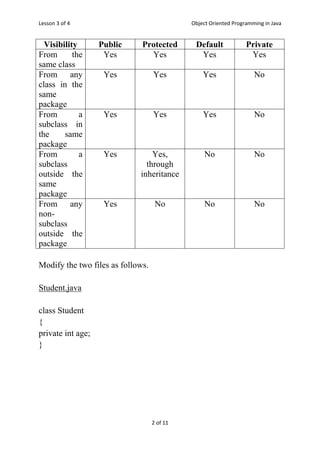
Visibility Public Protected Default Private
From the
same class
Yes Yes Yes Yes
From any
class in the
same
package
Yes Yes Yes No
From a
subclass in
the same
package
Yes Yes Yes No
From a
subclass
outside the
same
package
Yes Yes,
through
inheritance
No No
From any
non-
subclass
outside the
package
Yes No No No
Modify the two files as follows.
Student.java
class Student
{
private int age;
}
Lesson 3 of 4 Object Oriented Programming in Java
3 of 11
Test.java
class Test
{
public static void main(String args[])
{
Student s=new Student();
s.age=78;
}
}
After compiling the above code you will see following error message.
The attribute age is private to the class Student. The attribute cannot
be accessed through another class.
Usually attributes are private and methods are public. This is not a
rule and there can be exceptional cases.
We have to use getter and setter public methods to access private
attributes.
Lesson 3 of 4 Object Oriented Programming in Java
4 of 11
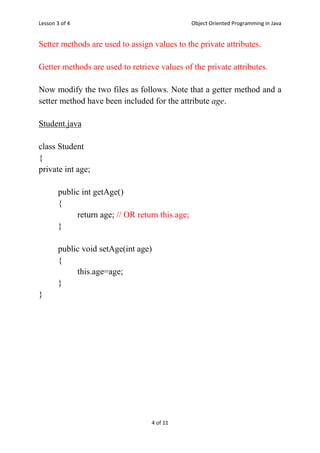
Setter methods are used to assign values to the private attributes.
Getter methods are used to retrieve values of the private attributes.
Now modify the two files as follows. Note that a getter method and a
setter method have been included for the attribute age.
Student.java
class Student
{
private int age;
public int getAge()
{
return age; // OR return this.age;
}
public void setAge(int age)
{
this.age=age;
}
}
Lesson 3 of 4 Object Oriented Programming in Java
5 of 11
Test.java
class Test
{
public static void main(String args[])
{
Student s=new Student();
s.setAge(78);
System.out.println(s.getAge());
}
}
The getter and the setter of an instance attribute should be instance
methods.
The getter and the setter of a class attribute should be class methods.
Now modify the file Student.java as follows.
Student.java
class Student
{
private char name;
private int age;
private double marksMaths;
private double marksEnglish;
private double average;
private static double avg;
Lesson 3 of 4 Object Oriented Programming in Java
6 of 11
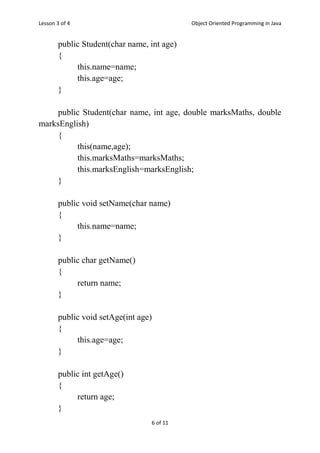
public Student(char name, int age)
{
this.name=name;
this.age=age;
}
public Student(char name, int age, double marksMaths, double
marksEnglish)
{
this(name,age);
this.marksMaths=marksMaths;
this.marksEnglish=marksEnglish;
}
public void setName(char name)
{
this.name=name;
}
public char getName()
{
return name;
}
public void setAge(int age)
{
this.age=age;
}
public int getAge()
{
return age;
}
Lesson 3 of 4 Object Oriented Programming in Java
7 of 11
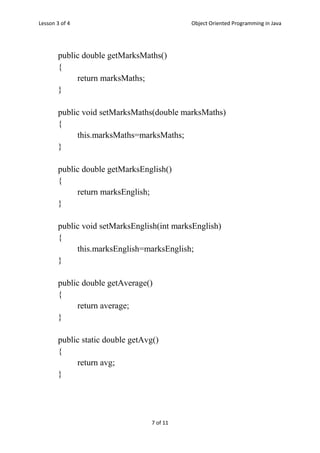
public double getMarksMaths()
{
return marksMaths;
}
public void setMarksMaths(double marksMaths)
{
this.marksMaths=marksMaths;
}
public double getMarksEnglish()
{
return marksEnglish;
}
public void setMarksEnglish(int marksEnglish)
{
this.marksEnglish=marksEnglish;
}
public double getAverage()
{
return average;
}
public static double getAvg()
{
return avg;
}
Lesson 3 of 4 Object Oriented Programming in Java
8 of 11
public void calAverage()
{
average=(marksMaths+marksEnglish)/2;
}
public static void calAvg(Student s[], int n)
{
int i;
avg=0.0;
for(i=0;i<n;i++)
{
avg+=s[i].average;
}
avg/=n;
}
public void display()
{
System.out.println("Name: "+name);
System.out.println("Age: "+age);
System.out.println("Maths marks: "+marksMaths);
System.out.println("English marks: "+marksEnglish);
System.out.println("Average marks: "+average);
System.out.println("Overall average marks: "+avg);
}
}
Lesson 3 of 4 Object Oriented Programming in Java
9 of 11
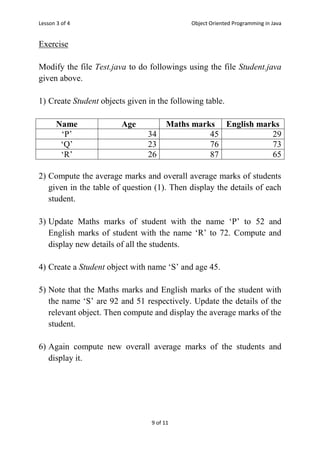
Exercise
Modify the file Test.java to do followings using the file Student.java
given above.
1) Create Student objects given in the following table.
Name Age Maths marks English marks
‘P’ 34 45 29
‘Q’ 23 76 73
‘R’ 26 87 65
2) Compute the average marks and overall average marks of students
given in the table of question (1). Then display the details of each
student.
3) Update Maths marks of student with the name ‘P’ to 52 and
English marks of student with the name ‘R’ to 72. Compute and
display new details of all the students.
4) Create a Student object with name ‘S’ and age 45.
5) Note that the Maths marks and English marks of the student with
the name ‘S’ are 92 and 51 respectively. Update the details of the
relevant object. Then compute and display the average marks of the
student.
6) Again compute new overall average marks of the students and
display it.
Lesson 3 of 4 Object Oriented Programming in Java
10 of 11
Answer
class Test
{
public static void main(String args[])
{
Student t[]=new Student[10];
int i,n;
n=3;
t[0]=new Student('P',34,45,29);
t[1]=new Student('Q',23,76,73);
t[2]=new Student('R',26,87,65);
for(i=0;i<n;i++)
{
t[i].calAverage();
}
Student.calAvg(t,3);
for(i=0;i<n;i++)
{
System.out.println();
t[i].display();
}
t[0].setMarksMaths(52);
t[2].setMarksEnglish(72);
Lesson 3 of 4 Object Oriented Programming in Java
11 of 11
for(i=0;i<n;i++)
{
t[i].calAverage();
}
Student.calAvg(t,3);
for(i=0;i<n;i++)
{
System.out.println();
t[i].display();
}
t[3]=new Student('S',45);
t[3].setMarksMaths(92);
t[3].setMarksEnglish(51);
t[3].calAverage();
System.out.println("nAverage marks:
"+t[3].getAverage());
Student.calAvg(t,4);
System.out.println("nOverall average marks:
"+Student.getAvg());
}
}

Access modifiers

  • 1.
    Lesson 3 of4 Object Oriented Programming in Java 1 of 11 Lesson 3: Access Modifiers Author: Kasun Ranga Wijeweera Email: krw19870829@gmail.com Date: 2016 December 21 Access modifiers control the access to methods and attributes. There are four access modifiers in java: default, public, private, and protected. Examples private int x; public static void main (String args[]) { } Default access modifier: If we do not specify any access modifier then that attribute or method will have default access modifier. Such attribute or method is available only to any other class in the same package. Public access modifier: The public access modifier allows an attribute or a method available to any other class. Private access modifier: An attribute or a method with private access modifier can only be accessed within their own class. Protected access modifier: An attribute or a method with protected access modifier can only be accessed by its subclasses and by classes of the same package.
  • 2.
    Lesson 3 of4 Object Oriented Programming in Java 2 of 11 Visibility Public Protected Default Private From the same class Yes Yes Yes Yes From any class in the same package Yes Yes Yes No From a subclass in the same package Yes Yes Yes No From a subclass outside the same package Yes Yes, through inheritance No No From any non- subclass outside the package Yes No No No Modify the two files as follows. Student.java class Student { private int age; }
  • 3.
    Lesson 3 of4 Object Oriented Programming in Java 3 of 11 Test.java class Test { public static void main(String args[]) { Student s=new Student(); s.age=78; } } After compiling the above code you will see following error message. The attribute age is private to the class Student. The attribute cannot be accessed through another class. Usually attributes are private and methods are public. This is not a rule and there can be exceptional cases. We have to use getter and setter public methods to access private attributes.
  • 4.
    Lesson 3 of4 Object Oriented Programming in Java 4 of 11 Setter methods are used to assign values to the private attributes. Getter methods are used to retrieve values of the private attributes. Now modify the two files as follows. Note that a getter method and a setter method have been included for the attribute age. Student.java class Student { private int age; public int getAge() { return age; // OR return this.age; } public void setAge(int age) { this.age=age; } }
  • 5.
    Lesson 3 of4 Object Oriented Programming in Java 5 of 11 Test.java class Test { public static void main(String args[]) { Student s=new Student(); s.setAge(78); System.out.println(s.getAge()); } } The getter and the setter of an instance attribute should be instance methods. The getter and the setter of a class attribute should be class methods. Now modify the file Student.java as follows. Student.java class Student { private char name; private int age; private double marksMaths; private double marksEnglish; private double average; private static double avg;
  • 6.
    Lesson 3 of4 Object Oriented Programming in Java 6 of 11 public Student(char name, int age) { this.name=name; this.age=age; } public Student(char name, int age, double marksMaths, double marksEnglish) { this(name,age); this.marksMaths=marksMaths; this.marksEnglish=marksEnglish; } public void setName(char name) { this.name=name; } public char getName() { return name; } public void setAge(int age) { this.age=age; } public int getAge() { return age; }
  • 7.
    Lesson 3 of4 Object Oriented Programming in Java 7 of 11 public double getMarksMaths() { return marksMaths; } public void setMarksMaths(double marksMaths) { this.marksMaths=marksMaths; } public double getMarksEnglish() { return marksEnglish; } public void setMarksEnglish(int marksEnglish) { this.marksEnglish=marksEnglish; } public double getAverage() { return average; } public static double getAvg() { return avg; }
  • 8.
    Lesson 3 of4 Object Oriented Programming in Java 8 of 11 public void calAverage() { average=(marksMaths+marksEnglish)/2; } public static void calAvg(Student s[], int n) { int i; avg=0.0; for(i=0;i<n;i++) { avg+=s[i].average; } avg/=n; } public void display() { System.out.println("Name: "+name); System.out.println("Age: "+age); System.out.println("Maths marks: "+marksMaths); System.out.println("English marks: "+marksEnglish); System.out.println("Average marks: "+average); System.out.println("Overall average marks: "+avg); } }
  • 9.
    Lesson 3 of4 Object Oriented Programming in Java 9 of 11 Exercise Modify the file Test.java to do followings using the file Student.java given above. 1) Create Student objects given in the following table. Name Age Maths marks English marks ‘P’ 34 45 29 ‘Q’ 23 76 73 ‘R’ 26 87 65 2) Compute the average marks and overall average marks of students given in the table of question (1). Then display the details of each student. 3) Update Maths marks of student with the name ‘P’ to 52 and English marks of student with the name ‘R’ to 72. Compute and display new details of all the students. 4) Create a Student object with name ‘S’ and age 45. 5) Note that the Maths marks and English marks of the student with the name ‘S’ are 92 and 51 respectively. Update the details of the relevant object. Then compute and display the average marks of the student. 6) Again compute new overall average marks of the students and display it.
  • 10.
    Lesson 3 of4 Object Oriented Programming in Java 10 of 11 Answer class Test { public static void main(String args[]) { Student t[]=new Student[10]; int i,n; n=3; t[0]=new Student('P',34,45,29); t[1]=new Student('Q',23,76,73); t[2]=new Student('R',26,87,65); for(i=0;i<n;i++) { t[i].calAverage(); } Student.calAvg(t,3); for(i=0;i<n;i++) { System.out.println(); t[i].display(); } t[0].setMarksMaths(52); t[2].setMarksEnglish(72);
  • 11.
    Lesson 3 of4 Object Oriented Programming in Java 11 of 11 for(i=0;i<n;i++) { t[i].calAverage(); } Student.calAvg(t,3); for(i=0;i<n;i++) { System.out.println(); t[i].display(); } t[3]=new Student('S',45); t[3].setMarksMaths(92); t[3].setMarksEnglish(51); t[3].calAverage(); System.out.println("nAverage marks: "+t[3].getAverage()); Student.calAvg(t,4); System.out.println("nOverall average marks: "+Student.getAvg()); } }