© 2015 IBM Corporation
IBM WebSphere Users Group
23rd March 2015
Virtualization Aware JVM
Making the most of a virtualized environment
Tim Ellison – Hursley labs
© 2015 IBM Corporation
Important Disclaimers
THE INFORMATION CONTAINED IN THIS PRESENTATION IS PROVIDED FOR INFORMATIONAL PURPOSES ONLY.
WHILST EFFORTS WERE MADE TO VERIFY THE COMPLETENESS AND ACCURACY OF THE INFORMATION
CONTAINED IN THIS PRESENTATION, IT IS PROVIDED “AS IS”, WITHOUT WARRANTY OF ANY KIND, EXPRESS OR
IMPLIED.
ALL PERFORMANCE DATA INCLUDED IN THIS PRESENTATION HAVE BEEN GATHERED IN A CONTROLLED
ENVIRONMENT. YOUR OWN TEST RESULTS MAY VARY BASED ON HARDWARE, SOFTWARE OR INFRASTRUCTURE
DIFFERENCES.
ALL DATA INCLUDED IN THIS PRESENTATION ARE MEANT TO BE USED ONLY AS A GUIDE.
IN ADDITION, THE INFORMATION CONTAINED IN THIS PRESENTATION IS BASED ON IBM’S CURRENT PRODUCT
PLANS AND STRATEGY, WHICH ARE SUBJECT TO CHANGE BY IBM, WITHOUT NOTICE.
IBM AND ITS AFFILIATED COMPANIES SHALL NOT BE RESPONSIBLE FOR ANY DAMAGES ARISING OUT OF THE USE
OF, OR OTHERWISE RELATED TO, THIS PRESENTATION OR ANY OTHER DOCUMENTATION.
NOTHING CONTAINED IN THIS PRESENTATION IS INTENDED TO, OR SHALL HAVE THE EFFECT OF:
- CREATING ANY WARRANT OR REPRESENTATION FROM IBM, ITS AFFILIATED COMPANIES OR ITS OR THEIR
SUPPLIERS AND/OR LICENSORS
2
© 2015 IBM Corporation3
Goals of this talk
 Describe the impact of deep systems virtualization on the Java Virtual Machine (JVM) and
Java Applications.
 Explain the benefits of making the JVM virtualization aware.
 Discuss techniques to optimize implementations for virtualized environments.
© 2015 IBM Corporation4
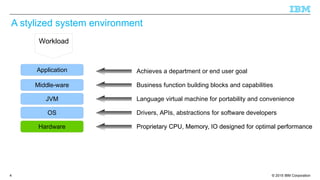
A stylized system environment
Hardware
OS
JVM
Middle-ware
Application
Proprietary CPU, Memory, IO designed for optimal performanceProprietary CPU, Memory, IO designed for optimal performance
Drivers, APIs, abstractions for software developers
Language virtual machine for portability and convenience
Business function building blocks and capabilities
Achieves a department or end user goal
Workload
© 2015 IBM Corporation5
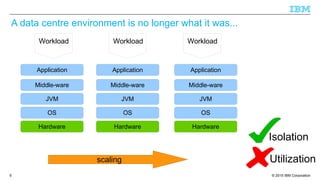
A data centre environment is no longer what it was...
Hardware
OS
JVM
Middle-ware
Application
Hardware
OS
JVM
Middle-ware
Application
Hardware
OS
JVM
Middle-ware
Application
Workload Workload Workload
scaling
Isolation
Utilization
© 2015 IBM Corporation6
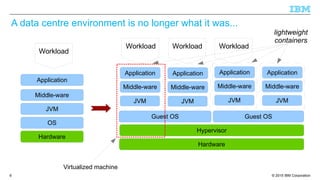
A data centre environment is no longer what it was...
Hardware
OS
JVM
Middle-ware
Application
Hardware
Hypervisor
Guest OS Guest OS
JVM
Middle-ware
Application
JVM
Middle-ware
Application
JVM
Middle-ware
Application
JVM
Middle-ware
Application
Workload
Workload Workload Workload
lightweight
containers
Virtualized machine
© 2015 IBM Corporation7
Virtualization available at every layer

Hardware Virtualization

Helps pack in more applications compared to bare metal

These provide very good isolation at a cost of duplication of services → Higher Overhead

Usecase: Multiple customers can be hosted on the same infrastructure.

OS Virtualization - Containers

New light weight containers such as Docker, Warden, AIX WPAR, Solaris Containers provide
basic isolation mechanism with very little overhead.

Usecase: Multiple applications each running inside a container of its own for a single
customer.

Runtime Virtualization – Virtualization aware Java VM

Runtime Virtualization increases the resources that can be shared while still offering reduced
isolation.

Usecase: Several instances of an application hosted on a single instance of Java for a single
customer.
© 2015 IBM Corporation8
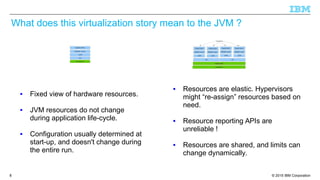
What does this virtualization story mean to the JVM ?
 Fixed view of hardware resources.
 JVM resources do not change
during application life-cycle.
 Configuration usually determined at
start-up, and doesn't change during
the entire run.
 Resources are elastic. Hypervisors
might “re-assign” resources based on
need.
 Resource reporting APIs are
unreliable !
 Resources are shared, and limits can
change dynamically.
© 2015 IBM Corporation9
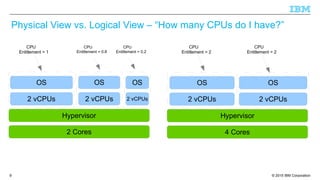
Physical View vs. Logical View – “How many CPUs do I have?”
Hypervisor
2 vCPUs 2 vCPUs
2 Cores
OS OS
Hypervisor
2 vCPUs 2 vCPUs
4 Cores
OS OS
2 vCPUs
OS
CPU
Entitlement = 1
CPU
Entitlement = 0.8
CPU
Entitlement = 0.2
CPU
Entitlement = 2
CPU
Entitlement = 2
© 2015 IBM Corporation10
Am I Real or Am I Virtual ?!
Q. Do Java applications need to know if they are running inside a Guest OS ?
A. Mostly No. Only a small class of applications benefit

Resource Orchestrators and Load Balancers

Monitoring tools

Debuggers and RAS Tools
Q. Does the JVM implementation need to know if it is running inside a Guest OS ?
A. Absolutely Yes !

Manage Java resources based upon real physical resources.

Provide virtualization info to applications.
© 2015 IBM Corporation11
Benefits of a virtualization aware JVM
 Make the most efficient use of resources in a virtualized environment.
 Propagate the knowledge up the software stack to enable load balancers to take
appropriate decisions.
 Remove necessity for multiple middle-ware products to understand intricacies of
hypervisors.
 Provide unified interface to be able to deal with a multitude of hypervisors.
© 2015 IBM Corporation12
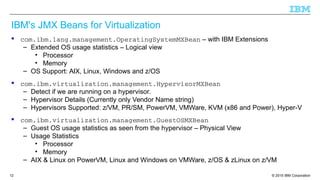
IBM's JMX Beans for Virtualization
 com.ibm.lang.management.OperatingSystemMXBean – with IBM Extensions
– Extended OS usage statistics – Logical view
• Processor
• Memory
– OS Support: AIX, Linux, Windows and z/OS
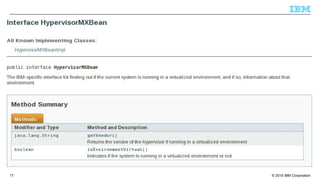
 com.ibm.virtualization.management.HypervisorMXBean
– Detect if we are running on a hypervisor.
– Hypervisor Details (Currently only Vendor Name string)
– Hypervisors Supported: z/VM, PR/SM, PowerVM, VMWare, KVM (x86 and Power), Hyper-V
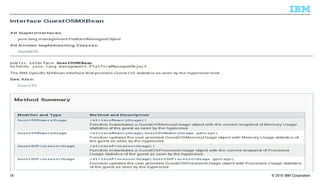
 com.ibm.virtualization.management.GuestOSMXBean
– Guest OS usage statistics as seen from the hypervisor – Physical View
– Usage Statistics
• Processor
• Memory
– AIX & Linux on PowerVM, Linux and Windows on VMWare, z/OS & zLinux on z/VM
© 2015 IBM Corporation13
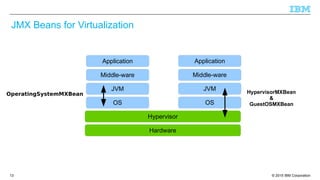
JMX Beans for Virtualization
Hardware
OS
JVM
Middle-ware
Application
Hypervisor
OS
JVM
Middle-ware
Application
OperatingSystemMXBean HypervisorMXBean
&
GuestOSMXBean
© 2015 IBM Corporation14
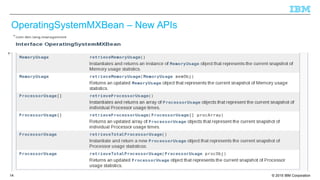
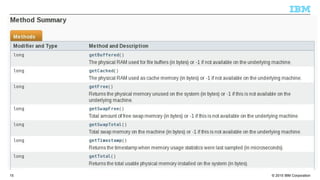
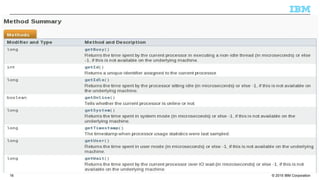
OperatingSystemMXBean – New APIs
© 2015 IBM Corporation15
© 2015 IBM Corporation16
© 2015 IBM Corporation17
© 2015 IBM Corporation18
© 2015 IBM Corporation19
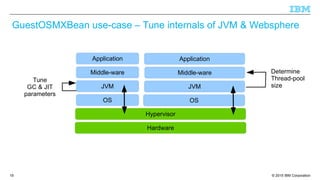
GuestOSMXBean use-case – Tune internals of JVM & Websphere
Hardware
OS
JVM
Middle-ware
Application
Hypervisor
OS
JVM
Middle-ware
Application
Determine
Thread-pool
size
Tune
GC & JIT
parameters
© 2015 IBM Corporation20
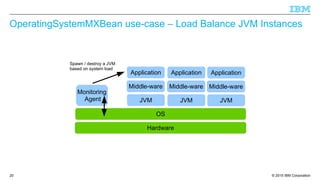
OperatingSystemMXBean use-case – Load Balance JVM Instances
Hardware
Monitoring
Agent
OS
JVM
Middle-ware
Application
JVM
Middle-ware
Application
JVM
Middle-ware
Application
Spawn / destroy a JVM
based on system load
© 2015 IBM Corporation21
Implementation Notes
■ The Beans are available in IBM Java SDK version 7.1 onwards
■ Hypervisor specific setup may be required to obtain usage data.
– VMWare requires VMGuestLib to be installed (Is part of VMware tools)
– Hypfs needs to be mounted on zLinux
■ Hypervisor detection known to fail on certain older Intel processors
– IBM_JAVA_HYPERVISOR_SETTINGS environment variable can be used as a workaround
– See javadoc for HypervisorMXBean for more details.
■ Some data may not be available on specific OS / Hypervisor combinations.
– Javadoc should have all relevant info.
■ Currently only one level of hypervisor is supported. In case of multiple layers of hypervisor
(e.g. on zSystems), only the top level hypervisor info is returned.
■ Javacore now contains virtualization info.
© 2015 IBM Corporation22
Additional virtualization optimizations
© 2015 IBM Corporation23
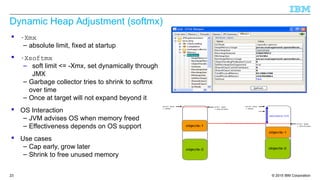
Dynamic Heap Adjustment (softmx)
 ­Xmx
– absolute limit, fixed at startup
 ­Xsoftmx
– soft limit <= -Xmx, set dynamically through
JMX
– Garbage collector tries to shrink to softmx
over time
– Once at target will not expand beyond it
 OS Interaction
– JVM advises OS when memory freed
– Effectiveness depends on OS support
 Use cases
– Cap early, grow later
– Shrink to free unused memory
© 2015 IBM Corporation24
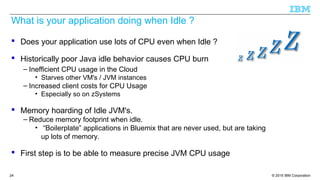
What is your application doing when Idle ?
 Does your application use lots of CPU even when Idle ?
 Historically poor Java idle behavior causes CPU burn
– Inefficient CPU usage in the Cloud
• Starves other VM's / JVM instances
– Increased client costs for CPU Usage
• Especially so on zSystems
 Memory hoarding of Idle JVM's.
– Reduce memory footprint when idle.
• “Boilerplate” applications in Bluemix that are never used, but are taking
up lots of memory.
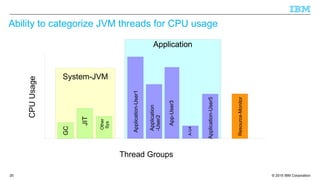
 First step is to be able to measure precise JVM CPU usage
© 2015 IBM Corporation25
Application
System-JVM
Ability to categorize JVM threads for CPU usage
Application-User1
Application
Application
-User2
App-User3
A-U4
Application-User5
GC
JIT
Other
Sys
CPUUsage
Thread Groups
Resource-Monitor
© 2015 IBM Corporation26
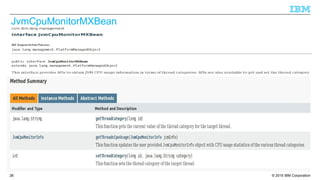
JvmCpuMonitorMXBean
© 2015 IBM Corporation27
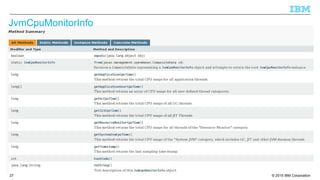
JvmCpuMonitorInfo
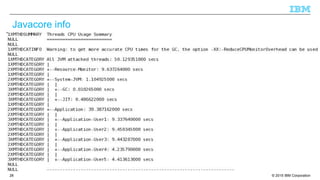
© 2015 IBM Corporation28
Javacore info
© 2015 IBM Corporation29
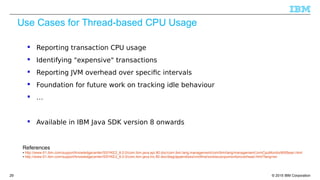
Use Cases for Thread-based CPU Usage
 Reporting transaction CPU usage
 Identifying "expensive" transactions
 Reporting JVM overhead over specific intervals
 Foundation for future work on tracking idle behaviour
 …
 Available in IBM Java SDK version 8 onwards
References
● http://www-01.ibm.com/support/knowledgecenter/SSYKE2_8.0.0/com.ibm.java.api.80.doc/com.ibm.lang.management/com/ibm/lang/management/JvmCpuMonitorMXBean.html
● http://www-01.ibm.com/support/knowledgecenter/SSYKE2_8.0.0/com.ibm.java.lnx.80.doc/diag/appendixes/cmdline/xxreducecpumonitoroverhead.html?lang=en
© 2015 IBM Corporation30
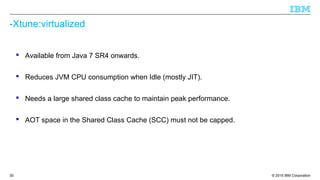
-Xtune:virtualized
 Available from Java 7 SR4 onwards.
 Reduces JVM CPU consumption when Idle (mostly JIT).
 Needs a large shared class cache to maintain peak performance.
 AOT space in the Shared Class Cache (SCC) must not be capped.
© 2015 IBM Corporation31
Summary
 Virtualization layers hide “real” resource information.
 JVM needs to know the underlying architecture at start time.
– It then needs to periodically monitor for any changes.
 Applications can make use of the MBeans to do the same.
 Use only as much memory as you need.
– Make use of SoftMX to reduce the heap dynamically.
 Idle detection and deep sleep helps cut costs.
– Use MXBean to monitor Idle behaviour.
© 2015 IBM Corporation32
Copyright and Trademarks
© IBM Corporation 2015. All Rights Reserved.
IBM, the IBM logo, and ibm.com are trademarks or registered trademarks of International
Business Machines Corp., and registered in many jurisdictions worldwide.
Other product and service names might be trademarks of IBM or other companies.
A current list of IBM trademarks is available on the Web – see the IBM “Copyright and
trademark information” page at URL: www.ibm.com/legal/copytrade.shtml

Virtualization aware Java VM

  • 1.
    © 2015 IBMCorporation IBM WebSphere Users Group 23rd March 2015 Virtualization Aware JVM Making the most of a virtualized environment Tim Ellison – Hursley labs
  • 2.
    © 2015 IBMCorporation Important Disclaimers THE INFORMATION CONTAINED IN THIS PRESENTATION IS PROVIDED FOR INFORMATIONAL PURPOSES ONLY. WHILST EFFORTS WERE MADE TO VERIFY THE COMPLETENESS AND ACCURACY OF THE INFORMATION CONTAINED IN THIS PRESENTATION, IT IS PROVIDED “AS IS”, WITHOUT WARRANTY OF ANY KIND, EXPRESS OR IMPLIED. ALL PERFORMANCE DATA INCLUDED IN THIS PRESENTATION HAVE BEEN GATHERED IN A CONTROLLED ENVIRONMENT. YOUR OWN TEST RESULTS MAY VARY BASED ON HARDWARE, SOFTWARE OR INFRASTRUCTURE DIFFERENCES. ALL DATA INCLUDED IN THIS PRESENTATION ARE MEANT TO BE USED ONLY AS A GUIDE. IN ADDITION, THE INFORMATION CONTAINED IN THIS PRESENTATION IS BASED ON IBM’S CURRENT PRODUCT PLANS AND STRATEGY, WHICH ARE SUBJECT TO CHANGE BY IBM, WITHOUT NOTICE. IBM AND ITS AFFILIATED COMPANIES SHALL NOT BE RESPONSIBLE FOR ANY DAMAGES ARISING OUT OF THE USE OF, OR OTHERWISE RELATED TO, THIS PRESENTATION OR ANY OTHER DOCUMENTATION. NOTHING CONTAINED IN THIS PRESENTATION IS INTENDED TO, OR SHALL HAVE THE EFFECT OF: - CREATING ANY WARRANT OR REPRESENTATION FROM IBM, ITS AFFILIATED COMPANIES OR ITS OR THEIR SUPPLIERS AND/OR LICENSORS 2
  • 3.
    © 2015 IBMCorporation3 Goals of this talk  Describe the impact of deep systems virtualization on the Java Virtual Machine (JVM) and Java Applications.  Explain the benefits of making the JVM virtualization aware.  Discuss techniques to optimize implementations for virtualized environments.
  • 4.
    © 2015 IBMCorporation4 A stylized system environment Hardware OS JVM Middle-ware Application Proprietary CPU, Memory, IO designed for optimal performanceProprietary CPU, Memory, IO designed for optimal performance Drivers, APIs, abstractions for software developers Language virtual machine for portability and convenience Business function building blocks and capabilities Achieves a department or end user goal Workload
  • 5.
    © 2015 IBMCorporation5 A data centre environment is no longer what it was... Hardware OS JVM Middle-ware Application Hardware OS JVM Middle-ware Application Hardware OS JVM Middle-ware Application Workload Workload Workload scaling Isolation Utilization
  • 6.
    © 2015 IBMCorporation6 A data centre environment is no longer what it was... Hardware OS JVM Middle-ware Application Hardware Hypervisor Guest OS Guest OS JVM Middle-ware Application JVM Middle-ware Application JVM Middle-ware Application JVM Middle-ware Application Workload Workload Workload Workload lightweight containers Virtualized machine
  • 7.
    © 2015 IBMCorporation7 Virtualization available at every layer  Hardware Virtualization  Helps pack in more applications compared to bare metal  These provide very good isolation at a cost of duplication of services → Higher Overhead  Usecase: Multiple customers can be hosted on the same infrastructure.  OS Virtualization - Containers  New light weight containers such as Docker, Warden, AIX WPAR, Solaris Containers provide basic isolation mechanism with very little overhead.  Usecase: Multiple applications each running inside a container of its own for a single customer.  Runtime Virtualization – Virtualization aware Java VM  Runtime Virtualization increases the resources that can be shared while still offering reduced isolation.  Usecase: Several instances of an application hosted on a single instance of Java for a single customer.
  • 8.
    © 2015 IBMCorporation8 What does this virtualization story mean to the JVM ?  Fixed view of hardware resources.  JVM resources do not change during application life-cycle.  Configuration usually determined at start-up, and doesn't change during the entire run.  Resources are elastic. Hypervisors might “re-assign” resources based on need.  Resource reporting APIs are unreliable !  Resources are shared, and limits can change dynamically.
  • 9.
    © 2015 IBMCorporation9 Physical View vs. Logical View – “How many CPUs do I have?” Hypervisor 2 vCPUs 2 vCPUs 2 Cores OS OS Hypervisor 2 vCPUs 2 vCPUs 4 Cores OS OS 2 vCPUs OS CPU Entitlement = 1 CPU Entitlement = 0.8 CPU Entitlement = 0.2 CPU Entitlement = 2 CPU Entitlement = 2
  • 10.
    © 2015 IBMCorporation10 Am I Real or Am I Virtual ?! Q. Do Java applications need to know if they are running inside a Guest OS ? A. Mostly No. Only a small class of applications benefit  Resource Orchestrators and Load Balancers  Monitoring tools  Debuggers and RAS Tools Q. Does the JVM implementation need to know if it is running inside a Guest OS ? A. Absolutely Yes !  Manage Java resources based upon real physical resources.  Provide virtualization info to applications.
  • 11.
    © 2015 IBMCorporation11 Benefits of a virtualization aware JVM  Make the most efficient use of resources in a virtualized environment.  Propagate the knowledge up the software stack to enable load balancers to take appropriate decisions.  Remove necessity for multiple middle-ware products to understand intricacies of hypervisors.  Provide unified interface to be able to deal with a multitude of hypervisors.
  • 12.
    © 2015 IBMCorporation12 IBM's JMX Beans for Virtualization  com.ibm.lang.management.OperatingSystemMXBean – with IBM Extensions – Extended OS usage statistics – Logical view • Processor • Memory – OS Support: AIX, Linux, Windows and z/OS  com.ibm.virtualization.management.HypervisorMXBean – Detect if we are running on a hypervisor. – Hypervisor Details (Currently only Vendor Name string) – Hypervisors Supported: z/VM, PR/SM, PowerVM, VMWare, KVM (x86 and Power), Hyper-V  com.ibm.virtualization.management.GuestOSMXBean – Guest OS usage statistics as seen from the hypervisor – Physical View – Usage Statistics • Processor • Memory – AIX & Linux on PowerVM, Linux and Windows on VMWare, z/OS & zLinux on z/VM
  • 13.
    © 2015 IBMCorporation13 JMX Beans for Virtualization Hardware OS JVM Middle-ware Application Hypervisor OS JVM Middle-ware Application OperatingSystemMXBean HypervisorMXBean & GuestOSMXBean
  • 14.
    © 2015 IBMCorporation14 OperatingSystemMXBean – New APIs
  • 15.
    © 2015 IBMCorporation15
  • 16.
    © 2015 IBMCorporation16
  • 17.
    © 2015 IBMCorporation17
  • 18.
    © 2015 IBMCorporation18
  • 19.
    © 2015 IBMCorporation19 GuestOSMXBean use-case – Tune internals of JVM & Websphere Hardware OS JVM Middle-ware Application Hypervisor OS JVM Middle-ware Application Determine Thread-pool size Tune GC & JIT parameters
  • 20.
    © 2015 IBMCorporation20 OperatingSystemMXBean use-case – Load Balance JVM Instances Hardware Monitoring Agent OS JVM Middle-ware Application JVM Middle-ware Application JVM Middle-ware Application Spawn / destroy a JVM based on system load
  • 21.
    © 2015 IBMCorporation21 Implementation Notes ■ The Beans are available in IBM Java SDK version 7.1 onwards ■ Hypervisor specific setup may be required to obtain usage data. – VMWare requires VMGuestLib to be installed (Is part of VMware tools) – Hypfs needs to be mounted on zLinux ■ Hypervisor detection known to fail on certain older Intel processors – IBM_JAVA_HYPERVISOR_SETTINGS environment variable can be used as a workaround – See javadoc for HypervisorMXBean for more details. ■ Some data may not be available on specific OS / Hypervisor combinations. – Javadoc should have all relevant info. ■ Currently only one level of hypervisor is supported. In case of multiple layers of hypervisor (e.g. on zSystems), only the top level hypervisor info is returned. ■ Javacore now contains virtualization info.
  • 22.
    © 2015 IBMCorporation22 Additional virtualization optimizations
  • 23.
    © 2015 IBMCorporation23 Dynamic Heap Adjustment (softmx)  ­Xmx – absolute limit, fixed at startup  ­Xsoftmx – soft limit <= -Xmx, set dynamically through JMX – Garbage collector tries to shrink to softmx over time – Once at target will not expand beyond it  OS Interaction – JVM advises OS when memory freed – Effectiveness depends on OS support  Use cases – Cap early, grow later – Shrink to free unused memory
  • 24.
    © 2015 IBMCorporation24 What is your application doing when Idle ?  Does your application use lots of CPU even when Idle ?  Historically poor Java idle behavior causes CPU burn – Inefficient CPU usage in the Cloud • Starves other VM's / JVM instances – Increased client costs for CPU Usage • Especially so on zSystems  Memory hoarding of Idle JVM's. – Reduce memory footprint when idle. • “Boilerplate” applications in Bluemix that are never used, but are taking up lots of memory.  First step is to be able to measure precise JVM CPU usage
  • 25.
    © 2015 IBMCorporation25 Application System-JVM Ability to categorize JVM threads for CPU usage Application-User1 Application Application -User2 App-User3 A-U4 Application-User5 GC JIT Other Sys CPUUsage Thread Groups Resource-Monitor
  • 26.
    © 2015 IBMCorporation26 JvmCpuMonitorMXBean
  • 27.
    © 2015 IBMCorporation27 JvmCpuMonitorInfo
  • 28.
    © 2015 IBMCorporation28 Javacore info
  • 29.
    © 2015 IBMCorporation29 Use Cases for Thread-based CPU Usage  Reporting transaction CPU usage  Identifying "expensive" transactions  Reporting JVM overhead over specific intervals  Foundation for future work on tracking idle behaviour  …  Available in IBM Java SDK version 8 onwards References ● http://www-01.ibm.com/support/knowledgecenter/SSYKE2_8.0.0/com.ibm.java.api.80.doc/com.ibm.lang.management/com/ibm/lang/management/JvmCpuMonitorMXBean.html ● http://www-01.ibm.com/support/knowledgecenter/SSYKE2_8.0.0/com.ibm.java.lnx.80.doc/diag/appendixes/cmdline/xxreducecpumonitoroverhead.html?lang=en
  • 30.
    © 2015 IBMCorporation30 -Xtune:virtualized  Available from Java 7 SR4 onwards.  Reduces JVM CPU consumption when Idle (mostly JIT).  Needs a large shared class cache to maintain peak performance.  AOT space in the Shared Class Cache (SCC) must not be capped.
  • 31.
    © 2015 IBMCorporation31 Summary  Virtualization layers hide “real” resource information.  JVM needs to know the underlying architecture at start time. – It then needs to periodically monitor for any changes.  Applications can make use of the MBeans to do the same.  Use only as much memory as you need. – Make use of SoftMX to reduce the heap dynamically.  Idle detection and deep sleep helps cut costs. – Use MXBean to monitor Idle behaviour.
  • 32.
    © 2015 IBMCorporation32 Copyright and Trademarks © IBM Corporation 2015. All Rights Reserved. IBM, the IBM logo, and ibm.com are trademarks or registered trademarks of International Business Machines Corp., and registered in many jurisdictions worldwide. Other product and service names might be trademarks of IBM or other companies. A current list of IBM trademarks is available on the Web – see the IBM “Copyright and trademark information” page at URL: www.ibm.com/legal/copytrade.shtml