JAVA SENDING MAIL
NHÓM THỰC HIỆN:
1. HỒ THỊ THANH THẢO
2. QUANG TUẤN ĐẠT
3. NGUYỄN THÀNH LUÂN
4. NGUYỄN VĂN NGÂN
27/06/2016 1
GVHD: Lê Thanh Trọng
AGENDA
 Introduction
 Protocols
 JavaMail Architecture
 JavaMail API Core Classes
 Sending E-mail Steps
 Demo
27/06/2016 2
INTRODUCTION – WHAT IS IT?
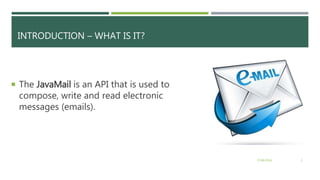
 The JavaMail is an API that is used to
compose, write and read electronic
messages (emails).
27/06/2016 3
INTRODUCTION – WHEN TO USE IT?
 The JavaMail facility can be applied to
many events.
 registering the user (sending confirmation
email)
 forgot password (sending password to the
users email id)
 sending notifications for important
updates etc.
27/06/2016 4
PROTOCOLS USED IN JAVAMAIL API
 SMTP - deliver email
 POP – get mail
 IMAP – get mail
 MIME - format of the messages
 NNTP and others
27/06/2016 5
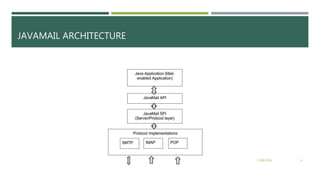
JAVAMAIL ARCHITECTURE
27/06/2016 6
JAVAMAIL API CORE CLASSES
 javax.mail.Session
 javax.mail.Authenticator
 javax.mail.internet.MimeMessage
 javax.mail.Transport
27/06/2016 7
SENDING EMAIL - STEPS
1. Get the session object
2. Compose the message
3. Send the message
27/06/2016 8
SENDING EMAIL – 1. GET SESSION OBJECT
String to = “xxxxx@gmail.com"; // change accordingly
String from = “yyyyyyy@gmail.com"; // change accordingly
String host = "localhost"; // or IP address
//Get the session object
Properties properties = System.getProperties();
properties.setProperty("mail.smtp.host", host);
Session session = Session.getDefaultInstance (properties);
27/06/2016 9
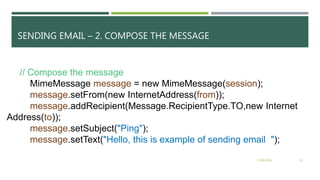
SENDING EMAIL – 2. COMPOSE THE MESSAGE
// Compose the message
MimeMessage message = new MimeMessage(session);
message.setFrom(new InternetAddress(from));
message.addRecipient(Message.RecipientType.TO,new Internet
Address(to));
message.setSubject("Ping");
message.setText("Hello, this is example of sending email ");
27/06/2016 10
SENDING EMAIL – 3. SEND MESSAGE
// Send message
Transport.send(message);
System.out.println("message sent successfully....");
27/06/2016 11
RECOMMENDED WEBSITES
 http://www.tutorialspoint.com/javamail_api/ - đọc hiểu
 http://www.javatpoint.com/java-mail-api-tutorial - đọc code
 https://javamail.java.net/nonav/docs/api/ - đọc thêm
27/06/2016 12

Java Sending mail

  • 1.
    JAVA SENDING MAIL NHÓMTHỰC HIỆN: 1. HỒ THỊ THANH THẢO 2. QUANG TUẤN ĐẠT 3. NGUYỄN THÀNH LUÂN 4. NGUYỄN VĂN NGÂN 27/06/2016 1 GVHD: Lê Thanh Trọng
  • 2.
    AGENDA  Introduction  Protocols JavaMail Architecture  JavaMail API Core Classes  Sending E-mail Steps  Demo 27/06/2016 2
  • 3.
    INTRODUCTION – WHATIS IT?  The JavaMail is an API that is used to compose, write and read electronic messages (emails). 27/06/2016 3
  • 4.
    INTRODUCTION – WHENTO USE IT?  The JavaMail facility can be applied to many events.  registering the user (sending confirmation email)  forgot password (sending password to the users email id)  sending notifications for important updates etc. 27/06/2016 4
  • 5.
    PROTOCOLS USED INJAVAMAIL API  SMTP - deliver email  POP – get mail  IMAP – get mail  MIME - format of the messages  NNTP and others 27/06/2016 5
  • 6.
  • 7.
    JAVAMAIL API CORECLASSES  javax.mail.Session  javax.mail.Authenticator  javax.mail.internet.MimeMessage  javax.mail.Transport 27/06/2016 7
  • 8.
    SENDING EMAIL -STEPS 1. Get the session object 2. Compose the message 3. Send the message 27/06/2016 8
  • 9.
    SENDING EMAIL –1. GET SESSION OBJECT String to = “xxxxx@gmail.com"; // change accordingly String from = “yyyyyyy@gmail.com"; // change accordingly String host = "localhost"; // or IP address //Get the session object Properties properties = System.getProperties(); properties.setProperty("mail.smtp.host", host); Session session = Session.getDefaultInstance (properties); 27/06/2016 9
  • 10.
    SENDING EMAIL –2. COMPOSE THE MESSAGE // Compose the message MimeMessage message = new MimeMessage(session); message.setFrom(new InternetAddress(from)); message.addRecipient(Message.RecipientType.TO,new Internet Address(to)); message.setSubject("Ping"); message.setText("Hello, this is example of sending email "); 27/06/2016 10
  • 11.
    SENDING EMAIL –3. SEND MESSAGE // Send message Transport.send(message); System.out.println("message sent successfully...."); 27/06/2016 11
  • 12.
    RECOMMENDED WEBSITES  http://www.tutorialspoint.com/javamail_api/- đọc hiểu  http://www.javatpoint.com/java-mail-api-tutorial - đọc code  https://javamail.java.net/nonav/docs/api/ - đọc thêm 27/06/2016 12

Editor's Notes

  • #7 Trình bày quá trình hoạt động thông qua kiến trúc của javaMail