

Java and GPU: where are we
now?
And why?
2
Dmitry Alexandrov
T-Systems | @bercut2000
3
4
5
What is a video card?
A video card (also called a display card, graphics card, display
adapter or graphics adapter) is an expansion card which generates a
feed of output images to a display (such as a computer monitor).
Frequently, these are advertised as discrete or dedicated graphics
cards, emphasizing the distinction between these and integrated
graphics.
6
What is a video card?
But as for today:
Video cards are not limited to simple image output, they have a built-in
graphics processor that can perform additional processing, removing
this task from the central processor of the computer.
7
So what does it do?
8
9
What is a GPU?
• Graphics Processing Unit
10
What is a GPU?
• Graphics Processing Unit
• First used by Nvidia in 1999
11
What is a GPU?
• Graphics Processing Unit
• First used by Nvidia in 1999
• GeForce 256 is called as «The world’s first GPU»
12
What is a GPU?
• Defined as “single-chip processor with integrated transform, lighting,
triangle setup/clipping, and rendering engines capable of processing
of 10000 polygons per second”
13
What is a GPU?
• Defined as “single-chip processor with integrated transform, lighting,
triangle setup/clipping, and rendering engines capable of processing
of 10000 polygons per second”
• ATI called them VPU..
14
By idea it looks like this
15
GPGPU
• General-purpose computing on graphics processing units
16
GPGPU
• General-purpose computing on graphics processing units
• Performs not only graphic calculations..
17
GPGPU
• General-purpose computing on graphics processing units
• Performs not only graphic calculations..
• … but also those usually performed on CPU
18
So much cool! We have to use
them!
19
Let’s look at the hardware!
20
Based on
“From Shader Code to a Teraflop: How GPU Shader Cores Work”, By Kayvon Fatahalian, Stanford University
The CPU in general looks like this
21
How to convert?
22
Let’s simplify!
23
Then let’s just clone them
24
To make a lot of them!
25
But we are doing the same
calculation just with different
data
26
So we come to SIMD paradigm
27
So we use this paradigm
28
And here we start to talk about vectors..
29
… and in the and we are here:
30
Nice! But how on earth can we
code here?!
31
It all started with a shader
• Cool video cards were able to offload some of the tasks from the CPU
32
It all started with a shader
• Cool video cards were able to offload some of the tasks from the CPU
• But the most of the algorithms we just “hardcoded”
33
It all started with a shader
• Cool video cards were able to offload some of the tasks from the CPU
• But the most of the algorithms we just “hardcoded”
• They were considered “standard”
34
It all started with a shader
• Cool video cards were able to offload some of the tasks from the CPU
• But the most of the algorithms we just “hardcoded”
• They were considered “standard”
• Developers were able just to call them
35
It all started with a shader
• But its obvious, not everything can be done with “hardcoded” algorithms
36
It all started with a shader
• But its obvious, not everything can be done with “hardcoded” algorithms
• That’s why some of the vendors “opened access” for developers to use their own
algorithms with own programs
37
It all started with a shader
• But its obvious, not everything can be done with “hardcoded” algorithms
• That’s why some of the vendors “opened access” for developers to use their own
algorithms with own programs
• These programs are called Shaders
38
It all started with a shader
• But its obvious, not everything can be done with “hardcoded” algorithms
• That’s why some of the vendors “opened access” for developers to use their own
algorithms with own programs
• These programs are called Shaders
• From this moment video card could work on transformations, geometry and
textures as the developers want!
39
It all started with a shader
• First shadres were different:
• Vertex
• Geometry
• Pixel
• Then they were united to Common Shader Architecture
40
There are several shaders languages
• RenderMan
• OSL
• GLSL
• Cg
• DirectX ASM
• HLSL
• …
41
As an example:
42
With or without them
43
But they are so low level..
44
Having in mind it all started with
gaming…
45
Several abstractions were created:
• OpenGL
• is a cross-language, cross-platform application programming interface (API) for
rendering 2D and 3Dvector graphics. The API is typically used to interact with
a graphics processing unit (GPU), to achieve hardware-accelerated rendering.
• Silicon Graphics Inc., (SGI) started developing OpenGL in 1991 and released it in
January 1992;
• DirectX
• is a collection of application programming interfaces (APIs) for handling tasks related
to multimedia, especially game programming and video, on Microsoft platforms.
Originally, the names of these APIs all began with Direct, such
as Direct3D, DirectDraw, DirectMusic, DirectPlay, DirectSound, and so forth. The
name DirectX was coined as a shorthand term for all of these APIs (the X standing in
for the particular API names) and soon became the name of the collection.
46
By the way, what about Java?
47
OpenGL in Java
• JSR – 231
• Started in 2003
• Latest release in 2008
• Supports OpenGL 2.0
48
OpenGL
• Now is an independent project GOGL
• Supports OpenGL up to 4.5
• Provide support for GLU и GLUT
• Access to low level API on С via JNI
49
50
But somewhere in 2005 it was
finally realized this can be used
for general computations as well
51
BrookGPU
• Early efforts to use GPGPU
• Own subset of ANSI C
• Brook Streaming Language
• Made in Stanford University
52
GPGPU
• CUDA — Nvidia C subset proprietary platform.
• DirectCompute — Microsoft proprietary shader language, part of
Direct3d, starting from DirectX 10.
• AMD FireStream — ATI proprietary technology.
• OpenACC – multivendor consortium
• C++ AMP – Microsoft proprietary language
• OpenCL – Common standard controlled by Kronos group.
53
Why should we ever use GPU on Java
• Why Java
• Safe and secure
• Portability (“write once, run everywhere”)
• Used on 3 000 000 000 devices
54
Why should we ever use GPU on Java
• Why Java
• Safe and secure
• Portability (“write once, run everywhere”)
• Used on 3 000 000 000 devices
• Where can we apply GPU
• Data Analytics and Data Science (Hadoop, Spark …)
• Security analytics (log processing)
• Finance/Banking
55
For this we have:
56
But Java works on JVM.. But
there we have some low level..
57
For low level we use:
• JNI (Java Native Interface)
• JNA (Java Native Access)
58
But we can go crazy there..
59
Someone actually did this…
60
But may be there is something
done already?
61
For OpenCL:
• JOCL
• JogAmp
• JavaCL (not supported anymore)
62
.. and for Cuda
• JCuda
• Cublas
• JCufft
• JCurand
• JCusparse
• JCusolver
• Jnvgraph
• Jcudpp
• JNpp
• JCudnn
63
Disclaimer: its hard to work with GPU!
• Its not just run a program
• You need to know your hardware!
• Its low level..
64
Let’s start with:
65
What’s that?
• Short for Open Compute Language
• Consortium of Apple, nVidia, AMD, IBM, Intel, ARM, Motorola and
many more
• Very abstract model
• Works both on GPU and CPU
66
Should work on everything
67
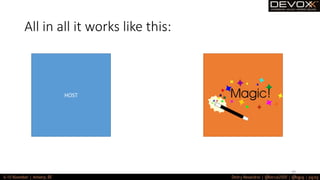
All in all it works like this:
HOST DEVICE
Data
Program/Kernel
68
All in all it works like this:
HOST
69
All in all it works like this:
HOST DEVICE
Result
70
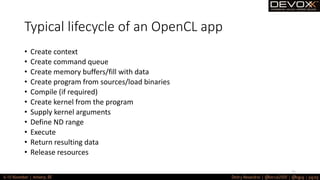
Typical lifecycle of an OpenCL app
• Create context
• Create command queue
• Create memory buffers/fill with data
• Create program from sources/load binaries
• Compile (if required)
• Create kernel from the program
• Supply kernel arguments
• Define ND range
• Execute
• Return resulting data
• Release resources
71
Better take a look
72
73
1. There is the host code. Its on
Java.
74
2. There is a device code. A
specific subset of C.
75
3. Communication between the
host and the device is done via
memory buffers.
76
So what can we actually transfer?
77
The data is not quite the same..
78
Datatypes: scalars
79
Datatypes:vectors
80
Datatypes:vectors
float f = 4.0f;
float3 f3 = (float3)(1.0f, 2.0f, 3.0f);
float4 f4 = (float4)(f3, f);
//f4.x = 1.0f,
//f4.y = 2.0f,
//f4.z = 3.0f,
//f4.w = 4.0f
81
So how are they saved there?
82
So how are they saved there?
In a hard way..
83
Memory Model
• __global
• __constant
• __local
• __private
84
Memory Model
85
But that’s not all
86
Remember SIMD?
87
Execution model
• We’ve got a lot of data
• We need to perform the same computations over them
• So we can just shard them
• OpenCL is here t help us
88
Execution model
89
ND Range – what is that?
90
For example: matrix multiplication
• We would write it like this:
void MatrixMul_sequential(int dim, float *A, float *B, float *C) {
for(int iRow=0; iRow<dim;++iRow) {
for(int iCol=0; iCol<dim;++iCol) {
float result = 0.f;
for(int i=0; i<dim;++i) {
result += A[iRow*dim + i]*B[i*dim + iCol];
}
C[iRow*dim + iCol] = result;
}
}
}
91
For example: matrix multiplication
92
For example: matrix multiplication
• So on GPU:
void MatrixMul_kernel_basic(int dim,
__global float *A, __global float *B, __global float *C) {
//Get the index of the work-item
int iCol = get_global_id(0);
int iRow = get_global_id(1);
float result = 0.0;
for(int i=0;i< dim;++i) {
result += A[iRow*dim + i]*B[i*dim + iCol];
}
C[iRow*dim + iCol] = result;
}
93
For example: matrix multiplication
• So on GPU:
void MatrixMul_kernel_basic(int dim,
__global float *A, __global float *B, __global float *C) {
//Get the index of the work-item
int iCol = get_global_id(0);
int iRow = get_global_id(1);
float result = 0.0;
for(int i=0;i< dim;++i) {
result += A[iRow*dim + i]*B[i*dim + iCol];
}
C[iRow*dim + iCol] = result;
}
94
Typical GPU
--- Info for device GeForce GT 650M: ---
CL_DEVICE_NAME: GeForce GT 650M
CL_DEVICE_VENDOR: NVIDIA
CL_DRIVER_VERSION: 10.14.20 355.10.05.15f03
CL_DEVICE_TYPE: CL_DEVICE_TYPE_GPU
CL_DEVICE_MAX_COMPUTE_UNITS: 2
CL_DEVICE_MAX_WORK_ITEM_DIMENSIONS: 3
CL_DEVICE_MAX_WORK_ITEM_SIZES: 1024 / 1024 / 64
CL_DEVICE_MAX_WORK_GROUP_SIZE: 1024
CL_DEVICE_MAX_CLOCK_FREQUENCY: 900 MHz
CL_DEVICE_ADDRESS_BITS: 64
CL_DEVICE_MAX_MEM_ALLOC_SIZE: 256 MByte
CL_DEVICE_GLOBAL_MEM_SIZE: 1024 MByte
CL_DEVICE_ERROR_CORRECTION_SUPPORT: no
CL_DEVICE_LOCAL_MEM_TYPE: local
CL_DEVICE_LOCAL_MEM_SIZE: 48 KByte
CL_DEVICE_MAX_CONSTANT_BUFFER_SIZE: 64 KByte
CL_DEVICE_QUEUE_PROPERTIES: CL_QUEUE_PROFILING_ENABLE
CL_DEVICE_IMAGE_SUPPORT: 1
CL_DEVICE_MAX_READ_IMAGE_ARGS: 256
CL_DEVICE_MAX_WRITE_IMAGE_ARGS: 16
CL_DEVICE_SINGLE_FP_CONFIG: CL_FP_DENORM CL_FP_INF_NAN CL_FP_ROUND_TO_NEAREST CL_FP_ROUND_TO_ZERO CL_FP_ROUND_TO_INF
CL_FP_CORRECTLY_ROUNDED_DIVIDE_SQRT
CL_DEVICE_2D_MAX_WIDTH 16384
CL_DEVICE_2D_MAX_HEIGHT 16384
CL_DEVICE_3D_MAX_WIDTH 2048
CL_DEVICE_3D_MAX_HEIGHT 2048
CL_DEVICE_3D_MAX_DEPTH 2048
CL_DEVICE_PREFERRED_VECTOR_WIDTH_<t> CHAR 1, SHORT 1, INT 1, LONG 1, FLOAT 1, DOUBLE 1
95
Typical CPU
--- Info for device Intel(R) Core(TM) i7-3720QM CPU @ 2.60GHz: ---
CL_DEVICE_NAME: Intel(R) Core(TM) i7-3720QM CPU @ 2.60GHz
CL_DEVICE_VENDOR: Intel
CL_DRIVER_VERSION: 1.1
CL_DEVICE_TYPE: CL_DEVICE_TYPE_CPU
CL_DEVICE_MAX_COMPUTE_UNITS: 8
CL_DEVICE_MAX_WORK_ITEM_DIMENSIONS: 3
CL_DEVICE_MAX_WORK_ITEM_SIZES: 1024 / 1 / 1
CL_DEVICE_MAX_WORK_GROUP_SIZE: 1024
CL_DEVICE_MAX_CLOCK_FREQUENCY: 2600 MHz
CL_DEVICE_ADDRESS_BITS: 64
CL_DEVICE_MAX_MEM_ALLOC_SIZE: 2048 MByte
CL_DEVICE_GLOBAL_MEM_SIZE: 8192 MByte
CL_DEVICE_ERROR_CORRECTION_SUPPORT: no
CL_DEVICE_LOCAL_MEM_TYPE: global
CL_DEVICE_LOCAL_MEM_SIZE: 32 KByte
CL_DEVICE_MAX_CONSTANT_BUFFER_SIZE: 64 KByte
CL_DEVICE_QUEUE_PROPERTIES: CL_QUEUE_PROFILING_ENABLE
CL_DEVICE_IMAGE_SUPPORT: 1
CL_DEVICE_MAX_READ_IMAGE_ARGS: 128
CL_DEVICE_MAX_WRITE_IMAGE_ARGS: 8
CL_DEVICE_SINGLE_FP_CONFIG: CL_FP_DENORM CL_FP_INF_NAN CL_FP_ROUND_TO_NEAREST CL_FP_ROUND_TO_ZERO CL_FP_ROUND_TO_INF
CL_FP_FMA CL_FP_CORRECTLY_ROUNDED_DIVIDE_SQRT
CL_DEVICE_2D_MAX_WIDTH 8192
CL_DEVICE_2D_MAX_HEIGHT 8192
CL_DEVICE_3D_MAX_WIDTH 2048
CL_DEVICE_3D_MAX_HEIGHT 2048
CL_DEVICE_3D_MAX_DEPTH 2048
CL_DEVICE_PREFERRED_VECTOR_WIDTH_<t> CHAR 16, SHORT 8, INT 4, LONG 2, FLOAT 4, DOUBLE 2
96
And what about CUDA?
97
And what about CUDA?
Well.. It looks to be easier
98
And what about CUDA?
Well.. It looks to be easier
for C developers…
99
CUDA kernel
#define N 10
__global__ void add( int *a, int *b, int *c ) {
int tid = blockIdx.x; // this thread handles the data at its thread id
if (tid < N)
c[tid] = a[tid] + b[tid];
}
100
CUDA setup
int a[N], b[N], c[N];
int *dev_a, *dev_b, *dev_c;
// allocate the memory on the GPU
cudaMalloc( (void**)&dev_a, N * sizeof(int) );
cudaMalloc( (void**)&dev_b, N * sizeof(int) );
cudaMalloc( (void**)&dev_c, N * sizeof(int) );
// fill the arrays 'a' and 'b' on the CPU
for (int i=0; i<N; i++) {
a[i] = -i;
b[i] = i * i;
}
101
CUDA copy to memory and run
// copy the arrays 'a' and 'b' to the GPU
cudaMemcpy(dev_a, a, N *sizeof(int),
cudaMemcpyHostToDevice);
cudaMemcpy(dev_b,b,N*sizeof(int),
cudaMemcpyHostToDevice);
add<<<N,1>>>(dev_a,dev_b,dev_c);
// copy the array 'c' back from the GPU to the CPU
cudaMemcpy(c,dev_c,N*sizeof(int),
cudaMemcpyDeviceToHost);
102
CUDA get results
// display the results
for (int i=0; i<N; i++) {
printf( "%d + %d = %dn", a[i], b[i], c[i] );
}
// free the memory allocated on the GPU
cudaFree( dev_a );
cudaFree( dev_b );
cudaFree( dev_c );
103
But CUDA has some other superpowers
• Cublas – all about matrices
• JCufft – Fast Frontier Transformation
• Jcurand – all about random
• JCusparse – sparse matrices
• Jcusolver – factorization and some other crazy stuff
• Jnvgraph – all about graphs
• Jcudpp – CUDA Data Parallel Primitives Library, and some sorting
• JNpp – image processing on GPU
• Jcudnn – Deep Neural Network library (that’s scary)
104
For example we need a good rand
int n = 100;
curandGenerator generator = new curandGenerator();
float hostData[] = new float[n];
Pointer deviceData = new Pointer();
cudaMalloc(deviceData, n * Sizeof.FLOAT);
curandCreateGenerator(generator, CURAND_RNG_PSEUDO_DEFAULT);
curandSetPseudoRandomGeneratorSeed(generator, 1234);
curandGenerateUniform(generator, deviceData, n);
cudaMemcpy(Pointer.to(hostData), deviceData,
n * Sizeof.FLOAT, cudaMemcpyDeviceToHost);
System.out.println(Arrays.toString(hostData));
curandDestroyGenerator(generator);
cudaFree(deviceData);
105
For example we need a good rand
• With a strong theory underneath
• Developed by Russian mathematician Ilya Sobolev back in 1967
• https://en.wikipedia.org/wiki/Sobol_sequence
106
nVidia memory looks like this
107
Btw.. Talking about memory
108
©Wikipedia
Optimizations…
__kernel void MatrixMul_kernel_basic(int dim,
__global float *A,
__global float *B,
__global float *C){
int iCol = get_global_id(0);
int iRow = get_global_id(1);
float result = 0.0;
for(int i=0;i< dim;++i)
{
result +=
A[iRow*dim + i]*B[i*dim + iCol];
}
C[iRow*dim + iCol] = result;
}
109
<—Optimizations
#define VECTOR_SIZE 4
__kernel void MatrixMul_kernel_basic_vector4(int dim,
__global float4 *A,
__global float4 *B,
__global float *C)
int localIdx = get_global_id(0);
int localIdy = get_global_id(1);
float result = 0.0;
float4 Bvector[4];
float4 Avector, temp;
float4 resultVector[4] = {0,0,0,0};
int rowElements = dim/VECTOR_SIZE;
for(int i=0; i<rowElements; ++i){
Avector = A[localIdy*rowElements + i];
Bvector[0] = B[dim*i + localIdx];
Bvector[1] = B[dim*i + rowElements + localIdx];
Bvector[2] = B[dim*i + 2*rowElements + localIdx];
Bvector[3] = B[dim*i + 3*rowElements + localIdx];
temp = (float4)(Bvector[0].x, Bvector[1].x, Bvector[2].x, Bvector[3].x);
resultVector[0] += Avector * temp;
temp = (float4)(Bvector[0].y, Bvector[1].y, Bvector[2].y, Bvector[3].y);
resultVector[1] += Avector * temp;
temp = (float4)(Bvector[0].z, Bvector[1].z, Bvector[2].z, Bvector[3].z);
resultVector[2] += Avector * temp;
temp = (float4)(Bvector[0].w, Bvector[1].w, Bvector[2].w, Bvector[3].w);
resultVector[3] += Avector * temp;
}
C[localIdy*dim + localIdx*VECTOR_SIZE] = resultVector[0].x + resultVector[0].y + resultVector[0].z + resultVector[0].w;
C[localIdy*dim + localIdx*VECTOR_SIZE + 1] = resultVector[1].x + resultVector[1].y + resultVector[1].z + resultVector[1].w;
C[localIdy*dim + localIdx*VECTOR_SIZE + 2] = resultVector[2].x + resultVector[2].y + resultVector[2].z + resultVector[2].w;
C[localIdy*dim + localIdx*VECTOR_SIZE + 3] = resultVector[3].x + resultVector[3].y + resultVector[3].z + resultVector[3].w;
} 110
<—Optimizations
#define VECTOR_SIZE 4
__kernel void MatrixMul_kernel_basic_vector4(int dim,
__global float4 *A,
__global float4 *B,
__global float *C)
int localIdx = get_global_id(0);
int localIdy = get_global_id(1);
float result = 0.0;
float4 Bvector[4];
float4 Avector, temp;
float4 resultVector[4] = {0,0,0,0};
int rowElements = dim/VECTOR_SIZE;
for(int i=0; i<rowElements; ++i){
Avector = A[localIdy*rowElements + i];
Bvector[0] = B[dim*i + localIdx];
Bvector[1] = B[dim*i + rowElements + localIdx];
Bvector[2] = B[dim*i + 2*rowElements + localIdx];
Bvector[3] = B[dim*i + 3*rowElements + localIdx];
temp = (float4)(Bvector[0].x, Bvector[1].x, Bvector[2].x, Bvector[3].x);
resultVector[0] += Avector * temp;
temp = (float4)(Bvector[0].y, Bvector[1].y, Bvector[2].y, Bvector[3].y);
resultVector[1] += Avector * temp;
temp = (float4)(Bvector[0].z, Bvector[1].z, Bvector[2].z, Bvector[3].z);
resultVector[2] += Avector * temp;
temp = (float4)(Bvector[0].w, Bvector[1].w, Bvector[2].w, Bvector[3].w);
resultVector[3] += Avector * temp;
}
C[localIdy*dim + localIdx*VECTOR_SIZE] = resultVector[0].x + resultVector[0].y + resultVector[0].z + resultVector[0].w;
C[localIdy*dim + localIdx*VECTOR_SIZE + 1] = resultVector[1].x + resultVector[1].y + resultVector[1].z + resultVector[1].w;
C[localIdy*dim + localIdx*VECTOR_SIZE + 2] = resultVector[2].x + resultVector[2].y + resultVector[2].z + resultVector[2].w;
C[localIdy*dim + localIdx*VECTOR_SIZE + 3] = resultVector[3].x + resultVector[3].y + resultVector[3].z + resultVector[3].w;
} 111
But we don’t want to have C at
all…
112
We don’t want to think about
those hosts and devices…
113
We can use GPU partially..
114
Project Sumatra
• Research project
115
Project Sumatra
• Research project
• Focused on Java 8
116
Project Sumatra
• Research project
• Focused on Java 8
• … to be more precise on streams
117
Project Sumatra
• Research project
• Focused on Java 8
• … to be more precise on streams
• … and even more precise lambdas and .forEach()
118
AMD HSAIL
119
AMD HSAIL
120
AMD HSAIL
• Detects forEach() block
• Gets HSAIL code with Graal
• On low level supply the
generated from lambda
kernel to the GPU
121
AMD APU tries to solve the main issue..
122
©Wikipedia
But if we want some more
general solution..
123
IBM patched JVM for GPU
• Focused on CUDA (for now)
• Focused on Stream API
• Created their own .parallel()
124
IBM patched JVM for GPU
Imagine:
void fooJava(float A[], float B[], int n) {
// similar to for (idx = 0; i < n; i++)
IntStream.range(0, N).parallel().forEach(i -> { b[i] = a[i] * 2.0; });
}
125
IBM patched JVM for GPU
Imagine:
void fooJava(float A[], float B[], int n) {
// similar to for (idx = 0; i < n; i++)
IntStream.range(0, N).parallel().forEach(i -> { b[i] = a[i] * 2.0; });
}
… we would like the lambda to be automatically converted to GPU code…
126
IBM patched JVM for GPU
When n is big the lambda code is executed on GPU:
class Par {
void foo(float[] a, float[] b, float[] c, int n) {
IntStream.range(0, n).parallel()
.forEach(i -> {
b[i] = a[i] * 2.0;
c[i] = a[i] * 3.0;
});
}
}
*only lambdas with primitive types in one dimension arrays.
127
IBM patched JVM for GPU
Optimized IBM JIT compiler:
• Use read-only cache
• Fewer writes to global GPU memory
• Optimized Host to Device data copy rate
• Fewer data to be copied
• Eliminate exceptions as much as possible
• In the GPU Kernel
128
IBM patched JVM for GPU
• Success story:
+ +
129
IBM patched JVM for GPU
• Officially:
130
IBM patched JVM for GPU
• More info:
https://github.com/IBMSparkGPU/GPUEnabler
131
But can we just write in Java,
and its just being converted to
OpenCL/CUDA?
132
Yes, you can!
133
Aparapi is there for you!
134
Aparapi
• Short for «A PARallel API»
135
Aparapi
• Short for «A PARallel API»
• Works like Hibernate for databases
136
Aparapi
• Short for «A PARallel API»
• Works like Hibernate for databases
• Dynamically converts JVM Bytecode to code for Host and Device
137
Aparapi
• Short for «A PARallel API»
• Works like Hibernate for databases
• Dynamically converts JVM Bytecode to code for Host and Device
• OpenCL under the cover
138
Aparapi
• Started by AMD
139
Aparapi
• Started by AMD
• Then abandoned…
140
Aparapi
• Started by AMD
• Then abandoned…
• In 5 years Opensourced under Apache 2.0 license
141
Aparapi
• Started by AMD
• Then abandoned…
• In 5 years Opensourced under Apache 2.0 license
• Back to life!!!
142
Aparapi – now its so much simple!
public static void main(String[] _args) {
final int size = 512;
final float[] a = new float[size];
final float[] b = new float[size];
for (int i = 0; i < size; i++) {
a[i] = (float) (Math.random() * 100);
b[i] = (float) (Math.random() * 100);
}
final float[] sum = new float[size];
Kernel kernel = new Kernel(){
@Override public void run() {
int gid = getGlobalId();
sum[gid] = a[gid] + b[gid];
}
};
kernel.execute(Range.create(size));
for (int i = 0; i < size; i++) {
System.out.printf("%6.2f + %6.2f = %8.2fn", a[i], b[i], sum[i]);
}
kernel.dispose();
}
143
But what about the clouds?
144
We can’t sell our product if its
not cloud native!
145
nVidia is your friend!
146
nVidia GRID
• Announced in 2012
• Already in production
• Works on the most of the
hypervisors
• .. And in the clouds!
147
nVidia GRID
148
nVidia GRID
149
… AMD is a bit behind…
150
Anyway, its here!
151
Its here: Nvidia GPU
152
Its here : ATI Radeon
153
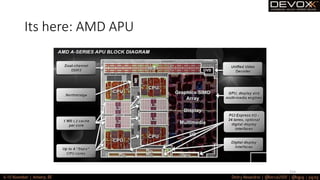
Its here: AMD APU
154
Its here: Intel Skylake
155
Its here: Nvidia Tegra Parker
156
Intel with VEGA??
157
But first read:
158
So use it!
159
So use it!
If the task is suitable
160
…its hard,
but worth it!
161
You will rule’em’all!
162
Thanks!
Dank je!
Merci beaucoup!
163
164

Java on the GPU: Where are we now?

  • 2.
    Java and GPU:where are we now? And why? 2
  • 3.
  • 4.
  • 5.
  • 6.
    What is avideo card? A video card (also called a display card, graphics card, display adapter or graphics adapter) is an expansion card which generates a feed of output images to a display (such as a computer monitor). Frequently, these are advertised as discrete or dedicated graphics cards, emphasizing the distinction between these and integrated graphics. 6
  • 7.
    What is avideo card? But as for today: Video cards are not limited to simple image output, they have a built-in graphics processor that can perform additional processing, removing this task from the central processor of the computer. 7
  • 8.
    So what doesit do? 8
  • 9.
  • 10.
    What is aGPU? • Graphics Processing Unit 10
  • 11.
    What is aGPU? • Graphics Processing Unit • First used by Nvidia in 1999 11
  • 12.
    What is aGPU? • Graphics Processing Unit • First used by Nvidia in 1999 • GeForce 256 is called as «The world’s first GPU» 12
  • 13.
    What is aGPU? • Defined as “single-chip processor with integrated transform, lighting, triangle setup/clipping, and rendering engines capable of processing of 10000 polygons per second” 13
  • 14.
    What is aGPU? • Defined as “single-chip processor with integrated transform, lighting, triangle setup/clipping, and rendering engines capable of processing of 10000 polygons per second” • ATI called them VPU.. 14
  • 15.
    By idea itlooks like this 15
  • 16.
    GPGPU • General-purpose computingon graphics processing units 16
  • 17.
    GPGPU • General-purpose computingon graphics processing units • Performs not only graphic calculations.. 17
  • 18.
    GPGPU • General-purpose computingon graphics processing units • Performs not only graphic calculations.. • … but also those usually performed on CPU 18
  • 19.
    So much cool!We have to use them! 19
  • 20.
    Let’s look atthe hardware! 20 Based on “From Shader Code to a Teraflop: How GPU Shader Cores Work”, By Kayvon Fatahalian, Stanford University
  • 21.
    The CPU ingeneral looks like this 21
  • 22.
  • 23.
  • 24.
    Then let’s justclone them 24
  • 25.
    To make alot of them! 25
  • 26.
    But we aredoing the same calculation just with different data 26
  • 27.
    So we cometo SIMD paradigm 27
  • 28.
    So we usethis paradigm 28
  • 29.
    And here westart to talk about vectors.. 29
  • 30.
    … and inthe and we are here: 30
  • 31.
    Nice! But howon earth can we code here?! 31
  • 32.
    It all startedwith a shader • Cool video cards were able to offload some of the tasks from the CPU 32
  • 33.
    It all startedwith a shader • Cool video cards were able to offload some of the tasks from the CPU • But the most of the algorithms we just “hardcoded” 33
  • 34.
    It all startedwith a shader • Cool video cards were able to offload some of the tasks from the CPU • But the most of the algorithms we just “hardcoded” • They were considered “standard” 34
  • 35.
    It all startedwith a shader • Cool video cards were able to offload some of the tasks from the CPU • But the most of the algorithms we just “hardcoded” • They were considered “standard” • Developers were able just to call them 35
  • 36.
    It all startedwith a shader • But its obvious, not everything can be done with “hardcoded” algorithms 36
  • 37.
    It all startedwith a shader • But its obvious, not everything can be done with “hardcoded” algorithms • That’s why some of the vendors “opened access” for developers to use their own algorithms with own programs 37
  • 38.
    It all startedwith a shader • But its obvious, not everything can be done with “hardcoded” algorithms • That’s why some of the vendors “opened access” for developers to use their own algorithms with own programs • These programs are called Shaders 38
  • 39.
    It all startedwith a shader • But its obvious, not everything can be done with “hardcoded” algorithms • That’s why some of the vendors “opened access” for developers to use their own algorithms with own programs • These programs are called Shaders • From this moment video card could work on transformations, geometry and textures as the developers want! 39
  • 40.
    It all startedwith a shader • First shadres were different: • Vertex • Geometry • Pixel • Then they were united to Common Shader Architecture 40
  • 41.
    There are severalshaders languages • RenderMan • OSL • GLSL • Cg • DirectX ASM • HLSL • … 41
  • 42.
  • 43.
  • 44.
    But they areso low level.. 44
  • 45.
    Having in mindit all started with gaming… 45
  • 46.
    Several abstractions werecreated: • OpenGL • is a cross-language, cross-platform application programming interface (API) for rendering 2D and 3Dvector graphics. The API is typically used to interact with a graphics processing unit (GPU), to achieve hardware-accelerated rendering. • Silicon Graphics Inc., (SGI) started developing OpenGL in 1991 and released it in January 1992; • DirectX • is a collection of application programming interfaces (APIs) for handling tasks related to multimedia, especially game programming and video, on Microsoft platforms. Originally, the names of these APIs all began with Direct, such as Direct3D, DirectDraw, DirectMusic, DirectPlay, DirectSound, and so forth. The name DirectX was coined as a shorthand term for all of these APIs (the X standing in for the particular API names) and soon became the name of the collection. 46
  • 47.
    By the way,what about Java? 47
  • 48.
    OpenGL in Java •JSR – 231 • Started in 2003 • Latest release in 2008 • Supports OpenGL 2.0 48
  • 49.
    OpenGL • Now isan independent project GOGL • Supports OpenGL up to 4.5 • Provide support for GLU и GLUT • Access to low level API on С via JNI 49
  • 50.
  • 51.
    But somewhere in2005 it was finally realized this can be used for general computations as well 51
  • 52.
    BrookGPU • Early effortsto use GPGPU • Own subset of ANSI C • Brook Streaming Language • Made in Stanford University 52
  • 53.
    GPGPU • CUDA —Nvidia C subset proprietary platform. • DirectCompute — Microsoft proprietary shader language, part of Direct3d, starting from DirectX 10. • AMD FireStream — ATI proprietary technology. • OpenACC – multivendor consortium • C++ AMP – Microsoft proprietary language • OpenCL – Common standard controlled by Kronos group. 53
  • 54.
    Why should weever use GPU on Java • Why Java • Safe and secure • Portability (“write once, run everywhere”) • Used on 3 000 000 000 devices 54
  • 55.
    Why should weever use GPU on Java • Why Java • Safe and secure • Portability (“write once, run everywhere”) • Used on 3 000 000 000 devices • Where can we apply GPU • Data Analytics and Data Science (Hadoop, Spark …) • Security analytics (log processing) • Finance/Banking 55
  • 56.
    For this wehave: 56
  • 57.
    But Java workson JVM.. But there we have some low level.. 57
  • 58.
    For low levelwe use: • JNI (Java Native Interface) • JNA (Java Native Access) 58
  • 59.
    But we cango crazy there.. 59
  • 60.
  • 61.
    But may bethere is something done already? 61
  • 62.
    For OpenCL: • JOCL •JogAmp • JavaCL (not supported anymore) 62
  • 63.
    .. and forCuda • JCuda • Cublas • JCufft • JCurand • JCusparse • JCusolver • Jnvgraph • Jcudpp • JNpp • JCudnn 63
  • 64.
    Disclaimer: its hardto work with GPU! • Its not just run a program • You need to know your hardware! • Its low level.. 64
  • 65.
  • 66.
    What’s that? • Shortfor Open Compute Language • Consortium of Apple, nVidia, AMD, IBM, Intel, ARM, Motorola and many more • Very abstract model • Works both on GPU and CPU 66
  • 67.
    Should work oneverything 67
  • 68.
    All in allit works like this: HOST DEVICE Data Program/Kernel 68
  • 69.
    All in allit works like this: HOST 69
  • 70.
    All in allit works like this: HOST DEVICE Result 70
  • 71.
    Typical lifecycle ofan OpenCL app • Create context • Create command queue • Create memory buffers/fill with data • Create program from sources/load binaries • Compile (if required) • Create kernel from the program • Supply kernel arguments • Define ND range • Execute • Return resulting data • Release resources 71
  • 72.
  • 73.
  • 74.
    1. There isthe host code. Its on Java. 74
  • 75.
    2. There isa device code. A specific subset of C. 75
  • 76.
    3. Communication betweenthe host and the device is done via memory buffers. 76
  • 77.
    So what canwe actually transfer? 77
  • 78.
    The data isnot quite the same.. 78
  • 79.
  • 80.
  • 81.
    Datatypes:vectors float f =4.0f; float3 f3 = (float3)(1.0f, 2.0f, 3.0f); float4 f4 = (float4)(f3, f); //f4.x = 1.0f, //f4.y = 2.0f, //f4.z = 3.0f, //f4.w = 4.0f 81
  • 82.
    So how arethey saved there? 82
  • 83.
    So how arethey saved there? In a hard way.. 83
  • 84.
    Memory Model • __global •__constant • __local • __private 84
  • 85.
  • 86.
  • 87.
  • 88.
    Execution model • We’vegot a lot of data • We need to perform the same computations over them • So we can just shard them • OpenCL is here t help us 88
  • 89.
  • 90.
    ND Range –what is that? 90
  • 91.
    For example: matrixmultiplication • We would write it like this: void MatrixMul_sequential(int dim, float *A, float *B, float *C) { for(int iRow=0; iRow<dim;++iRow) { for(int iCol=0; iCol<dim;++iCol) { float result = 0.f; for(int i=0; i<dim;++i) { result += A[iRow*dim + i]*B[i*dim + iCol]; } C[iRow*dim + iCol] = result; } } } 91
  • 92.
    For example: matrixmultiplication 92
  • 93.
    For example: matrixmultiplication • So on GPU: void MatrixMul_kernel_basic(int dim, __global float *A, __global float *B, __global float *C) { //Get the index of the work-item int iCol = get_global_id(0); int iRow = get_global_id(1); float result = 0.0; for(int i=0;i< dim;++i) { result += A[iRow*dim + i]*B[i*dim + iCol]; } C[iRow*dim + iCol] = result; } 93
  • 94.
    For example: matrixmultiplication • So on GPU: void MatrixMul_kernel_basic(int dim, __global float *A, __global float *B, __global float *C) { //Get the index of the work-item int iCol = get_global_id(0); int iRow = get_global_id(1); float result = 0.0; for(int i=0;i< dim;++i) { result += A[iRow*dim + i]*B[i*dim + iCol]; } C[iRow*dim + iCol] = result; } 94
  • 95.
    Typical GPU --- Infofor device GeForce GT 650M: --- CL_DEVICE_NAME: GeForce GT 650M CL_DEVICE_VENDOR: NVIDIA CL_DRIVER_VERSION: 10.14.20 355.10.05.15f03 CL_DEVICE_TYPE: CL_DEVICE_TYPE_GPU CL_DEVICE_MAX_COMPUTE_UNITS: 2 CL_DEVICE_MAX_WORK_ITEM_DIMENSIONS: 3 CL_DEVICE_MAX_WORK_ITEM_SIZES: 1024 / 1024 / 64 CL_DEVICE_MAX_WORK_GROUP_SIZE: 1024 CL_DEVICE_MAX_CLOCK_FREQUENCY: 900 MHz CL_DEVICE_ADDRESS_BITS: 64 CL_DEVICE_MAX_MEM_ALLOC_SIZE: 256 MByte CL_DEVICE_GLOBAL_MEM_SIZE: 1024 MByte CL_DEVICE_ERROR_CORRECTION_SUPPORT: no CL_DEVICE_LOCAL_MEM_TYPE: local CL_DEVICE_LOCAL_MEM_SIZE: 48 KByte CL_DEVICE_MAX_CONSTANT_BUFFER_SIZE: 64 KByte CL_DEVICE_QUEUE_PROPERTIES: CL_QUEUE_PROFILING_ENABLE CL_DEVICE_IMAGE_SUPPORT: 1 CL_DEVICE_MAX_READ_IMAGE_ARGS: 256 CL_DEVICE_MAX_WRITE_IMAGE_ARGS: 16 CL_DEVICE_SINGLE_FP_CONFIG: CL_FP_DENORM CL_FP_INF_NAN CL_FP_ROUND_TO_NEAREST CL_FP_ROUND_TO_ZERO CL_FP_ROUND_TO_INF CL_FP_CORRECTLY_ROUNDED_DIVIDE_SQRT CL_DEVICE_2D_MAX_WIDTH 16384 CL_DEVICE_2D_MAX_HEIGHT 16384 CL_DEVICE_3D_MAX_WIDTH 2048 CL_DEVICE_3D_MAX_HEIGHT 2048 CL_DEVICE_3D_MAX_DEPTH 2048 CL_DEVICE_PREFERRED_VECTOR_WIDTH_<t> CHAR 1, SHORT 1, INT 1, LONG 1, FLOAT 1, DOUBLE 1 95
  • 96.
    Typical CPU --- Infofor device Intel(R) Core(TM) i7-3720QM CPU @ 2.60GHz: --- CL_DEVICE_NAME: Intel(R) Core(TM) i7-3720QM CPU @ 2.60GHz CL_DEVICE_VENDOR: Intel CL_DRIVER_VERSION: 1.1 CL_DEVICE_TYPE: CL_DEVICE_TYPE_CPU CL_DEVICE_MAX_COMPUTE_UNITS: 8 CL_DEVICE_MAX_WORK_ITEM_DIMENSIONS: 3 CL_DEVICE_MAX_WORK_ITEM_SIZES: 1024 / 1 / 1 CL_DEVICE_MAX_WORK_GROUP_SIZE: 1024 CL_DEVICE_MAX_CLOCK_FREQUENCY: 2600 MHz CL_DEVICE_ADDRESS_BITS: 64 CL_DEVICE_MAX_MEM_ALLOC_SIZE: 2048 MByte CL_DEVICE_GLOBAL_MEM_SIZE: 8192 MByte CL_DEVICE_ERROR_CORRECTION_SUPPORT: no CL_DEVICE_LOCAL_MEM_TYPE: global CL_DEVICE_LOCAL_MEM_SIZE: 32 KByte CL_DEVICE_MAX_CONSTANT_BUFFER_SIZE: 64 KByte CL_DEVICE_QUEUE_PROPERTIES: CL_QUEUE_PROFILING_ENABLE CL_DEVICE_IMAGE_SUPPORT: 1 CL_DEVICE_MAX_READ_IMAGE_ARGS: 128 CL_DEVICE_MAX_WRITE_IMAGE_ARGS: 8 CL_DEVICE_SINGLE_FP_CONFIG: CL_FP_DENORM CL_FP_INF_NAN CL_FP_ROUND_TO_NEAREST CL_FP_ROUND_TO_ZERO CL_FP_ROUND_TO_INF CL_FP_FMA CL_FP_CORRECTLY_ROUNDED_DIVIDE_SQRT CL_DEVICE_2D_MAX_WIDTH 8192 CL_DEVICE_2D_MAX_HEIGHT 8192 CL_DEVICE_3D_MAX_WIDTH 2048 CL_DEVICE_3D_MAX_HEIGHT 2048 CL_DEVICE_3D_MAX_DEPTH 2048 CL_DEVICE_PREFERRED_VECTOR_WIDTH_<t> CHAR 16, SHORT 8, INT 4, LONG 2, FLOAT 4, DOUBLE 2 96
  • 97.
  • 98.
    And what aboutCUDA? Well.. It looks to be easier 98
  • 99.
    And what aboutCUDA? Well.. It looks to be easier for C developers… 99
  • 100.
    CUDA kernel #define N10 __global__ void add( int *a, int *b, int *c ) { int tid = blockIdx.x; // this thread handles the data at its thread id if (tid < N) c[tid] = a[tid] + b[tid]; } 100
  • 101.
    CUDA setup int a[N],b[N], c[N]; int *dev_a, *dev_b, *dev_c; // allocate the memory on the GPU cudaMalloc( (void**)&dev_a, N * sizeof(int) ); cudaMalloc( (void**)&dev_b, N * sizeof(int) ); cudaMalloc( (void**)&dev_c, N * sizeof(int) ); // fill the arrays 'a' and 'b' on the CPU for (int i=0; i<N; i++) { a[i] = -i; b[i] = i * i; } 101
  • 102.
    CUDA copy tomemory and run // copy the arrays 'a' and 'b' to the GPU cudaMemcpy(dev_a, a, N *sizeof(int), cudaMemcpyHostToDevice); cudaMemcpy(dev_b,b,N*sizeof(int), cudaMemcpyHostToDevice); add<<<N,1>>>(dev_a,dev_b,dev_c); // copy the array 'c' back from the GPU to the CPU cudaMemcpy(c,dev_c,N*sizeof(int), cudaMemcpyDeviceToHost); 102
  • 103.
    CUDA get results //display the results for (int i=0; i<N; i++) { printf( "%d + %d = %dn", a[i], b[i], c[i] ); } // free the memory allocated on the GPU cudaFree( dev_a ); cudaFree( dev_b ); cudaFree( dev_c ); 103
  • 104.
    But CUDA hassome other superpowers • Cublas – all about matrices • JCufft – Fast Frontier Transformation • Jcurand – all about random • JCusparse – sparse matrices • Jcusolver – factorization and some other crazy stuff • Jnvgraph – all about graphs • Jcudpp – CUDA Data Parallel Primitives Library, and some sorting • JNpp – image processing on GPU • Jcudnn – Deep Neural Network library (that’s scary) 104
  • 105.
    For example weneed a good rand int n = 100; curandGenerator generator = new curandGenerator(); float hostData[] = new float[n]; Pointer deviceData = new Pointer(); cudaMalloc(deviceData, n * Sizeof.FLOAT); curandCreateGenerator(generator, CURAND_RNG_PSEUDO_DEFAULT); curandSetPseudoRandomGeneratorSeed(generator, 1234); curandGenerateUniform(generator, deviceData, n); cudaMemcpy(Pointer.to(hostData), deviceData, n * Sizeof.FLOAT, cudaMemcpyDeviceToHost); System.out.println(Arrays.toString(hostData)); curandDestroyGenerator(generator); cudaFree(deviceData); 105
  • 106.
    For example weneed a good rand • With a strong theory underneath • Developed by Russian mathematician Ilya Sobolev back in 1967 • https://en.wikipedia.org/wiki/Sobol_sequence 106
  • 107.
    nVidia memory lookslike this 107
  • 108.
    Btw.. Talking aboutmemory 108 ©Wikipedia
  • 109.
    Optimizations… __kernel void MatrixMul_kernel_basic(intdim, __global float *A, __global float *B, __global float *C){ int iCol = get_global_id(0); int iRow = get_global_id(1); float result = 0.0; for(int i=0;i< dim;++i) { result += A[iRow*dim + i]*B[i*dim + iCol]; } C[iRow*dim + iCol] = result; } 109
  • 110.
    <—Optimizations #define VECTOR_SIZE 4 __kernelvoid MatrixMul_kernel_basic_vector4(int dim, __global float4 *A, __global float4 *B, __global float *C) int localIdx = get_global_id(0); int localIdy = get_global_id(1); float result = 0.0; float4 Bvector[4]; float4 Avector, temp; float4 resultVector[4] = {0,0,0,0}; int rowElements = dim/VECTOR_SIZE; for(int i=0; i<rowElements; ++i){ Avector = A[localIdy*rowElements + i]; Bvector[0] = B[dim*i + localIdx]; Bvector[1] = B[dim*i + rowElements + localIdx]; Bvector[2] = B[dim*i + 2*rowElements + localIdx]; Bvector[3] = B[dim*i + 3*rowElements + localIdx]; temp = (float4)(Bvector[0].x, Bvector[1].x, Bvector[2].x, Bvector[3].x); resultVector[0] += Avector * temp; temp = (float4)(Bvector[0].y, Bvector[1].y, Bvector[2].y, Bvector[3].y); resultVector[1] += Avector * temp; temp = (float4)(Bvector[0].z, Bvector[1].z, Bvector[2].z, Bvector[3].z); resultVector[2] += Avector * temp; temp = (float4)(Bvector[0].w, Bvector[1].w, Bvector[2].w, Bvector[3].w); resultVector[3] += Avector * temp; } C[localIdy*dim + localIdx*VECTOR_SIZE] = resultVector[0].x + resultVector[0].y + resultVector[0].z + resultVector[0].w; C[localIdy*dim + localIdx*VECTOR_SIZE + 1] = resultVector[1].x + resultVector[1].y + resultVector[1].z + resultVector[1].w; C[localIdy*dim + localIdx*VECTOR_SIZE + 2] = resultVector[2].x + resultVector[2].y + resultVector[2].z + resultVector[2].w; C[localIdy*dim + localIdx*VECTOR_SIZE + 3] = resultVector[3].x + resultVector[3].y + resultVector[3].z + resultVector[3].w; } 110
  • 111.
    <—Optimizations #define VECTOR_SIZE 4 __kernelvoid MatrixMul_kernel_basic_vector4(int dim, __global float4 *A, __global float4 *B, __global float *C) int localIdx = get_global_id(0); int localIdy = get_global_id(1); float result = 0.0; float4 Bvector[4]; float4 Avector, temp; float4 resultVector[4] = {0,0,0,0}; int rowElements = dim/VECTOR_SIZE; for(int i=0; i<rowElements; ++i){ Avector = A[localIdy*rowElements + i]; Bvector[0] = B[dim*i + localIdx]; Bvector[1] = B[dim*i + rowElements + localIdx]; Bvector[2] = B[dim*i + 2*rowElements + localIdx]; Bvector[3] = B[dim*i + 3*rowElements + localIdx]; temp = (float4)(Bvector[0].x, Bvector[1].x, Bvector[2].x, Bvector[3].x); resultVector[0] += Avector * temp; temp = (float4)(Bvector[0].y, Bvector[1].y, Bvector[2].y, Bvector[3].y); resultVector[1] += Avector * temp; temp = (float4)(Bvector[0].z, Bvector[1].z, Bvector[2].z, Bvector[3].z); resultVector[2] += Avector * temp; temp = (float4)(Bvector[0].w, Bvector[1].w, Bvector[2].w, Bvector[3].w); resultVector[3] += Avector * temp; } C[localIdy*dim + localIdx*VECTOR_SIZE] = resultVector[0].x + resultVector[0].y + resultVector[0].z + resultVector[0].w; C[localIdy*dim + localIdx*VECTOR_SIZE + 1] = resultVector[1].x + resultVector[1].y + resultVector[1].z + resultVector[1].w; C[localIdy*dim + localIdx*VECTOR_SIZE + 2] = resultVector[2].x + resultVector[2].y + resultVector[2].z + resultVector[2].w; C[localIdy*dim + localIdx*VECTOR_SIZE + 3] = resultVector[3].x + resultVector[3].y + resultVector[3].z + resultVector[3].w; } 111
  • 112.
    But we don’twant to have C at all… 112
  • 113.
    We don’t wantto think about those hosts and devices… 113
  • 114.
    We can useGPU partially.. 114
  • 115.
  • 116.
    Project Sumatra • Researchproject • Focused on Java 8 116
  • 117.
    Project Sumatra • Researchproject • Focused on Java 8 • … to be more precise on streams 117
  • 118.
    Project Sumatra • Researchproject • Focused on Java 8 • … to be more precise on streams • … and even more precise lambdas and .forEach() 118
  • 119.
  • 120.
  • 121.
    AMD HSAIL • DetectsforEach() block • Gets HSAIL code with Graal • On low level supply the generated from lambda kernel to the GPU 121
  • 122.
    AMD APU triesto solve the main issue.. 122 ©Wikipedia
  • 123.
    But if wewant some more general solution.. 123
  • 124.
    IBM patched JVMfor GPU • Focused on CUDA (for now) • Focused on Stream API • Created their own .parallel() 124
  • 125.
    IBM patched JVMfor GPU Imagine: void fooJava(float A[], float B[], int n) { // similar to for (idx = 0; i < n; i++) IntStream.range(0, N).parallel().forEach(i -> { b[i] = a[i] * 2.0; }); } 125
  • 126.
    IBM patched JVMfor GPU Imagine: void fooJava(float A[], float B[], int n) { // similar to for (idx = 0; i < n; i++) IntStream.range(0, N).parallel().forEach(i -> { b[i] = a[i] * 2.0; }); } … we would like the lambda to be automatically converted to GPU code… 126
  • 127.
    IBM patched JVMfor GPU When n is big the lambda code is executed on GPU: class Par { void foo(float[] a, float[] b, float[] c, int n) { IntStream.range(0, n).parallel() .forEach(i -> { b[i] = a[i] * 2.0; c[i] = a[i] * 3.0; }); } } *only lambdas with primitive types in one dimension arrays. 127
  • 128.
    IBM patched JVMfor GPU Optimized IBM JIT compiler: • Use read-only cache • Fewer writes to global GPU memory • Optimized Host to Device data copy rate • Fewer data to be copied • Eliminate exceptions as much as possible • In the GPU Kernel 128
  • 129.
    IBM patched JVMfor GPU • Success story: + + 129
  • 130.
    IBM patched JVMfor GPU • Officially: 130
  • 131.
    IBM patched JVMfor GPU • More info: https://github.com/IBMSparkGPU/GPUEnabler 131
  • 132.
    But can wejust write in Java, and its just being converted to OpenCL/CUDA? 132
  • 133.
  • 134.
    Aparapi is therefor you! 134
  • 135.
    Aparapi • Short for«A PARallel API» 135
  • 136.
    Aparapi • Short for«A PARallel API» • Works like Hibernate for databases 136
  • 137.
    Aparapi • Short for«A PARallel API» • Works like Hibernate for databases • Dynamically converts JVM Bytecode to code for Host and Device 137
  • 138.
    Aparapi • Short for«A PARallel API» • Works like Hibernate for databases • Dynamically converts JVM Bytecode to code for Host and Device • OpenCL under the cover 138
  • 139.
  • 140.
    Aparapi • Started byAMD • Then abandoned… 140
  • 141.
    Aparapi • Started byAMD • Then abandoned… • In 5 years Opensourced under Apache 2.0 license 141
  • 142.
    Aparapi • Started byAMD • Then abandoned… • In 5 years Opensourced under Apache 2.0 license • Back to life!!! 142
  • 143.
    Aparapi – nowits so much simple! public static void main(String[] _args) { final int size = 512; final float[] a = new float[size]; final float[] b = new float[size]; for (int i = 0; i < size; i++) { a[i] = (float) (Math.random() * 100); b[i] = (float) (Math.random() * 100); } final float[] sum = new float[size]; Kernel kernel = new Kernel(){ @Override public void run() { int gid = getGlobalId(); sum[gid] = a[gid] + b[gid]; } }; kernel.execute(Range.create(size)); for (int i = 0; i < size; i++) { System.out.printf("%6.2f + %6.2f = %8.2fn", a[i], b[i], sum[i]); } kernel.dispose(); } 143
  • 144.
    But what aboutthe clouds? 144
  • 145.
    We can’t sellour product if its not cloud native! 145
  • 146.
    nVidia is yourfriend! 146
  • 147.
    nVidia GRID • Announcedin 2012 • Already in production • Works on the most of the hypervisors • .. And in the clouds! 147
  • 148.
  • 149.
  • 150.
    … AMD isa bit behind… 150
  • 151.
  • 152.
  • 153.
    Its here :ATI Radeon 153
  • 154.
  • 155.
    Its here: IntelSkylake 155
  • 156.
    Its here: NvidiaTegra Parker 156
  • 157.
  • 158.
  • 159.
  • 160.
    So use it! Ifthe task is suitable 160
  • 161.
  • 162.
  • 163.
  • 164.